Go To Market Tool Stack in 2026: What Actually Works
Most GTM stacks are three tools doing the same job at three price points. Here is what a go to market tool actually has to do in 2026, what each layer costs, and which line items to cut first.
TL;DR
- A "go to market tool" is not one product. It is five jobs — data, engagement, intelligence, orchestration, and measurement — and most teams buy the same job twice without noticing.
- The layer that decides whether the rest works is data. A $500/mo sequencer running on 40% bounce-rate contacts loses to a $49/mo email finder feeding a free CRM.
- Median mid-market GTM spend in 2026 lands around $45K–$70K per year across 7–9 tools. Roughly a third of that is duplicate coverage.
- Buy the data layer by accuracy and API access, not by database size. Buy the engagement layer by deliverability controls. Buy everything else last.
- If you are under 20 reps, a four-tool stack (CRM + data + sequencer + enrichment API) covers 90% of what a platform suite sells you for 4x the price.
What is a go to market tool?#
A go to market tool is any software that helps you find, reach, convert, or measure buyers — the operational layer under your revenue strategy. The term got vague because vendors stretched it. A sales engagement platform calls itself GTM. So does an intent-data provider, a CRM, a product analytics tool, and a Chrome extension that scrapes LinkedIn.
The useful definition is functional. A tool belongs in your GTM stack if it does one of five things:
- Supplies contact and company data — email addresses, phone numbers, firmographics, technographics. This is the input layer. Everything downstream inherits its error rate.
- Delivers outbound and inbound engagement — sequencers, dialers, LinkedIn automation, chat, and the deliverability infrastructure underneath them.
- Generates buying signals — intent data, website visitor identification, job-change alerts, funding triggers, product usage events.
- Orchestrates workflow — CRM, routing rules, enrichment pipelines, Zapier/Make automations, the plumbing that moves a record from signal to sequence.
- Measures what happened — attribution, pipeline analytics, conversation intelligence, forecast tooling.
Most stacks over-invest in layers 2 and 5 and under-invest in layer 1. That inversion is the single most common reason a GTM stack costs a lot and produces little. You cannot analytics your way out of a bad contact list.
Worth being precise about the org chart too: GTM tooling is what revenue operations actually administers day to day. If nobody owns RevOps at your company, the stack will sprawl regardless of what you buy — the tools are downstream of the ownership problem.
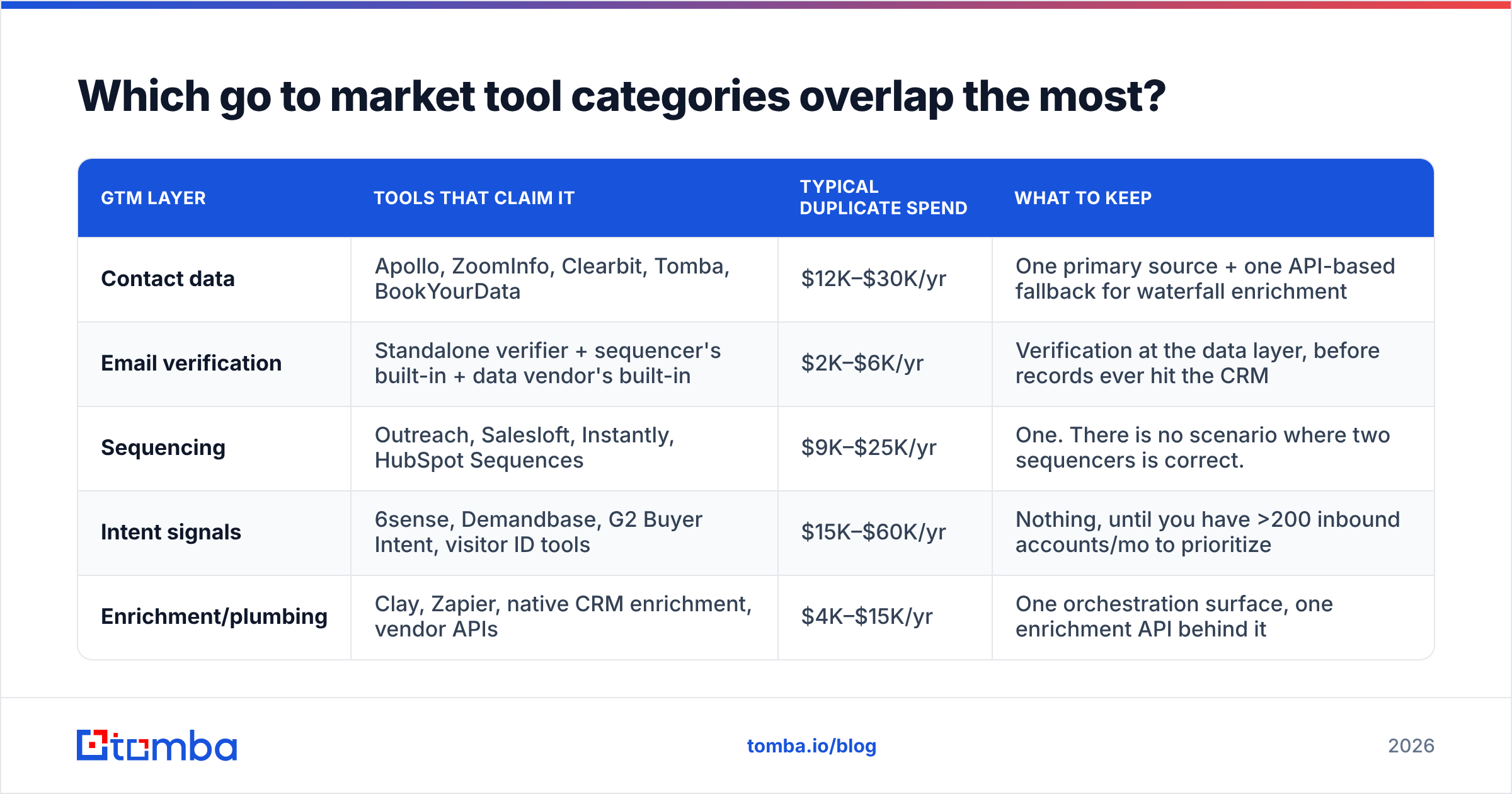
Which go to market tool categories overlap the most?#
Overlap is where the money leaks. Here is where the same job gets paid for twice in a typical mid-market stack:
| GTM layer | Tools that claim it | Typical duplicate spend | What to keep |
|---|---|---|---|
| Contact data | Apollo, ZoomInfo, Clearbit, Tomba, BookYourData | $12K–$30K/yr | One primary source + one API-based fallback for waterfall enrichment |
| Email verification | Standalone verifier + sequencer's built-in + data vendor's built-in | $2K–$6K/yr | Verification at the data layer, before records ever hit the CRM |
| Sequencing | Outreach, Salesloft, Instantly, HubSpot Sequences | $9K–$25K/yr | One. There is no scenario where two sequencers is correct. |
| Intent signals | 6sense, Demandbase, G2 Buyer Intent, visitor ID tools | $15K–$60K/yr | Nothing, until you have >200 inbound accounts/mo to prioritize |
| Enrichment/plumbing | Clay, Zapier, native CRM enrichment, vendor APIs | $4K–$15K/yr | One orchestration surface, one enrichment API behind it |
The pattern: teams buy a suite for one strong feature, then buy a point solution because the suite's other features are mediocre, then keep paying for both. Audit your stack by job, not by logo, and the duplicates surface in about twenty minutes.
How much does a go to market stack actually cost in 2026?#
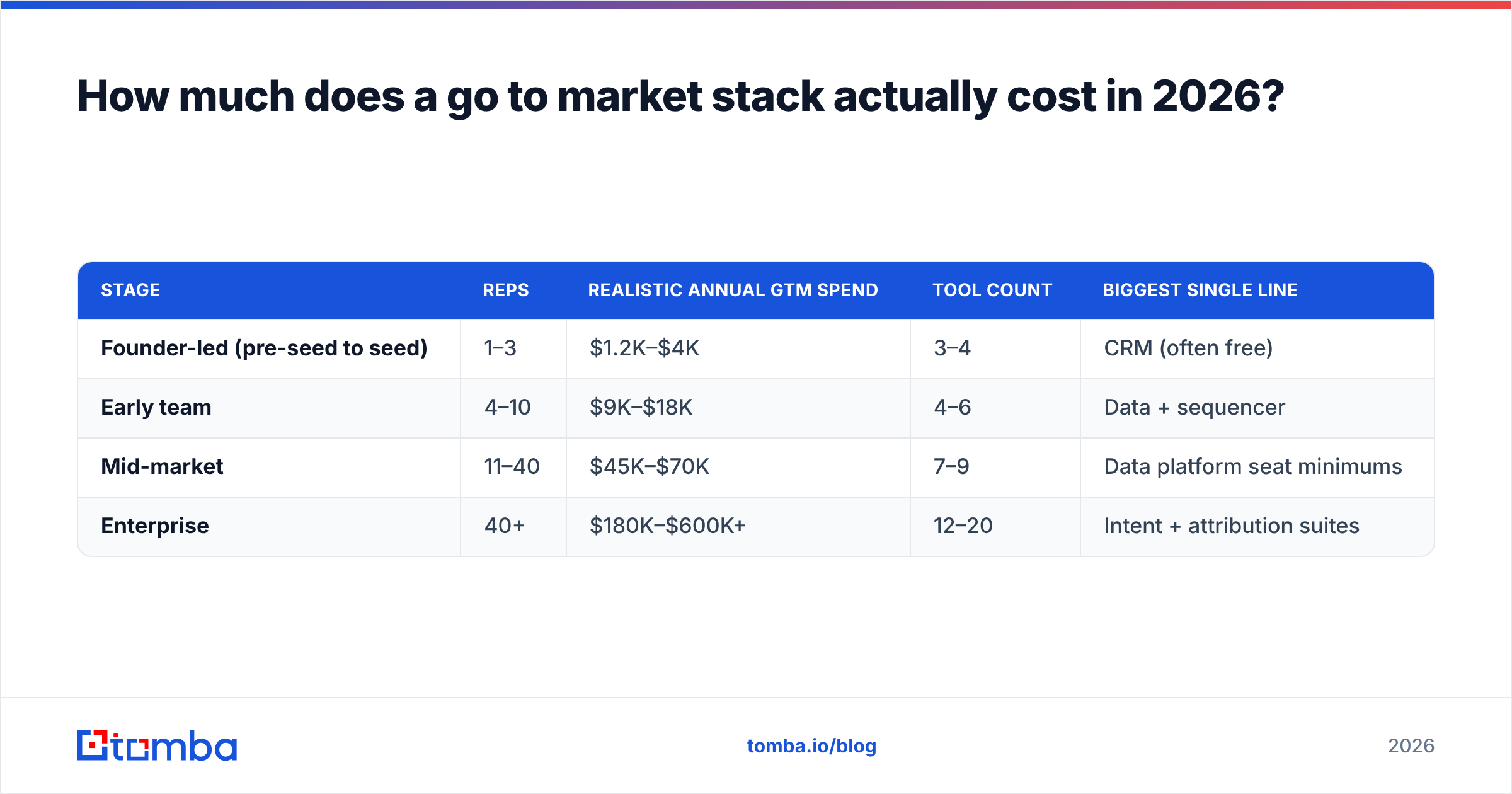
Sticker prices in this category are rarely the real number. Seat minimums, credit overages, annual-only contracts, and "platform fees" move the effective cost 40–80% above the page price. Here is a realistic total-cost view by company stage.
| Stage | Reps | Realistic annual GTM spend | Tool count | Biggest single line |
|---|---|---|---|---|
| Founder-led (pre-seed to seed) | 1–3 | $1.2K–$4K | 3–4 | CRM (often free) |
| Early team | 4–10 | $9K–$18K | 4–6 | Data + sequencer |
| Mid-market | 11–40 | $45K–$70K | 7–9 | Data platform seat minimums |
| Enterprise | 40+ | $180K–$600K+ | 12–20 | Intent + attribution suites |
The mid-market row is where the pain concentrates. A team of 25 reps on a full-suite sales intelligence contract routinely pays $30K+ for seat minimums it does not use, because the contract was sized for a hiring plan that did not happen. Two questions kill most of that waste before you sign:
- Is this priced per seat or per credit? Credit pricing scales with usage. Seat pricing scales with headcount plans that change. For data tooling specifically, credit and API pricing almost always wins.
- What happens at renewal if we shrink? Many enterprise data contracts have no down-sizing clause. That is a $20K/yr decision hidden in a paragraph.
For comparison, transparent per-credit pricing looks like Tomba's plans: a free tier with 25 searches/mo, Starter at $49/mo, Growth at $99/mo, Pro at $249/mo, and custom enterprise. No seat minimum means a 25-person team and a 3-person team can pay the same if they consume the same data.
Is a suite better than a best-of-breed stack?#
It depends on one variable: whether your workflow is standard.
Buy the suite when your motion is high-volume SMB outbound, your reps do the same seven actions every day, and nobody on the team writes SQL or scripts. Suites win on onboarding speed and on having one vendor to call. Platforms like HubSpot's CRM are genuinely good at collapsing five tools into one for teams under about 30 people.
Buy best-of-breed when your ICP is narrow, your data sources are unusual, or your enrichment logic is conditional ("if the company uses Shopify and hired a Head of CX in the last 90 days, then..."). Suites cannot express that. APIs can.
The honest middle path most efficient teams land on in 2026: one suite for CRM and engagement, plus dedicated APIs for the data layer. You get the suite's workflow ergonomics without inheriting its weakest component — which, for nearly every suite, is contact data freshness.
That is not a slight against suites. It is a structural fact about how contact data decays. Roughly 25–30% of B2B contact records go stale annually through job changes alone, and a vendor whose core business is workflow software will always refresh data less aggressively than a vendor whose core business is data. Independent category reviews on G2's sales intelligence listings show the same split in user complaints: suites get dinged for data accuracy, point tools get dinged for missing workflow features.
What should you look for in the data layer?#
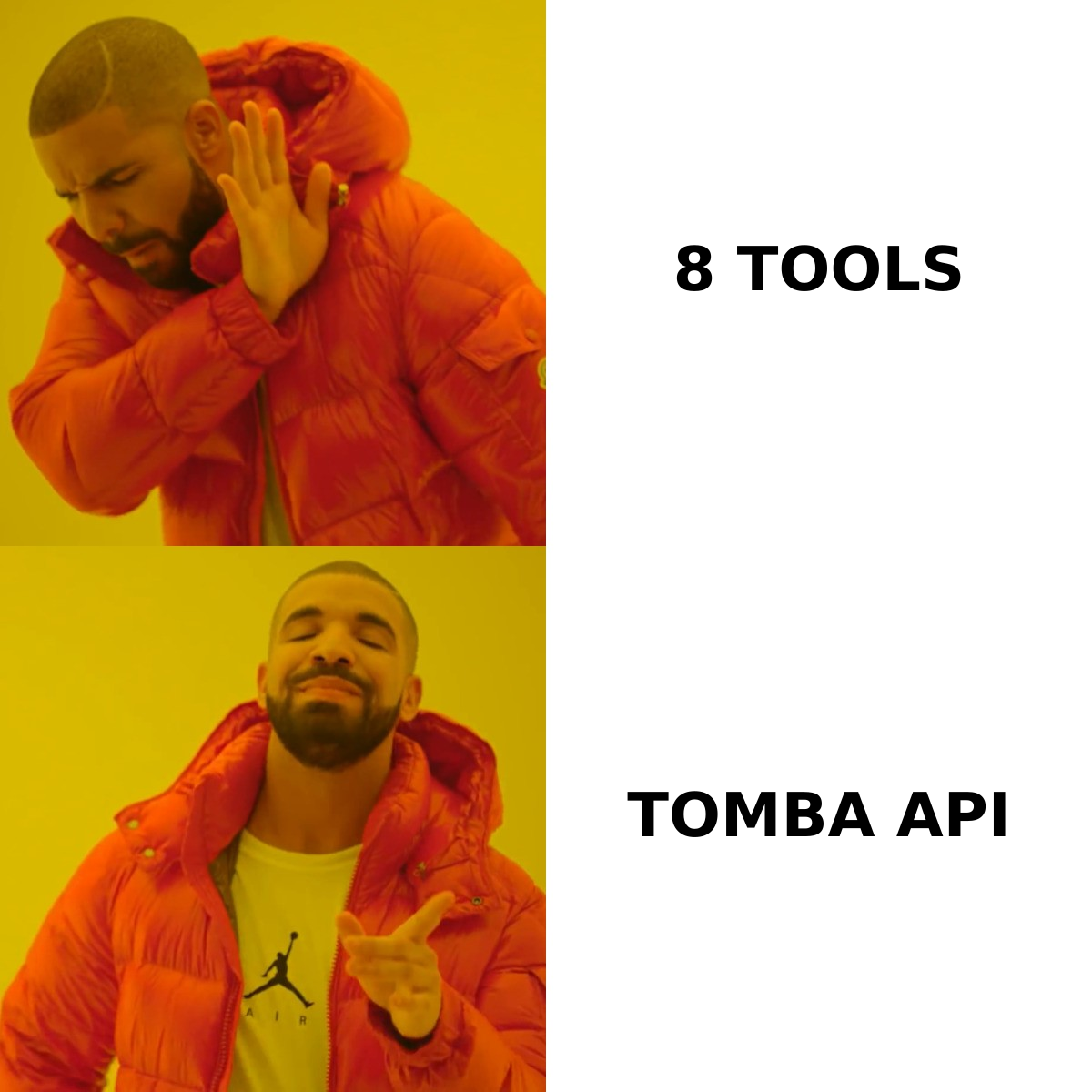
This is the layer worth being picky about, because every downstream metric is a multiple of it. Evaluate on six things:
- Verified-at-time-of-delivery accuracy — not "we have 700M contacts." Ask what percentage of delivered emails are SMTP-verified at the moment of the request, and what the refund/credit policy is for bounces.
- Catch-all handling — roughly a fifth of B2B domains are catch-all, which means naive verification returns "valid" for everything. A vendor without an explicit catch-all verifier is quietly inflating its accuracy number.
- API-first access — if you cannot hit it programmatically, you will end up doing CSV round-trips forever. A real email finder API with sane rate limits is the difference between an enrichment pipeline and a manual chore.
- Coverage in your actual geography — global averages hide enormous variance. EMEA and APAC coverage is where most US-centric vendors fall apart. Test on 200 of your own accounts, not the vendor's sample.
- Compliance posture — GDPR/CCPA handling, opt-out propagation, and where the data was sourced. Ask for the data sourcing documentation in writing.
- Pricing that survives a bad month — credits that roll over, or at least don't punish you for a slow quarter.
Run the test the same way every time: take 250 real target accounts, run them through each candidate, then verify the output through a neutral third-party email verifier. Score on deliverable matches, not raw match rate. Vendors optimize for the number they know you will look at; deliverable-match is the number that predicts your reply rate.
How do you build a lean go to market tool stack?#
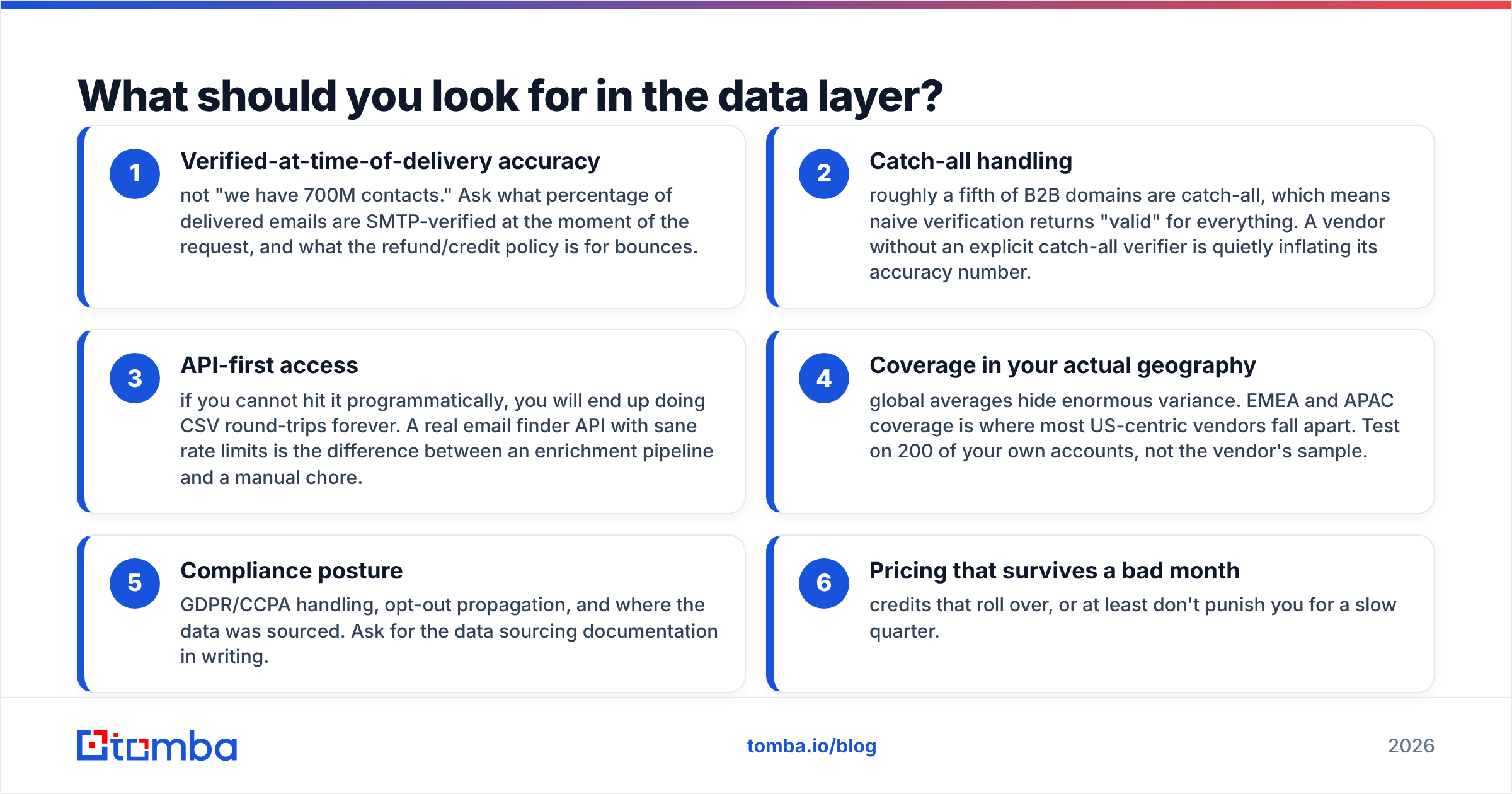
Here is what a defensible four-layer stack looks like for a team under 20 reps, with the reasoning for each slot.
| Layer | What to buy | Rough cost | Why this slot exists |
|---|---|---|---|
| Record of truth | HubSpot free/Starter or Pipedrive | $0–$25/user/mo | One place a deal lives. Do not skip. |
| Contact data | Credit-priced email finder + verifier | $49–$99/mo | Feeds everything. Highest ROI per dollar in the stack. |
| Engagement | One sequencer with deliverability controls | $30–$100/user/mo | Sending infrastructure matters more than template features. |
| Enrichment/automation | Enrichment API + Zapier or Make | $20–$150/mo | Turns signals into records without hiring an ops person. |
| Everything else | Nothing, yet | $0 | Intent, attribution, and conversation intelligence are stage-4 purchases. |
Total: roughly $400–$1,400/mo for a 10-person team. Compare that to the $45K–$70K mid-market average and the gap is almost entirely tools bought before the motion existed to justify them.
Two additions earn their place earlier than most people expect. First, contact enrichment on inbound form fills — it shortens forms, which lifts conversion, and it routes leads correctly on day one. Second, a bulk workflow for list building, so your SDRs are not doing single-record lookups by hand; a bulk email finder turns a two-day list-build into a twenty-minute job.
What are the mistakes that kill GTM stacks?#
- Buying intent data before you can act on it. Intent tells you which accounts are warm. If you have no capacity to work the warm ones you already know about, you have bought a more expensive way to feel behind. Gartner's sales research has been consistent on this for years: capability gaps are usually process gaps wearing a technology costume.
- Measuring tools by adoption instead of outcome. "90% of reps log in weekly" is not a result. Pipeline per rep per tool-dollar is.
- Letting each team buy its own data vendor. Marketing buys one, sales buys another, RevOps discovers three sources of truth in the same CRM. Centralize the data layer even if you decentralize everything else.
- Ignoring deliverability until domains burn. Verification is cheaper than domain recovery by two orders of magnitude. Verify before you send, not after the bounce report.
- Signing annual before running a 250-account test. Every vendor will give you a trial. Every vendor's aggregate accuracy number is different from your accuracy number.
What is the fastest way to fix an overweight stack?#
Do the audit in one afternoon. List every GTM tool, its annual cost, and the single job it does. Sort by cost. Then, for each tool, answer: if this disappeared tomorrow, what breaks and what covers it? Anything where a cheaper tool already covers it goes on the cut list at renewal.
Then rebuild from the data layer up. Fix contact accuracy first, and watch what happens to reply rates before you buy anything else — most teams find that a 15-point improvement in deliverable-contact rate does more for pipeline than the last three tools they bought combined.
If the data layer is where you are starting, start with the piece that feeds everything: the Tomba Email Finder gives you verified professional emails by domain, name, or company, with a free tier at 25 searches/mo to run your own 250-account bake-off before you commit a dollar. Test it against whatever you are paying for now, score on deliverable matches, and let the numbers decide the rest of your stack.
Related guides#
Ready to find emails that actually work?
Join 150,000+ professionals who stopped guessing and started sending. Free credits on signup — no credit card required.
Get the Tomba newsletter
Practical outbound tactics and product updates — once every two weeks.
About the author