Go-To-Market Tools for 2026: The Complete Stack Guide
A neutral breakdown of the go-to-market tools worth paying for in 2026 — what each layer does, what it costs, where stacks overlap, and how to cut spend without losing pipeline.
TL;DR
- A 2026 go-to-market stack has six functional layers: data, engagement, signals, CRM, enablement, and analytics. Most teams buy nine tools and only use four layers.
- The median seat-based GTM stack now runs $180–$420 per rep per month once you add data credits. Data and enrichment is the layer where overspend is most common — and easiest to fix.
- All-in-one platforms win on setup speed and single-vendor billing. Best-of-breed wins on data quality and cost control past ~15 reps.
- Verification is the cheapest insurance in the stack. Bad contact data quietly destroys deliverability, and no sequencer can fix it downstream.
- Start with CRM + one data source + one sequencer. Add signal and enablement tools only after you can prove your baseline reply rate.
What are go-to-market tools in 2026?#
Go-to-market tools are the software your revenue team uses to find buyers, reach them, track the deal, and measure what worked. That definition has not changed. What changed is the boundary between categories.
In 2021, you bought a data vendor, a sequencer, and a CRM, and each one stayed in its lane. In 2026, your sequencer sells you contact data, your data vendor sells you sequences, and your CRM sells you an AI agent that claims to do both. The result is a stack where you pay three vendors for the same capability and use one of them.
Think of it like a kitchen. You need a knife, a pan, and a heat source. What vendors sell you is three multi-cookers that each include a mediocre knife. The cooking still happens with one good knife.
So the useful question for 2026 is not "which go-to-market tools are best" — it's "which layer is this tool actually excellent at, and am I paying for that layer twice?"
Which layers does a modern GTM stack actually need?#
Six. Every credible GTM tool sits in one of these, no matter how the marketing page describes it.
- Data and enrichment — Who are the buyers, what are their email addresses and phone numbers, and is that information still true today? This includes email finders, data enrichment APIs, and B2B databases. Everything downstream inherits the quality of this layer.
- Engagement and sequencing — Sending the email, dialing the number, running the LinkedIn touch, and scheduling follow-ups. Tools like Outreach, Salesloft, Instantly, and Smartlead live here.
- Signals and intent — Job changes, funding rounds, hiring spikes, tech-stack changes, website visits. This layer tells you when to reach out, which usually matters more than what you write.
- CRM and pipeline — The system of record. HubSpot, Salesforce, Pipedrive, Attio. If it isn't in the CRM, it didn't happen.
- Enablement and coaching — Call recording, deal reviews, battlecards, onboarding content. Gong, Chorus, and the newer AI-notetaker wave.
- Analytics and attribution — Conversion rates by stage, source, and rep. Increasingly folded into revenue operations platforms rather than bought standalone.
A team of five reps genuinely needs layers 1, 2, and 4. Layers 3, 5, and 6 are force multipliers that only pay for themselves once you have enough volume to see patterns.

What does a full GTM stack cost in 2026?#
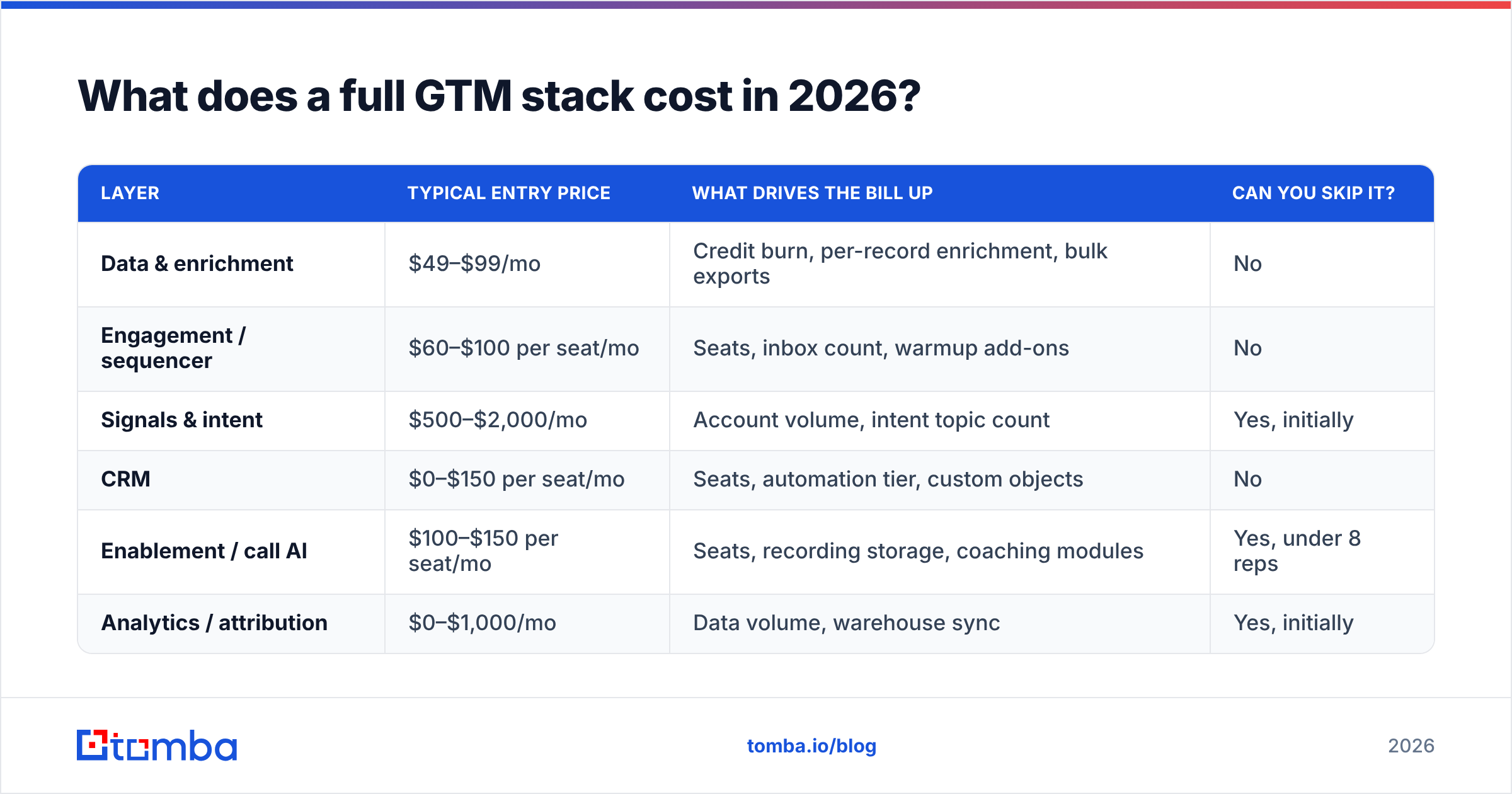
Here is where the money actually goes. Prices below are entry-level published list prices as of 2026; enterprise contracts vary widely and almost always include annual commitments.
| Layer | Typical entry price | What drives the bill up | Can you skip it? |
|---|---|---|---|
| Data & enrichment | $49–$99/mo | Credit burn, per-record enrichment, bulk exports | No |
| Engagement / sequencer | $60–$100 per seat/mo | Seats, inbox count, warmup add-ons | No |
| Signals & intent | $500–$2,000/mo | Account volume, intent topic count | Yes, initially |
| CRM | $0–$150 per seat/mo | Seats, automation tier, custom objects | No |
| Enablement / call AI | $100–$150 per seat/mo | Seats, recording storage, coaching modules | Yes, under 8 reps |
| Analytics / attribution | $0–$1,000/mo | Data volume, warehouse sync | Yes, initially |
A five-rep team running only the mandatory layers lands around $700–$1,100 per month all-in. The same team running all six layers with mid-tier plans lands closer to $4,500. That gap is not a quality gap — it's a maturity gap. Buy the second stack when you have the volume to feed it.
The trap is the middle: teams that buy the intent platform before they have a repeatable message, then blame the data when nothing converts.
Which data and enrichment tools should you compare?#
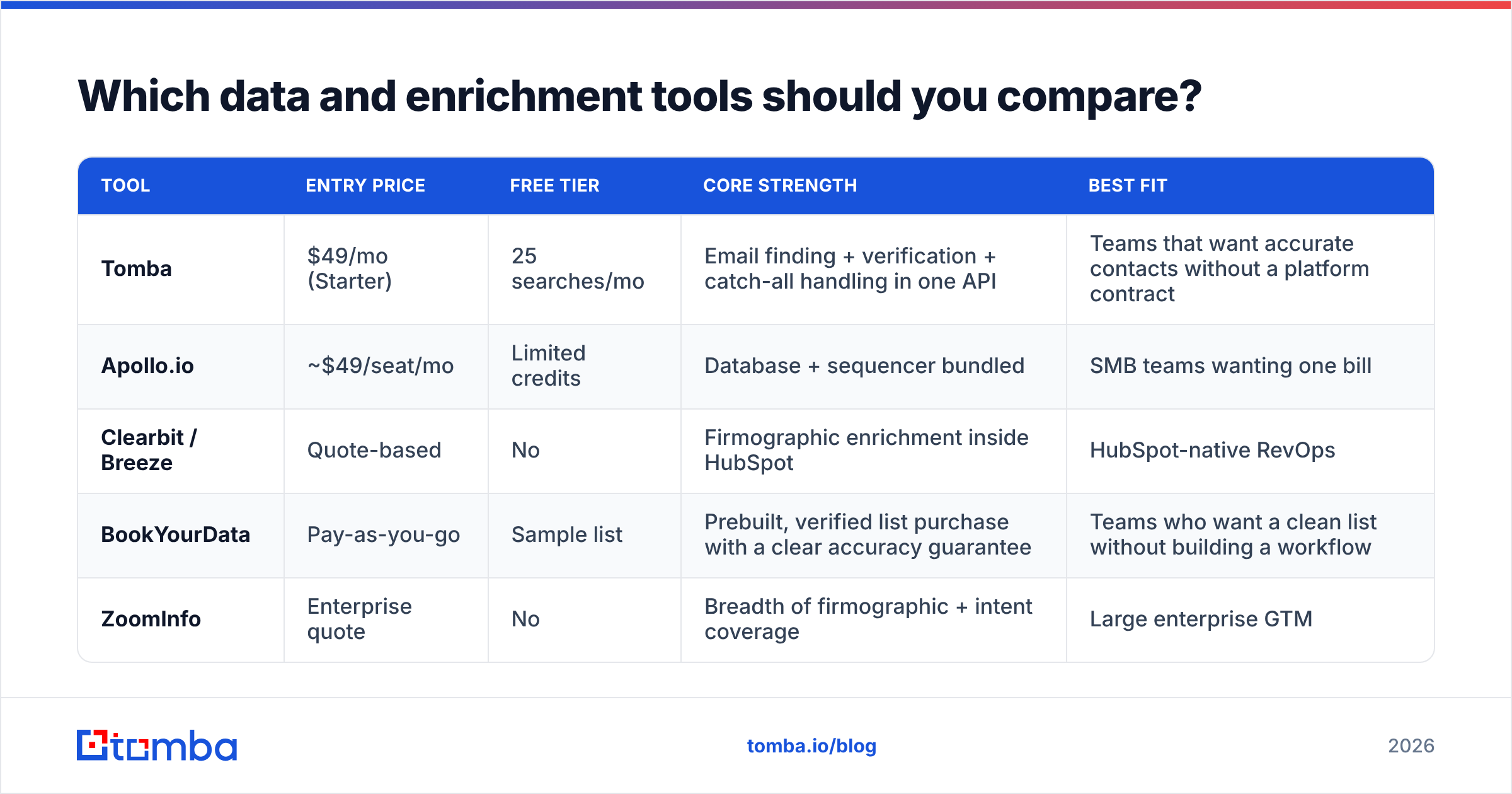
This is the layer with the widest quality spread and the least transparent pricing. Two vendors can quote the same price and deliver a 30-point difference in valid-email rate.
| Tool | Entry price | Free tier | Core strength | Best fit |
|---|---|---|---|---|
| Tomba | $49/mo (Starter) | 25 searches/mo | Email finding + verification + catch-all handling in one API | Teams that want accurate contacts without a platform contract |
| Apollo.io | ~$49/seat/mo | Limited credits | Database + sequencer bundled | SMB teams wanting one bill |
| Clearbit / Breeze | Quote-based | No | Firmographic enrichment inside HubSpot | HubSpot-native RevOps |
| BookYourData | Pay-as-you-go | Sample list | Prebuilt, verified list purchase with a clear accuracy guarantee | Teams who want a clean list without building a workflow |
| ZoomInfo | Enterprise quote | No | Breadth of firmographic + intent coverage | Large enterprise GTM |
Two things to test before you sign anything.
Test one: the known-contacts audit. Take 50 contacts you already know are correct — customers, partners, former colleagues. Run them through each vendor's finder. Count exact matches, near matches, and misses. Vendors that look identical on a pricing page separate immediately here.
Test two: the catch-all problem. Roughly a fifth of B2B domains accept every address at the SMTP layer, which means a naive verifier marks garbage as valid. Ask each vendor directly how they classify catch-all domains. If the answer is "we return unknown," you are doing that work yourself. Tools with a dedicated catch-all verifier resolve those addresses instead of punting them back to you.
Credits are the other hidden cost. Some vendors charge a credit for a failed lookup; some charge per verification on top of per-find. Read the credit policy before the price. Tomba pricing runs Free (25 searches/mo), Starter $49/mo, Growth $99/mo, Pro $249/mo, and Enterprise custom — with verification bundled rather than metered separately, which is the detail that changes real monthly cost more than headline price does.
Is an all-in-one GTM platform better than best-of-breed?#
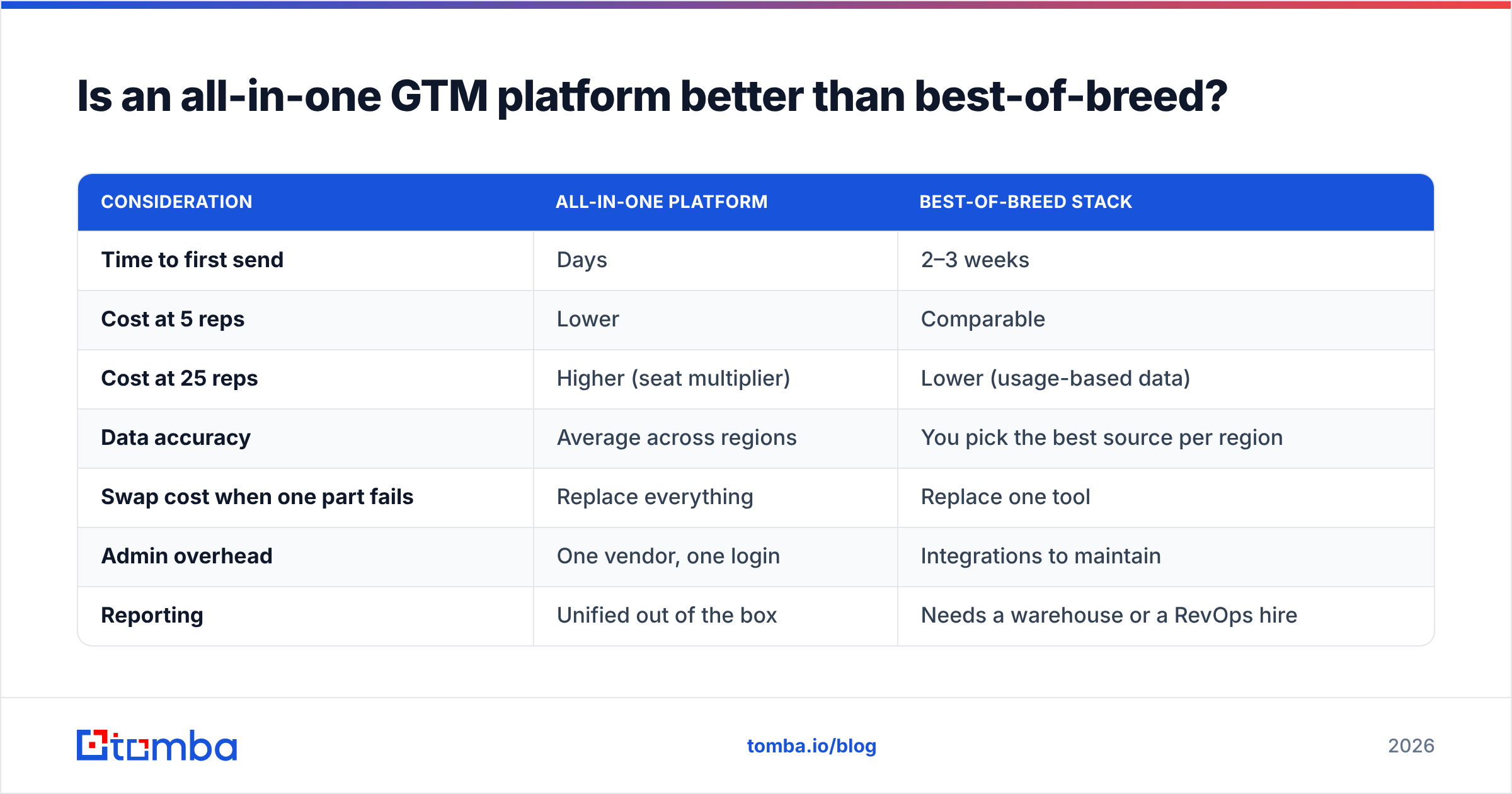
Depends entirely on headcount and how much your data quality matters.
| Consideration | All-in-one platform | Best-of-breed stack |
|---|---|---|
| Time to first send | Days | 2–3 weeks |
| Cost at 5 reps | Lower | Comparable |
| Cost at 25 reps | Higher (seat multiplier) | Lower (usage-based data) |
| Data accuracy | Average across regions | You pick the best source per region |
| Swap cost when one part fails | Replace everything | Replace one tool |
| Admin overhead | One vendor, one login | Integrations to maintain |
| Reporting | Unified out of the box | Needs a warehouse or a RevOps hire |
The honest rule: under ten reps, all-in-one usually wins. You do not have the ops capacity to maintain six integrations, and the accuracy penalty is smaller than the productivity penalty of a half-built stack.
Past twenty reps, best-of-breed usually wins, because seat-based bundles scale linearly while a good data API scales with usage. A 25-rep team paying an all-in-one bundle for data it barely touches is subsidizing seats that don't prospect.
The middle — ten to twenty reps — is where you should be running the audit, not signing a three-year renewal.
How do you avoid paying for the same capability twice?#
Run a capability matrix, not a tool list. Put your six layers down the left, your current tools across the top, and mark which tool you actually use for each layer. Not which one supports it — which one you use.
Most teams find:
- Two sources of contact data. The sequencer's bundled database and the standalone finder. One of them is dead weight.
- Two email verifiers. One inside the sequencer, one standalone. Keep the one that handles catch-alls.
- Three places recording notes. CRM, notetaker, and the sequencer's activity log. Pick the CRM.
- An intent tool nobody has opened in 60 days. This is the single most common line item to cut.
Then cancel on the renewal date, not immediately — you already paid for the term.
Why does data quality decide whether the rest of the stack works?#
Because deliverability is the gate, and bad data closes it.
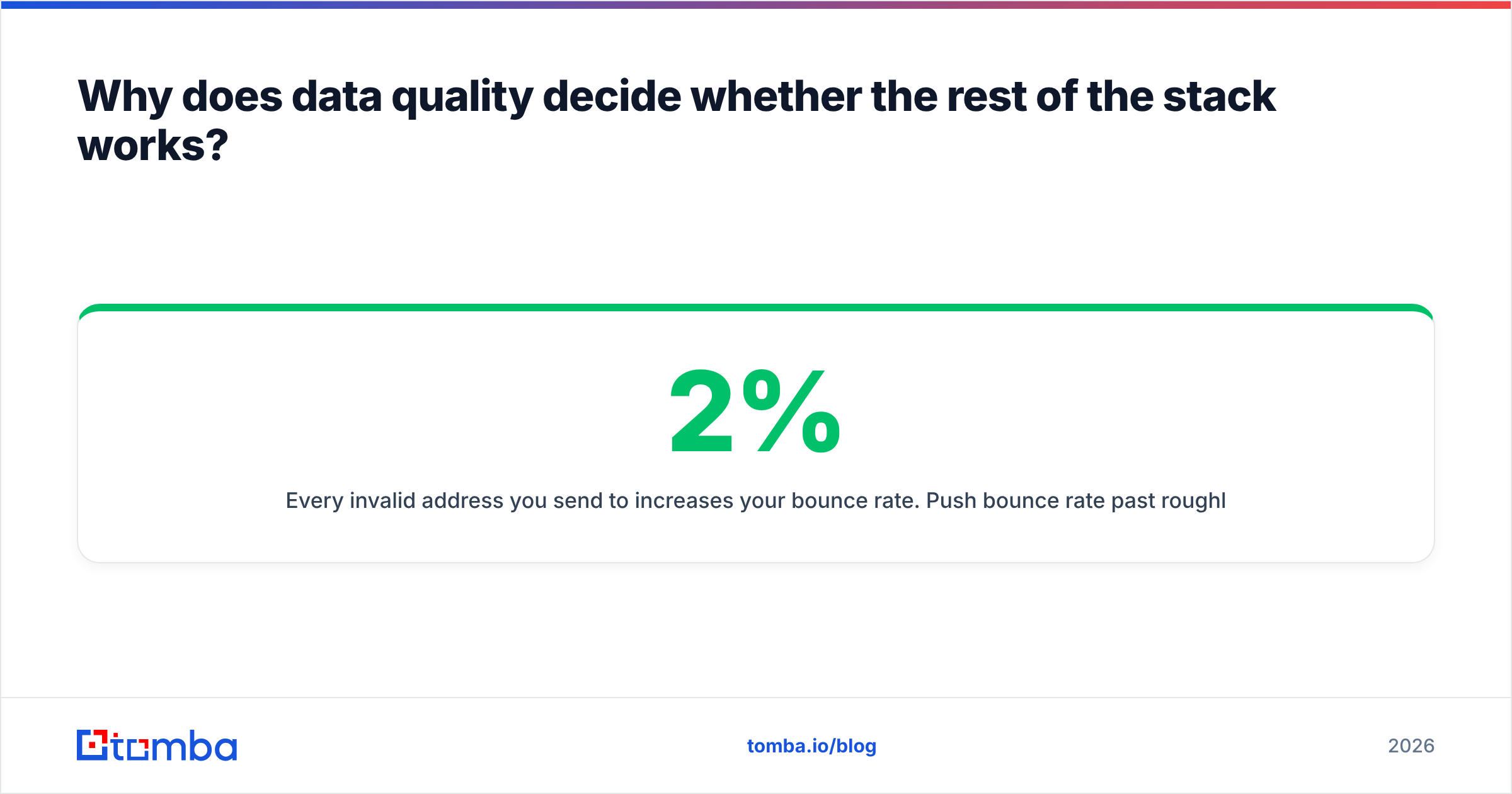
Every invalid address you send to increases your bounce rate. Push bounce rate past roughly 2% and mailbox providers begin routing you to spam — including the messages to valid, interested prospects. At that point your $100-per-seat sequencer is efficiently delivering nothing, and your $2,000 intent platform is identifying accounts you can no longer reach.
Google and Yahoo's bulk-sender requirements formalized this: authentication, low complaint rates, and easy unsubscribe are now table stakes rather than best practice. Sender reputation is scored per domain and recovers slowly. You can rebuild a sequence in an afternoon; rebuilding a burned sending domain takes weeks.
That is why verification belongs before the sequencer, not inside it. Run finds and verifications in the same workflow — a good email verifier catches syntax errors, disposables, role accounts, and dead mailboxes before a single send. For teams pushing lists in bulk, doing it at the API layer via the Tomba API keeps it automatic rather than a step someone forgets on a busy Friday.
Independent review data backs the priority order. Scan the G2 sales intelligence category and the recurring complaint across every vendor is not features or UI — it's stale contacts.
What's actually changing in GTM tooling in 2026?#
Four shifts worth planning around.
AI agents moved from demo to line item. Autonomous SDR agents that research, draft, and send are now sold as seats. They are genuinely good at research and drafting. They are still bad at judgment — knowing when not to send. Treat them as a drafting layer with human approval, not a replacement headcount, and your results will hold up.
Signal-based selling replaced spray volume. With inbox filtering tighter, the winning play is fewer sends triggered by a real event: a funding round, a new VP, a competitor's tech removed from the site. Gartner's B2B buying research has been consistent that buyers spend a small fraction of their cycle with any vendor — timing is most of the edge.
Consolidation is real but partial. HubSpot and Salesforce keep absorbing adjacent categories. They are absorbing engagement and enablement fastest, and data quality slowest — which is exactly why standalone data vendors keep surviving.
Compliance became a buying criterion. Where a vendor sources data now shows up in procurement reviews. Ask any provider for their sourcing documentation before you commit; Tomba's data sources page is the kind of disclosure to expect as a baseline.
How do you build a GTM stack from zero without overspending?#
A sequence that works for teams under 20 reps:
- Week 1 — CRM. Pick the one your team will actually update. Free HubSpot is fine to start.
- Week 2 — one data source. Run the 50-contact accuracy test on two vendors. Buy the winner on a monthly plan, not annual.
- Week 3 — one sequencer plus authentication. Set up SPF, DKIM, and DMARC before the first send. Warm the domain for two to three weeks.
- Weeks 4–8 — baseline. Send at low volume. Measure bounce rate, open rate, and response rate per segment. Do not add tools during this window.
- Week 9+ — add one layer. If reply rate is healthy but volume is low, add signals. If volume is fine but conversion is weak, add enablement. Add one, measure for 30 days, then decide.
The discipline is step 4. Teams that skip the baseline can never tell whether a new tool helped, because they changed three variables at once.
Which GTM tool should you buy first?#
The data layer — because it is the only one whose failures are invisible until they're expensive. A bad sequencer sends fewer emails. A bad CRM annoys your reps. A bad data source silently poisons deliverability for everything else you bought.
If you're building or auditing your 2026 stack, start by pressure-testing contact accuracy. The Tomba Email Finder gives you 25 free searches a month — enough to run the 50-contact audit against your existing vendor before you renew anything, with verification and catch-all handling included rather than billed as a separate line. Find the accurate contacts first, then decide how much stack you actually need on top.
Related guides#
Ready to find emails that actually work?
Join 150,000+ professionals who stopped guessing and started sending. Free credits on signup — no credit card required.
Get the Tomba newsletter
Practical outbound tactics and product updates — once every two weeks.
About the author