Go4database vs Salesbot: Which B2B Lead Tool Wins in 2026?
One sells you a prepackaged contact list, the other automates the outreach around it. Here is an honest breakdown of where Go4database and Salesbot each earn their keep — and where both leave you exposed.
TL;DR
- Go4database and Salesbot are not really competitors — one sells you static B2B contact lists, the other automates conversations and outreach on top of whatever data you already have.
- If you buy a prepackaged list and mail it raw, your bounce rate is the variable that decides everything. Purchased databases age at roughly 2-3% decay per month as people change jobs.
- Salesbot-style AI sales automation multiplies whatever data quality you feed it. Bad inputs get amplified, not fixed.
- The stack most teams actually need is three layers: a verified source of contacts, a verification pass before send, and an outreach engine. Neither vendor covers all three well.
- Budget check: a real-time email finder like Tomba starts at $49/mo with a free 25-search tier, which is usually cheaper than one bad list purchase plus the domain reputation cleanup afterwards.
What exactly are Go4database and Salesbot?#
They solve different halves of the same problem, which is why the comparison confuses people.
Go4database is a B2B contact list vendor. You tell it an industry, geography, job title, or technology, and it sells you a downloadable file of matching contacts — email addresses, phone numbers, company attributes. The commercial model is a one-time or per-record purchase. You own the file. See their own site for the current segment catalog, since list vendors rotate their packaged datasets frequently.
Salesbot sits at the other end of the funnel. The "salesbot" category — and Salesbot as a product name — refers to AI-driven sales agents: bots that qualify inbound chats, run automated email sequences, respond to replies, and hand off warm conversations to a human rep. It is an execution layer, not a data layer. Some salesbot products bundle a contact database, but the database is rarely the reason anyone buys one.
So the honest framing of go4database vs salesbot is not "which tool is better." It is: do you have a data problem or an execution problem? If your reps have plenty of contacts but no time to work them, a salesbot helps. If your reps are burning hours hunting for the right person at the right company, a list vendor or a live email finder helps.
How do their data models actually differ?#
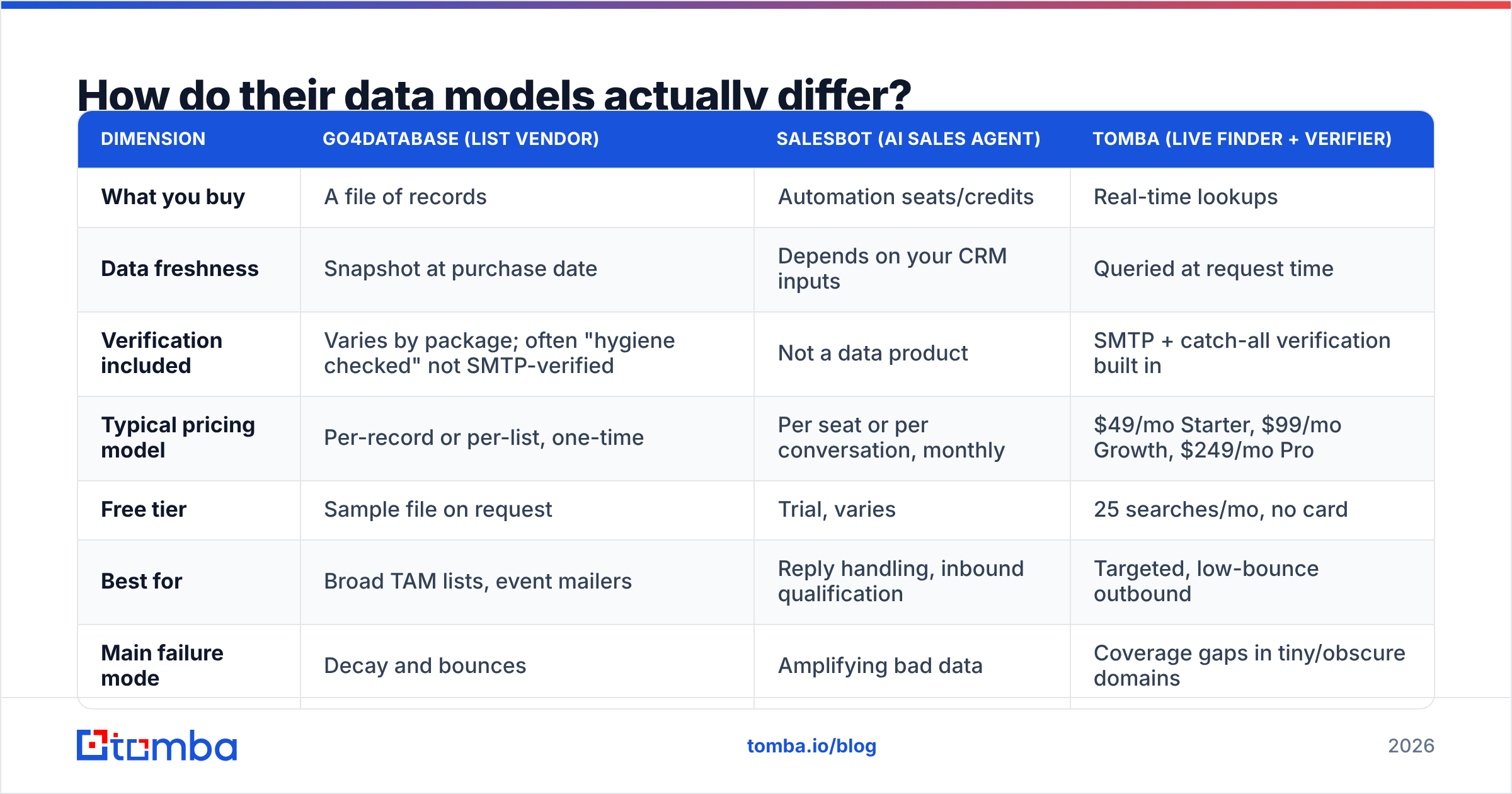
This is the core distinction and it drives everything downstream — pricing, deliverability, compliance risk, and how often you have to repurchase.
| Dimension | Go4database (list vendor) | Salesbot (AI sales agent) | Tomba (live finder + verifier) |
|---|---|---|---|
| What you buy | A file of records | Automation seats/credits | Real-time lookups |
| Data freshness | Snapshot at purchase date | Depends on your CRM inputs | Queried at request time |
| Verification included | Varies by package; often "hygiene checked" not SMTP-verified | Not a data product | SMTP + catch-all verification built in |
| Typical pricing model | Per-record or per-list, one-time | Per seat or per conversation, monthly | $49/mo Starter, $99/mo Growth, $249/mo Pro |
| Free tier | Sample file on request | Trial, varies | 25 searches/mo, no card |
| Best for | Broad TAM lists, event mailers | Reply handling, inbound qualification | Targeted, low-bounce outbound |
| Main failure mode | Decay and bounces | Amplifying bad data | Coverage gaps in tiny/obscure domains |
The row that matters most is data freshness. A purchased file is a photograph. The moment it lands in your inbox, it starts drifting: people get promoted, companies get acquired, mailboxes get deprovisioned. Industry consensus puts B2B contact decay somewhere around 25-30% per year, which means a list bought in January is materially wrong by summer.
A live lookup avoids that entirely because the record is resolved when you ask for it, not when someone compiled a spreadsheet eight months ago. That is also why a domain search run today beats a static file from a vendor's Q1 refresh — you are asking about the company as it exists now.
Which one is better for cold outbound in 2026?#
Neither, alone. And the reason is deliverability.
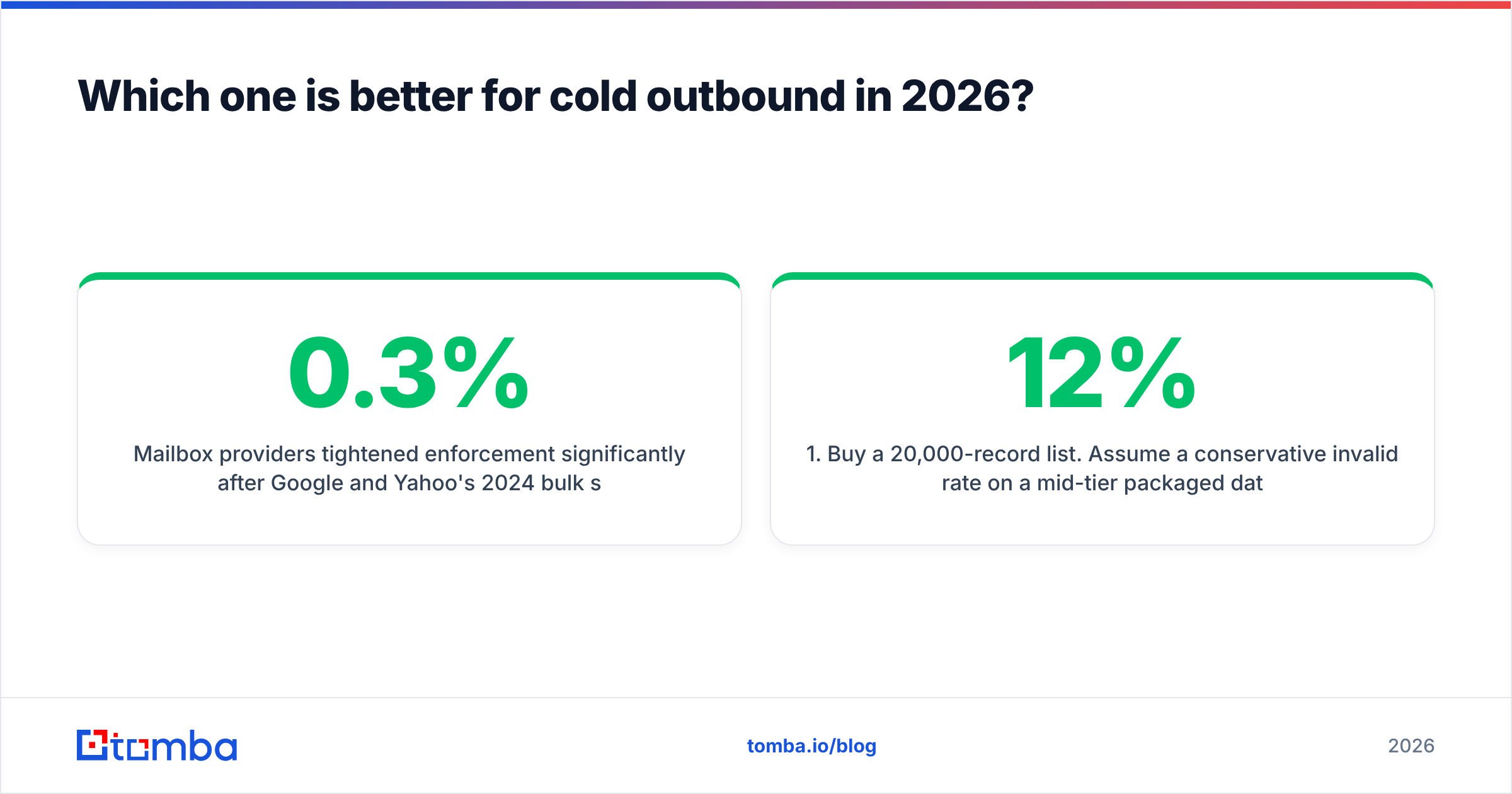
Mailbox providers tightened enforcement significantly after Google and Yahoo's 2024 bulk sender requirements, and the trend has only continued. Spam complaint thresholds are enforced at 0.3%. Authentication is mandatory. Bounce rates above roughly 2-3% start suppressing your inbox placement across the whole domain, not just the campaign.
Here is what that means in practice:
- Buy a 20,000-record list. Assume a conservative 12% invalid rate on a mid-tier packaged database.
- Load it into any sequencer, salesbot included. The automation now sends 2,400 messages to addresses that do not exist.
- Watch your sender reputation collapse in about four days. The bot did nothing wrong. It executed exactly what you told it to.
- Spend three weeks warming a new domain. Meanwhile pipeline goes to zero.
An AI sales agent has no defense against this. It is a throughput multiplier, and throughput multipliers make data quality problems worse, not better. If you are going to run a salesbot on purchased data, the email verifier pass between purchase and first send is not optional — it is the single highest-ROI step in the entire sequence.
For context on why this matters structurally, read up on email deliverability and how sender reputation compounds. Reputation is a slow asset to build and a fast one to destroy.
What does each one actually cost?#
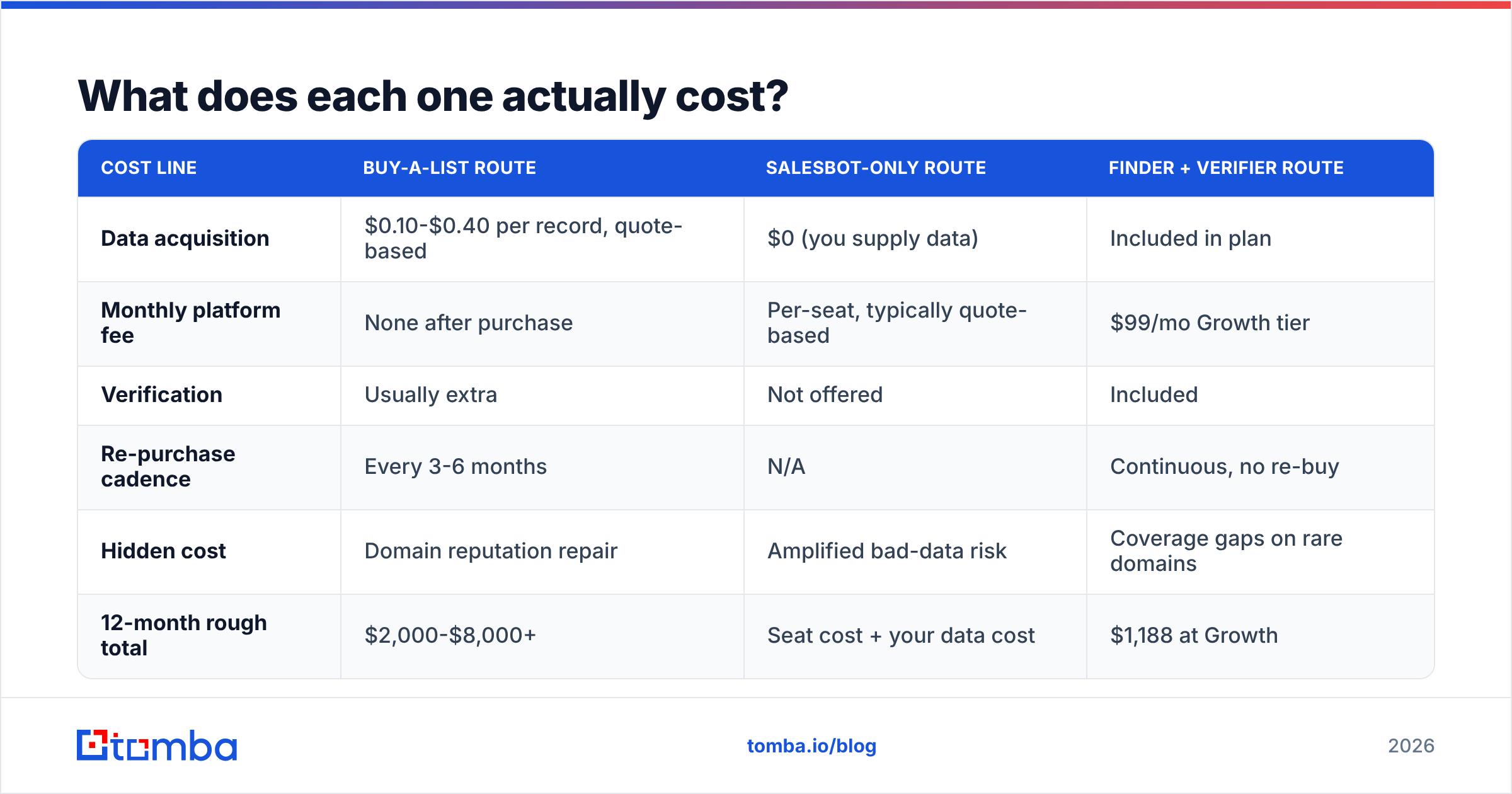
List vendors and automation vendors price on completely different axes, so a straight per-month comparison is misleading. Here is a like-for-like on a realistic scenario: a two-rep team that needs 5,000 verified contacts per quarter and wants to run sequences against them.
| Cost line | Buy-a-list route | Salesbot-only route | Finder + verifier route |
|---|---|---|---|
| Data acquisition | $0.10-$0.40 per record, quote-based | $0 (you supply data) | Included in plan |
| Monthly platform fee | None after purchase | Per-seat, typically quote-based | $99/mo Growth tier |
| Verification | Usually extra | Not offered | Included |
| Re-purchase cadence | Every 3-6 months | N/A | Continuous, no re-buy |
| Hidden cost | Domain reputation repair | Amplified bad-data risk | Coverage gaps on rare domains |
| 12-month rough total | $2,000-$8,000+ | Seat cost + your data cost | $1,188 at Growth |
Two honest caveats on that table. First, list vendors negotiate hard and volume discounts are real — a big enough order changes the per-record math considerably. Second, quote-based pricing means the numbers above are directional; get a written quote before you plan a budget around them. Full Tomba pricing is public, which makes it easier to model than most of this category.
If you specifically want a reputable prepackaged-list option rather than a live finder, BookYourData is worth a look — it is one of the more transparent players in that segment, with pay-as-you-go credits and a published accuracy guarantee. Different model from Tomba, and a legitimate fit if your workflow genuinely needs a downloadable file.
Is a purchased database ever the right call?#
Yes, in three specific situations. Anyone telling you list buying is always wrong is selling you something.
- Total addressable market sizing. You need to know how many manufacturing firms with 200-1,000 employees exist in the Midwest. You are not emailing them. A bulk file answers this fast and cheap.
- Direct mail and events. Physical mail does not have a spam folder. Postal address decay is slower than email decay, and a 12% invalid rate costs you postage, not your sending domain.
- ABM enrichment seeds. You have 400 target accounts and need a starting roster of names per account. A list gives you the skeleton; you verify and enrich the specific people you actually contact.
- Regional coverage where finders are thin. Some geographies and industries are genuinely under-indexed by real-time tools. A specialist regional list vendor may simply have better coverage there.
What a purchased database is not good for: pouring straight into a cold email sequencer. If you take one thing from this comparison, take that.
Also worth knowing your legal footing. In the US, purchased-list emailing is legal under the CAN-SPAM Act provided you honor opt-outs and identify yourself honestly. In the EU and UK, GDPR and PECR make it substantially riskier — legitimate interest is arguable for B2B but the burden of proof sits with you, not the vendor who sold you the file.

How do you build a stack that beats either one alone?#
Stop thinking of this as go4database vs salesbot and start thinking of it as three layers you have to staff regardless of vendor.
Layer 1 — Source. Where do contacts come from? Options: a list purchase, a real-time finder, LinkedIn exports, inbound forms, or scraped firmographics. Real-time wins on freshness; lists win on bulk volume for non-email use.
Layer 2 — Validate. Every address gets an SMTP check before it ever enters a sequence. Catch-all domains need their own handling — a catch-all verifier tells you whether an accept-all server is genuinely routing mail or silently discarding it, which a standard verifier cannot distinguish.
Layer 3 — Execute. This is where a salesbot or sequencer earns its money: sending, following up, parsing replies, booking meetings, and pushing everything into the CRM.
Most teams over-invest in layer 3 and under-invest in layers 1 and 2, because layer 3 is the part with a shiny dashboard. Then they wonder why a well-configured AI sequencer produces a 0.4% reply rate. The bot is fine. The list is the problem.
Which should you pick for your team?#
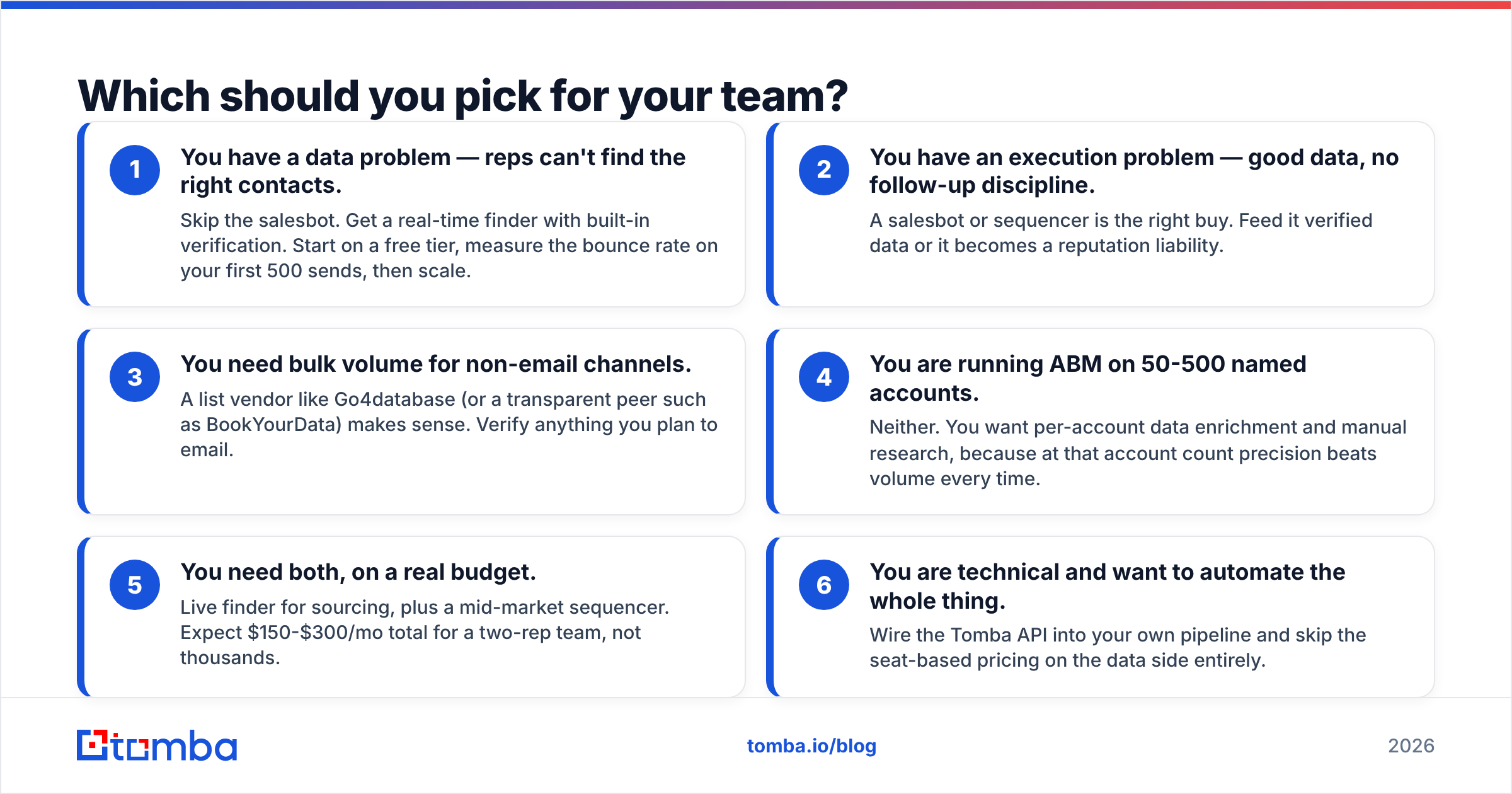
A straight decision framework, ranked by how common the situation is:
- You have a data problem — reps can't find the right contacts. Skip the salesbot. Get a real-time finder with built-in verification. Start on a free tier, measure the bounce rate on your first 500 sends, then scale.
- You have an execution problem — good data, no follow-up discipline. A salesbot or sequencer is the right buy. Feed it verified data or it becomes a reputation liability.
- You need bulk volume for non-email channels. A list vendor like Go4database (or a transparent peer such as BookYourData) makes sense. Verify anything you plan to email.
- You are running ABM on 50-500 named accounts. Neither. You want per-account data enrichment and manual research, because at that account count precision beats volume every time.
- You need both, on a real budget. Live finder for sourcing, plus a mid-market sequencer. Expect $150-$300/mo total for a two-rep team, not thousands.
- You are technical and want to automate the whole thing. Wire the Tomba API into your own pipeline and skip the seat-based pricing on the data side entirely.
For independent user feedback on any of these categories before you commit, the G2 sales intelligence category is more useful than vendor case studies — filter reviews by company size closest to yours, since a 5,000-seat enterprise experience tells you almost nothing about a 4-person team's.
What's the honest verdict?#
Go4database and Salesbot are answering different questions, and the version of this comparison that pretends otherwise is not being straight with you.
If you are buying data, evaluate on freshness, verification depth, and whether pricing lets you test small before committing. A static file that is six months old is a liability dressed up as an asset, regardless of who sold it to you.
If you are buying automation, evaluate on reply parsing, CRM sync quality, and how gracefully it hands off to a human. And then be ruthless about what you feed it.
The failure mode nobody warns you about is buying the automation first, feeding it whatever data was cheapest, and burning the sending domain you spent two years building. That sequence has killed more outbound programs than any competitor.
Start with the data layer. Tomba's Email Finder resolves professional email addresses in real time by domain, name, or company — with SMTP verification, catch-all detection, and confidence scoring built into the same call, so nothing enters your sequencer unverified. The free tier gives you 25 searches a month with no card required; paid plans start at $49/mo. Run your next 100 prospects through it, compare the bounce rate against your last purchased list, and let the numbers decide.
Related guides#
Ready to find emails that actually work?
Join 150,000+ professionals who stopped guessing and started sending. Free credits on signup — no credit card required.
Get the Tomba newsletter
Practical outbound tactics and product updates — once every two weeks.
About the author