GoAutoDial JustGoCloud Pricing, Reviews, Pros and Cons (2026)
GoAutoDial's community edition is free, but JustGoCloud isn't — and the seat price is only part of the bill. Here's what a hosted GoAutoDial deployment really costs in 2026, plus honest pros, cons, and alternatives.
TL;DR
- GoAutoDial is an open-source predictive-dialer stack built on Asterisk and the VICIdial lineage; JustGoCloud is the vendor's hosted, per-agent version of it.
- The community edition costs nothing to license. JustGoCloud charges per agent seat per month, typically in the $25–$40 range depending on tier and commitment — always confirm current rates on the vendor site, because published pricing moves.
- The seat fee is rarely the biggest line on the invoice. Voice termination, DID rentals, recording storage, and compliance tooling usually cost more than the software.
- Reviews cluster around the same verdict: excellent value and control, rough onboarding, thin documentation, support quality depends heavily on which partner you buy through.
- Dialer economics are downstream of list quality. A 22% connect rate on a clean list beats a 6% rate on a scraped one — no dialer feature fixes bad data.
What is GoAutoDial, and how does JustGoCloud fit in?#
Think of it like buying a car engine versus renting a car. GoAutoDial Community Edition is the engine: free, open-source, powerful, and entirely your problem once it's bolted in. JustGoCloud is the rental: the same engine, pre-installed in a maintained chassis, billed monthly per driver.
Technically, GoAutoDial is a web-based contact-center suite that wraps Asterisk — the open-source PBX — with agent screens, campaign management, dispositions, call recording, and a predictive/progressive/preview dialer. It shares DNA with VICIdial, and if you've ever worked a VICIdial floor, the GoAutoDial agent screen will feel familiar within an hour.
JustGoCloud is the commercially hosted deployment operated by the GoAutoDial team. You get a provisioned tenant, managed upgrades, and vendor support instead of standing up your own CentOS/Rocky box, tuning Asterisk, and taking 2 a.m. pages when a trunk drops.
Two buyers, two very different math problems:
- The self-hoster pays $0 in licensing and a lot in engineering hours. If you already employ a VoIP-literate sysadmin, this is genuinely the cheapest predictive dialer on earth.
- The JustGoCloud buyer pays a predictable seat fee to skip the sysadmin. If you're a 10–50 seat BPO or an outbound sales team without in-house telecom skills, this is the entire value proposition.
- The partner buyer goes through a regional reseller who bundles hosting, trunks, and local support. Pricing here is negotiated and opaque, and quality varies enormously.
- The hybrid runs CE for overflow or training seats and JustGoCloud for production — workable, but you own the data-sync problem.
How much does GoAutoDial JustGoCloud pricing actually cost?#
Here's the honest framing: JustGoCloud sits in the budget tier of hosted contact-center software. It is not competing with Five9 or Genesys on features, and it doesn't price like them either.
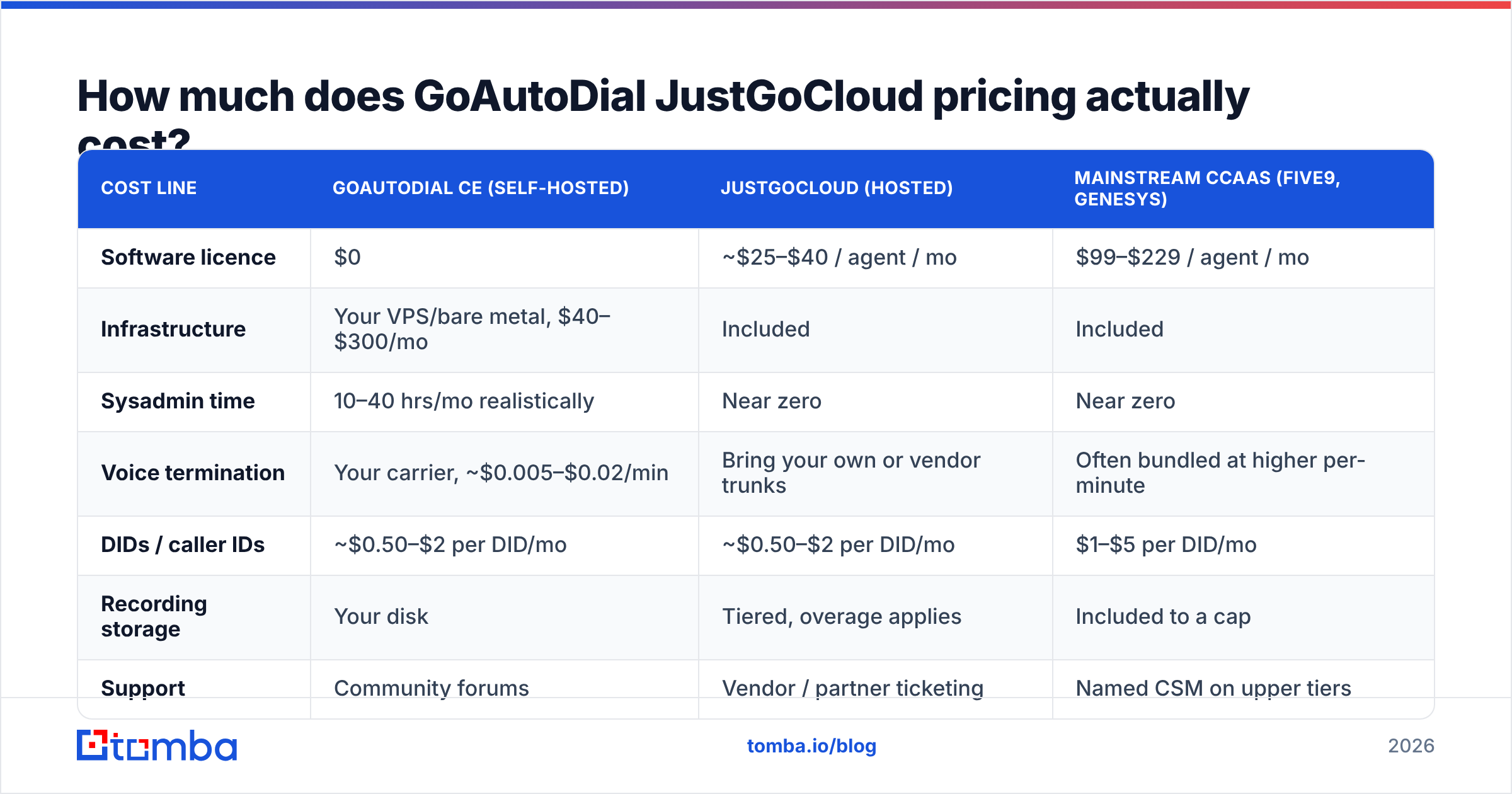
Published rates at the time of writing land roughly in the $25–$40 per agent per month band, with lower effective rates on annual commitments and volume seats. Some regional partners quote lower with minimum-seat floors. Because the vendor adjusts tiers and occasionally runs partner-specific pricing, treat every number below as a planning estimate and verify on goautodial.com before you build a model on it.
| Cost line | GoAutoDial CE (self-hosted) | JustGoCloud (hosted) | Mainstream CCaaS (Five9, Genesys) |
|---|---|---|---|
| Software licence | $0 | ~$25–$40 / agent / mo | $99–$229 / agent / mo |
| Infrastructure | Your VPS/bare metal, $40–$300/mo | Included | Included |
| Sysadmin time | 10–40 hrs/mo realistically | Near zero | Near zero |
| Voice termination | Your carrier, ~$0.005–$0.02/min | Bring your own or vendor trunks | Often bundled at higher per-minute |
| DIDs / caller IDs | ~$0.50–$2 per DID/mo | ~$0.50–$2 per DID/mo | $1–$5 per DID/mo |
| Recording storage | Your disk | Tiered, overage applies | Included to a cap |
| Support | Community forums | Vendor / partner ticketing | Named CSM on upper tiers |
| Realistic 20-seat monthly total | $300–$900 + salary | $900–$1,800 all-in | $3,000–$6,000 all-in |
The pattern is consistent across every quote I've seen modelled: JustGoCloud is roughly a third to a fifth the cost of tier-one CCaaS, and roughly double the cash cost of running CE yourself — before you price the engineer you'd need to run CE.
What are the hidden costs nobody quotes you?#
This is where dialer budgets break. The seat fee is the number on the proposal; these are the numbers on the invoice.
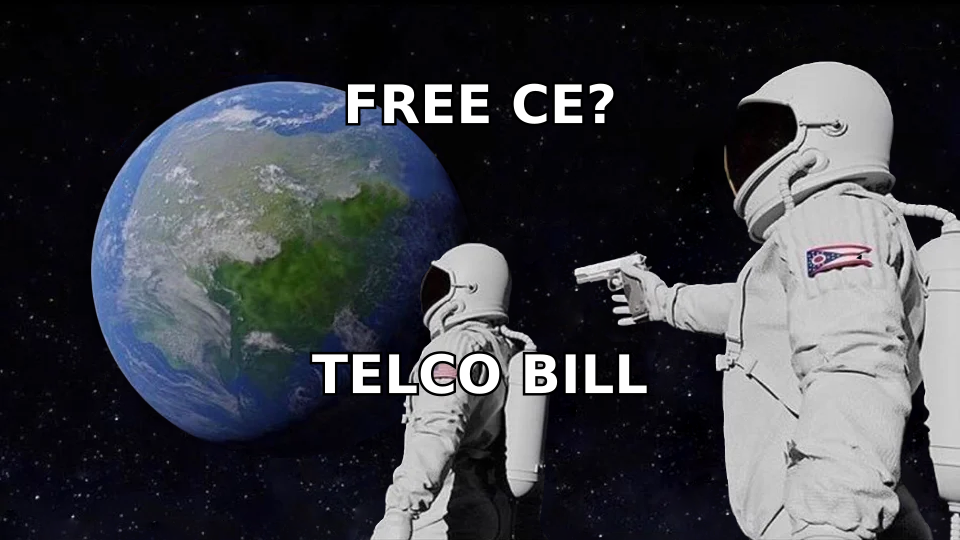
- Voice minutes. A predictive dialer at 2.5:1 ratio with 20 agents can burn 150,000+ minutes a month. At $0.01/min that's $1,500 — more than the software. Termination rates vary wildly by destination; US domestic is cheap, mobile termination in APAC and LATAM is not.
- DID inventory and rotation. Serious outbound teams rotate local presence numbers to protect answer rates. A hundred DIDs is normal. Add carrier-level caller-ID reputation monitoring if you dial the US, because STIR/SHAKEN attestation problems will quietly halve your connect rate.
- Recording storage and retention. Compliance regimes (PCI, GDPR, state two-party consent laws) may force 12–24 month retention. Stereo recordings at scale are a real storage line.
- Implementation. Budget 2–6 weeks for campaign setup, dispositions, IVR flows, CRM sync, and agent training. Partners often charge a one-time onboarding fee.
- Integration glue. GoAutoDial's API is functional but not the polished REST surface you get from a modern SaaS. Syncing to HubSpot, Salesforce, or a custom CRM usually means someone writes and maintains middleware.
- List acquisition and verification. The biggest one. Dialing a stale list wastes minutes, agent hours, and caller-ID reputation simultaneously.
That last point deserves its own section, because it's the cost line most teams never put in the spreadsheet.
Why does list quality decide your real cost per contact?#
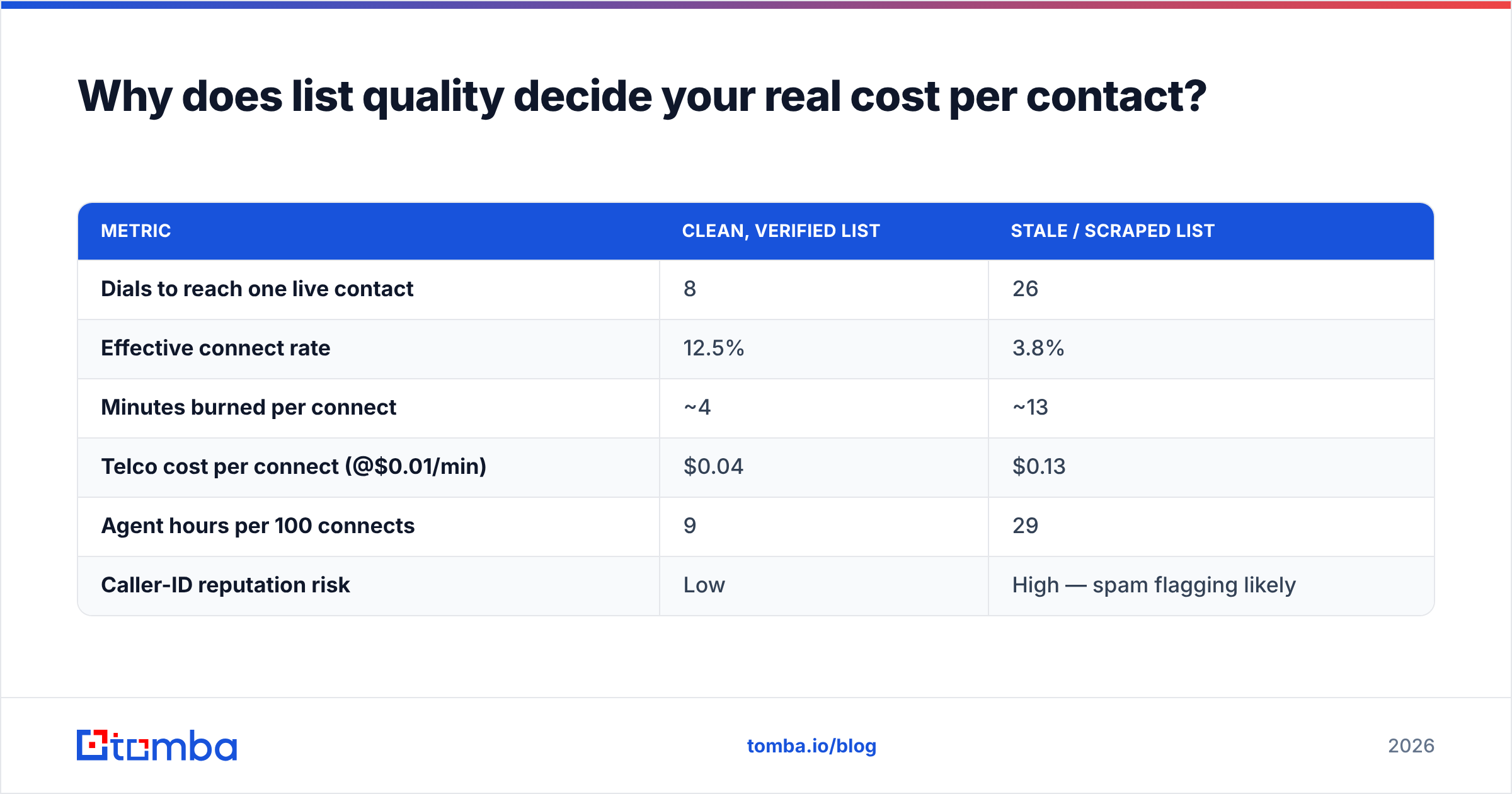
A dialer's efficiency is bounded by the list you feed it. Run the arithmetic on a 20-seat floor:
| Metric | Clean, verified list | Stale / scraped list |
|---|---|---|
| Dials to reach one live contact | 8 | 26 |
| Effective connect rate | 12.5% | 3.8% |
| Minutes burned per connect | ~4 | ~13 |
| Telco cost per connect (@$0.01/min) | $0.04 | $0.13 |
| Agent hours per 100 connects | 9 | 29 |
| Caller-ID reputation risk | Low | High — spam flagging likely |
The dialer software cost per connect barely moves between those columns. Everything else triples. This is why "which dialer is cheapest" is usually the wrong opening question — the right one is "what does a verified contact cost me, and how many do I need?"
If your outbound motion is multichannel (and in 2026 it should be), the same list feeds email and phone. Running numbers through a phone validator before import and pairing each record with a verified work email via an email verifier means your dialer only ever touches reachable humans. A B2B phone finder that returns direct dials rather than switchboard numbers compounds the effect — direct dials connect at multiples of main-line numbers.
What do real GoAutoDial and JustGoCloud reviews say?#
Aggregate review sentiment across G2 and Capterra is consistent enough to summarise honestly.
What reviewers praise:
- Cost. Overwhelmingly the number-one theme. Teams migrating from tier-one CCaaS report 60–80% reductions in software spend.
- Dialer performance. The predictive engine is mature — it's Asterisk plus a decade of VICIdial-lineage tuning, not a v1 product.
- Control. Campaign logic, dispositions, recycling rules, and lead-recycling behaviour are deeply configurable.
- No per-minute lock-in. Bring your own carrier and you control the largest cost line yourself.
What reviewers criticise:
- UI age. The agent and admin interfaces are functional but dated compared to modern SaaS. New agents need real training, not a five-minute tour.
- Documentation gaps. Community docs are patchy; a lot of institutional knowledge lives in forum threads.
- Support variance. Direct vendor support gets reasonable marks. Reseller support is a lottery — vet your partner harder than you vet the product.
- Reporting. Adequate operational reporting, weak analytics. Teams that want cohort analysis or conversation intelligence export to a BI tool.
- Setup friction. Self-hosted CE installs go wrong in familiar Asterisk ways: NAT, codecs, SIP registration, firewall rules.
Net verdict from the review corpus: buy it for economics and dialer power, not for polish.
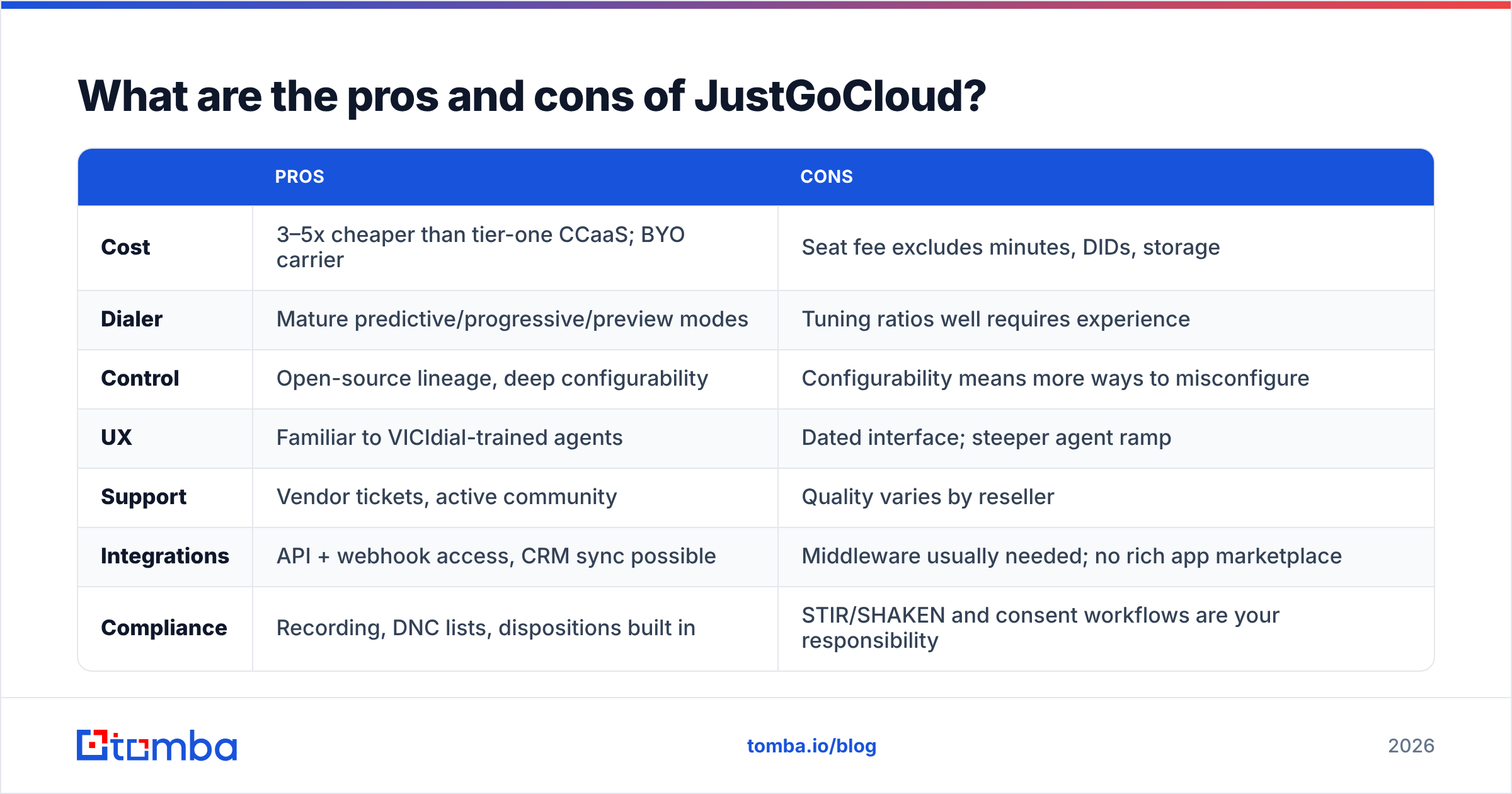
What are the pros and cons of JustGoCloud?#
| Pros | Cons | |
|---|---|---|
| Cost | 3–5x cheaper than tier-one CCaaS; BYO carrier | Seat fee excludes minutes, DIDs, storage |
| Dialer | Mature predictive/progressive/preview modes | Tuning ratios well requires experience |
| Control | Open-source lineage, deep configurability | Configurability means more ways to misconfigure |
| UX | Familiar to VICIdial-trained agents | Dated interface; steeper agent ramp |
| Support | Vendor tickets, active community | Quality varies by reseller |
| Integrations | API + webhook access, CRM sync possible | Middleware usually needed; no rich app marketplace |
| Compliance | Recording, DNC lists, dispositions built in | STIR/SHAKEN and consent workflows are your responsibility |
| Scale | Proven at hundreds of seats in BPO settings | Reporting/analytics thin at enterprise scale |
Is JustGoCloud better than the alternatives?#
It depends entirely on which constraint binds you.
Choose JustGoCloud if you run high-volume outbound (BPO, collections, insurance, lead-gen), your seat count is 10–200, budget discipline outranks interface polish, and you either have or can hire someone comfortable with SIP concepts.
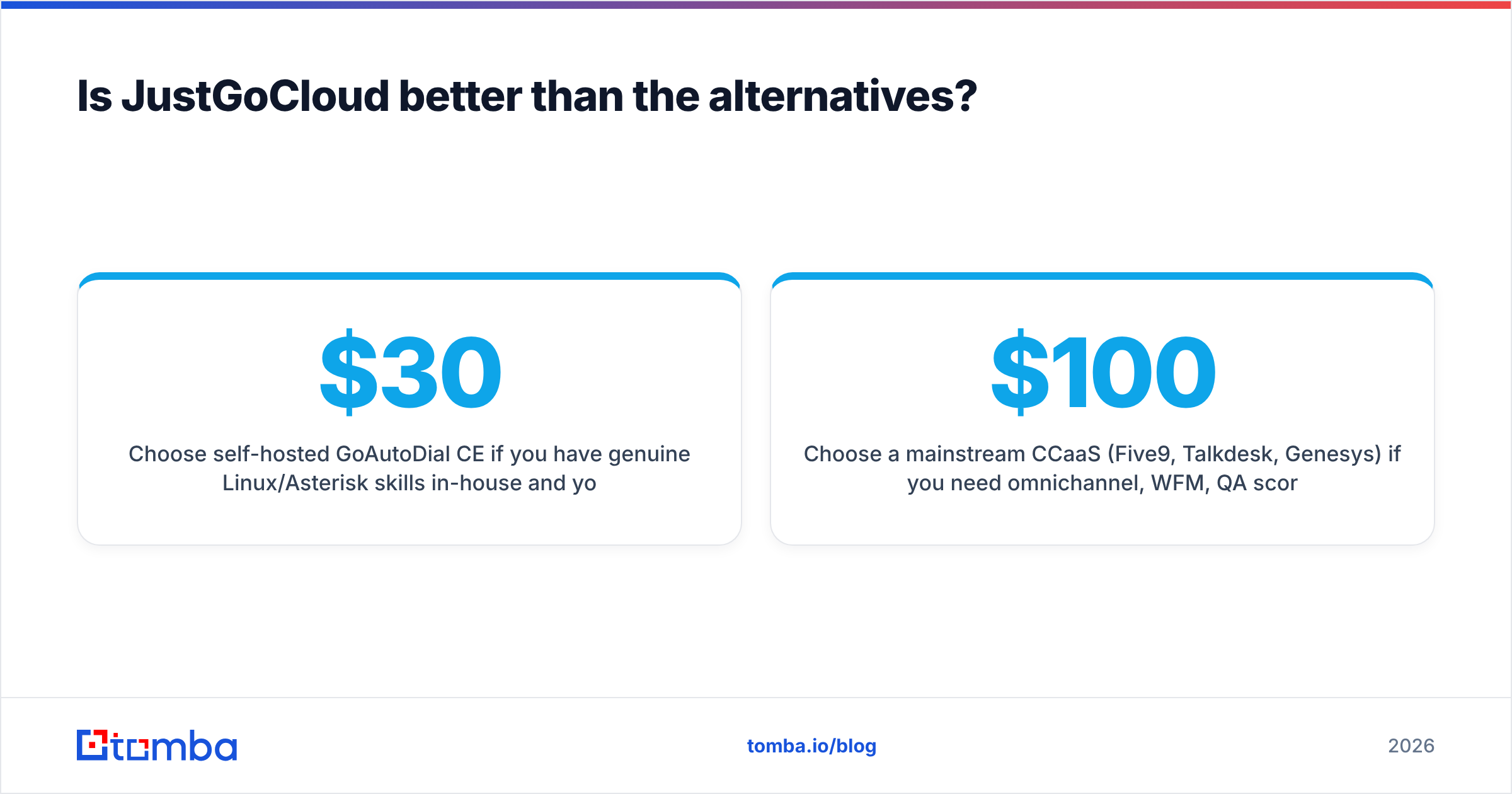
Choose self-hosted GoAutoDial CE if you have genuine Linux/Asterisk skills in-house and your seat count is large enough that saving $30/seat/month funds the engineer. Below ~30 seats, the maths rarely works.
Choose VICIdial if you want the widest pool of contractors who know the stack — it's the older, larger community. The trade-off is an even rougher interface.
Choose a mainstream CCaaS (Five9, Talkdesk, Genesys) if you need omnichannel, WFM, QA scoring, conversation intelligence, and enterprise procurement checkboxes, and you can defend $100–$229 per seat.
Choose a modern lightweight dialer (Aircall, JustCall, Kixie) if you're a sub-20-seat SaaS sales team that wants CRM-native calling rather than a call-center floor. Predictive dialing is overkill for consultative B2B selling anyway — you'll spend more time on research than on dial volume.
One structural note for B2B sellers specifically: predictive dialers are optimised for consumer-scale lists. If your TAM is 4,000 accounts, the winning play is fewer, better-researched dials paired with email and LinkedIn touches. That's a data problem, not a dialer problem — which is why teams in that bracket get more lift from contact enrichment than from upgrading their dialer.
How should you evaluate it before signing?#
Run a structured 30-day pilot rather than a demo:
- Price a full month, not a seat. Model seats + estimated minutes + DIDs + storage + onboarding. Compare against your current all-in number, not against a competitor's list price.
- Test with your worst list segment. Anyone's dialer looks good on fresh data. You want to see how disposition recycling and answer-machine detection behave on aged records.
- Stress the integration. Push 500 leads through the API into your CRM and back. Time how long the glue takes to build — that estimate is your real switching cost.
- Audit caller-ID health. Check your outbound numbers against spam-flag databases before and after two weeks of dialing.
- Interview the support channel. File three tickets during the trial, at different times of day, and measure response quality. This is the single biggest variance in reported satisfaction.
- Check exit cost. Confirm you can export recordings, call logs, and lead data in bulk. Open-source lineage helps here, but confirm it contractually.
Frequently asked questions#
Is GoAutoDial free? The Community Edition is free and open source. JustGoCloud, the hosted service, is a paid per-agent subscription.
Does JustGoCloud include calling minutes? Generally no — you either bring your own SIP trunk or buy termination separately. Budget minutes as a distinct line item.
Can it dial internationally? Yes, subject to your carrier's coverage and the destination country's dialing regulations. Compliance is on you, not the platform.
How many seats before self-hosting pays off? Rough rule: above 30–50 seats, the licence savings start covering a part-time sysadmin. Below that, hosted almost always wins.
The bottom line#
GoAutoDial JustGoCloud pricing is genuinely competitive — you're paying budget-tier rates for a mature dialer engine, and the trade-offs are interface polish, documentation depth, and support consistency rather than core capability. For high-volume outbound floors, it's one of the best value propositions available in 2026. For consultative B2B teams under 20 seats, a lighter CRM-native dialer is usually the better fit.
Whichever you pick, the dialer is the last mile. Your cost per conversation is set upstream, by the quality of the list you load. Before your next campaign, build the list properly: use the Tomba Email Finder to attach verified work emails to every account in your target list, layer in direct dials, and push only reachable, deduplicated records into your dialer. Tomba's free tier gives you 25 searches a month to test the data quality yourself, with paid plans starting at $49/mo — see Tomba pricing for the full breakdown. Cheaper dials start with better contacts.
Related guides#
Ready to find emails that actually work?
Join 150,000+ professionals who stopped guessing and started sending. Free credits on signup — no credit card required.
Get the Tomba newsletter
Practical outbound tactics and product updates — once every two weeks.
About the author