11 Best GoCustomer Alternatives in 2026 (Free & Paid)
GoCustomer bundles AI personalization with sending, but the data layer underneath is where most teams get burned. Here are 11 alternatives compared on accuracy, pricing, and what they actually replace.
TL;DR
- GoCustomer is an AI-personalization-plus-sending tool. Most teams who churn off it do so because the contact data underneath the personalization was thin, not because the AI was bad.
- Split the decision into two layers: who you email (data) and how you email them (sequencing). Very few tools are genuinely good at both.
- If your problem is bounce rate and bad contact records, fix the data layer first — Tomba, Findymail, or Prospeo. Sequencing tools can wait.
- If your problem is sending volume and inbox rotation, Instantly and Smartlead are the two obvious replacements, at roughly a third of the bundled-suite price.
- Budget reality: a data tool plus a sender typically lands around $80–$150/mo combined, which is usually cheaper and better than one all-in-one seat.
What is GoCustomer and what does it actually do?#
GoCustomer positions itself as an AI sales assistant: it takes a list of prospects, generates personalized first lines and email bodies based on scraped signals (website copy, LinkedIn headline, recent posts), and sends the sequence through connected mailboxes. The pitch is that you skip the manual research step and still get emails that don't read like a mail merge.
That pitch works when two things are true. First, your contact list is accurate — the AI can't personalize its way out of an email that bounces. Second, your ICP is homogeneous enough that a template plus a variable actually captures the relevant context.
When teams search for GoCustomer alternatives, the complaint pattern is usually one of four:
- Data quality gaps — the built-in contact sourcing returns stale or guessed addresses, and bounce rates climb past 5%.
- Personalization that reads as AI — generated intros pattern-match to "I noticed your company does X," which prospects now recognize instantly.
- Pricing that scales with contacts, not value — you pay for enriched records you never email.
- Deliverability control — limited warmup, inbox rotation, or sending-domain management compared with purpose-built senders.
Knowing which of the four is your problem determines which alternative you should shortlist. A personalization tool won't fix bounce rate. A data tool won't fix your sender reputation.
How should you split the outbound stack in 2026?#
Stop shopping for "a GoCustomer replacement" and start shopping for the layer that's broken. Here's the honest decomposition of what an outbound stack needs:
- Contact discovery — finding the right person at the right company. Sources: LinkedIn scrapes, domain crawls, community-contributed data, licensed B2B databases.
- Verification — confirming the address will accept mail before you send. This is where SMTP checks, catch-all handling, and role-account filtering live.
- Enrichment — attaching firmographics, tech stack, headcount, funding, and phone numbers so your segmentation isn't guesswork.
- Personalization — generating or assembling the relevant message. Can be AI, can be a research VA, can be a well-built template library.
- Sending and deliverability — mailbox rotation, warmup, throttling, SPF/DKIM/DMARC hygiene, reply detection.
- Measurement — reply rate, positive-reply rate, meetings booked, and per-domain deliverability trends.
All-in-one suites like GoCustomer try to cover 1 through 5. In practice they're strong at one or two and adequate at the rest. That's not a knock on GoCustomer specifically — it's true of Apollo, Lusha, Seamless, and every other bundle. The economics of building a world-class data pipeline and a world-class sending infrastructure are brutal.
The teams with the best reply rates I've seen run a two-tool stack: a specialist data provider feeding a specialist sender. It costs less and each half is replaceable when it stops working.
Which GoCustomer alternatives are worth shortlisting?#
Below is the comparison that matters. Prices are list prices for entry paid tiers as of early 2026; annual billing usually knocks 20–30% off.
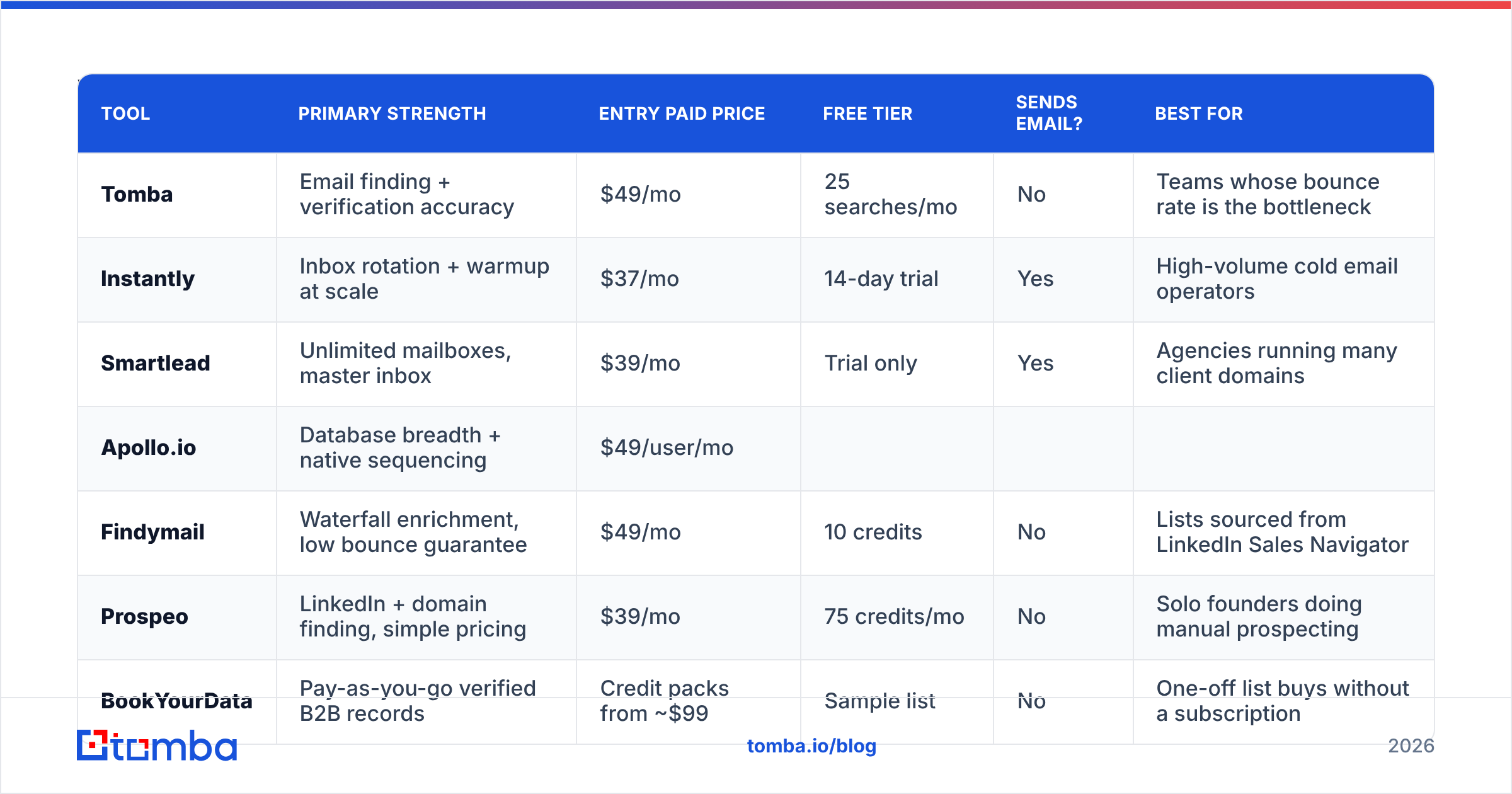
| Tool | Primary strength | Entry paid price | Free tier | Sends email? | Best for |
|---|---|---|---|---|---|
| Tomba | Email finding + verification accuracy | $49/mo | 25 searches/mo | No | Teams whose bounce rate is the bottleneck |
| Instantly | Inbox rotation + warmup at scale | $37/mo | 14-day trial | Yes | High-volume cold email operators |
| Smartlead | Unlimited mailboxes, master inbox | $39/mo | Trial only | Yes | Agencies running many client domains |
| Apollo.io | Database breadth + native sequencing | $49/user/mo | |||
| Limited credits | Yes | SMB teams wanting one seat for everything | |||
| Findymail | Waterfall enrichment, low bounce guarantee | $49/mo | 10 credits | No | Lists sourced from LinkedIn Sales Navigator |
| --- | --- | --- | --- | --- | --- |
| Prospeo | LinkedIn + domain finding, simple pricing | $39/mo | 75 credits/mo | No | Solo founders doing manual prospecting |
| BookYourData | Pay-as-you-go verified B2B records | Credit packs from ~$99 | Sample list | No | One-off list buys without a subscription |
| Clay | Waterfall orchestration across 50+ providers | $149/mo | 100 credits | Via integration | RevOps teams building custom enrichment logic |
| Lemlist | Personalized image/video, multichannel | $69/mo | Trial only | Yes | Creative-heavy sequences |
| Reply.io | Multichannel cadences + AI SDR | $59/user/mo | 14-day trial | Yes | Teams blending email, calls, and LinkedIn |
| Woodpecker | Deliverability-first sending, agency mode | $29/mo | 7-day trial | Yes | Small teams with modest volume |
A few notes on reading that table honestly.
Price per seat versus price per workspace matters more than the headline number. Apollo and Reply.io charge per user; Instantly, Smartlead, and Tomba charge per workspace with usage limits. A five-person team hits very different totals.
"Sends email" is not a feature you always want. If you already run Instantly or Smartlead, a data tool that also sends is redundant surface area you're paying for.
Credit definitions differ wildly. One provider's "credit" is one email found; another's is one enriched record with 20 fields; another's is one API call regardless of result. Always test with your own list before committing annually.
How accurate is the contact data in each option?#
This is the question that decides whether the rest of your stack matters, and it's the one vendors are vaguest about.
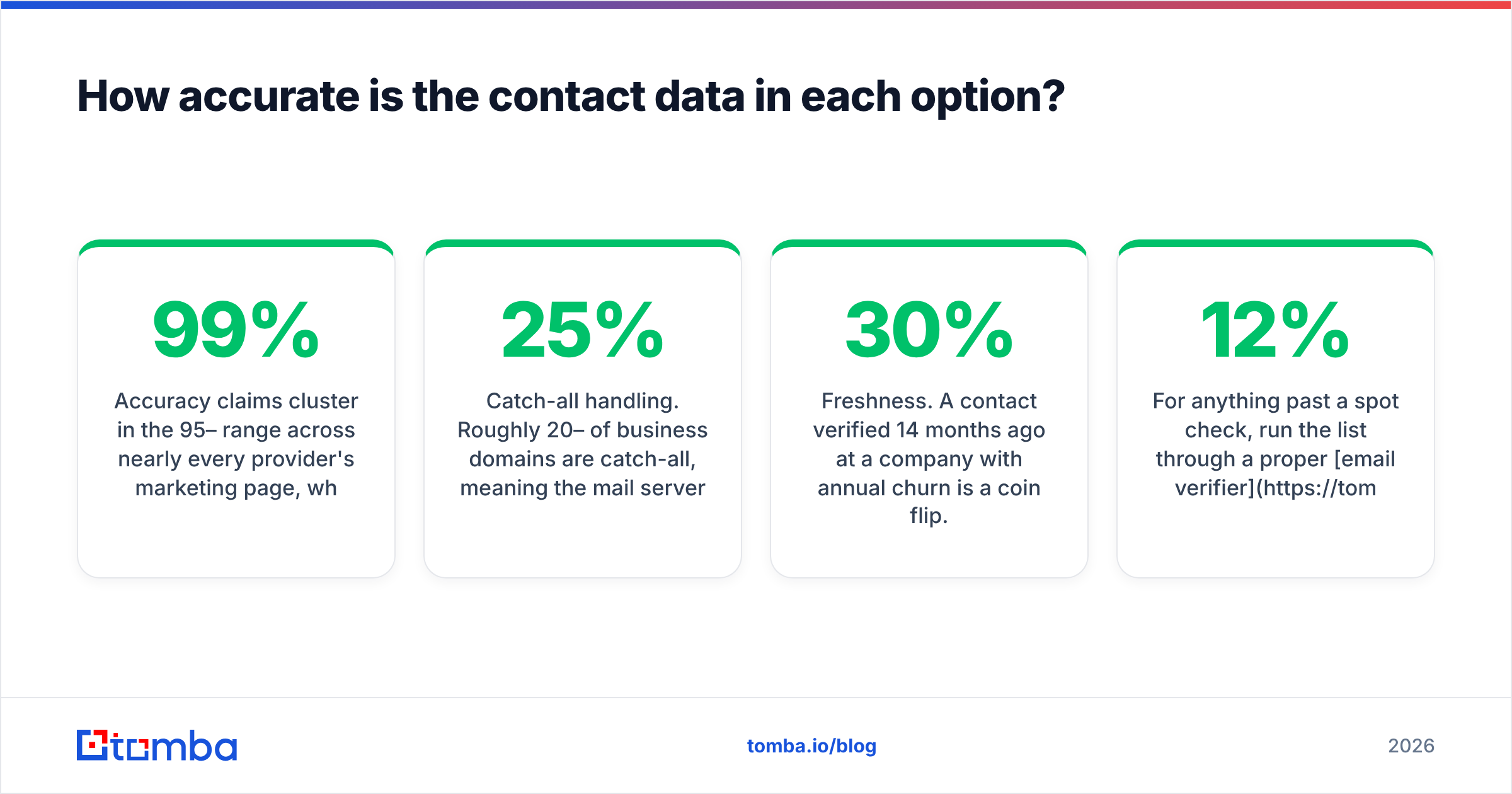
Accuracy claims cluster in the 95–99% range across nearly every provider's marketing page, which tells you the marketing pages are useless. What actually varies:
- Coverage by region. North American SaaS contacts are well covered everywhere. EMEA mid-market, APAC, and non-English domains are where providers diverge sharply.
- Catch-all handling. Roughly 20–25% of business domains are catch-all, meaning the mail server accepts everything and standard SMTP verification can't tell you anything. Providers that mark these "valid" inflate their accuracy number and hand you the bounce. A dedicated catch-all verifier is the difference between a usable segment and a landmine.
- Freshness. A contact verified 14 months ago at a company with 30% annual churn is a coin flip. Ask when the record was last re-verified, not when it was first found.
- Role account filtering. info@, sales@, support@ addresses technically "verify" but tank your engagement metrics and your sender reputation.

The practical test: take 100 contacts you already know are good (current customers, people who've replied to you), strip the emails, and run them through each trial. Count exact matches. That gives you a real accuracy number for your ICP, which is the only number that matters. Most vendors' free tiers are large enough to run this — Tomba's free tier gives 25 searches, Prospeo's 75, Findymail's 10, which is enough for a directional read across three tools in an afternoon.
For anything past a spot check, run the list through a proper email verifier before it touches your sequencer. Verifying after the fact is how you learn about a 12% bounce rate from your ESP's suspension email.

Is an all-in-one suite better than a two-tool stack?#
Depends on your volume and your tolerance for vendor lock-in.
All-in-one wins when: you're a one-to-three-person team, you send under 2,000 emails a month, and the operational overhead of moving CSVs between tools costs you more than the feature gaps. Apollo and Reply.io are legitimately good at this. One login, one bill, one support queue.
Two-tool stacks win when: you send enough volume that a 3% difference in bounce rate is real money, you run multiple sending domains, or you have any kind of RevOps function that can maintain an integration. The pairing that shows up most often in high-performing teams is a specialist finder (Tomba, Findymail, or Prospeo) feeding Instantly or Smartlead, connected via Zapier, Make, or a direct API call.
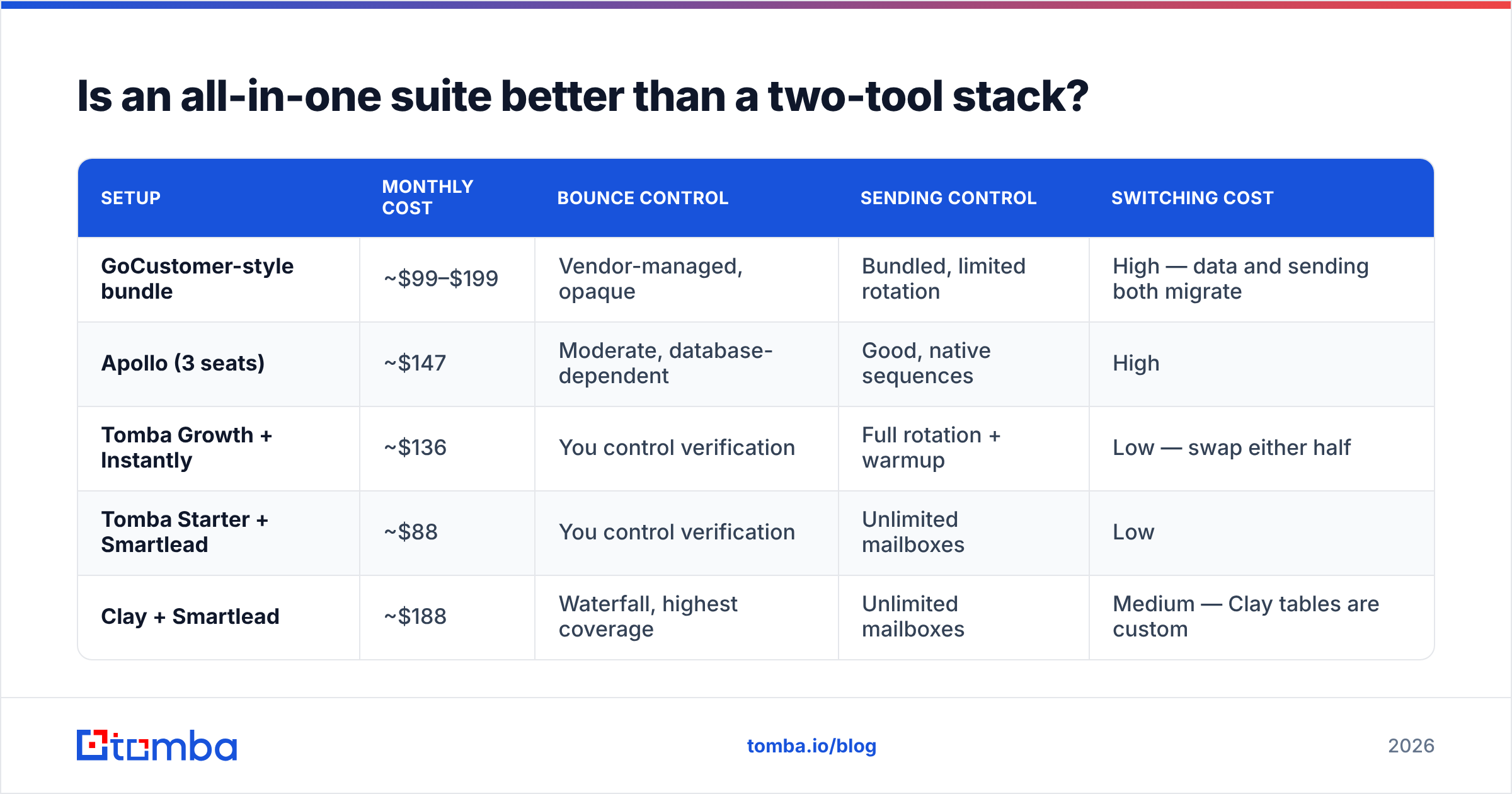
The cost comparison, for a team sending ~10,000 emails/month to ~3,000 new contacts:
| Setup | Monthly cost | Bounce control | Sending control | Switching cost |
|---|---|---|---|---|
| GoCustomer-style bundle | ~$99–$199 | Vendor-managed, opaque | Bundled, limited rotation | High — data and sending both migrate |
| Apollo (3 seats) | ~$147 | Moderate, database-dependent | Good, native sequences | High |
| Tomba Growth + Instantly | ~$136 | You control verification | Full rotation + warmup | Low — swap either half |
| Tomba Starter + Smartlead | ~$88 | You control verification | Unlimited mailboxes | Low |
| Clay + Smartlead | ~$188 | Waterfall, highest coverage | Unlimited mailboxes | Medium — Clay tables are custom |
The two-tool rows are not dramatically cheaper. The argument for them is control and replaceability, not price. When your bounce rate spikes, a two-tool stack lets you diagnose which half broke. A bundle gives you a support ticket.

What about the AI personalization piece specifically?#
If AI-generated first lines were the reason you bought GoCustomer, be honest about whether they're working.
Prospect-side pattern recognition has caught up. "I saw you're hiring for [role] — usually that means [inference]" was novel in 2023 and is now a recognized template. Reply rates on generic AI personalization have compressed toward plain-template rates in most benchmarks I trust, and the gap is closing further.
What still moves reply rates:
- Segment-level relevance over contact-level personalization. A message written for "Series A fintech ops leads with 20-50 headcount" beats a generic message with a scraped detail bolted on. That requires enrichment data — headcount, funding, tech stack — not an AI writer. Tomba's data enrichment and similar tools exist for exactly this.
- A real trigger. Funding round, new exec hire, tech stack change, job posting. The trigger is the personalization; the sentence wrapping it is nearly irrelevant.
- Brevity. Sub-75-word emails outperform 150-word AI-expanded ones consistently. Most AI personalization tools add words.
If you want AI in the loop, treat it as a drafting assistant rather than a pipeline stage. A cold email AI writer or a subject-line generator you use while building the sequence costs nothing per send and doesn't lock you into a suite.
How do you migrate off GoCustomer without dropping deals?#
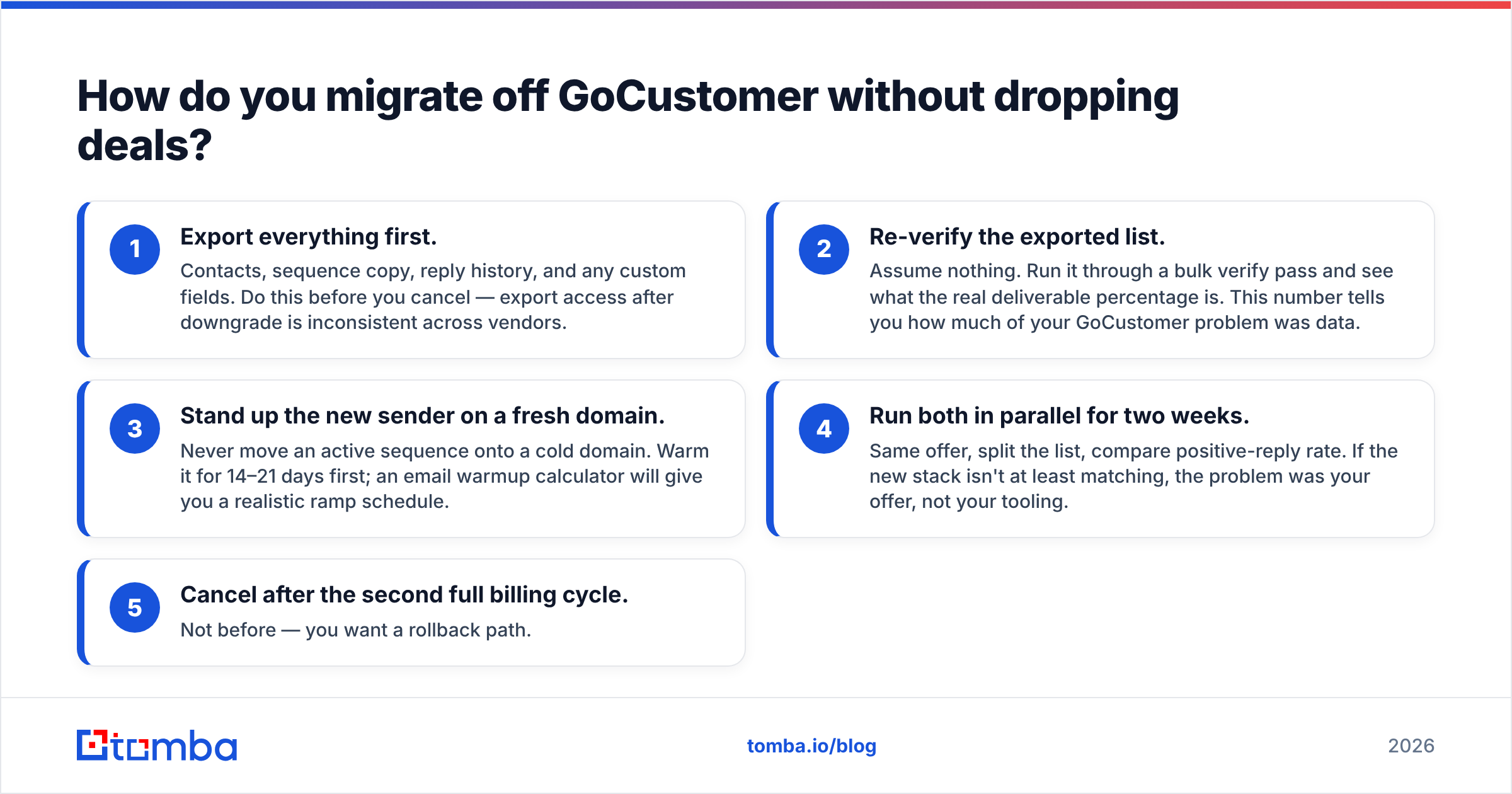
Run the switch in parallel, not as a cutover. Four weeks is enough.
- Export everything first. Contacts, sequence copy, reply history, and any custom fields. Do this before you cancel — export access after downgrade is inconsistent across vendors.
- Re-verify the exported list. Assume nothing. Run it through a bulk verify pass and see what the real deliverable percentage is. This number tells you how much of your GoCustomer problem was data.
- Stand up the new sender on a fresh domain. Never move an active sequence onto a cold domain. Warm it for 14–21 days first; an email warmup calculator will give you a realistic ramp schedule.
- Run both in parallel for two weeks. Same offer, split the list, compare positive-reply rate. If the new stack isn't at least matching, the problem was your offer, not your tooling.
- Cancel after the second full billing cycle. Not before — you want a rollback path.
Before you send anything from the new stack, confirm your DNS is clean. Run an SPF checker and confirm DMARC is at least at p=none with reporting on. Google and Yahoo's bulk-sender requirements have been enforced since 2024, and the enforcement has only tightened; unauthenticated bulk mail from a new domain goes straight to spam regardless of how good your copy is. Google's own sender guidelines are the authoritative reference here, not vendor blog posts.
Which alternative should you pick?#
Pick by bottleneck, not by feature list.
- Bounce rate above 4% → fix data first. Tomba, Findymail, or Prospeo. Verify before you send, always.
- Deliverability collapsing at volume → Instantly or Smartlead. Mailbox rotation and warmup are their entire product, and it shows.
- You want one tool and one bill → Apollo.io or Reply.io. Accept the data tradeoff; budget for a verification pass on top.
- You need lists without a subscription → BookYourData's pay-as-you-go credit packs are a clean fit when your buying is lumpy and you don't want a recurring seat.
- You have RevOps capacity and complex ICPs → Clay. Powerful, genuinely steep learning curve, and the credit model punishes sloppy table design.
- Small team, modest volume, deliverability-conscious → Woodpecker at $29/mo is underrated.
Cross-check whatever you shortlist on G2 and read the two-star reviews specifically. Five-star reviews tell you what the tool does; two-star reviews tell you where it breaks, which is what you're actually buying against. Vendor comparison pages — including this one — are written by people with an interest.
Ready to fix the data layer first?#
If your GoCustomer frustration traces back to bounces, stale contacts, or catch-all domains you couldn't resolve, start there before you buy another sending tool. The Tomba Email Finder finds professional addresses by domain, name, or company, with verification built into the same call — so the list that reaches your sequencer is one you can actually send to.
The free tier gives you 25 searches a month, enough to run the 100-contact accuracy test described above against your real ICP. Paid plans start at $49/mo for Starter and $99/mo for Growth; full Tomba pricing is public, and there's an email finder API if you'd rather wire verification directly into your existing stack than move CSVs around. Test it against whatever you're using now, and let the bounce report decide.
Related guides#
Ready to find emails that actually work?
Join 150,000+ professionals who stopped guessing and started sending. Free credits on signup — no credit card required.
Get the Tomba newsletter
Practical outbound tactics and product updates — once every two weeks.
About the author