GoCustomer vs Saleshandy 2026: Which Outbound Tool Wins?
One is an AI-agent outbound platform, the other a cold email engine with a built-in lead database. Here is how GoCustomer and Saleshandy actually differ on data, deliverability, pricing, and who should buy which.
GoCustomer vs Saleshandy is a choice between two very different bets. One sells an AI agent that does the research for you. The other sells a sending engine built for volume. Here is how the two compare on data, deliverability, price, and fit.
TL;DR
- GoCustomer sells AI-agent outbound. It researches accounts, writes personalized variants, and runs multichannel sequences with little human input. It is demo-led and priced by conversation, not by a public card.
- Saleshandy is a cold email engine first. You get many sending accounts on higher tiers, sequence logic, a unified inbox, warmup, plus a bolt-on Lead Finder database.
- If your bottleneck is volume and deliverability, Saleshandy is the cheaper, more predictable pick. If your bottleneck is research and personalization at scale, GoCustomer's agent layer is the differentiator.
- Neither tool solves contact data on its own. Both work better with a dedicated email finder and email verifier in front of the sequencer.
- Budget reality: a Saleshandy seat plus a $49/mo Tomba Starter plan usually costs less than one AI-SDR contract. And you own the data layer.
What are GoCustomer and Saleshandy?#
GoCustomer calls itself an AI-driven sales engagement platform. The pitch is simple. An agent handles the work that used to eat an SDR's morning. It pulls signals about an account. It drafts a first line that is actually about the prospect. It picks a channel and adapts follow-ups based on replies. You supply the ICP and the offer. The system supplies the volume of thinking.
Saleshandy comes from the other direction. It began as an email tracking and sequencing tool. It grew into a full cold outreach stack: many sending mailboxes per campaign, mailbox rotation, spintax, a unified inbox, sequence branching, and email warmup. Lead Finder came later. It is a B2B contact database, so you can source prospects without leaving the app.
Think of it as a kitchen. Saleshandy is a very good commercial oven. It will cook whatever you put in it, fast, at scale, without burning the outside. GoCustomer is closer to a prep cook who decides what to cook based on what is in the fridge. The oven is cheaper and more predictable. The prep cook saves you time when the menu changes every week.
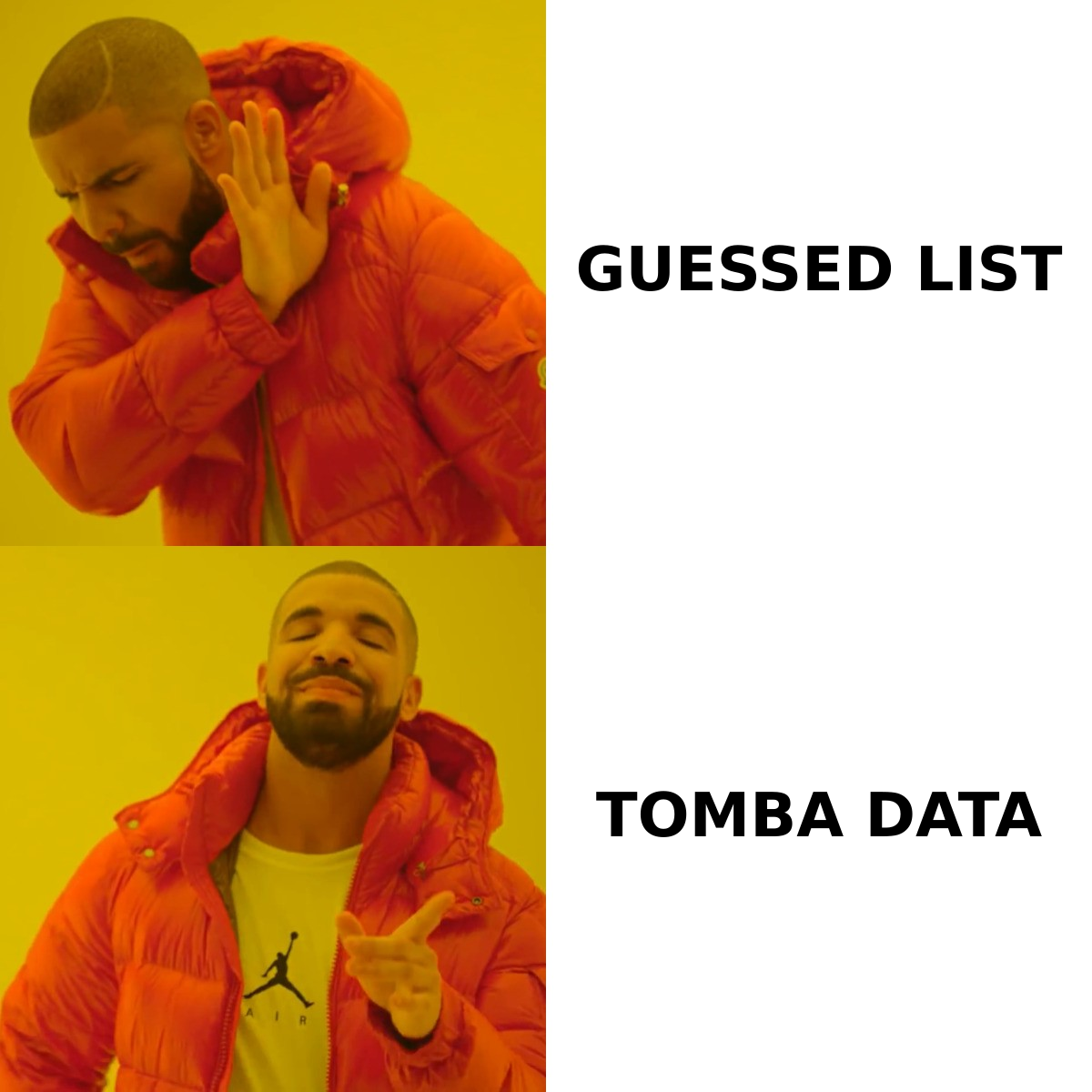
GoCustomer vs Saleshandy: how do they compare head-to-head?#
Here is the honest side-by-side. Both vendors ship fast, so check their own pages before you sign anything.
| Dimension | GoCustomer | Saleshandy |
|---|---|---|
| Core identity | AI agent for outbound research + personalization | Cold email sequencing and deliverability engine |
| Primary channel | Email plus multichannel orchestration | Email (LinkedIn steps as manual tasks) |
| Built-in contact data | Yes, agent-sourced enrichment | Yes, Lead Finder database (credit-based) |
| Email verification | Included in enrichment flow | Built-in verification on Lead Finder exports |
| Sending accounts | Managed per plan | Multiple mailboxes, rotation on paid tiers |
| Warmup | Bundled/partner-dependent | Native warmup included |
| Sequence branching | AI-driven, reply-aware | Rules-based conditional steps |
| Unified inbox | Yes | Yes |
| Pricing transparency | Demo-led quote | Public, self-serve tiers |
| Best fit | Teams with a fuzzy ICP and heavy research needs | Agencies and SMB teams sending high volume |
| Learning curve | Higher — you configure an agent | Lower — you configure a campaign |
The two products overlap in the middle. Both send sequences and both claim contact data. They diverge at the edges. That divergence is where your decision lives.
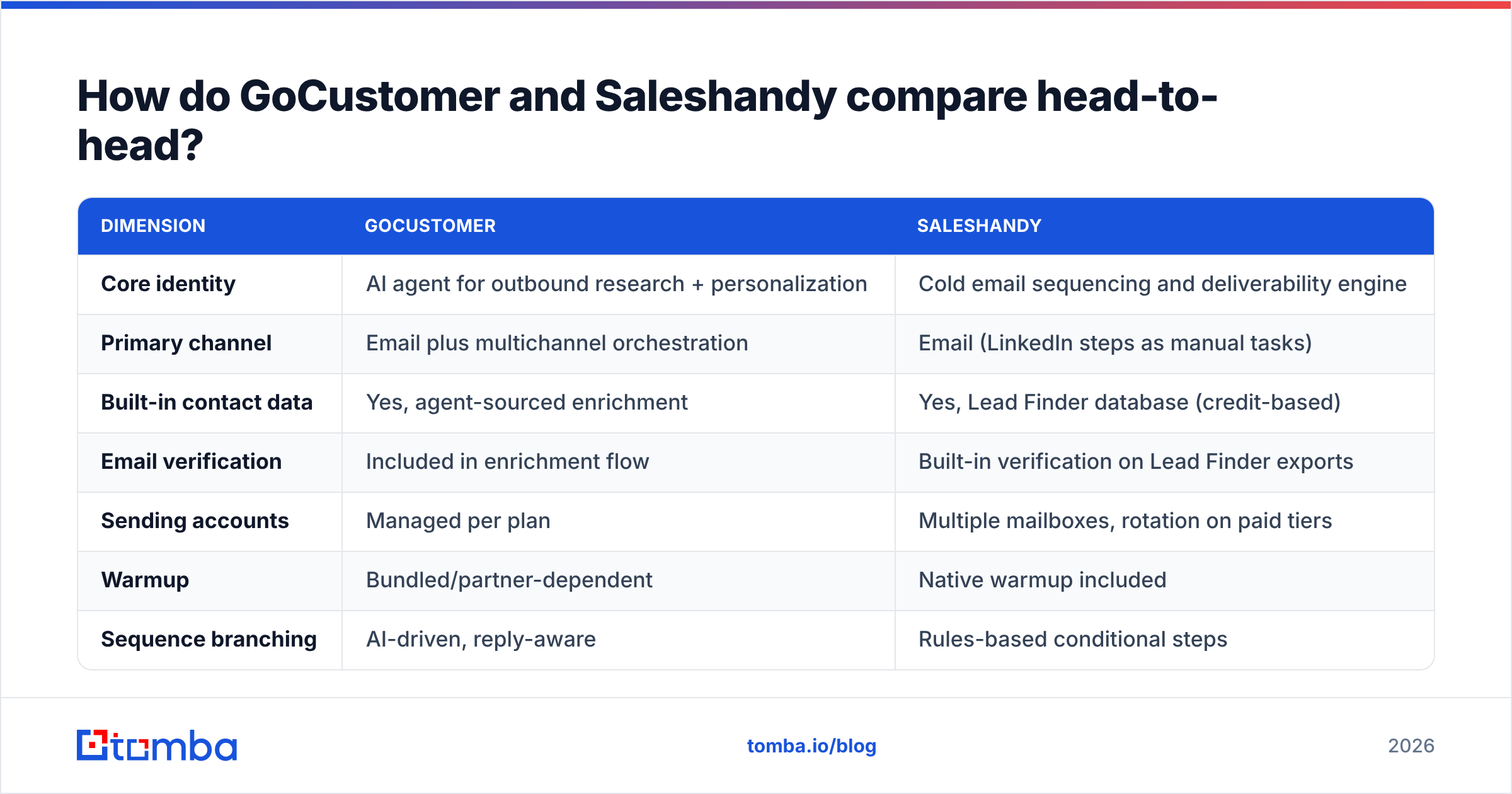
What does each tool actually cost?#
Saleshandy publishes its tiers. GoCustomer does not publish a full price card today. Expect a discovery call and an annual commitment. That is normal for AI-SDR tools, and it filters buyers. If you need to swipe a card today and send tomorrow, GoCustomer is not that product.
| Cost factor | GoCustomer | Saleshandy | Tomba (data layer) |
|---|---|---|---|
| Entry price | Quote-based, demo required | ~$36/mo entry outreach tier | Free tier: 25 searches/mo |
| Mid tier | Quote-based | ~$99/mo range | Growth $99/mo |
| Team/scale tier | Annual contract typical | ~$199+/mo | Pro $249/mo |
| Data credits | Bundled into the contract | Lead Finder credits sold separately | Included in plan credits |
| Free trial | Demo-gated | Free plan + trial available | Free tier, no card |
| Contract length | Usually annual | Monthly or annual | Monthly or annual |
Two budgeting notes worth a sticky note:
- Lead Finder credits are a separate line item on Saleshandy. The outreach plan price is not the all-in price if you also source contacts inside the tool.
- AI-SDR contracts are priced against headcount, not software. The vendor's argument is "this costs less than an SDR." That is fair if it truly replaces the work. It is expensive if you already have SDRs who just need better lists.
Check current Tomba pricing if you are modelling the data layer on its own, which you should.
Which one gives you better lead data?#
Neither one is a data company. That matters more than the feature grid suggests. Sequencers bundle data to shorten onboarding, not because contact data is their core skill.
- GoCustomer's strength is context, not coverage. The agent is good at finding why now signals — funding, hiring, tech changes — and turning them into copy. Raw email coverage on long-tail domains is not the selling point.
- Saleshandy's Lead Finder is a licensed database. It is handy and it is verified at export. But like every bundled database, it goes stale on the edges: small companies, non-US domains, recent job changes.
- Both degrade on the same segments. Sub-50-employee companies, EU domains, and catch-all mail servers are where bundled databases return nothing or return a guess.
- Catch-all domains are the silent killer. Roughly a third of B2B domains accept everything at the SMTP layer. So "valid" means almost nothing without a dedicated catch-all verifier.
Most teams land on the same pattern. Use the sequencer's database for the easy 60% of your list. Then fill the gap with a purpose-built finder. A domain search against your target account list will usually surface contacts the bundled database missed. Verify everything before import. That protects the sending reputation you are paying the sequencer to preserve.
Which is better for deliverability?#
Saleshandy, bluntly. Deliverability is its founding obsession, not a feature it added later.
The mechanics that matter:
- Mailbox rotation. Saleshandy spreads volume across many connected inboxes, so no single domain absorbs the whole campaign. At volume, this is the biggest lever on inbox placement.
- Native warmup. Warmup runs inside the tool that sends. Ramp schedules and campaign volume stay aware of each other instead of fighting.
- Sender-level throttling. Per-mailbox daily caps with random intervals. That is what keeps a 5,000-send week from looking like a burst.
- Bounce handling. Campaigns pause automatically on bounce spikes. That guardrail saves domains when a list turns out to be dirty.
- Authentication checks. Setup nudges for SPF, DKIM, and DMARC before you send. If yours are shaky, run an SPF checker first.
GoCustomer sends too, and it does the job well. But its center of gravity is the message, not the pipes. Say your problem is "we send 300 emails and 40 land in spam." The fix is infrastructure discipline, not smarter first lines. Google and Yahoo's bulk sender rules made this non-negotiable. A strong sender reputation is now a prerequisite for any outbound program, whichever sequencer you buy.
Which tool fits which team?#
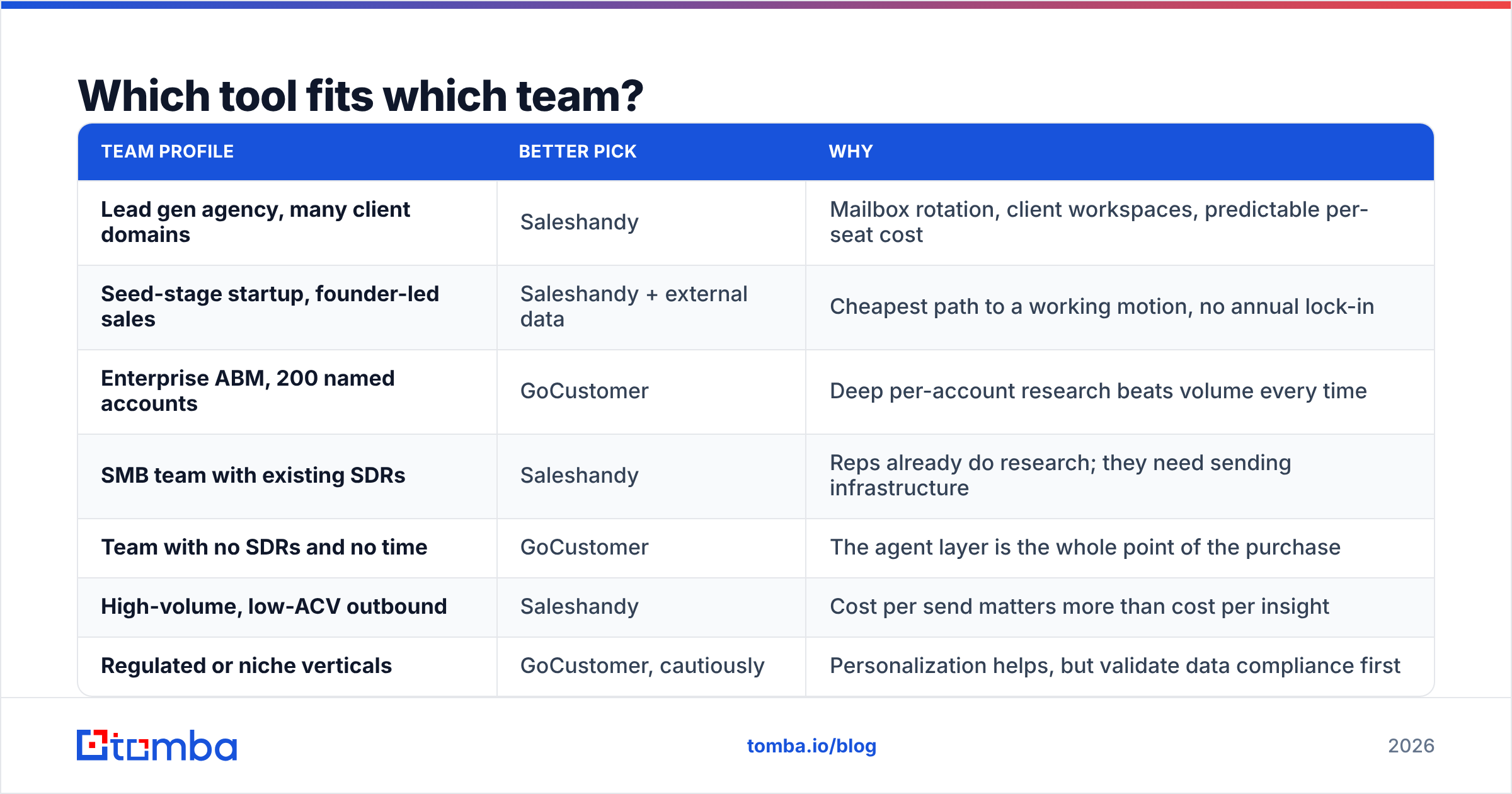
| Team profile | Better pick | Why |
|---|---|---|
| Lead gen agency, many client domains | Saleshandy | Mailbox rotation, client workspaces, predictable per-seat cost |
| Seed-stage startup, founder-led sales | Saleshandy + external data | Cheapest path to a working motion, no annual lock-in |
| Enterprise ABM, 200 named accounts | GoCustomer | Deep per-account research beats volume every time |
| SMB team with existing SDRs | Saleshandy | Reps already do research; they need sending infrastructure |
| Team with no SDRs and no time | GoCustomer | The agent layer is the whole point of the purchase |
| High-volume, low-ACV outbound | Saleshandy | Cost per send matters more than cost per insight |
| Regulated or niche verticals | GoCustomer, cautiously | Personalization helps, but validate data compliance first |
Here is a useful gut check. Divide your target account count by your rep count. Under 100 accounts per rep, personalization wins, and GoCustomer's model makes sense. Over 500, throughput wins, and Saleshandy's model makes sense. In between, you are probably buying Saleshandy and spending the savings on better data.
What do real reviewers say about each?#
Spend an hour on G2's sales engagement category. It is worth it, because the complaints cluster in predictable ways.
For Saleshandy, praise lands on price-to-value, the unified inbox, and fast support. Criticism lands on Lead Finder data depth outside North America. Reviewers also say the UI gets busy once you run dozens of campaigns at once.
For AI-SDR tools in general, GoCustomer included, praise lands on time saved and first-line quality. Criticism lands on two things. First, personalization that reads well but feels generic once prospects have seen twenty of them. Second, contract friction when results take longer than the pilot promised. The category is young, so reference calls matter more than review counts.
One thing reviewers rarely mention: reply handling. Ask both vendors what happens when a prospect replies "not me, talk to Sarah." Any tool can send. The one that routes that reply correctly saves your reps real hours.
Where does a dedicated email finder fit alongside either tool?#
Between your list build and your first send. In 2026, it is not optional.
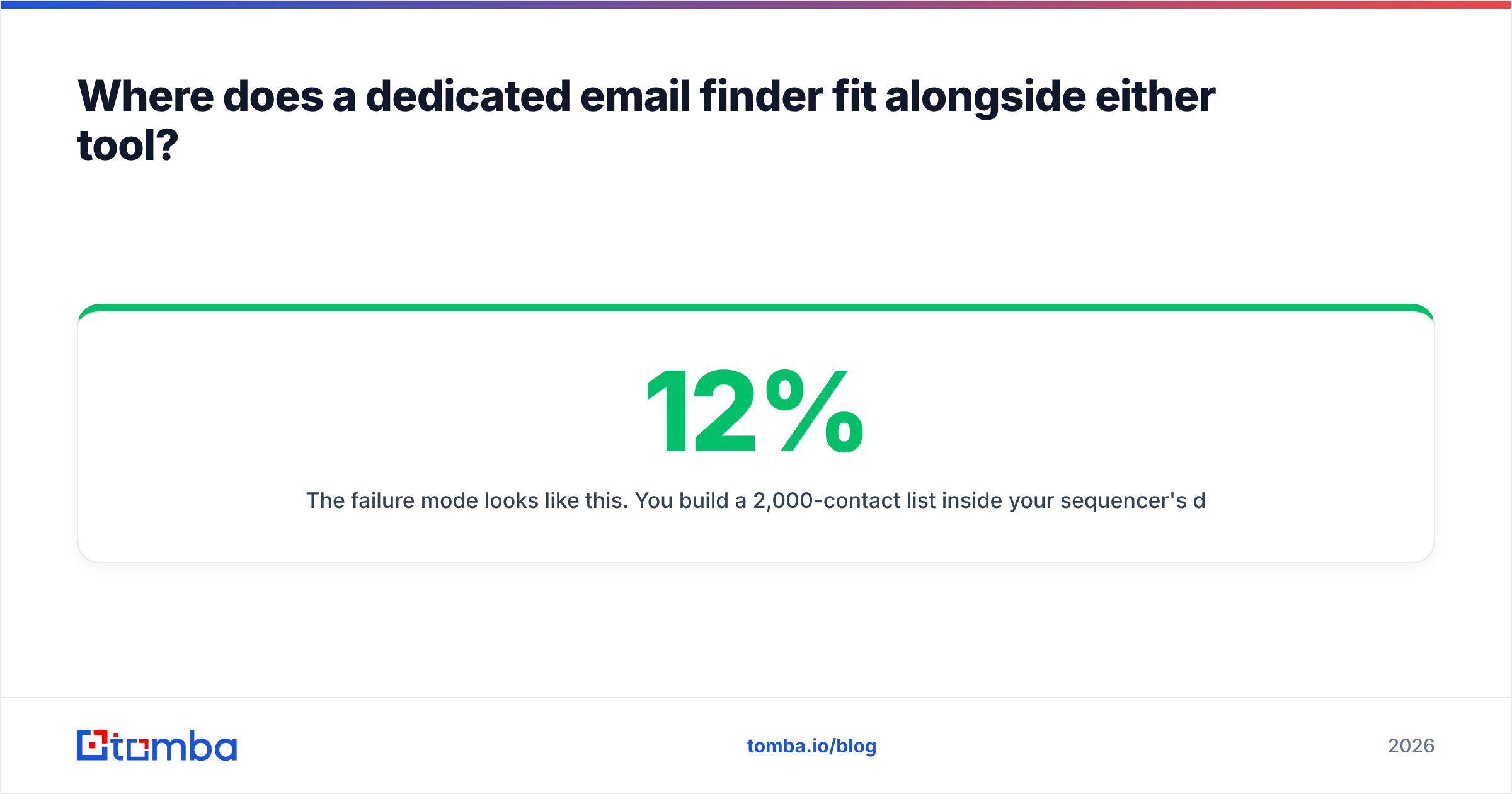
The failure mode looks like this. You build a 2,000-contact list inside your sequencer's database. About 12% of those addresses are stale because someone changed jobs. Another 8% sit on catch-all domains that accept the message and drop it. You send anyway. Bounce rate hits 7%, and your domain reputation takes a hit that costs three weeks of ramp to recover. The sequencer did nothing wrong. The list did.
A separate data layer fixes this, because it is built for one job:
- Fill coverage gaps. Run the accounts your sequencer missed through a bulk email finder. You will usually recover a meaningful slice of the list.
- Verify before import. Every address gets checked for syntax, MX records, and SMTP acceptance before it enters a campaign.
- Flag catch-alls clearly. Do not label them "valid" and hope. Treat them as a separate risk tier and send less volume to them.
- Automate the handoff. The Tomba API drops finding and verification into your list-building workflow. Nobody exports CSVs by hand.
- Keep the data portable. Outbound teams switch sequencers often. Your contact data should come with you, not live in a vendor's walled garden.
This is also the cheapest lever you have. Data hygiene costs a fraction of either platform, and it improves whichever one you pick. Cleaning your inputs to lift response rate is boring work. It also beats most copy experiments.
So which should you buy?#
The GoCustomer vs Saleshandy call comes down to what is actually slowing you down.
Buy Saleshandy if you are cost-sensitive, send at volume, run multiple domains or clients, and already have people who can write. It is the lower-risk purchase: public pricing, monthly billing, a free plan to test with, and deliverability engineering from day one. Pair it with an external data layer. You get a complete stack for well under what one AI-SDR contract costs.
Buy GoCustomer if your account list is small enough that every email should be different, you have no SDR capacity for that research, and you can run a pilot long enough to judge it fairly. Ask for a 90-day out clause. Define success metrics before you sign. Insist on seeing real generated copy for your ICP during the demo, not the vendor's showcase account.
Whichever you pick, do not let the bundled database be your only source of contacts. That one decision is the most likely to quietly cap your results.
Start by fixing the input. Tomba's Email Finder finds and verifies professional email addresses by domain, name, or company. The free tier gives you 25 searches a month, and paid plans start at $49/mo. That is enough to test whether better data or a smarter sequencer is your real bottleneck. Run one campaign with your current list and one with a verified list. Let the reply rates decide.
Related guides#
Ready to find emails that actually work?
Join 150,000+ professionals who stopped guessing and started sending. Free credits on signup — no credit card required.
Get the Tomba newsletter
Practical outbound tactics and product updates — once every two weeks.
About the author