GoDaddy DMARC Setup: The Complete 2026 Guide for Senders
GoDaddy DNS makes DMARC setup deceptively simple — and that simplicity hides the traps that break your cold email. Here is the full record-by-record walkthrough, plus what to do when p=reject bounces your own mail.

TL;DR
- DMARC is a TXT record at
_dmarc.yourdomain.comthat tells inbox providers what to do when SPF and DKIM fail. GoDaddy hosts the DNS; it does not configure the policy for you. - Start at
p=nonewithrua=reporting, read two to four weeks of aggregate reports, then move top=quarantineand finallyp=reject. - The single most common GoDaddy mistake: typing the full hostname
_dmarc.yourdomain.cominto the Name field, which produces_dmarc.yourdomain.com.yourdomain.com. Enter only_dmarc. - SPF passing is not enough. DMARC requires alignment — the domain in the visible From: header must match the domain that passed SPF or DKIM.
- Since Google and Yahoo's 2024 bulk-sender rules, any domain sending over 5,000 messages a day to Gmail needs a valid DMARC record. In 2026 that expectation has drifted down to almost every commercial sender.
What is DMARC and why does GoDaddy DNS matter?#
DMARC (Domain-based Message Authentication, Reporting and Conformance) is a published instruction to receiving mail servers. It says: if a message claims to come from my domain but cannot prove it, here is what I want you to do about it, and please send me a report.
Think of it like the signature card your bank keeps on file. SPF is the list of tellers allowed to hand over cash on your behalf. DKIM is the tamper-proof seal on the envelope. DMARC is the branch manager's standing order about what happens when the signature does not match the card — wave it through, hold it, or refuse it outright.
GoDaddy's role in this is narrower than most people assume. GoDaddy is your DNS host (and often your registrar). It stores the TXT record. It does not generate your DMARC policy, does not parse your aggregate reports, and does not warn you when your policy is silently failing legitimate mail. Everything about whether DMARC helps or hurts your outbound program happens in the record content you type into that box.
That distinction matters because GoDaddy's DNS management screen has a few specific behaviours that trip people up — the Name-field suffix behaviour, TXT value quoting, and a TTL default that makes iteration slower than it needs to be. We will cover each.

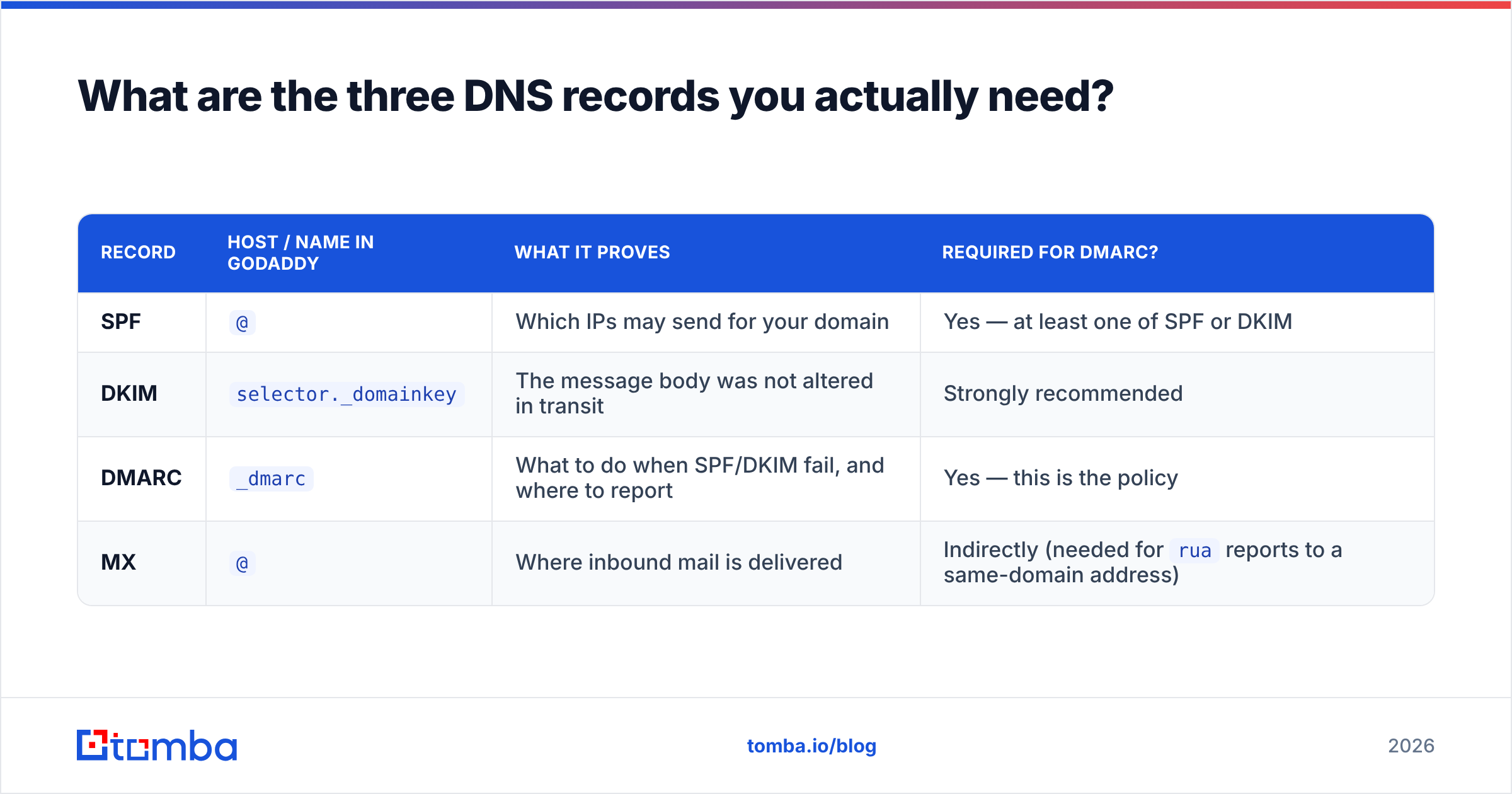
What are the three DNS records you actually need?#
DMARC does not work alone. It is the third leg of a stool, and publishing it without the other two produces a record that fails everything.
| Record | Host / Name in GoDaddy | What it proves | Required for DMARC? |
|---|---|---|---|
| SPF | @ |
Which IPs may send for your domain | Yes — at least one of SPF or DKIM |
| DKIM | selector._domainkey |
The message body was not altered in transit | Strongly recommended |
| DMARC | _dmarc |
What to do when SPF/DKIM fail, and where to report | Yes — this is the policy |
| MX | @ |
Where inbound mail is delivered | Indirectly (needed for rua reports to a same-domain address) |
A DMARC record with no SPF and no DKIM published is worse than no DMARC record at all. Every message you send will fail authentication, and at p=reject you will have built a machine that blocks your own email.
The exact GoDaddy steps#
- Log into your GoDaddy account and open My Products, then Domains, then DNS next to the domain you are configuring.
- Click Add New Record and choose TXT from the Type dropdown.
- Set Name to
_dmarc— nothing else. Not_dmarc.yourdomain.com. GoDaddy appends your domain automatically, so the full hostname is constructed for you. - Paste your policy into the Value field, starting at monitoring mode:
v=DMARC1; p=none; rua=mailto:dmarc@yourdomain.com; fo=1 - Set TTL to 1 hour rather than the default. You will be editing this record several times over the next month and a one-hour TTL keeps propagation fast.
- Save, then verify with
dig TXT _dmarc.yourdomain.comor any public DMARC lookup tool before you assume it is live.
Step 3 is where the majority of broken GoDaddy DMARC records come from. If you check your record and see it resolving at _dmarc.yourdomain.com.yourdomain.com, that is the cause. Delete and re-add with just _dmarc.
What does each DMARC tag actually do?#
The record is a semicolon-delimited list of tag-value pairs. Most guides copy-paste a string without explaining it, which is how people end up with policies they cannot debug.
v=DMARC1— Version. Mandatory, must be first, and must be exactly this string. Any variation and receivers ignore the whole record.p=— The policy:none(monitor only),quarantine(route to spam), orreject(refuse at SMTP). This is the only tag that changes deliverability behaviour.rua=— Where aggregate XML reports go. Without this, you are flying blind. Use a dedicated mailbox or a reporting service, because raw XML at volume is unreadable.ruf=— Forensic reports on individual failures. Most large providers, including Google, no longer send these for privacy reasons. Setting it is harmless but do not depend on it.pct=— Percentage of failing mail the policy applies to.pct=25withp=quarantinemeans one in four failing messages gets quarantined. This is your safety valve during rollout.sp=— Subdomain policy. If you send frommail.yourdomain.comor a marketing subdomain, this overridesp=for those. Omit it and subdomains inherit the parent policy.adkim=/aspf=— Alignment strictness,r(relaxed, default) ors(strict). Relaxed allows organisational-domain matching; strict demands an exact match. Leave both relaxed unless you have a specific reason.fo=— Failure reporting options.fo=1requests a report when either SPF or DKIM fails, which is more useful than the defaultfo=0.
Why does SPF pass but DMARC still fail?#
Because DMARC checks something SPF does not: alignment.
SPF validates the envelope sender — the MAIL FROM address that recipients never see. DMARC validates that the visible From: header domain matches the authenticated domain. When you send through a third-party platform, those two frequently diverge.
Here is the scenario that breaks most cold email setups. You send from you@yourdomain.com through a sending platform. The platform's SPF check passes against its own bounce domain, bounces.platform.com. SPF: pass. Alignment: fail, because bounces.platform.com and yourdomain.com are not the same organisational domain. DMARC verdict: fail.
The fix is DKIM. Sign with a key published under your own domain — s1._domainkey.yourdomain.com — and the DKIM d= value aligns with your From: header even when SPF does not. This is why nearly every sending platform asks you to add CNAME records during setup, and why skipping that step quietly destroys your DMARC compliance.
Two additional alignment failure modes worth knowing:
Forwarding. When a recipient auto-forwards your message, the forwarding server's IP is not in your SPF record, so SPF breaks. DKIM survives forwarding because the signature travels with the message. Another argument for DKIM being non-optional.
Mailing lists. List servers frequently rewrite subject lines and append footers, which invalidates the DKIM signature. Legitimate mail from your domain can fail DMARC entirely through no fault of your configuration. This is exactly the kind of thing aggregate reports surface before you go to p=reject.
How do you roll out from p=none to p=reject safely?#
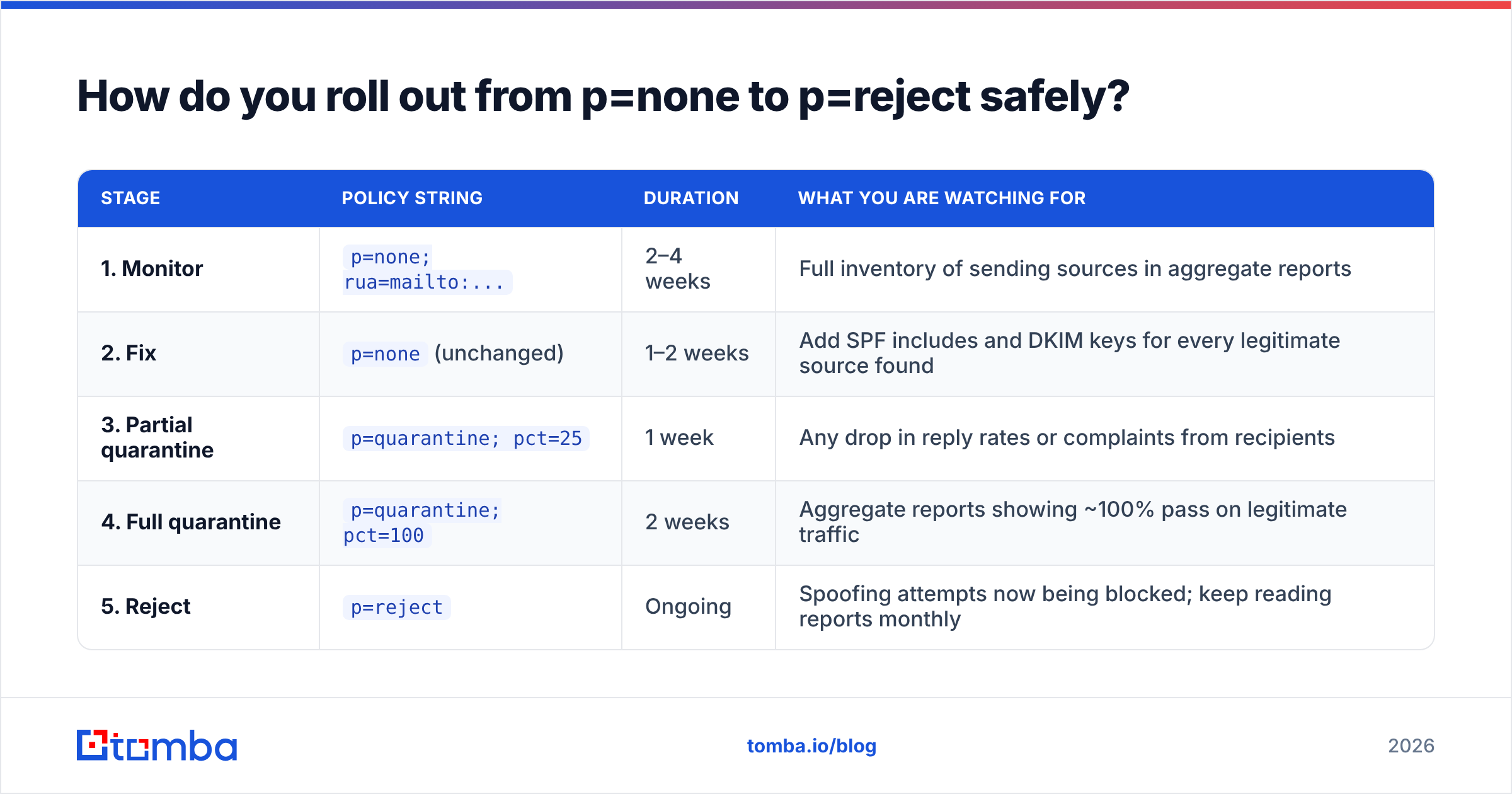
Slowly, and with reports in hand. The rollout is a staged migration, not a switch.
| Stage | Policy string | Duration | What you are watching for |
|---|---|---|---|
| 1. Monitor | p=none; rua=mailto:... |
2–4 weeks | Full inventory of sending sources in aggregate reports |
| 2. Fix | p=none (unchanged) |
1–2 weeks | Add SPF includes and DKIM keys for every legitimate source found |
| 3. Partial quarantine | p=quarantine; pct=25 |
1 week | Any drop in reply rates or complaints from recipients |
| 4. Full quarantine | p=quarantine; pct=100 |
2 weeks | Aggregate reports showing ~100% pass on legitimate traffic |
| 5. Reject | p=reject |
Ongoing | Spoofing attempts now being blocked; keep reading reports monthly |
The failure mode is impatience. Someone reads that Google and Yahoo require DMARC, publishes p=reject the same afternoon, and three days later discovers the invoicing system, the helpdesk, and the marketing platform have all been silently rejected. The staged path exists precisely because you will find sending sources you had forgotten about — every organisation does.
Google's own sender guidelines are explicit that bulk senders need SPF, DKIM, DMARC, one-click unsubscribe, and a spam rate under 0.3%. That last number does most of the work. Authentication gets you to the gate; list quality decides whether you get through it.
How does list quality interact with DMARC?#
Directly, and more than most people expect. DMARC proves you are who you claim to be. It does not prove you are welcome.
A perfectly aligned p=reject domain sending to a list scraped six months ago will still get filtered, because bounce rate and spam-complaint rate are separate reputation signals from authentication. Gmail's filters weigh engagement heavily. High bounces on a newly warmed domain read as a purchased list, and purchased lists read as spam regardless of your DNS hygiene.
This is where verification does the heavy lifting. Running your list through an email verifier before a send removes the invalid addresses that generate hard bounces, and a catch-all verifier handles the accept-all domains that most tools mark as "unknown" and leave in your list to guess at. Pairing clean authentication with a clean list is the whole game — either one alone underperforms.
If you are building the list rather than cleaning an inherited one, sourcing verified addresses at collection time avoids the problem entirely. A domain search that returns confidence-scored addresses for a target company is structurally safer than any scrape, because the verification step happens before the address ever enters your sequence.
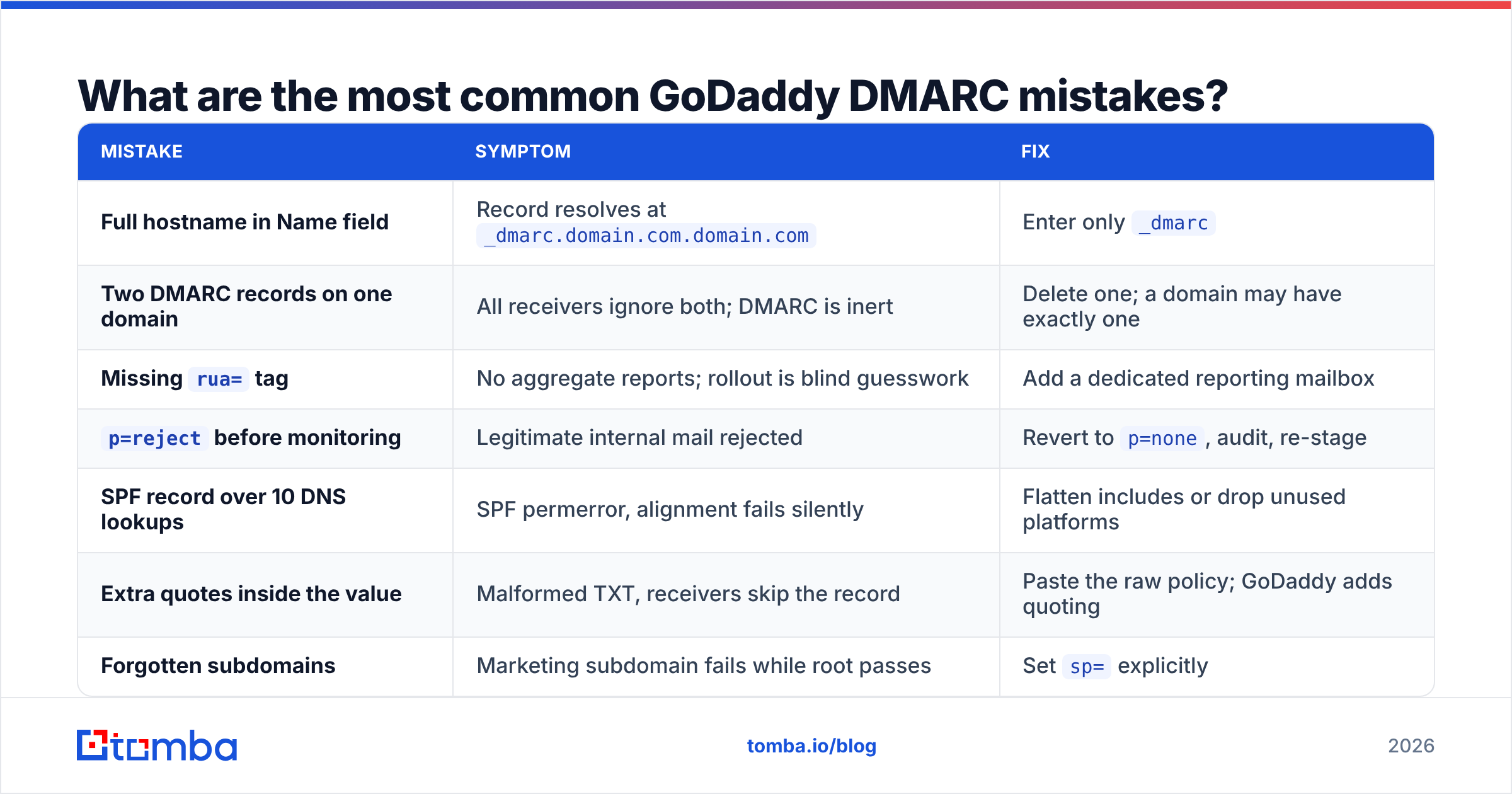
What are the most common GoDaddy DMARC mistakes?#
| Mistake | Symptom | Fix |
|---|---|---|
| Full hostname in Name field | Record resolves at _dmarc.domain.com.domain.com |
Enter only _dmarc |
| Two DMARC records on one domain | All receivers ignore both; DMARC is inert | Delete one; a domain may have exactly one |
Missing rua= tag |
No aggregate reports; rollout is blind guesswork | Add a dedicated reporting mailbox |
p=reject before monitoring |
Legitimate internal mail rejected | Revert to p=none, audit, re-stage |
| SPF record over 10 DNS lookups | SPF permerror, alignment fails silently | Flatten includes or drop unused platforms |
| Extra quotes inside the value | Malformed TXT, receivers skip the record | Paste the raw policy; GoDaddy adds quoting |
| Forgotten subdomains | Marketing subdomain fails while root passes | Set sp= explicitly |
The SPF ten-lookup limit deserves a note. Every include: in your SPF record costs a DNS lookup, and each of those may nest further lookups. Add a CRM, a helpdesk, a marketing platform, and a transactional service and you can cross the limit without noticing. When you do, SPF returns permerror, which DMARC treats as a fail. Run an SPF checker against your record before you touch the DMARC policy — a broken SPF record makes every DMARC symptom harder to diagnose.
Do you need a paid DMARC monitoring service?#
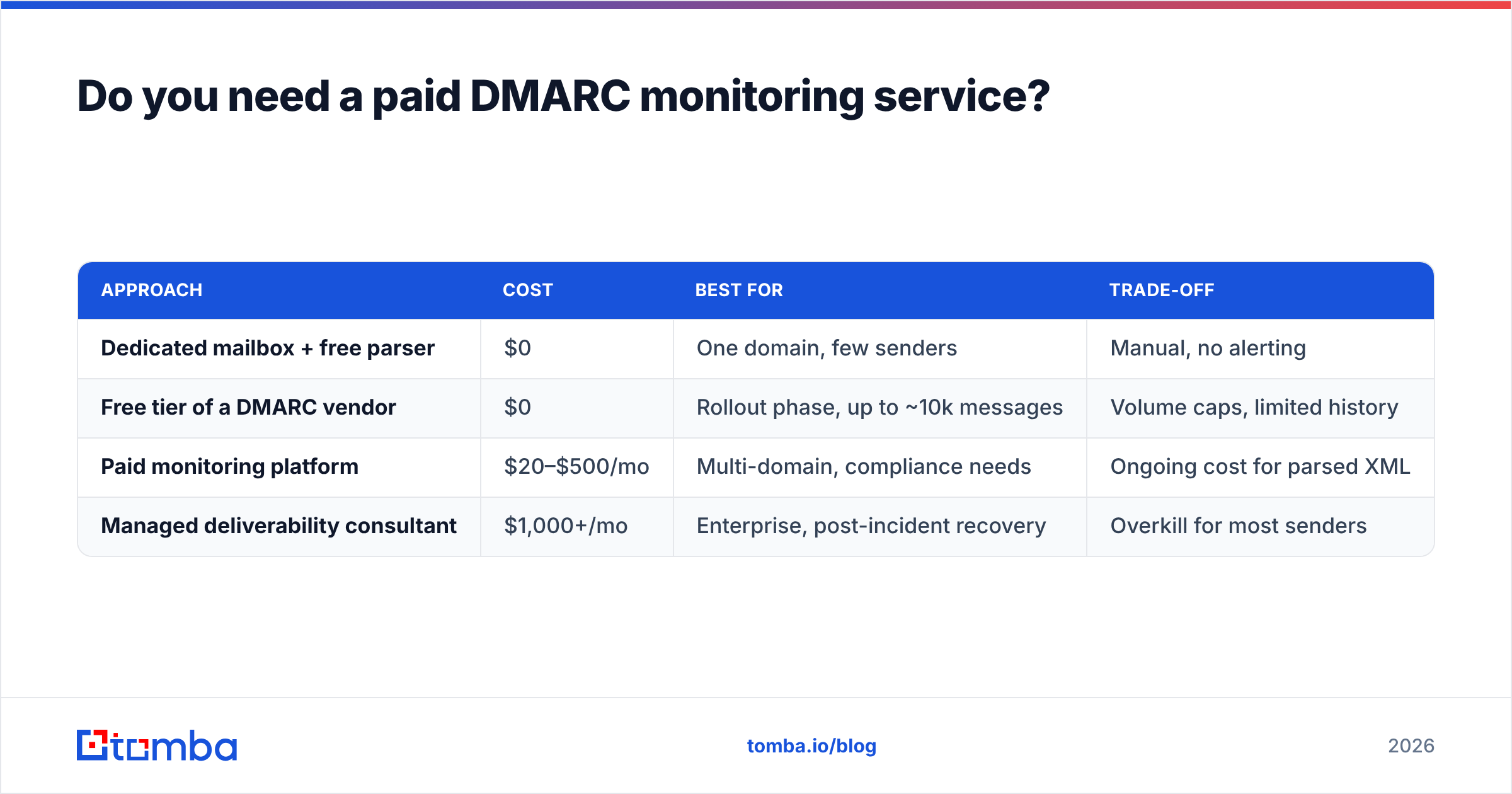
For a single domain sending modest volume, no. A dedicated dmarc@ mailbox and a free XML parser will get you to p=reject.
For anything past that — multiple domains, multiple sending platforms, a team that changes vendors — the raw reports become genuinely unmanageable. Aggregate XML arrives daily from dozens of receivers, each describing IP-level pass/fail counts. Vendors in the category are reviewed comparably on G2, and the honest summary is that they all parse the same XML; you are paying for the dashboard, alerting, and hosted subdomain delegation.
A reasonable middle path: use a free tier for the monitoring phase, decide at p=quarantine whether the reports are readable without help, and only pay if they are not.
| Approach | Cost | Best for | Trade-off |
|---|---|---|---|
| Dedicated mailbox + free parser | $0 | One domain, few senders | Manual, no alerting |
| Free tier of a DMARC vendor | $0 | Rollout phase, up to ~10k messages | Volume caps, limited history |
| Paid monitoring platform | $20–$500/mo | Multi-domain, compliance needs | Ongoing cost for parsed XML |
| Managed deliverability consultant | $1,000+/mo | Enterprise, post-incident recovery | Overkill for most senders |
What should you do after DMARC is at p=reject?#
Treat it as maintenance, not a finished project.
Review reports monthly. New sending sources appear whenever someone signs up for a tool with your work email and enables sending. You want to catch that before a campaign fails.
Re-check after every vendor change. Switching CRM, ESP, or helpdesk means new SPF includes and new DKIM keys. This is the number one cause of a previously healthy domain suddenly failing alignment.
Watch your bounce rate independently. DMARC status and list health are separate metrics that fail in different ways. A domain at p=reject with a 12% bounce rate is still headed for the spam folder.
Keep DKIM keys rotated. Annual rotation is a reasonable cadence. Publish the new selector, confirm signing, then remove the old one — never both at once in the reverse order.
If you want deeper background on how receivers weigh these signals, the email deliverability entry in Tomba's glossary covers the reputation model that sits underneath authentication, and Wikipedia's DMARC article is a solid neutral reference on the specification itself.
The bottom line#
GoDaddy DMARC setup is ten minutes of DNS work wrapped around three to six weeks of patient monitoring. The DNS part is easy and the monitoring part is where the value is — the aggregate reports tell you things about your own sending infrastructure that nothing else will.
But authentication only earns you the right to be judged on content and list quality. Once _dmarc is published and aligned, the next constraint on your reply rate is whether the addresses in your sequence are real. That is a data problem, not a DNS problem.
Tomba's Email Finder returns verified professional addresses with confidence scores, so the list you send to after all this DNS work is one your newly pristine sender reputation deserves. The free tier covers 25 searches a month; paid plans start at $49/mo on Starter, with Growth at $99/mo and Pro at $249/mo — full Tomba pricing is public. Get the authentication right, then get the addresses right. Neither works alone.
Related guides#
Ready to find emails that actually work?
Join 150,000+ professionals who stopped guessing and started sending. Free credits on signup — no credit card required.
Get the Tomba newsletter
Practical outbound tactics and product updates — once every two weeks.
About the author