GoDaddy DMARC Office 365 Setup: The Complete 2026 Guide
Your DNS lives at GoDaddy, your mail lives in Microsoft 365, and your DMARC record has to satisfy both. Here is the exact record set, the safe rollout order, and the five mistakes that silently kill inbox placement.
A GoDaddy DMARC Office 365 setup breaks in the same few places every time. Your DNS lives at GoDaddy. Your mail lives at Microsoft. Neither side publishes the missing piece for you.
TL;DR
- DMARC only works if SPF or DKIM already passes and aligns with your From domain. Publish DMARC last, not first.
- In GoDaddy's DNS manager you add one TXT record with Name
_dmarcand a value startingv=DMARC1; p=none;. GoDaddy auto-appends your domain, so never type_dmarc.yourdomain.com. - Microsoft 365 needs custom-domain DKIM turned on manually. Out of the box you sign as
onmicrosoft.com, which fails DMARC alignment. - Run
p=nonefor 2–4 weeks, read the aggregate reports, then move top=quarantine; pct=25before you ever touchp=reject. - Gmail, Yahoo, and Microsoft now enforce authentication for bulk senders. A missing or broken DMARC record is a deliverability problem, not a compliance checkbox.
What is DMARC, and why does GoDaddy complicate it?#
DMARC is the instruction you leave for receiving mail servers: if a message claims to come from my domain but can't prove it, here is what to do with it. Think of SPF and DKIM as two forms of ID. DMARC is the bouncer's written policy for anyone who shows up with neither.
The GoDaddy part matters because GoDaddy is where your DNS lives, not where your mail lives. Microsoft 365 handles the sending. GoDaddy publishes the records that vouch for it. The two systems don't talk to each other unless GoDaddy also resells you Microsoft 365. Even then, the records GoDaddy sets up for you cover MX, autodiscover, and SPF. They do not cover DMARC, and they do not cover custom-domain DKIM.
That gap is where most broken setups live. Mail flows fine, so nothing looks wrong. But your domain publishes no policy at all, and any spoofer who forges your From address gets the benefit of the doubt.

How do SPF, DKIM, and DMARC actually fit together?#
Get the order right and the rest is data entry. Get it wrong and you'll quarantine your own invoices.
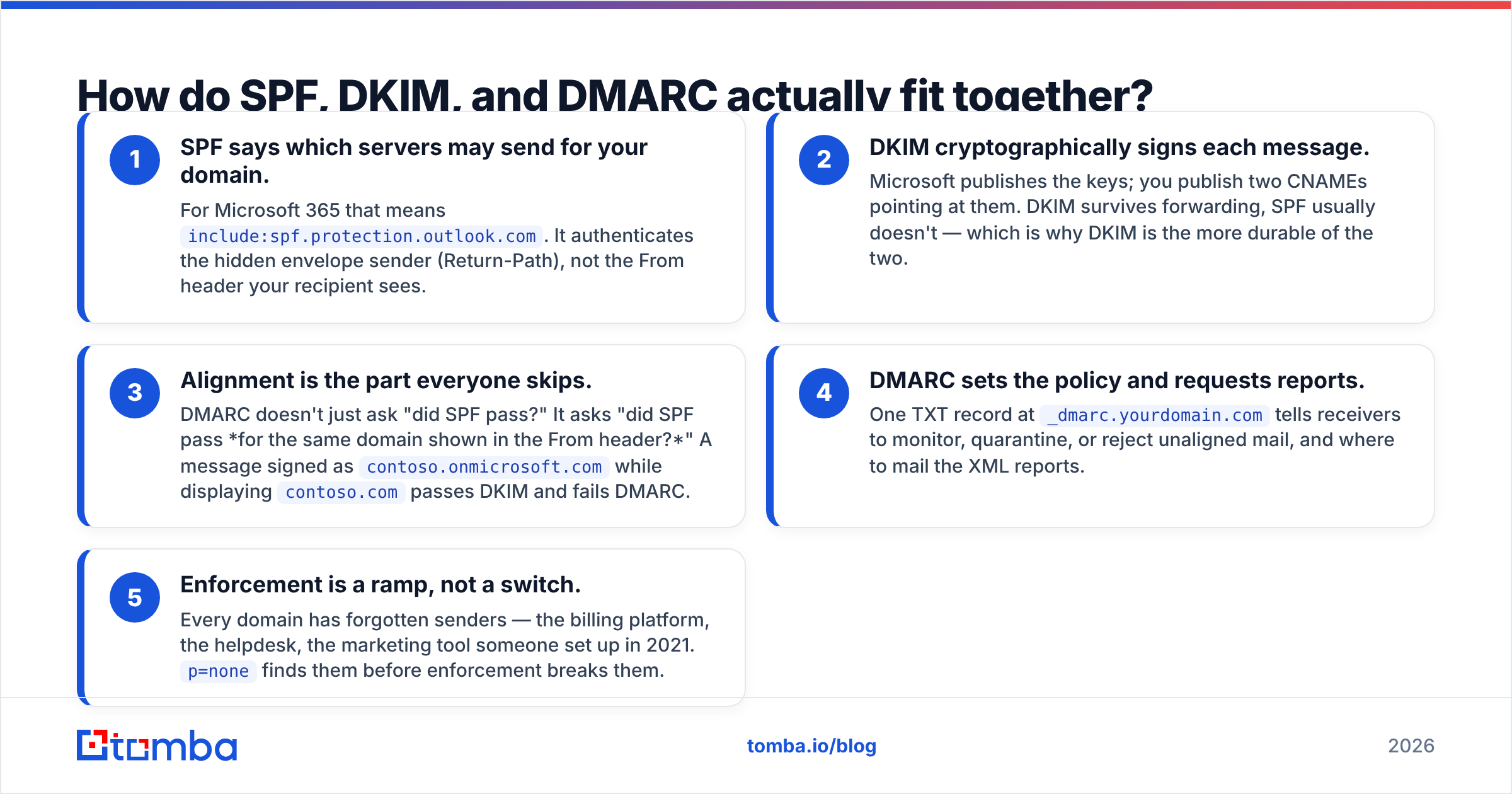
- SPF says which servers may send for your domain. For Microsoft 365 that means
include:spf.protection.outlook.com. It checks the hidden envelope sender, not the From header your reader sees. - DKIM signs each message with a key. Microsoft publishes the keys, and you publish two CNAMEs that point at them. DKIM survives forwarding. SPF usually doesn't, which makes DKIM the more durable of the two.
- Alignment is the part everyone skips. DMARC doesn't just ask whether SPF passed. It asks whether SPF passed for the same domain shown in the From header. A message signed as
contoso.onmicrosoft.comwhile displayingcontoso.compasses DKIM and fails DMARC.
Those three decide whether a message can be trusted. The last two decide what happens next.
- DMARC sets the policy and asks for reports. One TXT record at
_dmarc.yourdomain.comtells receivers to monitor, quarantine, or reject unaligned mail, and where to send the XML reports. - Enforcement is a ramp, not a switch. Every domain has forgotten senders: the billing platform, the helpdesk, the marketing tool someone set up in 2021.
p=nonefinds them before enforcement breaks them.
The practical rule: never publish an enforcing policy until aggregate reports show 100% of your legitimate volume passing. For the underlying terms, Tomba's glossary entries on email deliverability and the SPF record are a decent five-minute primer.
What DNS records does a GoDaddy DMARC Office 365 setup need?#
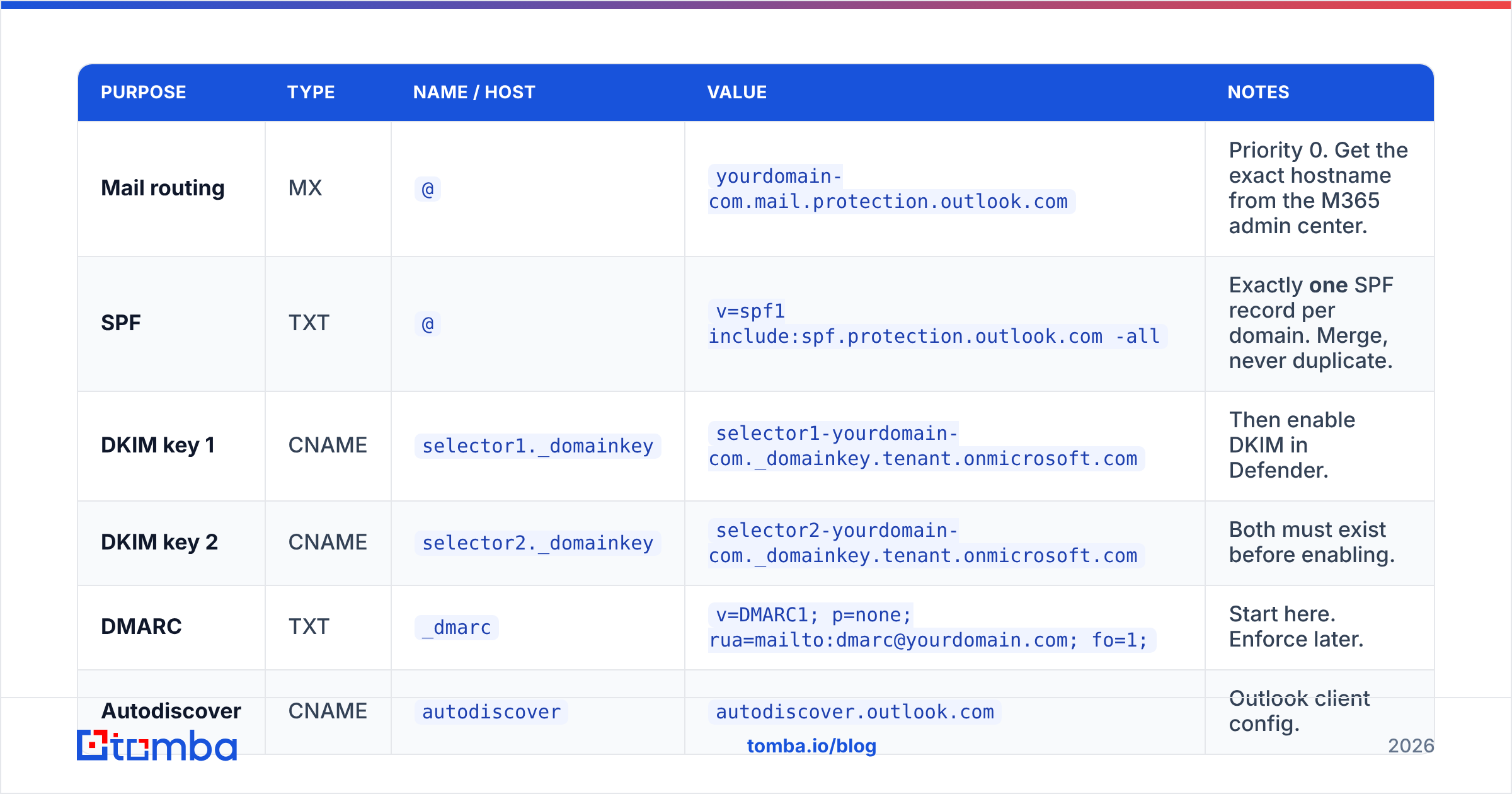
Here's the full record set. Log into GoDaddy, open My Products → Domains → DNS, and compare against this line by line.
| Purpose | Type | Name / Host | Value | Notes |
|---|---|---|---|---|
| Mail routing | MX | @ |
yourdomain-com.mail.protection.outlook.com |
Priority 0. Get the exact hostname from the M365 admin center. |
| SPF | TXT | @ |
v=spf1 include:spf.protection.outlook.com -all |
Exactly one SPF record per domain. Merge, never duplicate. |
| DKIM key 1 | CNAME | selector1._domainkey |
selector1-yourdomain-com._domainkey.tenant.onmicrosoft.com |
Then enable DKIM in Defender. |
| DKIM key 2 | CNAME | selector2._domainkey |
selector2-yourdomain-com._domainkey.tenant.onmicrosoft.com |
Both must exist before enabling. |
| DMARC | TXT | _dmarc |
v=DMARC1; p=none; rua=mailto:dmarc@yourdomain.com; fo=1; |
Start here. Enforce later. |
| Autodiscover | CNAME | autodiscover |
autodiscover.outlook.com |
Outlook client config. |
Two GoDaddy-specific traps hide in that table:
The trailing-domain trap. GoDaddy adds your domain to whatever you type in the Name field. Type _dmarc and you get _dmarc.yourdomain.com. Type the whole thing and you get _dmarc.yourdomain.com.yourdomain.com, which resolves to nothing and does nothing. GoDaddy's own TXT record documentation confirms the behavior. It is the single most common reason a published DMARC record never shows up in a lookup.
The second SPF record. If you used to run mail through GoDaddy shared hosting or Workspace Email, a stale v=spf1 include:secureserver.net record is often still sitting there. Two SPF records is a permanent error. Receivers return permerror and SPF fails outright. Merge the includes into a single record, or delete the dead one.
How do you add the DMARC record in GoDaddy step by step?#
- Open DNS Management for the domain in GoDaddy.
- Click Add New Record and choose type TXT.
- Name:
_dmarc— nothing else, no domain suffix, no missing underscore. - Value:
v=DMARC1; p=none; rua=mailto:dmarc@yourdomain.com; fo=1; - TTL: 1 hour is fine. Drop it to 600 seconds if you plan to iterate quickly.
- Save, then wait. GoDaddy usually propagates in minutes, but budget up to an hour before testing.
- Verify with a public lookup:
dig TXT _dmarc.yourdomain.comfrom a terminal, or any DMARC checker. If nothing comes back, you almost certainly hit the trailing-domain trap.
While you're in there, run your SPF through a SPF checker to confirm you have exactly one record, under 10 DNS lookups, and no stale includes.
For the Microsoft side, turn on custom-domain DKIM in the Defender portal under Email & collaboration → Policies & rules → Threat policies → Email authentication settings → DKIM. Microsoft's DMARC configuration documentation walks the exact clicks and is kept current. Follow it over any third-party screenshot guide, because the portal layout shifts every few quarters.
Should you start at p=none, p=quarantine, or p=reject?#
Start at p=none. Every time. The impatient path costs more than the wait.
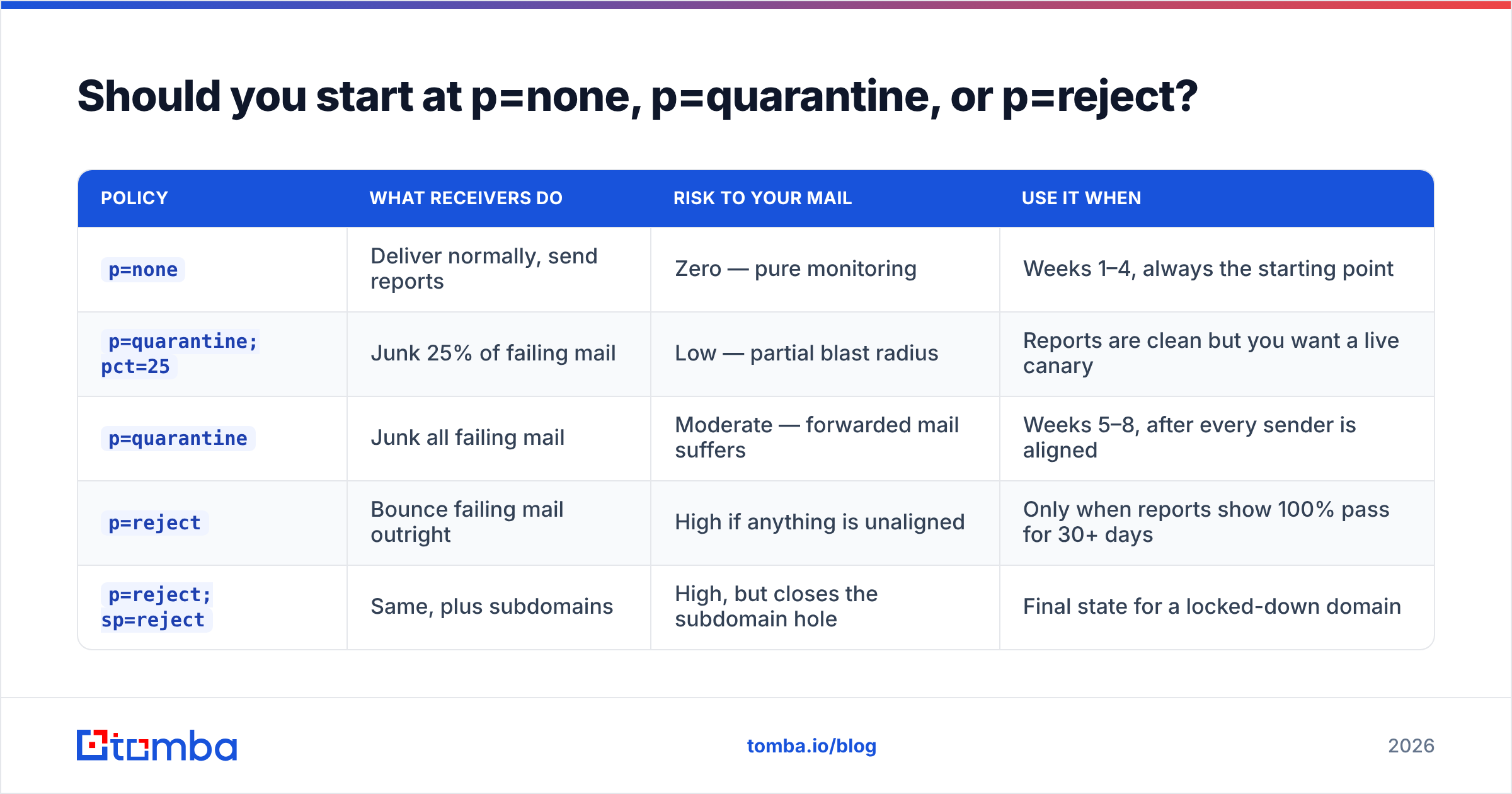
| Policy | What receivers do | Risk to your mail | Use it when |
|---|---|---|---|
p=none |
Deliver normally, send reports | Zero — pure monitoring | Weeks 1–4, always the starting point |
p=quarantine; pct=25 |
Junk 25% of failing mail | Low — partial blast radius | Reports are clean but you want a live canary |
p=quarantine |
Junk all failing mail | Moderate — forwarded mail suffers | Weeks 5–8, after every sender is aligned |
p=reject |
Bounce failing mail outright | High if anything is unaligned | Only when reports show 100% pass for 30+ days |
p=reject; sp=reject |
Same, plus subdomains | High, but closes the subdomain hole | Final state for a locked-down domain |
The pct tag is underrated. pct=25 applies your policy to a quarter of the failing messages. If you misjudged something, three quarters of the damage never happens. Ramp 25 → 50 → 100 over a couple of weeks rather than flipping the whole domain at once.
One nuance is specific to Microsoft 365. Exchange Online Protection honors the sending domain's DMARC policy on inbound mail. How it treats p=quarantine versus p=reject is set in your own anti-phishing policy. So if you test against your own tenant, your inbound settings can mask what the rest of the internet actually does. Test with an outside Gmail address too.
Why do GoDaddy DMARC Office 365 setups fail?#
Five failure modes account for most support tickets. The first three are setup mistakes:
- DKIM never got enabled for the custom domain. The CNAMEs exist, but nobody clicked Enable in Defender. Messages sign as
tenant.onmicrosoft.com, so alignment fails. DMARC then passes only when SPF happens to align, and forwarded mail fails outright. - Third-party senders were never added to SPF. Your CRM, invoicing tool, support desk, and marketing platform all send as your domain. Each one needs an SPF include or its own DKIM key. Each one shows up as a failure in your first week of reports.
- A
-allhard fail went live before the sender list was complete. Hard fail plus a missing sender equals bounced legitimate mail. Use~allwhile you are still finding senders.
The last two are things teams set up correctly, then forget:
- The
ruamailbox doesn't exist. Reports go todmarc@yourdomain.com, which nobody created. The XML bounces into the void and you make enforcement decisions blind. - Subdomains are left wide open. Without an
sp=tag, subdomains inherit the parent policy. But plenty of teams publish a separate, weaker_dmarcrecord on a subdomain for one mail tool and then forget it. Spoofers look for exactly this.
If you inherited a domain and don't know its sending history, run it through a blacklist checker first. A domain that is already listed somewhere has a different problem, and fixing DNS won't move the needle.
How do you read DMARC reports without drowning in XML?#
Aggregate reports (rua) arrive daily as gzipped XML from every major receiver. Raw, they're unreadable. You have three options, in order of effort.
Option one — a hosted analyzer. Point rua at a service like Dmarcian, Postmark's free DMARC digest, or Valimail. You get a weekly summary in plain English showing which IPs sent as your domain and whether they passed. For most teams this is the right answer, and the free tiers cover a single domain.
Option two — parse them yourself. Fine if you have one domain and a scripting habit. The XML schema is documented at dmarc.org, and each report lists source IP, message count, SPF result, DKIM result, and disposition.
Option three — ignore them. This is what most people do, and it's why so many domains sit at p=none forever. p=none with unread reports is the same as having no DMARC record, except you've talked yourself into feeling protected.
In the first two weeks you're building one short list: every source IP sending volume as your domain. Each one is either yours and needs authenticating, or not yours and should fail. Once that list holds only aligned, passing sources, you're ready to enforce.
Does DMARC fix cold email deliverability on its own?#
No, and this is where a lot of outbound teams misread the situation.
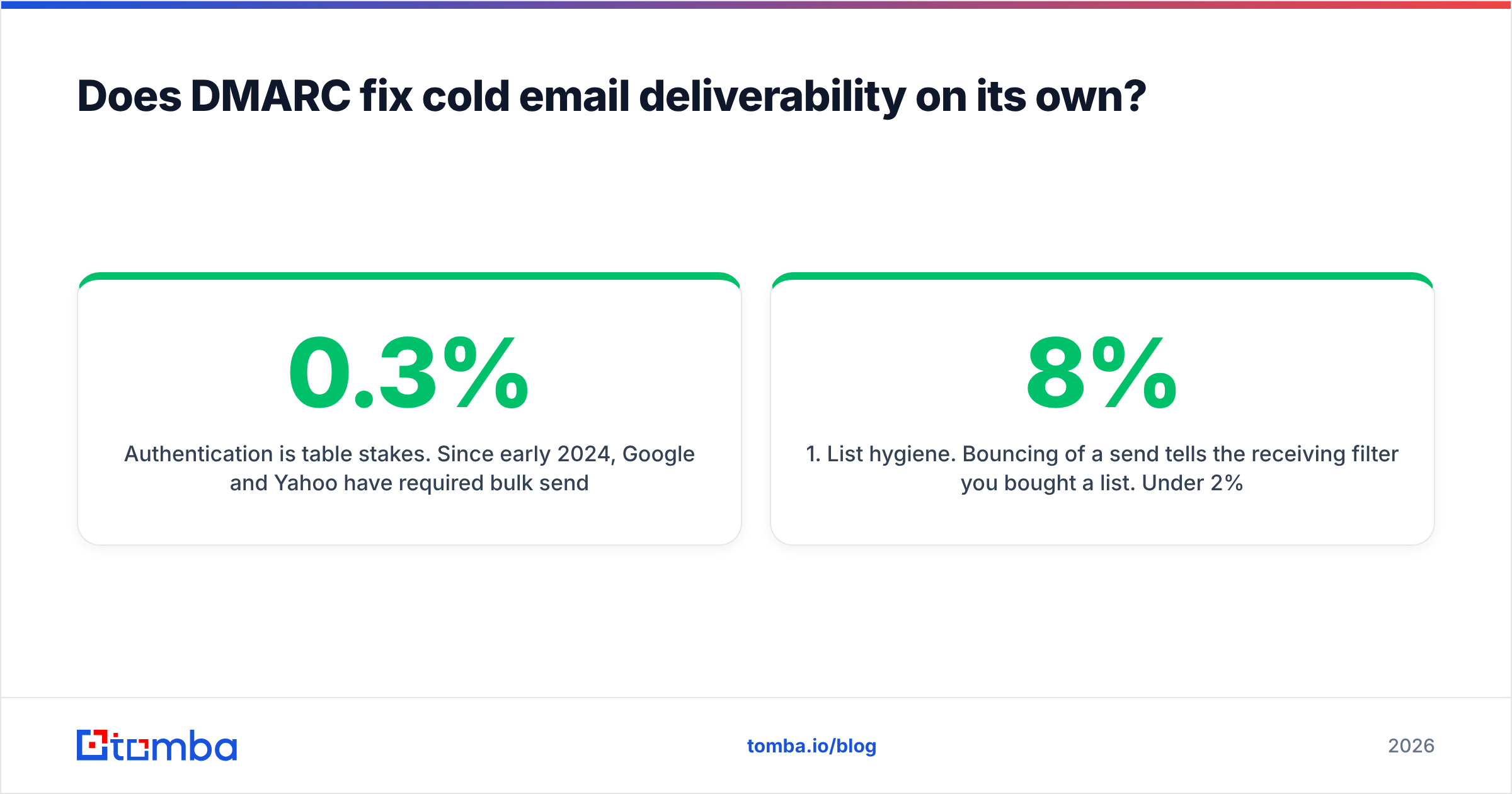
Authentication is table stakes. Since early 2024, Google and Yahoo have required bulk senders to publish DMARC and keep spam complaints under 0.3%. Microsoft extended similar rules to high-volume senders into Outlook.com. Passing DMARC gets you considered. It does not get you delivered.
After authentication, four things move inbox placement, in this order:
- List hygiene. Bouncing 8% of a send tells the receiving filter you bought a list. Under 2% is the working target.
- Engagement signals. Opens, replies, and "not spam" clicks outweigh nearly every technical factor once authentication passes.
- Volume ramp. A domain that sent 4 messages last month and 4,000 this month looks like a hijacked account, whatever its DNS says.
- Content and link reputation. Shortened links, tracking domains with no history, and heavy image-to-text ratios all cost you.
Point one is the one you control most directly and neglect most often. A verified list protects the sender reputation that DMARC exists to defend. Run your contacts through an email verifier before a campaign to catch dead mailboxes, typos, and spam traps. Those are what burn the domain you just spent a month authenticating. When you can't get a clean SMTP answer, a catch-all verifier gives you a confidence score instead of a coin flip.
What does a finished, healthy setup look like?#
A healthy GoDaddy DMARC Office 365 setup has all of the following true at once:
- One SPF record, under 10 lookups, covering every legitimate sender, ending in
-all. - Custom-domain DKIM enabled in Microsoft 365, with both selectors resolving.
- A
_dmarcTXT record atp=reject, orp=quarantineat minimum, with a monitoredruaaddress and ansp=tag. - Thirty days in a row of aggregate reports showing 100% pass on legitimate volume.
- A named owner who reviews the reports monthly. New SaaS tools join your stack constantly, and each one is a possible unaligned sender.
Getting there takes six to eight weeks of patience, not an afternoon. That's the honest timeline. Rushing it is how teams end up quarantining their own payroll notices.
Authenticate the domain, then protect it. Once DMARC is enforcing, the fastest way to undo that work is to send mail to addresses that don't exist. Use the Tomba Email Finder to build lists from verified, source-attributed data instead of guessed patterns. Every result ships with the sources it was confirmed against, so your bounce rate stays low enough to hold the reputation you just built. The free tier covers 25 searches a month, and paid plans start at $49/mo. Full Tomba pricing is on the site.
Related guides#
Ready to find emails that actually work?
Join 150,000+ professionals who stopped guessing and started sending. Free credits on signup — no credit card required.
Get the Tomba newsletter
Practical outbound tactics and product updates — once every two weeks.
About the author