Gong vs Zoom: Revenue Intelligence vs Video Meetings
Gong analyzes what happens on sales calls. Zoom hosts them — and now sells its own revenue AI. Here's how the two stack up on pricing, coaching, CRM sync, and which one your team actually needs.
TL;DR
- Gong and Zoom are not the same category. Zoom is the meeting layer; Gong is the analysis layer that sits on top of meetings, calls, and emails.
- Zoom Revenue Accelerator changed the math. If you already pay for Zoom Workplace, you can bolt on conversation intelligence without buying a second platform.
- Gong still wins on depth: deal boards, forecast rollups, coaching scorecards, and a far richer integration surface with CRM and sales engagement tools.
- Price gap is real. Zoom Workplace runs roughly $15–$22 per user per month; Gong is typically quoted per seat annually plus a platform fee, and rarely lands under five figures for a full team.
- Neither tool fills your pipeline. Both analyze conversations you already booked — you still need contact data to book them.
What is the actual difference between Gong and Zoom?#
Start here, because most comparison posts blur it: Zoom is where the conversation happens. Gong is what reads the conversation afterward.
Zoom is a communications platform — video meetings, phone, webinars, chat, and now an AI Companion baked into the workplace suite. Sales teams use it because prospects already know how to click a Zoom link.
Gong is a revenue intelligence platform. It ingests your calls, emails, and CRM activity, transcribes them, tags topics and objections, scores deals, and rolls all of it into forecast and coaching views for managers. Gong doesn't host your meeting. It listens to it.
The comparison only becomes fair because of one product: Zoom Revenue Accelerator, Zoom's own conversation-intelligence add-on. That's the head-to-head. Not "Gong vs Zoom meetings" — that's a category error — but "Gong vs Zoom Revenue Accelerator," where an incumbent video vendor is trying to eat a category that Gong helped create.
How do Gong and Zoom compare on features and price?#
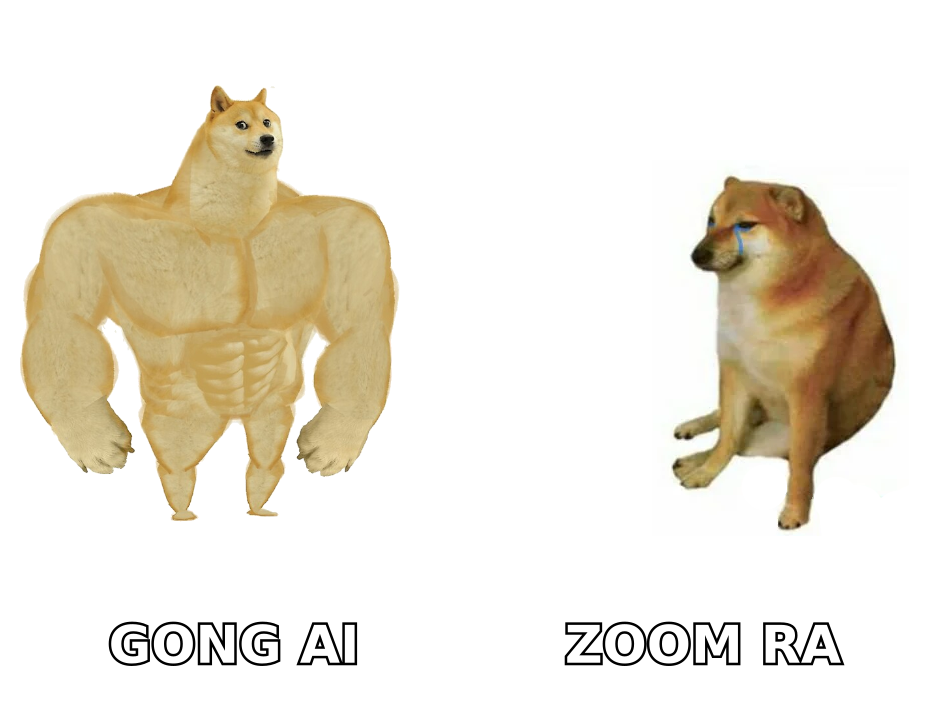
Pricing on both sides is quote-driven at the top end. Zoom publishes list prices for Workplace tiers; Revenue Accelerator is sales-assisted. Gong publishes nothing publicly and prices per seat with a platform fee on top. Numbers below reflect commonly reported ranges from buyer reviews on sites like G2 — treat them as directional, not contractual.
| Dimension | Gong | Zoom (Workplace + Revenue Accelerator) |
|---|---|---|
| Primary job | Revenue intelligence and coaching | Meetings, phone, and bolt-on call analysis |
| Published pricing | None — quote only | Workplace Pro ~$15.99/user/mo; Business ~$21.99/user/mo; RA quoted separately |
| Typical annual cost | Per-seat license plus platform fee; five figures for most teams | Meeting seats are cheap; RA add-on reported around $1,000–$1,500/user/yr |
| Free tier | No | Yes, for basic meetings (40-min limit) |
| Call recording + transcript | Yes, across Zoom, Teams, Meet, dialers | Yes, native to Zoom meetings and Zoom Phone |
| Deal boards and forecasting | Yes — deal health, risk flags, forecast rollup | Basic deal signals; forecasting is thinner |
| Coaching scorecards | Yes, mature and manager-oriented | Yes, simpler and newer |
| Non-Zoom meeting capture | Yes | Limited — strongest inside the Zoom ecosystem |
| Email and CRM activity analysis | Yes | Partial |
| Best fit | 20+ rep teams with a defined sales process | Zoom-standardized teams wanting one vendor |
The pattern is consistent across every buyer conversation I've seen: Zoom competes on bundling, Gong competes on depth. If your reps live in Zoom all day and your finance team is tired of line items, Revenue Accelerator is an easy internal sell. If your VP of Sales wants to know why win rates dropped in EMEA last quarter and which discovery questions correlate with closed-won, Gong has three years of product work you can't shortcut.
Which one should you buy for your team size?#
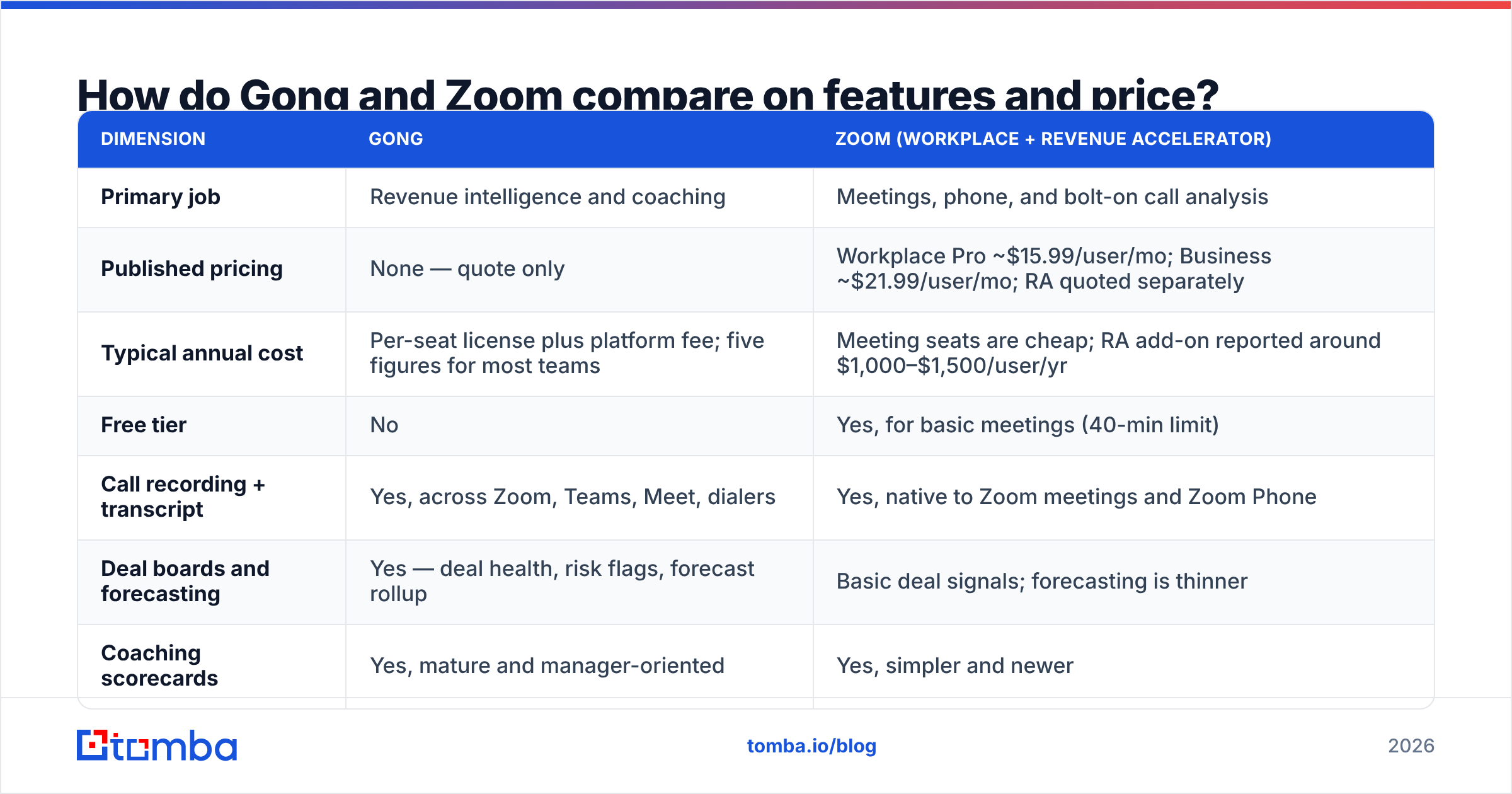
Team size predicts the right answer better than feature checklists do.
- 1–5 reps. Buy neither. Record calls with Zoom's native recording, review them yourself, and put the budget into pipeline. Conversation intelligence with five reps is a solution looking for a problem.
- 6–20 reps, Zoom-standardized. Zoom Revenue Accelerator. You get transcripts, talk-time ratios, topic tracking, and basic deal signals inside a vendor you already trust with procurement and security review.
- 20–75 reps with a real sales methodology. Gong. This is the sweet spot. You have enough calls for pattern detection to mean something, and enough managers to actually use coaching scorecards.
- 75+ reps, multi-channel, multi-region. Gong, and expect a real implementation. Budget for a RevOps owner who maintains trackers, scorecards, and CRM field mapping — the tool is only as good as the person configuring it.
- Mixed-stack orgs (Teams + Zoom + Meet + a dialer). Gong. Zoom's analysis is strongest on Zoom's own rails; the more your calls happen elsewhere, the more coverage gaps you inherit.
That last point is the one buyers underweight. Ask any vendor exactly which meeting platforms and dialers get full transcript-plus-analysis treatment versus a partial feed. The answer changes the ROI case more than the sticker price does.
Is Zoom Revenue Accelerator good enough to replace Gong?#
For some teams, yes — and that's an honest answer, not a hedge.
Revenue Accelerator covers the table stakes competently: recording, transcription, speaker separation, talk-listen ratio, filler-word counts, topic and keyword tracking, sentiment, and post-meeting summaries that push into your CRM. If your current process is "managers occasionally listen to a recording when a deal goes sideways," that's a step change.
Where it comes up short against Gong:
- Deal intelligence. Gong's deal boards surface stalled deals, missing stakeholders, and engagement decay across the whole opportunity, not just the last call. Zoom's equivalent is shallower.
- Forecast credibility. Gong pushes toward an activity-and-signal-based forecast that leadership can challenge. Zoom leans on CRM stages, which is what you already had.
- Coaching workflow. Gong's library, snippets, and scorecard workflows are built for sales managers as a daily habit. Zoom's are built for occasional review.
- Ecosystem. Gong's integration catalog — engagement platforms, CRMs, data warehouses, BI — is significantly broader.
There's also a strategic question worth asking out loud: do you want your analysis layer owned by the same vendor as your meeting layer? Single-vendor stacks are cheaper and simpler until you want to switch one piece. If you're evaluating whether to consolidate or stay best-of-breed, it's worth reading through the Gong alternative landscape too — the category has more credible mid-market options than it did two years ago.
What do both tools completely fail to do?#
Neither Gong nor Zoom puts a single new prospect in your calendar.
This is the blind spot in every conversation-intelligence purchase. Both products are post-booking tools. They make existing conversations more productive. They assume the meeting already exists. If your problem is "our reps run good calls but we don't have enough of them," you just bought a very expensive microscope for a pipeline you don't have.
Run the diagnostic honestly:
- If win rate is your problem — reps get meetings but lose them — conversation intelligence is the right spend. Gong or Zoom RA will pay for itself.
- If meeting volume is your problem — reps close what they get but the top of funnel is empty — conversation intelligence changes nothing. You need contact data, targeting, and outbound volume.
- If both are broken, fix pipeline first. Coaching a rep on discovery questions they never get to ask is theater.
The mechanical version of the top-of-funnel fix: build a target account list, find the decision-maker at each account, verify the address before you send, and enrich the record so your sequencing is personalized rather than generic. That's a data problem, not an AI-coaching problem. A domain search pulls the contactable people at a target company; an email verifier keeps your bounce rate low enough that your domain reputation survives the campaign; data enrichment fills in title, seniority, and company firmographics so your first line isn't "Hi {{first_name}}, I noticed your company."
Once those meetings are on the calendar, then Gong or Zoom earns its seat.
What does the total cost of ownership actually look like?#
Sticker price is the smallest line in a revenue-intelligence budget. Model these four instead:
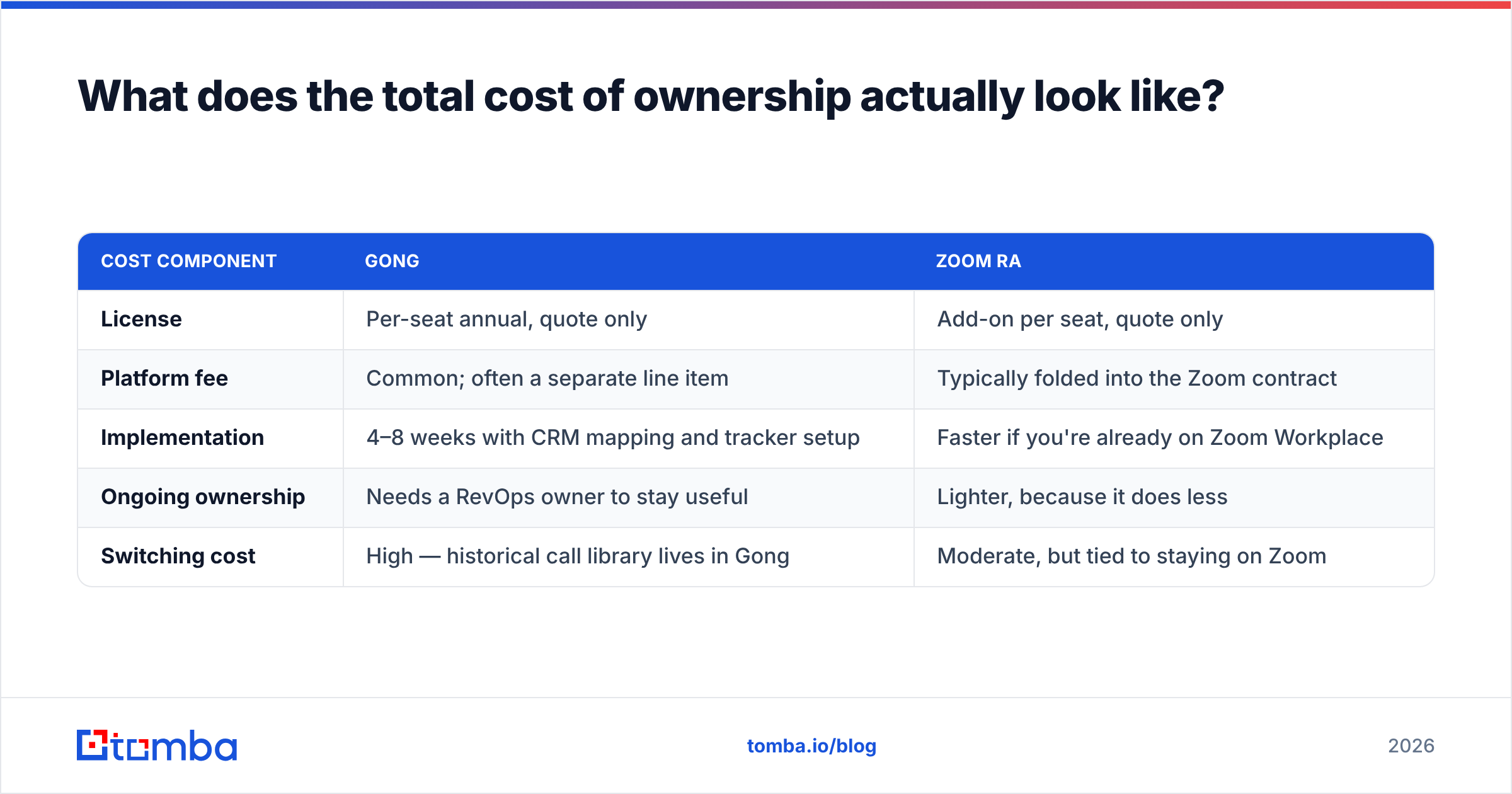
| Cost component | Gong | Zoom RA |
|---|---|---|
| License | Per-seat annual, quote only | Add-on per seat, quote only |
| Platform fee | Common; often a separate line item | Typically folded into the Zoom contract |
| Implementation | 4–8 weeks with CRM mapping and tracker setup | Faster if you're already on Zoom Workplace |
| Ongoing ownership | Needs a RevOps owner to stay useful | Lighter, because it does less |
| Switching cost | High — historical call library lives in Gong | Moderate, but tied to staying on Zoom |
That switching-cost row deserves attention. Both platforms accumulate a call library that becomes an institutional asset — onboarding material, objection-handling examples, competitive intel. Two years in, moving vendors means leaving that archive behind. Ask about export formats during evaluation, not during renewal.
Also negotiate the seat definition. Some teams license every rep; others license only reps whose calls need analysis and give managers view-only access. The second structure can cut a quoted contract meaningfully, and vendors rarely volunteer it.
How should you actually run the evaluation?#
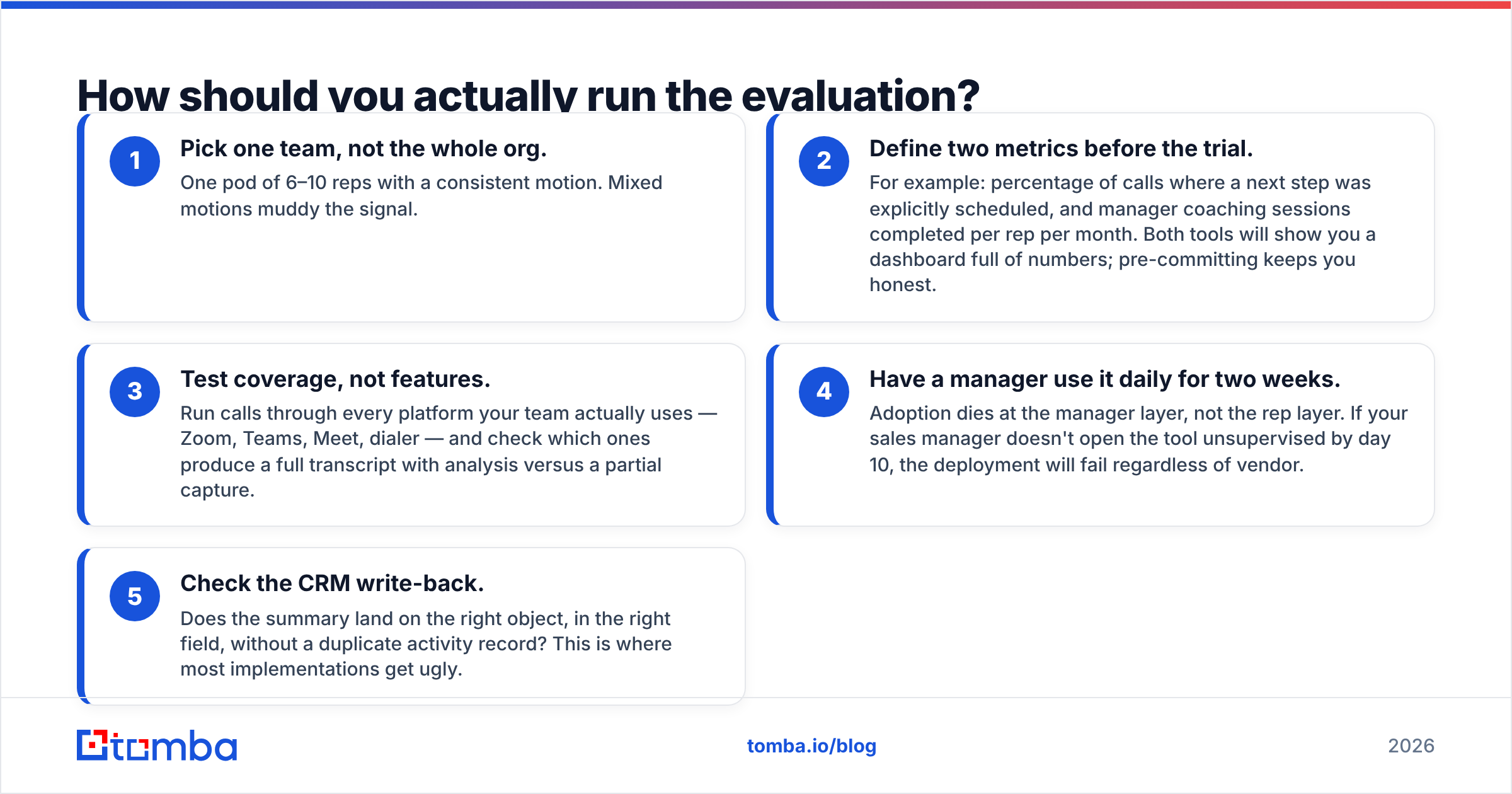
A 30-day test that produces a real decision:
- Pick one team, not the whole org. One pod of 6–10 reps with a consistent motion. Mixed motions muddy the signal.
- Define two metrics before the trial. For example: percentage of calls where a next step was explicitly scheduled, and manager coaching sessions completed per rep per month. Both tools will show you a dashboard full of numbers; pre-committing keeps you honest.
- Test coverage, not features. Run calls through every platform your team actually uses — Zoom, Teams, Meet, dialer — and check which ones produce a full transcript with analysis versus a partial capture.
- Have a manager use it daily for two weeks. Adoption dies at the manager layer, not the rep layer. If your sales manager doesn't open the tool unsupervised by day 10, the deployment will fail regardless of vendor.
- Check the CRM write-back. Does the summary land on the right object, in the right field, without a duplicate activity record? This is where most implementations get ugly.
If Zoom RA clears the bar on your two metrics, take the cheaper bundled option. If it doesn't, you now have a documented reason to pay Gong prices — which is exactly the argument your CFO will ask for.
Verdict: Gong or Zoom?#
Choose Gong if you have 20+ reps, a defined methodology, a RevOps owner, mixed meeting platforms, and leadership that wants forecast and deal intelligence rather than call summaries. It is the deeper product and the category standard, and the price reflects both.
Choose Zoom Revenue Accelerator if you're already standardized on Zoom, have fewer than about 20 reps, want conversation intelligence without a second procurement cycle, and can live with lighter deal and forecast tooling. The bundled economics are hard to argue with.
Choose neither, for now, if your calendar isn't full. Analysis tools multiply the value of conversations you're already having. Zero times anything is still zero.
If the honest diagnosis is that your reps need more meetings before they need better ones, start upstream. The Tomba Email Finder gets you verified, contactable decision-makers by name or by company domain, so your outbound lands in inboxes instead of bouncing. Start free with 25 searches a month, or scale up from $49/mo on Starter — full Tomba pricing is public, no sales call required. Fill the pipeline first; buy the microscope second.
Related guides#
Ready to find emails that actually work?
Join 150,000+ professionals who stopped guessing and started sending. Free credits on signup — no credit card required.
Get the Tomba newsletter
Practical outbound tactics and product updates — once every two weeks.
About the author