Goodmeetings Pricing, Reviews, Pros and Cons (2026 Guide)
A neutral breakdown of Goodmeetings pricing in 2026: what each tier really costs per seat, where the hidden fees hide, what reviewers praise and complain about, and when a cheaper stack wins.
TL;DR
- Goodmeetings is an AI meeting assistant and revenue-intelligence tool for sales teams: it records calls, transcribes them, writes summaries, extracts action items, and scores rep performance.
- Pricing is per seat, per month, and the meaningful features (coaching scorecards, CRM sync, custom AI prompts, admin controls) sit on the higher tiers — budget well above the entry number.
- Reviewers consistently praise the summary quality, multilingual transcription, and speed of onboarding. The recurring complaints are seat-based cost creep, transcription accuracy on heavy accents or crosstalk, and integration depth versus enterprise incumbents.
- It is a strong fit for 5–50 seat sales teams that run lots of live calls. It is a poor fit if your bottleneck is getting meetings, not analyzing them.
- If you have no pipeline to record, meeting intelligence is the wrong line item. Fix contact data first — that spend is measured in dollars per month, not dollars per seat.
What is Goodmeetings and who is it actually for?#
Goodmeetings is an AI meeting assistant built for customer-facing teams. It joins your Zoom, Google Meet, or Microsoft Teams calls, records them, produces a transcript, and turns that transcript into structured output: a summary, next steps, objections raised, and a searchable moment-by-moment library of what was said.
Think of it as a flight recorder for your sales calls. On its own, a black box doesn't fly the plane — it tells you what happened after the fact so the next flight goes better. That framing matters when you evaluate the price, because the return on a meeting-intelligence tool is entirely downstream of how many meetings you actually run.
The core buyer profile is a sales or customer-success leader managing 5–50 reps who wants three things: reps stop typing notes, managers stop listening to full recordings to coach, and the CRM stops going stale. Goodmeetings competes in the same market as conversation intelligence platforms on G2 — Gong, Chorus, Avoma, Fathom, and a dozen newer AI-notetaker entrants.
Where it differentiates: it is priced meaningfully below the enterprise revenue-intelligence incumbents, it ships strong multilingual transcription (a real advantage for teams selling across India, Southeast Asia, and the Middle East), and it does not require a six-figure annual commitment to get started. Check the official Goodmeetings site for current feature packaging before you commit — this category ships changes monthly.
How much does Goodmeetings pricing cost in 2026?#
Goodmeetings uses a per-user, per-month subscription with three published tiers plus a custom enterprise motion. Annual billing carries the usual 15–20% discount, and — this is the part that catches teams — the most-quoted headline price is the annual-billing rate, not what you pay month to month.
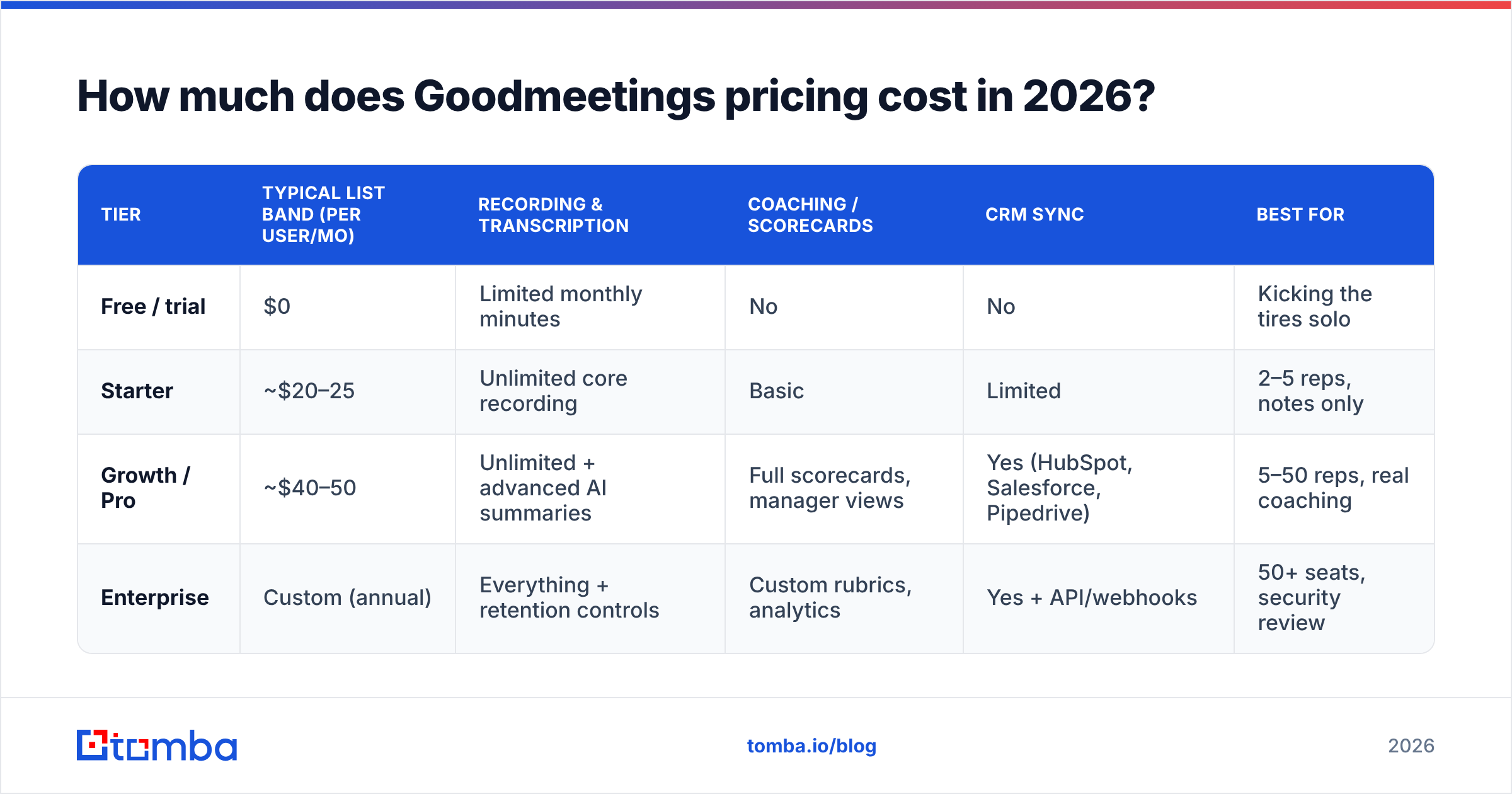
Here is the shape of the published pricing at the time of writing. Verify current numbers directly on the vendor's pricing page before you budget — AI tooling in this category re-prices frequently, and regional pricing differs.
| Tier | Typical list band (per user/mo) | Recording & transcription | Coaching / scorecards | CRM sync | Best for |
|---|---|---|---|---|---|
| Free / trial | $0 | Limited monthly minutes | No | No | Kicking the tires solo |
| Starter | ~$20–25 | Unlimited core recording | Basic | Limited | 2–5 reps, notes only |
| Growth / Pro | ~$40–50 | Unlimited + advanced AI summaries | Full scorecards, manager views | Yes (HubSpot, Salesforce, Pipedrive) | 5–50 reps, real coaching |
| Enterprise | Custom (annual) | Everything + retention controls | Custom rubrics, analytics | Yes + API/webhooks | 50+ seats, security review |
Two structural notes that change the real cost:
The per-seat model compounds. A 12-person sales team on the Growth tier is roughly $500–600/month, or $6,000–7,000/year, before a single integration is configured. That is not unreasonable for the category — it is a fraction of what Gong quotes — but it is not the "$25 a month" number most people carry in their head after skimming a pricing page.
Manager seats usually cost the same as rep seats. Coaching is the reason you buy this, and coaching requires managers in the tool. Count them.
What do the pricing tiers actually include?#
Rather than reading feature checklists top to bottom, evaluate against the five things that determine whether the tool earns its seat cost:
- Recording coverage and minute caps. Free and entry tiers meter minutes or meetings. If your AEs run 20 calls a week, you will blow through a metered plan in week two. Confirm "unlimited" means unlimited, not fair-use unlimited.
- AI summary depth. Every tool in 2026 writes a summary. The differentiator is whether it extracts structured fields — budget, timeline, competitors named, objections — that map to CRM properties. That capability typically sits on the mid tier and up.
- Coaching scorecards. The single feature that separates a notetaker from a revenue tool. If scorecards are gated above your budget, you are paying for transcription with extra steps.
- CRM write-back. Read-only sync is close to worthless. You want the summary and next steps pushed into the deal record automatically, the way a mature CRM workflow expects. Bidirectional sync is usually a Growth-tier feature.
- Data retention, redaction, and admin controls. Recording customer conversations creates a compliance surface. Retention windows, PII redaction, and role-based access are typically Enterprise-gated — factor that in if you sell into regulated buyers.
If items 3, 4, and 5 all land on the Enterprise tier for your use case, the honest budget number is "custom quote," not the published list price.
What do Goodmeetings reviews say?#
Aggregated review sentiment across public software marketplaces is consistently positive, with a recognizable pattern in both directions.
What reviewers repeatedly praise:
- Summary quality out of the box. Reviewers note that the AI notes are usable without prompt-tuning — a low-friction win versus tools that require heavy configuration.
- Multilingual and accented-English handling. Frequently cited by teams selling across India, MENA, and Southeast Asia, where generic English-first transcription degrades badly.
- Fast onboarding. Days, not the multi-week implementation typical of enterprise revenue-intelligence rollouts.
- Responsive support. A common theme in reviews of challenger tools — you get real humans, quickly.
What reviewers repeatedly criticize:
- Cost scaling with headcount. The most common complaint about any per-seat tool. Teams that added seats mid-year report the line item growing faster than expected.
- Transcription errors on crosstalk. Multi-speaker calls with heavy overlap still produce attribution mistakes. This is a category-wide limitation, not a Goodmeetings-specific defect.
- Integration breadth versus incumbents. The core CRMs are covered. Long-tail tools in your stack may need Zapier or a webhook.
- Analytics depth. Deal-level forecasting and pipeline-risk scoring are lighter than what dedicated revenue-intelligence platforms produce — which is also why it costs a fraction as much.
Treat marketplace scores as directional, not decisive. Category leaders and challengers alike optimize review collection; read the two-star and three-star reviews, where the specific operational complaints live.
What are the real pros and cons of Goodmeetings?#
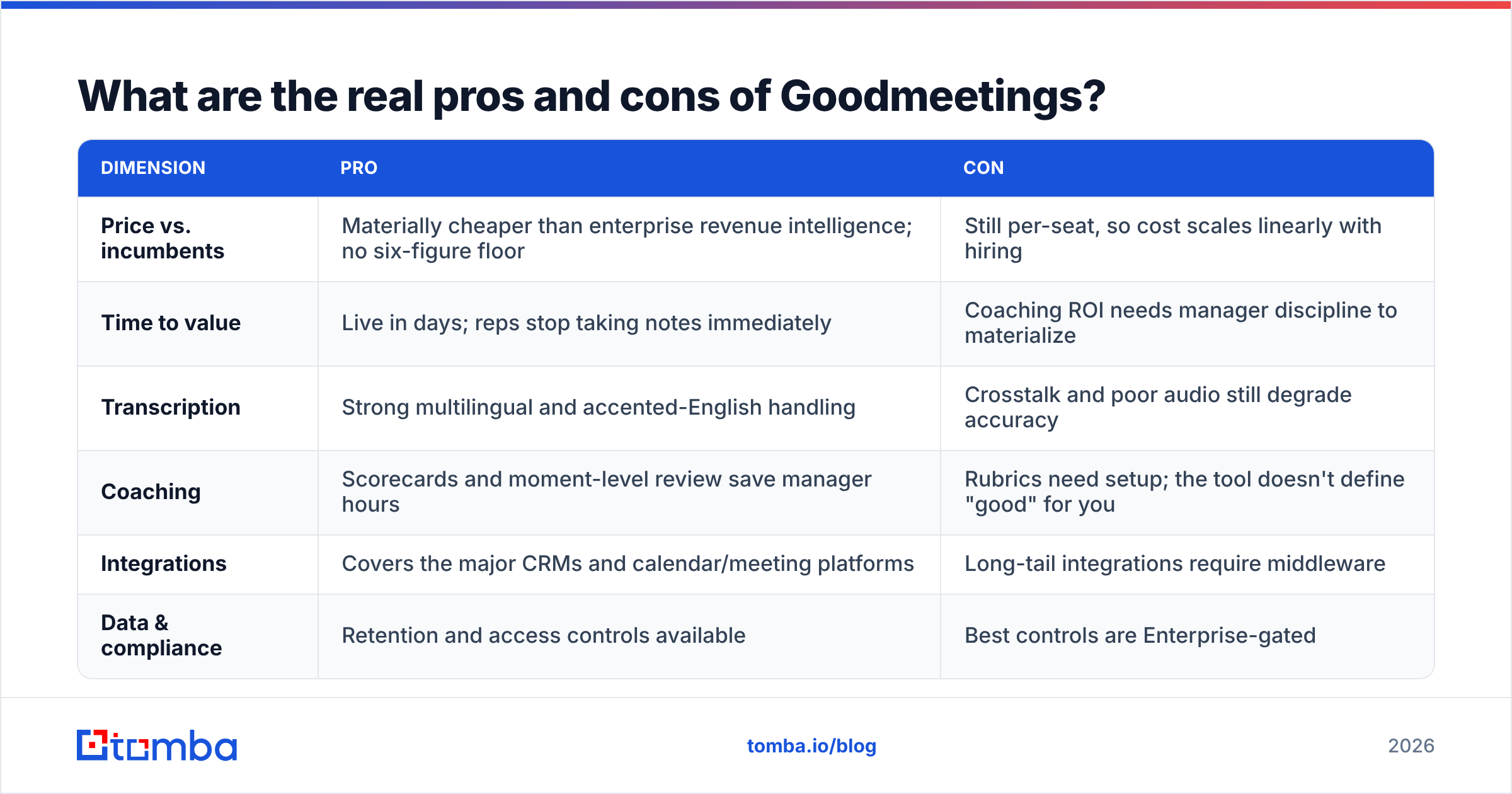
| Dimension | Pro | Con |
|---|---|---|
| Price vs. incumbents | Materially cheaper than enterprise revenue intelligence; no six-figure floor | Still per-seat, so cost scales linearly with hiring |
| Time to value | Live in days; reps stop taking notes immediately | Coaching ROI needs manager discipline to materialize |
| Transcription | Strong multilingual and accented-English handling | Crosstalk and poor audio still degrade accuracy |
| Coaching | Scorecards and moment-level review save manager hours | Rubrics need setup; the tool doesn't define "good" for you |
| Integrations | Covers the major CRMs and calendar/meeting platforms | Long-tail integrations require middleware |
| Data & compliance | Retention and access controls available | Best controls are Enterprise-gated |
The honest summary: Goodmeetings is a well-built tool in a crowded category, priced sensibly for mid-market teams, with the exact limitations you would predict from a challenger competing on price and speed rather than analytics depth.
Is Goodmeetings worth it compared to the alternatives?#
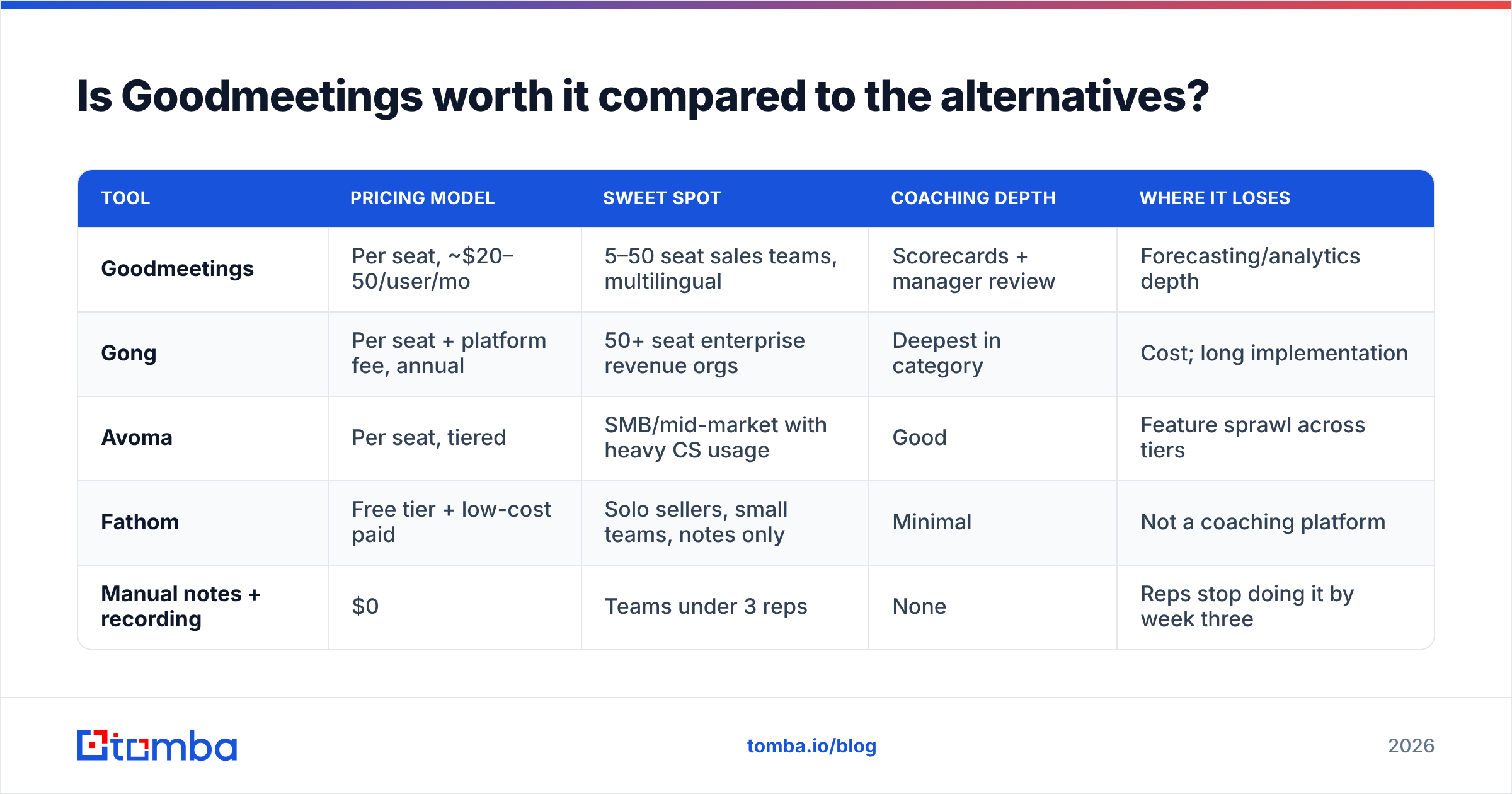
Compare on the axis that actually matters for your team — meeting volume per rep and whether you need coaching or just notes.
| Tool | Pricing model | Sweet spot | Coaching depth | Where it loses |
|---|---|---|---|---|
| Goodmeetings | Per seat, ~$20–50/user/mo | 5–50 seat sales teams, multilingual | Scorecards + manager review | Forecasting/analytics depth |
| Gong | Per seat + platform fee, annual | 50+ seat enterprise revenue orgs | Deepest in category | Cost; long implementation |
| Avoma | Per seat, tiered | SMB/mid-market with heavy CS usage | Good | Feature sprawl across tiers |
| Fathom | Free tier + low-cost paid | Solo sellers, small teams, notes only | Minimal | Not a coaching platform |
| Manual notes + recording | $0 | Teams under 3 reps | None | Reps stop doing it by week three |
The decision tree is short. Under five reps and you only want notes: a free or near-free notetaker is enough. Five to fifty reps with a manager who will actually run coaching sessions: Goodmeetings is priced right for that band. Fifty-plus seats with a RevOps function and forecasting requirements: you are shopping for enterprise revenue intelligence, and the price step is real.
What should you budget for the rest of the outbound stack?#
Here is the uncomfortable arithmetic most teams skip. Meeting intelligence improves the conversion of meetings you already booked. It does nothing about the number of meetings on the calendar. If your reps run four calls a week instead of fourteen, a per-seat AI notetaker is an expensive way to record an underused calendar.
A realistic mid-market stack splits roughly three ways:
- Contact data and enrichment — finding and verifying the people worth calling.
- Sequencing and delivery — getting messages into inboxes that accept them.
- Meeting intelligence — improving what happens once someone says yes.
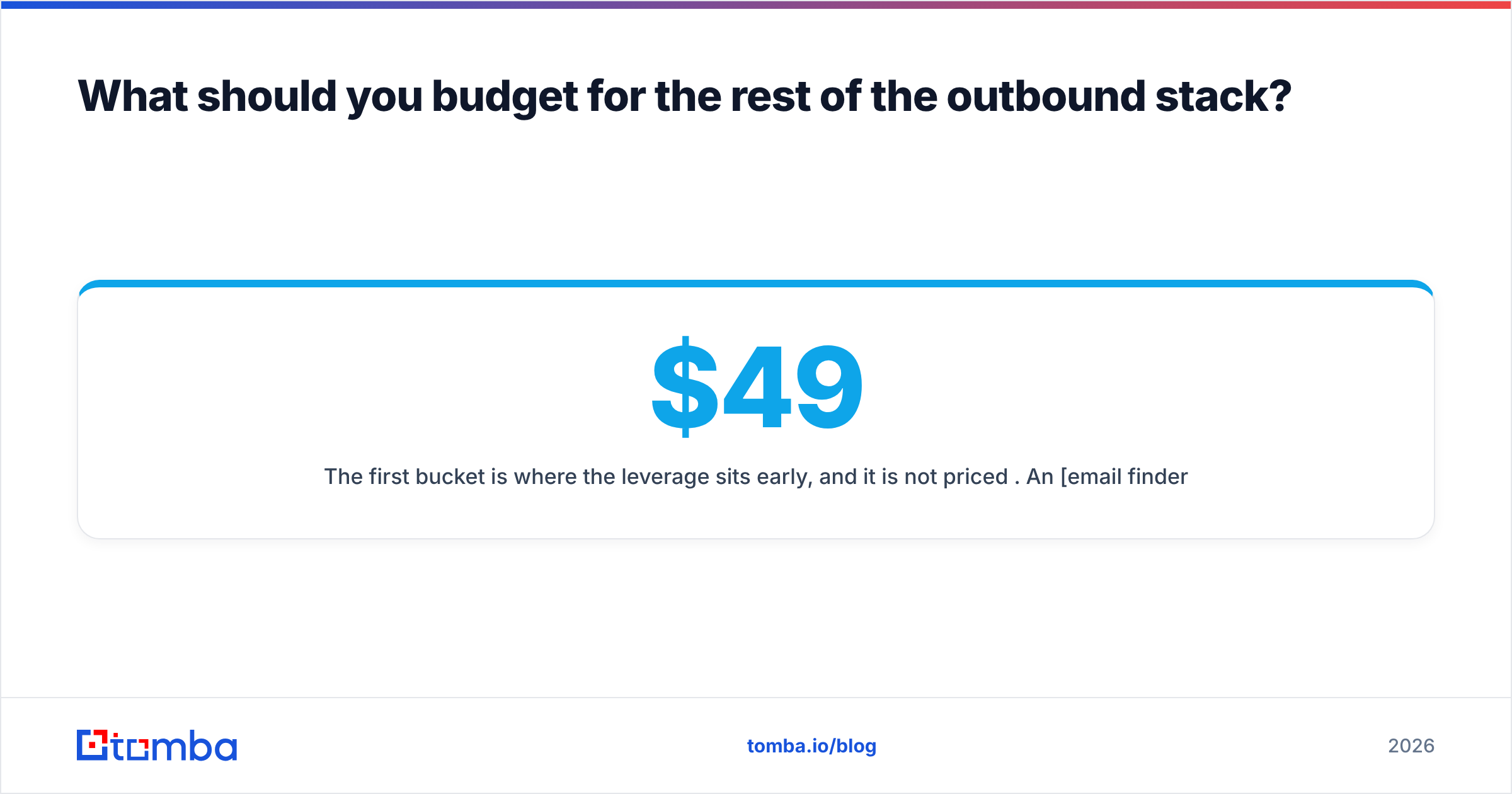
The first bucket is where the leverage sits early, and it is not priced per seat. An email finder that returns verified addresses at a known accuracy rate costs the same whether two reps or twelve use it. Tomba's pricing starts free at 25 searches a month, with Starter at $49/mo, Growth at $99/mo, and Pro at $249/mo — flat, not multiplied by headcount. Running found contacts through an email verifier before they hit a sequence protects your sender reputation, which is the input that decides whether any of this reaches a human.
Sequence order matters more than tool selection. Verified contacts create replies, replies create meetings, meetings create the recordings a tool like Goodmeetings analyzes. Buying step three before step one is the most common budget mistake in early-stage sales orgs — a pattern HubSpot's sales research has documented across thousands of teams.
How do you evaluate Goodmeetings without wasting a quarter?#
Run a structured 30-day trial rather than a vibes-based one:
- Baseline first. Record your current meeting-to-opportunity conversion rate and average manager coaching hours per rep per week. Without a baseline, you cannot prove ROI at renewal.
- Pilot with three reps, not the whole team. Include your strongest and weakest performer. The delta between their calls is where the coaching value shows up.
- Test the CRM write-back on real deals. Confirm that summaries and next steps land on the right records without manual cleanup. If a rep has to fix the sync, you have not removed work — you have moved it.
- Stress-test transcription on your worst audio. Take a genuinely messy call — crosstalk, background noise, two accents — and grade the output. Best-case demo audio tells you nothing.
- Price the renewal, not the trial. Model the cost at your projected headcount 12 months out, with manager seats included and month-to-month billing. If that number makes you flinch, negotiate annual terms now.
FAQ#
Does Goodmeetings have a free plan? There is a free entry point with limited monthly usage, intended for evaluation rather than sustained team use. Metered minutes run out fast for full-time sellers.
Is Goodmeetings cheaper than Gong? Substantially, yes — it competes on a per-seat rate that lands well below enterprise revenue-intelligence platform pricing, with no platform fee floor. You trade analytics and forecasting depth for that difference.
Does Goodmeetings integrate with my CRM? The major CRMs — Salesforce, HubSpot, Pipedrive — are supported on the mid and upper tiers. Anything outside that list typically routes through Zapier or webhooks.
Do I need meeting intelligence at all? Only if you are already running enough meetings that reviewing them is a bottleneck. Under roughly eight to ten calls per rep per week, your constraint is pipeline generation, not call analysis.
The bottom line#
Goodmeetings is fairly priced for what it does: a capable, fast-to-deploy AI meeting assistant with genuine coaching features at a mid-market per-seat rate, strongest for multilingual teams and weakest on deep forecasting analytics. The pros and cons are legible, the reviews are consistent, and the main budget risk is per-seat cost creep as you hire.
Just make sure you are solving the right constraint. If your calendar is thin, no amount of call analysis fixes it. Start by building a list of contacts that are actually reachable: use the Tomba Email Finder to pull verified professional addresses by domain, name, or company, verify them before they enter a sequence, and let the meeting-intelligence spend follow the meetings — not the other way around.
Related guides#
Ready to find emails that actually work?
Join 150,000+ professionals who stopped guessing and started sending. Free credits on signup — no credit card required.
Get the Tomba newsletter
Practical outbound tactics and product updates — once every two weeks.
About the author