Google Maps Lead Scraper: The Complete Guide for 2026
Scraping Google Maps gives you names, phones, and websites in minutes — but almost never a usable email. Here is what each method costs, what it legally exposes you to, and how to turn raw Maps rows into a list that converts.
TL;DR
- A Google Maps lead scraper pulls business name, category, address, phone, rating, and website URL out of Maps listings at scale. It almost never returns a decision-maker email, because Maps does not store one.
- The three real options are browser extensions ($0–$49/mo, brittle), hosted scrapers like Apify or Outscraper (usage-priced, reliable), and the official Places API (~$32 per 1,000 text-search calls, fully compliant, no emails).
- Scraping public listing data sits in a legal grey zone that varies by jurisdiction; scraping personal data of EU residents pulls you into GDPR whether you scraped it or bought it.
- The bottleneck is never the scrape. It is the enrichment step: turning
website.comintofirstname@website.comand proving that address exists before you send. - Budget for the full stack — scraper + enrichment + verification. A scrape alone typically converts at a fraction of a verified list, mostly because bounces wreck your sender reputation before the campaign warms up.
What is a Google Maps lead scraper?#
A Google Maps lead scraper is a tool that runs a Maps search query — "dental clinics in Austin", "HVAC contractors near Manchester" — and writes every result into a spreadsheet instead of making you click each pin.
Think of it like a photocopier pointed at a phone book. It is very good at duplicating what is on the page, and completely incapable of adding anything that was never printed there.
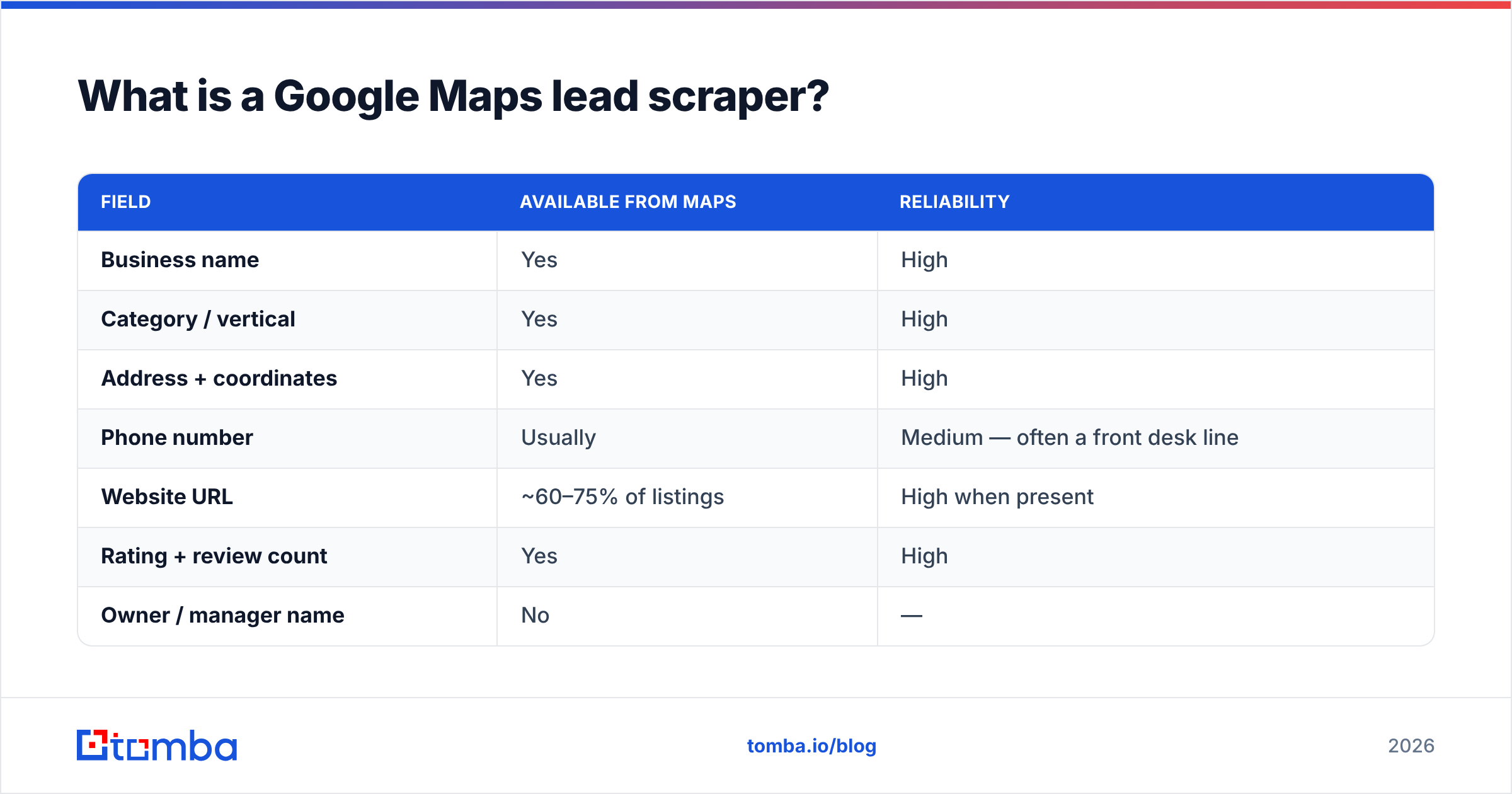
That distinction matters more than any feature list. A typical scraped row looks like this:
| Field | Available from Maps | Reliability |
|---|---|---|
| Business name | Yes | High |
| Category / vertical | Yes | High |
| Address + coordinates | Yes | High |
| Phone number | Usually | Medium — often a front desk line |
| Website URL | ~60–75% of listings | High when present |
| Rating + review count | Yes | High |
| Owner / manager name | No | — |
| Business email | Rarely (some listings expose a contact form only) | Low |
You get a firmographic skeleton. You do not get a person to email. Every workflow described below exists to close that gap.
Why do sales teams still scrape Google Maps in 2026?#
Because for local and SMB outbound, Maps is the most complete business registry that exists, and it self-updates. A restaurant that closed in March disappears from Maps faster than it disappears from any purchased list.
Three use cases where a Google Maps lead scraper genuinely outperforms a database subscription:
- Hyper-local territory building. "Every independent pharmacy within 30 miles of this zip code" is a query Maps answers precisely and most B2B databases answer badly.
- Long-tail verticals. Mobile dog groomers, kayak rental outfits, single-location physiotherapy clinics — these businesses are underrepresented in enterprise data providers because nobody pays for them.
- Intent signals you can only read visually. Review velocity, rating drops, "temporarily closed" flags, photo recency, and whether the listing links to a website at all. A business with 4.8 stars and no website is a live lead for anyone selling web design.
Where Maps loses badly: anything with a headquarters model. If you sell to VPs of Engineering at Series B SaaS companies, Maps is the wrong dataset entirely — you want a B2B database with role and seniority filters.
Is scraping Google Maps legal?#
Short answer: publicly visible business data is the least risky thing to scrape, but "least risky" is not "safe," and this is not legal advice.
Three separate layers usually get confused:
- Google's Terms of Service. Automated extraction outside the official API violates them. The practical consequence is account or IP blocking, not litigation, for the vast majority of scrapers. The compliant path is the Google Places API, which permits programmatic access under documented usage and caching limits.
- Computer-misuse law. US courts have generally held that scraping publicly accessible pages, without bypassing authentication, is not unauthorized access. That reasoning has not been universally adopted elsewhere.
- Privacy law. This is the one that bites. GDPR, and UK GDPR after it, apply to personal data.
info@clinic.comis usually corporate.sarah.hughes@clinic.comis personal data about an identifiable individual, and once you hold it you owe transparency, a lawful basis, and deletion on request — regardless of whether you scraped it, guessed it, or bought it.
Practical position most compliant outbound teams land on: scrape business-level firmographics freely, treat any individual's contact details as regulated personal data from the moment it enters your CRM, keep source provenance on every record, and honor opt-outs within 48 hours.
What does each scraping method actually cost?#
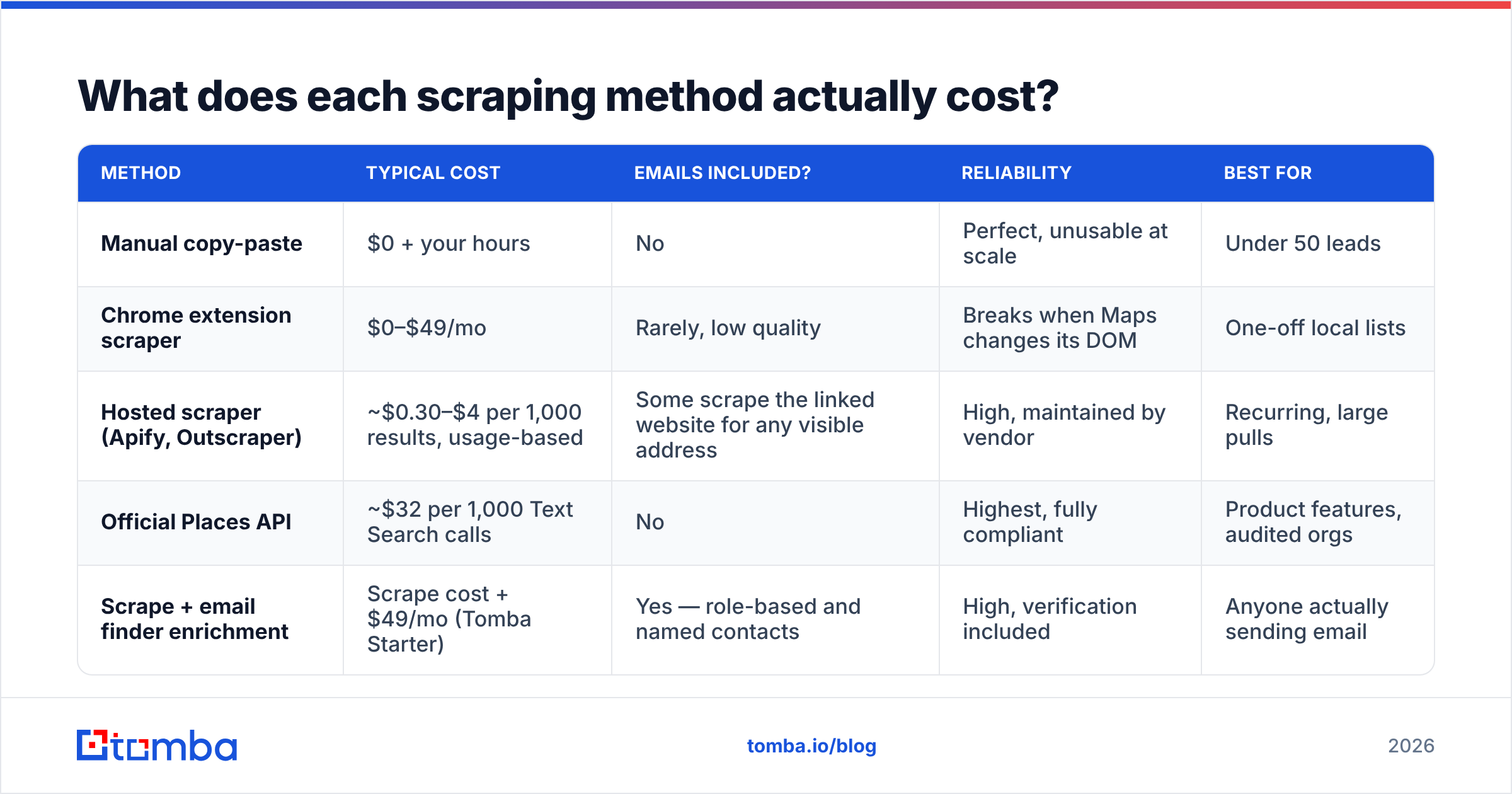
This is where teams get ambushed. The extension is cheap; the API is not; and neither includes the enrichment you will inevitably need.
| Method | Typical cost | Emails included? | Reliability | Best for |
|---|---|---|---|---|
| Manual copy-paste | $0 + your hours | No | Perfect, unusable at scale | Under 50 leads |
| Chrome extension scraper | $0–$49/mo | Rarely, low quality | Breaks when Maps changes its DOM | One-off local lists |
| Hosted scraper (Apify, Outscraper) | ~$0.30–$4 per 1,000 results, usage-based | Some scrape the linked website for any visible address | High, maintained by vendor | Recurring, large pulls |
| Official Places API | ~$32 per 1,000 Text Search calls | No | Highest, fully compliant | Product features, audited orgs |
| Scrape + email finder enrichment | Scrape cost + $49/mo (Tomba Starter) | Yes — role-based and named contacts | High, verification included | Anyone actually sending email |
Two notes on that table. First, the official API bills per call, not per result, so a paginated query for 200 businesses can cost several calls. Vendors like Apify exist largely because that arithmetic gets ugly fast at prospecting volume. Second, no row in the "emails" column is fully green except the last one, and that is the whole point of the next section.
Why do scraped Google Maps emails bounce so hard?#
Because most scrapers get emails the lazy way: they visit the listing's website, regex anything matching \S+@\S+, and dump it in the row.
That produces four categories of garbage:
- Stale addresses left on a contact page nobody has edited since 2019.
- Image-embedded or obfuscated addresses that regex mangles into invalid strings.
- Third-party addresses — the web agency's own email in the footer, a Squarespace support address, a privacy@ from an embedded widget.
- Catch-all domains that accept every message at the SMTP layer and silently discard most of them. These look deliverable and are not, which is why a dedicated catch-all verifier is a separate product category.
The compounding damage is what people underestimate. Mailbox providers read hard bounces as a signal that you do not know who you are emailing. A campaign that opens with a double-digit bounce rate damages sender reputation for every later campaign from that domain, including the clean ones.
The fix is boring and reliable: never send to an address a scraper produced. Send to an address a finder produced and a verifier confirmed.
How do you turn a Maps scrape into a list that converts?#
Here is the sequence that works, in order. Each step reduces volume and increases hit rate, which is exactly what you want.
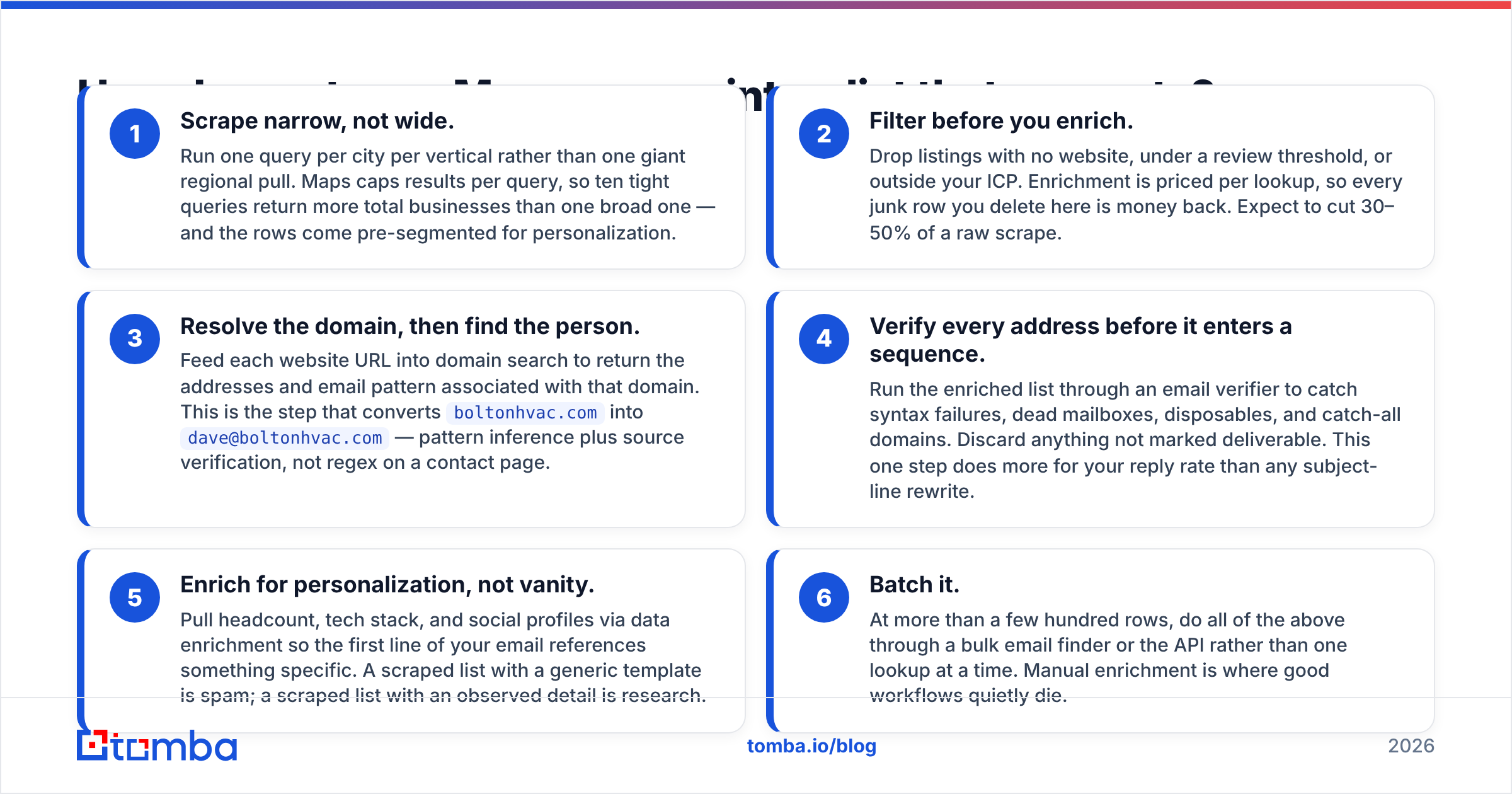
- Scrape narrow, not wide. Run one query per city per vertical rather than one giant regional pull. Maps caps results per query, so ten tight queries return more total businesses than one broad one — and the rows come pre-segmented for personalization.
- Filter before you enrich. Drop listings with no website, under a review threshold, or outside your ICP. Enrichment is priced per lookup, so every junk row you delete here is money back. Expect to cut 30–50% of a raw scrape.
- Resolve the domain, then find the person. Feed each website URL into domain search to return the addresses and email pattern associated with that domain. This is the step that converts
boltonhvac.comintodave@boltonhvac.com— pattern inference plus source verification, not regex on a contact page. - Verify every address before it enters a sequence. Run the enriched list through an email verifier to catch syntax failures, dead mailboxes, disposables, and catch-all domains. Discard anything not marked deliverable. This one step does more for your reply rate than any subject-line rewrite.
- Enrich for personalization, not vanity. Pull headcount, tech stack, and social profiles via data enrichment so the first line of your email references something specific. A scraped list with a generic template is spam; a scraped list with an observed detail is research.
- Batch it. At more than a few hundred rows, do all of the above through a bulk email finder or the API rather than one lookup at a time. Manual enrichment is where good workflows quietly die.
Which tool should you pick for your situation?#
There is no single best Google Maps lead scraper — there is a best one for your volume and your compliance posture.
Pick a Chrome extension if you need one list of 200 local businesses this afternoon and will never repeat the task. Accept that it will break in a few months; extensions live and die with Google's front-end changes. Check recent reviews on G2 before paying for one, since abandoned scrapers keep their listings up long after they stop working.
Pick a hosted scraper if you rebuild territory lists monthly. Usage pricing beats a subscription when your volume is spiky, and the vendor absorbs the maintenance burden when Maps changes.
Pick the official Places API if you are embedding location data in a product, your legal team reviews vendor contracts, or you operate in a regulated industry. You will pay more per record and get zero emails, but you will never have a compliance conversation about it.
Skip scraping entirely if your ICP is defined by job title rather than location. In that case a curated provider — BookYourData is a solid option for verified, role-filtered B2B contacts, and enterprise databases cover the upmarket end — gets you to a usable list faster than any scrape-plus-enrich pipeline. Maps simply does not model org charts.
Combine, in most real cases. The pattern that works for the majority of SMB-focused teams: hosted scraper for discovery, email finder for contacts, verifier as the gate before send. Three tools, roughly $100–$150/month at moderate volume, and a list that is actually deliverable.
What should you measure to know it worked?#
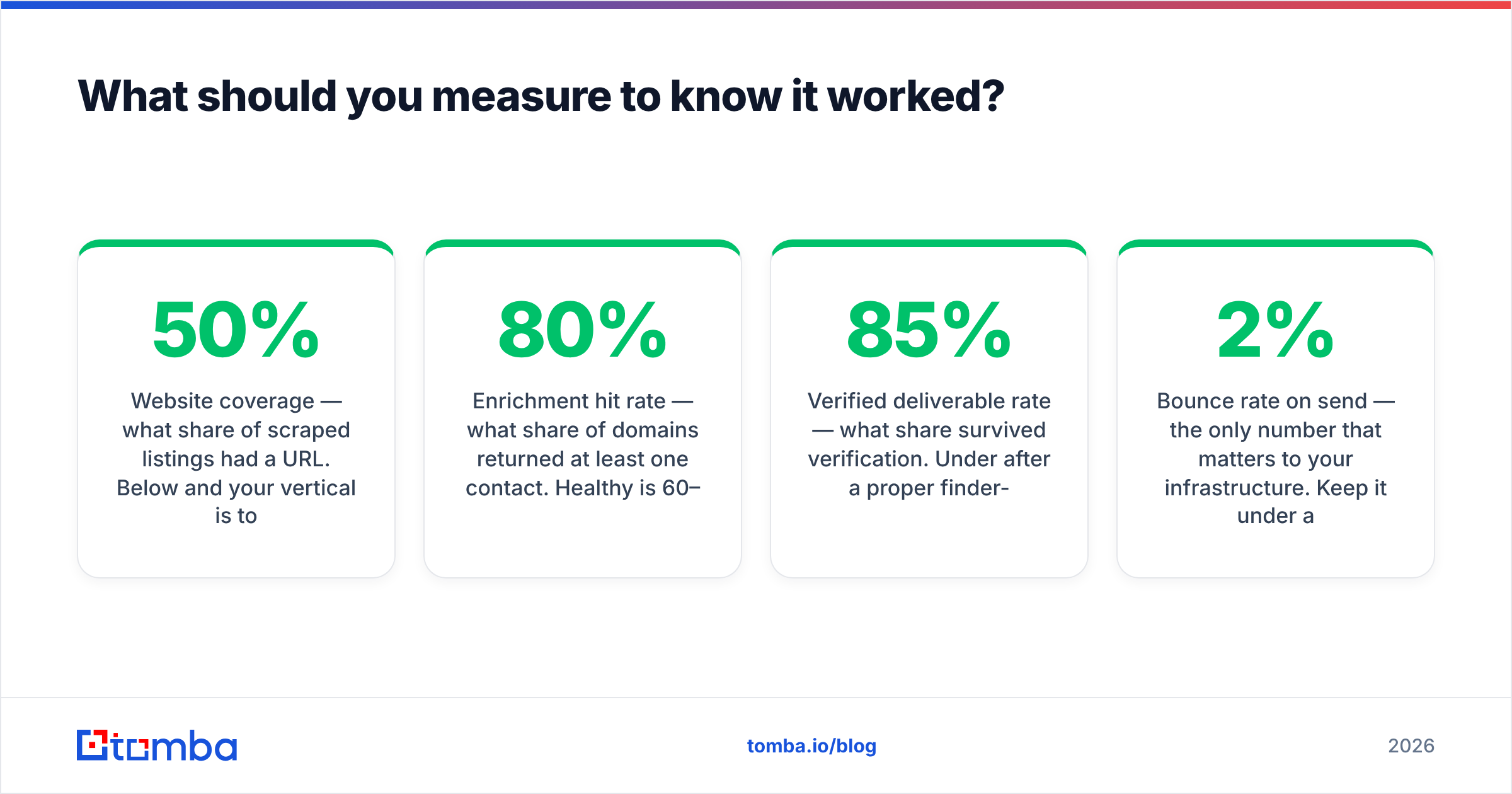
Track four numbers per scrape batch, not just replies:
- Website coverage — what share of scraped listings had a URL. Below 50% and your vertical is too offline for email; switch to phone or door-to-door.
- Enrichment hit rate — what share of domains returned at least one contact. Healthy is 60–80% for SMB domains; much lower usually means your filtering step was too loose.
- Verified deliverable rate — what share survived verification. Under 85% after a proper finder-plus-verifier pass points at a data-source problem, not a sending problem.
- Bounce rate on send — the only number that matters to your infrastructure. Keep it under 2% and the rest of your outbound stays healthy.
If those four are green and replies are still flat, the problem is your offer, not your Google Maps lead scraper. That is a useful thing to be able to prove.
Start with the contact layer, not the scrape#
The scrape is the easy half. Any of a dozen tools will hand you a spreadsheet of businesses within the hour. What separates a list that books meetings from a list that torches your domain is whether the addresses on it are real, current, and attached to a person who can say yes.
That is the layer to invest in first. Run your Maps export through the Tomba Email Finder to resolve real, source-verified addresses from the domains you scraped — with verification built into the same pass, so nothing unconfirmed reaches your sequencer. The free tier covers 25 searches a month if you want to test the accuracy on your own scrape before committing, and Starter runs $49/mo when you are ready to enrich at volume.
Scrape the map. Verify the people. Send in that order.
Related guides#
Ready to find emails that actually work?
Join 150,000+ professionals who stopped guessing and started sending. Free credits on signup — no credit card required.
Get the Tomba newsletter
Practical outbound tactics and product updates — once every two weeks.
About the author