Google Sheets Sales Tracker Template: Build One in 2026
A free Google Sheets sales tracker template beats a half-configured CRM for most small teams — until it doesn't. Here's the exact build, the formulas, and the point where you should move on.

TL;DR
- A Google Sheets sales tracker template works genuinely well up to roughly 3 reps and ~300 open opportunities. Past that, manual data entry costs more than a CRM seat.
- The build needs exactly four tabs:
Pipeline,Activity,Config,Dashboard. Anything more and you'll stop updating it. - Weighted pipeline value (
Deal Value × Stage Probability) is the single most useful formula in the sheet — it turns a wish list into a forecast. - The real failure point isn't the spreadsheet. It's stale contact data: bad emails, dead phone numbers, and rows nobody has touched in 60 days.
- Feed the sheet with verified contacts up front and it stays useful far longer. That's where an email finder earns its keep alongside the tracker.
What is a Google Sheets sales tracker template?#
A Google Sheets sales tracker template is a pre-structured spreadsheet that logs every deal, its stage, its value, its owner, and its next action — then rolls those rows up into a forecast you can actually read.
Think of it as a kitchen order rail. Every ticket (deal) hangs in a position (stage), the line cook (rep) can see what's next, and the manager can glance at the rail and know whether tonight is busy or dead. A CRM is the full point-of-sale system: more powerful, more expensive, and overkill if you're running a food truck.
The distinction matters because most teams reach for a CRM far too early, spend three weeks configuring custom objects, and end up tracking deals in a spreadsheet anyway — just an undocumented one that lives on someone's laptop.
Why do most sales trackers die within six weeks?#
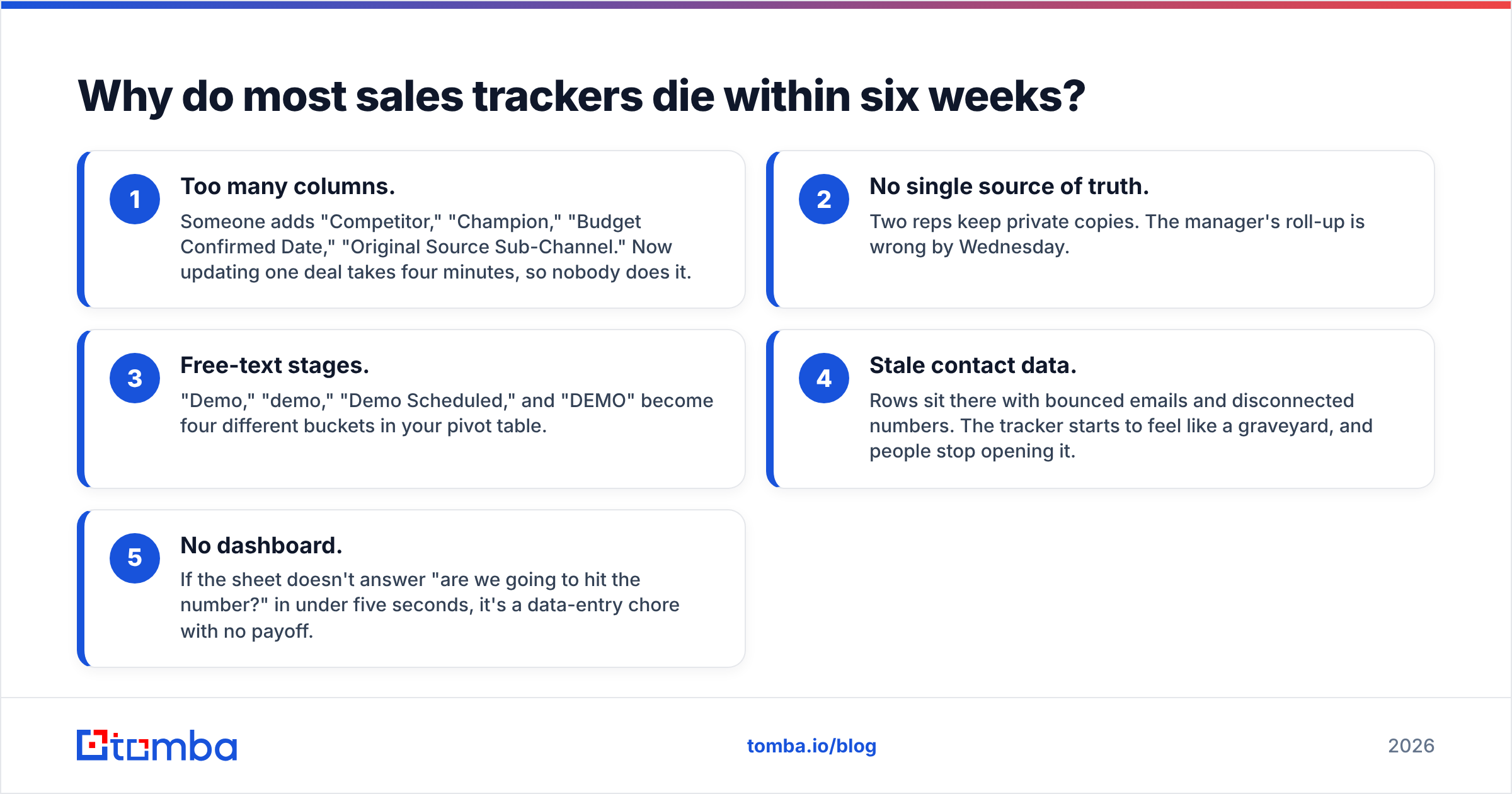
Because they get too complicated to maintain. Every abandoned tracker I've seen shares the same symptoms:
- Too many columns. Someone adds "Competitor," "Champion," "Budget Confirmed Date," "Original Source Sub-Channel." Now updating one deal takes four minutes, so nobody does it.
- No single source of truth. Two reps keep private copies. The manager's roll-up is wrong by Wednesday.
- Free-text stages. "Demo," "demo," "Demo Scheduled," and "DEMO" become four different buckets in your pivot table.
- Stale contact data. Rows sit there with bounced emails and disconnected numbers. The tracker starts to feel like a graveyard, and people stop opening it.
- No dashboard. If the sheet doesn't answer "are we going to hit the number?" in under five seconds, it's a data-entry chore with no payoff.

Fix items 1, 3, and 5 and your tracker survives. The build below is designed around exactly that.
What tabs and columns does the template need?#
Four tabs. That's it. Here's the structure, column by column.
Tab 1 — Pipeline (the core sheet)
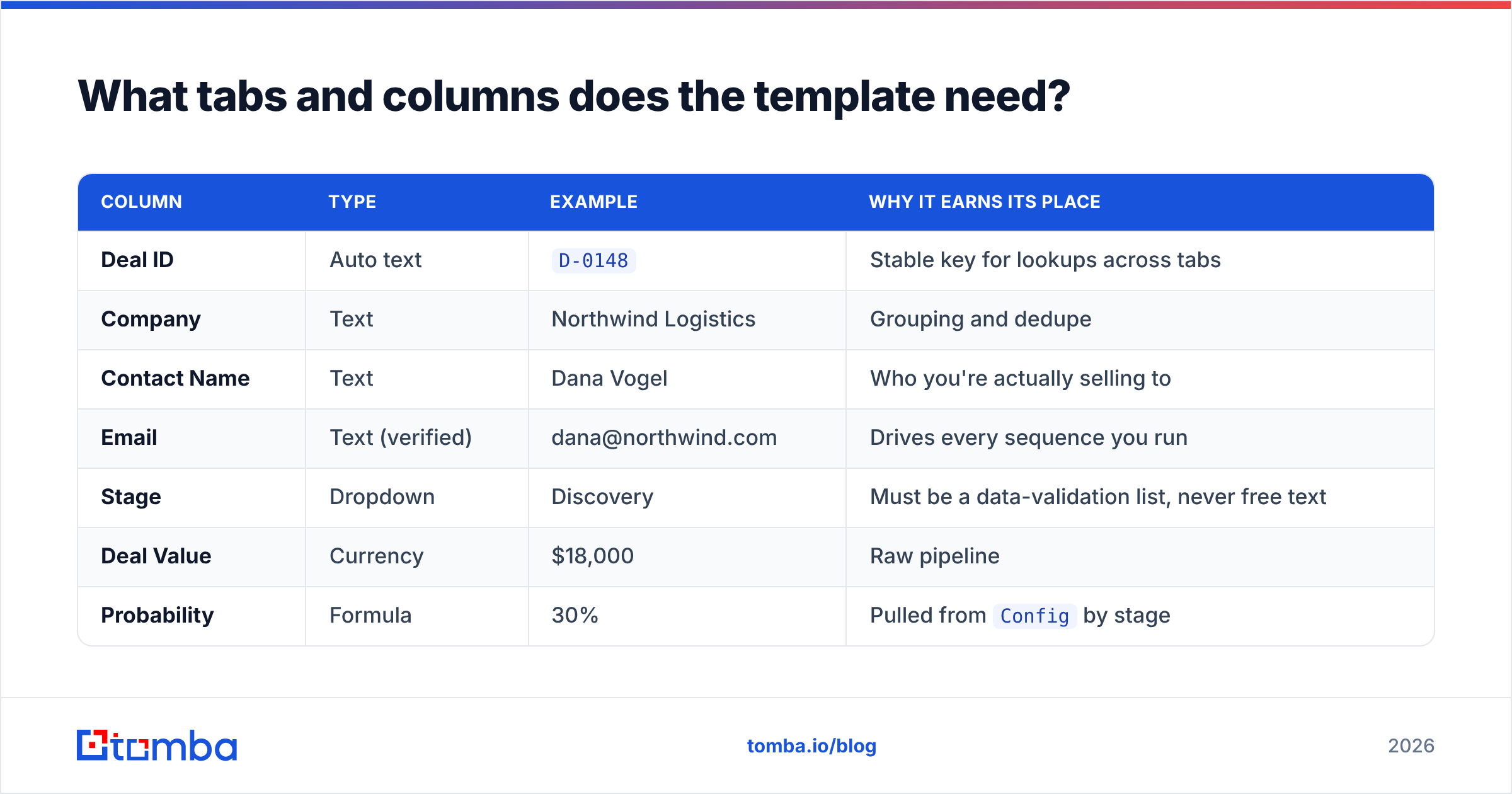
| Column | Type | Example | Why it earns its place |
|---|---|---|---|
| Deal ID | Auto text | D-0148 |
Stable key for lookups across tabs |
| Company | Text | Northwind Logistics | Grouping and dedupe |
| Contact Name | Text | Dana Vogel | Who you're actually selling to |
| Text (verified) | dana@northwind.com | Drives every sequence you run | |
| Stage | Dropdown | Discovery | Must be a data-validation list, never free text |
| Deal Value | Currency | $18,000 | Raw pipeline |
| Probability | Formula | 30% | Pulled from Config by stage |
| Weighted Value | Formula | $5,400 | Deal Value × Probability |
| Expected Close | Date | 2026-10-15 | Drives the monthly forecast |
| Owner | Dropdown | Priya | Per-rep filtering |
| Last Touch | Date | 2026-08-21 | The staleness alarm |
| Next Step | Text | Send pricing v2 | Forces a commitment |
Tab 2 — Activity. One row per call, email, or meeting: Date, Deal ID, Type, Owner, Notes. This is what lets you measure activity-to-outcome ratios instead of guessing.
Tab 3 — Config. Your stage list with probabilities, your owner list, your currency, your quota targets. Everything the other tabs reference. Change a probability here and the whole forecast updates.
Tab 4 — Dashboard. Pure formulas, zero manual entry.
Which formulas actually matter?#
Six formulas carry the entire template. Everything else is decoration.
- Stage probability lookup —
=IFERROR(VLOOKUP(E2, Config!$A$2:$B$8, 2, FALSE), 0). Pulls the probability for the deal's stage so reps never type a percentage by hand. - Weighted value —
=F2*G2. Deal value times probability. Sum this column and you have a forecast that isn't fiction. - Days since last touch —
=IF(K2="", "", TODAY()-K2). Wrap it in conditional formatting: amber past 14 days, red past 30. - Stage-level roll-up —
=SUMIFS(Pipeline!$F:$F, Pipeline!$E:$E, A2)on the Dashboard, one row per stage. This is your funnel. - Month forecast —
=SUMIFS(Pipeline!$H:$H, Pipeline!$I:$I, ">="&EOMONTH(TODAY(),-1)+1, Pipeline!$I:$I, "<="&EOMONTH(TODAY(),0)). Weighted value closing this month. - Win rate —
=COUNTIF(Pipeline!E:E,"Closed Won")/COUNTIFS(Pipeline!E:E,"Closed*"). Track it monthly; a moving win rate tells you more about your process than raw revenue does.
Two setup details people skip and then regret. First, put your stage dropdown in via Data → Data validation → "List from a range" pointing at Config, and check "Reject input." Second, freeze row 1 and protect the Config tab so a rep can't nuke your probability table while filtering.
Is a Google Sheets sales tracker better than a CRM?#
For small teams, often yes — for about the first year. Here's the honest comparison.
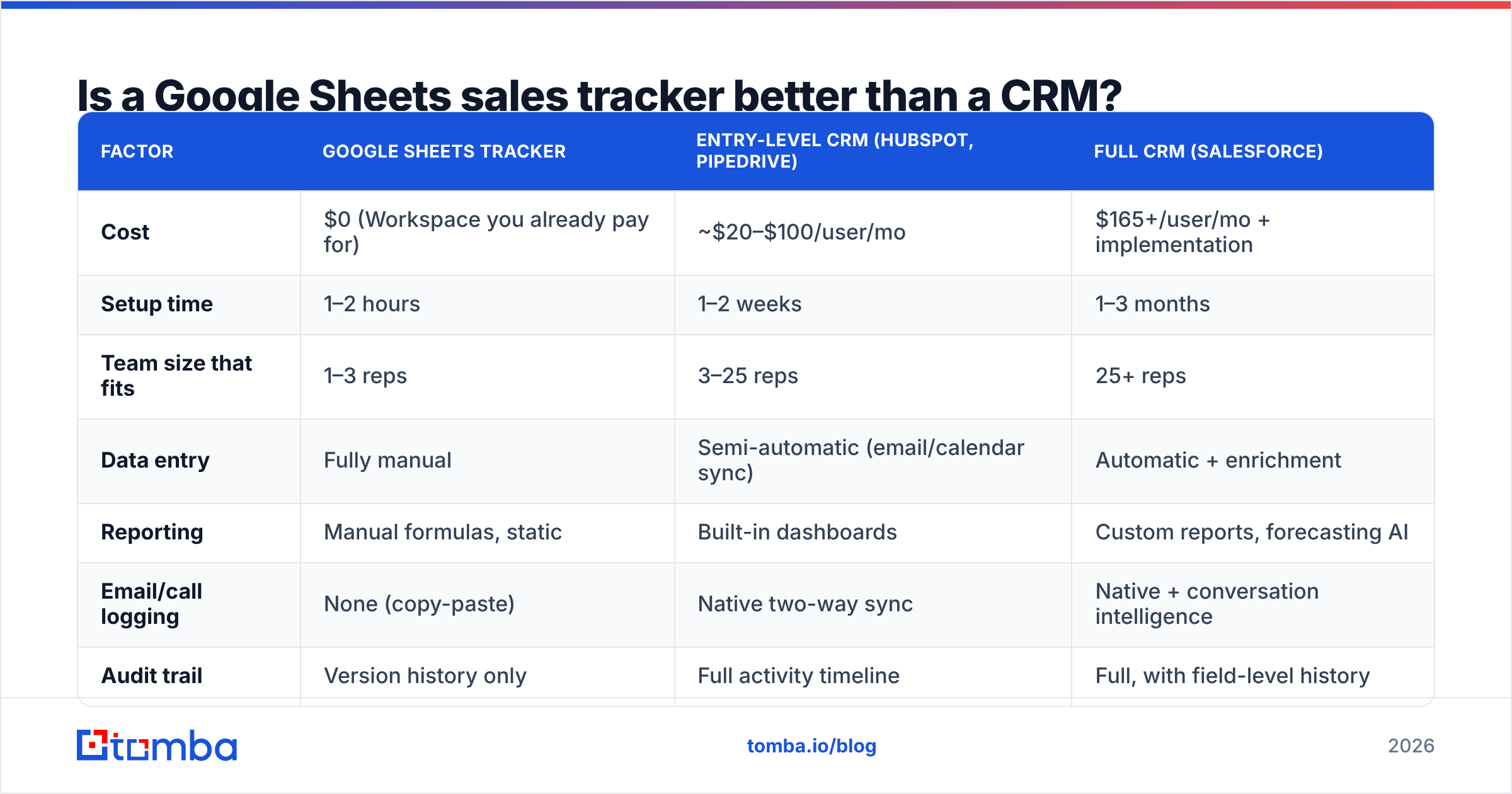
| Factor | Google Sheets tracker | Entry-level CRM (HubSpot, Pipedrive) | Full CRM (Salesforce) |
|---|---|---|---|
| Cost | $0 (Workspace you already pay for) | ~$20–$100/user/mo | $165+/user/mo + implementation |
| Setup time | 1–2 hours | 1–2 weeks | 1–3 months |
| Team size that fits | 1–3 reps | 3–25 reps | 25+ reps |
| Data entry | Fully manual | Semi-automatic (email/calendar sync) | Automatic + enrichment |
| Reporting | Manual formulas, static | Built-in dashboards | Custom reports, forecasting AI |
| Email/call logging | None (copy-paste) | Native two-way sync | Native + conversation intelligence |
| Audit trail | Version history only | Full activity timeline | Full, with field-level history |
| Breaks at | ~300 open rows / 3 users | ~10k records | Effectively no limit |
| Customization | Unlimited, but you maintain it | Moderate | Extensive |
The pattern is clear: the spreadsheet wins on cost and speed-to-value, loses on automation and durability. The switching trigger isn't revenue — it's headcount plus manual-entry minutes. When your team spends more than about three hours a week collectively updating rows, a $50/user CRM is already cheaper than the time you're burning.
G2's CRM category is a reasonable place to shop when you do cross that line, and HubSpot's free CRM tier is the usual first stop for teams graduating from a sheet.

How do you keep the tracker's data from rotting?#
This is where most template guides stop and most trackers actually fail. A pipeline sheet is only as good as the contact rows feeding it, and B2B contact data decays fast — commonly cited estimates put annual decay somewhere north of 25% as people change jobs, companies rebrand, and domains get retired.
Three habits keep the sheet alive.
1. Verify before the row exists. Don't import a prospect list and hope. Run it through an email verifier first so bounced addresses never enter the tracker. A bounced send doesn't just waste a touch — it damages your sender reputation, which quietly suppresses every other email you send that week.
2. Enrich in place, not by hand. Copy-pasting emails from LinkedIn into a spreadsheet is the single biggest time sink in this workflow. Use a Sheets email finder add-on so you can paste a company domain and a name in columns A and B and get a verified email in column C. Same idea for B2B phone numbers if you're running a call motion.
3. Add a Data Checked column and a 90-day rule. Any row whose Data Checked date is older than 90 days gets re-verified or archived. Conditional-format it red. Ruthless archiving is what keeps the sheet fast and believable.
There's a fourth habit worth naming: never let the tracker be your only copy. Google Sheets version history is decent, but it isn't a backup strategy. Export a dated CSV monthly.
What should the dashboard tab actually show?#
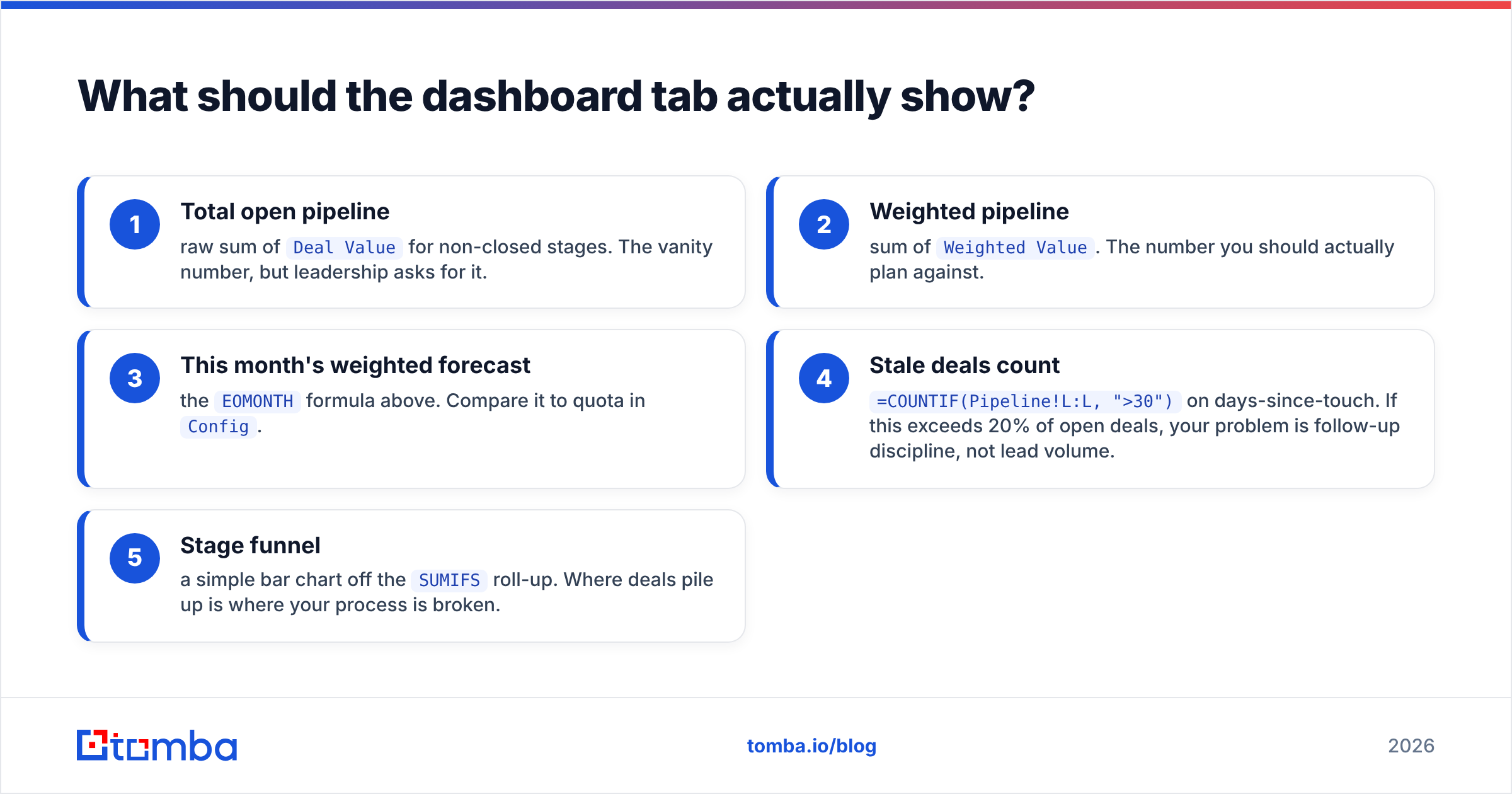
Five numbers, all above the fold, all formula-driven:
- Total open pipeline — raw sum of
Deal Valuefor non-closed stages. The vanity number, but leadership asks for it. - Weighted pipeline — sum of
Weighted Value. The number you should actually plan against. - This month's weighted forecast — the
EOMONTHformula above. Compare it to quota inConfig. - Stale deals count —
=COUNTIF(Pipeline!L:L, ">30")on days-since-touch. If this exceeds 20% of open deals, your problem is follow-up discipline, not lead volume. - Stage funnel — a simple bar chart off the
SUMIFSroll-up. Where deals pile up is where your process is broken.
Add one chart: weighted pipeline by expected close month, as a column chart. It shows you the air pocket two months out, which is the only forecasting insight most small teams need.
Resist adding cohort analysis, lead-source attribution, or velocity-by-segment to a spreadsheet. Those are legitimate questions — they're just questions a spreadsheet answers badly. When you find yourself wanting them, that's your CRM signal.
How does this fit a broader outbound workflow?#
The tracker is the middle of the machine, not the whole thing. A working setup looks like this:
- Sourcing — build target account lists, then find the decision-makers. A domain search turns a company domain into a list of named contacts with role context, which is faster than hunting profile by profile.
- Verification — every address gets checked before it enters the sheet. Catch-all domains get a separate pass so you're not guessing.
- Tracking — the Google Sheets template above. Stage, value, next step, last touch.
- Sequencing — your sending tool of choice pulls from the sheet or a CSV export.
- Review — a weekly 20-minute pass: archive stale rows, update stages, sanity-check the forecast.
That weekly review is non-negotiable. A tracker nobody audits becomes fiction within a month, and a fictional forecast is worse than no forecast — it makes people plan hiring and spend against numbers that were never real.
One more note on scale. If you're pulling more than a few hundred contacts a month, do it in batches rather than one lookup at a time. A bulk email finder run against a CSV of company domains will populate a quarter's worth of pipeline rows in a single pass, and you can drop the output straight into the Pipeline tab.
When should you finally leave the spreadsheet?#
Four signals, any one of which is enough:
- You've hired a fourth rep. Concurrent editing conflicts and ownership disputes start here.
- Someone asks "what did we say to this account in March?" and nobody can answer. Spreadsheets don't hold conversation history.
- You need automated follow-up reminders. Conditional formatting is a passive nudge; it doesn't ping anyone.
- You're reconciling the sheet against invoices manually. That's a two-system problem a CRM with billing integration solves.
Until then, the spreadsheet is not a compromise. It's the correct tool. Plenty of teams have run to their first million in ARR on a sheet exactly like the one described above, and the discipline it forces — you must decide the next step for every deal, by hand — is genuinely valuable training for when you do adopt a real system.
Build it once, then feed it well#
The template takes an hour. Four tabs, six formulas, one chart. The part that determines whether it's still in use next quarter isn't the structure — it's whether the emails and phone numbers in it are real.
Start your Pipeline tab with contacts you've actually verified. Use the Tomba Email Finder to turn a name and company domain into a confirmed, deliverable address before it ever reaches row 2 — the free tier covers 25 searches a month if you just want to test the workflow, and paid plans start at $49/mo on the Starter tier. Check the current Tomba pricing if you're sizing a bigger list build.
A clean tracker with 80 verified contacts will outperform a bloated one with 800 guesses. Build small, verify everything, review weekly.
Related guides#
Ready to find emails that actually work?
Join 150,000+ professionals who stopped guessing and started sending. Free credits on signup — no credit card required.
Get the Tomba newsletter
Practical outbound tactics and product updates — once every two weeks.
About the author