Grain Pricing Reviews Pros and Cons for Sales Teams (2026)
Grain looks cheap at the seat level and expensive at the org level. Here is what the pricing tiers actually include, where the costs hide, and when a cheaper notetaker wins.
Grain pricing reviews pros and cons come down to one gap: the seat price looks small, and the org-level bill does not. Here is what each plan costs, where the extra seats hide, and when the budget belongs somewhere else.
TL;DR
- Grain is a per-seat AI meeting recorder. The list price looks small. The org-level bill does not, because everyone who joins a call usually needs a seat.
- The free plan works for solo founders and tiny teams. It caps AI notes and storage, so most reviewers hit the ceiling inside a month.
- Pros: fast setup, clean highlight clips, CRM push on paid tiers, and a much lower entry price than Gong-class platforms.
- Cons: per-seat billing that punishes wide adoption, annual-only discounts, coaching gated to the top tiers, and no help filling your calendar.
- Grain is worth it if each rep records 10+ external calls a week. If your problem is empty pipeline, spend the budget upstream.
What is Grain and who is it actually for?#
Grain records, transcribes, and summarizes video meetings. It then turns the interesting parts into shareable clips and CRM-ready notes. It sits in the AI notetaker group, next to Fireflies, Fathom, and Otter. That is one rung below full revenue-intelligence suites like Gong or Chorus.
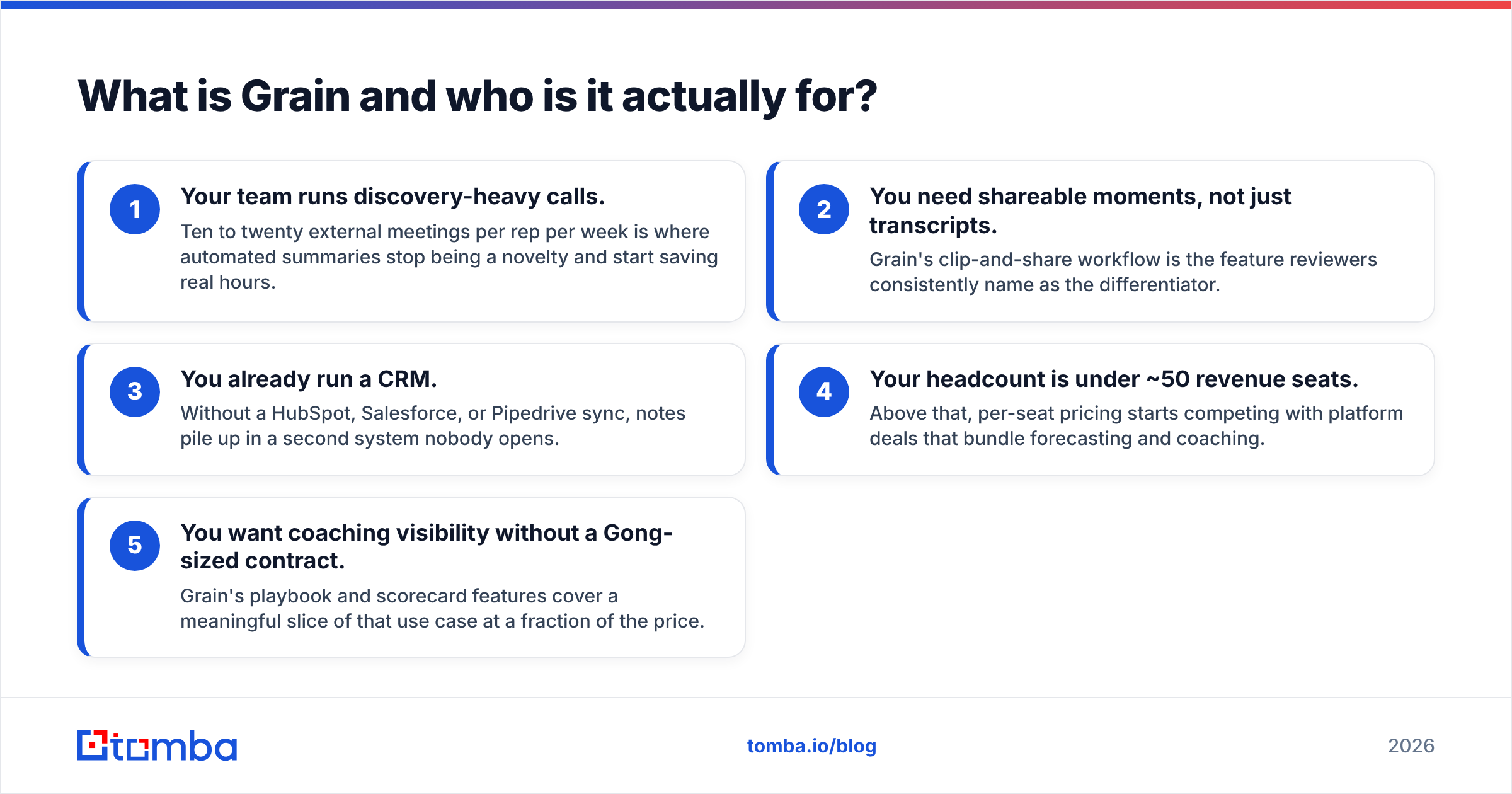
The buyer profile is narrower than the marketing suggests. Grain fits best when:
- Your team runs discovery-heavy calls. Ten to twenty external meetings per rep per week is where automated summaries stop being a novelty and start saving real hours.
- You need shareable moments, not just transcripts. Grain's clip-and-share workflow is the feature reviewers consistently name as the differentiator.
- You already run a CRM. Without a HubSpot, Salesforce, or Pipedrive sync, notes pile up in a second system nobody opens.
- Your headcount is under ~50 revenue seats. Above that, per-seat pricing starts competing with platform deals that bundle forecasting and coaching.
- You want coaching visibility without a Gong-sized contract. Grain's playbook and scorecard features cover a meaningful slice of that use case at a fraction of the price.
If two of those five don't describe you, the honest answer is that a free tier — Grain's or a competitor's — will carry you further than a paid rollout.
How much does Grain cost in 2026?#
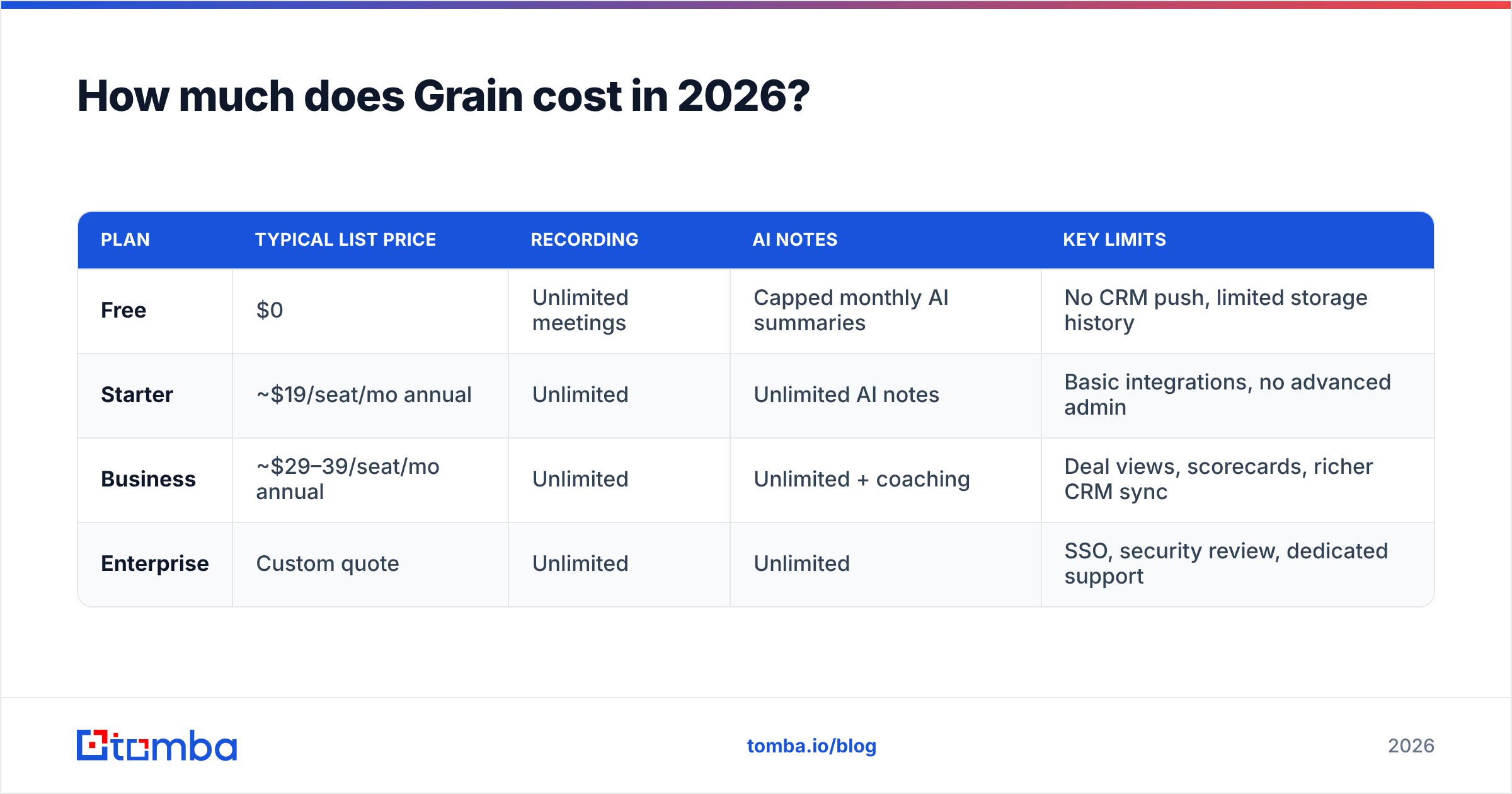
Grain publishes list pricing on grain.com/pricing. Like most seat-based SaaS, the headline number is the annual rate. Month-to-month runs 25–30% higher. Always check the vendor page before you build a budget, because tiers move.
| Plan | Typical list price | Recording | AI notes | Key limits |
|---|---|---|---|---|
| Free | $0 | Unlimited meetings | Capped monthly AI summaries | No CRM push, limited storage history |
| Starter | ~$19/seat/mo annual | Unlimited | Unlimited AI notes | Basic integrations, no advanced admin |
| Business | ~$29–39/seat/mo annual | Unlimited | Unlimited + coaching | Deal views, scorecards, richer CRM sync |
| Enterprise | Custom quote | Unlimited | Unlimited | SSO, security review, dedicated support |
Two structural details matter more than the numbers themselves.
First, seats are per participant, not per recorder. If a solutions engineer, an AE, and a manager all want their own view of the same call library, that's three seats. Teams budget one seat for the note taker. Then the bill lands at three or four times the plan.
Second, the discount ladder is annual-only. There is no meaningful monthly discount, so the cheap price you see in reviews is a 12-month commitment. That's normal for the category. It just means the trial-to-contract jump is bigger than it looks.
What do Grain pricing reviews get right about the pros?#
Verified reviews on G2 and similar directories repeat the same four praise themes. Any honest list of grain pricing reviews pros and cons starts here.
Time-to-value is genuinely short. Grain connects to a calendar and starts joining calls the same day. There's no implementation project, no CSM onboarding sequence, no data-mapping workshop. For a five-person team, you can be live before lunch.
The clip workflow is best-in-class for its price band. Pulling a 40-second objection out of a 50-minute call and dropping it into Slack is the single feature reviewers cite most. Competitors do transcripts well; fewer do highlights well.
The free tier is not a demo in disguise. Unlimited recording with capped AI summaries is a usable product for a solo consultant. Plenty of tools in this category gate recording itself, which makes evaluation impossible.
The price gap versus enterprise revenue intelligence is real. A Gong-class rollout usually starts in the five figures a year, with platform fees on top of seats. Grain's Business tier covers a decent slice of the call-review and coaching workflow at roughly a tenth of that cost. For teams under 30 reps, that trade is often correct.
What are the cons that keep showing up?#
The criticisms are less about the product and more about how the pricing model meets a real org chart.
Per-seat billing punishes exactly the behavior the product wants. Grain's value grows when marketing, product, and support all watch customer calls. But every new viewer is another seat. So teams ration access. The call library becomes a sales-only tool, and that undercuts the voice-of-customer pitch that justified the purchase.
Feature gating pushes small teams to the middle tier. CRM sync, deal views, and coaching scorecards are the reasons most teams buy. Those sit on Business, not Starter. In practice, the Starter tier is a stepping stone rather than a destination, so model your budget at the Business rate from day one.
Accuracy slips in the usual places. Heavy accents, cross-talk, and industry jargon still produce transcript errors, and AI summaries inherit those errors. This is not unique to Grain. Every tool in the category has the same ceiling. Still, reviewers who expected magic report disappointment.
Storage and retention need reading carefully. Lower tiers trim how far back your library goes. If your sales cycle is nine months, a rolling retention window means the discovery call you want to revisit at contract time may be gone.
It solves a downstream problem. Grain makes the meetings you already booked more useful. It does nothing to book more of them. That's a scope statement, not a flaw. But it is the most common source of buyer's remorse, because teams with a top-of-funnel problem buy a bottom-of-funnel tool.
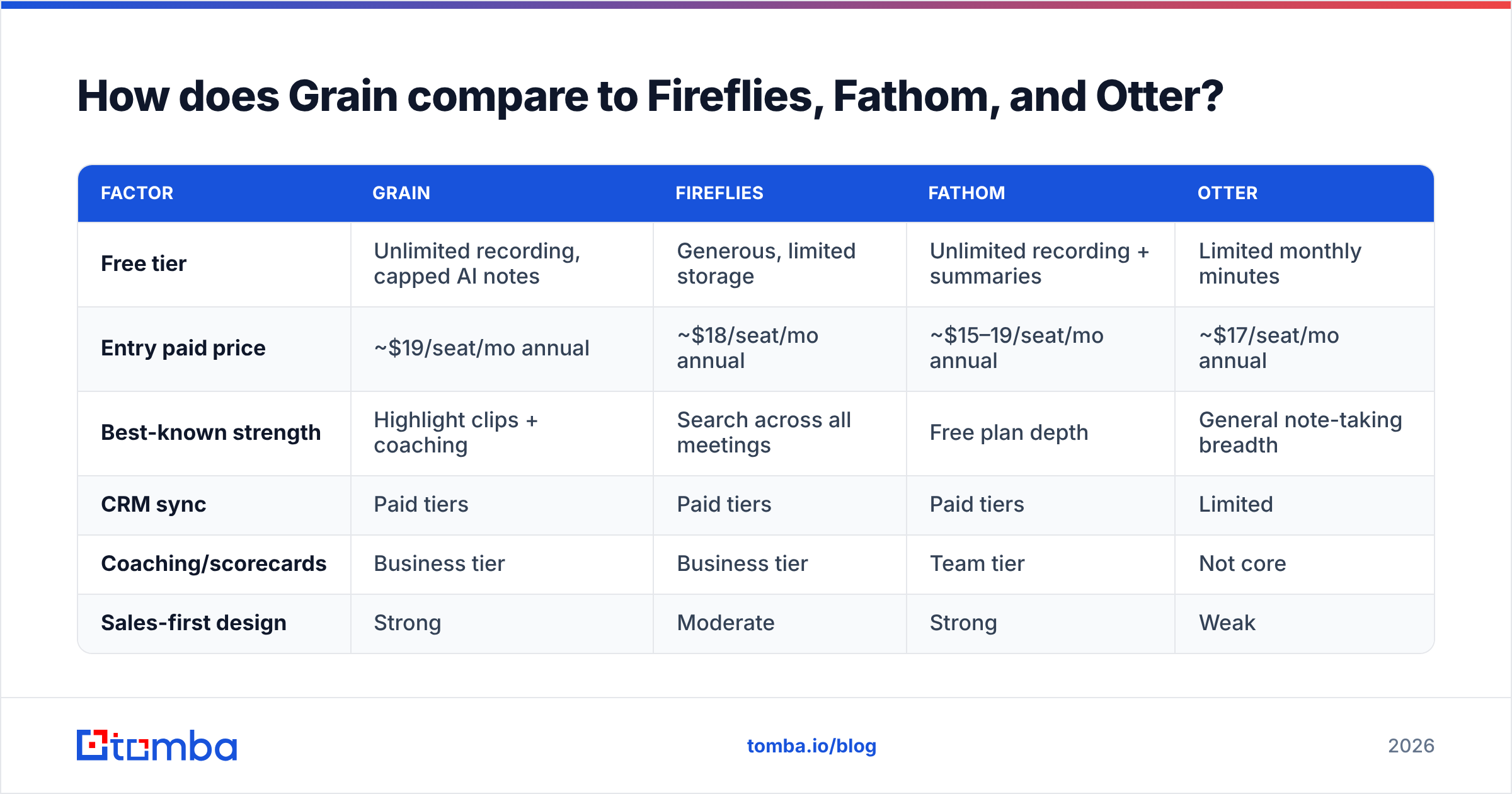
How does Grain compare to Fireflies, Fathom, and Otter?#
| Factor | Grain | Fireflies | Fathom | Otter |
|---|---|---|---|---|
| Free tier | Unlimited recording, capped AI notes | Generous, limited storage | Unlimited recording + summaries | Limited monthly minutes |
| Entry paid price | ~$19/seat/mo annual | ~$18/seat/mo annual | ~$15–19/seat/mo annual | ~$17/seat/mo annual |
| Best-known strength | Highlight clips + coaching | Search across all meetings | Free plan depth | General note-taking breadth |
| CRM sync | Paid tiers | Paid tiers | Paid tiers | Limited |
| Coaching/scorecards | Business tier | Business tier | Team tier | Not core |
| Sales-first design | Strong | Moderate | Strong | Weak |
The honest read: at the entry price point these four are close enough that pricing shouldn't decide it. Pick on workflow. If you share clips, Grain. If you search transcripts across hundreds of meetings, Fireflies. If your budget is genuinely zero, Fathom's free plan is the most generous in the category. If you take notes in non-sales contexts too, Otter.
Where the decision flips is at scale. Past roughly 40 seats, the per-seat math on any of them starts approaching a platform deal, and you should at least price the tier above.
Where does the real cost hide in Grain pricing?#
Most grain pricing reviews pros and cons lists stop at the sticker price. Run the math before the demo, not after.
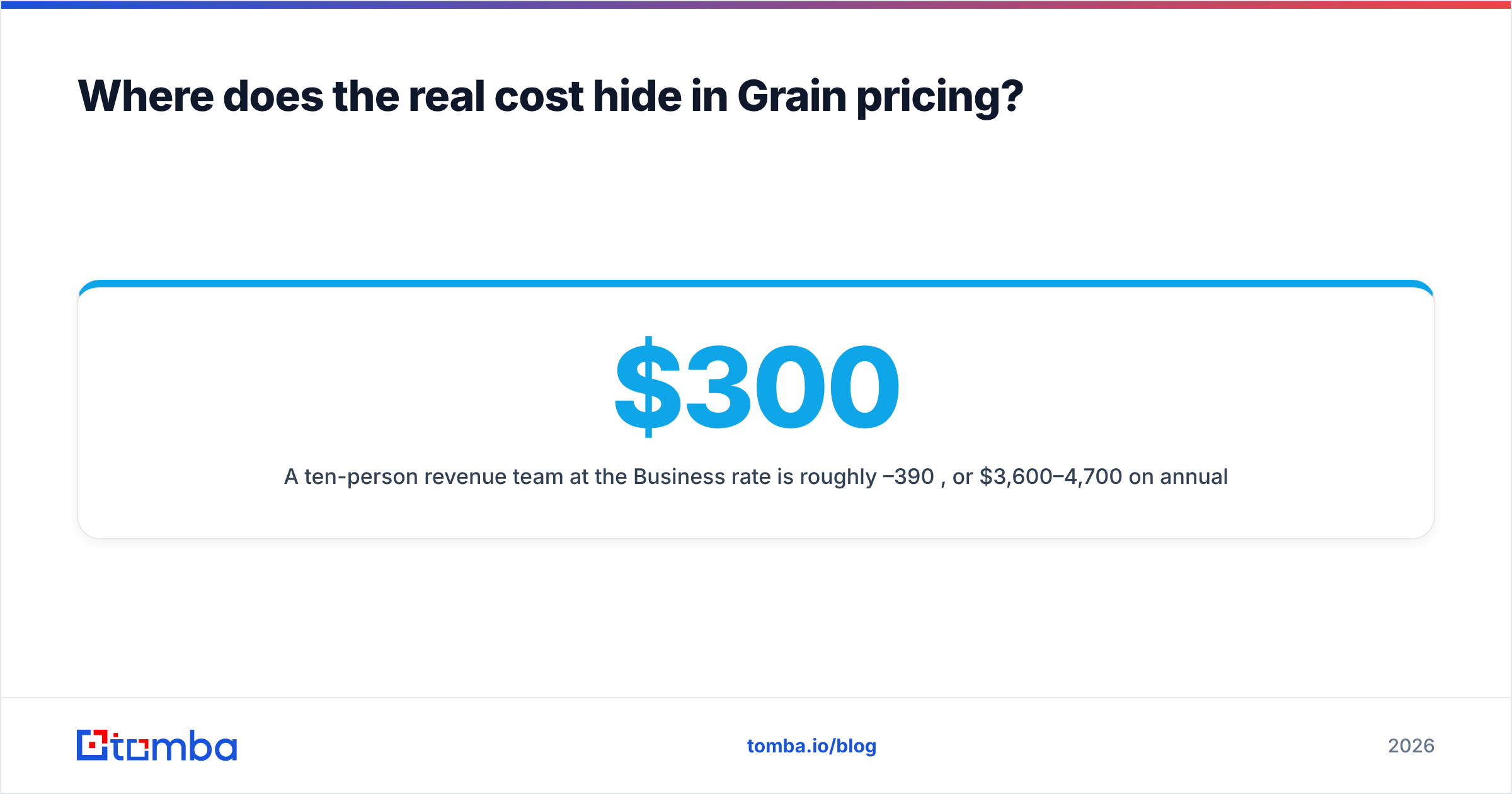
A ten-person revenue team at the Business rate is roughly $300–390 per month, or $3,600–4,700 per year on annual billing. Add the three non-quota-carrying people who want access — a founder, a product manager, a CS lead — and you're at 13 seats and past $6,000. That's not unreasonable for the value. It is just a different conversation than $29 a seat.
Then the second-order costs:
- Adoption gaps. Seats that record but never get reviewed are pure waste. Reviewers who churn almost always describe the same pattern: strong first month, silent third month.
- Duplicate tooling. If your CRM already summarizes calls, or your dialer includes recording, you may be paying twice for the same transcript.
- Annual lock-in. The discount that makes the price attractive is also what makes a mid-year change expensive.
- The opportunity cost. Every dollar in call intelligence is a dollar not spent on contact data, sending infrastructure, or headcount.

That last point deserves the most attention, because it's where the budget conversation usually goes wrong.
Is Grain worth it, or should the budget go upstream?#
Conclusion first: buy Grain when your calendar is full and your notes are a mess. Don't buy it when your calendar is empty.
An AI notetaker multiplies the value of existing meetings. If a rep runs 15 calls a week, saving 20 minutes of admin per call is real money. If that same rep runs three calls a week, you've bought a $350/month transcription service. The bottleneck — not enough qualified conversations — is untouched.
The diagnostic is simple. Look at your last full quarter and ask which number is embarrassing: meetings booked, or meetings converted. If it's conversion, call intelligence is a defensible buy. If it's booking, the money belongs at the top of the funnel.
That's a different toolchain. A prospecting stack usually runs a domain search to map who works at a target account. An email verifier strips the addresses that will bounce. Then data enrichment fills in the title and company fields your sequencer needs. Those tools are credit-based, not seat-based, so the cost scales with output instead of headcount. That is the opposite of the Grain model.
For teams running both, the sequencing matters: fix the input before you optimize the output. A perfectly summarized call library built on 30 meetings a quarter is an expensive filing cabinet.
What should you check before signing a Grain contract?#
Five questions, in order:
- How many people actually need a seat? Count viewers, not recorders. Multiply by the Business rate, not the Starter rate.
- Does the CRM sync write where you need it? Integrating with HubSpot and writing a structured summary to the deal record are different claims. Test it in trial. HubSpot's own docs are worth a read first.
- What's the retention window on your tier? Match it to your sales cycle. A short window loses the calls you need most at renewal time.
- Can you export? Transcripts and summaries are your data. Confirm a bulk export path before you commit a year of call history.
- What breaks if adoption is 50%? Model the contract at half usage. If the ROI still works, it is a safe buy. If it only works at full adoption, you are betting on behavior change.
Most teams that regret the purchase skipped question one and question five.
Grain pricing reviews pros and cons: the final verdict#
Grain is fairly priced for what it does. It is correctly positioned between free notetakers and enterprise revenue platforms. The pros — quick setup, a strong clip workflow, real coaching features at a mid-market price — are genuine. The cons are structural rather than product flaws: per-seat billing that discourages wide access, mid-tier gating on the features most buyers want, and an annual commitment that makes mistakes expensive.
Recommendation by team shape:
- Solo or two-person team: free tier, or Fathom's free plan. Don't pay yet.
- 5–15 reps with full calendars: Business tier is a defensible line item. Model it at 1.3x your rep count.
- 30+ reps: price Grain Business against a platform deal. The gap narrows faster than you expect.
- Any team with a booking problem, not a conversion problem: skip it this quarter. Spend the money on data and volume, revisit in two quarters when the calendar justifies it.
If your audit lands in that last bucket, start where the funnel actually leaks. Tomba's Email Finder finds verified work addresses by name, domain, or company, so your reps have someone to call. The free tier gives 25 searches a month, and paid plans start at $49/mo. You can test the top of the funnel before you commit a year of per-seat spend downstream. Full Tomba pricing is public, and the Tomba API drops the same lookups into whatever sequencer or CRM you already run.
Related guides#
Ready to find emails that actually work?
Join 150,000+ professionals who stopped guessing and started sending. Free credits on signup — no credit card required.
Get the Tomba newsletter
Practical outbound tactics and product updates — once every two weeks.
About the author