Great Email Subject Lines: What Actually Gets Opened in 2026
Most subject line advice is recycled folklore. Here is what the open-rate data, Apple Mail Privacy Protection, and reply-rate testing actually show about writing great email subject lines in 2026.
TL;DR
- Open rate is no longer a trustworthy scoreboard. Apple Mail Privacy Protection auto-opens messages, so a chunk of your "opens" never happened. Judge subject lines by reply rate and positive-reply rate instead.
- Great email subject lines are short (2–5 words for cold outbound), lowercase-leaning, specific to the recipient, and make no promise the body can't keep.
- The single biggest lever is not wording. It's whether the message reaches the inbox at all — a bad list kills good copy every time.
- Four formulas cover roughly 90% of high-performing B2B subject lines: the question, the referral, the observation, and the plain noun phrase.
- Test one variable at a time across at least 400 sends per variant, or you're reading noise.
Why do most subject line guides give you bad advice?#
Because they optimize for the wrong metric.
Almost every "127 subject lines that get 80% open rates" post is built on open-rate data collected before September 2021, when Apple shipped Mail Privacy Protection. MPP pre-fetches images on Apple's servers, which fires your tracking pixel whether or not a human ever looked at the message. Apple Mail accounts for a large share of B2B inbox traffic, and Gmail's image proxy adds its own distortion.
The practical result: your reported open rate is inflated by an unknowable amount, and it varies by audience composition. A list heavy on Apple Mail users will show 70% opens. The same copy sent to a Outlook-heavy enterprise list shows 34%. Neither number tells you whether the subject line worked.
So what's left? Reply rate, positive-reply rate, and meetings booked. These are harder to game and impossible to fake with a pre-fetch. When this post says a subject line "performs," it means it moved replies — not pixels.
There's a second problem with the listicle genre: subject lines don't work in isolation. A subject line is a promise, the preview text is the elaboration, and the first line of the body is the payment. Break any link in that chain and the other two stop mattering.
What makes a subject line actually great?#
Six attributes show up consistently in lines that earn replies. Not all six at once — that would be exhausting — but the good ones hit at least three.
- Short enough to survive mobile truncation. iOS Mail shows roughly 35–40 characters in portrait. Gmail on Android shows a bit more. Anything past character 45 is decoration for most readers. Cold outbound performs best at 2–5 words.
- Specific to one recipient. "Quick question" is invisible because everyone sends it. "your Q3 hiring page" is specific enough that the reader assumes a human wrote it.
- Congruent with the body. If your subject says "pricing question" the first sentence had better contain a pricing question. Incongruence is the fastest route to the spam button.
- Free of manufactured urgency. "ACT NOW," "LAST CHANCE," and "URGENT" are spam-filter bait and reader repellent in B2B. Save urgency for a real deadline.
- Written like an internal email. Colleagues write "notes from tuesday," not "Unlock Your Team's Full Potential." Lowercase and sentence case both outperform Title Case in cold outbound because they mimic peer-to-peer mail.
- Curiosity without a gap gimmick. A subject line should raise a question the body immediately answers. It should not withhold information to force an open — readers punish that with unsubscribes.
Which subject line formulas actually perform?#
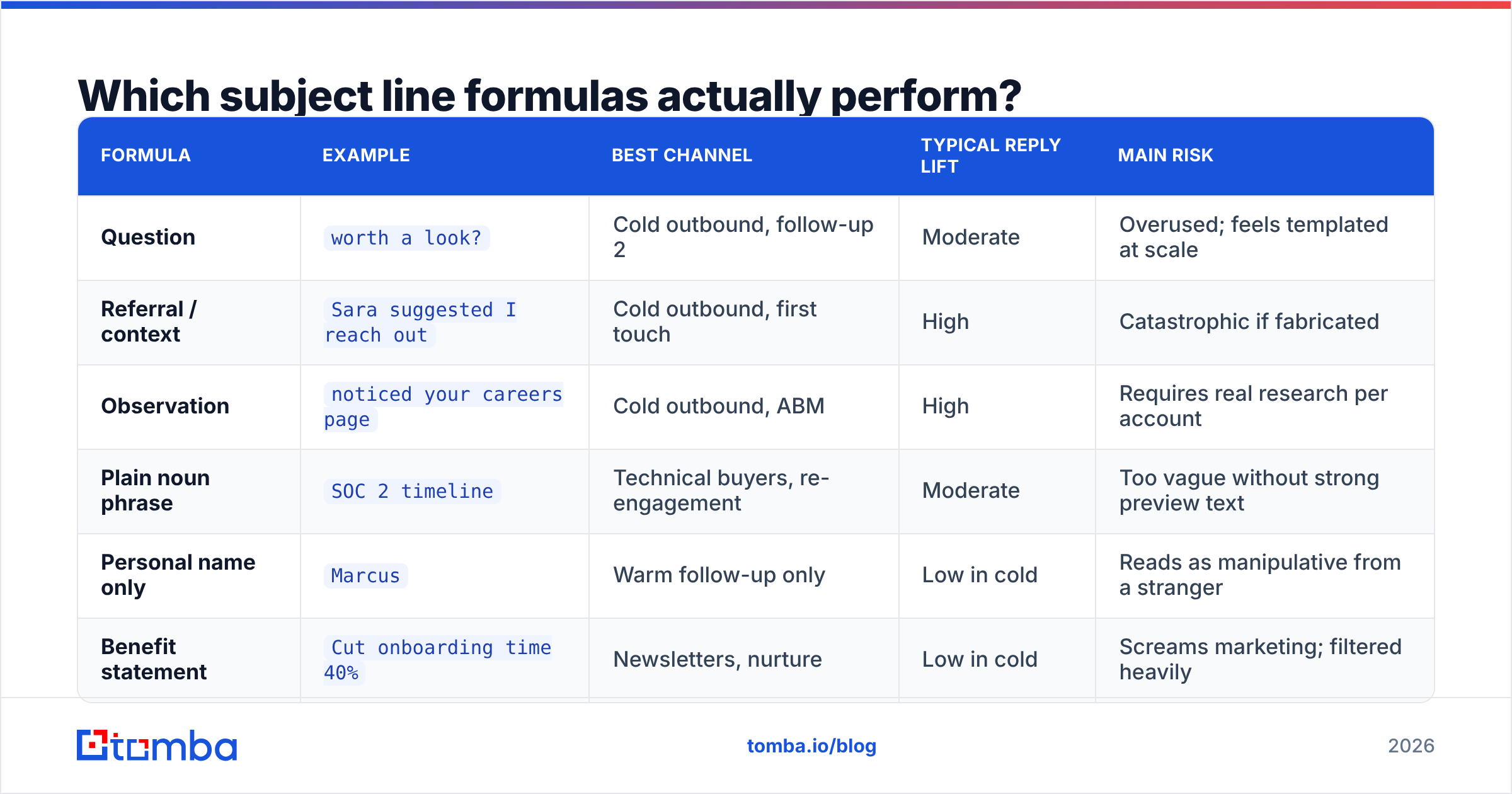
Four patterns cover most of what works in B2B. Everything else tends to be a variation.
The question. "worth a look?" / "wrong person?" / "still using Salesloft?" Questions imply a conversation is already underway. They also invite a one-word reply, which is a very low bar to clear.
The referral or context anchor. "Sara suggested I reach out" / "from your webinar Thursday." These work because they answer the reader's first unconscious question — why is this in my inbox? Only use them when true. A fabricated referral is the fastest way to burn a domain's reputation with an entire company.
The observation. "noticed your careers page" / "your pricing page vs Stripe's." You've done homework. The subject line proves it before the body has to.
The plain noun phrase. "invoice automation" / "SOC 2 timeline" / "warehouse routing." No verb, no pitch, no punctuation. Reads like an internal thread title. Surprisingly strong on technical buyers who are allergic to marketing language.
Here's how the four compare on the dimensions that actually matter for cold outbound:
| Formula | Example | Best channel | Typical reply lift | Main risk |
|---|---|---|---|---|
| Question | worth a look? |
Cold outbound, follow-up 2 | Moderate | Overused; feels templated at scale |
| Referral / context | Sara suggested I reach out |
Cold outbound, first touch | High | Catastrophic if fabricated |
| Observation | noticed your careers page |
Cold outbound, ABM | High | Requires real research per account |
| Plain noun phrase | SOC 2 timeline |
Technical buyers, re-engagement | Moderate | Too vague without strong preview text |
| Personal name only | Marcus |
Warm follow-up only | Low in cold | Reads as manipulative from a stranger |
| Benefit statement | Cut onboarding time 40% |
Newsletters, nurture | Low in cold | Screams marketing; filtered heavily |
Note the last two rows. Both are staples of subject-line listicles and both underperform in cold outbound. The name-only subject works when the recipient already knows you and fails when they don't. The benefit statement works in a nurture sequence where the reader opted in and fails cold, because a stranger asserting a percentage improvement is indistinguishable from every other stranger.
How long should a subject line be?#
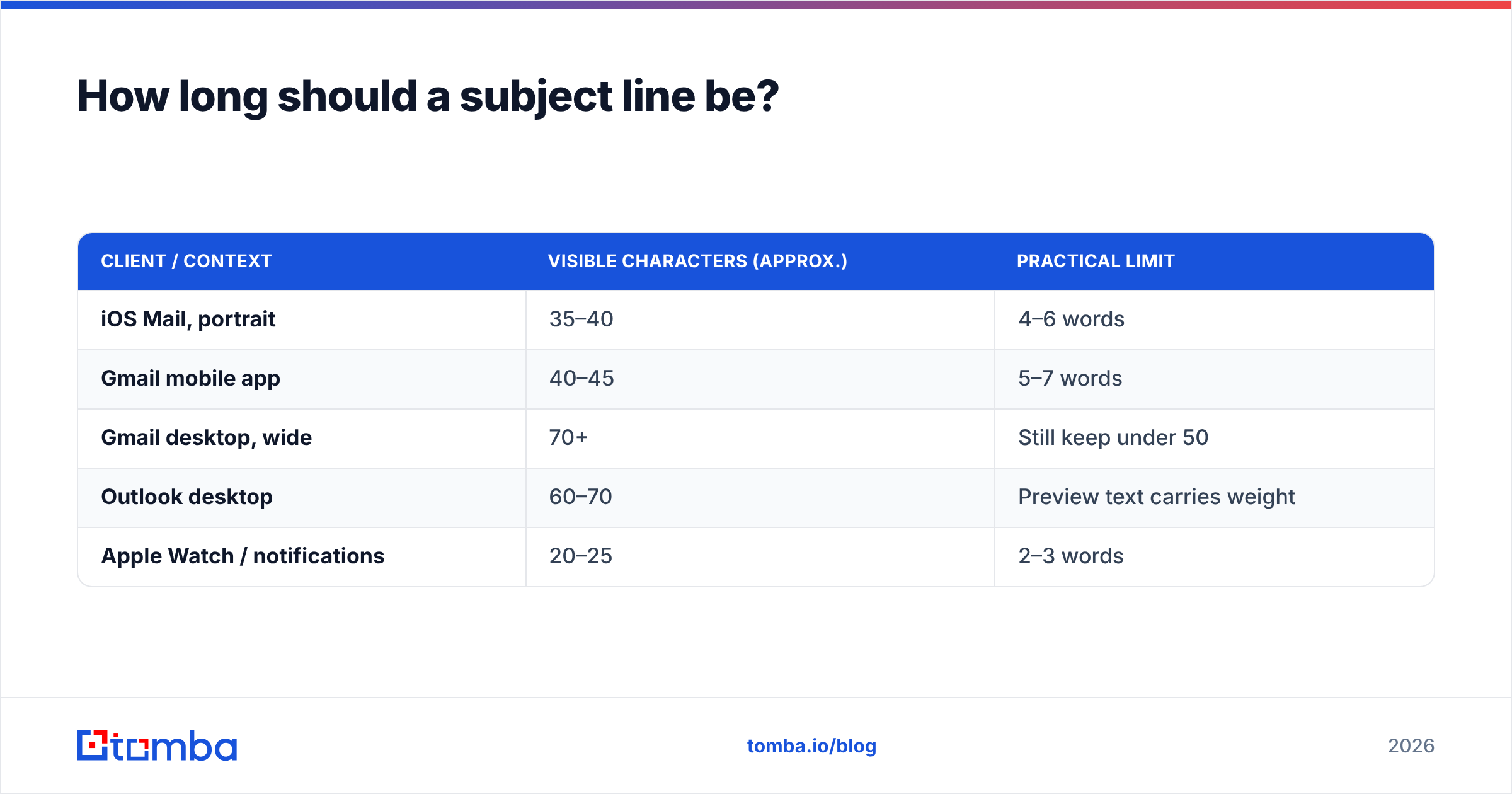
Shorter than you think, and the reason is mechanical rather than psychological.
| Client / context | Visible characters (approx.) | Practical limit |
|---|---|---|
| iOS Mail, portrait | 35–40 | 4–6 words |
| Gmail mobile app | 40–45 | 5–7 words |
| Gmail desktop, wide | 70+ | Still keep under 50 |
| Outlook desktop | 60–70 | Preview text carries weight |
| Apple Watch / notifications | 20–25 | 2–3 words |
The safest planning number is 40 characters. Write the line, count it, and if it exceeds 40 ask whether the extra words are load-bearing. They usually aren't.
Preview text (the preheader) is the underused half of this equation. Most senders let it default to the first line of the body, which means readers see "Hi {{FirstName}}, I hope this email finds you..." as the elaboration of a carefully written subject. Set preview text deliberately. Treat it as sentence two of a two-sentence hook.
Does personalization in the subject line still work?#
Partially — and much less than the merge-tag era assumed.
Inserting {{FirstName}} into a subject line is now so common it carries no signal. Readers have learned that "Marcus, quick question" means a machine sent it. What still works is personalization the reader can verify: a company event, a page on their site, a job posting, a recent funding round, a shared connection.
The gap between the two is research cost. Token personalization is free and worthless. Real personalization costs minutes per account and works. This is why account-based outbound at 50 emails per day routinely beats spray at 2,000 — the former can afford the observation subject line, the latter cannot.
If you're going to personalize at scale, personalize on a firmographic signal you can pull automatically. Job title, tech stack, headcount band, hiring velocity. A data enrichment step that appends those fields to your list lets you write four or five subject-line variants that each feel researched, without researching each account individually.
Why does your subject line not matter if your list is bad?#
Because filters run before humans do.
A subject line can only be judged by someone who receives the email. If your list contains 18% invalid addresses, your bounce rate spikes, your domain reputation drops, and Google starts routing your mail to spam — where the subject line is read by nobody. At that point A/B testing copy is like repainting a car with no engine.
The order of operations that actually improves reply rate:
- Clean the list. Remove invalids, role accounts, and spam traps before the first send. Run the list through an email verifier and treat anything below "deliverable" as excluded, not as a gamble.
- Handle catch-all domains explicitly. Catch-all servers accept everything, so standard verification returns "unknown." A dedicated catch-all verifier narrows that band instead of letting you guess.
- Authenticate the domain. SPF, DKIM, and DMARC configured correctly. Google and Yahoo's bulk-sender rules made this non-optional in 2024, and enforcement tightened since.
- Warm the sending domain. Ramp volume gradually. A brand-new domain sending 500 cold emails on day one is a deliverability failure regardless of copy quality.
- Then test subject lines. Only now does the copy variable become measurable, because the denominator is stable.
Skipping straight to step five is the most common mistake in outbound. It's also the most seductive, because writing subject lines is fun and list hygiene is not.
Worth checking your sender reputation before you conclude a subject line failed. Sometimes the copy was fine and the domain was the problem.
How should you test subject lines properly?#
One variable, adequate volume, and reply rate as the outcome. That's the entire method.
One variable. If variant A is "worth a look?" and variant B is "Hi Marcus — I noticed your team is hiring three SDRs, worth a quick chat about pipeline coverage?", you haven't tested a subject line. You've tested length, personalization, punctuation, and tone simultaneously, and you'll learn nothing transferable.
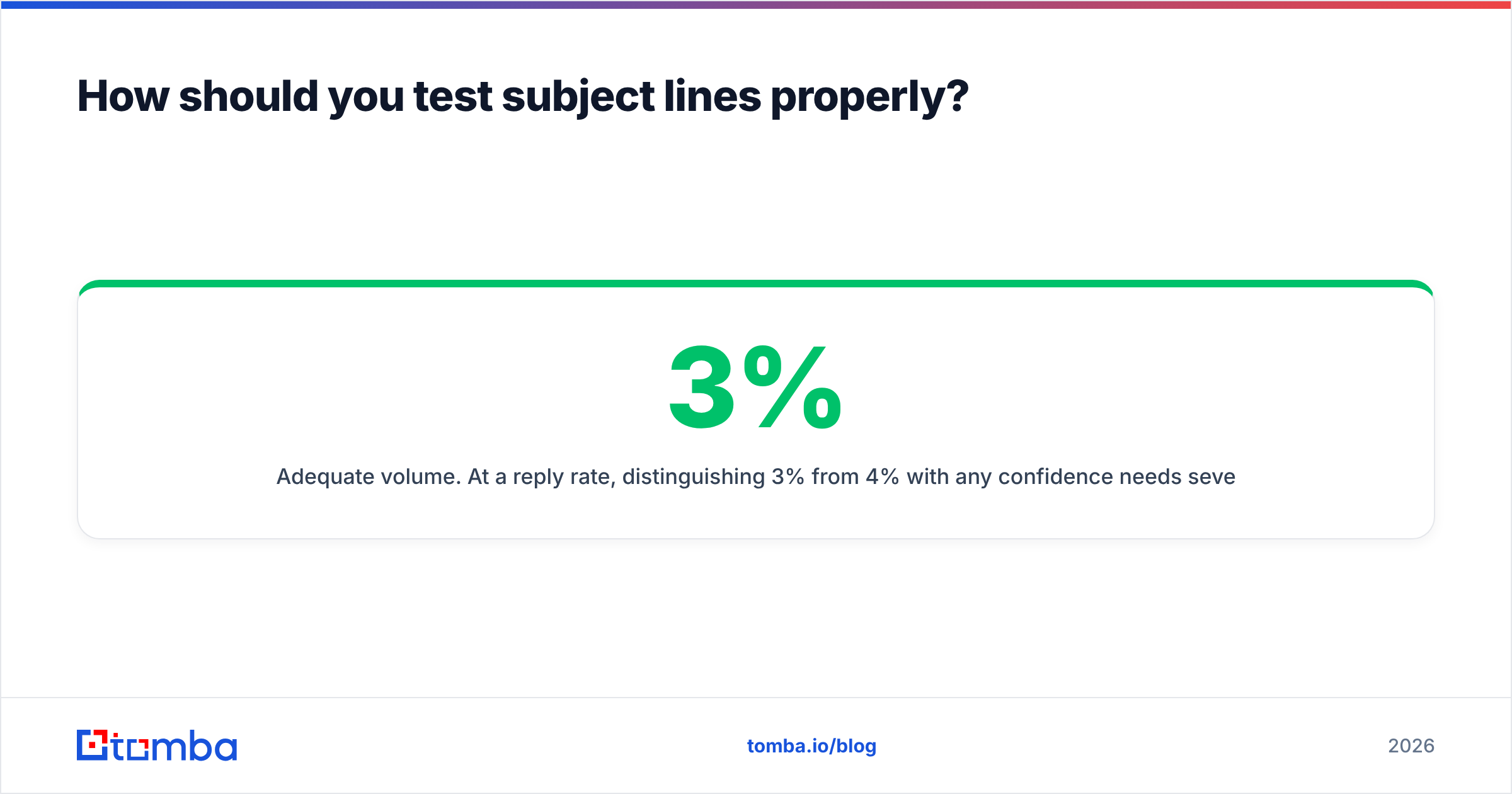
Adequate volume. At a 3% reply rate, distinguishing 3% from 4% with any confidence needs several hundred sends per variant. Under 200 sends per arm you are reading random variation and building superstitions. If your total list is 300 contacts, don't A/B test — pick the better-reasoned line and move on.
Reply rate as the outcome. Not opens, for the MPP reasons above. Ideally positive-reply rate, since "unsubscribe me" is technically a reply. Track meetings booked if your volume supports it.
Test in sequence position. A subject line that works as touch one often fails as touch three, and vice versa. Most sequence tools thread follow-ups under the original subject, which is usually correct — a fresh subject line on follow-up four resets the reader's context and loses the thread's accumulated familiarity.
For a starting point rather than a blank page, a subject line generator will produce variants you can then cut down and make specific. Generated lines are raw material, not finished copy — the specificity has to come from you.
What subject lines should you never send?#
A short blacklist, each with a reason rather than a vibe.
- "Quick question" — the single most-sent cold subject line in B2B. Zero differentiation, and some filters now weight it negatively.
- Anything in ALL CAPS — reads as shouting, triggers spam heuristics.
- "Re:" or "Fwd:" on a first touch — a lie about conversation history. Readers notice, and it converts a neutral prospect into an annoyed one.
- Emoji in cold B2B — fine in consumer newsletters, corrosive in enterprise outbound. Renders inconsistently in Outlook.
- Multiple punctuation marks — "Ready to grow?!" trips filters and reads as amateur.
- Free / guarantee / risk-free / act now — legacy spam vocabulary. Filters have moved on from strict keyword blocking, but these still correlate with junk in every model's training data.
- Anything longer than 60 characters — truncated everywhere that matters.
Run drafts through a spam checker before a large send. It won't catch tone problems, but it will catch the mechanical ones.
How do subject lines differ by email type?#
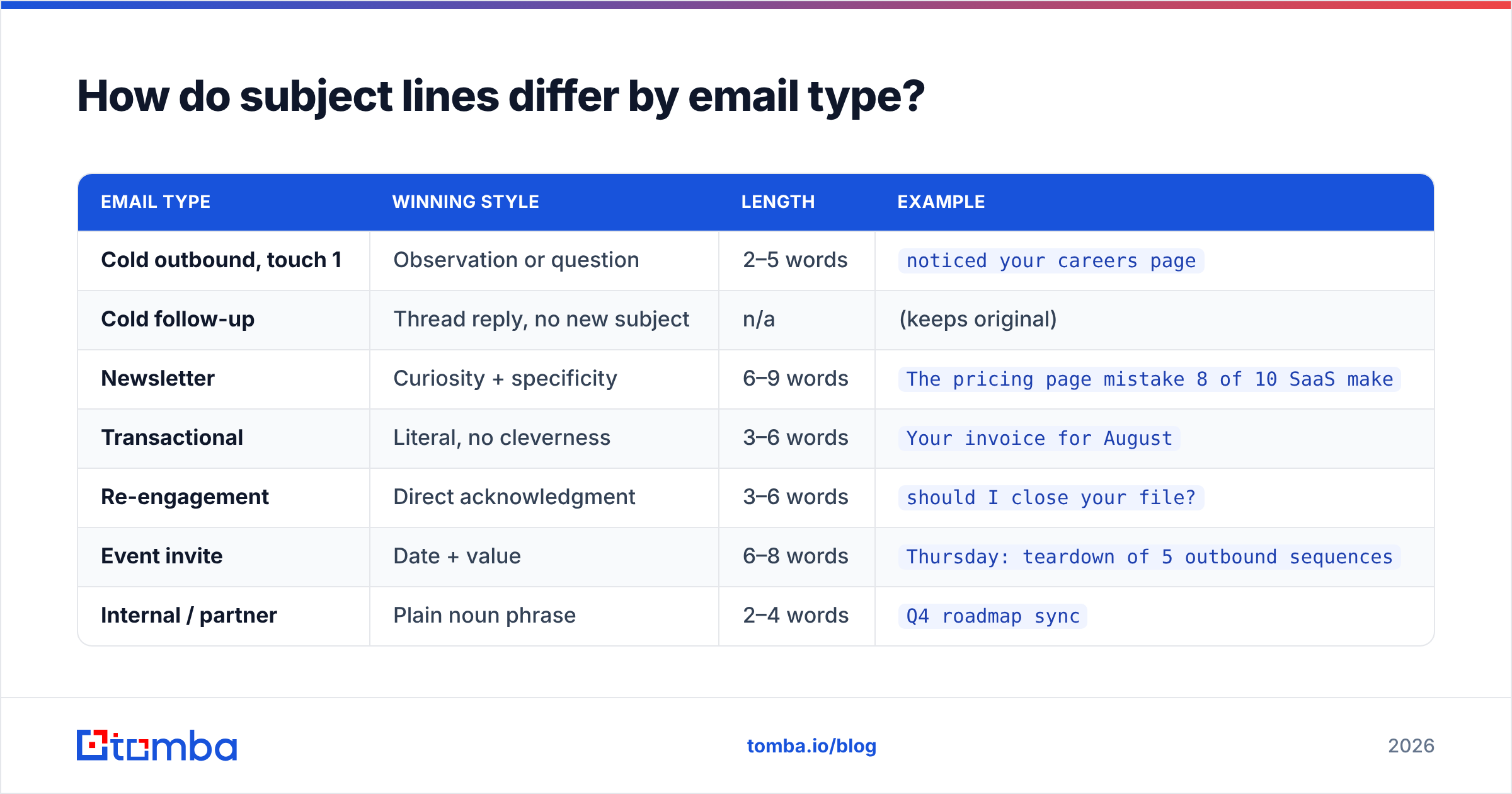
The formula that wins cold outbound loses in a newsletter. Match the pattern to the context.
| Email type | Winning style | Length | Example |
|---|---|---|---|
| Cold outbound, touch 1 | Observation or question | 2–5 words | noticed your careers page |
| Cold follow-up | Thread reply, no new subject | n/a | (keeps original) |
| Newsletter | Curiosity + specificity | 6–9 words | The pricing page mistake 8 of 10 SaaS make |
| Transactional | Literal, no cleverness | 3–6 words | Your invoice for August |
| Re-engagement | Direct acknowledgment | 3–6 words | should I close your file? |
| Event invite | Date + value | 6–8 words | Thursday: teardown of 5 outbound sequences |
| Internal / partner | Plain noun phrase | 2–4 words | Q4 roadmap sync |
The re-engagement row deserves a note. "Should I close your file?" and its cousins ("permission to close?") consistently outperform gentler alternatives, because they force a decision. They also occasionally irritate people. Use once per sequence, at the end, never as an opener.
What does the full workflow look like?#
Subject lines sit at step four of a five-step process. Skipping the first three is why most campaigns underperform.
- Build a targeted list. Narrow ICP, firmographic filters, no scraped bulk. Use domain search to pull contacts at accounts you've already qualified, rather than buying a list you can't explain.
- Verify and enrich. Drop invalids, resolve catch-alls, append the two or three fields your personalization depends on.
- Fix deliverability. Authentication, warmup, sending volume, dedicated domain.
- Write the subject line and body as one unit. Subject promises, preview elaborates, first sentence pays.
- Test, measure on replies, iterate monthly. Not weekly — you won't have volume for weekly significance.
Peer tools cover parts of this well. BookYourData is a solid option if you'd rather buy a pre-verified list than build one, and it's a reasonable complement to an in-house finding workflow. HubSpot handles sequence orchestration and reporting once your list is clean. Compare options on G2 before committing to an annual contract — the category moves fast and last year's leaderboard is stale.
Where does Tomba fit?#
Step one and step two, which is where the compounding returns are.
Great email subject lines are worth writing, but they multiply an existing number rather than creating one. A 40% relative improvement in reply rate is meaningless if only 60% of your list is reachable. Fix the denominator first.
Start with the Tomba Email Finder to build a list from domains and names you've actually qualified, then run it through verification before your first send. The free tier gives you 25 searches per month to test the workflow; Starter is $49/mo and Growth is $99/mo if you need volume — full Tomba pricing is public, no sales call required. Get the list right, then spend your energy on the four words in the subject line.
Related guides#
Ready to find emails that actually work?
Join 150,000+ professionals who stopped guessing and started sending. Free credits on signup — no credit card required.
Get the Tomba newsletter
Practical outbound tactics and product updates — once every two weeks.
About the author