GrowMeOrganic vs Labnify (2026): Which One Should You Buy?
One tool finds the leads, the other sends the mail. Here is where GrowMeOrganic and Labnify actually overlap, where each one breaks down, and which stack makes sense for a small outbound team in 2026.
TL;DR
- GrowMeOrganic is a prospecting platform first: a large B2B contact database, a LinkedIn scraper, and a basic cold-email sender bolted on. Labnify is a sending platform first: bulk email delivery, SMTP relay, list hygiene, and campaign automation with no meaningful prospecting layer.
- They only look like competitors because both sell to the same buyer — the bootstrapped founder or two-person SDR team who wants everything for under $100/month.
- If you already have lists, Labnify is the cheaper way to send at volume. If you have no lists, GrowMeOrganic gets you contacts faster but its exported emails need verification before they touch a mailbox.
- Neither is a great fit if data accuracy is your bottleneck. A dedicated email finder plus a sender you trust usually beats one all-in-one that does both jobs at 70%.
- Budget honestly: the tool cost is the small number. Bounced sends, burned domains, and re-warming a reputation cost far more than the $50/month you saved.
What are GrowMeOrganic and Labnify, actually?#
They solve two different halves of the same problem, which is why the comparison is confusing until you name the halves.
GrowMeOrganic is a B2B lead generation suite built around a contact database and a Chrome extension that pulls profile data out of LinkedIn and Sales Navigator. You search by industry, title, geography, or company size, export a list, and then — optionally — run a drip sequence from your connected mailbox. The sending module exists, but it is not why people buy the product. People buy it for the export button.
Labnify comes at it from the opposite direction. It is an email delivery and marketing platform: you bring a list, connect SMTP credentials or use their relay, and send campaigns at volume with tracking, throttling, and basic automation. The pitch is cost per email sent, not cost per contact found. There is no serious prospecting database behind it.
So "GrowMeOrganic vs Labnify" is really the question: do I pay for finding, or for sending? Most teams eventually pay for both — the only question is whether they do it in one bill or two.
One caveat before the tables: both vendors change plans and run limited-time lifetime deals frequently. Treat every number below as directional and confirm on the vendor's own pricing page before you buy.
How do GrowMeOrganic and Labnify compare feature by feature?#
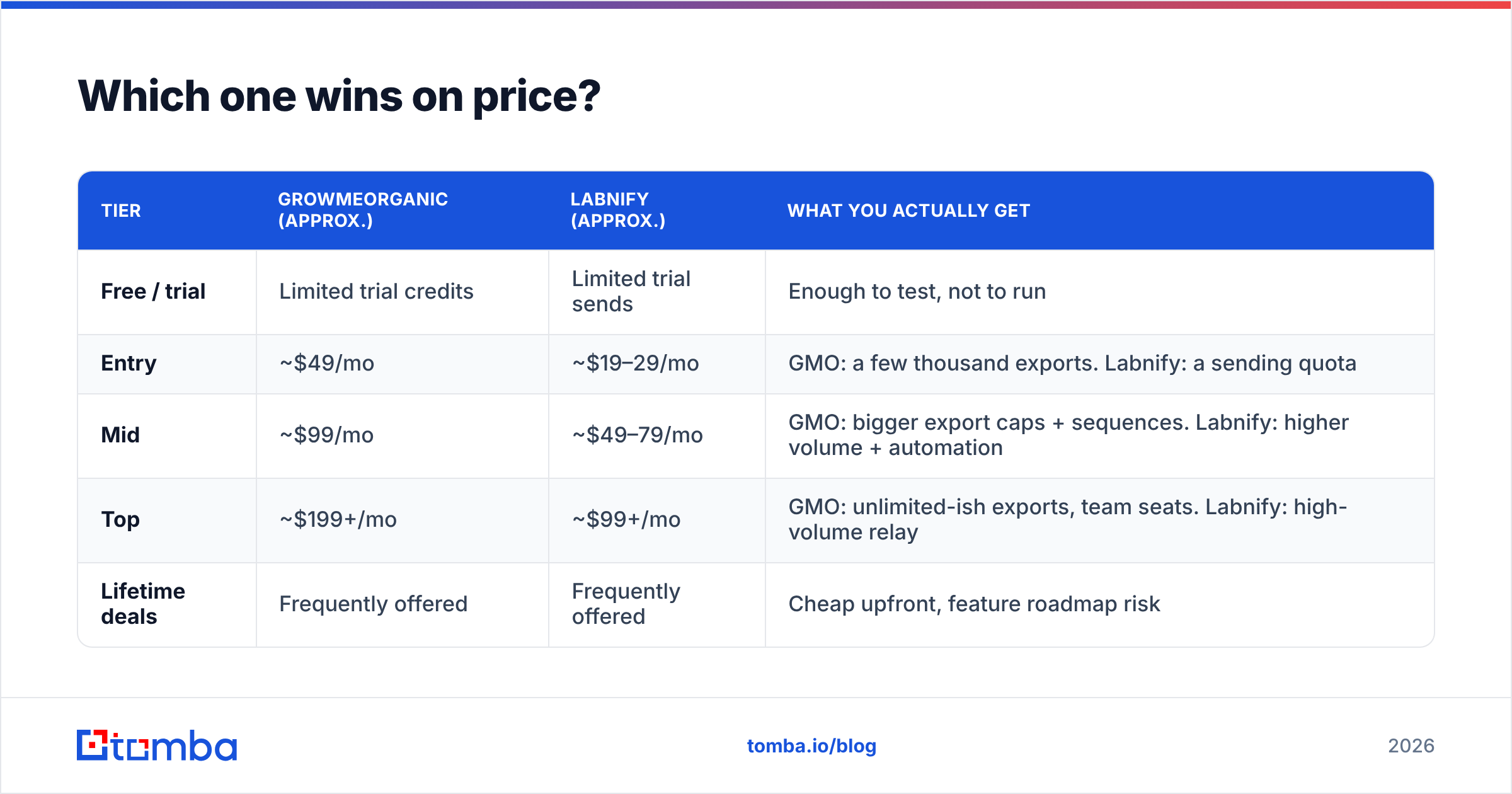
| Capability | GrowMeOrganic | Labnify |
|---|---|---|
| Primary job | Find and export B2B contacts | Send email at volume |
| Contact database | Yes — hundreds of millions of records claimed | No |
| LinkedIn extraction | Yes, Chrome extension for LinkedIn + Sales Navigator | No |
| Email verification | Basic, bundled | List hygiene / bounce handling on send |
| Cold email sequences | Yes, but simple (limited branching, basic A/B) | Yes, campaign-style with automation |
| SMTP relay / bring-your-own SMTP | Mailbox connection only | Core feature — relay plus BYO SMTP |
| Deliverability tooling | Minimal | Throttling, rotation, bounce suppression |
| CRM features | Lightweight pipeline included | No |
| API access | Available on higher tiers | Available for sending |
| Best for | Teams with no list and no data budget | Teams with a list and a volume problem |
The pattern is obvious once it is laid out. GrowMeOrganic's sending is a convenience feature; Labnify's data is nonexistent. Buying one and expecting the other's strength is the most common regret in this comparison.

Which one wins on price?#
Roughly, and with the caveat above:
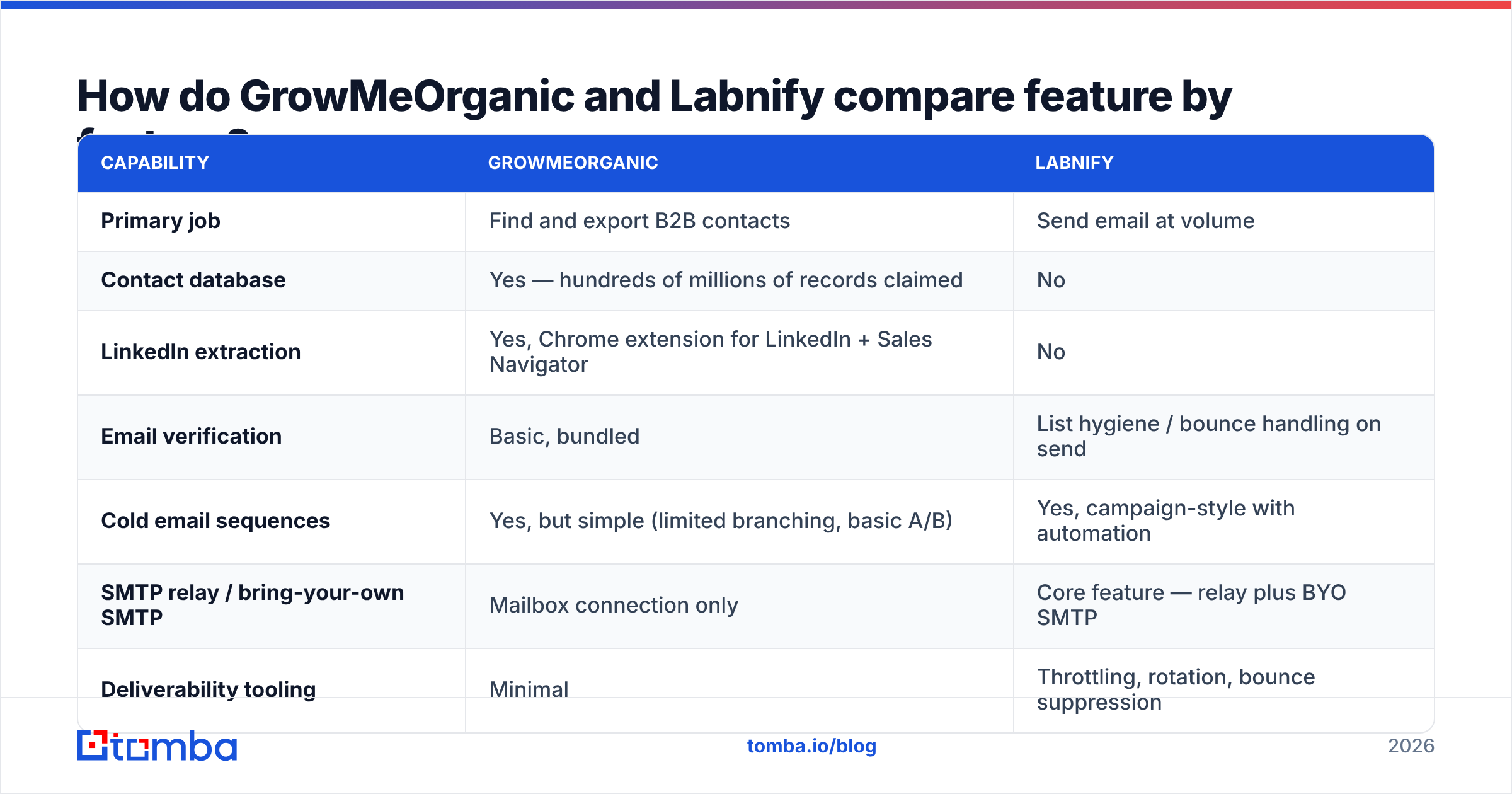
| Tier | GrowMeOrganic (approx.) | Labnify (approx.) | What you actually get |
|---|---|---|---|
| Free / trial | Limited trial credits | Limited trial sends | Enough to test, not to run |
| Entry | ~$49/mo | ~$19–29/mo | GMO: a few thousand exports. Labnify: a sending quota |
| Mid | ~$99/mo | ~$49–79/mo | GMO: bigger export caps + sequences. Labnify: higher volume + automation |
| Top | ~$199+/mo | ~$99+/mo | GMO: unlimited-ish exports, team seats. Labnify: high-volume relay |
| Lifetime deals | Frequently offered | Frequently offered | Cheap upfront, feature roadmap risk |
Labnify is cheaper per unit of work because sending is cheaper to provide than data is to maintain. Databases decay — roughly 25–30% of B2B contact records go stale every year as people change jobs — and somebody has to pay for that refresh cycle. That cost shows up in GrowMeOrganic's price, and it also shows up in the accuracy gap when a vendor tries to keep the price down.
Compare either against Tomba pricing and you will see the same structure: a free tier for testing (25 searches/month), $49/mo Starter, $99/mo Growth, $249/mo Pro. The number that matters is not the sticker — it is the cost per usable contact after verification.
Is GrowMeOrganic's data accurate enough to send to?#
Accurate enough to work with. Not accurate enough to send to raw.
That is not a knock on GrowMeOrganic specifically — it applies to every aggregated database at this price point. Scraped and licensed records come with three predictable failure modes:
- Job-change decay. The record was true when it was collected. The person left eleven months ago. The mailbox now hard-bounces or, worse, routes to a spam trap the domain owner recycled.
- Pattern-guessed addresses. Many "found" emails are inferred from a company's format (first.last@, f.last@) rather than confirmed. A guess that matches the pattern still bounces if the person's address is an exception.
- Catch-all domains. The server accepts everything, so a naive verifier marks the address "valid" and you find out the truth from your bounce report. This is why a dedicated catch-all verifier matters more than most buyers realise.
The practical consequence: if you export 5,000 contacts from any bundled database and push them straight into a sender, expect a bounce rate well into double digits. Google and Microsoft both treat sustained bounce rates above ~2% as a reputation signal, and Google's bulk-sender requirements formalised that expectation. One bad campaign can cost you a domain.
So the workflow that actually works looks like this, regardless of which of these two tools you buy:
- Step 1 — Source. Pull the list from a database, a LinkedIn export, or your own research.
- Step 2 — Verify. Run every address through a real email verifier and drop anything that is not deliverable or catch-all-safe.
- Step 3 — Enrich. Fill in the missing fields you will personalise on, using data enrichment rather than a mail-merge that says "Hi {{first_name}}".
- Step 4 — Send. Now the sender's throttling, rotation, and warmup settings are protecting a clean list instead of hiding a dirty one.
- Step 5 — Suppress. Feed hard bounces and unsubscribes back into your source so the same bad record does not get exported twice.
Skip step 2 and every other step gets more expensive.

Can Labnify replace your whole sending stack?#
For a certain kind of sender, yes — with conditions.
Labnify's strength is cost-efficient volume. If you are sending newsletters, product updates, transactional-adjacent broadcasts, or high-volume campaigns to a list you own, a relay-based platform is the right shape of tool and you will pay a fraction of what a per-contact marketing suite charges.
Where it gets riskier is classic cold outbound. Cold email lives or dies on inbox placement, and inbox placement depends on things a cheap relay does not solve for you:
- Authentication. SPF, DKIM, and DMARC must be correct on every sending domain. Run an SPF checker before your first send, not after your first spam complaint.
- Warmup. New domains and new mailboxes need weeks of gradual ramp. Use a warmup calculator to plan the curve instead of guessing.
- Reputation isolation. Shared relay IPs mean you inherit other senders' behaviour. For cold outbound, dedicated infrastructure or per-mailbox sending is safer.
- Content hygiene. Spam-triggering copy sinks clean lists too. A quick pass through a spam checker catches the obvious offenders.
None of that is unique to Labnify — it is true of every low-cost sender. But it means "Labnify is cheaper" is only true if you are also doing the deliverability work yourself. If you are not, the cheap plan is a false economy, and your sender reputation pays the difference.
Which should you pick for your use case?#
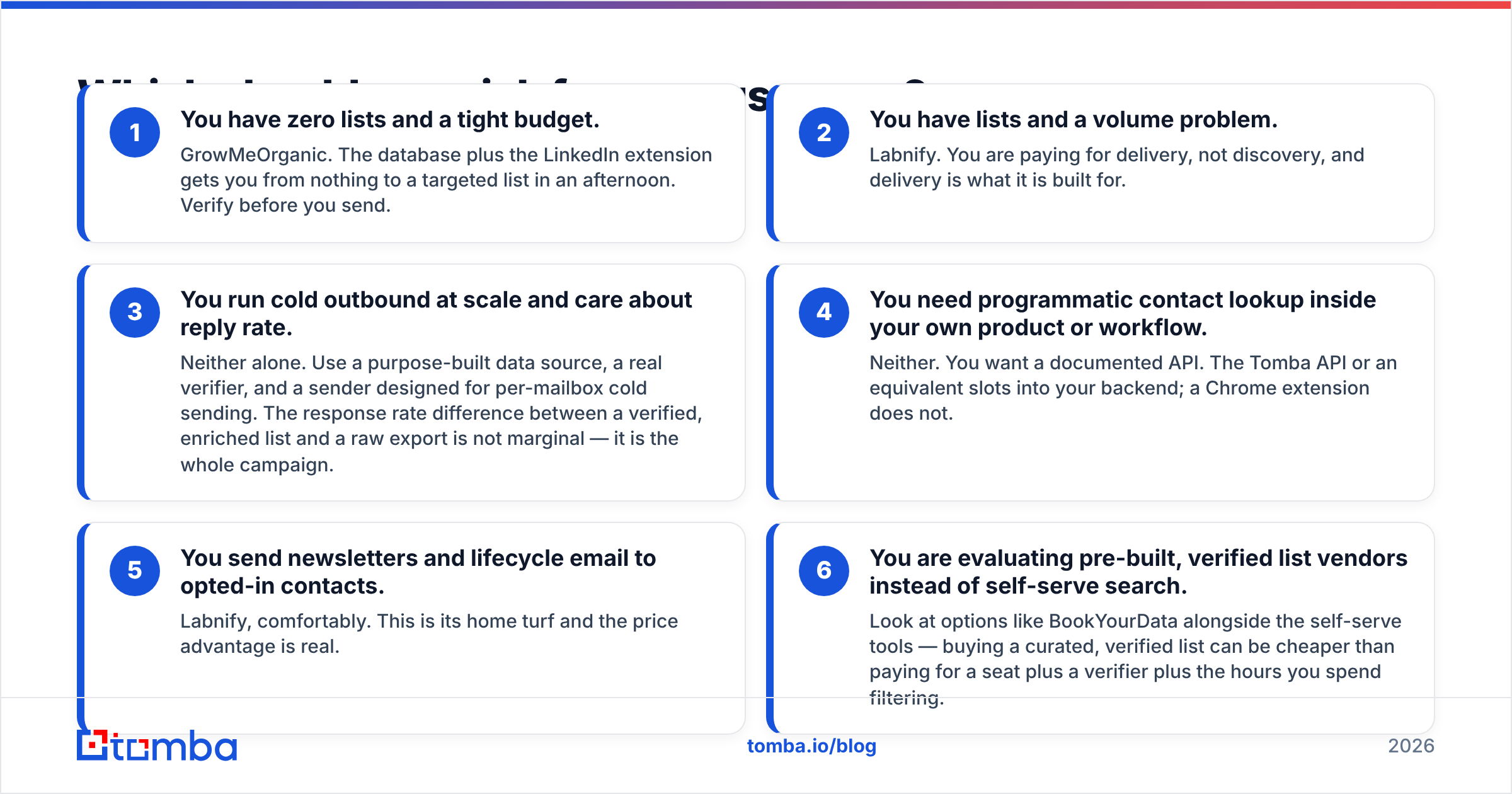
- You have zero lists and a tight budget. GrowMeOrganic. The database plus the LinkedIn extension gets you from nothing to a targeted list in an afternoon. Verify before you send.
- You have lists and a volume problem. Labnify. You are paying for delivery, not discovery, and delivery is what it is built for.
- You run cold outbound at scale and care about reply rate. Neither alone. Use a purpose-built data source, a real verifier, and a sender designed for per-mailbox cold sending. The response rate difference between a verified, enriched list and a raw export is not marginal — it is the whole campaign.
- You need programmatic contact lookup inside your own product or workflow. Neither. You want a documented API. The Tomba API or an equivalent slots into your backend; a Chrome extension does not.
- You send newsletters and lifecycle email to opted-in contacts. Labnify, comfortably. This is its home turf and the price advantage is real.
- You are evaluating pre-built, verified list vendors instead of self-serve search. Look at options like BookYourData alongside the self-serve tools — buying a curated, verified list can be cheaper than paying for a seat plus a verifier plus the hours you spend filtering.
What does a better two-tool stack look like?#
Split the job along the seam where these products already split.
Data layer. Use a tool whose only job is finding and confirming contact details. That means real-time verification at lookup time rather than a database dump, domain search when you know the company but not the person, bulk verify for lists you inherited, and data sources you can actually explain to a prospect who asks where you got their address. Tomba's free tier gives you 25 searches a month to test the accuracy against a list you already know the answers to — that is the only benchmark that matters.
Sending layer. Use whatever gives you per-mailbox control, sane throttling, and clean reporting. Labnify qualifies for volume work. For cold sequences, a dedicated cold-email sender with mailbox rotation is usually worth the extra spend.
Glue. Push everything into your CRM automatically. Both a HubSpot integration and a Zapier integration will keep the data layer and the sending layer in sync without a CSV round trip, which is where most small teams silently lose hours every week.
Two focused tools at $49 and $29 will beat one all-in-one at $99 nearly every time, because the all-in-one is subsidising its weak half with your bounce rate.
So what is the verdict on GrowMeOrganic vs Labnify?#
GrowMeOrganic wins if your problem is "I don't have anyone to email." It is a reasonable entry point, the LinkedIn extraction saves real time, and the bundled CRM is fine for a solo founder. Just do not trust the export blindly, and do not expect its sequencer to compete with a dedicated cold-email platform.
Labnify wins if your problem is "I have people to email and sending is too expensive." It is the cheaper engine, and for opted-in list sending it is the more sensible purchase of the two. For cold outbound, budget separately for authentication, warmup, and reputation monitoring — the platform will not do that thinking for you.
Neither wins on data quality, and data quality is what determines whether any of this works. Check reviews on G2 for both before you commit, and weight the complaints about bounce rates heavily — those are the ones that predict your own experience.
Before you spend on either, fix the layer underneath both of them. Run 25 of your target contacts through the Tomba Email Finder on the free tier, compare what comes back against whatever list you are about to buy, and let the delta decide your stack. Verified data makes a cheap sender look great. Bad data makes an expensive one look broken.
Related guides#
Ready to find emails that actually work?
Join 150,000+ professionals who stopped guessing and started sending. Free credits on signup — no credit card required.
Get the Tomba newsletter
Practical outbound tactics and product updates — once every two weeks.
About the author