GrowMeOrganic vs Mail Merge for Gmail: 2026 Comparison
One is a full prospecting suite with a scraper and sequencer. The other is a $20 Gmail add-on that just sends. Here is which one actually fits your outbound motion in 2026 — and where both quietly fail.
TL;DR
- GrowMeOrganic is an all-in-one prospecting suite: LinkedIn scraping, a B2B contact database, email finding, and a built-in sequencer. Plans start around $49/mo with unlimited-ish usage caps.
- Mail Merge for Gmail (the Google Workspace add-on category — GMass, YAMM, Mailmeteor, and Google's own Sheets mail merge) is a sending layer only. It costs $0–$30/mo and does nothing to find or verify contacts.
- They are not really competitors. GrowMeOrganic replaces four tools; a mail merge add-on replaces one manual step.
- The hidden failure in both: neither gives you deliverability-grade email verification by default. Sending unverified scraped data through your primary Gmail account is how domains get burned.
- Best setup for most teams under 10 reps: a dedicated email finder plus verifier for data, a mail merge add-on or sequencer for sending, and a separate sending domain.
What are GrowMeOrganic and Mail Merge for Gmail, exactly?#
They solve different halves of the same problem, which is why the comparison keeps coming up.
GrowMeOrganic is an Indian-built B2B prospecting platform that bundles a LinkedIn Chrome extension, a claimed 575M+ contact database, an email finder, an email verifier, and a drip campaign sender. You buy it to go from "I know my ICP" to "emails are landing" without stitching tools together. See their official site for the current feature list.
Mail Merge for Gmail is not one product. It is a category of Google Workspace add-ons that pull rows from a Google Sheet and send personalized emails through your Gmail account:
- GMass — the heaviest of the group. Sequences, auto follow-ups, open/click tracking, list verification as a paid add-on.
- Yet Another Mail Merge (YAMM) — Sheets-native, simple, tracking included, hard daily caps.
- Mailmeteor — privacy-focused, clean UI, generous free tier.
- Google's built-in mail merge — available in Workspace Business Standard and up, extremely limited, no tracking.
- Streak / Mixmax — CRM-first tools that include merge functionality as a feature rather than the product.
The critical structural difference: mail merge add-ons send through your Gmail account, inheriting Google's daily sending limits and your existing domain reputation. GrowMeOrganic sends through connected mailboxes with its own scheduling layer on top.

How do GrowMeOrganic and mail merge tools compare head to head?#
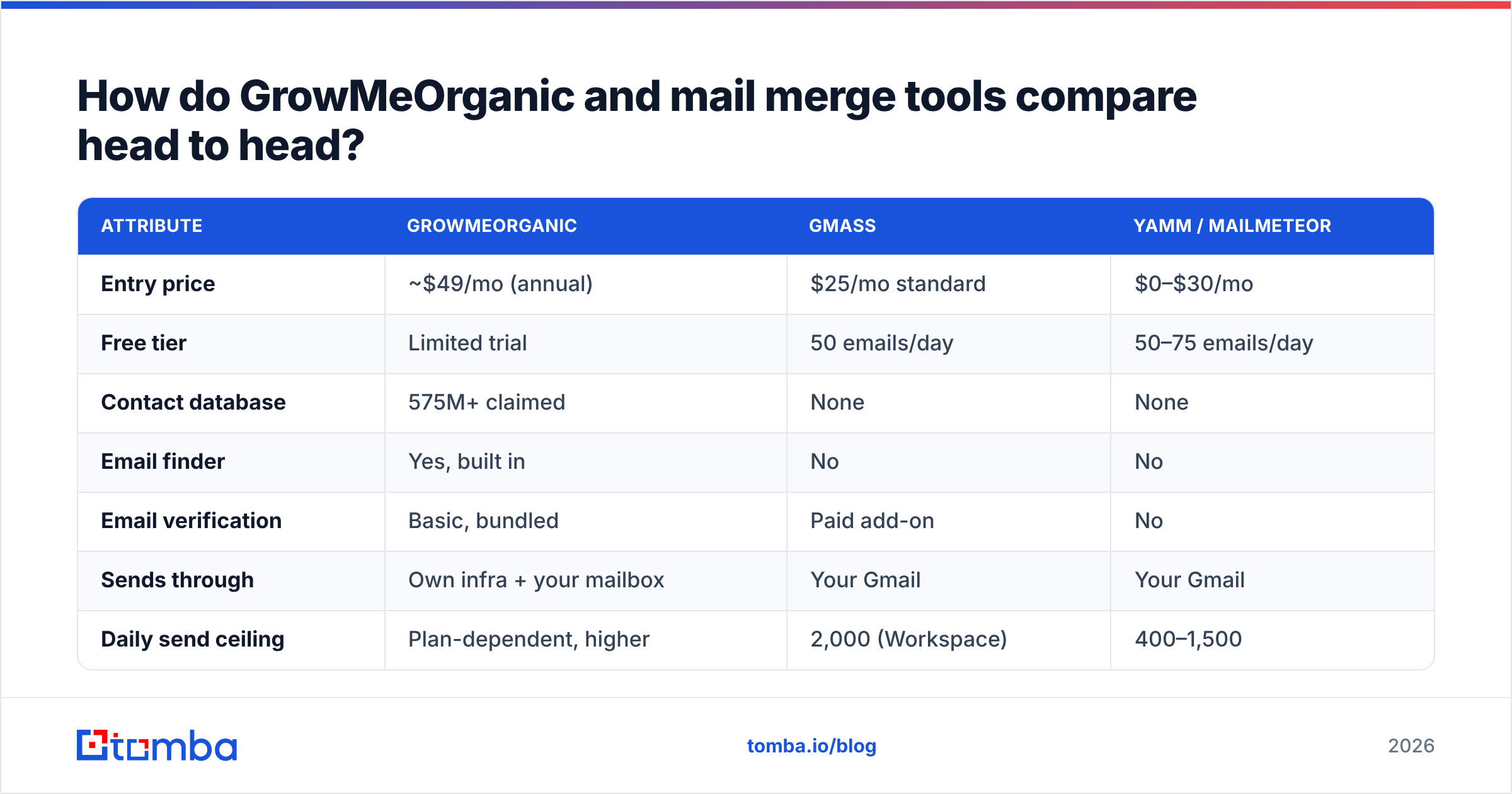
| Attribute | GrowMeOrganic | GMass | YAMM / Mailmeteor |
|---|---|---|---|
| Entry price | ~$49/mo (annual) | $25/mo standard | $0–$30/mo |
| Free tier | Limited trial | 50 emails/day | 50–75 emails/day |
| Contact database | 575M+ claimed | None | None |
| Email finder | Yes, built in | No | No |
| Email verification | Basic, bundled | Paid add-on | No |
| Sends through | Own infra + your mailbox | Your Gmail | Your Gmail |
| Daily send ceiling | Plan-dependent, higher | 2,000 (Workspace) | 400–1,500 |
| Follow-up sequences | Yes | Yes | Manual / limited |
| LinkedIn scraping | Yes (extension) | No | No |
| CRM sync | Native + Zapier | Zapier | Zapier |
| Learning curve | Moderate | Low | Very low |
| Best for | Agencies, solo founders wanting one bill | Volume Gmail senders | Small, occasional campaigns |
Read that table as a fork in the road, not a scoreboard. If you have no list, a mail merge add-on is useless — you are buying an envelope with no address. If you already export clean contacts from a CRM or a dedicated data provider, GrowMeOrganic's database is a feature you are paying for and not using.
Is GrowMeOrganic's data actually good enough?#
This is where most GrowMeOrganic reviews get vague, so let's be concrete about what "575M contacts" means in practice.
Bundled databases in all-in-one suites are typically licensed or aggregated, refreshed on a slower cadence than dedicated data vendors, and heavily weighted toward large-company records. Users on G2 consistently report the same two patterns: good coverage on US/EU mid-market and enterprise, noticeably thinner coverage on SMB, non-English markets, and recently-changed roles.
The bigger issue is verification depth. A bundled verifier in a sales suite usually runs syntax, MX, and a basic SMTP handshake. That catches obvious garbage. It does not reliably resolve:
- Catch-all domains — the server accepts everything, so a simple SMTP check returns "valid" for addresses that will hard bounce. You need a dedicated catch-all verifier for these.
- Role accounts — info@, sales@, support@ deliver fine and destroy reply rates.
- Stale-but-alive mailboxes — the person left 14 months ago, the address still resolves.
- Spam traps — recycled addresses that will torch your sender reputation instantly.
If your bounce rate crosses roughly 3%, mailbox providers start throttling you regardless of which tool sent the mail. That is why running a separate email verifier pass on any bundled-database export is not paranoia — it is the cheapest insurance in your stack. Google documents its own filtering posture in the Gmail sender guidelines, and every requirement there assumes you know the address is real before you send.
Will a Gmail mail merge get your domain blocked?#
It can, and the mechanism is worth understanding because it is the single biggest risk in this comparison.
When you send via a mail merge add-on, every email leaves from your actual Gmail account on your actual domain. There is no separate sending infrastructure absorbing the damage. A 12% bounce rate on a 500-contact campaign does not just fail — it teaches Google that your domain sends to addresses that do not exist.
Practical guardrails if you go the mail merge route:
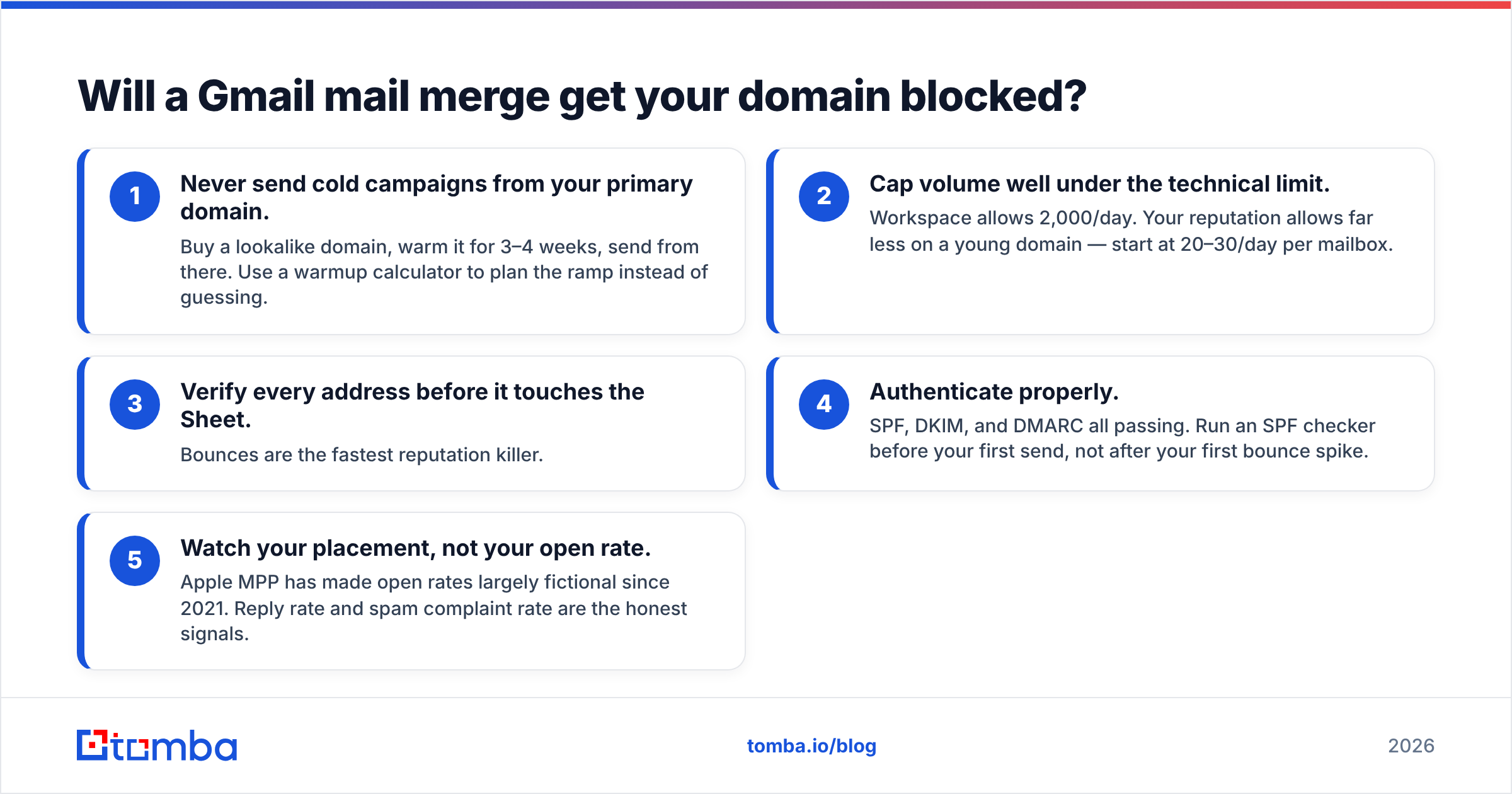
- Never send cold campaigns from your primary domain. Buy a lookalike domain, warm it for 3–4 weeks, send from there. Use a warmup calculator to plan the ramp instead of guessing.
- Cap volume well under the technical limit. Workspace allows 2,000/day. Your reputation allows far less on a young domain — start at 20–30/day per mailbox.
- Verify every address before it touches the Sheet. Bounces are the fastest reputation killer.
- Authenticate properly. SPF, DKIM, and DMARC all passing. Run an SPF checker before your first send, not after your first bounce spike.
- Watch your placement, not your open rate. Apple MPP has made open rates largely fictional since 2021. Reply rate and spam complaint rate are the honest signals.
GrowMeOrganic gives you a bit more insulation here — it manages sending schedules, throttling, and rotation across mailboxes — but it still connects to your mailboxes. There is no tool that makes bad data safe.

Which one is cheaper once you add everything up?#
Sticker price misleads badly on this comparison. Model the full stack instead.
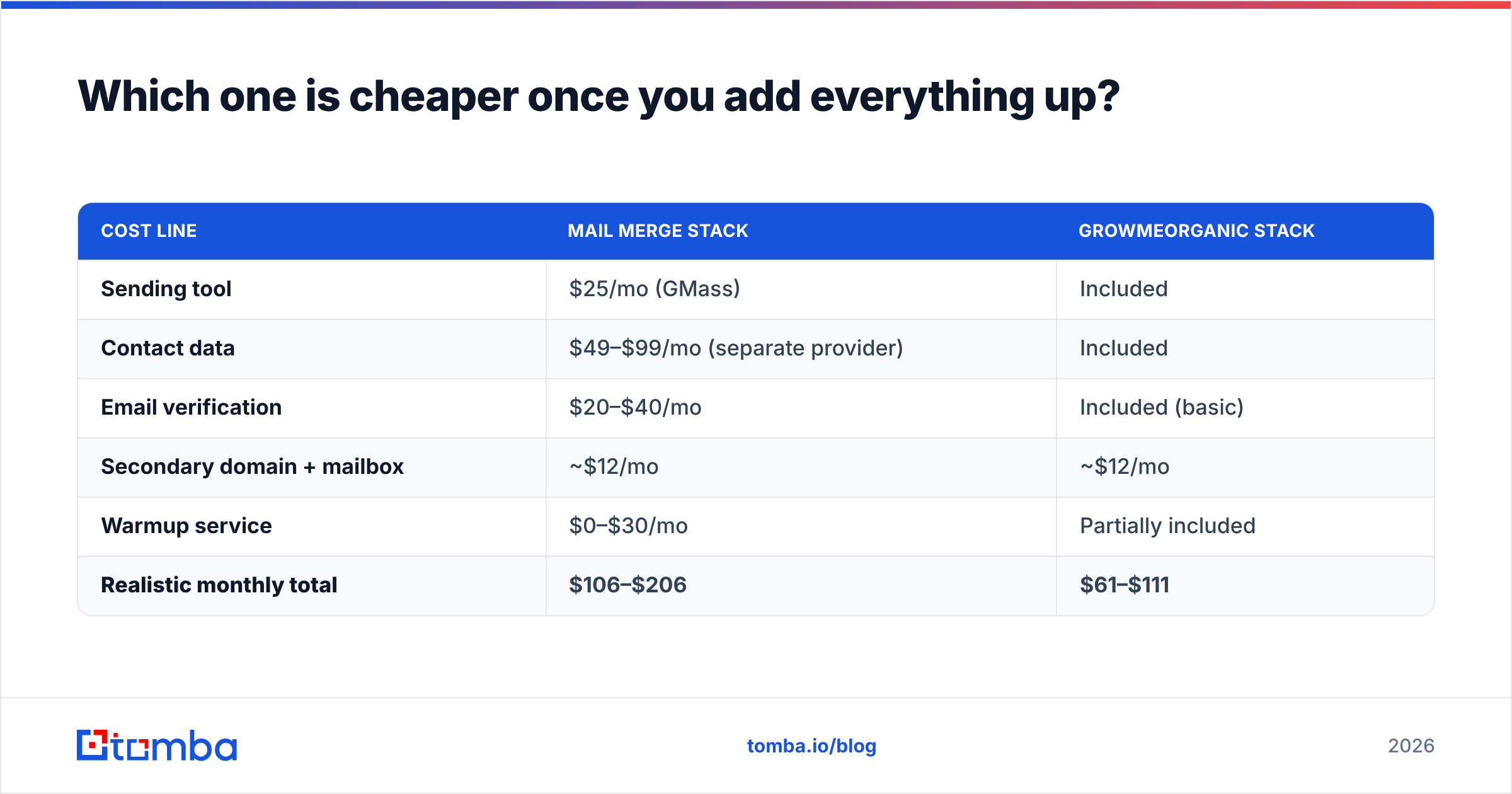
| Cost line | Mail merge stack | GrowMeOrganic stack |
|---|---|---|
| Sending tool | $25/mo (GMass) | Included |
| Contact data | $49–$99/mo (separate provider) | Included |
| Email verification | $20–$40/mo | Included (basic) |
| Secondary domain + mailbox | ~$12/mo | ~$12/mo |
| Warmup service | $0–$30/mo | Partially included |
| Realistic monthly total | $106–$206 | $61–$111 |
On paper GrowMeOrganic wins on bundled cost. In practice, two things flip it:
- Credit ceilings. "Unlimited" plans in this category are governed by fair-use policies and daily extraction caps. Heavy users hit walls that are not visible at signup.
- Data you re-verify anyway. If you add a dedicated verifier on top of GrowMeOrganic because bounce rates worry you, the bundled-price advantage narrows to almost nothing.
Compare it against transparent per-credit pricing — Tomba pricing runs a free tier at 25 searches/mo, Starter at $49/mo, Growth at $99/mo, and Pro at $249/mo — and the math becomes about volume predictability rather than headline bundling. Buy the bundle when your volume is steady. Buy per-credit when it spikes.
Who should pick which?#
Pick GrowMeOrganic if:
- You are a solo founder or a 2–5 person agency and you want one invoice, one login, and one support contact.
- LinkedIn is your primary prospecting surface and you want scraping plus sending in one motion.
- Your ICP skews toward mid-market and enterprise in US/EU, where bundled databases perform best.
- You do not yet have a dedicated data vendor and want to avoid a second procurement conversation.
Pick a Gmail mail merge add-on if:
- You send fewer than ~1,000 emails a month and personalization matters more than volume.
- Your list comes from somewhere reliable already — an event export, a CRM segment, a partner list.
- You want your replies to land in the same Gmail thread view your team already lives in.
- You are running warm outreach, not cold — customer announcements, event invites, re-engagement.
Pick neither — build a two-part stack — if:
- Bounce rate is your bottleneck. Then data quality is the product you should be buying, and sending is the commodity.
- You need API access to enrich records inside your own systems. A email finder API plugs into your workflow rather than forcing you into a UI.
- You run multiple domains and need per-domain reputation isolation.
That third path is what most teams converge on after 12 months. The sequencer becomes interchangeable. The data provider does not.
What do most teams get wrong about this decision?#
Three recurring mistakes, in order of how expensive they are.
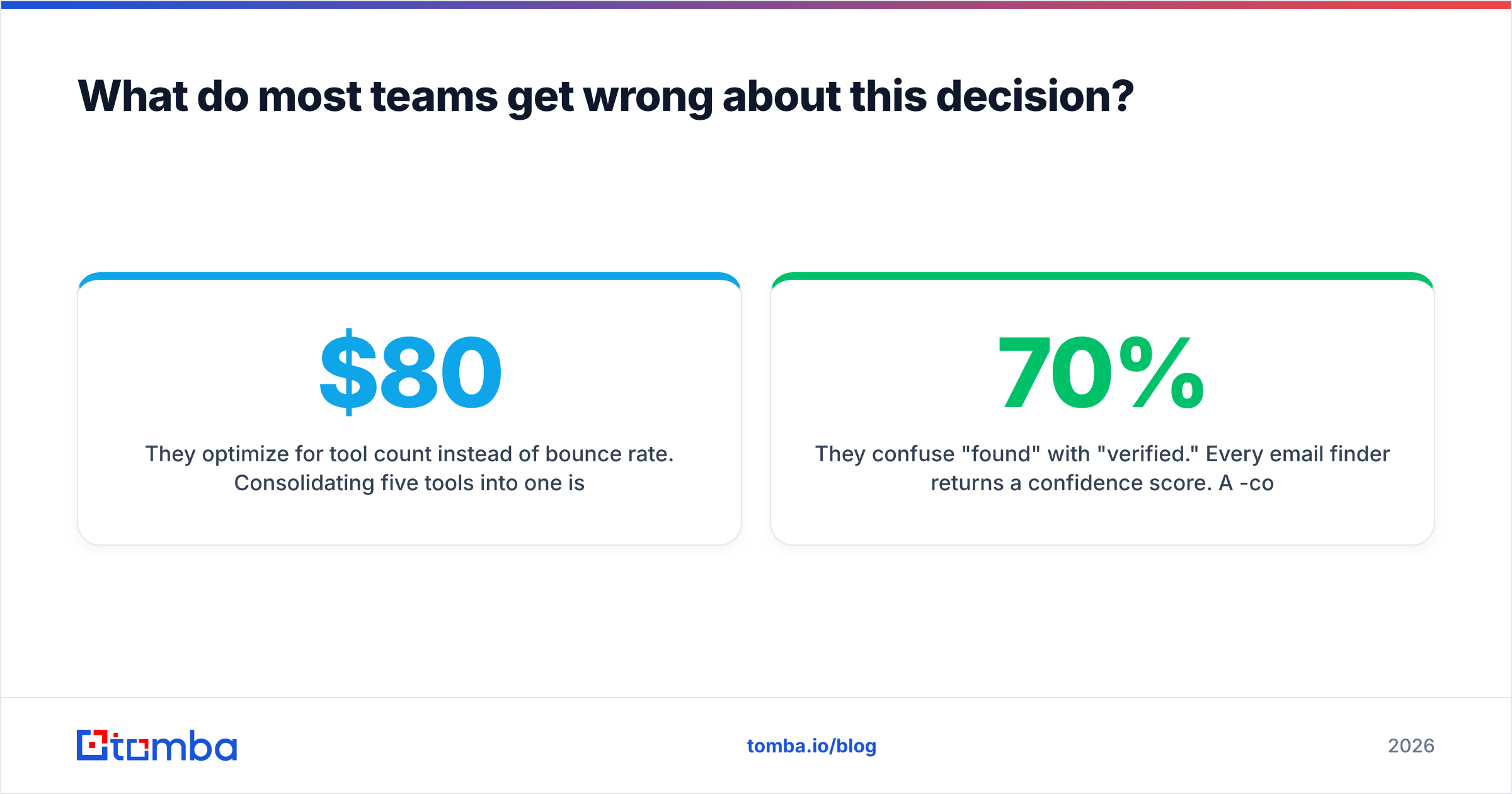
They optimize for tool count instead of bounce rate. Consolidating five tools into one is satisfying and saves maybe $80/mo. A 9% bounce rate on your main domain costs you a quarter of pipeline while you rebuild reputation. The consolidation savings are not close to worth it if data quality drops.
They confuse "found" with "verified." Every email finder returns a confidence score. A 70%-confidence guess from a pattern-matching engine is a coin flip dressed as a data point. Push everything through a bulk verify pass before it enters a sequence, regardless of which finder produced it.
They send cold mail from their real domain because the add-on made it easy. Mail merge tools are frictionless by design, which is exactly the problem. The two-minute setup skips every guardrail that protects your sender reputation.
If you want a broader look at how the all-in-one suites stack up against focused tools, HubSpot's sales tooling research is a reasonable neutral starting point, and it is worth noting that specialist data providers like BookYourData have carved out a strong position precisely because buyers keep discovering that data quality is the hard part, not sending.
The verdict for 2026#
GrowMeOrganic wins if you need a list and a sender in one purchase. It is a legitimate consolidation play for small teams, and the bundled price is real.
A Gmail mail merge add-on wins if you already have good contacts and just need personalized sends without a new platform to learn. GMass for volume, Mailmeteor or YAMM for simplicity.
But the decision that actually moves your reply rate is neither. It is whether the addresses you load are real. Every downside in this comparison — throttling, spam folders, burned domains, wasted sequences — traces back to unverified data entering the pipeline.
Start there. Use the Tomba Email Finder to source addresses by domain, name, or company, run them through verification before the first send, then pick whichever sending layer fits your budget. The free tier gives you 25 searches a month to test the data quality against your own ICP before you commit to anything — which is exactly the order these decisions should be made in.
Related guides#
Ready to find emails that actually work?
Join 150,000+ professionals who stopped guessing and started sending. Free credits on signup — no credit card required.
Get the Tomba newsletter
Practical outbound tactics and product updates — once every two weeks.
About the author