GrowMeOrganic vs OutreachBin: Which Outreach Tool Wins?
One bundles a huge B2B lead database with sending. The other is a deliverability-first cold email sender built around inbox warmup. Here is where each one actually wins — and where both leave a gap you have to fill yourself.
GrowMeOrganic vs OutreachBin is a fair fight only if you know which half of outbound is broken for you. One tool finds people. The other gets mail into the inbox. Here is the short version.
TL;DR
- GrowMeOrganic is a data-first platform. You get a big B2B contact database, a LinkedIn scraper, and a basic email sequencer on top. You buy it for the leads, not the sending.
- OutreachBin is a sending-first platform. Inbox warmup, sequences, reply detection, and deliverability tools are the product. There is no real lead database. You bring your own list.
- They are not the same category. A head-to-head only makes sense if you want one tool to cover both jobs. The answer depends on your bottleneck: list building or inbox placement.
- Both share one weak spot: verified contact data. All-in-one senders rarely run their own verification layer. That is why bounce rates creep up after month two.
- Best setup for most teams: a dedicated data source to find and verify addresses, plus whichever sender fits your budget.
What are GrowMeOrganic and OutreachBin?#
GrowMeOrganic is a B2B prospecting suite built in India. It packages three things. First, a large contact database. Second, a Chrome extension that pulls profile and company data out of LinkedIn and Google Maps. Third, an email drip sequencer with near-unlimited sending on higher tiers.
The pitch is simple: one subscription, the whole funnel. It has also been a regular on lifetime-deal sites, which is where much of its user base came from.
OutreachBin starts from the other end. It is a cold email tool, and its headline feature is inbox warmup. Seed accounts email each other to build sender reputation before you send at volume. Around that sit sequences, A/Z testing, reply detection, and inbox rotation. There is no real native lead database. You import a CSV or plug in a data source.
So the real question behind GrowMeOrganic vs OutreachBin is not which software is better. It is this: is your outbound broken because you cannot find the right people, or because your emails never land?
Those are two different problems with two different fixes. Pick the wrong tool for your bottleneck and you end up paying for two subscriptions and still missing quota.
GrowMeOrganic vs OutreachBin: how do they compare head-to-head?#
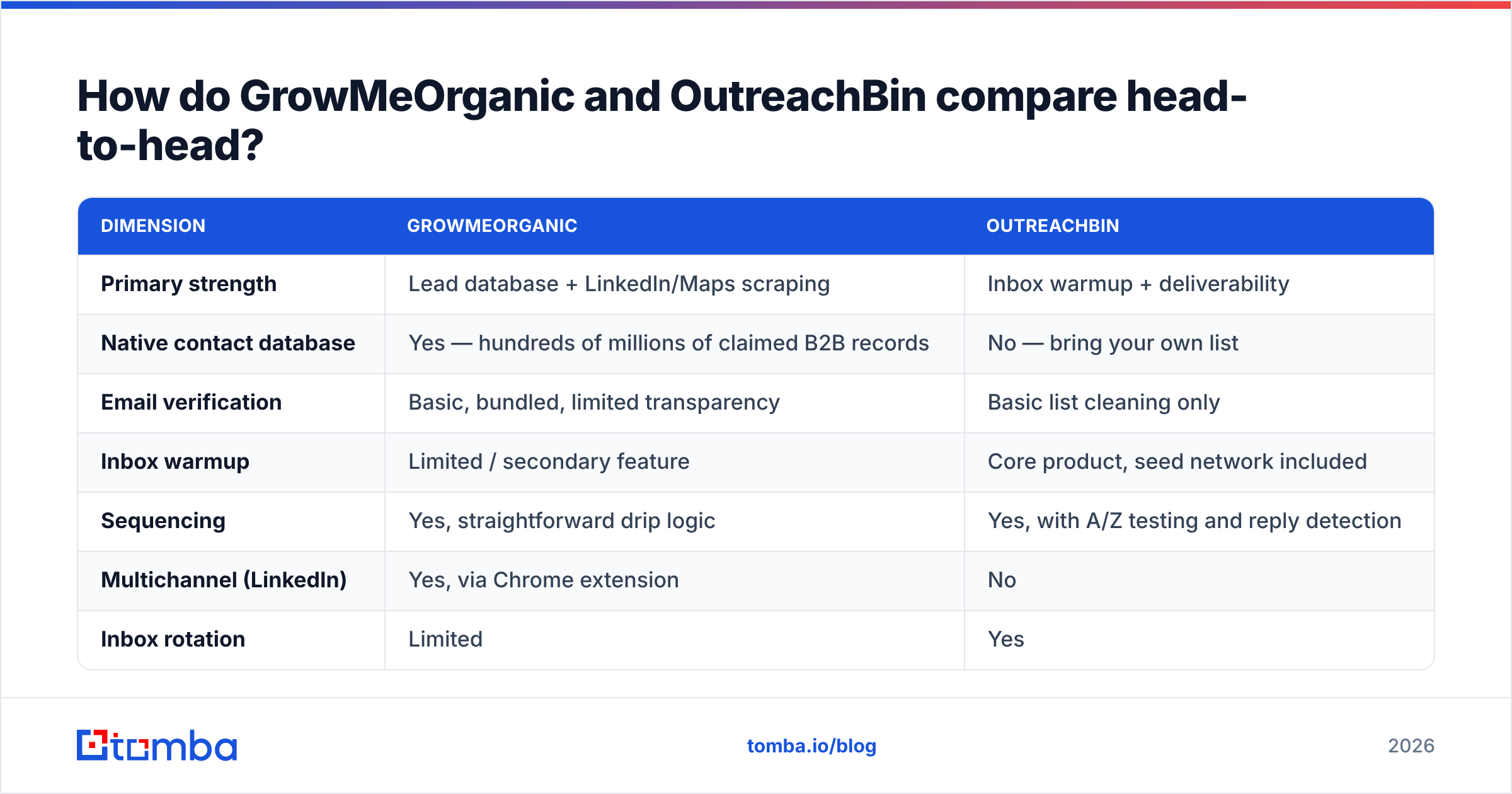
Here is the GrowMeOrganic vs OutreachBin comparison in one table.
| Dimension | GrowMeOrganic | OutreachBin |
|---|---|---|
| Primary strength | Lead database + LinkedIn/Maps scraping | Inbox warmup + deliverability |
| Native contact database | Yes — hundreds of millions of claimed B2B records | No — bring your own list |
| Email verification | Basic, bundled, limited transparency | Basic list cleaning only |
| Inbox warmup | Limited / secondary feature | Core product, seed network included |
| Sequencing | Yes, straightforward drip logic | Yes, with A/Z testing and reply detection |
| Multichannel (LinkedIn) | Yes, via Chrome extension | No |
| Inbox rotation | Limited | Yes |
| Entry pricing | Roughly $40–$80/mo billed annually | Roughly $20–$40/mo entry tier |
| Lifetime-deal history | Yes (AppSumo-era buyers still active) | Yes |
| API access | Limited | Limited |
| Best for | Solo founders and small agencies who need lists and sending in one bill | Teams who already have data and are fighting the spam folder |
Prices on both platforms change often, and both run promo tiers. Treat the figures above as a guide. Check each vendor's own pricing page before you buy.
The shape of the offer is stable, though. GrowMeOrganic charges for data volume. OutreachBin charges for sending seats and connected inboxes.

What does GrowMeOrganic actually do well?#
A few things stand out if you use it honestly.
- It cuts your tool count. For a two-person agency, list building, enrichment, and sending under one login is a real win. Fewer CSVs between tabs means fewer mistakes.
- The LinkedIn extension is fast. A filtered Sales Navigator search becomes a working list in minutes, not an afternoon of copying.
- Google Maps scraping is underrated for local B2B. If you sell to dentists, gyms, or contractors, Maps gets you owner names and phone numbers that pure B2B databases miss.
- The price feels safe to small teams. One bill around $50–$100 that covers data and sending is easier to defend than three separate ones.
Where it gets shaky: the sequencer works, but it is plain. Deliverability controls are thinner than in dedicated senders.
Database freshness also swings by region and job level. That is the same complaint you see in G2 reviews of every all-in-one suite. European and APAC coverage is thinner than US coverage. People change jobs, every static database decays, and bundled tools rarely re-check often enough to keep up.
What does OutreachBin actually do well?#
Warmup is the reason people buy it. Spin up three fresh Google Workspace inboxes, send at volume, and watch your open rates fall apart in week two. That is the problem warmup solves. It builds a positive signal — opens, replies, moves out of spam — before your real campaign starts.
Its other real strengths:
- Inbox rotation spreads volume across several sending accounts, so no single mailbox trips a limit.
- Reply detection stops a sequence as soon as a human answers. That sounds basic, until you apologise for a fourth follow-up sent to someone who already booked a call.
- A/Z testing goes past two-variant splits, which helps when you do not know which angle lands.
- It stays in its lane. It is not trying to be a database too, so the sending screens stay clean.
The trade-off is plain. OutreachBin hands you a warm inbox and asks you to fill it. If your list is scraped, stale, or unverified, warmup will not save you. Hard bounces hurt sender reputation faster than warmup can repair it. You are pouring clean water into a leaking bucket.
In a GrowMeOrganic vs OutreachBin split, that is the trade: leads on one side, inbox placement on the other.
Which tool fits which use case?#
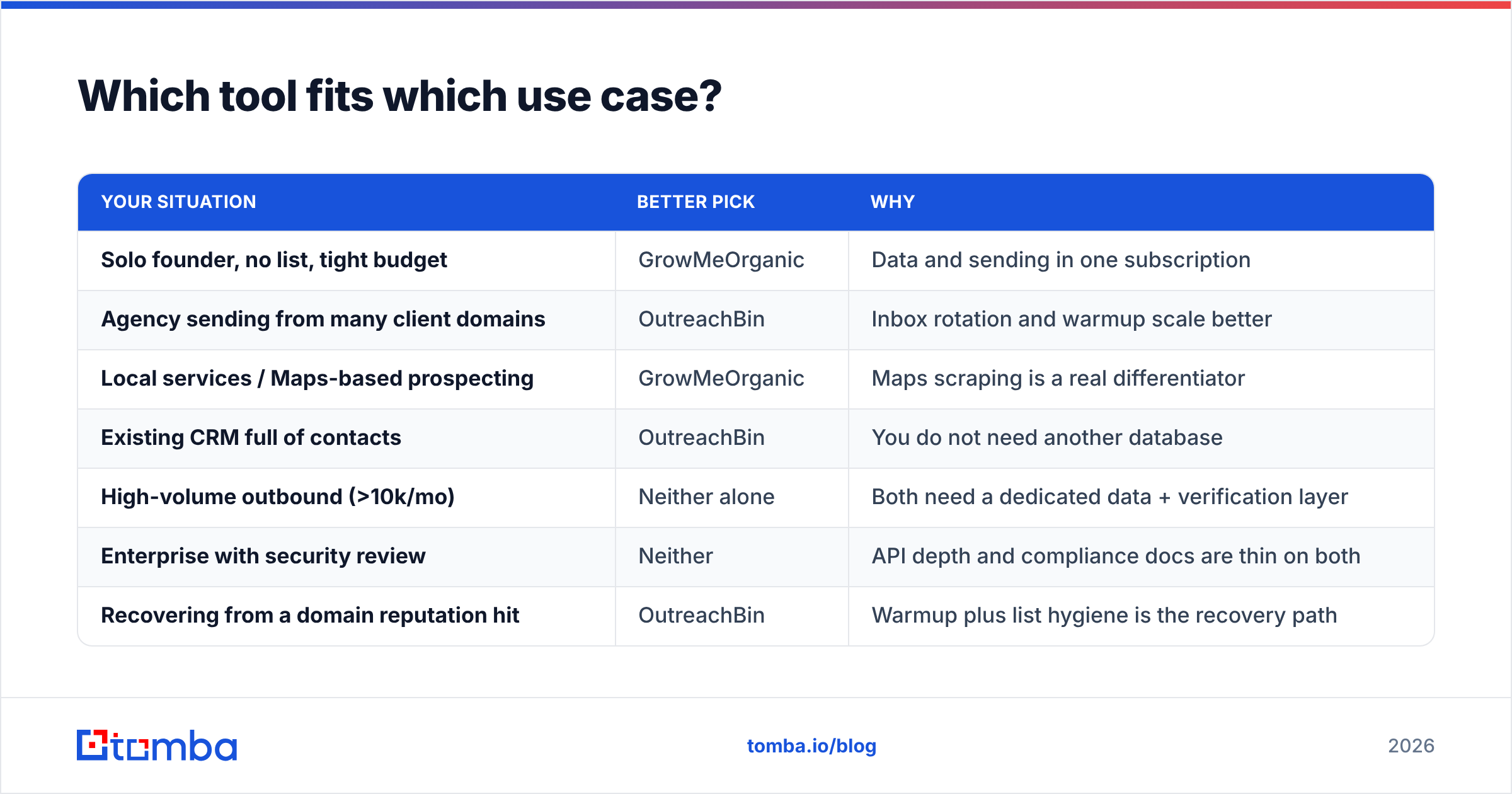
The choice gets easier when you frame it by situation.
| Your situation | Better pick | Why |
|---|---|---|
| Solo founder, no list, tight budget | GrowMeOrganic | Data and sending in one subscription |
| Agency sending from many client domains | OutreachBin | Inbox rotation and warmup scale better |
| Local services / Maps-based prospecting | GrowMeOrganic | Maps scraping is a real differentiator |
| Existing CRM full of contacts | OutreachBin | You do not need another database |
| High-volume outbound (>10k/mo) | Neither alone | Both need a dedicated data + verification layer |
| Enterprise with security review | Neither | API depth and compliance docs are thin on both |
| Recovering from a domain reputation hit | OutreachBin | Warmup plus list hygiene is the recovery path |
GrowMeOrganic vs OutreachBin: where do both tools fall short?#
Here is the part vendor comparison pages skip. Neither GrowMeOrganic nor OutreachBin is a data accuracy company.
GrowMeOrganic licenses and pools data, then bundles verification as a convenience. OutreachBin does not touch data at all. Either way, the contact you send to has passed through fewer checks than a purpose-built pipeline would run.
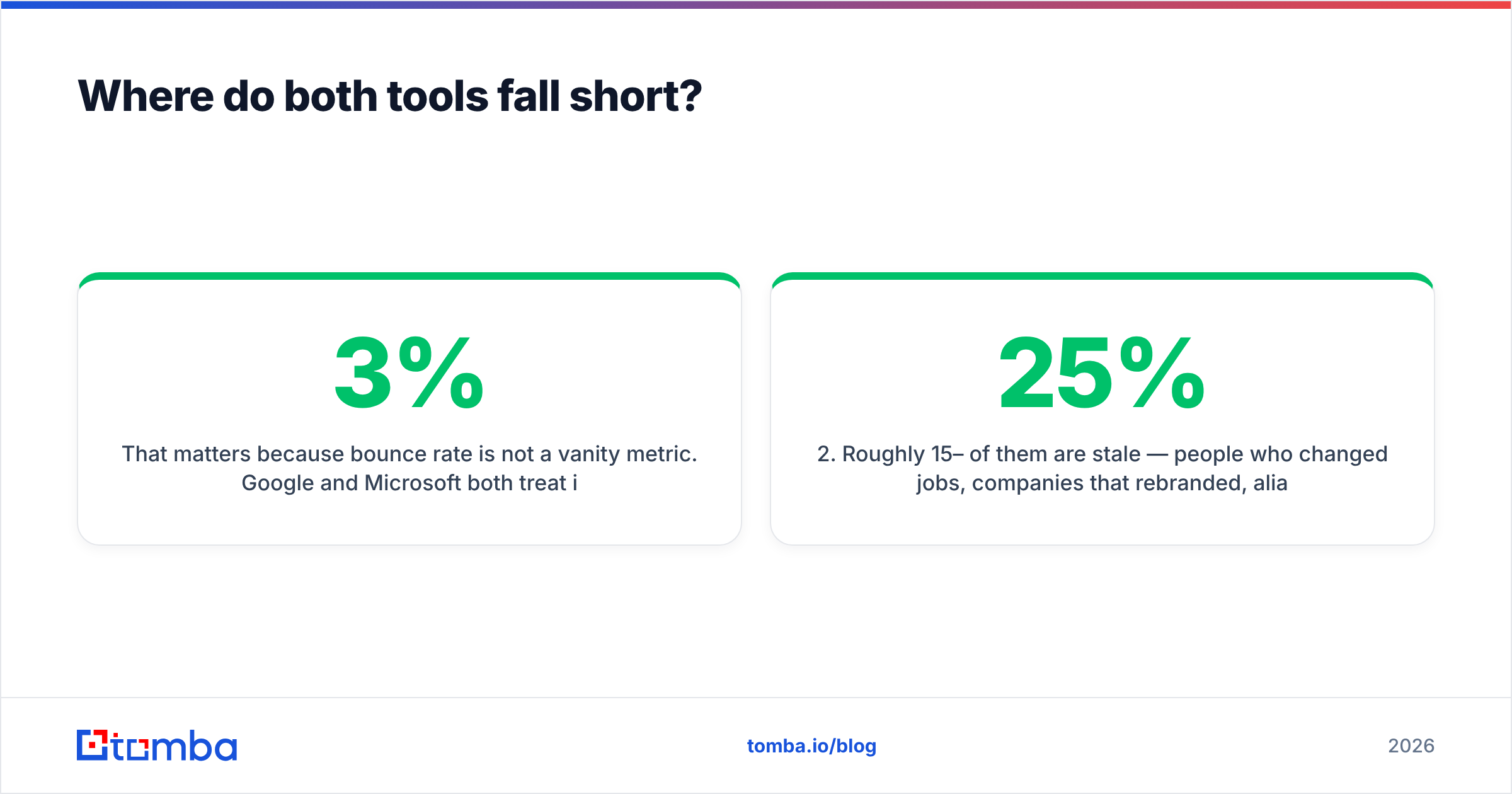
That matters, because bounce rate is not a vanity metric. Google and Microsoft both read invalid-recipient rates as a reputation signal. Google's own Postmaster Tools guidance says plainly that mail to dead addresses hurts your standing. A 3% bounce rate is a warning. A 7% bounce rate on a fresh domain is a slow burn.
The failure pattern looks like this:
- You export 5,000 contacts from a bundled database.
- Roughly 15–25% are stale. People moved jobs, firms rebranded, aliases were dropped.
- The bundled checker catches dead syntax and some hard failures. It passes catch-all domains as "unknown" — or, worse, as "valid."
- You send. Bounces spike. Placement drops. Even good addresses stop replying, because your domain is now flagged.
- You blame the copy and rewrite the sequence. That changes nothing.
This is why serious outbound teams split the find and verify layer from the send layer. A dedicated email verifier with real SMTP checks and clear catch-all handling catches what bundled tools wave through. Tomba's catch-all verifier exists for that reason. Accept-all domains are where most tools give up and hand you a coin flip.

How should you actually build the stack?#
Do not force one tool to do everything badly. Split the job into stages and buy the best fit for each. For most teams under 50 seats, this costs less than the two-subscription trap and works far better.
- Source your targets. Build the account list first: firmographics, tech stack, hiring signals, funding. GrowMeOrganic's Maps and LinkedIn extraction helps here. So do Sales Navigator exports and your own closed-lost pile.
- Find the addresses. Run those names and domains through a dedicated email finder. Pattern-based discovery with cited sources beats a static record dump, because it runs against the company's current domain instead of a two-year-old snapshot.
- Verify before you import. Check every address: syntax, MX, SMTP, disposable, catch-all. Run it as a bulk email finder job so it happens once, cleanly, instead of one row at a time.
Those three stages are the ones both platforms treat as an afterthought. The rest is sending hygiene.
- Warm the infrastructure. Use a separate sending domain, correct SPF/DKIM/DMARC, and a slow volume ramp. This is where OutreachBin earns its fee, and where a warmup calculator sets a realistic pace.
- Measure inbox placement, not opens. Apple Mail Privacy Protection inflates open rates. Placement tests and reply rate are the honest signals left.
- Re-verify every quarter. B2B contact data decays 20–30% a year. A list you cleaned in January is measurably worse by July.
That gap is the real answer to GrowMeOrganic vs OutreachBin: both leave the data layer to you.
What does each option cost in practice?#
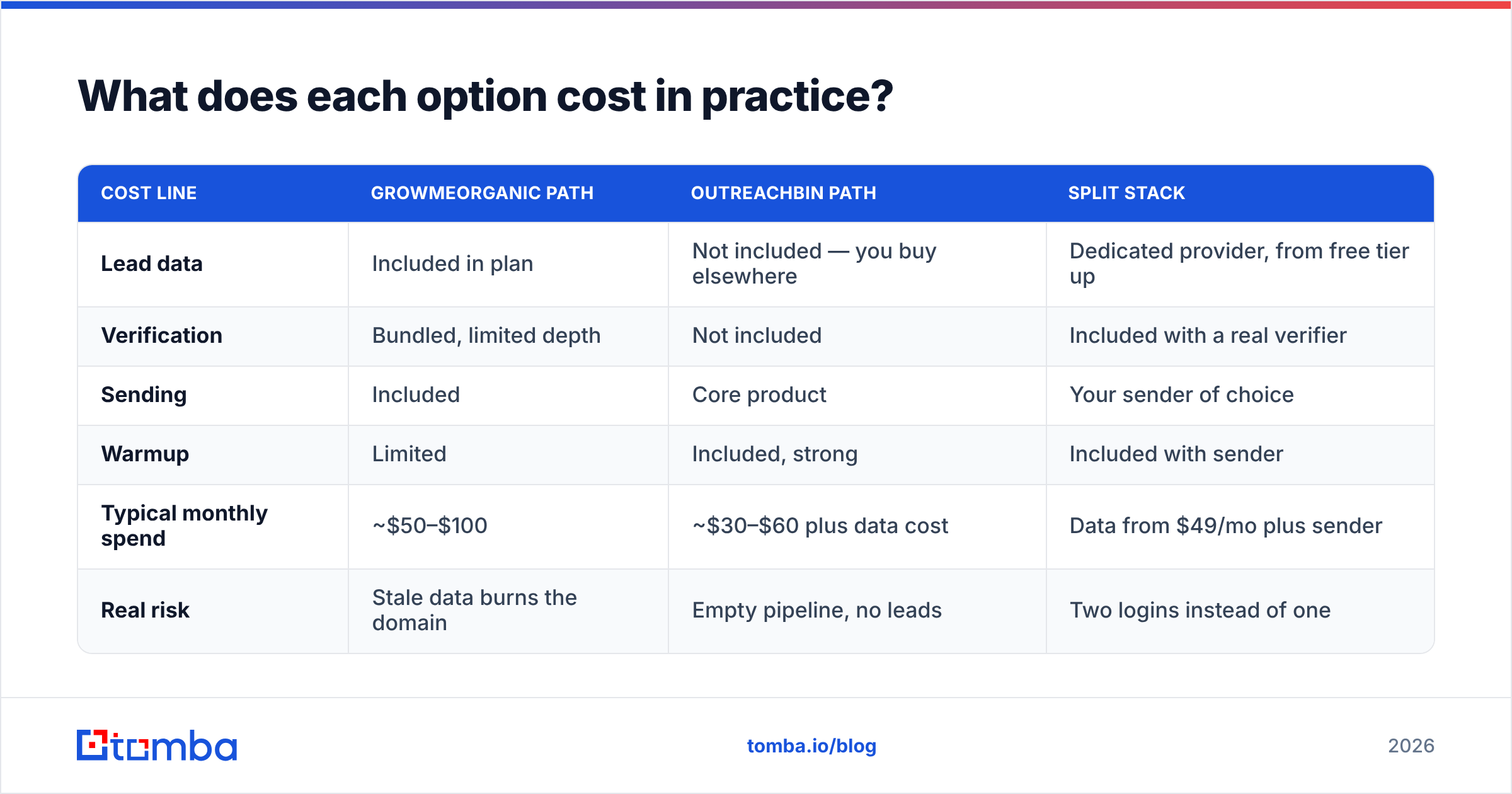
Cost is the other half of the GrowMeOrganic vs OutreachBin decision.
| Cost line | GrowMeOrganic path | OutreachBin path | Split stack |
|---|---|---|---|
| Lead data | Included in plan | Not included — you buy elsewhere | Dedicated provider, from free tier up |
| Verification | Bundled, limited depth | Not included | Included with a real verifier |
| Sending | Included | Core product | Your sender of choice |
| Warmup | Limited | Included, strong | Included with sender |
| Typical monthly spend | ~$50–$100 | ~$30–$60 plus data cost | Data from $49/mo plus sender |
| Real risk | Stale data burns the domain | Empty pipeline, no leads | Two logins instead of one |
For reference, Tomba's own pricing starts with a free tier at 25 searches a month. Starter is $49/mo, Growth is $99/mo, and Pro is $249/mo, with enterprise pricing on request. That covers the data and verification stage without asking you to drop a sender you already like.
Is GrowMeOrganic better than OutreachBin?#
For list building, yes. It has a database and a scraper. OutreachBin has neither. If your problem is "I do not have enough people to email," GrowMeOrganic solves more of it in one purchase.
For deliverability, no. OutreachBin was built by people who think about inbox placement first, and it shows in warmup quality and inbox rotation. If your emails go to spam, GrowMeOrganic will not fix that.
For a full outbound motion, neither wins. Each one optimises a different half of the same funnel. Teams that hit their reply-rate targets tend to run a dedicated data layer plus a dedicated sender. They treat the all-in-one suites as a starting point, not the endgame.
If you are choosing between only these two, use this rule. Buy GrowMeOrganic if you are starting from zero contacts and can live with mixed data quality. Buy OutreachBin if you already have data and your domain reputation is the constraint. Either way, budget for real verification. It is the cheapest insurance in outbound.
GrowMeOrganic vs OutreachBin: the bottom line#
These two are complements dressed up as rivals. One fills the top of the funnel. The other protects the bottom. Whichever you pick, the contact data flowing through it shapes your results more than the interface does.
So get that part right first. Start with Tomba Email Finder. Find verified addresses by domain, name, or company. Check each one before it enters a sequence. Import a list your sender can actually deliver. The free tier gives you 25 searches a month, which is enough to test it against the list you run today. If the bounce rate drops, you found your bottleneck.
Related guides#
Ready to find emails that actually work?
Join 150,000+ professionals who stopped guessing and started sending. Free credits on signup — no credit card required.
Get the Tomba newsletter
Practical outbound tactics and product updates — once every two weeks.
About the author