GTM Automation in 2026: How to Build a System That Scales
GTM automation promises pipeline on autopilot. Most teams end up with 14 disconnected tools and worse data. Here's the layer-by-layer build order that actually works, plus a stack comparison.

TL;DR
- GTM automation fails at the data layer, not the workflow layer. Automating outreach on top of stale contact records just sends bad emails faster.
- Build in this order: data foundation → enrichment → routing → sequencing → reporting. Skipping straight to sequencing is the single most common mistake.
- A functional stack for a 10-person revenue team costs roughly $600–$1,500/month. The $8,000/month "all-in-one" tier rarely outperforms it.
- Consolidate where the data lives, stay modular where the workflows live. The opposite arrangement is what creates 14-tool sprawl.
- Measure automation by pipeline per rep-hour, not by number of tasks automated. Automation that produces junk leads is a cost, not a saving.
What is GTM automation, actually?#
GTM automation is the practice of replacing manual, repeatable steps in your go-to-market motion — finding accounts, enriching contacts, routing leads, sequencing outreach, updating the CRM, reporting on it — with software that executes those steps on a trigger.
Think of it like a restaurant kitchen. Automation is not the robot that plates the dish. It's the prep line: someone dices the onions, portions the proteins, and labels the containers before service starts. When prep is done well, the line cooks move fast. When prep is sloppy — wrong ingredients, unlabeled containers — automation just means you serve the wrong dish to more tables per hour.
That's the part most teams get backwards. They buy a sequencing tool, connect it to a scraped list, and call it GTM automation. Six weeks later the domain reputation is damaged and nobody trusts the CRM numbers.
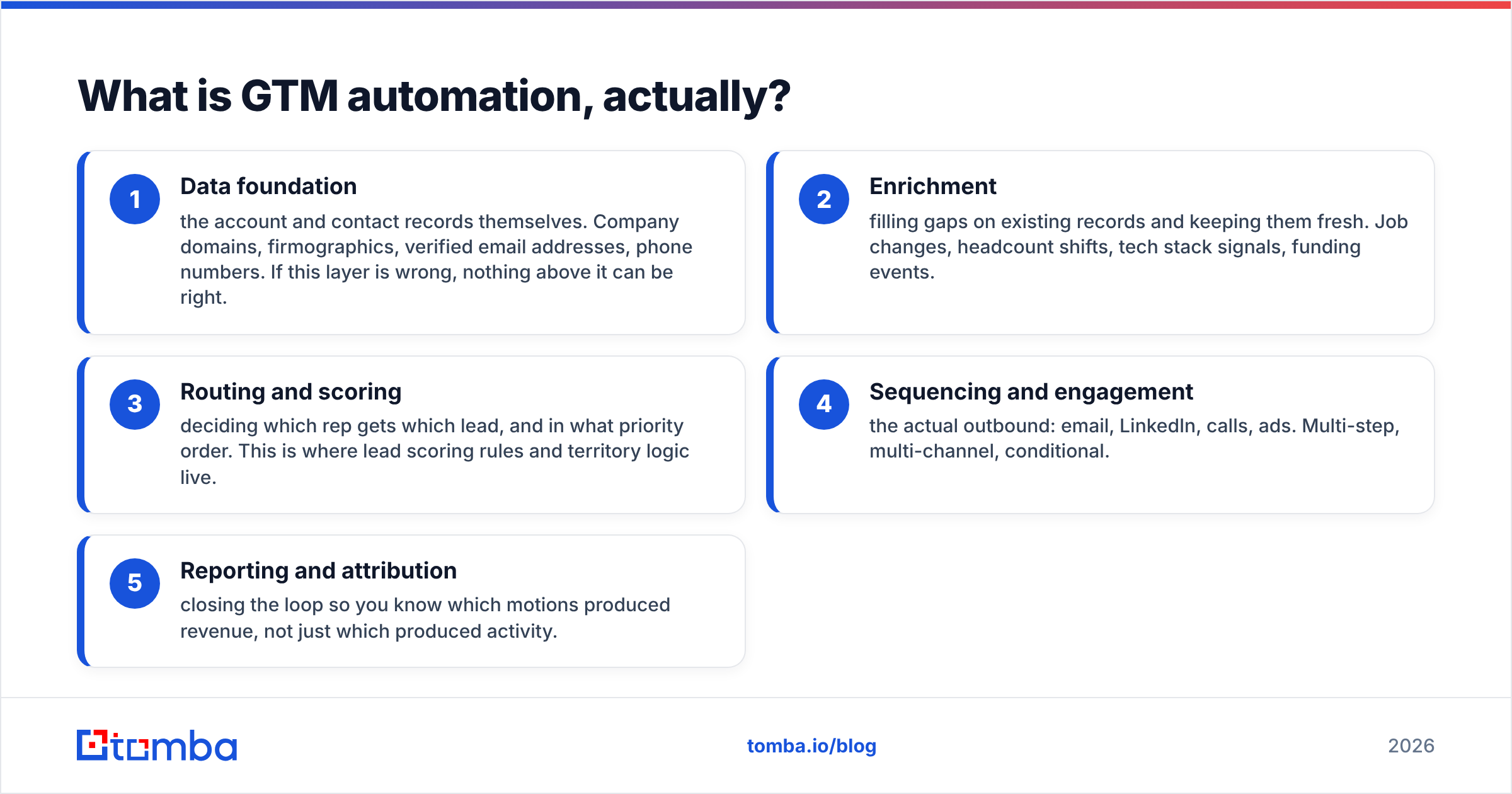
The technical version: GTM automation spans five distinct layers, and each one depends on the one beneath it.
- Data foundation — the account and contact records themselves. Company domains, firmographics, verified email addresses, phone numbers. If this layer is wrong, nothing above it can be right.
- Enrichment — filling gaps on existing records and keeping them fresh. Job changes, headcount shifts, tech stack signals, funding events.
- Routing and scoring — deciding which rep gets which lead, and in what priority order. This is where lead scoring rules and territory logic live.
- Sequencing and engagement — the actual outbound: email, LinkedIn, calls, ads. Multi-step, multi-channel, conditional.
- Reporting and attribution — closing the loop so you know which motions produced revenue, not just which produced activity.
Most vendors sell you layer 4 and imply the rest comes free. It doesn't.
Why do most GTM automation projects stall?#
Three failure modes account for nearly every stalled project I've seen.
Failure mode one: automating on top of decayed data. B2B contact data decays fast — industry estimates consistently put annual decay somewhere in the 25–30% range as people change roles, companies restructure, and domains get retired. A list you built in January is meaningfully wrong by July. If your sequencer fires 4,000 emails a month against a list with 25% bad addresses, you're generating 1,000 bounces — enough to damage sender reputation badly enough that your good emails stop landing.
Failure mode two: tool sprawl without a system of record. Each tool has its own version of the account. Marketing's "Acme Corp" is Sales' "Acme Corporation" is Finance's "Acme Inc." Nobody agrees on pipeline. This is a revenue operations problem masquerading as a tooling problem, and buying a 15th tool never fixes it.
Failure mode three: automating the wrong step. Teams automate what's easy to automate — sending emails — rather than what's expensive in human hours. In most orgs the expensive part is research and list-building, not send. A rep who spends 90 minutes a day finding and verifying contacts is losing more time than one who spends 20 minutes writing emails.
The fix for all three is the same: build bottom-up. Fix the data layer first, then automate on top of it.
What does a GTM automation stack actually cost?#
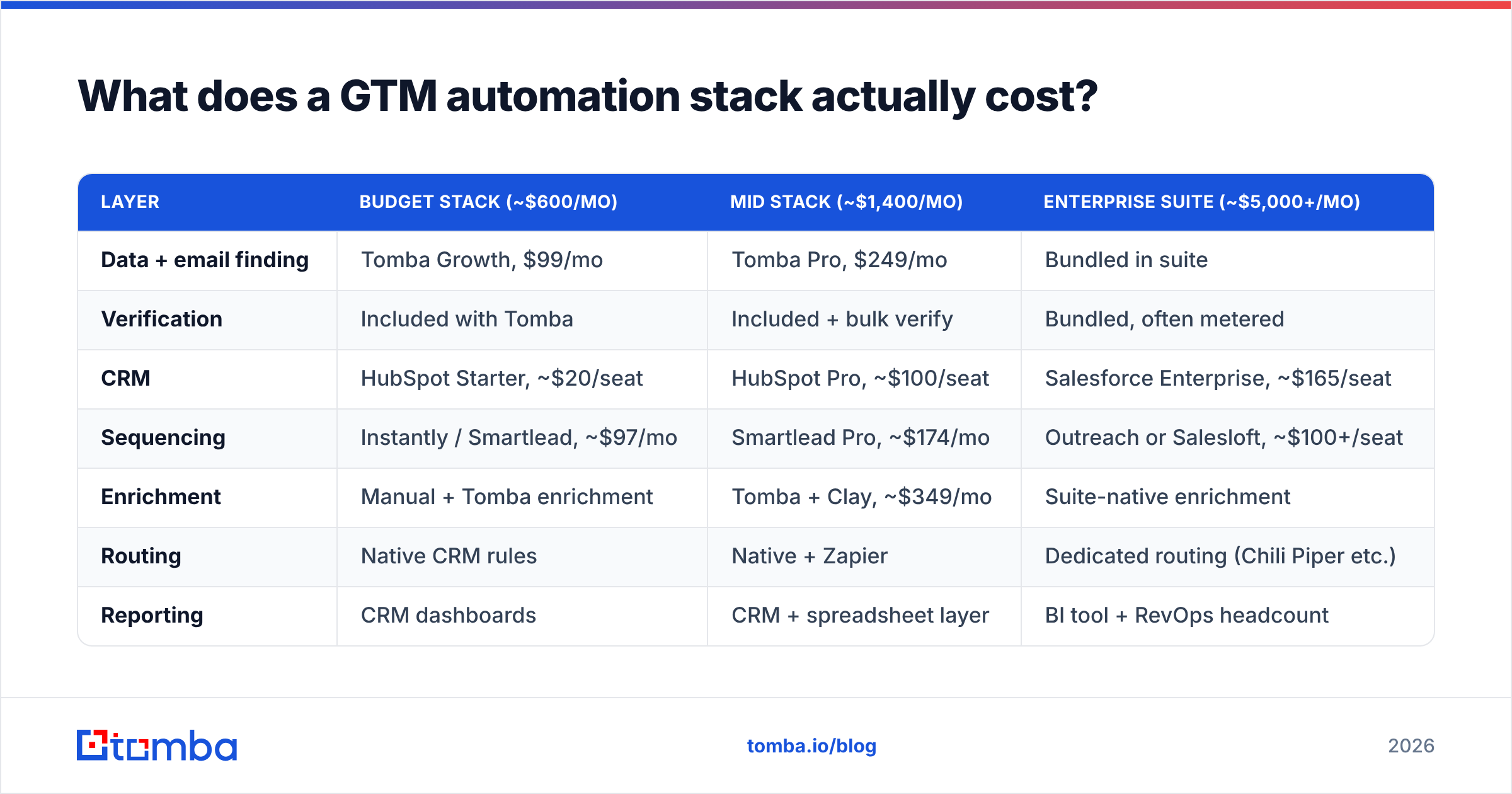
Here's a like-for-like comparison of three common stack shapes for a ~10-person revenue team running roughly 5,000 outbound touches per month. Prices are list prices as of early 2026 and will vary with negotiation and volume.
| Layer | Budget stack (~$600/mo) | Mid stack (~$1,400/mo) | Enterprise suite (~$5,000+/mo) |
|---|---|---|---|
| Data + email finding | Tomba Growth, $99/mo | Tomba Pro, $249/mo | Bundled in suite |
| Verification | Included with Tomba | Included + bulk verify | Bundled, often metered |
| CRM | HubSpot Starter, ~$20/seat | HubSpot Pro, ~$100/seat | Salesforce Enterprise, ~$165/seat |
| Sequencing | Instantly / Smartlead, ~$97/mo | Smartlead Pro, ~$174/mo | Outreach or Salesloft, ~$100+/seat |
| Enrichment | Manual + Tomba enrichment | Tomba + Clay, ~$349/mo | Suite-native enrichment |
| Routing | Native CRM rules | Native + Zapier | Dedicated routing (Chili Piper etc.) |
| Reporting | CRM dashboards | CRM + spreadsheet layer | BI tool + RevOps headcount |
| Setup time | ~1 week | ~3 weeks | 3–6 months, often with a partner |
| Best fit | Founder-led, first 2 reps | 5–25 person revenue team | 50+ reps, complex territories |
The honest read: the mid stack outperforms the enterprise suite for most teams under 40 reps, because suite value comes from governance and territory complexity — things a 15-person team doesn't have. Suites also tend to meter enrichment credits aggressively, so the "bundled" data is often the first thing you exhaust.
Where the enterprise tier genuinely wins: multi-region territory logic, strict compliance requirements, forecasting that a CFO will sign off on, and admin controls across dozens of seats.
Which layer should you automate first?#
Data. Always data. Here's why, in order of leverage.
- Contact discovery — the highest-leverage automation available to most teams. If a rep manually finds 20 contacts an hour and an API returns 2,000 in a minute, that's not a marginal improvement. Use a domain search to pull every discoverable address at a target company in one call rather than hunting names one by one.
- Verification before send — the cheapest insurance in outbound. Running your list through an email verifier before it hits the sequencer prevents the bounce cascade that kills deliverability. This step costs cents and saves domains.
- Enrichment on write — enrich records at the moment they enter the CRM, not in a quarterly batch. A form fill that arrives with company size, industry, and a verified work email routes itself correctly. One that arrives as
name + gmail addressneeds a human. - Routing rules — once records are complete, routing is trivial. Once records are incomplete, routing is impossible. This is why teams that skip steps 1–3 end up with round-robin assignment and confused reps.
- Sequencing — now, and only now, does automated outreach make sense. You're sending verified addresses to correctly-routed segments with real firmographic context to personalize against.
- Reporting — last, because reporting on a broken pipeline just produces confident wrong numbers.
The compounding effect is real. Every layer you automate before fixing the one below it creates rework you'll pay for later.
How do you automate the data layer without building a scraper?#
Three practical approaches, in increasing order of sophistication.
Approach 1: Bulk, on demand. You have a list of 3,000 companies and need contacts. Upload the domains, run bulk lead generation, get back verified contacts with roles and confidence scores. This is the right move for campaign-driven teams that build lists in discrete batches.
Approach 2: Spreadsheet-native. Your ops person lives in Google Sheets and doesn't want a new interface. A Sheets email finder add-on turns a column of names and domains into a column of verified emails with a formula. Low ceremony, immediate value, no engineering involvement.
Approach 3: API-driven. You want enrichment to happen automatically when a record is created. Wire the email finder API into your CRM or your workflow tool so every new account triggers a lookup. This is the version that scales, and it's the one that turns GTM automation from a manual chore into infrastructure.
For most teams the honest answer is a mix: API for inbound records, bulk for outbound campaigns, spreadsheet for one-off research. Trying to force everything through one pattern is where the friction comes from.
Where should you consolidate vs. stay modular?#
This is the strategic call that determines whether your stack ages well.
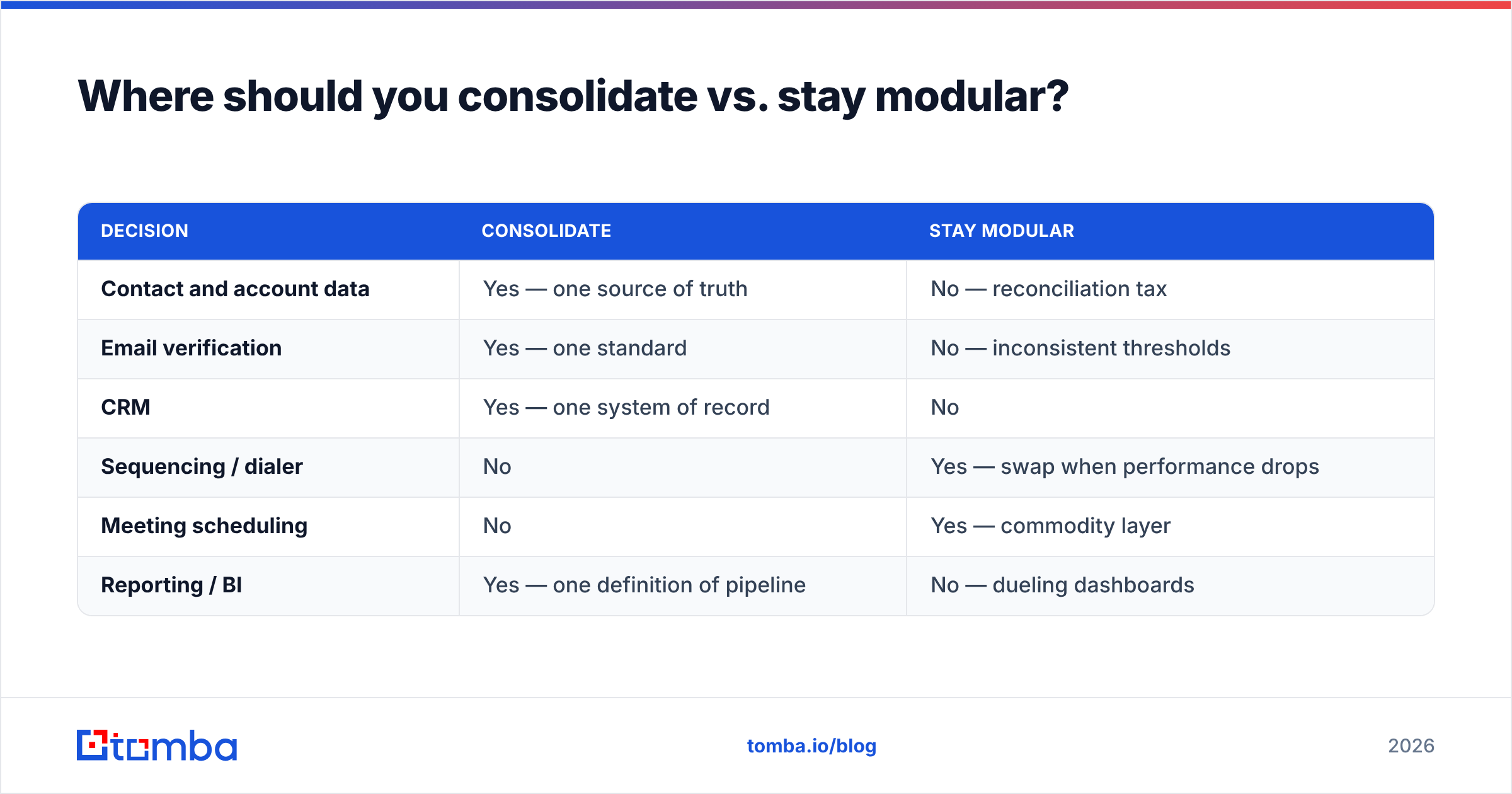
Consolidate the data layer. One canonical source for contacts and accounts, one enrichment provider, one verification standard. When three tools each hold their own version of a contact, reconciliation becomes a permanent tax. Pick a provider with broad coverage and a real API, make it the source, and push from there.
Stay modular on workflow. Sequencers, dialers, scheduling tools, and CRMs all evolve at different speeds. Best-of-breed with clean integrations beats a monolithic suite you can't swap out of. When your sequencer's deliverability degrades, you want to be able to replace it in a week, not renegotiate a three-year contract.
Standardize the plumbing. Zapier, Make, or native integrations — pick one orchestration pattern and stick with it. Half your workflows in one tool and half in another is how you end up with automations nobody can debug six months later.
| Decision | Consolidate | Stay modular |
|---|---|---|
| Contact and account data | Yes — one source of truth | No — reconciliation tax |
| Email verification | Yes — one standard | No — inconsistent thresholds |
| CRM | Yes — one system of record | No |
| Sequencing / dialer | No | Yes — swap when performance drops |
| Meeting scheduling | No | Yes — commodity layer |
| Reporting / BI | Yes — one definition of pipeline | No — dueling dashboards |
For teams evaluating consolidated data vendors, it's worth comparing purpose-built providers side by side. BookYourData is a solid option when you want pre-built, pay-as-you-go B2B lists with strong coverage in specific verticals. Tools like Tomba fit better when you need programmatic discovery and verification against domains you've already identified. They solve adjacent problems — many teams run both.
What should you measure to know it's working?#
Activity metrics lie. A dashboard showing "12,000 tasks automated" tells you nothing about whether revenue moved. Track these instead:
- Pipeline per rep-hour. The only metric that captures the actual promise of automation. If reps save 10 hours a week and pipeline is flat, the automation isn't working — it's just reshuffling where time goes.
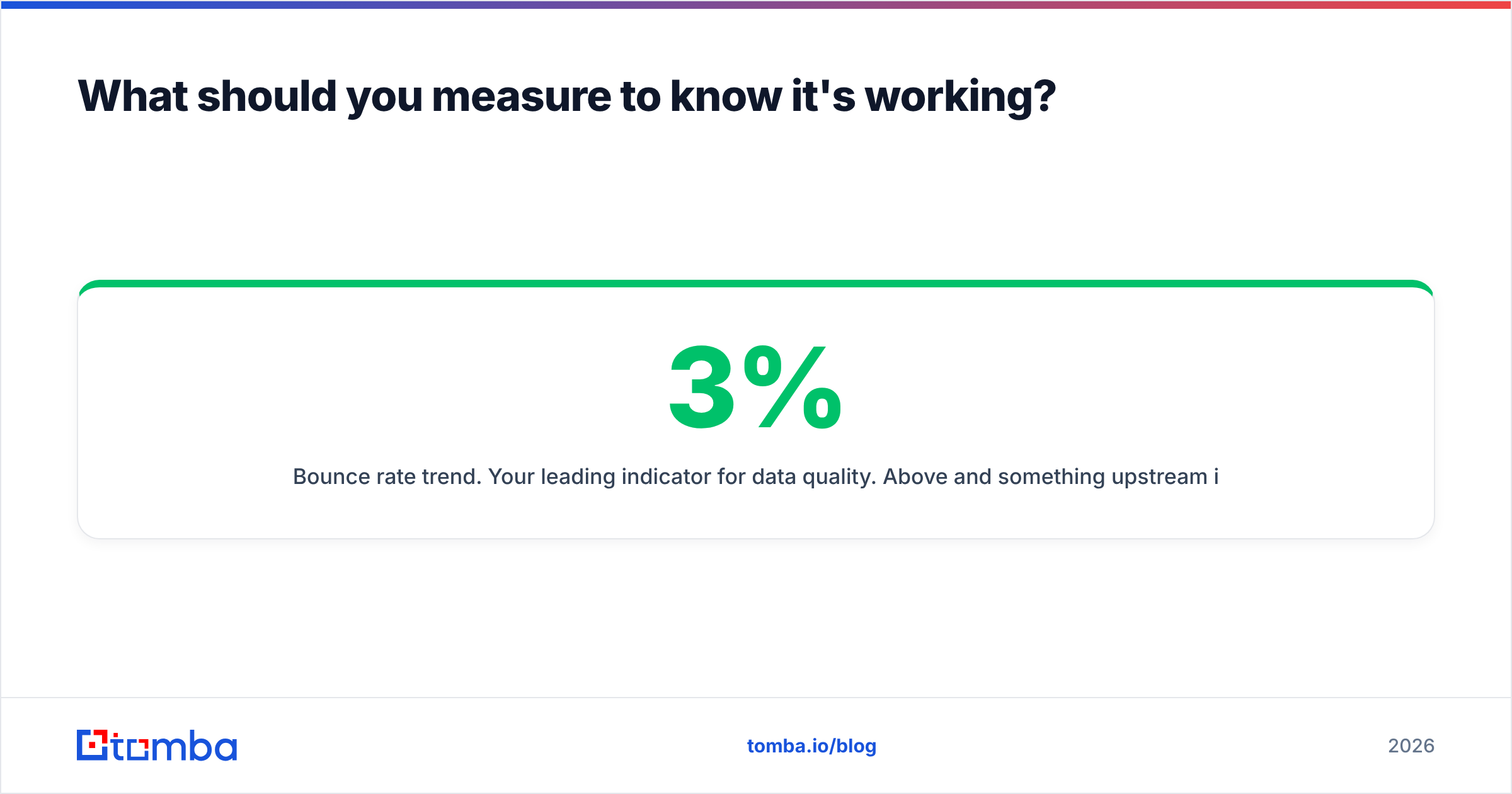
- Bounce rate trend. Your leading indicator for data quality. Above 3% and something upstream is broken. Above 5% and mailbox providers are already throttling you. Track it weekly, not quarterly.
- Data completeness rate. What percentage of new records arrive with every field routing needs? This is the honest score for your enrichment layer.
- Time from lead creation to first touch. Automation should compress this from days to minutes. If it hasn't, your routing layer is the bottleneck.
- Reply rate by segment. Automation makes it cheap to send more. Reply rate is what tells you whether the extra volume was worth sending. Watch response rate per segment, not in aggregate — aggregates hide the segments that are quietly failing.
One caution on volume metrics. It's tempting to celebrate a 3x increase in sends. But if reply rate drops by two-thirds, you've automated your way to the same number of conversations with three times the reputation risk. HubSpot's benchmark research consistently shows targeting quality beats raw volume in B2B outbound — automation should let you be more selective, not less.
What's changing in GTM automation in 2026?#
Two shifts worth planning around.
Agentic workflows are replacing rule chains. The "if X then Y" builders of 2022 are giving way to systems where an LLM agent decides the next action based on context. This is genuinely useful for research and personalization — an agent that reads a company's recent announcements and drafts a relevant opener does something no rule chain could. It's less useful for anything requiring determinism, like routing or compliance. Tools now expose MCP servers so agents can call enrichment functions directly; Tomba's MCP server is one example of this pattern.
Deliverability enforcement got stricter. Google and Yahoo's 2024 bulk-sender requirements were the start, not the end. Authentication is now table stakes, and spam-complaint thresholds are enforced automatically. The practical consequence: sloppy list hygiene now has immediate, mechanical costs. Verification stopped being optional the moment enforcement became algorithmic.
Both shifts point the same direction. The advantage moves from who can send the most to who has the cleanest data and the sharpest targeting. That's a data-layer advantage, and it compounds.
Getting started without boiling the ocean#
Pick one motion. Not your whole GTM — one motion. Say, inbound demo requests.
Map every manual step from form submit to first rep touch. Time each one. Then automate the single most expensive step, measure for two weeks, and only then move to the next. Teams that try to automate everything simultaneously ship nothing that works; teams that automate one motion end-to-end have something running in three weeks that they can point at when asking for budget.
Start where the leverage is highest: the contact data underneath everything else. If your reps are still manually hunting for email addresses, that's your first automation and it's not close. The Tomba Email Finder handles discovery and verification in one step, works through the API, Sheets, or bulk upload depending on how your team operates, and starts free with 25 searches a month so you can validate the workflow before committing budget. Paid plans run from $49/mo — see Tomba pricing for the full breakdown against your volume.
Fix the foundation, then automate upward. That order is the whole strategy.
Related guides#
Ready to find emails that actually work?
Join 150,000+ professionals who stopped guessing and started sending. Free credits on signup — no credit card required.
Get the Tomba newsletter
Practical outbound tactics and product updates — once every two weeks.
About the author