GTM Buddy Pricing, Reviews, Pros and Cons: 2026 Buyer Guide
GTM Buddy is quote-only, so the sticker price is never the real price. Here is how the tiers, seat minimums, implementation fees and renewal uplifts actually behave in 2026 — plus honest pros, cons and cheaper alternatives.
TL;DR
- GTM Buddy does not publish list pricing. Every number you find online — including the ranges below — is buyer-reported, not vendor-confirmed. Assume a demo call before you see a quote.
- Realistic 2026 budgeting: expect a per-seat annual contract in the low-to-mid three figures per user per year, a seat minimum, and a one-time onboarding/implementation line item on top.
- Reviews are consistently strong on two things: content findability inside the seller's workflow, and responsive support. They are consistently weaker on reporting depth and admin taxonomy work.
- The platform solves an enablement content problem. It does not solve a contact data problem — you still need a source of verified emails and phone numbers feeding the top of the funnel.
- Buy GTM Buddy if you have 25+ reps drowning in stale decks. Skip it if your real bottleneck is that reps can't find the right person to email in the first place.
What is GTM Buddy and who actually buys it?#
GTM Buddy is a revenue enablement platform. In plain terms: it's the company library, but the library walks over to your desk and hands you the right book before you ask.
That's the whole pitch. Instead of making a rep dig through a shared drive for the "Manufacturing ROI one-pager, v7 FINAL," GTM Buddy surfaces content contextually — inside Gmail, Outlook, Slack, LinkedIn, or the CRM record the rep is already looking at. The vendor calls this "just-in-time enablement." Competitors call it contextual recommendation. Same idea, different marketing.
The buyer profile is narrow and predictable. It's almost always an enablement lead, a RevOps director, or a VP of Sales at a B2B company with somewhere between 25 and 500 quota-carrying reps. Below 25 reps, a well-organized Google Drive and a Notion page beat any six-figure platform. Above 500, you're usually in a Highspot or Seismic procurement cycle already.
The company positions itself against the incumbents in the revenue operations stack — cheaper and faster to deploy than the enterprise giants, more structured than a folder system. Whether that positioning holds depends almost entirely on how messy your existing content library is. You can check the vendor's own framing at gtmbuddy.ai.
How does GTM Buddy pricing work in 2026?#
Short answer: it's quote-only, and that's the single most important fact about it.
There is no public pricing page, no self-serve checkout, no published free tier. You book a demo, you get scoped, you get a proposal. That means your leverage comes entirely from preparation — knowing seat counts, contract length, and what a competing quote looks like before you're on the call.
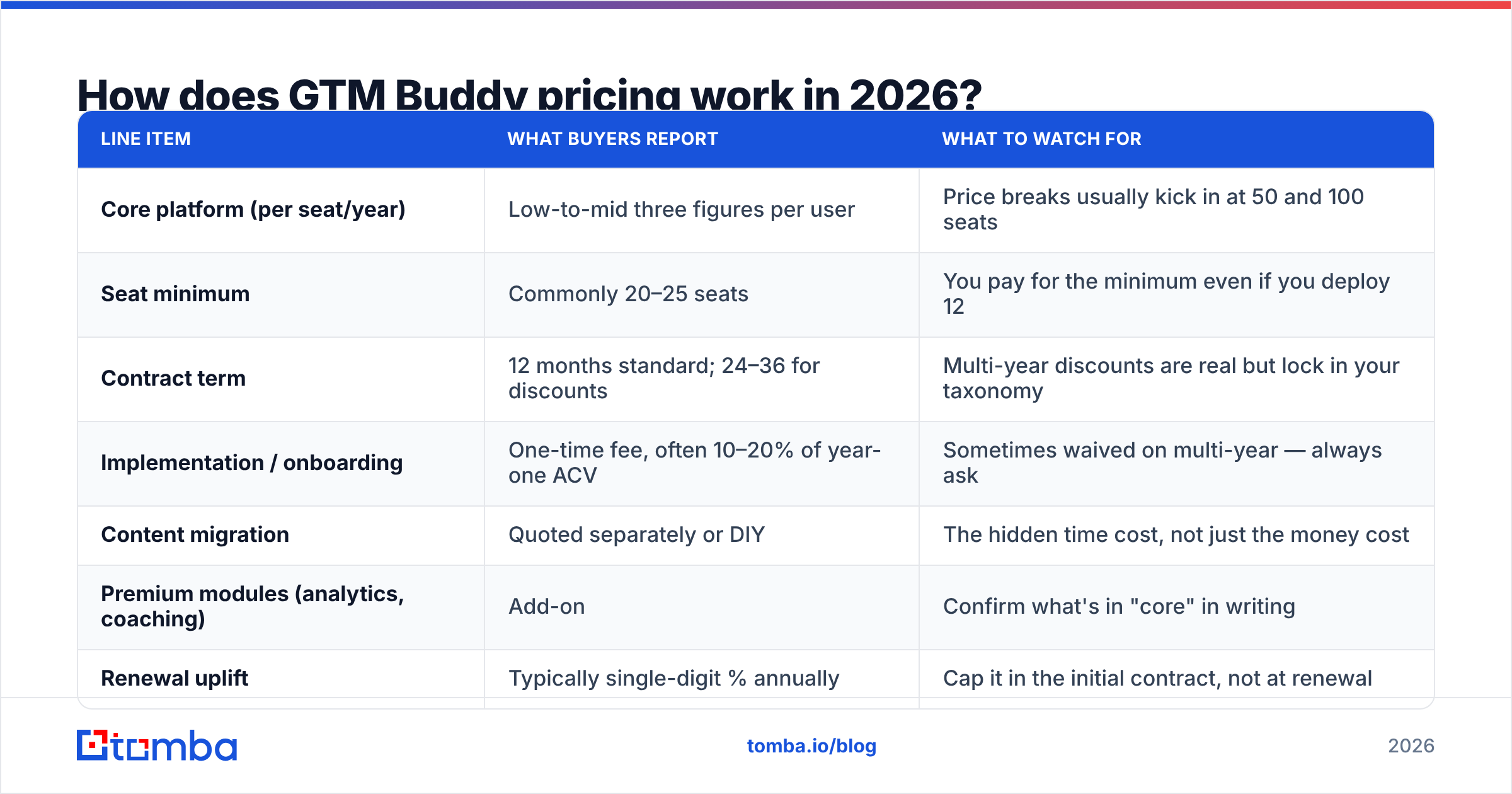
Here is what buyers consistently report in 2026. Treat every figure as an estimate to negotiate against, not a price list:
| Line item | What buyers report | What to watch for |
|---|---|---|
| Core platform (per seat/year) | Low-to-mid three figures per user | Price breaks usually kick in at 50 and 100 seats |
| Seat minimum | Commonly 20–25 seats | You pay for the minimum even if you deploy 12 |
| Contract term | 12 months standard; 24–36 for discounts | Multi-year discounts are real but lock in your taxonomy |
| Implementation / onboarding | One-time fee, often 10–20% of year-one ACV | Sometimes waived on multi-year — always ask |
| Content migration | Quoted separately or DIY | The hidden time cost, not just the money cost |
| Premium modules (analytics, coaching) | Add-on | Confirm what's in "core" in writing |
| Renewal uplift | Typically single-digit % annually | Cap it in the initial contract, not at renewal |
The pattern here is the standard enterprise SaaS shape: the platform fee is the number they quote you, and the total cost of ownership is roughly 1.3–1.5x that number in year one once implementation and internal admin time are counted.
Five questions that change your quote materially:
- What is the true seat count? Many teams license only closing reps and leave SDRs, CS, and partner managers out — then discover the content gap moves downstream. Decide before you sign, because mid-term seat adds rarely get the original discount.
- Which modules are core versus add-on? Content management is always core. Advanced analytics, coaching workflows, and digital sales rooms are the usual upsell boundary. Get the module list in the order form.
- Is implementation fixed-fee or time-and-materials? Fixed-fee protects you when your content library turns out to be worse than you claimed. It usually is.
- What's the renewal cap? A 7% annual uplift on a three-year deal is a 22% increase by year three. Negotiate the cap in year one when you still have leverage.
- What happens to your content on exit? Ask specifically about bulk export format and metadata retention. This is the question vendors answer slowest, which tells you something.

What do GTM Buddy reviews actually say?#
The review consensus in 2026 is genuinely positive but narrow in scope. On G2, the recurring themes cluster into a small set of statements that repeat across dozens of write-ups.
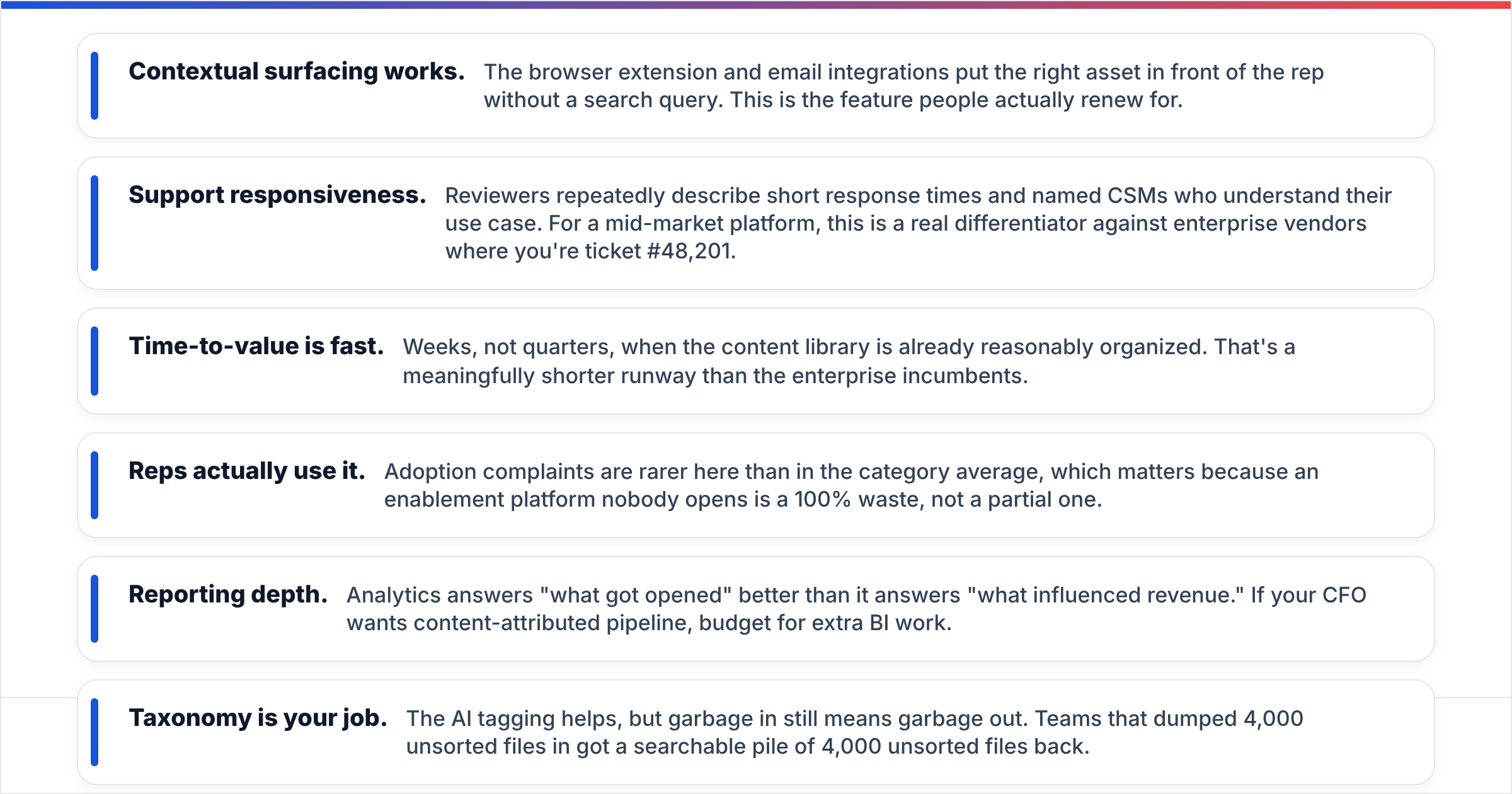
What reviewers praise, almost universally:
- Contextual surfacing works. The browser extension and email integrations put the right asset in front of the rep without a search query. This is the feature people actually renew for.
- Support responsiveness. Reviewers repeatedly describe short response times and named CSMs who understand their use case. For a mid-market platform, this is a real differentiator against enterprise vendors where you're ticket #48,201.
- Time-to-value is fast. Weeks, not quarters, when the content library is already reasonably organized. That's a meaningfully shorter runway than the enterprise incumbents.
- Reps actually use it. Adoption complaints are rarer here than in the category average, which matters because an enablement platform nobody opens is a 100% waste, not a partial one.
What reviewers criticize, also consistently:
- Reporting depth. Analytics answers "what got opened" better than it answers "what influenced revenue." If your CFO wants content-attributed pipeline, budget for extra BI work.
- Taxonomy is your job. The AI tagging helps, but garbage in still means garbage out. Teams that dumped 4,000 unsorted files in got a searchable pile of 4,000 unsorted files back.
- Admin learning curve. Not steep, but not zero. Most teams need one part-time owner. If nobody owns it, decay starts around month four.
- Integration breadth. Solid on the majors — Salesforce, HubSpot, Slack, Gmail, Outlook. Thinner on long-tail tools than the enterprise platforms with a decade of head start.
For category-level context rather than single-vendor opinion, Gartner Peer Insights maintains a revenue enablement platform category worth reading alongside G2, because the reviewer populations skew differently — Gartner leans larger enterprise, G2 leans mid-market.
How does GTM Buddy compare to other enablement platforms?#
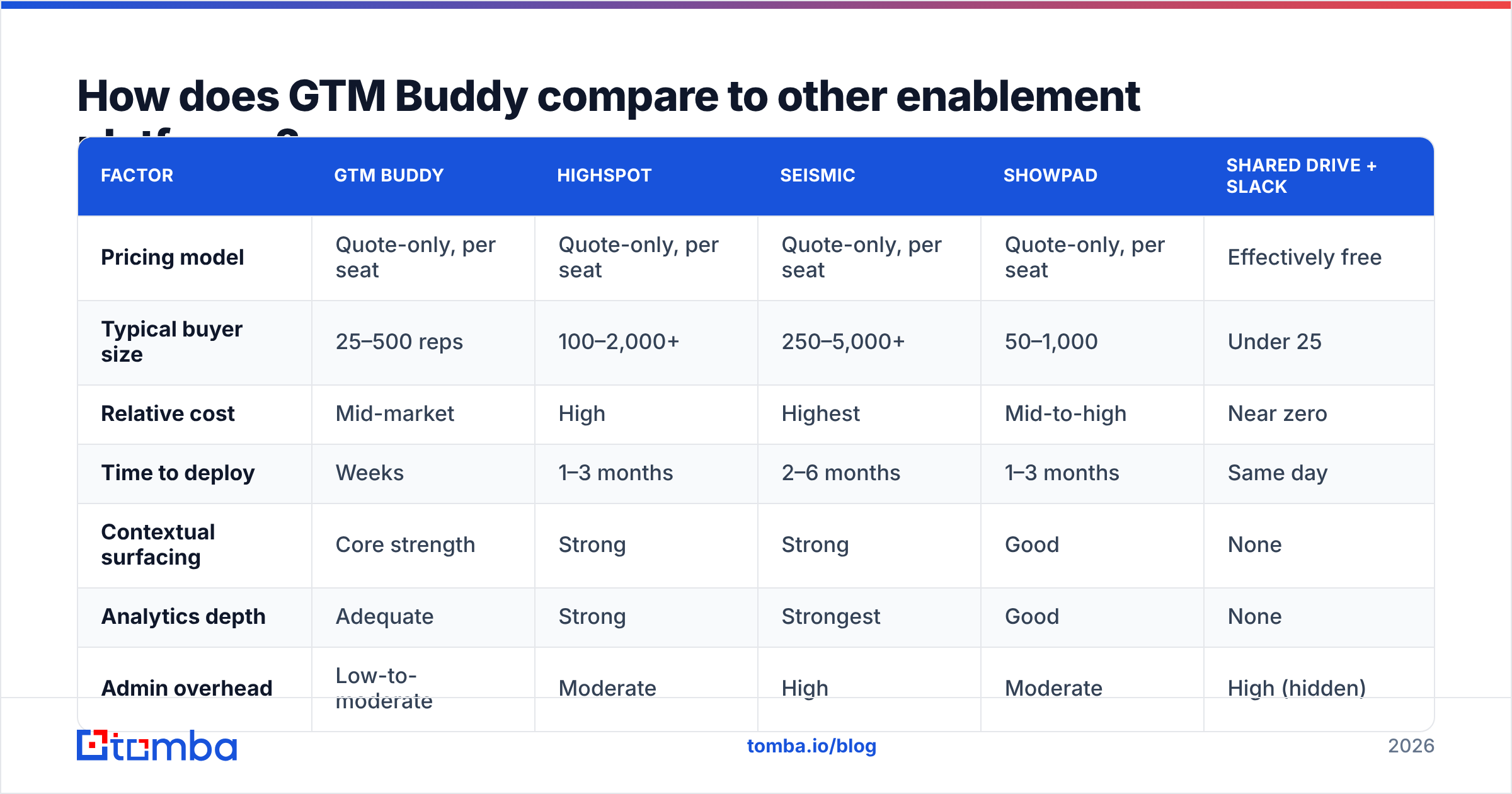
The honest comparison is less about features and more about what you're willing to spend and how much configuration you can absorb.
| Factor | GTM Buddy | Highspot | Seismic | Showpad | Shared drive + Slack |
|---|---|---|---|---|---|
| Pricing model | Quote-only, per seat | Quote-only, per seat | Quote-only, per seat | Quote-only, per seat | Effectively free |
| Typical buyer size | 25–500 reps | 100–2,000+ | 250–5,000+ | 50–1,000 | Under 25 |
| Relative cost | Mid-market | High | Highest | Mid-to-high | Near zero |
| Time to deploy | Weeks | 1–3 months | 2–6 months | 1–3 months | Same day |
| Contextual surfacing | Core strength | Strong | Strong | Good | None |
| Analytics depth | Adequate | Strong | Strongest | Good | None |
| Admin overhead | Low-to-moderate | Moderate | High | Moderate | High (hidden) |
| Best fit | Fast-moving mid-market | Large sales orgs | Enterprise, regulated | Field + partner sales | Early-stage teams |
The strategic read: GTM Buddy occupies the space where Seismic is overkill and a folder system has visibly failed. That's a real segment — most companies between Series B and Series D live there. But it also means the buying decision is usually "GTM Buddy versus doing nothing," not "GTM Buddy versus Seismic." Price your alternative honestly. Doing nothing has a cost too; it just doesn't arrive as an invoice.
What are the real pros of GTM Buddy?#
Adoption without mandates. The strongest argument for the platform is that it meets reps where they already work. Enablement tools die when they require a new tab. This one mostly doesn't.
Content decay becomes visible. Once assets are tagged and tracked, you find out that 60% of your library hasn't been opened in a year. That insight alone often justifies a chunk of the spend, because it redirects marketing production budget toward things sellers actually use.
Faster ramp for new hires. New reps stop asking "where's the security questionnaire response?" in Slack. Institutional knowledge stops living in three senior reps' heads.
Mid-market pricing with mid-market expectations. You're not paying enterprise rates for enterprise governance you'll never configure.
What are the cons and hidden costs?#
The quote-only wall. You cannot budget before a sales cycle. For a lean RevOps team evaluating six tools, that friction alone knocks vendors off the shortlist. It's a deliberate choice by the vendor, and it costs them consideration.
Implementation is not free, in money or hours. Budget internal time: someone has to define the taxonomy, audit the existing library, decide what gets migrated and what gets killed. Two to four weeks of a part-time owner is a realistic floor.
Attribution stops short. If you need to prove "this case study influenced $2.1M in closed-won," expect to export data and build that view yourself.
It solves a mid-funnel problem only. This is the point most buyers underweight. GTM Buddy makes your reps better at using content with contacts they already have. It does nothing to increase the number of qualified contacts entering the pipeline. If your reps have great decks and empty calendars, you bought the wrong tool.
Is GTM Buddy worth it for your team?#
Run this test before you book the demo.
Buy it if: you have 25+ reps, a content library over 200 assets, at least one person who can own taxonomy, and a documented complaint from sellers that they can't find or trust materials. Those four conditions together make the ROI arithmetic straightforward — a few hours per rep per month recovered pays for the seat cost quickly.
Don't buy it if: you have under 20 reps, fewer than 100 assets, no dedicated owner, or your primary pain is pipeline volume rather than deal execution. In the last case, the money buys more pipeline if you spend it on data and outbound capacity instead.
The uncomfortable middle: many teams that think they have an enablement problem actually have a targeting problem. Reps aren't losing deals because the deck was outdated. They're losing because they're emailing the wrong five people at the right company, or the right person at a bounced address. Before you sign a multi-year enablement contract, audit where deals actually die.
What should you budget alongside GTM Buddy?#
An enablement platform sits in the middle of the funnel. It needs something feeding it.
That's the layer where contact data lives — verified work emails, direct phone numbers, and enriched company records that make your CRM worth automating against. Enablement content is useless attached to a lead record with no reachable contact. And unlike enablement platforms, contact data tooling is priced transparently, so it's the easy half of the budget to plan.
A practical stack split for a 40-rep team: contact data and verification at the top, enablement content in the middle, CRM and forecasting at the bottom. Each layer is independently replaceable, which is the point — don't let one vendor's bundle discount lock you into their weakest module.
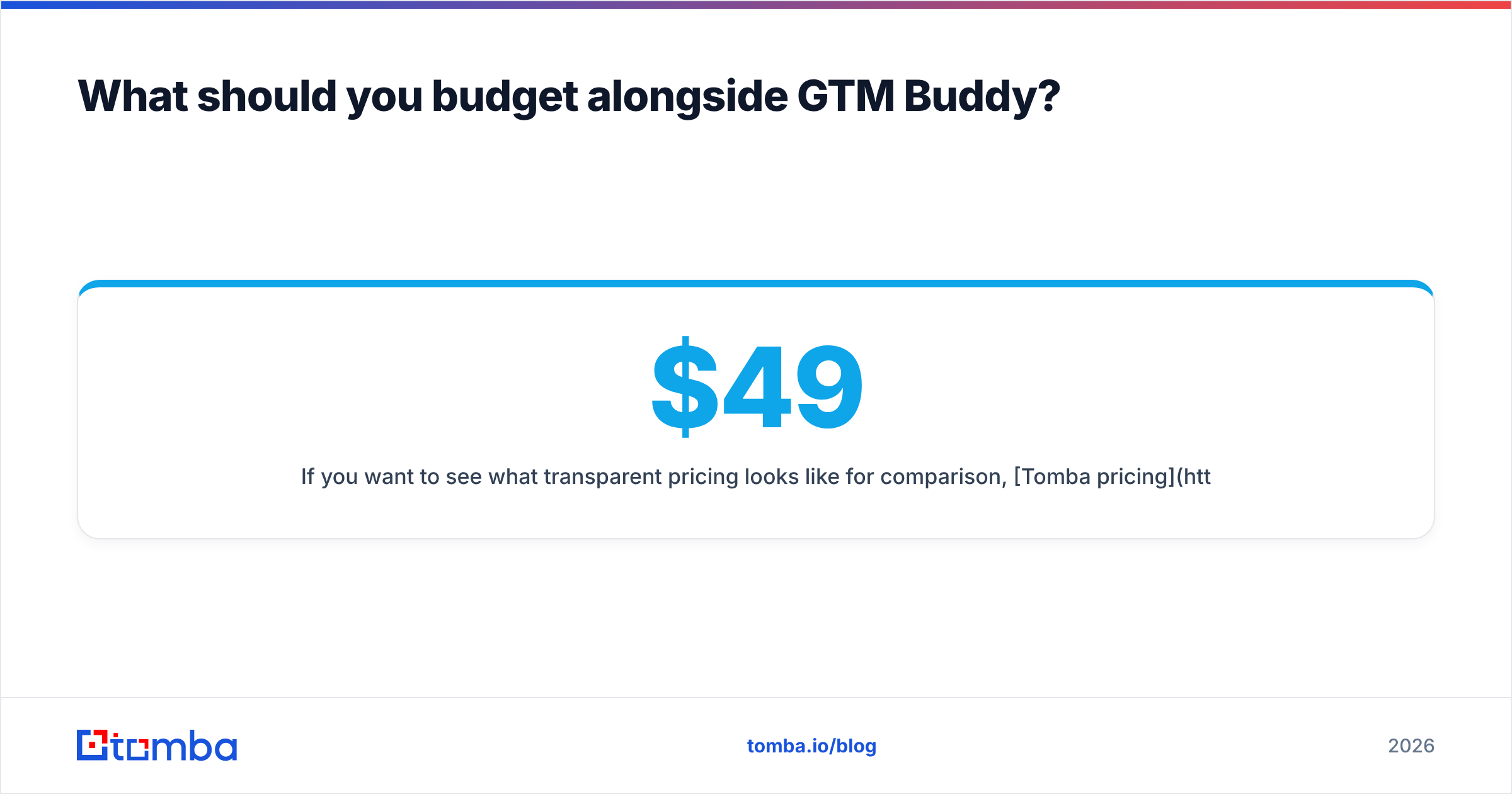
If you want to see what transparent pricing looks like for comparison, Tomba pricing runs a free tier at 25 searches per month, Starter at $49/mo, Growth at $99/mo, and Pro at $249/mo, with no demo call required to read any of it. That's not a knock on GTM Buddy's model — enterprise enablement genuinely is configuration-heavy — but it's a useful contrast when you're assembling a stack and need half the line items to be predictable.
Where should you start?#
Get the contact layer right before you spend six figures making your content layer prettier.
Start with Tomba Email Finder to build a verified list of the people your reps should be talking to — by domain, by name, or in bulk across a target account list. Pair it with data enrichment so the records landing in your CRM arrive complete, and push the whole thing through the Tomba API if you'd rather it run without anyone clicking a button. The free tier gives you 25 searches a month to test accuracy against your own target accounts before you pay anything — which is exactly the kind of pre-purchase proof a quote-only enablement platform can't give you.
Then, once your reps have full calendars, go buy them better decks.
Related guides#
Ready to find emails that actually work?
Join 150,000+ professionals who stopped guessing and started sending. Free credits on signup — no credit card required.
Get the Tomba newsletter
Practical outbound tactics and product updates — once every two weeks.
About the author