GTM Software in 2026: What It Is and How to Pick a Stack
GTM software promises one connected revenue engine, but most teams end up with seven tools that disagree. Here is what each layer actually does, what it costs, and how to build a stack that pays for itself.
TL;DR
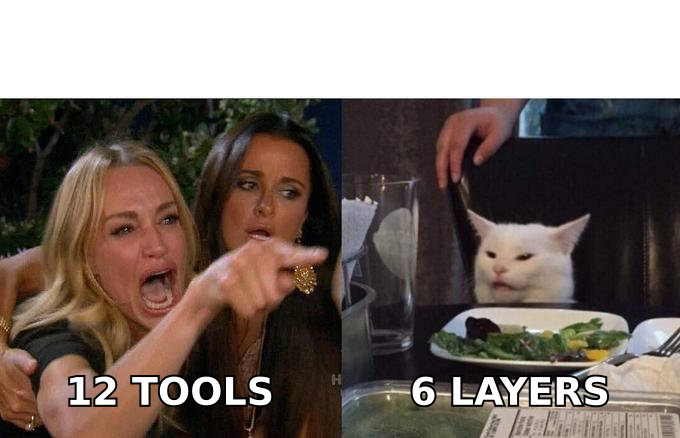
- GTM software is not one product. It's six layers — data, engagement, CRM, intelligence, orchestration, and analytics — that most teams buy in the wrong order.
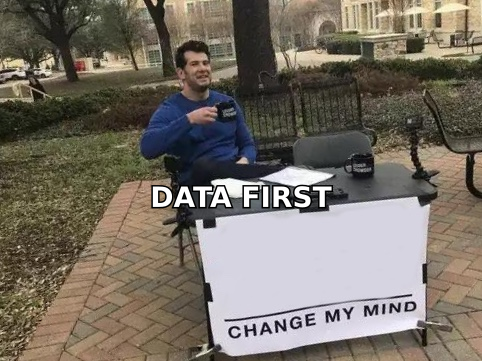
- The single highest-ROI layer is data quality. Every dollar spent on sequencing, AI scoring, or attribution multiplies whatever accuracy your contact data already has, including the negatives.
- A functional stack for a 5-rep team runs roughly $600–$1,400/month. Anything past $3,000/month at that size usually means you're paying twice for the same capability.
- Consolidated "all-in-one" GTM platforms trade data depth for convenience. Best-of-breed stacks win on quality but lose on integration overhead — pick your poison deliberately.
- Before you buy anything, run a 90-day audit: what percentage of your outbound bounces, and how many hours per rep go to manual list building? Those two numbers dictate your first purchase.
What is GTM software, exactly?#
GTM software is the tooling layer that turns a target market into booked revenue. Think of it like a restaurant kitchen. The CRM is the pass where finished plates go out; the sequencer is the line cook; but if the walk-in fridge is full of spoiled produce, nothing downstream saves the meal. That fridge is your data layer, and it is the part buyers consistently underfund.
The term "go-to-market software" got popular around 2022 when vendors realized "sales tools" sounded too narrow. Marketing, sales, customer success, and revenue operations all touch the same pipeline, so the category widened to cover anything that moves a prospect from unaware to closed-won.
That breadth is why the category is confusing. A $12/month Chrome extension and a $250,000/year platform both call themselves GTM software. They're solving different problems at different layers.
What are the six layers of a GTM stack?#
Here's the mental model that makes purchasing decisions obvious. Every GTM tool sits in exactly one of these layers, and you should be able to name yours for each.
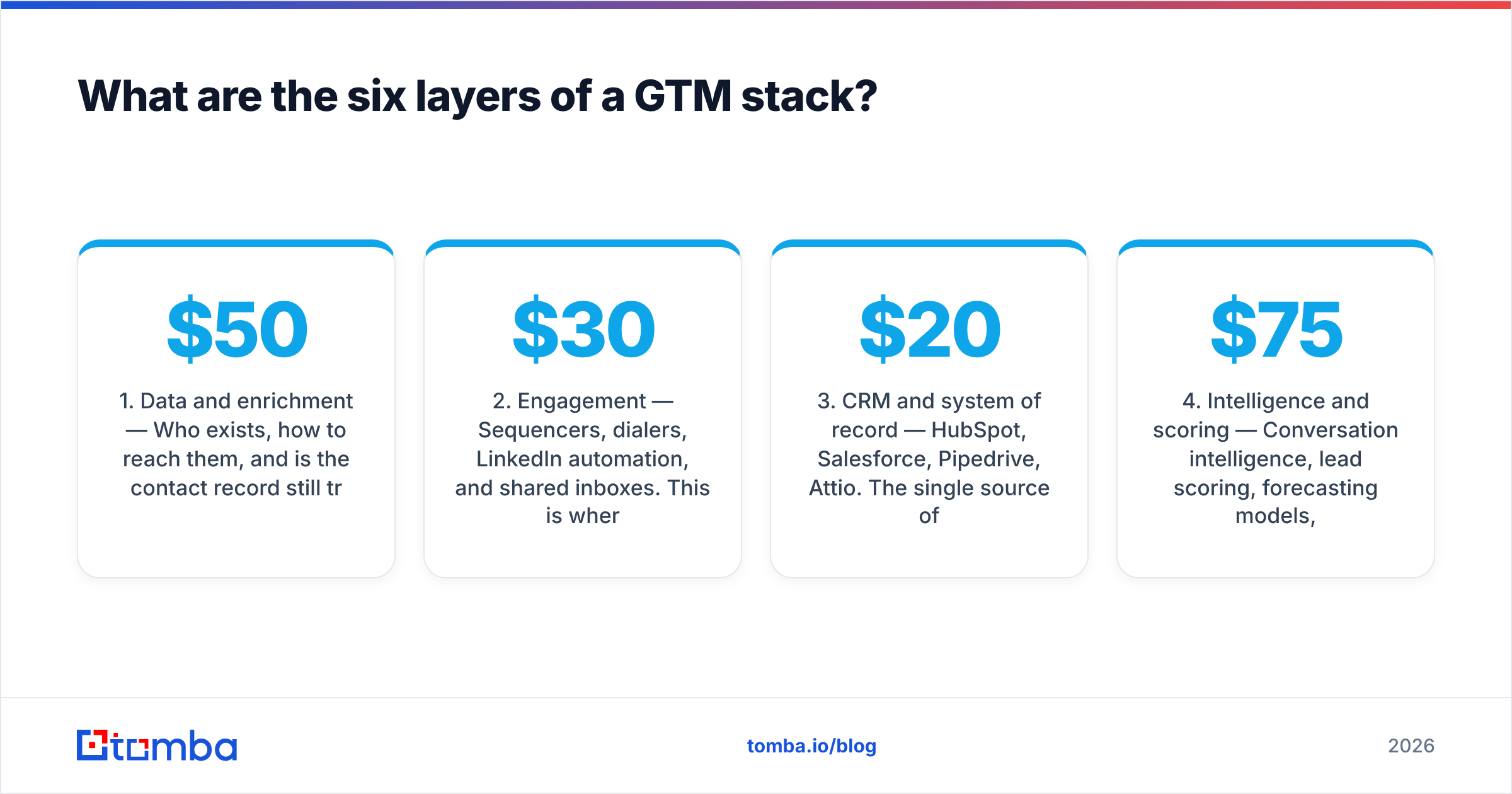
- Data and enrichment — Who exists, how to reach them, and is the contact record still true? This covers email finders, verification, phone data, firmographic enrichment, and intent signals. Cost: $50–$500/mo for most SMB teams.
- Engagement — Sequencers, dialers, LinkedIn automation, and shared inboxes. This is where messages actually leave the building. Cost: $30–$150 per seat/mo.
- CRM and system of record — HubSpot, Salesforce, Pipedrive, Attio. The single source of truth for deals and accounts. Cost: $20–$165 per seat/mo.
- Intelligence and scoring — Conversation intelligence, lead scoring, forecasting models, AI research agents. Cost: $75–$200 per seat/mo, and the layer most likely to be redundant with your CRM.
- Orchestration and workflow — Zapier, Make, Clay, n8n, or internal scripts wiring the other layers together. Cost: $20–$800/mo depending on operation volume.
- Analytics and attribution — Dashboards, pipeline decay reports, channel ROI. Cost: often bundled, $0–$1,000/mo standalone.
Skip a layer and something else absorbs the work. Teams without an orchestration layer end up with reps copy-pasting between tabs, which is orchestration priced at $60,000/year in salary instead of $49/month in software.
Why does the data layer matter more than the rest?#
Because error rates compound downstream and nothing above the data layer can detect them.
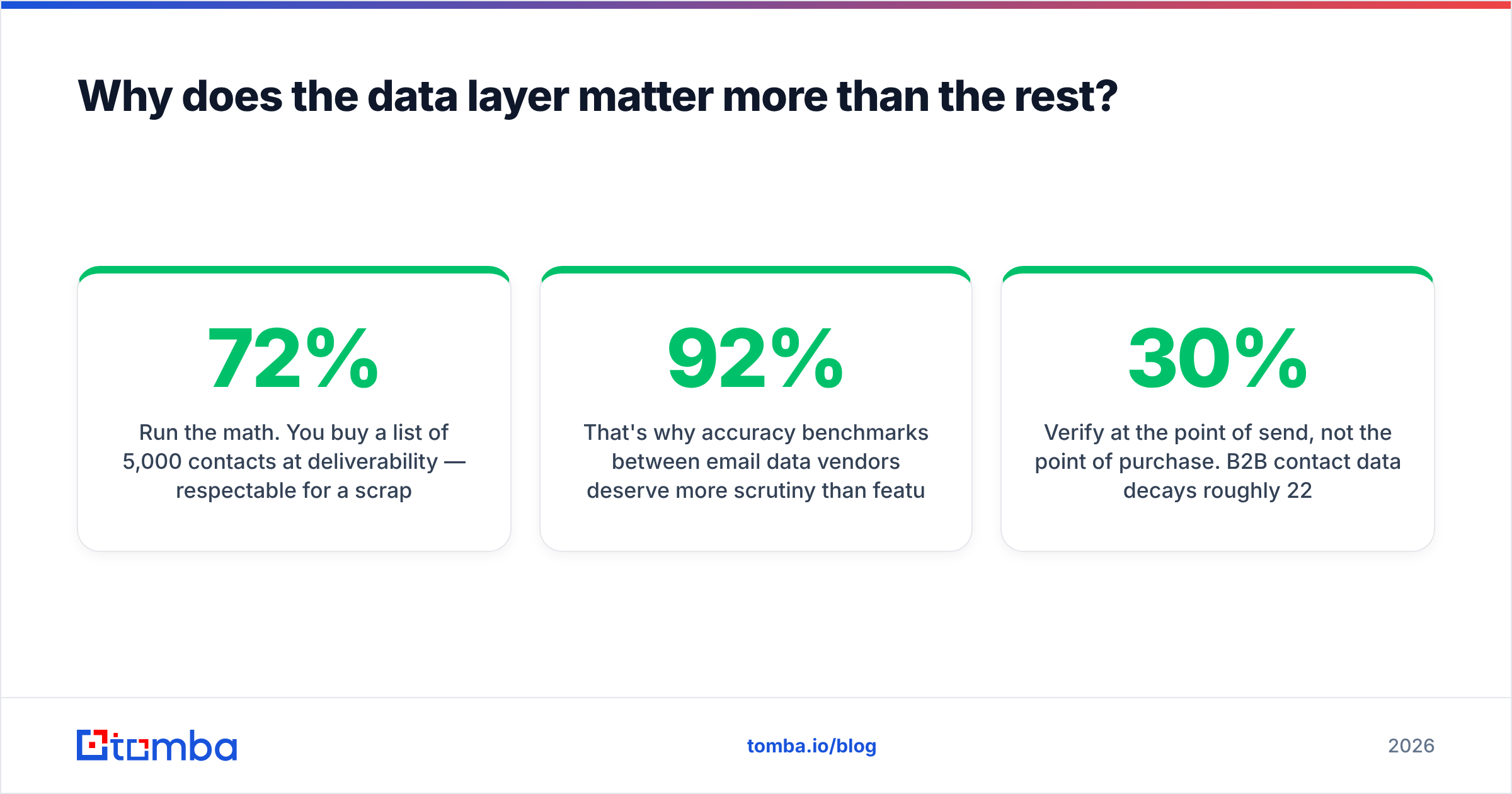
Run the math. You buy a list of 5,000 contacts at 72% deliverability — respectable for a scraped or aging database. You push it into a sequencer at $100/seat. Of the 1,400 bad addresses, some bounce immediately and some sit on catch-all domains returning ambiguous responses. Your bounce rate crosses 5%, mailbox providers start throttling, and your sender reputation degrades across every domain you send from — including the good contacts.
You didn't lose 1,400 contacts. You lost the performance of all 5,000, plus recovery time.
That's why accuracy benchmarks between email data vendors deserve more scrutiny than feature lists. The difference between 92% and 97% verified accuracy sounds like rounding error until you multiply it across 20,000 sends per quarter.
Two practical rules:
- Verify at the point of send, not the point of purchase. B2B contact data decays roughly 22–30% per year as people change jobs. A list verified in January is materially worse by June. An email verifier run before each campaign catches the drift.
- Treat catch-all domains as their own category. Roughly one in five B2B domains accepts all mail at the server level, which makes standard SMTP verification useless. A dedicated catch-all verifier uses pattern confidence and secondary signals instead of relying on the bounce response.
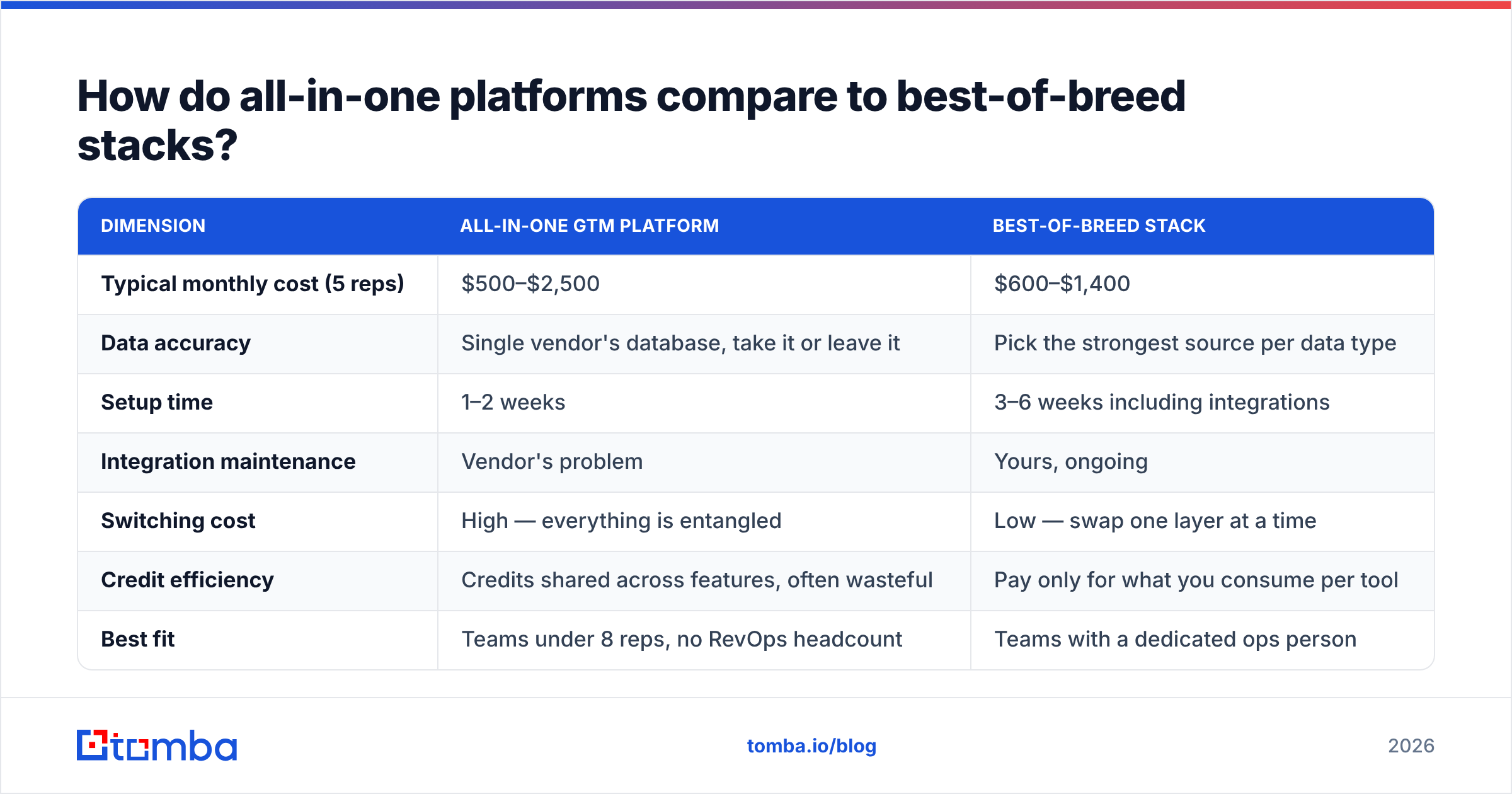
How do all-in-one platforms compare to best-of-breed stacks?#
This is the central buying decision, and both answers are defensible depending on team size.
| Dimension | All-in-one GTM platform | Best-of-breed stack |
|---|---|---|
| Typical monthly cost (5 reps) | $500–$2,500 | $600–$1,400 |
| Data accuracy | Single vendor's database, take it or leave it | Pick the strongest source per data type |
| Setup time | 1–2 weeks | 3–6 weeks including integrations |
| Integration maintenance | Vendor's problem | Yours, ongoing |
| Switching cost | High — everything is entangled | Low — swap one layer at a time |
| Credit efficiency | Credits shared across features, often wasteful | Pay only for what you consume per tool |
| Best fit | Teams under 8 reps, no RevOps headcount | Teams with a dedicated ops person |
The honest tiebreaker: do you have someone whose job includes maintaining integrations? If yes, best-of-breed wins on data quality and cost control. If no, an all-in-one platform's worse data still beats a best-of-breed stack nobody maintains.
A middle path works well in practice — one consolidated platform for engagement and CRM, plus a specialist vendor for the data layer. You get the convenience where convenience matters and precision where precision compounds.
What does a GTM stack actually cost in 2026?#
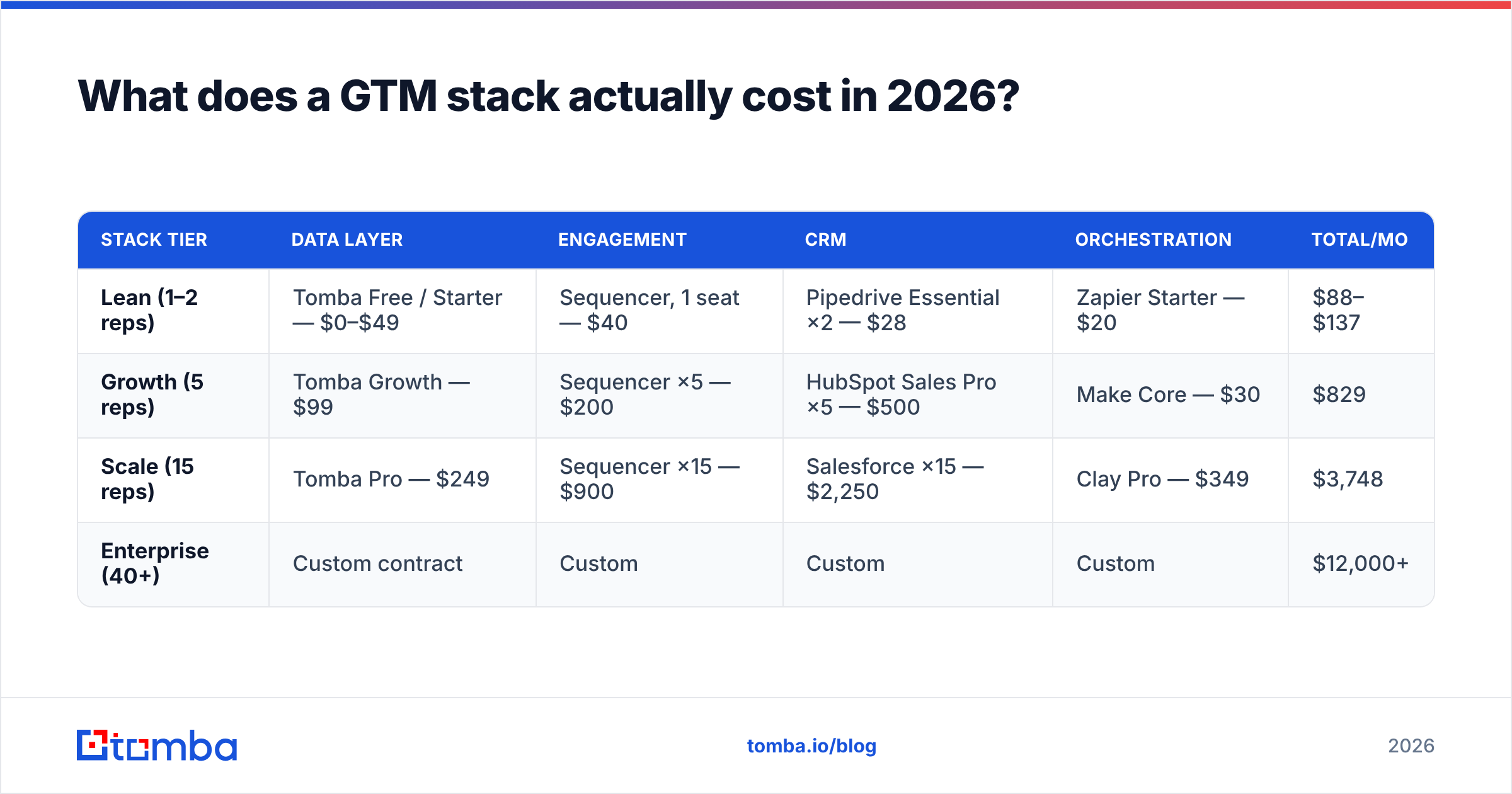
Published pricing has gotten more honest over the last two years, but credit systems still obscure real cost. Here's a like-for-like comparison of what teams commonly assemble at each budget level.
| Stack tier | Data layer | Engagement | CRM | Orchestration | Total/mo |
|---|---|---|---|---|---|
| Lean (1–2 reps) | Tomba Free / Starter — $0–$49 | Sequencer, 1 seat — $40 | Pipedrive Essential ×2 — $28 | Zapier Starter — $20 | $88–$137 |
| Growth (5 reps) | Tomba Growth — $99 | Sequencer ×5 — $200 | HubSpot Sales Pro ×5 — $500 | Make Core — $30 | $829 |
| Scale (15 reps) | Tomba Pro — $249 | Sequencer ×15 — $900 | Salesforce ×15 — $2,250 | Clay Pro — $349 | $3,748 |
| Enterprise (40+) | Custom contract | Custom | Custom | Custom | $12,000+ |
Two things stand out. First, the data layer is consistently the smallest line item — usually 5–12% of the stack — while determining the effectiveness of everything else. Second, per-seat CRM costs dominate at scale, which is why RevOps teams spend so much energy on seat audits.
Watch for these cost traps:
- Credit rollover policies. Some vendors expire unused credits monthly. If your outbound is seasonal, annual-pooled credits are worth a higher sticker price.
- Verification billed separately from discovery. Finding an address and confirming it's live are sometimes two charges. Check whether verified results are the default or an upsell. Tomba's pricing bundles verification into the finder response, which changes the effective per-contact math.
- API access gated to top tiers. If you plan to automate, confirm the email finder API is available on the plan you're actually buying, not two tiers up.

Which GTM software categories are worth buying first?#
Sequence matters more than selection. Buy in this order and each purchase makes the next one more valuable.
First: a CRM. Even a cheap one. Without a system of record, you can't measure whether anything else worked. Teams that delay CRM adoption spend six months generating pipeline they can't attribute.
Second: a data source. Discovery plus verification. This is where a domain search tool earns its keep — feed it a target account list and get back the contacts and email patterns without a rep manually hunting each one.
Third: engagement. Now that you have accounts and verified contacts, a sequencer has something worth sending. Buying this first is the most common ordering mistake; you end up with expensive software sending to a list you built by guessing addresses.
Fourth: orchestration. Once the first three run daily, you'll know exactly which handoffs are manual. Automate those specifically, rather than buying a general-purpose automation platform and hoping for use cases.
Fifth: intelligence. Scoring, forecasting, and conversation analysis need volume to be useful. Under a few hundred opportunities per quarter, a spreadsheet and a weekly pipeline review outperform any model.
How should you evaluate GTM vendors without wasting a quarter?#
Vendor demos are optimized to show the tool working on the vendor's data. Force the evaluation onto yours.
- Bring your own list. Take 100 real target accounts and run them through every finalist during the trial. Measure hit rate and bounce rate, not interface polish. G2's category reviews are useful for shortlisting but useless as a substitute for testing on your ICP.
- Test your worst segment, not your best. Every vendor performs well on US-based SaaS companies with 200+ employees. Test the segment where you actually struggle — European mid-market, healthcare, sub-50-employee companies.
- Ask what happens on a miss. Does the tool return a low-confidence guess or nothing? Guesses that look like data are worse than blanks, because they end up in a sequencer.
- Check the integration you'll rely on daily. A native HubSpot integration behaves very differently from a Zapier bridge with a 15-minute delay and a per-task charge.
- Read the fair-use clause. Unlimited plans usually aren't. Find the throttle before you build a workflow that depends on the ceiling.
For teams evaluating specialist data vendors, BookYourData is a solid option worth including on the shortlist alongside Tomba — it takes a database-first approach with pay-as-you-go pricing, which suits teams that buy contacts in occasional large batches rather than continuously. Different consumption model, same layer of the stack.

What GTM software mistakes cost the most money?#
Ranked by how much damage they do relative to how common they are.
Buying intelligence before you have data volume. AI scoring models trained on 40 closed deals produce confident nonsense. HubSpot's own sales research repeatedly finds that data hygiene beats model sophistication for teams under Series B.
Paying per seat for tools only ops uses. Enrichment and orchestration platforms rarely need rep seats. Audit who logs in monthly; the answer is usually two people on a ten-seat contract.
Running one sending domain for everything. Your GTM stack can be perfect and still fail if reputation collapses. Separate domains for outbound and transactional mail, and monitor email deliverability as its own metric rather than assuming the sequencer handles it.
Signing annual contracts during a pilot. The discount is 15–20%. The cost of being locked into the wrong data vendor for twelve months is considerably more than 20%.
Never deprecating anything. Stacks accrete. Once a quarter, list every tool, its cost, and the last date someone used it for a decision. Tools that fail that test get cut — you'll typically find 15–25% of spend that way.
What does a well-run GTM stack look like day to day?#
The test isn't which logos are in your stack. It's whether a rep can go from "here's a target account" to "message sent to a verified decision-maker" in under three minutes without leaving their workflow.
That usually means: account list lives in the CRM, enrichment runs automatically on record creation, verified contacts sync back within minutes, and the sequencer pulls from CRM views rather than uploaded CSVs. When it works, reps stop being data-entry clerks. When it doesn't, you'll see it in the CSV files sitting in everyone's Downloads folder.
Measure two things monthly: bounce rate (target under 2%) and hours per rep spent on list building (target under two per week). Those two numbers tell you more about stack health than any dashboard your vendors ship.
Start with the layer that multiplies everything else. Before you add another seat, another model, or another dashboard, fix the contact data feeding them. Tomba's Email Finder gives you verified professional emails by name, domain, or company, with verification built into the response instead of billed as an extra step — free tier included at 25 searches a month, Starter at $49/mo when you outgrow it. Run your 100 hardest accounts through it and compare the hit rate against whatever you're using now. That test takes an afternoon and will tell you more than a quarter of vendor demos.
Related guides#
Ready to find emails that actually work?
Join 150,000+ professionals who stopped guessing and started sending. Free credits on signup — no credit card required.
Get the Tomba newsletter
Practical outbound tactics and product updates — once every two weeks.
About the author