GTM Solutions in 2026: How to Build a Stack That Works
Most GTM stacks are five tools solving one problem badly. Here's how the categories actually break down, what each layer should cost, and where to start if you're building from scratch.
TL;DR
- "GTM solutions" is a category label, not a product. It covers six distinct layers: data, engagement, orchestration, intelligence, enablement, and analytics — and most teams accidentally buy the same layer three times.
- The single highest-ROI layer for teams under 50 reps is data quality. Everything downstream inherits your contact accuracy, including your sender reputation.
- All-in-one platforms trade flexibility for convenience. Expect $1,000–$4,000/mo for a bundled suite versus roughly $300–$600/mo for a composed stack that does the same job.
- Start with a verified contact source (Tomba's free tier is 25 searches/mo, Starter $49/mo), add a sequencer, then add orchestration only when routing rules become a spreadsheet.
- Skip the "AI GTM engine" pitch until you can answer: what data does it read, and who owns the output when it's wrong?
What are GTM solutions, actually?#
Go-to-market solutions are the software layer between "we have a product" and "a human at the target account replied." That's it. The term got inflated because every vendor in B2B sales tooling repositioned as a GTM platform between 2023 and 2026 — CRMs, sequencers, intent providers, data brokers, and conversation intelligence tools all now use the same three words on their homepage.
That inflation is your problem, not theirs. When five vendors describe themselves identically, you can't tell whether you're buying an overlap or a gap. So ignore the marketing category and sort by function instead.
Here are the six layers a working GTM stack actually contains:
- Data layer — Who exists, where they work, how to reach them. Email addresses, phone numbers, firmographics, technographics. This is the foundation; bad data here breaks everything above it.
- Engagement layer — Sending things. Sequencers, dialers, LinkedIn automation, email sending infrastructure. Where your message physically leaves the building.
- Orchestration layer — Routing and rules. Lead assignment, territory logic, enrichment triggers, handoffs between SDR and AE. Usually a workflow tool or a RevOps-owned automation platform.
- Intelligence layer — Signals that tell you when to act. Intent data, website visitor identification, job-change alerts, funding triggers.
- Enablement layer — Making reps better. Call recording, coaching, content libraries, battlecards.
- Analytics layer — Did any of it work? Attribution, pipeline forecasting, cohort reporting.
Most teams under 30 people need layers 1 and 2 properly, layer 3 lightly, and can defer 4–6 entirely. The mistake is buying a platform that bundles all six at mediocre quality when you needed two of them done well.

Which GTM layer should you buy first?#
The data layer. Not because it's the most exciting, but because every other layer's output degrades proportionally to your contact accuracy.
Run the math. If your contact list is 70% accurate and you send 1,000 emails, 300 hit dead addresses. Those bounces don't just waste sends — they damage your sender reputation, which suppresses inbox placement for the 700 valid addresses too. A bad data layer doesn't cost you 30% of results. It costs you closer to 50%, because deliverability compounds downward.
Google and Yahoo's bulk-sender requirements, in effect since 2024, made this stricter: sustained hard-bounce rates and spam complaints above 0.3% now get you throttled or blocked outright. You can read the current requirements in Google's Postmaster documentation. The upshot is that a cheap, inaccurate data source is now actively more expensive than an accurate one.
This is why the sequencing matters. Buy verified data, then buy sending capability. Reversing that order — which most teams do, because sequencers demo better — means you spend the first quarter burning domains.
Practically: use an email verifier as a gate before anything enters your sequencer, and treat catch-all verification as a separate decision. Catch-all domains accept everything at the SMTP layer and tell you nothing, so they need a different confidence threshold than standard mailboxes.
How do bundled GTM platforms compare to a composed stack?#
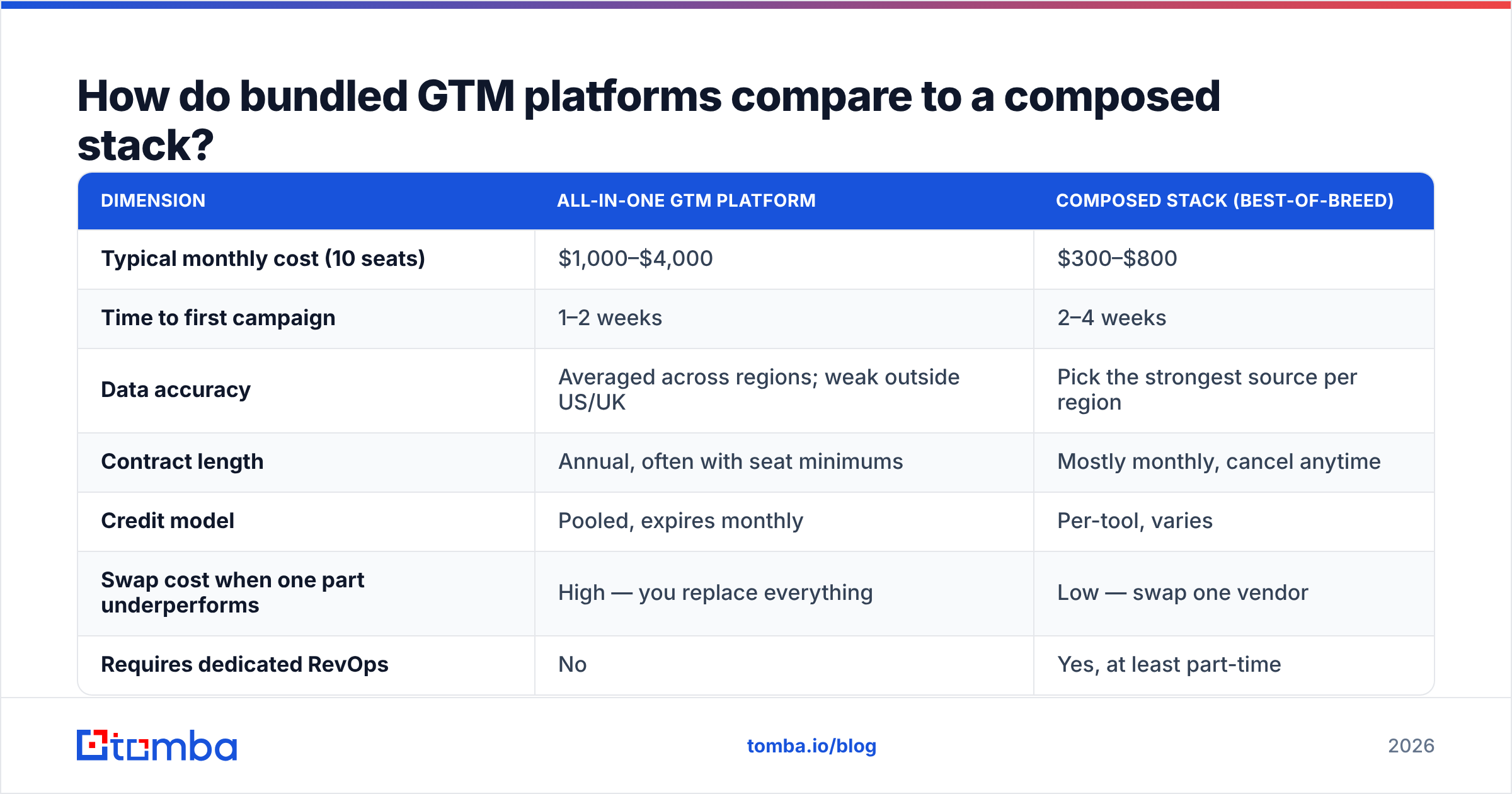
This is the real decision, and it's mostly about team size and RevOps headcount.
| Dimension | All-in-one GTM platform | Composed stack (best-of-breed) |
|---|---|---|
| Typical monthly cost (10 seats) | $1,000–$4,000 | $300–$800 |
| Time to first campaign | 1–2 weeks | 2–4 weeks |
| Data accuracy | Averaged across regions; weak outside US/UK | Pick the strongest source per region |
| Contract length | Annual, often with seat minimums | Mostly monthly, cancel anytime |
| Credit model | Pooled, expires monthly | Per-tool, varies |
| Swap cost when one part underperforms | High — you replace everything | Low — swap one vendor |
| Requires dedicated RevOps | No | Yes, at least part-time |
| API access | Often gated to top tier | Usually available on entry tiers |
Bundled platforms are genuinely the right call when you have no RevOps function and need something operational this month. The convenience is real. What you're paying for is integration work you don't have to do, and that's a legitimate purchase.
They stop being the right call when a single layer underperforms. If your bundled platform's European contact data is thin — a common weakness, since most large B2B databases are US-centric — you can't swap just that piece. You either accept the gap or you pay twice, running a second data source alongside the platform you're already paying for. At that point the "all-in-one saves money" argument has already collapsed.
A composed stack has the opposite failure mode: it works well until nobody owns the connections. Six tools with four integrations between them is a part-time job. If nobody has that job, the stack silently drifts out of sync and you get duplicate contacts, stale enrichment, and reps working from three different truths.
What should each layer cost in 2026?#
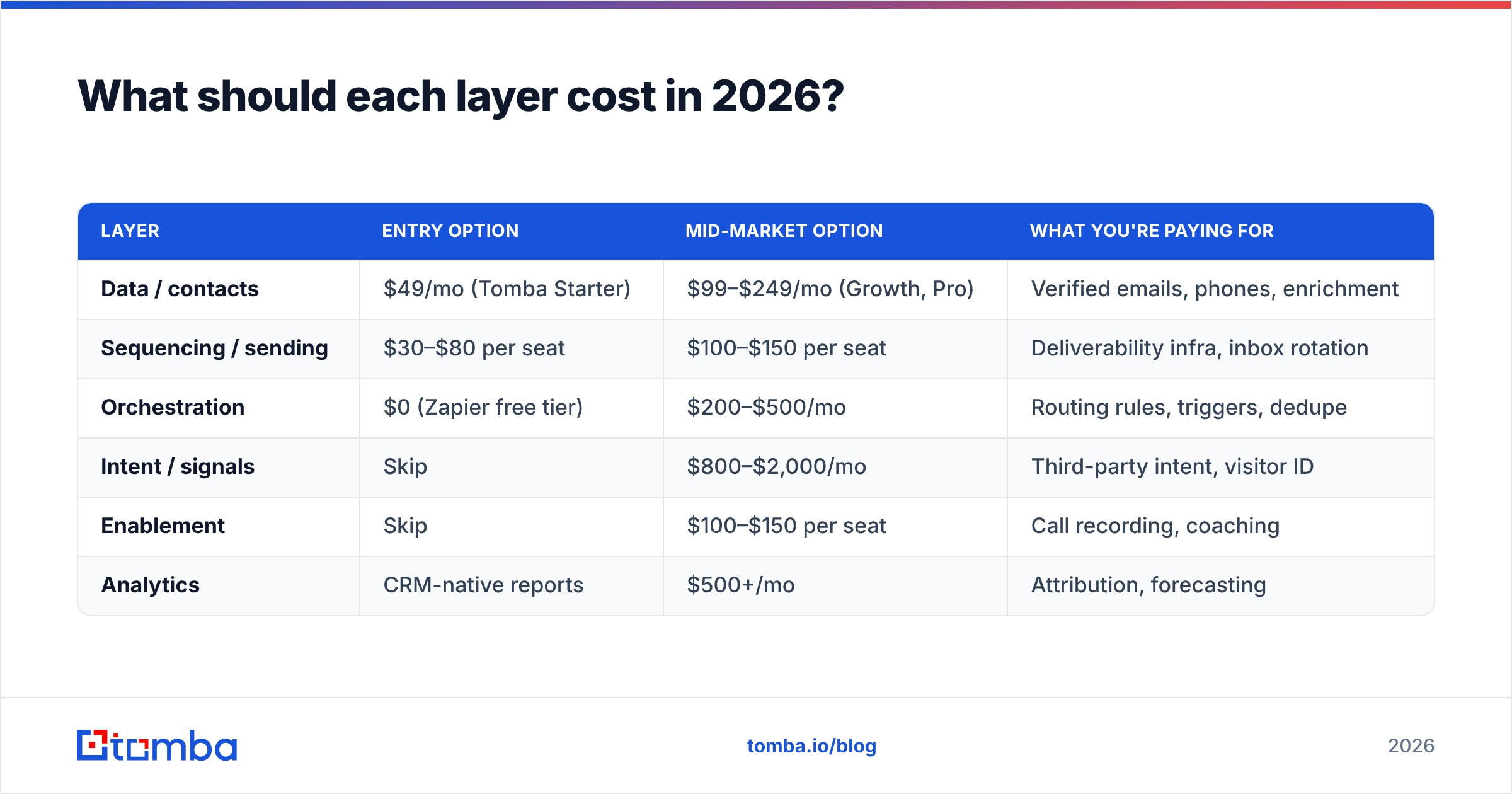
Rough benchmarks for a 10-person go-to-market team. These are list prices; most vendors discount 15–25% on annual.
| Layer | Entry option | Mid-market option | What you're paying for |
|---|---|---|---|
| Data / contacts | $49/mo (Tomba Starter) | $99–$249/mo (Growth, Pro) | Verified emails, phones, enrichment |
| Sequencing / sending | $30–$80 per seat | $100–$150 per seat | Deliverability infra, inbox rotation |
| Orchestration | $0 (Zapier free tier) | $200–$500/mo | Routing rules, triggers, dedupe |
| Intent / signals | Skip | $800–$2,000/mo | Third-party intent, visitor ID |
| Enablement | Skip | $100–$150 per seat | Call recording, coaching |
| Analytics | CRM-native reports | $500+/mo | Attribution, forecasting |
Two observations from that table.
First, the intent layer is where budgets go to die. It's the most expensive line item and the hardest to attribute. Intent data is genuinely useful at enterprise scale with a large account list, and genuinely a waste under about 500 target accounts, where you can just read the news yourself. Buy it when your TAM is too large to monitor manually, not before.
Second, the gap between entry and mid-market in the data layer is small in absolute dollars and large in outcome. Going from a $49 plan to a $249 plan is $200/mo — less than one seat of most sequencers — and it typically buys you a 5–10x credit increase plus API access for automated enrichment. That's usually the best marginal dollar in the entire stack. Full Tomba pricing is public if you want to compare tier-by-tier.
How do you evaluate a GTM vendor without wasting a quarter?#
Vendor evaluation in this category is unusually easy to do badly, because every demo is run against the vendor's best-case data. Here's a protocol that produces a real answer in under two weeks.
Step 1 — Build a 100-contact truth set. Pull 100 contacts you already have verified emails for, spanning your actual target segments and geographies. Include at least 20 non-US contacts if you sell internationally. This is your answer key.
Step 2 — Run it blind against each vendor. Strip the emails, feed the names and domains to each tool, and score match rate and accuracy separately. Match rate is "did it return something." Accuracy is "was it right." Vendors quote the first number and hope you don't check the second.
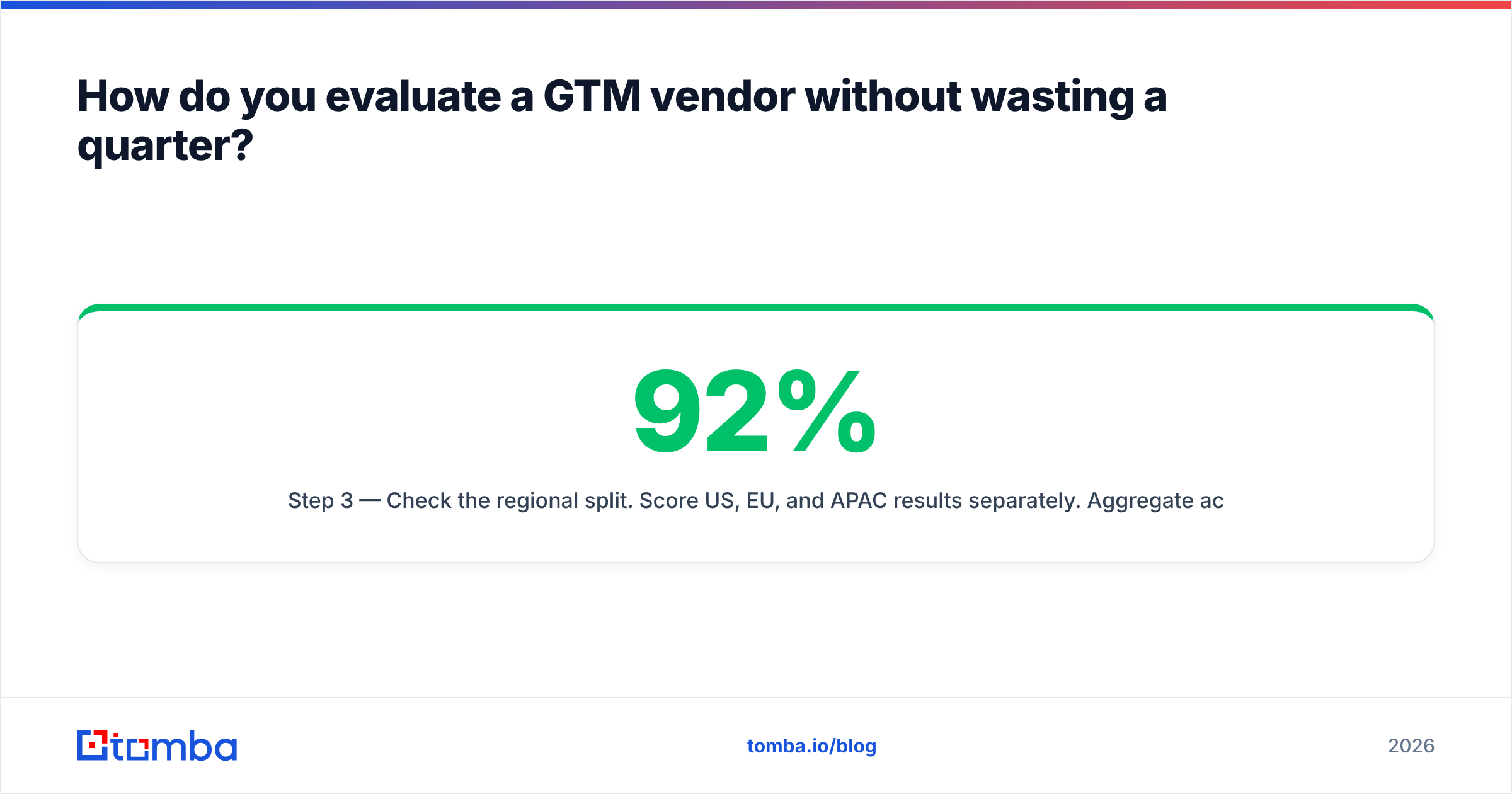
Step 3 — Check the regional split. Score US, EU, and APAC results separately. Aggregate accuracy hides enormous regional variation. A tool at 92% overall might be 96% US and 61% DACH. If you sell into Germany, that aggregate number is a lie by omission.
Step 4 — Test the failure mode. What does the tool return when it isn't sure? A vendor that returns a low-confidence guess and charges you a credit for it is worse than one that returns nothing. Ask explicitly how confidence scores map to billing.
Step 5 — Time the integration. Have someone who isn't the vendor's solutions engineer connect it to your CRM. If it takes more than a day, factor that into cost. Check whether the HubSpot integration or Salesforce integration you need is native or requires middleware.
Step 6 — Read the credit expiry terms. Monthly-expiring credits with annual billing is the least customer-friendly structure in this category, and it's common. If you buy 12 months of credits and they expire monthly, you're paying for capacity you can't bank.

Which GTM solutions fit which team size?#
There's no universal best stack, but the shape of the right answer changes predictably with headcount.
Under 10 people, founder-led sales. You need a data source and a sending tool. That's the whole stack. A domain search to map target companies, a verifier to gate the list, and a sequencer. Total cost should be under $200/mo. Skip the CRM upgrade, skip intent, skip enablement. Anything else is procrastination dressed as infrastructure.
10–50 people, first RevOps hire. Add orchestration. This is the point where routing becomes a real problem — leads land in the wrong territory, enrichment doesn't fire, and someone maintains a spreadsheet mapping accounts to reps. That spreadsheet is the signal. Add a workflow layer and start enriching on ingest rather than in batches.
50–200 people. Add intelligence and enablement. Your account list is now too large to monitor manually, which is the actual trigger for buying intent data. Enablement becomes worth it because you have enough reps that a 5% conversion lift pays for the tool.
200+. You're now buying for governance as much as capability: SSO, audit logs, data residency, seat provisioning. Feature comparisons matter less than compliance and vendor stability. Check independent review volume on G2 rather than vendor case studies — the ratio of recent reviews to total is a decent proxy for whether a vendor is still investing in the product.
Worth noting for teams that prefer buying lists outright rather than searching per-contact: providers like BookYourData operate on a pay-as-you-go database model with per-record accuracy guarantees, which suits one-off campaign builds better than a subscription search tool does. It's a different purchase shape, not a worse one — the right choice depends on whether your prospecting is continuous or campaign-driven.
What are the most common GTM stack mistakes?#
Buying the engagement layer first. Sequencers demo beautifully and cost less than data tools per seat. Teams buy one, load a scraped list, and burn their domain in six weeks. Data first, always.
Paying for overlapping enrichment. Check whether your CRM, your sequencer, and your data tool are all enriching the same fields. This is the single most common source of silent waste — three vendors charging for the same job title.
Treating credits as a proxy for value. 10,000 credits at 65% accuracy is worth less than 3,000 at 95%, and costs more in deliverability damage. Compare cost per verified contact, not cost per credit.
Never auditing. Run the 100-contact truth-set test annually, not just at purchase. Data vendors' quality shifts as their sources change. A tool that was excellent in 2024 may have degraded by 2026, and nobody will send you a notice.
Buying intent before you can act on it. Intent data tells you an account is researching. If you don't have the headcount to act on a signal within 48 hours, the signal is worthless. Buy the capacity to respond before the signal that triggers a response.
Ignoring bulk workflows. If you're enriching lists by hand in a UI, you're spending rep hours on a task that a bulk email finder or a Sheets add-on handles in one pass. This is the easiest efficiency gain in most stacks and it's almost always overlooked.
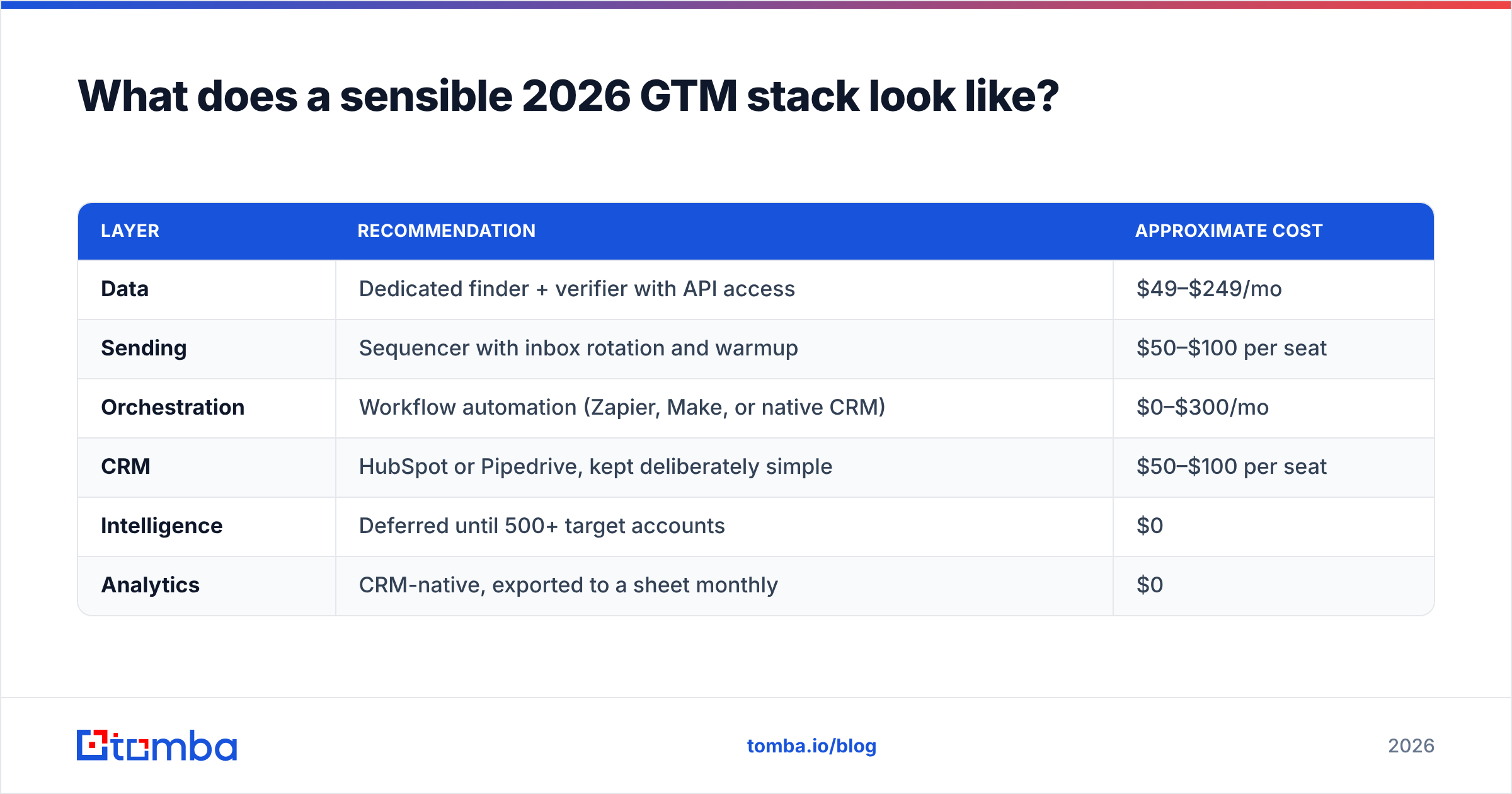
What does a sensible 2026 GTM stack look like?#
For most B2B teams under 100 people, this composition holds up:
| Layer | Recommendation | Approximate cost |
|---|---|---|
| Data | Dedicated finder + verifier with API access | $49–$249/mo |
| Sending | Sequencer with inbox rotation and warmup | $50–$100 per seat |
| Orchestration | Workflow automation (Zapier, Make, or native CRM) | $0–$300/mo |
| CRM | HubSpot or Pipedrive, kept deliberately simple | $50–$100 per seat |
| Intelligence | Deferred until 500+ target accounts | $0 |
| Analytics | CRM-native, exported to a sheet monthly | $0 |
The total for a 10-person team lands around $1,200–$2,000/mo all-in. Compare that to a single bundled platform quote at $3,000–$4,000/mo and the composed approach usually wins on both cost and quality — provided someone owns the integrations.
If nobody owns them, buy the bundle. A worse stack that's actually maintained beats a better stack that nobody keeps in sync. That's the honest tradeoff, and vendors on both sides will tell you otherwise.
Start with the layer everything else depends on#
Whatever else you buy, the contact data underneath it determines the ceiling. A sequencer can't rescue a bad list, orchestration can't route contacts that don't exist, and intent signals point at accounts you still have to reach.
Tomba Email Finder covers that foundation layer — find professional email addresses by domain, name, or company, with verification built into the same workflow rather than bolted on as a second vendor. The free tier gives you 25 searches a month, which is enough to run the 100-contact truth-set test in stages before you commit budget anywhere. Starter is $49/mo, Growth $99/mo, and Pro $249/mo with full API access for teams automating enrichment on ingest.
Test it against your own answer key. That's the only benchmark that matters.
Related guides#
Ready to find emails that actually work?
Join 150,000+ professionals who stopped guessing and started sending. Free credits on signup — no credit card required.
Get the Tomba newsletter
Practical outbound tactics and product updates — once every two weeks.
About the author