Guesser Email Tools in 2026: How Accurate Are They Really?
Email guessing takes two seconds and costs nothing, which is exactly why it wrecks so many domains. Here is what guesser email tools get right, where they fall apart, and the verify-first workflow that keeps your bounce rate under 2%.
TL;DR
- A guesser email tool builds every likely address from a name and a domain (
jane@,j.doe@,jdoe@). It hands you a list of guesses. It does not know which one is real. - Raw permutation lists run about 5-15% accurate per guess before you verify them. Sending to that list is the fastest way to burn your sending domain.
- Guess, then verify by SMTP. That works. Guess, then spray and pray does not, and most inbox providers punish it inside a single campaign.
- A database-backed email finder beats a guesser on hit rate at known companies. A guesser still wins on tiny, obscure, or brand-new domains.
- The 2026 setup: guess only when lookup fails, verify every candidate, and drop anything marked risky or catch-all.
What is a guesser email tool?#
A guesser email tool takes two inputs: a person's name and a company domain. It returns every address shape a mail admin might have set up. Feed it "Jane Doe" and "acme.com" and you get 20 to 40 candidates. Think jane@acme.com, jane.doe@acme.com, jdoe@acme.com, j.doe@acme.com, doej@acme.com, and a long tail of odd shapes.
Here is the analogy. A guesser is a locksmith who cuts you 30 keys for one lock. One key probably opens the door. The tool has no idea which one. Everything after that — checks, sends, reputation — rides on you finding out before you knock.
That is the whole gap between a guesser and a finder. A guesser makes addresses up. A finder returns one that was really seen somewhere: a code commit, a press release, a company website, a signature block, a partner dataset. Try the free email permutator to see the raw output shape. It is genuinely useful, as long as you treat each line as a guess and not a contact.
How does email guessing actually work?#
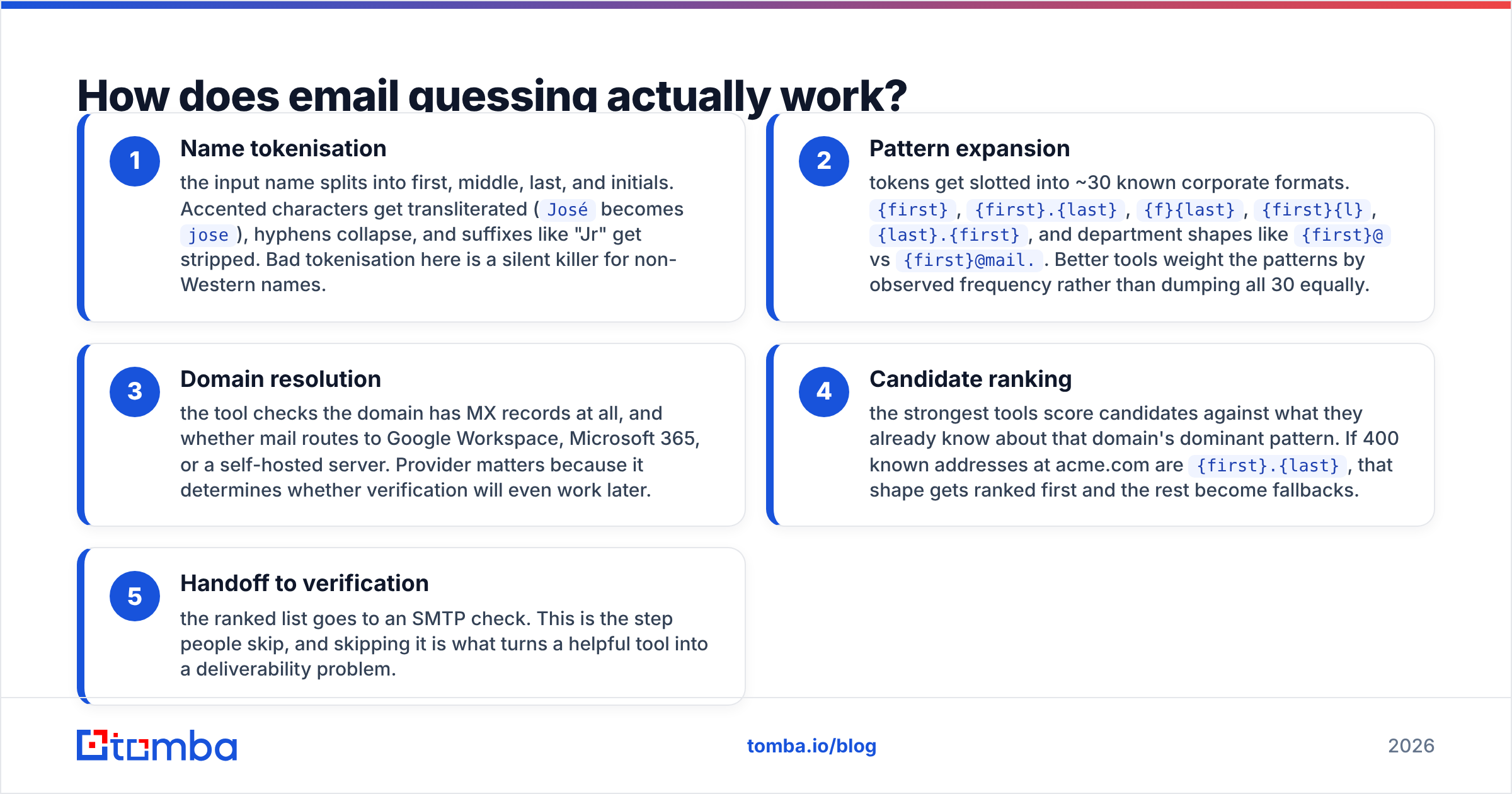
Under the hood, every guesser email tool runs the same five stages:
- Name splitting — the name splits into first, middle, last, and initials. Accents get flattened (
Josébecomesjose) and suffixes like "Jr" drop off. Sloppy splitting here quietly breaks non-Western names. - Pattern expansion — the parts drop into about 30 known formats:
{first},{first}.{last},{f}{last},{first}{l},{last}.{first}. Good tools weight patterns by how often each one shows up. - Domain check — the tool looks for MX records. It also checks whether mail routes to Google Workspace, Microsoft 365, or a self-hosted server. The provider decides whether verification will work later.
- Ranking — strong tools score each candidate against the domain's known format. If 400 known addresses at acme.com use
{first}.{last}, that shape ranks first and the rest become fallbacks. - Handoff to verification — the ranked list goes to an SMTP check. People skip this step. Skipping it is what turns a handy tool into a delivery problem.
Stage 4 is where a toy permutator and a real platform part ways. A plain permutator has no corpus, so it cannot rank. A company email pattern lookup tells you the main format at a domain first. That usually cuts 30 candidates down to two or three.

Why do so many guessed emails bounce?#
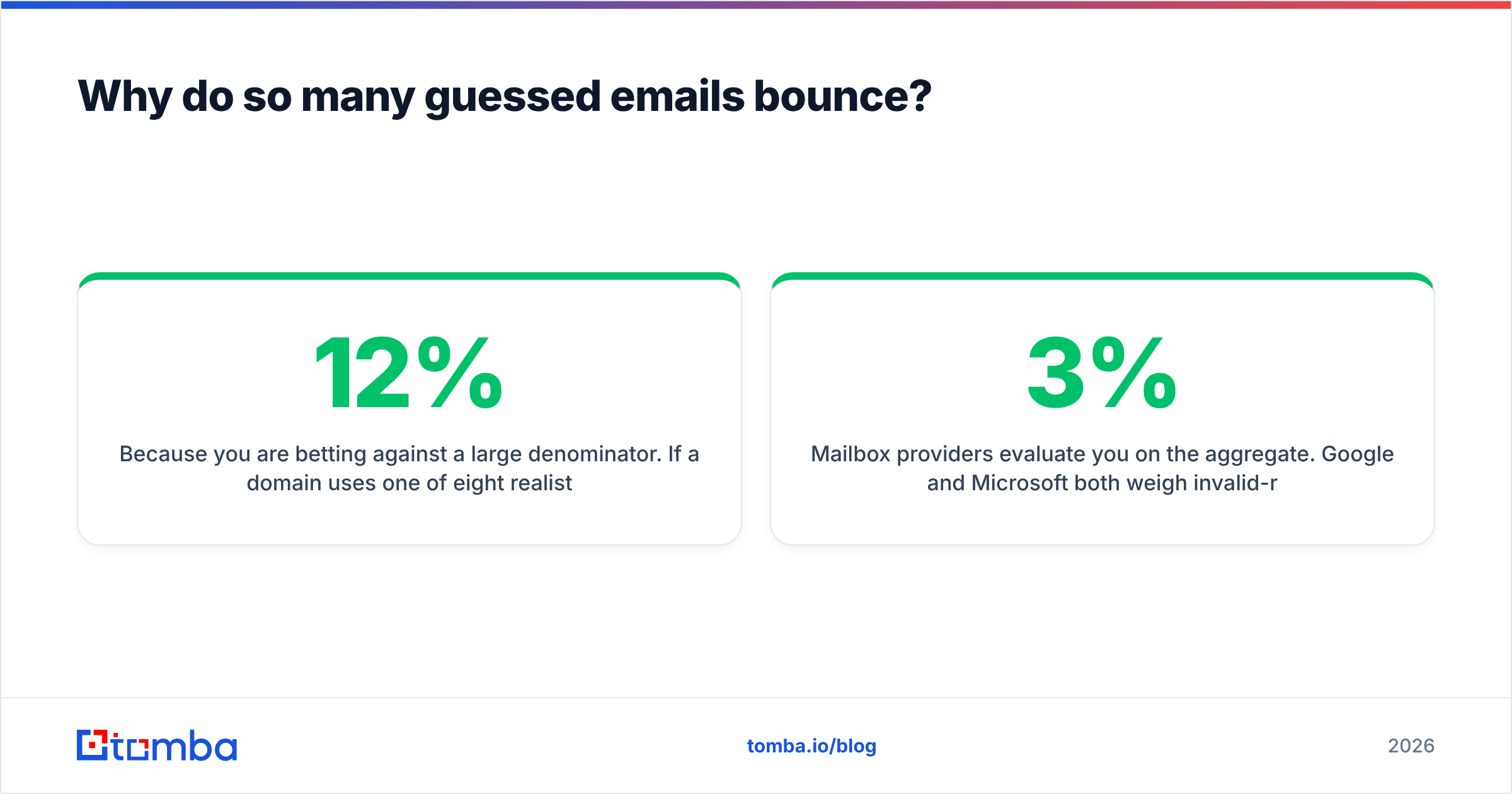
Because the odds are against you. Say a domain uses one of eight likely patterns and you have no ranking signal. A blind guess is right about 12% of the time. Real numbers beat pure chance, since {first}.{last} and {first} are common worldwide. But "better than chance" is still a terrible bounce rate at scale.
Three failure modes stack up:
Aliases that accept but never land. Many domains accept mail at info@, sales@, and other role addresses. Those route to a shared inbox nobody reads. The address is technically valid. Your reply rate is still zero, and role sends look like spam.
Catch-all domains. A catch-all server accepts every address at the domain, real or not. Your verifier says "accepted" for asdfgh@acme.com. You think you found 30 contacts. You found one polite server. That is why a catch-all verifier beats a plain yes/no check. It splits "the server says yes to everything" from "this mailbox is real".
People who left. Names scraped from LinkedIn lag reality by months. The pattern is right, but the person left in March. The address now hard-bounces, or lands with a manager who marks you as spam.
Mailbox providers judge you on the whole list. Google and Microsoft both weigh your invalid-recipient rate heavily. The threshold is harsh. Bounce rates above 2-3% start slowing your delivery. Above 5%, you can lose inbox placement for weeks.
One 500-contact campaign of raw guesses is enough to trigger that. For the mechanics, the SMTP specification shows why a 550 reply is a louder signal than most senders think.

Is a guesser email tool better than an email finder?#
Usually not. But they solve different problems, and the best setups use both.
An email finder searches a dataset of addresses seen in the wild. If the company is in that dataset, you get one address with a confidence score, and you are done. If the company is a three-person shop that registered its domain last quarter, no dataset has it. Then the guesser is your only option.
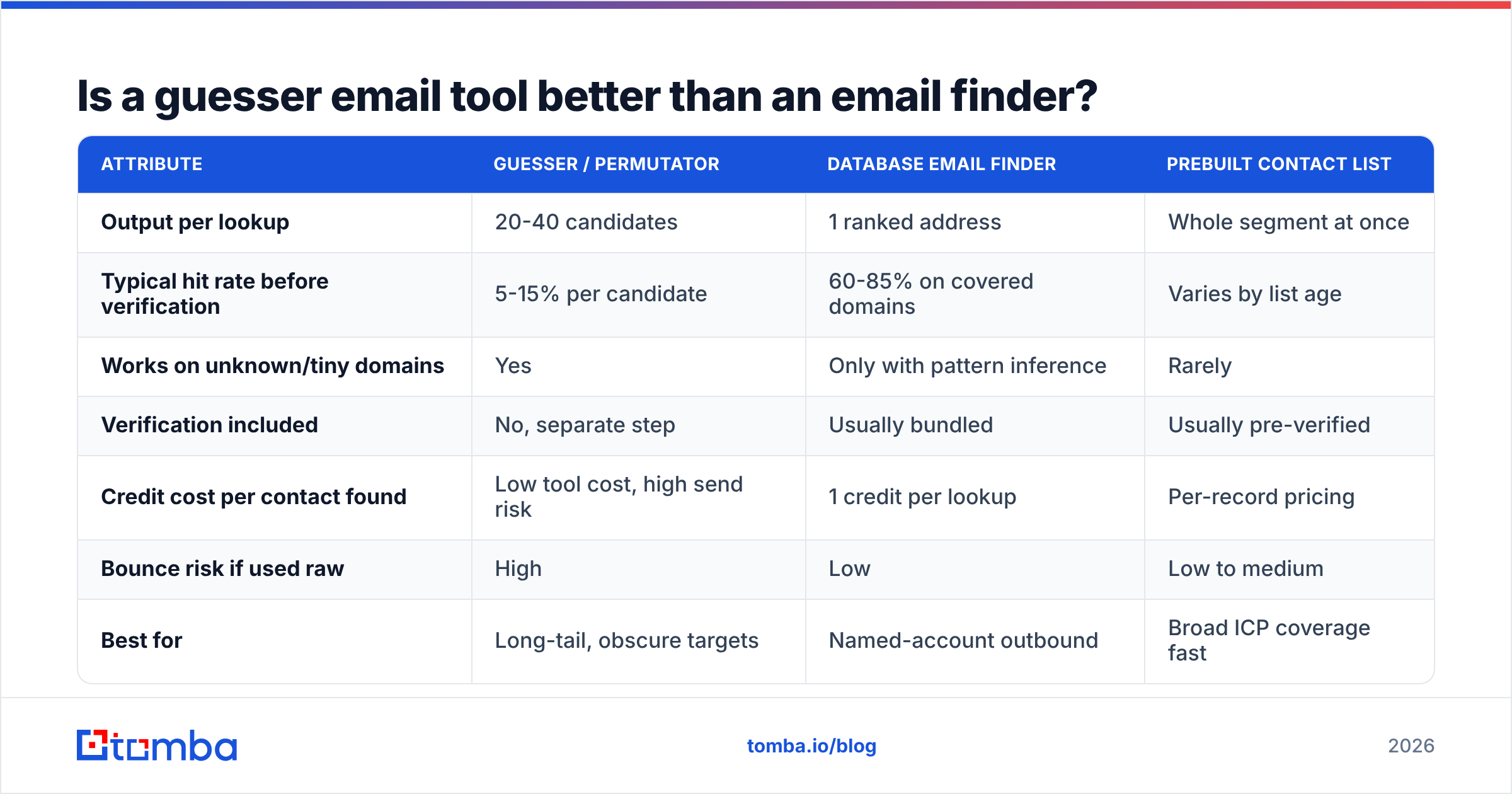
Here is how the options compare on what actually changes your results:
| Attribute | Guesser / permutator | Database email finder | Prebuilt contact list |
|---|---|---|---|
| Output per lookup | 20-40 candidates | 1 ranked address | Whole segment at once |
| Typical hit rate before verification | 5-15% per candidate | 60-85% on covered domains | Varies by list age |
| Works on unknown/tiny domains | Yes | Only with pattern inference | Rarely |
| Verification included | No, separate step | Usually bundled | Usually pre-verified |
| Credit cost per contact found | Low tool cost, high send risk | 1 credit per lookup | Per-record pricing |
| Bounce risk if used raw | High | Low | Low to medium |
| Best for | Long-tail, obscure targets | Named-account outbound | Broad ICP coverage fast |
Three examples. Prospecting into 200 mid-market SaaS companies? A domain search returns known addresses per company, and you never touch a guesser.
Chasing 40 boutique agencies with nothing but a one-page site? The guesser email tool is the only thing that returns anything at all.
Need broad coverage without per-lookup work? A vendor like BookYourData sells pre-verified records by segment. That is a different purchase. You are buying coverage, not resolving people one at a time.

Buyer reviews on G2's lead intelligence category show the same split. Teams rate finders on hit rate and verifiers on bounce prevention. Complaints about "wasted credits" almost always trace back to unverified guesses counted as finds.
What does a safe guess-then-verify workflow look like?#
Five steps, in order. Skip one and you inherit the bounce rate.
- Try lookup first. Run the name and domain through a finder before you guess. One email finder call either resolves the contact or tells you there is no coverage.
- Pull the domain's main pattern. If the finder has any address at that domain, you can infer the format. This one step cuts your candidate list by about 80%.
- Generate a short list. Two to four candidates, ranked by pattern. Not thirty. Every extra guess is another SMTP probe against a server that is watching you.
- Verify each candidate. Run the shortlist through an email verifier. Keep only the deliverable ones. Quarantine anything marked "unknown", "risky", or "accept-all".
- Route catch-alls elsewhere. Catch-all domains never resolve cleanly. Move those contacts to LinkedIn, a phone call, or an inbound play.
The rule is simple: never let an unverified guess reach a sending tool. Not "usually". Not "unless the deadline is tight". The math is lopsided. One guessed contact might be worth a $30k deal. A reputation hit costs you every deal behind it for a month.
How much does guessing really cost you?#
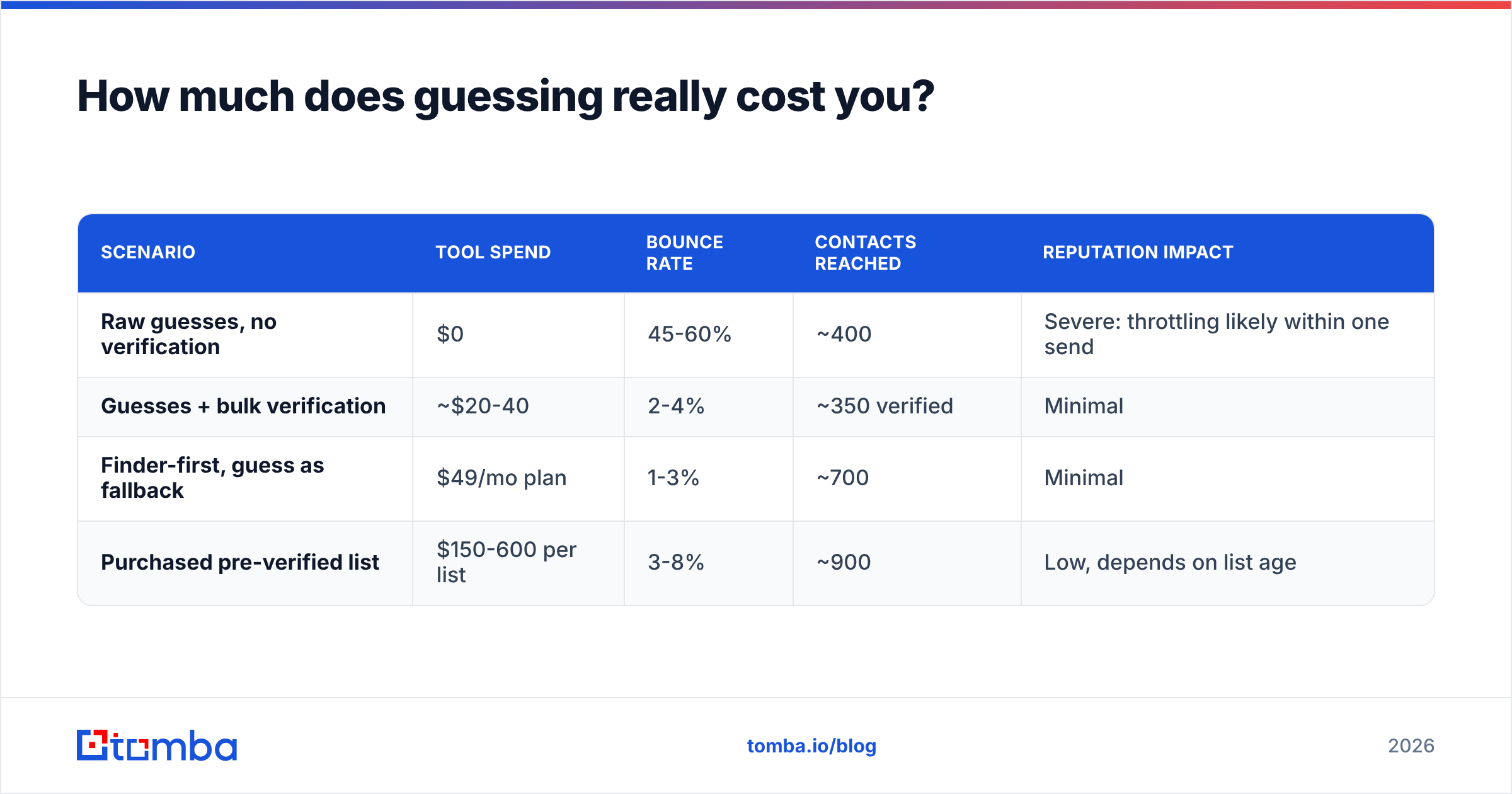
Free tools still have a price. It just lands on a different line. Model a 1,000-contact campaign four ways:
| Scenario | Tool spend | Bounce rate | Contacts reached | Reputation impact |
|---|---|---|---|---|
| Raw guesses, no verification | $0 | 45-60% | ~400 | Severe: throttling likely within one send |
| Guesses + bulk verification | ~$20-40 | 2-4% | ~350 verified | Minimal |
| Finder-first, guess as fallback | $49/mo plan | 1-3% | ~700 | Minimal |
| Purchased pre-verified list | $150-600 per list | 3-8% | ~900 | Low, depends on list age |
The result looks odd at first. The free path reaches fewer real humans than the paid path. Verification strips junk before it eats a send slot, not after. You pay in credits or in deliverability. Deliverability is the pricier one, because recovery takes weeks of low volume and warmup.
On plan sizing, Tomba pricing starts free at 25 searches a month. Then it is $49/mo for Starter, $99/mo for Growth, and $249/mo for Pro. Under 25 contacts a month, the free tier plus steady verification covers you. Past a few hundred, per-credit pricing beats any free-guesser workaround.
When is guessing still the right call?#
Four cases where a guesser email tool earns its keep:
- Companies under 10 people. Founders of tiny firms rarely show up in commercial datasets. Their format is almost always
{first}@domain, the safest guess there is. - Freshly rebranded domains. A company that moved from
oldname.comtonewname.iohas no data on the new domain. The pattern carries over, so guess it from the old confirmed format. - Regions with thin data. Datasets lean heavily toward North America and Western Europe. Elsewhere, pattern inference often beats lookup.
- Testing one hypothesis. Need one person for one reason? Generate three candidates and verify them. The trouble starts at scale.
These four share a shape: low volume, high intent, verification still required. Guessing is a scalpel, not a firehose.
What should you do about catch-all and risky results?#
Treat them as a routing call, not a failure. Roughly 15-20% of B2B domains run catch-all setups. So a real slice of your best-fit accounts will never return a clean result, whatever tool you use.
Three ways to handle them:
Escalate the signal. A catch-all finder can still flag likely-real mailboxes at accept-all domains. It uses pattern frequency and other signals, which beats a flat "unknown".
Switch channel. Move the contact to phone or LinkedIn. If you already have the company, a phone finder lookup often costs less than the risk of a blind send.
Send in a separate stream. If you must email catch-all contacts, use a second domain with its own warmup. Never send them from the domain that carries your pipeline. Splitting sending domains by risk tier is standard at volume, and HubSpot's deliverability guidance makes the same point.
The bottom line on guesser email tools#
Guessing is a fair technique that gives poor results when you use it alone. The tool is not the problem. Sending unverified output is. Teams with sub-2% bounce rates in 2026 do not refuse to guess. They guess narrowly, verify hard, and route the unclear results away from the send queue.
Start with lookup. Fall back to a ranked guess. Verify everything. Quarantine the unknowns. That order costs a few extra seconds per contact. It saves you the month it takes to rebuild a burned sending domain.
Want the lookup-first half in one place? The Tomba Email Finder resolves addresses by name and domain with a confidence score. You know when you found something, and when you are about to guess. The free tier gives you 25 searches a month. Run it against 25 domains you already know the answers to, and judge it on that.
Related guides#
Ready to find emails that actually work?
Join 150,000+ professionals who stopped guessing and started sending. Free credits on signup — no credit card required.
Get the Tomba newsletter
Practical outbound tactics and product updates — once every two weeks.
About the author