Guided Selling Tools in 2026: A Practical Buyer's Guide
Guided selling tools promise to tell reps what to do next on every deal. Here is what they actually automate, where they fail, and how to pick one without wasting a year of budget.
TL;DR
- Guided selling tools sit on top of your CRM and tell reps what to do next: which deal to touch, which question to ask, which content to send, which discount to approve.
- They break into four families — CPQ-style product guidance, playbook/methodology enforcement, conversation intelligence, and AI next-best-action layers. Buying the wrong family is the most common expensive mistake.
- Pricing runs $25–$165 per seat per month for the software, but the real cost is the 3–6 month configuration project and the data hygiene work nobody budgets for.
- Every one of these systems degrades to garbage if contact and account data is stale. Guidance quality is capped by data quality.
- Start with one motion, one segment, and a clean data foundation. Then buy guidance — not the other way round.
What are guided selling tools?#
Guided selling tools are software that decides, or strongly recommends, the next action a seller should take — and surfaces it inside the workflow the rep already lives in.
Think of a GPS versus a paper map. A map shows you everything and trusts you to navigate. A GPS knows where you are, knows the destination, and says "turn left in 200 metres." Guided selling is the GPS layer over your sales process: instead of a rep staring at 47 open opportunities and picking based on vibes, the system says "call this account today, mention the renewal risk, send the security one-pager."
Technically, these platforms combine three inputs:
- Deal and account state pulled from your CRM — stage, amount, age, last activity, competitor flags.
- A codified process — MEDDICC fields, a qualification checklist, a product configuration ruleset, or a manager-authored playbook.
- A signal layer — email opens, call transcripts, product usage, intent data, buying-committee changes.
The output is a prioritised action, usually rendered as a task list, an in-CRM sidebar, or a Slack nudge. Gartner has tracked this category under "sales engagement" and "revenue enablement" for several years; the Gartner sales technology research hub is a reasonable neutral starting point if you want analyst framing before vendor calls.
The important thing to internalise: guided selling is not a product category so much as a feature that four different categories all claim.
What are the four types of guided selling tools?#
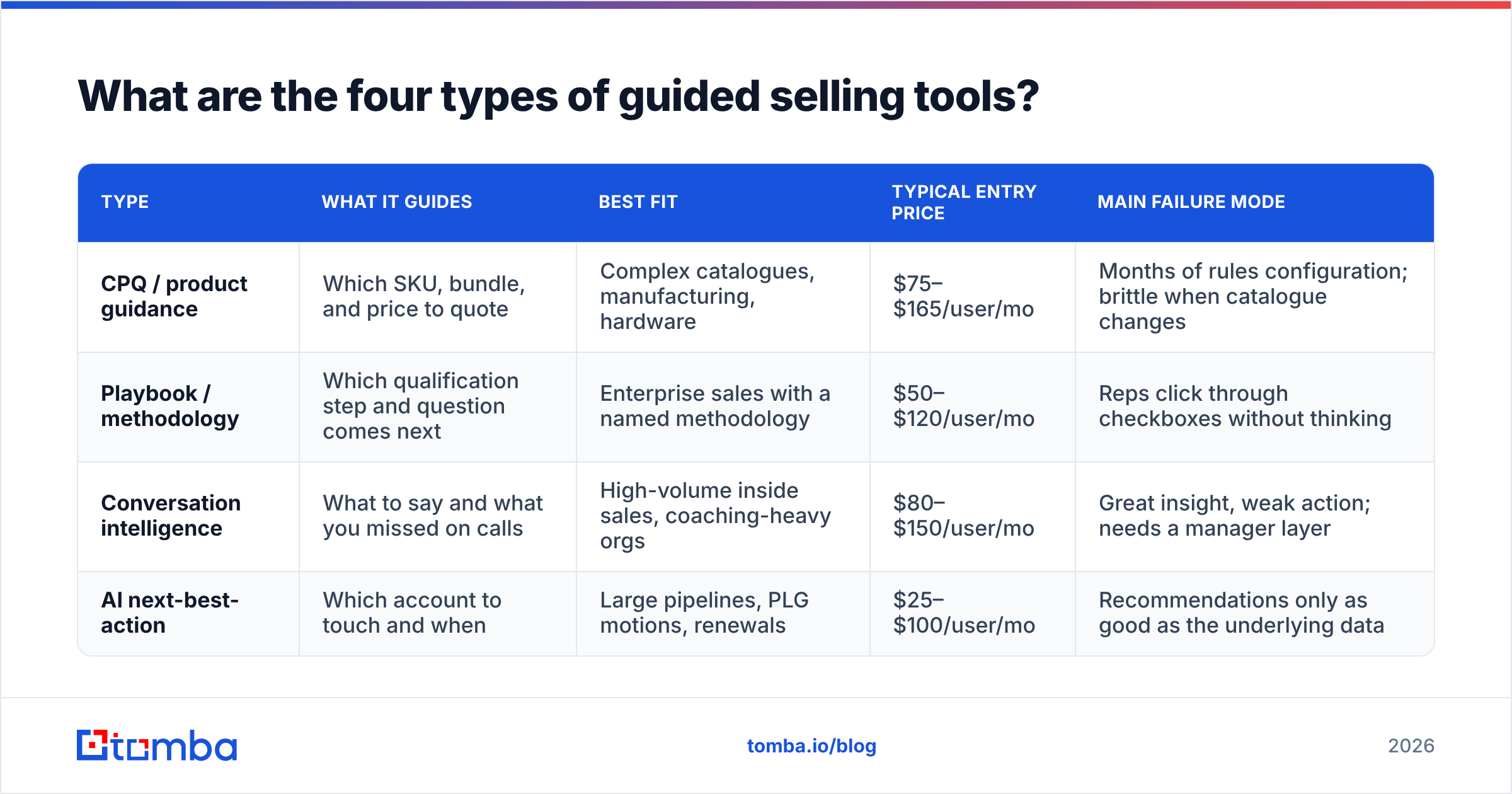
Vendors rarely tell you which family they belong to, because every one of them wants the whole budget. Here is the honest split.
| Type | What it guides | Best fit | Typical entry price | Main failure mode |
|---|---|---|---|---|
| CPQ / product guidance | Which SKU, bundle, and price to quote | Complex catalogues, manufacturing, hardware | $75–$165/user/mo | Months of rules configuration; brittle when catalogue changes |
| Playbook / methodology | Which qualification step and question comes next | Enterprise sales with a named methodology | $50–$120/user/mo | Reps click through checkboxes without thinking |
| Conversation intelligence | What to say and what you missed on calls | High-volume inside sales, coaching-heavy orgs | $80–$150/user/mo | Great insight, weak action; needs a manager layer |
| AI next-best-action | Which account to touch and when | Large pipelines, PLG motions, renewals | $25–$100/user/mo | Recommendations only as good as the underlying data |
A quick way to self-diagnose which family you need:
- Reps quote the wrong configuration or discount too hard → you need CPQ-style guidance, not AI nudges.
- Deals stall at the same stage every quarter → you need playbook enforcement with real exit criteria.
- Win rates vary 3x between reps with the same territory → you need conversation intelligence and coaching, not more automation.
- Reps waste hours deciding who to contact → you need next-best-action prioritisation on top of clean data.
- Reps contact the right accounts but emails bounce → you do not have a guided selling problem at all. You have a data problem.
That fifth case is more common than vendors admit.
Does guided selling actually improve win rates?#
Sometimes. The honest answer is that the gains are real but smaller and slower than the case studies suggest, and they concentrate in specific conditions.
Guided selling helps most when:
- Your process is genuinely repeatable. If every deal is a snowflake, there is nothing to encode. Guidance becomes noise.
- You have rep turnover or fast hiring. Ramp time is where guided selling earns its keep — a new rep with a playbook closes their first deal weeks earlier than one without.
- The product is complex enough that mistakes are expensive. Misconfigured quotes, missed compliance steps, wrong discount tiers.
- Managers actually inspect the guidance. Systems nobody audits get ignored within two quarters.
Guided selling helps least when:
- Your reps are senior, tenured, and already outperform the playbook. Forced-step enforcement demotivates them fast.
- Your CRM data is incomplete. Recommendations built on 40%-filled fields are confident nonsense.
- You have not defined what a good win rate looks like per segment, so you cannot tell whether the tool moved anything.
The measurement trap is worth naming. Most guided selling rollouts happen alongside other changes — a new comp plan, a territory reshuffle, a hiring wave. Attribution becomes impossible. If you want to know whether the tool works, hold out a control group of reps for a full sales cycle. Vendors will discourage this. Do it anyway.
Independent user reviews are a better sanity check than vendor decks. G2's sales enablement category surfaces the recurring complaints — configuration burden, admin overhead, adoption drop-off — far more reliably than any analyst summary.
How do guided selling tools compare on the things that matter?#
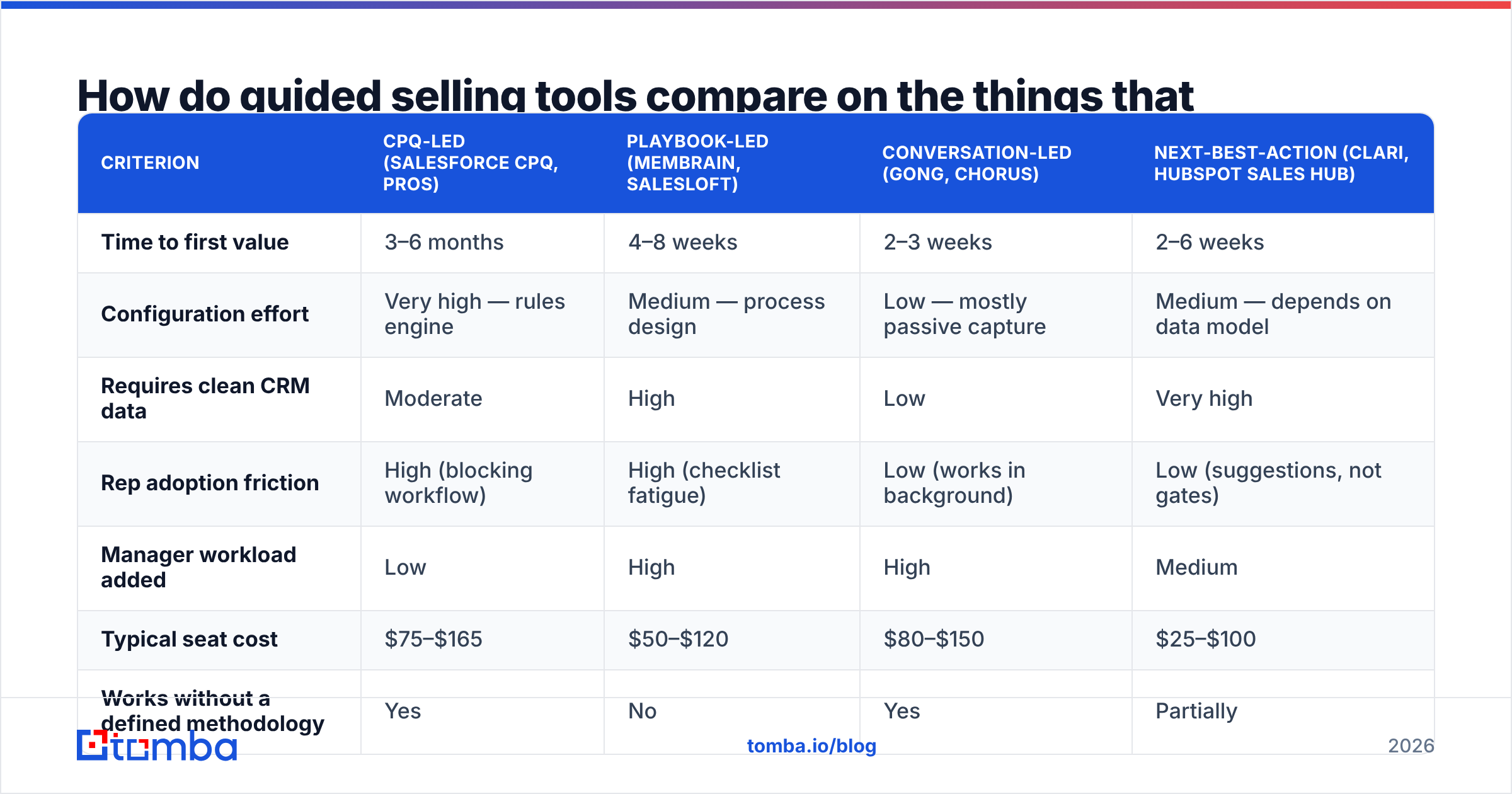
Here is a like-for-like comparison across the criteria that actually decide the outcome of a rollout. Prices are list prices as published and should be treated as starting points, since enterprise contracts vary widely.
| Criterion | CPQ-led (Salesforce CPQ, PROS) | Playbook-led (Membrain, Salesloft) | Conversation-led (Gong, Chorus) | Next-best-action (Clari, HubSpot Sales Hub) |
|---|---|---|---|---|
| Time to first value | 3–6 months | 4–8 weeks | 2–3 weeks | 2–6 weeks |
| Configuration effort | Very high — rules engine | Medium — process design | Low — mostly passive capture | Medium — depends on data model |
| Requires clean CRM data | Moderate | High | Low | Very high |
| Rep adoption friction | High (blocking workflow) | High (checklist fatigue) | Low (works in background) | Low (suggestions, not gates) |
| Manager workload added | Low | High | High | Medium |
| Typical seat cost | $75–$165 | $50–$120 | $80–$150 | $25–$100 |
| Works without a defined methodology | Yes | No | Yes | Partially |
| Best proof of ROI | Quote accuracy, discount leakage | Stage conversion rates | Talk-track adoption, ramp time | Pipeline coverage, forecast accuracy |
Two patterns fall out of that table.
First, the tools that demand the least from reps also demand the most from your data. Conversation intelligence works whether or not your CRM is tidy, because it generates its own inputs from calls. Next-best-action engines are the opposite: they are pure functions of what is already in your database. Feed them stale contacts and they will confidently route reps to people who left the company eighteen months ago.
Second, the tools with the lowest software cost often carry the highest people cost. A $50/seat playbook tool that requires a full-time enablement manager to maintain is more expensive than a $150/seat system that runs itself. Price the total, not the line item.
Why does data quality decide whether guided selling works?#
Because guidance is a multiplier, not a source. Multiply good data by a good playbook and you get compounding gains. Multiply bad data by the same playbook and you get faster wrong actions.
Concretely, here is what breaks a next-best-action engine:
- Stale contacts. B2B contact data decays roughly 25–30% per year through job changes alone. A recommendation to "re-engage the champion" is worthless if the champion left.
- Missing decision-makers. If only one contact per account exists in CRM, the system cannot model a buying committee, so its guidance defaults to single-threaded outreach — the single largest predictor of a stalled enterprise deal.
- Unverified emails. Every bounce degrades sender reputation, which suppresses deliverability across the whole domain, which makes the next batch of guided outreach perform worse. The system reads the lower reply rate as a signal about messaging, not infrastructure, and adjusts in the wrong direction.
- Duplicate accounts. Two records for the same company split activity history, so neither crosses the engagement threshold that triggers a recommendation.
The fix is unglamorous and it comes first. Before you buy guidance, get the underlying records right: run a bulk verify pass over your existing CRM contacts, fill in missing buying-committee members with a domain search against target accounts, and set up ongoing data enrichment so records refresh rather than rot. Teams that do this first routinely report that half the "insight" they expected from a guided selling tool was actually just visibility they never had because the data was missing.
What does guided selling actually cost in 2026?#
More than the sticker price, and the gap is predictable enough to budget for.
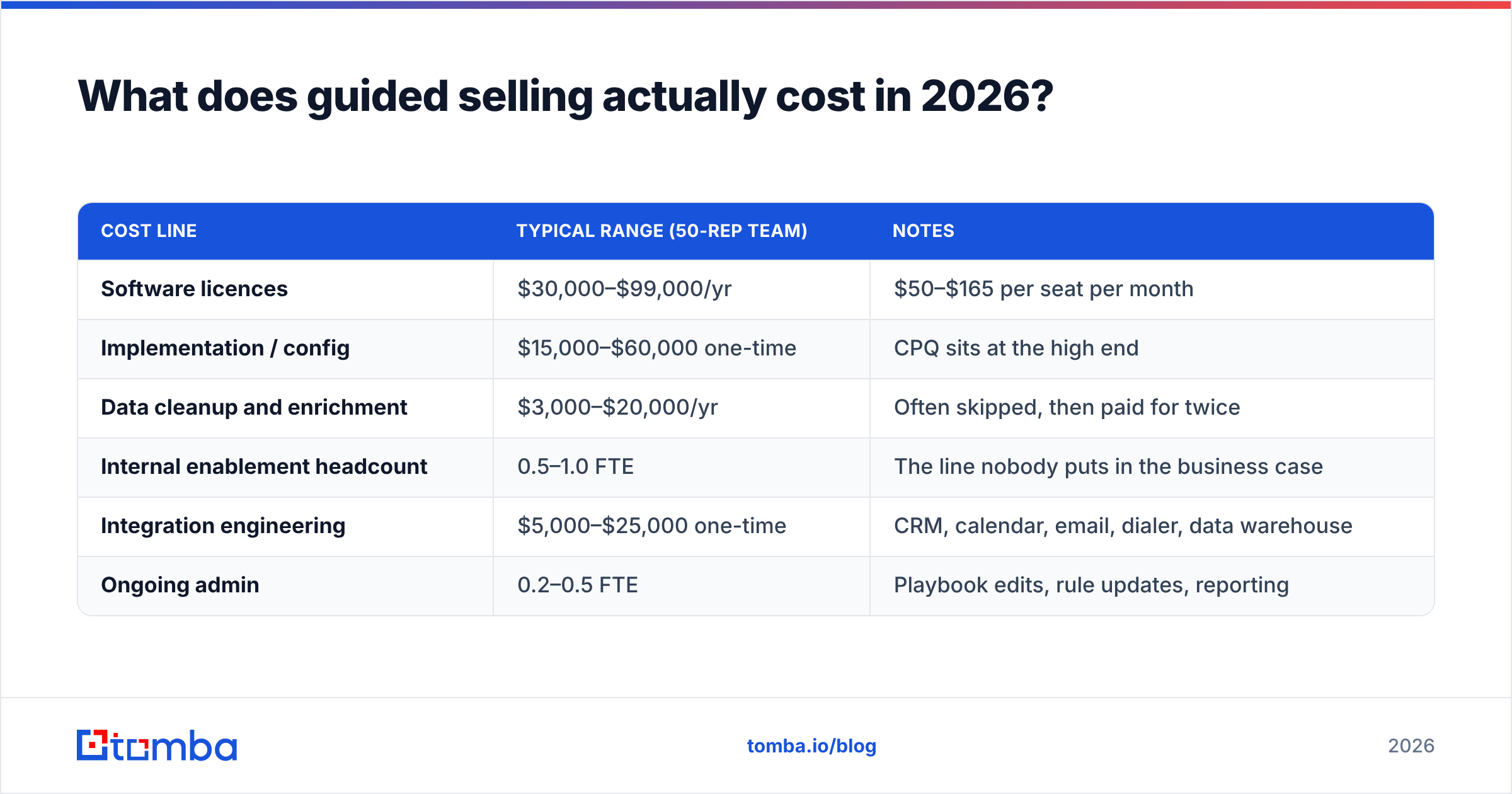
| Cost line | Typical range (50-rep team) | Notes |
|---|---|---|
| Software licences | $30,000–$99,000/yr | $50–$165 per seat per month |
| Implementation / config | $15,000–$60,000 one-time | CPQ sits at the high end |
| Data cleanup and enrichment | $3,000–$20,000/yr | Often skipped, then paid for twice |
| Internal enablement headcount | 0.5–1.0 FTE | The line nobody puts in the business case |
| Integration engineering | $5,000–$25,000 one-time | CRM, calendar, email, dialer, data warehouse |
| Ongoing admin | 0.2–0.5 FTE | Playbook edits, rule updates, reporting |
A 50-rep team should plan for roughly $80,000–$200,000 in year one, of which under half is software. If the business case only counts licences, it is not a business case.
Cheaper paths exist and are legitimate for smaller teams. HubSpot bundles reasonable next-best-action features into its Sales Hub tiers, and the HubSpot Sales Hub pricing page is transparent enough to benchmark against. For teams under 20 reps, a well-configured CRM with good data and three enforced stage-exit criteria beats a dedicated guided selling platform on cost per incremental deal, almost every time.
How should you roll out guided selling without wasting a year?#
Sequence matters more than vendor choice. Run it in this order.
- Fix the data foundation. Verify emails, dedupe accounts, add missing contacts on your top 200 target accounts. Two to four weeks. Non-negotiable prerequisite.
- Document the motion you want to guide. One motion — new business mid-market, or renewals, not both. Write the actual stage exit criteria a deal must meet. If you cannot write them, no tool can enforce them.
- Pick the family, then the vendor. Use the four-type table above. Shortlist two vendors within one family. Never shortlist across families — you will compare incomparable things and pick on demo polish.
- Pilot with 8–12 reps and a control group. One full sales cycle. Track stage conversion and ramp time, not "engagement with the tool."
- Decide on evidence. If the pilot group does not beat control on at least one hard metric, do not expand. Renegotiate or walk.
- Expand with a named owner. Guided selling without a maintainer decays into an ignored sidebar within two quarters.
The most common rollout failure is skipping step one, discovering in month four that recommendations are unreliable, and blaming the vendor. The second most common is skipping step four because leadership already announced the purchase internally.
What about the buying committee problem?#
Guided selling systems increasingly recommend multithreading — contact three to five people per account instead of one — because the data consistently shows single-threaded deals lose more often. That advice is correct and completely useless if you cannot find the other four people.
This is the practical boundary between guidance and data. The tool can tell you "this deal is single-threaded, add the CFO and the security lead." It cannot produce their contact details. That gap is where most guided selling recommendations quietly die in the task queue.
Closing it means having a repeatable way to go from "company + role" to "verified work email." Options range from LinkedIn-based extraction to domain pattern inference to dedicated finder APIs. Whichever route you take, verify before you send — an unverified guess sent at scale costs you more in email deliverability than the meeting was worth.
Which guided selling tool should you pick?#
Match the tool to your bottleneck, not to your ambition:
- Quote errors and discount leakage → CPQ-led guidance. Accept the six-month configuration reality.
- Inconsistent qualification and stalled stages → playbook-led. Budget for an enablement owner.
- Wide performance spread across reps → conversation intelligence, paired with actual coaching time on manager calendars.
- Too many accounts, unclear priorities → next-best-action, but only after a data cleanup pass.
- Under 20 reps, tight budget → CRM-native features plus disciplined process. Revisit dedicated tooling at 30+ reps.
- Good process, bad contact data → skip guided selling this cycle. Fix the data. The guidance you already have will start working.
Guided selling is not magic and it is not snake oil. It is a leverage layer that amplifies whatever is underneath it. Teams with a clear motion and clean records get a real lift. Teams hoping software will invent a process for them get an expensive dashboard.
Start with the layer everything else depends on#
Every guided selling recommendation ends the same way: contact this person, at this company, now. If that contact record is wrong, the entire chain of intelligence above it was wasted compute.
Tomba's Email Finder closes that last gap — find verified work emails by name and domain, fill in the missing buying-committee members your next-best-action engine keeps asking for, and push clean records back into your CRM before you spend six figures on guidance. The free tier gives you 25 searches a month to test accuracy on your own target accounts; paid plans start at $49/mo on Starter, with Growth at $99/mo and Pro at $249/mo. Full Tomba pricing is public, and the Tomba API plugs directly into whatever guided selling stack you land on.
Fix the data first. Then let the guidance do its job.
Related guides#
Ready to find emails that actually work?
Join 150,000+ professionals who stopped guessing and started sending. Free credits on signup — no credit card required.
Get the Tomba newsletter
Practical outbound tactics and product updates — once every two weeks.
About the author