12 Best Gumloop Alternatives in 2026 for AI Workflow Automation
Gumloop is a strong no-code AI workflow builder, but credit burn, node limits, and data gaps push many GTM teams elsewhere. Here are 12 alternatives ranked by what you actually run.
TL;DR
- Gumloop is a genuinely good no-code AI workflow builder — the problem is usually cost shape, not capability. Credits burn fastest on enrichment and scraping loops, which is exactly what GTM teams run all day.
- If you want the same visual canvas cheaper, look at n8n (self-hosted), Make, or Relay.app. If you want raw control, drop to an API layer and orchestrate it yourself.
- If your Gumloop bill is mostly data — finding emails, verifying them, enriching companies — the fix is not a different automation canvas. It's a cheaper, more accurate data source underneath whatever canvas you already use.
- Best combo for most outbound teams in 2026: keep a lightweight orchestrator (n8n, Make, or Gumloop itself) and swap the enrichment nodes for a dedicated provider with per-call pricing.
- Free tiers exist across most of this list. Test on 200 real records before you migrate a single production flow.
What is Gumloop and who actually uses it?#
Gumloop is a no-code platform for building AI-powered automations on a visual canvas. You drag nodes — scrape a page, call an LLM, read a Google Sheet, enrich a company, write back to a CRM — wire them together, and run the flow on a schedule, a webhook, or a spreadsheet of inputs.
The core appeal is that it collapses three things into one tool: the automation layer (what Zapier does), the AI layer (what you'd otherwise script against an LLM API), and a set of built-in data nodes. For a growth or RevOps person who doesn't want to maintain Python, that's a real unlock.
The friction shows up at scale. Gumloop meters usage in credits, and AI-heavy or scraping-heavy nodes consume them fast. A flow that enriches 5,000 leads with three LLM steps and a web lookup each is not the same cost as a flow that moves a form submission into a spreadsheet. Teams routinely discover this in month two, when the flow that "worked great in testing" hits a real list.
The second friction is data quality. Built-in enrichment nodes on general automation platforms are usually thin wrappers over one or two providers. When you're doing outbound at volume, a 60% hit rate versus an 85% hit rate on email discovery changes your pipeline math more than any node-editor UX difference.

Why do teams look for Gumloop alternatives?#
Five reasons come up over and over. Be honest about which one is yours, because they point to completely different replacements.
- Credit burn is unpredictable. You can't forecast next month's bill because it depends on how many rows your flow touches and which nodes fire. Teams that need a flat, predictable line item move to self-hosted or seat-priced tools.
- Enrichment coverage is too thin. The flow logic is fine; the data coming out of it isn't. This is the most common case and the most commonly misdiagnosed — people switch canvases and get the same bad emails.
- You need on-prem or strict data residency. Regulated industries and EU-first companies often can't route customer records through a US-hosted SaaS canvas at all.
- You outgrew no-code. Once your flow has 40 nodes and branching error handling, a visual canvas becomes harder to reason about than 200 lines of code. That's a signal to move to an API-first stack.
- You need deeper native integrations. If your entire world is HubSpot or Salesforce, a platform with first-class, deeply-mapped objects beats a generic HTTP node.
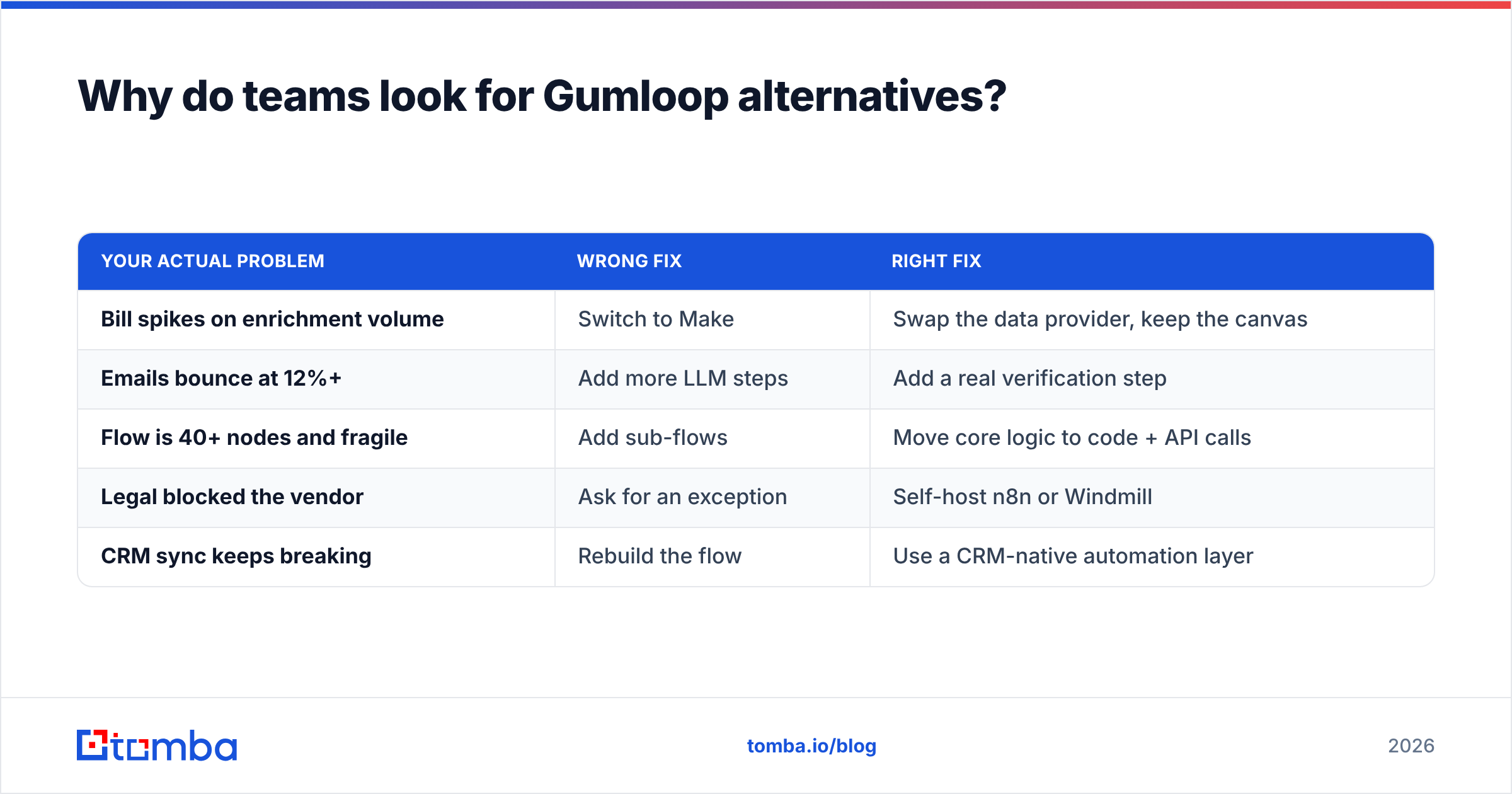
| Your actual problem | Wrong fix | Right fix |
|---|---|---|
| Bill spikes on enrichment volume | Switch to Make | Swap the data provider, keep the canvas |
| Emails bounce at 12%+ | Add more LLM steps | Add a real verification step |
| Flow is 40+ nodes and fragile | Add sub-flows | Move core logic to code + API calls |
| Legal blocked the vendor | Ask for an exception | Self-host n8n or Windmill |
| CRM sync keeps breaking | Rebuild the flow | Use a CRM-native automation layer |
What are the best Gumloop alternatives in 2026?#
Twelve options, grouped by what they're actually for. No single tool wins everything — pick by the row above.
Visual automation canvases (closest swaps)
- n8n — Open-source, self-hostable, and node-based. The cloud plans price per execution rather than per task, which is dramatically cheaper for multi-step flows. Steepest learning curve of the group, but the ceiling is highest. Best pick if cost predictability and data residency both matter.
- Make — Mature visual builder with ~2,000 integrations and operation-based pricing. Weaker native AI tooling than Gumloop, but you can call any model over HTTP. Best pick for non-technical operators who need breadth.
- Zapier — The default. Now has decent AI actions and Agents. Most expensive per task at volume, but nothing beats it for "connect these two SaaS apps in four minutes." Best pick when the flow is simple and the integration is obscure.
- Relay.app — Human-in-the-loop is the differentiator: flows can pause for an approval before continuing. Genuinely useful for outbound where you want a human to sanity-check AI-drafted copy before send.
- Windmill — Open-source, script-first with a UI layer on top. For teams that write TypeScript or Python and want versioning, tests, and a real deployment story. This is the "you outgrew no-code" answer.
GTM-specific platforms
- Clay — The most direct Gumloop competitor for go-to-market work. Waterfall enrichment across dozens of providers, spreadsheet-native UI. Powerful and expensive; credits behave similarly to Gumloop's, so migrate here for capability, not for savings.
- BookYourData — Comes at the problem from the data side rather than the workflow side: a large verified B2B contact database with pay-as-you-go credits and a bounce guarantee. Excellent when you'd rather buy a clean list than build a scraping pipeline to assemble one. Pairs well with a lightweight orchestrator on top.
- Apollo.io — Database plus sequencer plus light automation. Convenient bundling, and the built-in workflows cover the common outbound patterns. Data accuracy on smaller companies and non-US regions is the usual complaint; many teams keep Apollo for sequencing and go elsewhere for enrichment. See our notes on Apollo alternatives for the full picture.
API-first / developer layers
- Tomba API — Not a canvas at all. It's the data layer you call from a canvas: email finder API, verification, domain search, and enrichment endpoints with per-call pricing you can actually model. Swap this in for your enrichment nodes and keep the automation tool you already know.
- Pipedream — Code-first serverless workflows with a huge component library. Free tier is generous, and you can drop into Node/Python/Go mid-flow. Best for engineers who want glue code without managing infra.
- Trigger.dev — Durable background jobs written in TypeScript, with retries, queues, and observability built in. This is what you graduate to when reliability matters more than speed of assembly.
- Activepieces — Open-source, MIT-licensed, easy self-host. Smaller integration catalog than n8n, but a friendlier canvas. Good middle ground for small teams that want to own the box without a DevOps hire.
How do the top Gumloop alternatives compare on price and fit?#
Pricing changes; verify on each vendor's page before you commit. The shape of the pricing matters more than the exact number — that's what determines whether your bill scales with your list size.
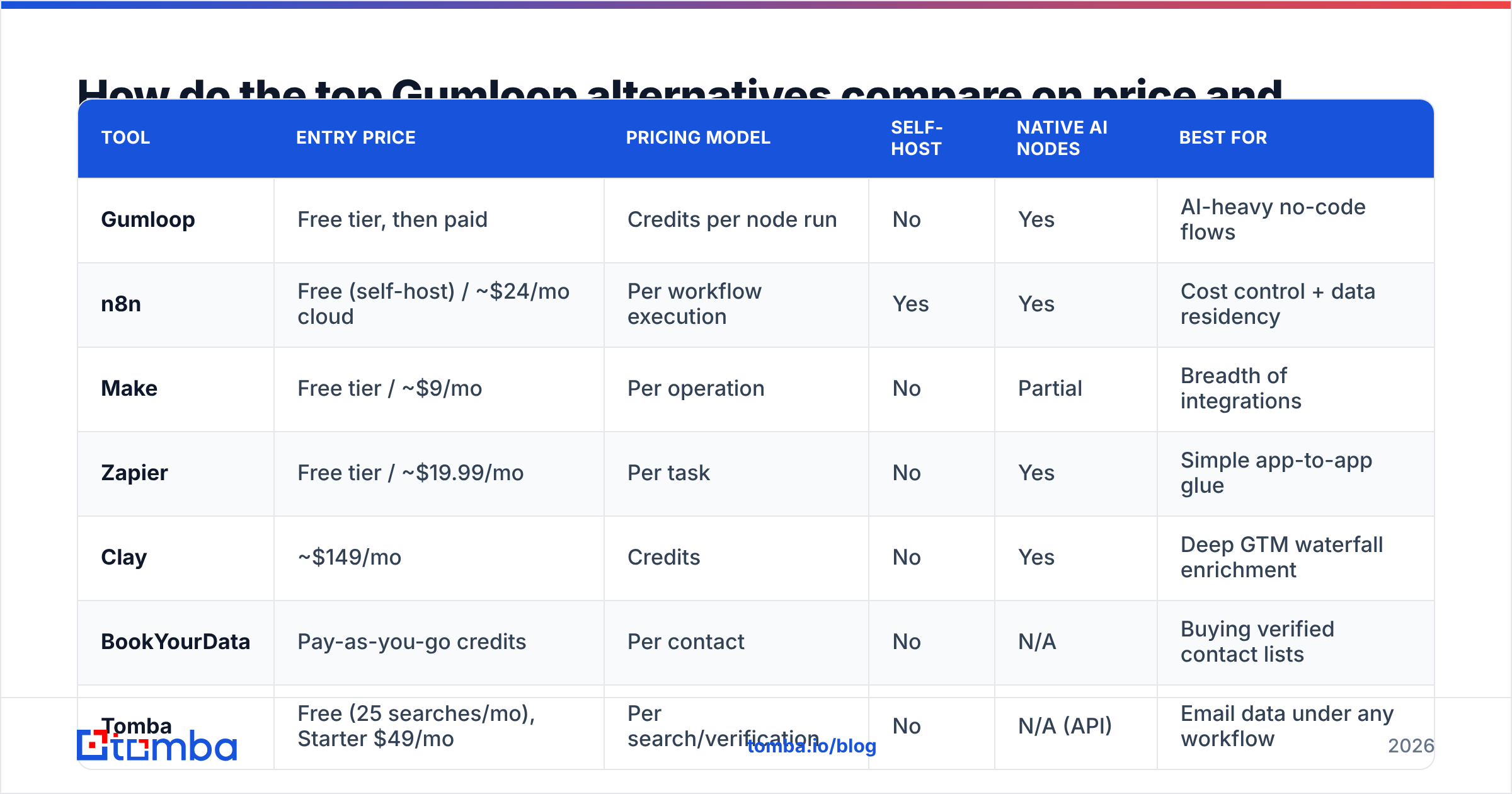
| Tool | Entry price | Pricing model | Self-host | Native AI nodes | Best for |
|---|---|---|---|---|---|
| Gumloop | Free tier, then paid | Credits per node run | No | Yes | AI-heavy no-code flows |
| n8n | Free (self-host) / ~$24/mo cloud | Per workflow execution | Yes | Yes | Cost control + data residency |
| Make | Free tier / ~$9/mo | Per operation | No | Partial | Breadth of integrations |
| Zapier | Free tier / ~$19.99/mo | Per task | No | Yes | Simple app-to-app glue |
| Clay | ~$149/mo | Credits | No | Yes | Deep GTM waterfall enrichment |
| BookYourData | Pay-as-you-go credits | Per contact | No | N/A | Buying verified contact lists |
| Tomba | Free (25 searches/mo), Starter $49/mo | Per search/verification | No | N/A (API) | Email data under any workflow |
| Pipedream | Free tier | Per credit/invocation | No | Yes | Developer glue code |
| Activepieces | Free (self-host) | Per task (cloud) | Yes | Yes | Lightweight open-source canvas |
Two patterns to notice. First, per-execution pricing (n8n) beats per-task pricing (Zapier) badly once flows get long — a 12-step flow is one execution but twelve tasks. Second, data providers priced per-lookup are far easier to forecast than credit systems where different nodes cost different amounts.
Is the real problem your automation tool or your data?#
Usually the data. Here's the test: open your last Gumloop or Clay invoice and estimate what share of credits went to enrichment, scraping, and lookup nodes versus pure logic and LLM steps. If enrichment is over half, changing canvases saves you nothing.
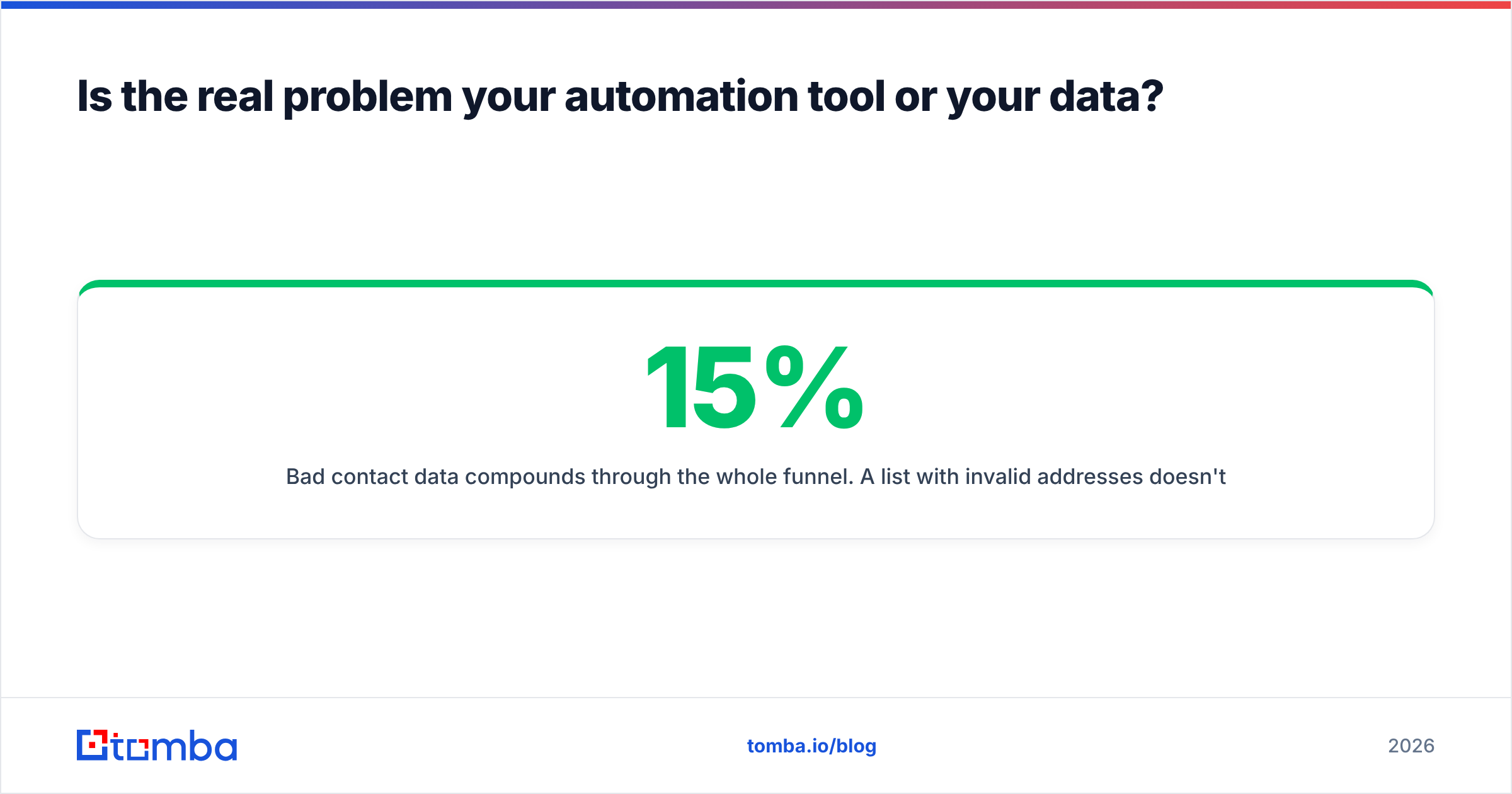
Bad contact data compounds through the whole funnel. A list with 15% invalid addresses doesn't just waste 15% of sends — it drags your sender reputation down, which suppresses inbox placement for the valid 85% too. Google and Yahoo both tightened bulk sender requirements, and their published guidance puts spam complaint rates under 0.3% as a hard expectation. You do not get there on a scraped, unverified list.
The fix has three parts, and none of them require abandoning your workflow tool:
- Find with a specialist, not a generalist. A dedicated email finder that queries public sources and pattern-matches against known company formats will out-cover a bundled node. Use domain search when you have a company but no name.
- Verify before you send, always. Run every address through an email verifier as a separate step. Catch-all domains need their own handling — a catch-all verifier tells you whether a "valid" result is actually meaningful.
- Enrich after, not before. Firmographic and technographic data enrichment is cheaper once you've already filtered to deliverable contacts. Enriching a list you'll later throw away is pure waste.

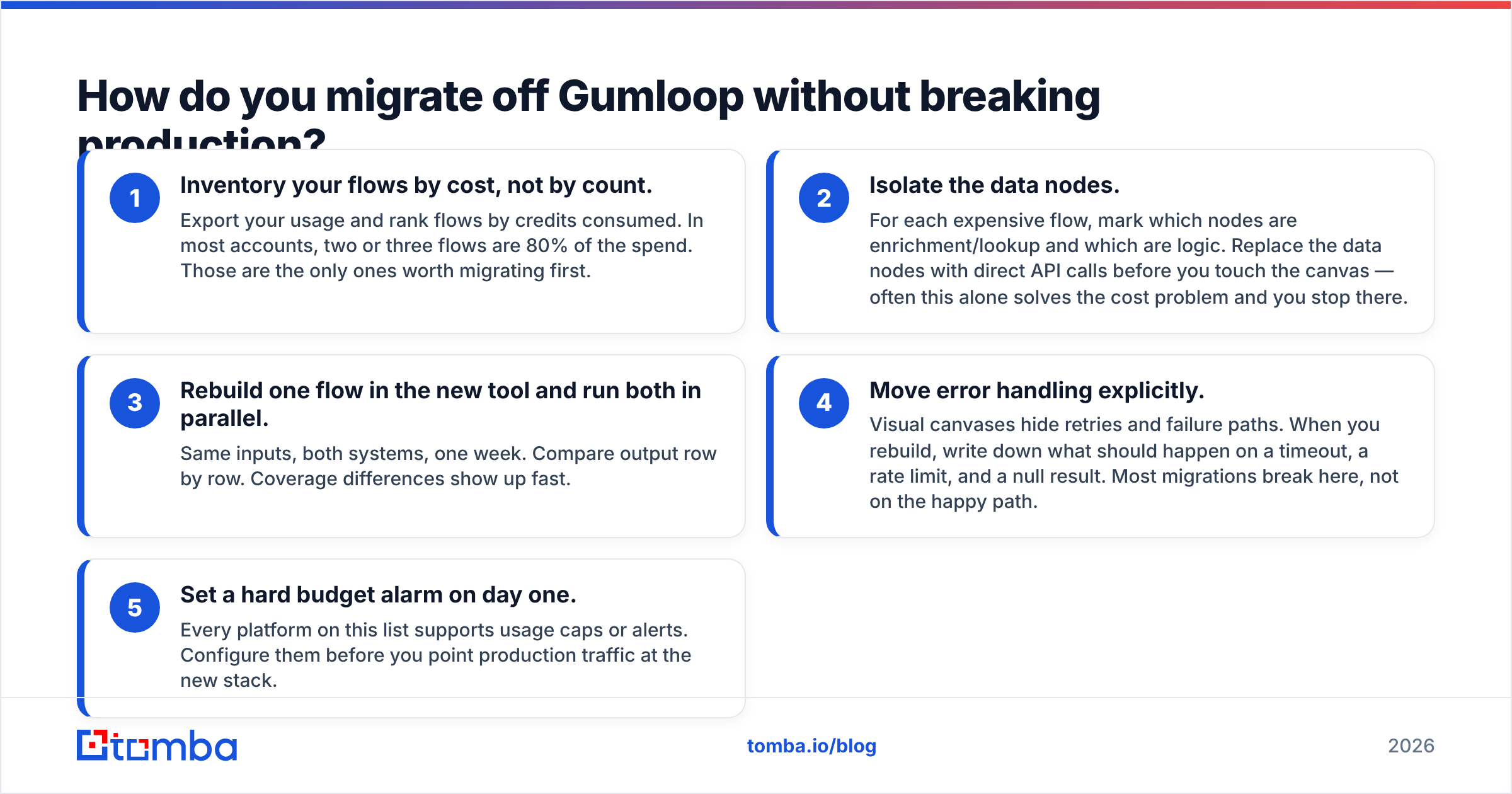
How do you migrate off Gumloop without breaking production?#
Do it in this order. Skipping step two is how people end up running two bills for three months.
- Inventory your flows by cost, not by count. Export your usage and rank flows by credits consumed. In most accounts, two or three flows are 80% of the spend. Those are the only ones worth migrating first.
- Isolate the data nodes. For each expensive flow, mark which nodes are enrichment/lookup and which are logic. Replace the data nodes with direct API calls before you touch the canvas — often this alone solves the cost problem and you stop there.
- Rebuild one flow in the new tool and run both in parallel. Same inputs, both systems, one week. Compare output row by row. Coverage differences show up fast.
- Move error handling explicitly. Visual canvases hide retries and failure paths. When you rebuild, write down what should happen on a timeout, a rate limit, and a null result. Most migrations break here, not on the happy path.
- Set a hard budget alarm on day one. Every platform on this list supports usage caps or alerts. Configure them before you point production traffic at the new stack.
If you're moving to a code-first tool, plan for the Tomba CLI or a scripted batch job to handle list processing outside the workflow engine entirely. Bulk operations belong in a queue, not in a per-row automation loop — that's where credit systems punish you hardest.
Which Gumloop alternative should you pick?#
Short answers by situation:
- You want the same thing, cheaper and predictable: n8n self-hosted. Budget a day of setup and someone who's comfortable with Docker.
- You want the same thing without touching infrastructure: Make for breadth, Relay.app if you need approval steps.
- Your bill is enrichment, not logic: Keep Gumloop. Replace the data nodes with a dedicated provider's API and re-check the invoice in 30 days.
- You need serious GTM waterfall enrichment: Clay, with eyes open about credit costs. Or BookYourData if buying a verified list beats assembling one.
- You have engineers and reliability requirements: Trigger.dev or Windmill. Version control and observability are worth the extra setup.
- You're a small team that wants to own the box: Activepieces.
For a wider view of the automation category and how buyers rate these tools, G2's marketing automation grid is a reasonable third-party sanity check, and n8n's own docs are unusually honest about what self-hosting actually requires. If your endgame is CRM-centric, HubSpot's workflow documentation is worth reading before you build anything external — some of what you're paying credits for may already be included in your CRM seat.
What should you do next?#
Run the invoice test first. Split your last bill into "logic and AI" versus "data lookups." If data lookups dominate — and for most outbound teams they do — the highest-leverage change isn't switching workflow platforms at all.
Point your enrichment nodes at the Tomba Email Finder instead. You get email discovery by domain, name, or company with source attribution, plus verification and catch-all handling in the same account. The free tier includes 25 searches a month, Starter is $49/mo, and Growth is $99/mo — check Tomba pricing for the full breakdown. Every plan works through the same API, so it drops into Gumloop, n8n, Make, Zapier, or your own scripts without a migration project.
Test it on 200 records from a list you already ran through your current stack. Compare hit rate and bounce rate side by side. That comparison, not a feature grid, is what should decide your 2026 stack.
Related guides#
Ready to find emails that actually work?
Join 150,000+ professionals who stopped guessing and started sending. Free credits on signup — no credit card required.
Get the Tomba newsletter
Practical outbound tactics and product updates — once every two weeks.
About the author