Gumloop Pricing in 2026: Reviews, Pros, Cons, and Costs
Gumloop sells AI automation by the credit, not the task — which changes the math completely. Here is what each tier really costs, where reviewers say credits disappear, and when a cheaper stack wins.

TL;DR
- Gumloop prices AI automation in credits, not tasks or "zaps" — so your bill tracks how expensive your nodes are, not how many workflows you build.
- The free tier is genuinely usable for testing, but any production workflow that calls an LLM on every row will chew through a starter allowance in days.
- Reviewers consistently praise the visual builder and the AI-node quality; the recurring complaints are credit opacity, seat pricing, and debugging long runs.
- Gumloop is strong as an orchestration layer. It is weak as a data source — you still need a dedicated provider for emails, phones, and enrichment.
- The cheapest sane B2B stack is usually: a data vendor at $49–$99/mo plus an automation layer, not one platform trying to do both.
What is Gumloop, and who actually buys it?#
Gumloop is a no-code AI workflow builder. You drag nodes onto a canvas — scrape a page, call an LLM, read a Google Sheet, hit an API, write the result back — and Gumloop runs the chain on a schedule, a webhook, or a button click. Think of it as a spreadsheet that can think: each column is a step, and some of those columns are a language model instead of a formula.
The buyer profile is specific. It is not the ops person who needs "when a form is submitted, create a HubSpot contact" — Zapier has owned that for a decade and does it for less. Gumloop's actual customer is the growth or RevOps person running AI-heavy batch jobs: enrich 5,000 companies, classify 2,000 inbound leads, summarise 800 job postings, personalise 3,000 first lines.
That distinction matters because it drives the pricing model. Zapier charges per task. Gumloop charges per credit, and credits are consumed unevenly depending on which nodes you use. Understanding that difference is most of what you need to evaluate Gumloop pricing honestly.
How does Gumloop pricing work in 2026?#
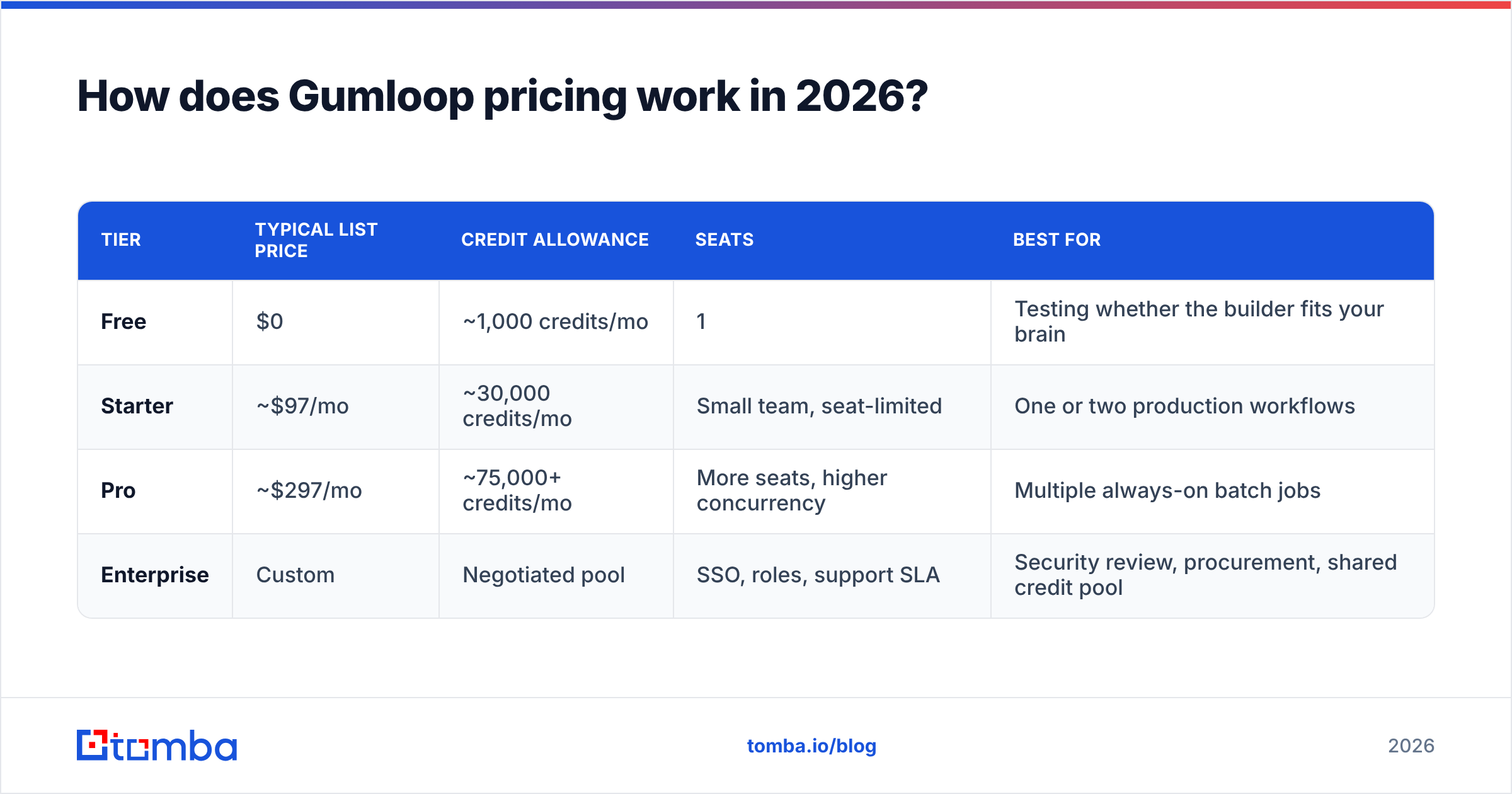
Gumloop publishes a free tier, two self-serve paid tiers, and an enterprise tier. Prices and credit allowances have moved more than once since launch, so treat the table below as the shape of the model and confirm current numbers on Gumloop's own pricing page before you commit a budget.
| Tier | Typical list price | Credit allowance | Seats | Best for |
|---|---|---|---|---|
| Free | $0 | ~1,000 credits/mo | 1 | Testing whether the builder fits your brain |
| Starter | ~$97/mo | ~30,000 credits/mo | Small team, seat-limited | One or two production workflows |
| Pro | ~$297/mo | ~75,000+ credits/mo | More seats, higher concurrency | Multiple always-on batch jobs |
| Enterprise | Custom | Negotiated pool | SSO, roles, support SLA | Security review, procurement, shared credit pool |
Three structural facts about this pricing that reviews tend to bury:
- Credits are the only real unit. Workflow count, node count, and run count are secondary. Two teams on the same tier can have wildly different effective costs because one is running cheap HTTP nodes and the other is running a large model on every row.
- Seats are priced separately from usage. Adding a colleague who only wants to click "run" still touches the seat count on lower tiers. Budget for people, not just compute.
- Overages are a real line item. When you exhaust the monthly pool, you either buy more credits or your automations stop. Neither is fun to discover on a Friday.
The jump from Starter to Pro is roughly 3x the price for roughly 2.5x the credits — so the per-credit rate does not improve dramatically as you scale. That is unusual. Most infrastructure gets cheaper per unit as you climb; Gumloop's ladder is closer to flat, which means the tier upgrade is really buying you seats, concurrency, and support rather than a volume discount.
What is a Gumloop credit, and how fast do they burn?#
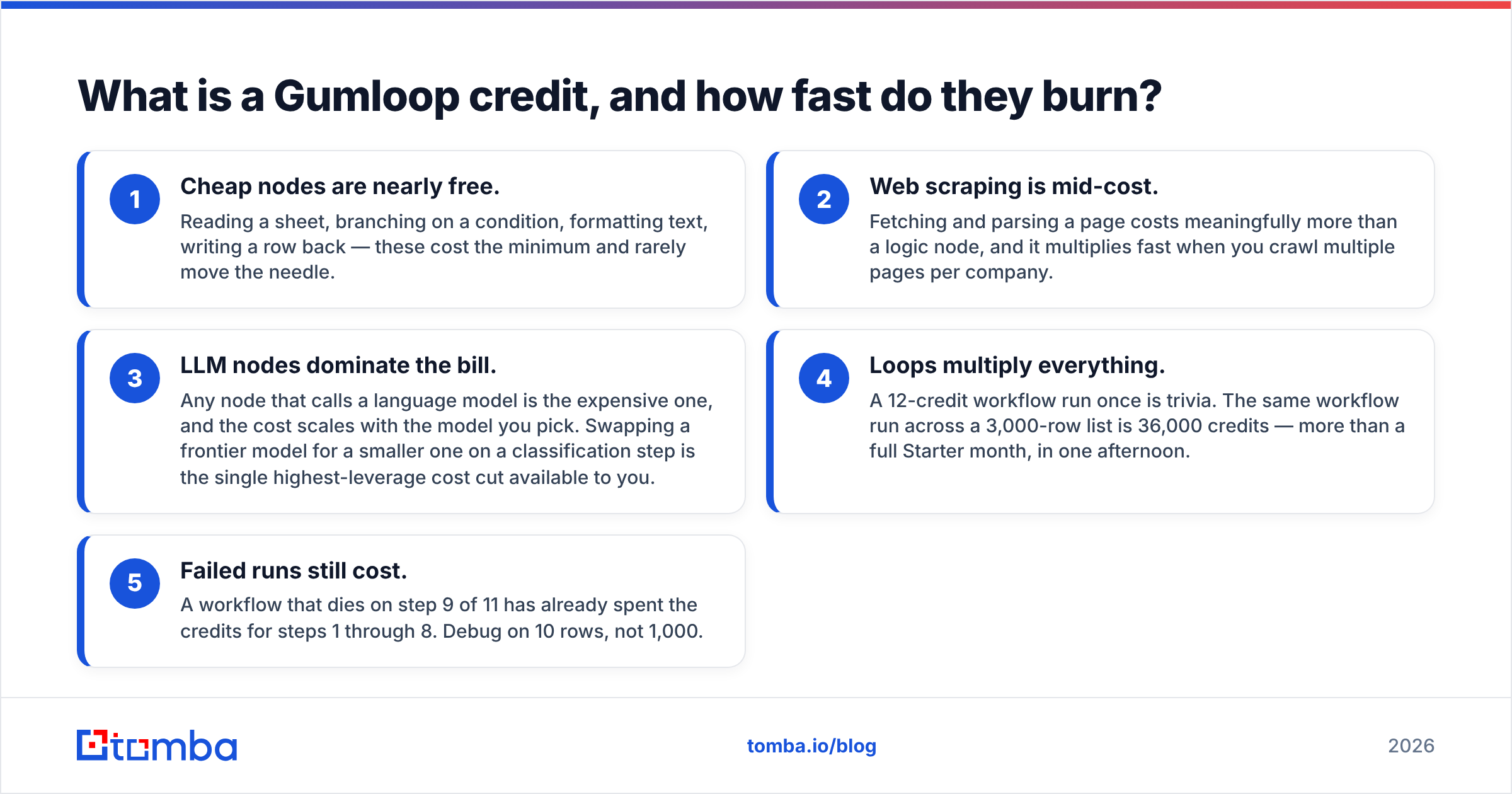
This is where most budget forecasts fall apart. A credit is not a run. A single workflow execution can cost anywhere from one credit to several dozen depending on what it does.
Here is how to model it before you buy:
- Cheap nodes are nearly free. Reading a sheet, branching on a condition, formatting text, writing a row back — these cost the minimum and rarely move the needle.
- Web scraping is mid-cost. Fetching and parsing a page costs meaningfully more than a logic node, and it multiplies fast when you crawl multiple pages per company.
- LLM nodes dominate the bill. Any node that calls a language model is the expensive one, and the cost scales with the model you pick. Swapping a frontier model for a smaller one on a classification step is the single highest-leverage cost cut available to you.
- Loops multiply everything. A 12-credit workflow run once is trivia. The same workflow run across a 3,000-row list is 36,000 credits — more than a full Starter month, in one afternoon.
- Failed runs still cost. A workflow that dies on step 9 of 11 has already spent the credits for steps 1 through 8. Debug on 10 rows, not 1,000.
The practical rule: build your workflow, run it on a 25-row sample, read the credit consumption, then multiply by your real list size and by 1.3 for retries and failures. If that number exceeds your tier's allowance, you have your answer before you've spent anything.
What do Gumloop reviews actually say?#
Aggregate sentiment across G2 and similar review sites is genuinely positive on the product and mixed on the economics. The pattern is consistent enough to summarise fairly.
What reviewers like:
- The canvas is the best part. People who bounced off code-first automation tools describe Gumloop's builder as the first one that let them ship an AI workflow the same day they signed up.
- AI nodes are first-class, not bolted on. In older automation platforms the LLM step feels like an afterthought wrapped around an API key. In Gumloop it is the point, and the input/output handling reflects that.
- Templates shorten the first hour. The prebuilt flows for lead research, content repurposing, and document extraction give you a working example instead of a blank canvas.
- Support responsiveness gets named often. For a company of this size, that is a real differentiator and shows up repeatedly in written reviews.
What reviewers complain about:
- Credit consumption is hard to predict in advance. The most common criticism is not that Gumloop is expensive — it's that you can't tell what a workflow will cost until you've already run it.
- Debugging long runs is painful. When a 2,000-row job fails partway, tracing which row broke and why takes longer than people expect.
- Seat pricing feels steep for occasional users. Teams where three people build and eight people just want to trigger a flow feel this immediately.
- Data quality is your problem, not Gumloop's. Gumloop orchestrates; it does not own a contact database. Garbage in, expensively enriched garbage out.
That last point is the one that most affects B2B teams, and it deserves its own section.
Is Gumloop worth it compared to Zapier, Make, and n8n?#
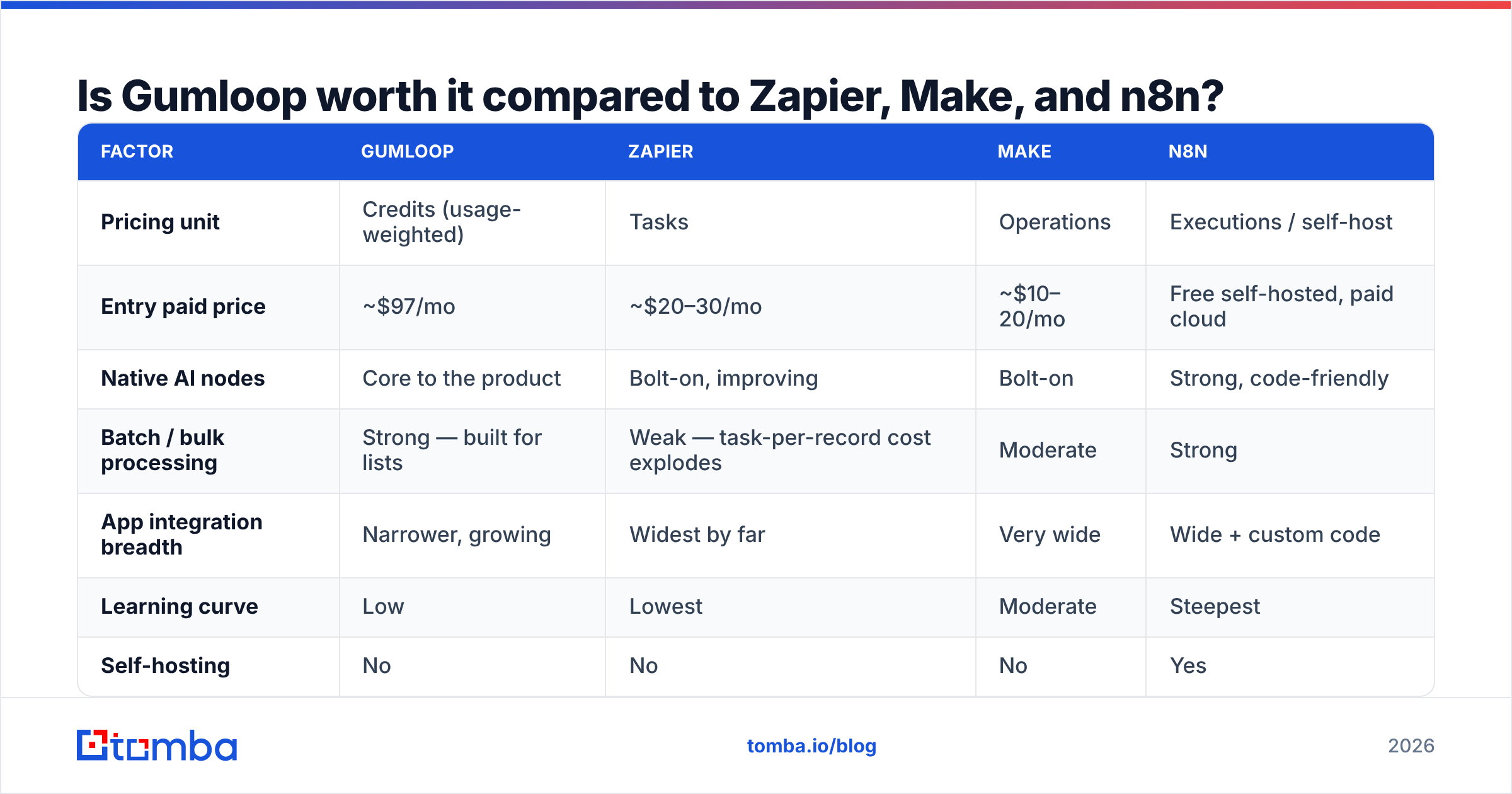
Comparing these four straight across is slightly unfair — they optimise for different jobs. But you are choosing one budget line, so here is the honest cut.
| Factor | Gumloop | Zapier | Make | n8n |
|---|---|---|---|---|
| Pricing unit | Credits (usage-weighted) | Tasks | Operations | Executions / self-host |
| Entry paid price | ~$97/mo | ~$20–30/mo | ~$10–20/mo | Free self-hosted, paid cloud |
| Native AI nodes | Core to the product | Bolt-on, improving | Bolt-on | Strong, code-friendly |
| Batch / bulk processing | Strong — built for lists | Weak — task-per-record cost explodes | Moderate | Strong |
| App integration breadth | Narrower, growing | Widest by far | Very wide | Wide + custom code |
| Learning curve | Low | Lowest | Moderate | Steepest |
| Self-hosting | No | No | No | Yes |
| Best fit | AI batch enrichment, research ops | Simple app-to-app triggers | Complex branching logic | Engineering-owned automation |
The verdict: if your workflows are mostly "move this record from A to B", Gumloop is overpriced for the job and Zapier or Make wins on cost. If your workflows are "read 2,000 things, reason about each one, and write structured output", Gumloop is priced fairly and the alternatives get awkward fast. If you have an engineer who will own it, n8n self-hosted is the cheapest ceiling — you just pay in maintenance instead of subscription.
Where does Gumloop fit in a B2B outbound stack?#
Here's the trap teams walk into: they buy an AI automation platform, point it at a list of company names, and ask it to find contact details. The LLM cheerfully guesses firstname.lastname@company.com, the workflow reports success, and 40% of the sends bounce three weeks later.
An automation platform is a conductor, not a musician. It sequences steps beautifully. It does not have proprietary contact data, and no amount of prompting creates data that the model never had. This is why credit spend on "find the email" nodes is usually the worst-value line in a Gumloop bill — you are paying premium compute to produce a guess.
The cleaner architecture separates the two concerns:
- Data layer — a dedicated provider that returns verified contact records with a confidence score. An email finder that checks patterns against real observed data, plus an email verifier pass before anything is sent, costs a fraction of what an LLM guess-and-check loop does.
- Orchestration layer — Gumloop (or Make, or n8n) calling that provider's API, handling the branching, and writing results back to your CRM.
- Execution layer — your sequencer or CRM doing the actual sending.
Wired that way, Gumloop's credits go to the work only Gumloop can do: reasoning, classification, personalisation, summarisation. The deterministic lookups run through a data API at cents per record. Most teams cut their credit consumption by 30–50% just by moving contact discovery out of the LLM node and into a bulk email finder step.
What are the hidden costs of Gumloop pricing?#
Beyond the sticker price, four things reliably surprise people in month two:
- Model choice is a pricing decision. Running a frontier model on a task a small model handles fine can triple a workflow's credit cost. Audit every LLM node and downgrade the ones doing simple classification.
- Retries and idempotency. Without a "skip already-processed rows" guard, a re-run of a failed batch re-pays for every row that already succeeded.
- Scheduled workflows you forgot about. A daily job on a stale list keeps billing. Review your schedules monthly.
- Data you pay twice for. Enriching the same 500 accounts every quarter because nothing caches results is pure waste. Store enrichment output in your own B2B database or CRM and only refresh what's stale.
None of these are Gumloop's fault, exactly. They are the standard failure modes of usage-based pricing, and they apply equally to any credit-metered platform. But they are why the "$97/mo" number in your budget spreadsheet often lands at $200–300 in practice.
Who should buy Gumloop, and who should skip it?#
Buy Gumloop if:
- You run genuine AI batch work — classification, extraction, summarisation, personalisation — over lists of hundreds or thousands of records.
- Nobody on your team wants to maintain infrastructure, and you'd rather pay for a hosted canvas than run n8n on a VPS.
- Your workflows change often enough that a visual builder beats a codebase.
- You've already modelled credit consumption on a sample and the numbers work.
Skip Gumloop if:
- Your automations are simple app-to-app triggers. You are paying an AI premium for a job Zapier does for a quarter of the price.
- You need one specific integration Gumloop doesn't support yet — breadth is still its weakest axis against the incumbents.
- Your real problem is data quality, not orchestration. No workflow builder fixes a bad list; it just processes it faster and more expensively.
- You have an engineer with spare cycles and a strong opinion about self-hosting.
Try before deciding: the free tier is not a token gesture. Build your actual highest-volume workflow on it, run it on 25 real rows, and read the credit meter. That single test tells you more than any review — including this one.
How should you budget for Gumloop realistically?#
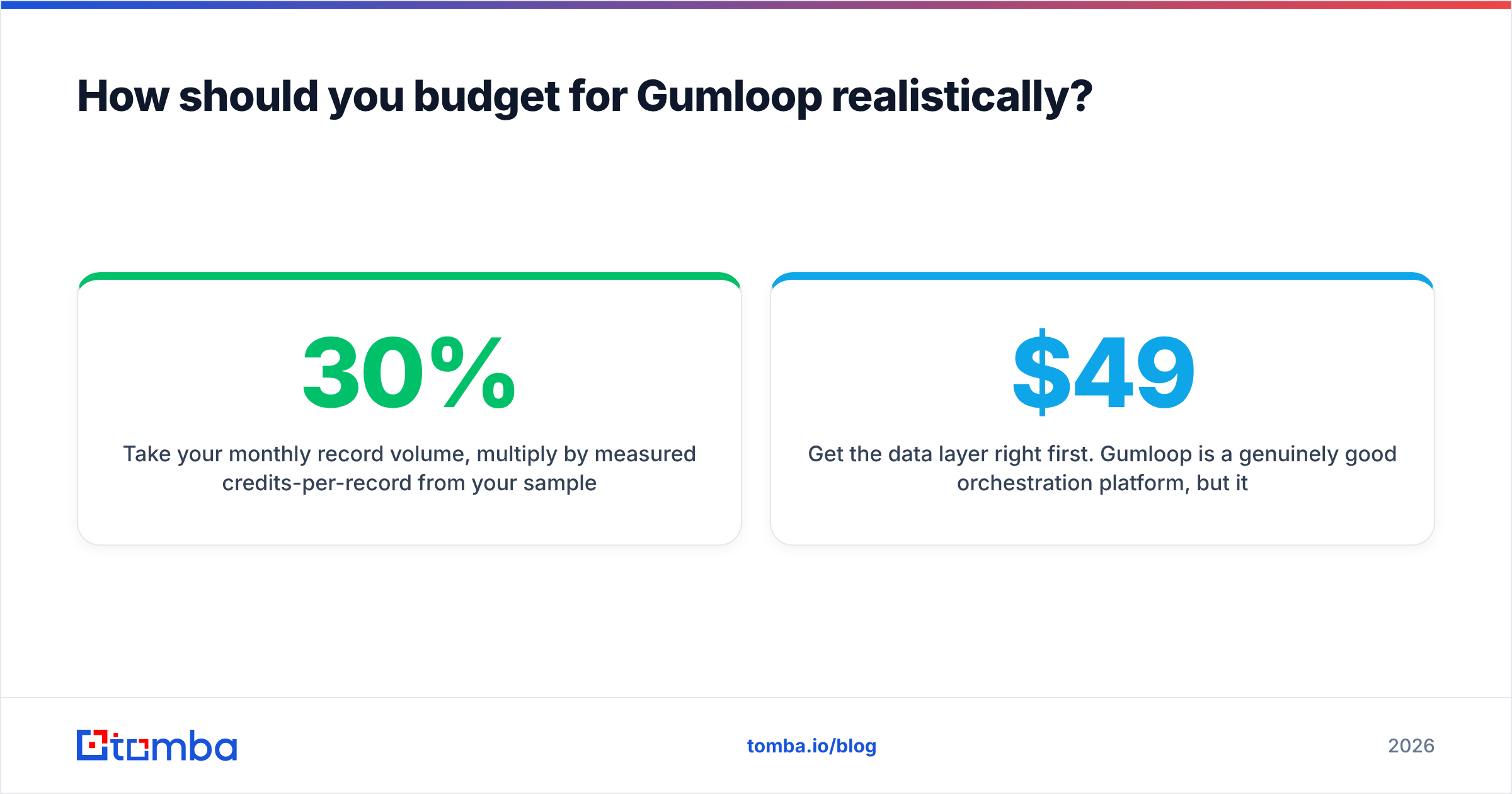
Take your monthly record volume, multiply by measured credits-per-record from your sample run, add 30% for retries and experimentation, and compare against tier allowances. Then subtract every step you can move out of the LLM: contact lookup, verification, phone matching, domain resolution. Those belong in a data API, not a reasoning node.
Teams that do this arithmetic before signing usually land on Starter and stay there for a year. Teams that don't usually land on Pro within two months and can't explain why.
Get the data layer right first. Gumloop is a genuinely good orchestration platform, but it only pays back when the records flowing through it are real. Start with verified contacts: Tomba's Email Finder returns professional email addresses by domain, name, or company with a confidence score attached, and the Tomba API drops straight into a Gumloop HTTP node. The free tier covers 25 searches a month, Starter is $49/mo, and Growth is $99/mo — check Tomba pricing to see where your volume lands. Fix the input, and every credit you spend downstream is worth more.
Related guides#
Ready to find emails that actually work?
Join 150,000+ professionals who stopped guessing and started sending. Free credits on signup — no credit card required.
Get the Tomba newsletter
Practical outbound tactics and product updates — once every two weeks.
About the author