Gumloop vs Lindy: Which AI Automation Platform Wins in 2026?
Gumloop builds visual AI workflows. Lindy hires AI agents that run on their own. Here is an honest breakdown of pricing, reliability, GTM fit, and the data problem neither one solves for you.
Gumloop vs Lindy is a choice between two models of AI automation. Gumloop gives you a canvas. You draw the workflow, and it runs the same way every time. Lindy gives you an agent. You brief it in plain words, and it decides how to act. This guide covers pricing, reliability, GTM fit, and the data gap neither tool closes.
TL;DR
- Gumloop is a canvas. You drag nodes, wire them together, and get a deterministic AI workflow. Run it on a schedule or in bulk. Best when you know exactly what the process should be.
- Lindy is an employee. You describe a job in plain language and connect a mailbox or calendar. The agent then decides how to act inside triggers you define. Best when the process is reactive and conversational.
Pricing and data are where teams get surprised:
- Pricing structures differ more than the headline numbers. Gumloop sells credits against workflow runs; Lindy sells tasks against agent actions. Heavy scraping and enrichment loops burn Gumloop credits fast. High-volume inbox handling burns Lindy tasks fast.
- Neither tool is a data provider. Both will happily automate outreach to email addresses that bounce. The contact data layer is yours to supply.
- The honest verdict: pick Gumloop for repeatable bulk pipelines, Lindy for autonomous inbox/meeting/CRM assistants, and run a real email verifier in front of either one.
What are Gumloop and Lindy, actually?#
Gumloop is a no-code AI workflow builder. You work on a node graph: an input node feeds a scraper node, which feeds an LLM node, which feeds a Google Sheets node. Runs are deterministic — the same graph with the same inputs takes the same path every time. It started in Y Combinator as AgentHub. The shape has not changed much since: a visual pipeline engine with AI steps built in, plus a browser extension and a bulk-run mode for spreadsheet-scale jobs.
Lindy sells a different mental model. You don't build a graph — you hire a "Lindy." You give it a job description. You connect it to Gmail, Slack, HubSpot, or a calendar. Then you set a trigger: an email arrives, a meeting ends, a form is submitted. From there the agent works out what to do, calls the tools it has, and can ask you before it acts. Meeting notetaking, inbox triage, and lead qualification are its most common deployments.
That difference — graph you author versus agent you brief — drives almost every other tradeoff here. Everything below is downstream of it.
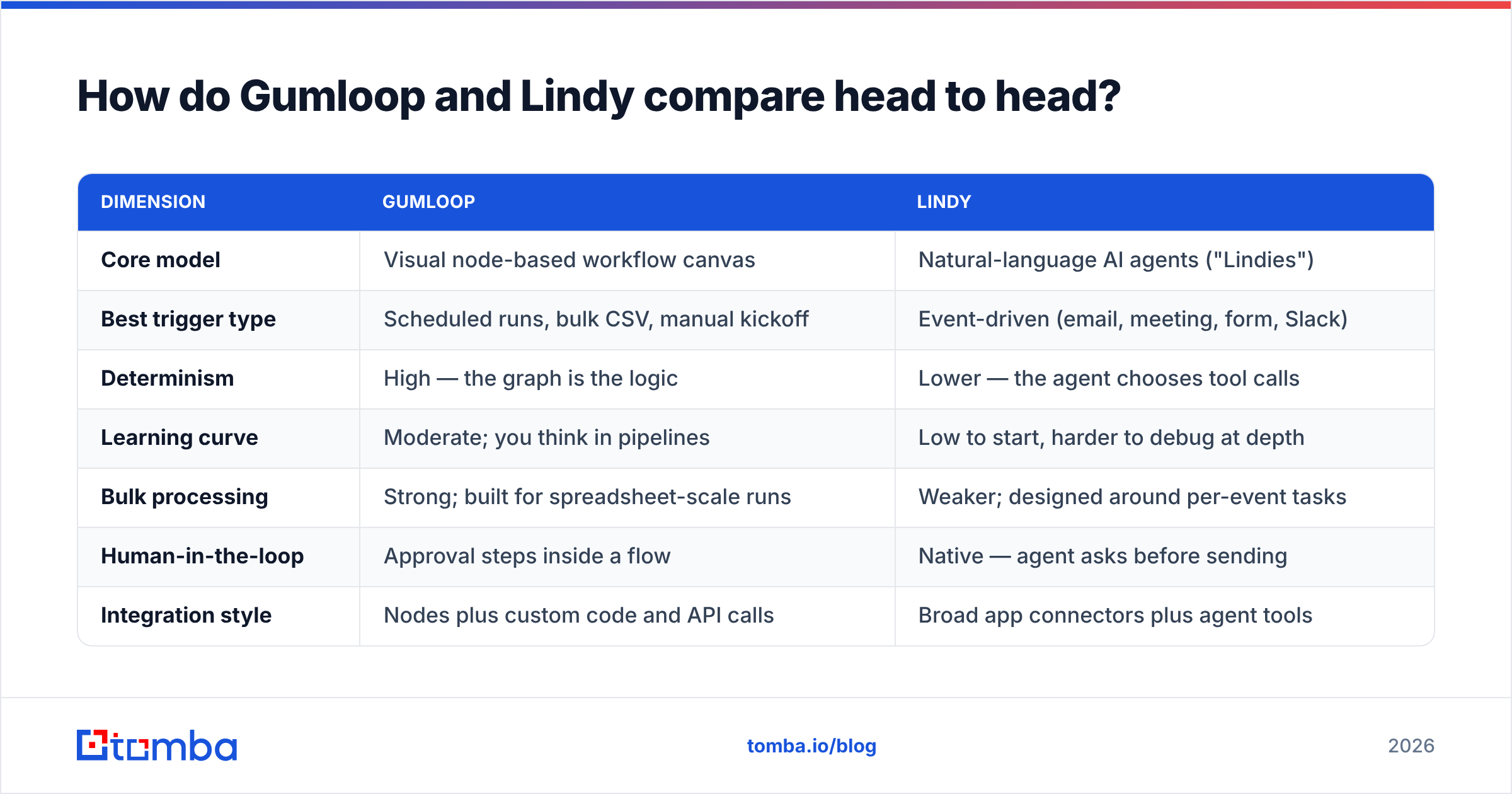
Gumloop vs Lindy: how do they compare head to head?#
| Dimension | Gumloop | Lindy |
|---|---|---|
| Core model | Visual node-based workflow canvas | Natural-language AI agents ("Lindies") |
| Best trigger type | Scheduled runs, bulk CSV, manual kickoff | Event-driven (email, meeting, form, Slack) |
| Determinism | High — the graph is the logic | Lower — the agent chooses tool calls |
| Learning curve | Moderate; you think in pipelines | Low to start, harder to debug at depth |
| Bulk processing | Strong; built for spreadsheet-scale runs | Weaker; designed around per-event tasks |
| Human-in-the-loop | Approval steps inside a flow | Native — agent asks before sending |
| Integration style | Nodes plus custom code and API calls | Broad app connectors plus agent tools |
| Typical GTM use | Lead research, content pipelines, scoring | Inbox triage, notetaking, CRM updates |
| Failure mode | A node breaks; the run stops loudly | The agent improvises; it fails quietly |
The last row matters more than teams expect. A broken Gumloop node throws an error you can see in the run log. A Lindy that misreads intent still completes — it just does the wrong thing politely. Deterministic failure is easier to operate than probabilistic failure. That is why regulated and revenue-critical steps tend to land on the Gumloop side of a stack.
What does each platform cost in 2026?#
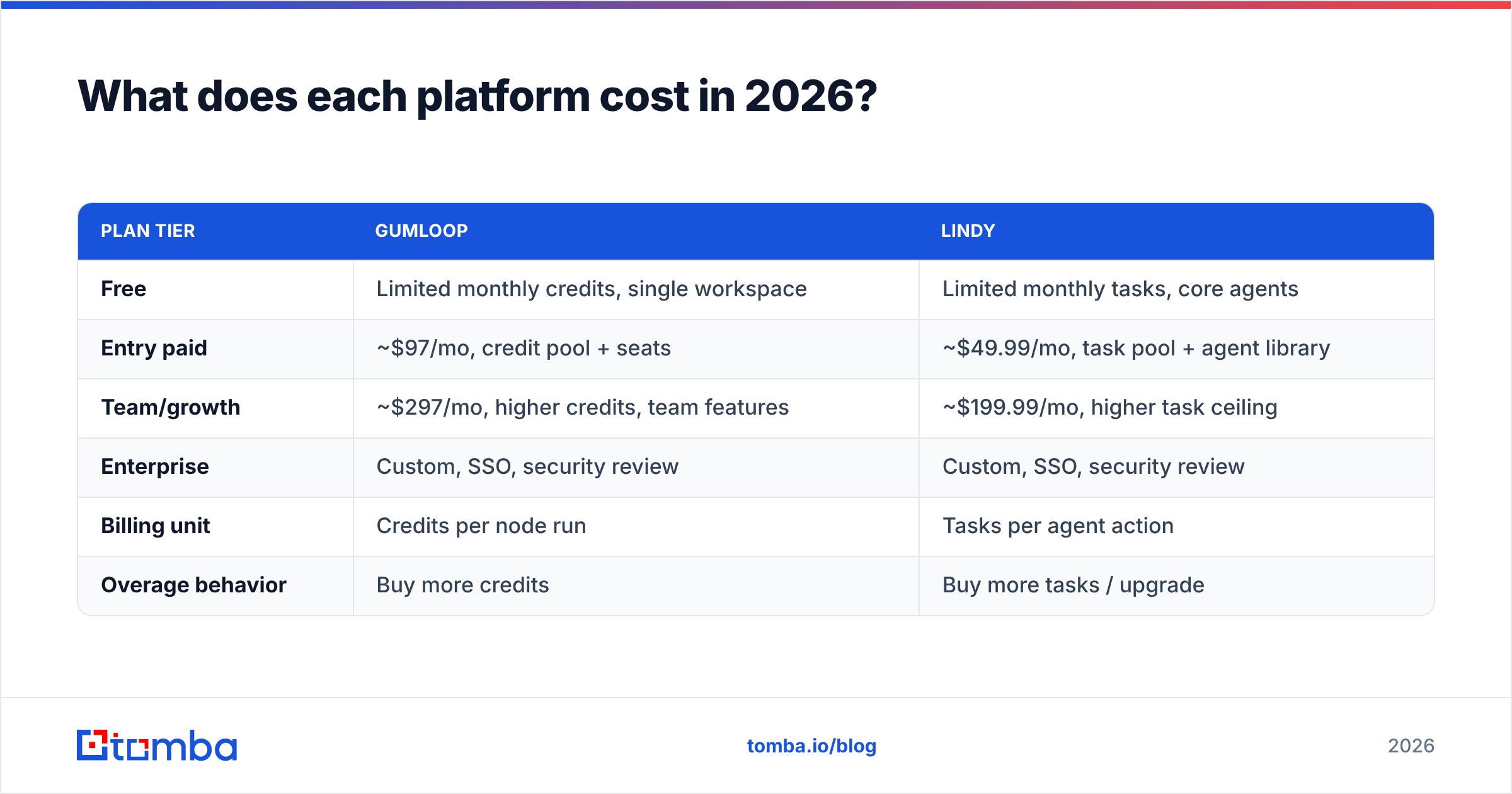
Both vendors publish list pricing and both change it. Treat the table below as a shape rather than a quote, and check the vendor pages before you budget.
| Plan tier | Gumloop | Lindy |
|---|---|---|
| Free | Limited monthly credits, single workspace | Limited monthly tasks, core agents |
| Entry paid | ~$97/mo, credit pool + seats | ~$49.99/mo, task pool + agent library |
| Team/growth | ~$297/mo, higher credits, team features | ~$199.99/mo, higher task ceiling |
| Enterprise | Custom, SSO, security review | Custom, SSO, security review |
| Billing unit | Credits per node run | Tasks per agent action |
| Overage behavior | Buy more credits | Buy more tasks / upgrade |
The billing unit is the whole story. A Gumloop workflow that scrapes 500 companies and runs six AI nodes per company is 3,000 node executions. The credit meter moves fast, even though you ran "one" workflow. A Lindy that triages 40 inbound emails a day and books meetings runs thousands of tasks a month, and each multi-step action counts. Model the unit economics against your real volume before you commit annually. Reviews on G2 from both user bases name credit and task consumption as the top budgeting surprise.
Is Gumloop better than Lindy for sales teams?#
For most B2B sales orgs, they solve different halves of the funnel. Here's the practical split:
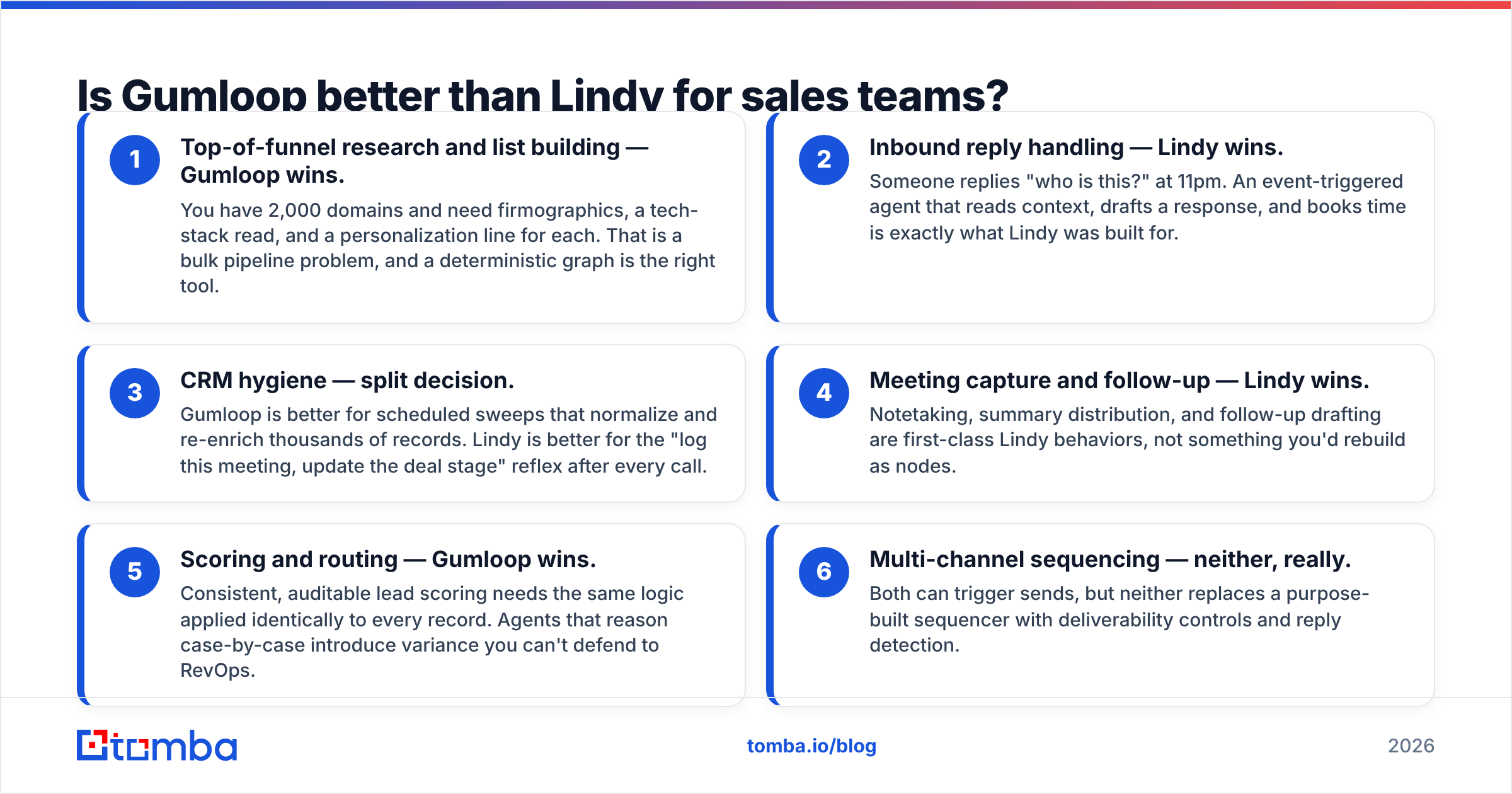
- Top-of-funnel research and list building — Gumloop wins. You have 2,000 domains and need firmographics, a tech-stack read, and a personalization line for each. That is a bulk pipeline problem, and a deterministic graph is the right tool.
- Inbound reply handling — Lindy wins. Someone replies "who is this?" at 11pm. An event-triggered agent that reads context, drafts a response, and books time is exactly what Lindy was built for.
- CRM hygiene — split decision. Gumloop is better for scheduled sweeps that normalize and re-enrich thousands of records. Lindy is better for the "log this meeting, update the deal stage" reflex after every call.
The next three are where teams most often change their minds:
- Meeting capture and follow-up — Lindy wins. Notetaking, summary distribution, and follow-up drafting are first-class Lindy behaviors, not something you'd rebuild as nodes.
- Scoring and routing — Gumloop wins. Consistent, auditable lead scoring needs the same logic applied identically to every record. Agents that reason case-by-case add variance you can't defend to RevOps.
- Multi-channel sequencing — neither, really. Both can trigger sends, but neither replaces a purpose-built sequencer with deliverability controls and reply detection.
If you only get one, the tiebreaker is where your bottleneck sits. Teams drowning in inbound and meetings should start with Lindy. Teams starving for qualified pipeline should start with Gumloop.
What breaks when you automate on top of bad data?#
This is the part vendor comparison posts skip. Both platforms assume the contact data flowing through them is correct. Neither one is a data provider, and neither verifies what you feed it.
Here is the failure chain, and it is boringly consistent:
- Step 1: Your workflow scrapes or exports a list of names and companies.
- Step 2: An AI node or agent guesses email addresses from a pattern —
first.last@domain.comand friends. - Step 3: The automation sends. Twelve percent bounce.
- Step 4: Your sender reputation drops, and the next campaign — sent to good addresses — lands in spam.
The automation worked perfectly. The outcome was still a burned domain. Pattern-guessing is not email finding. It produces addresses that look right with no evidence behind them. A real email finder resolves the address against source evidence and returns a confidence score. A verification pass then filters the rest before anything sends.
The clean architecture is simple. The automation platform orchestrates, a dedicated data API resolves and verifies contacts, and the sequencer sends. Both Gumloop and Lindy support outbound HTTP calls and custom API steps. So wiring the Tomba API into either one is a single node or a single agent tool. You call it with a domain plus a name, get back a verified address and a status, and branch on the result. Records that come back risky or undeliverable never reach the send step.

Which one is easier to live with six months in?#
Setup difficulty is not the same as operating difficulty, and the two platforms invert the curve.
Lindy is dramatically easier on day one. You describe a job, it starts working, and you feel productive in twenty minutes. Month six is harder. When an agent starts doing something subtly wrong across a hundred conversations, you are debugging a prompt and a set of tool permissions rather than a flowchart. Guardrails, approval steps, and narrow tool scopes keep this manageable. Give each agent the smallest set of permissions that lets it finish the job.
Gumloop is harder on day one, because node graphs force you to specify the process. It is easier at month six. Every run has a log, every node has an input and output you can inspect, and a regression traces back to a specific step. The cost is rigidity: when your process changes, you rebuild the graph. Teams that treat workflows as living infrastructure and version them do fine. Teams that build once and forget end up with brittle pipelines nobody wants to touch.
One more operational note: both platforms are only as reliable as their connectors. When an upstream API changes or rate-limits you, a Gumloop node errors and a Lindy agent may retry into a loop. Build alerting on run failures from day one. Otherwise you find a three-week silent outage during a pipeline review.
Can you run Gumloop and Lindy together?#
Yes, and for well-resourced GTM teams that is the strongest configuration. They compose cleanly because they occupy different layers.
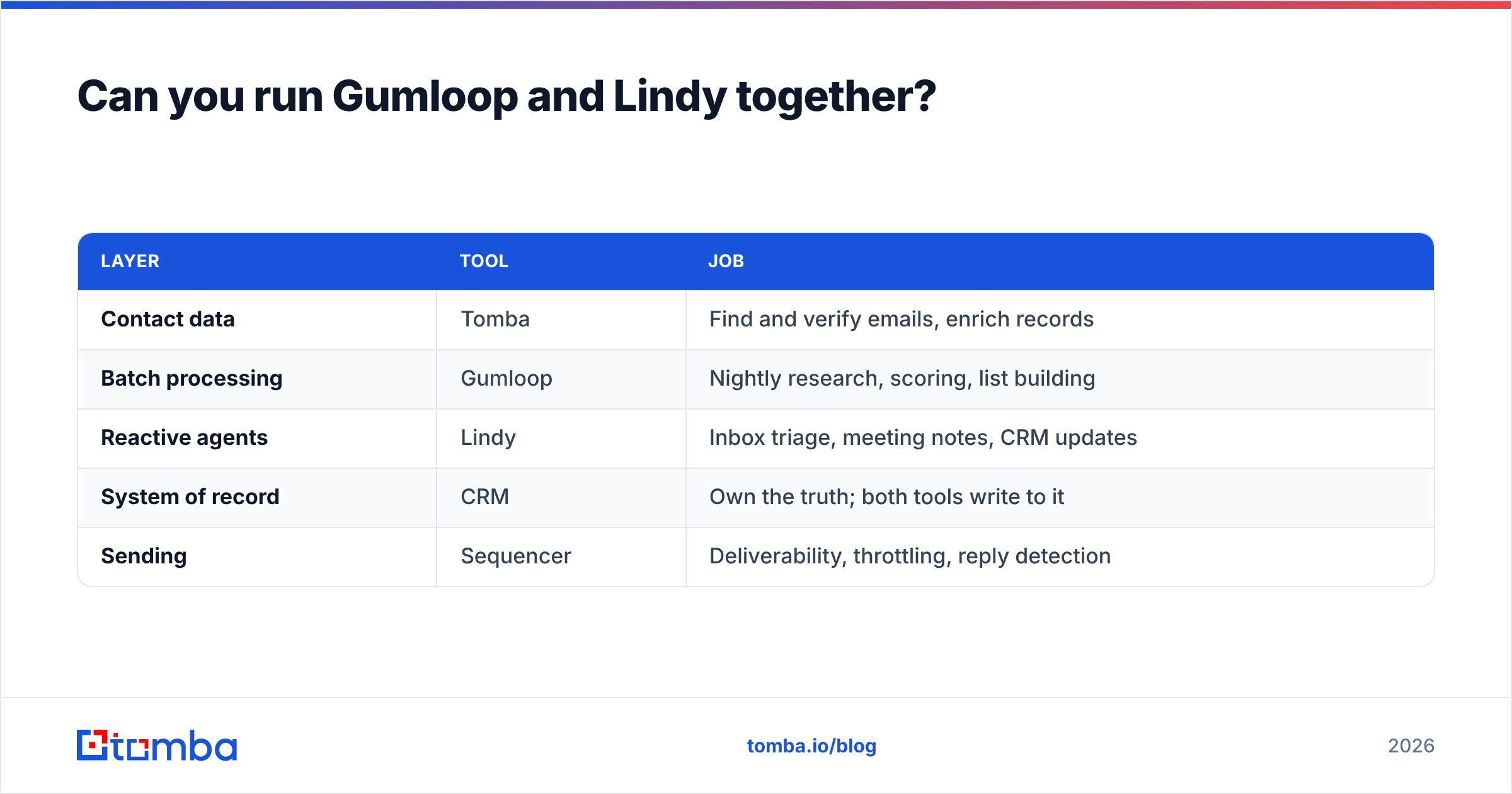
A realistic combined stack:
| Layer | Tool | Job |
|---|---|---|
| Contact data | Tomba | Find and verify emails, enrich records |
| Batch processing | Gumloop | Nightly research, scoring, list building |
| Reactive agents | Lindy | Inbox triage, meeting notes, CRM updates |
| System of record | CRM | Own the truth; both tools write to it |
| Sending | Sequencer | Deliverability, throttling, reply detection |
One rule keeps this stack sane: the CRM is the only source of truth, and every tool writes to it rather than to each other. Point-to-point wiring between automation platforms creates loops that are miserable to debug. Gumloop updates a record, that fires a Lindy trigger, and the agent updates the record again. Make the CRM the hub. If you are standardizing on HubSpot or Salesforce, both publish guidance on automation that doesn't fight itself; HubSpot's operations documentation is a reasonable starting point.
Some teams would rather enrich at the CRM layer than inside a workflow canvas. A direct HubSpot integration removes a whole class of sync bugs. The data lands where the reps already work, with no node graph in between.
Which should you pick?#
Short version: the Gumloop vs Lindy call comes down to your execution model, your billing unit, and how each tool fails.
- Choose Gumloop if your highest-value automation is bulk, repeatable, and auditable — research pipelines, enrichment sweeps, content generation at scale, scoring models. You want the process pinned down.
- Choose Lindy if your highest-value automation is reactive and conversational — inbound replies, meeting follow-ups, scheduling, CRM logging. You want judgment applied to events you can't fully specify in advance.
- Choose neither yet if your contact data is unverified. Automating outreach on guessed addresses speeds up damage, not pipeline. Fix the data layer first; it costs less than either platform.
- Choose both if you have the budget and a clear layer split, with the CRM as the hub and a verification gate before anything sends.
The comparison people expect to matter — which one has better AI — is mostly noise in 2026. Both call the same frontier models. Pick against execution model, billing unit, and failure mode, and you'll be right more often than picking on feature lists.
Start with data that doesn't bounce#
Whichever platform you land on, the automation is only as good as the addresses flowing through it. Use the Tomba Email Finder as the enrichment step inside your Gumloop node graph or your Lindy agent's tool list. It resolves professional email addresses by domain, name, or company and returns a confidence score you can branch on, so undeliverable records never reach a send step. The free tier includes 25 searches per month, Starter runs $49/mo, and Growth is $99/mo. Full Tomba pricing is public if you want to model it against your run volume. Wire it in once, and both platforms stop being sophisticated ways to bounce email.
Related guides#
Ready to find emails that actually work?
Join 150,000+ professionals who stopped guessing and started sending. Free credits on signup — no credit card required.
Get the Tomba newsletter
Practical outbound tactics and product updates — once every two weeks.
About the author