Guru Pricing Reviews Pros and Cons: Real Costs in 2026
Guru's list price looks simple until you multiply it by seats and add the AI search line. Here's what Guru pricing really costs in 2026, what reviewers praise, what they complain about, and when a cheaper stack wins.
Guru pricing reviews pros and cons all point the same way: good product, premium per-seat bill. This guide breaks down the real 2026 numbers, what buyers praise, what they gripe about, and when a cheaper stack does the job.
TL;DR
- Guru is a knowledge-management and AI search tool, not a prospecting or contact-data tool. Budget it as enablement, not pipeline.
- List pricing today: a free tier for tiny teams, an all-in-one plan at roughly $18–$30 per user per month, an AI search add-on, and custom Enterprise quotes. Re-check getguru.com/pricing before you model a budget.
- Pros reviewers repeat: browser-extension delivery, verification workflows, and strong search once content is clean.
- Cons reviewers repeat: per-seat cost scales badly, content rots without an owner, and the best features sit in higher tiers.
- If reps can't find accurate contact data, Guru won't fix it. That's a data problem. Solve it with a bulk email finder, then use Guru for the playbooks.
What is Guru and who actually buys it?#
Guru is a knowledge platform that puts your internal docs where people already work: a Chrome extension, Slack, Teams, and a web app. Nothing is buried in a wiki nobody opens. Think of it as a fridge magnet for company knowledge. The answer sticks to the surface you already look at, rather than sitting in a filing cabinet down the hall.
The buyer profile is consistent. Sales enablement leads buy it so reps stop DM'ing the same competitor question five times a week. Support leads buy it so agents answer from one verified source. HR and IT buy it for onboarding and policy lookup. In 2025–2026 Guru leaned into "AI enterprise search." One bar searches Guru cards plus connected sources like Google Drive, Confluence, Salesforce, and Slack.
That positioning matters for pricing, because it changes who has to be licensed. A sales-enablement wiki needs 40 seats. A company-wide search layer needs 400. The per-user math is the whole story.

How much does Guru cost in 2026?#
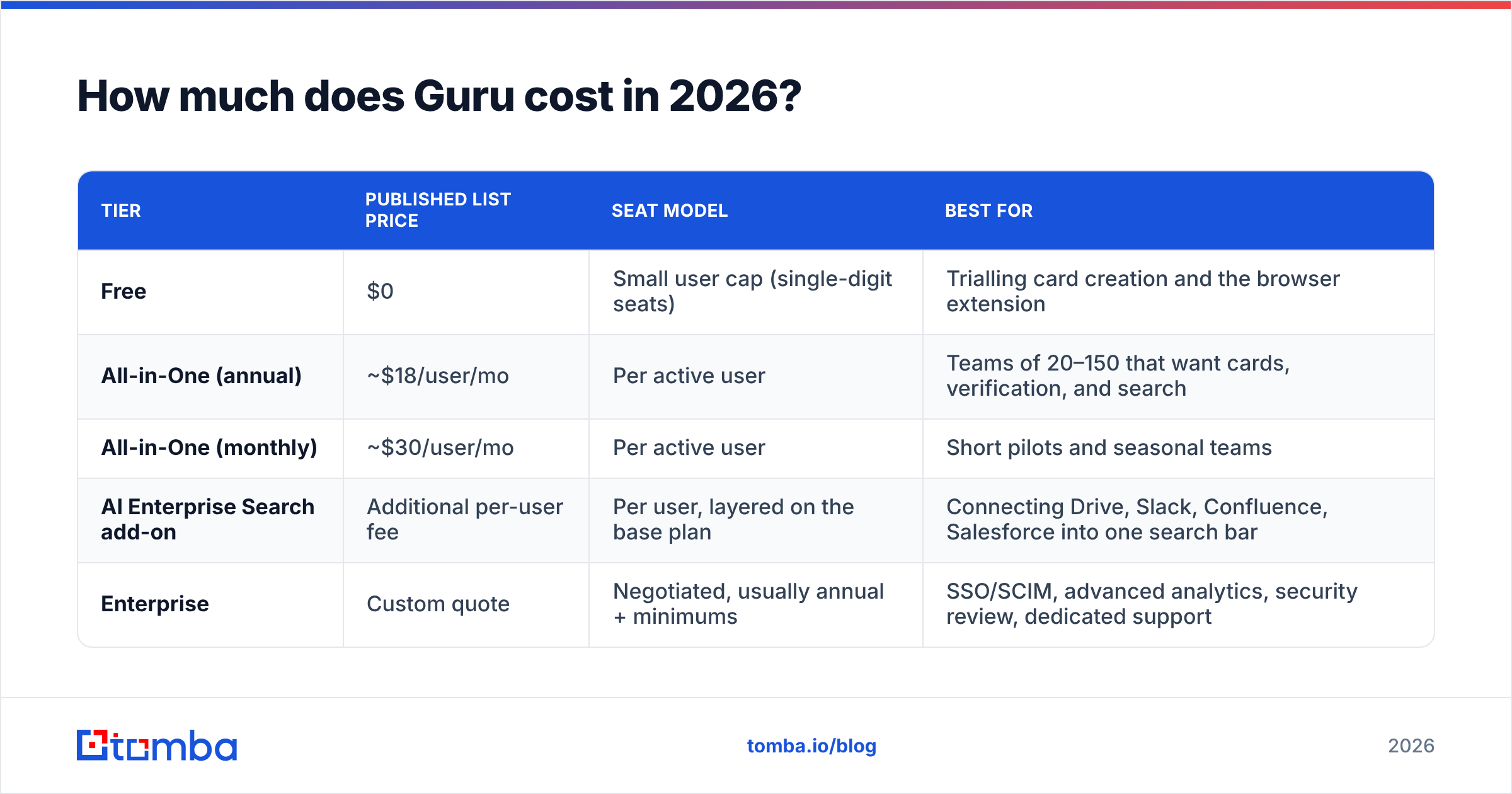
Guru publishes list pricing. Your real cost depends on billing cadence, seat count, and whether you add AI search across connected apps. Here is the shape of the plans as published today. Treat the numbers as a planning model, not a quote.
| Tier | Published list price | Seat model | Best for |
|---|---|---|---|
| Free | $0 | Small user cap (single-digit seats) | Trialling card creation and the browser extension |
| All-in-One (annual) | ~$18/user/mo | Per active user | Teams of 20–150 that want cards, verification, and search |
| All-in-One (monthly) | ~$30/user/mo | Per active user | Short pilots and seasonal teams |
| AI Enterprise Search add-on | Additional per-user fee | Per user, layered on the base plan | Connecting Drive, Slack, Confluence, Salesforce into one search bar |
| Enterprise | Custom quote | Negotiated, usually annual + minimums | SSO/SCIM, advanced analytics, security review, dedicated support |
Two things make Guru's sticker price misleading in both directions.
First, the monthly-versus-annual gap is unusually wide. Paying month-to-month can cost roughly 60% more per seat than committing for a year. If you pilot monthly and never migrate to annual, you quietly overpay for the life of the account.
Second, "active user" billing beats a flat headcount model. Say half your company reads three cards a quarter. You do not pay full freight for those people, as you would with a per-employee wiki license. Forecasting gets harder, though. Adoption success raises your bill.
What does a real annual bill look like?#
Run the math before the demo, not after. At roughly $18/user/month on annual billing:
- 25 seats — about $5,400/year. Cheap relative to one enablement contractor.
- 75 seats — about $16,200/year. The point where procurement starts asking questions.
- 200 seats — about $43,200/year, before any AI search add-on. Now you're negotiating, not buying.
- 500 seats with AI search — comfortably six figures at list. Nobody pays list here; this is an Enterprise conversation with a discount curve.
- Add-on drift — AI search, advanced analytics, and premium support each move the per-seat number. Ask for the fully loaded per-seat cost in writing.
What do Guru reviews actually say?#
Review sentiment on G2 and Capterra is steady: warm on usability, mixed on price and content hygiene. Read Guru pricing reviews pros and cons as a pattern, not as a pile of individual scores.
Reviewers praise the delivery model above all else. The browser extension shows a verified answer inside Salesforce or Zendesk. That is the feature people call "the reason we kept it." Verification comes second. A named owner re-confirms each card on a schedule, and that habit is the only thing that stops a knowledge base from turning into a graveyard.
The complaints cluster just as tightly. Cost per seat at scale is the number one objection. Second is the admin burden. Guru does not write or clean your content. A neglected instance gives confidently wrong answers faster than a stale wiki does. Third is feature gating. Several features buyers assume are standard sit behind Enterprise.
What are the pros of Guru?#
- Answers arrive in context. The extension puts the card next to the CRM record or ticket, which cuts the tab-switching tax that kills adoption in wiki tools.
- Verification is a real workflow, not a badge. Assign an owner, set an interval, get nagged. This is the single best defence against stale enablement content.
- Search quality is strong when content is clean. Guru's AI search handles natural-language questions well and cites the source card, so reps can sanity-check the answer.
- Onboarding time drops measurably. New reps stop interrupting senior reps; that's the ROI story most enablement leads use internally, and it's a fair one.
- Analytics show what nobody reads. Card-level engagement data tells you which playbooks to delete — an underrated cost saver.
What are the cons and hidden costs?#
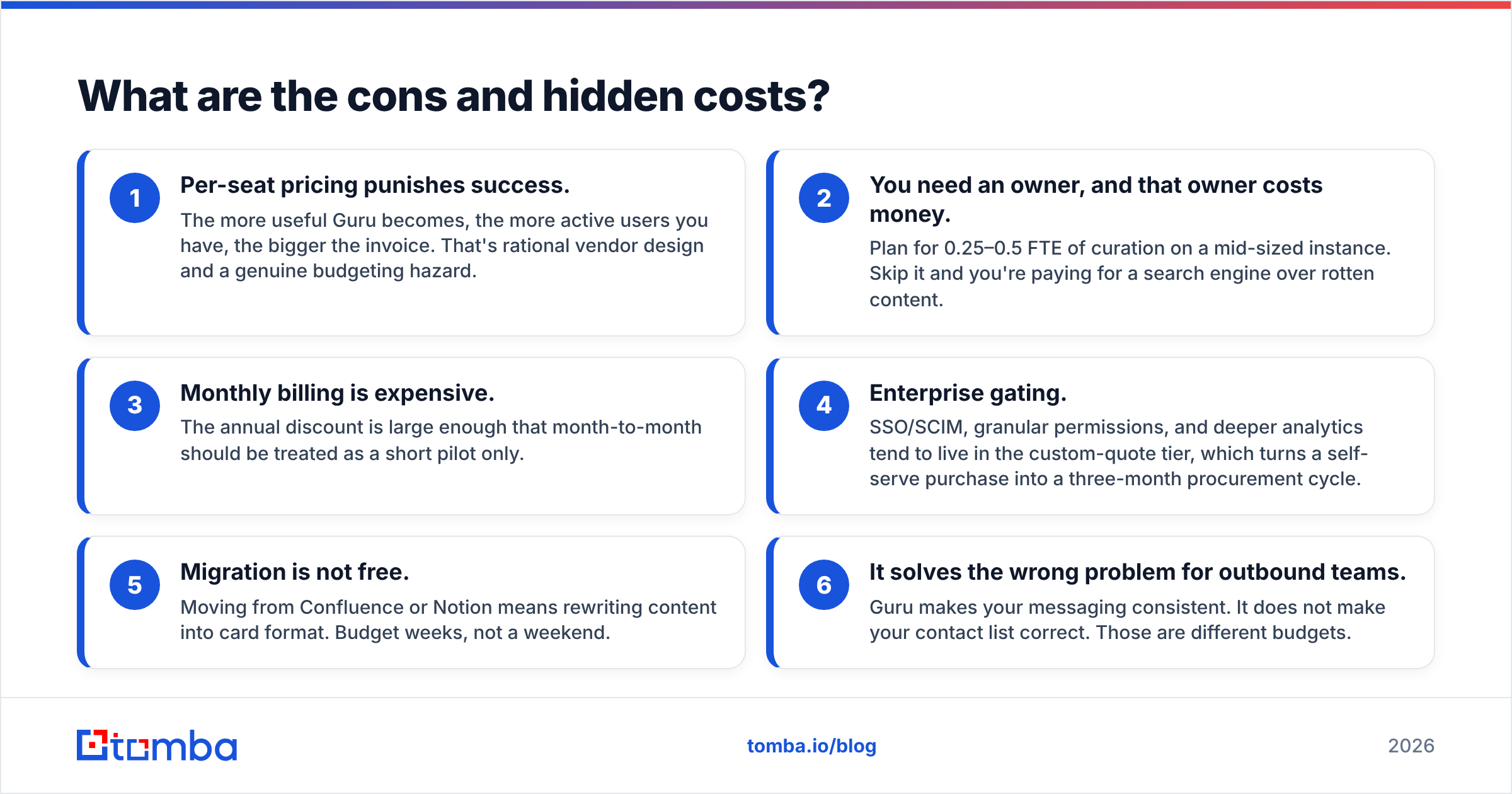
- Per-seat pricing punishes success. The more useful Guru becomes, the more active users you have, the bigger the invoice. That's rational vendor design and a genuine budgeting hazard.
- You need an owner, and that owner costs money. Plan for 0.25–0.5 FTE of curation on a mid-sized instance. Skip it and you're paying for a search engine over rotten content.
- Monthly billing is expensive. The annual discount is large enough that month-to-month should be treated as a short pilot only.
- Enterprise gating. SSO/SCIM, granular permissions, and deeper analytics tend to live in the custom-quote tier, which turns a self-serve purchase into a three-month procurement cycle.
- Migration is not free. Moving from Confluence or Notion means rewriting content into card format. Budget weeks, not a weekend.
- It solves the wrong problem for outbound teams. Guru makes your messaging consistent. It does not make your contact list correct. Those are different budgets.
How does Guru pricing compare to alternatives?#
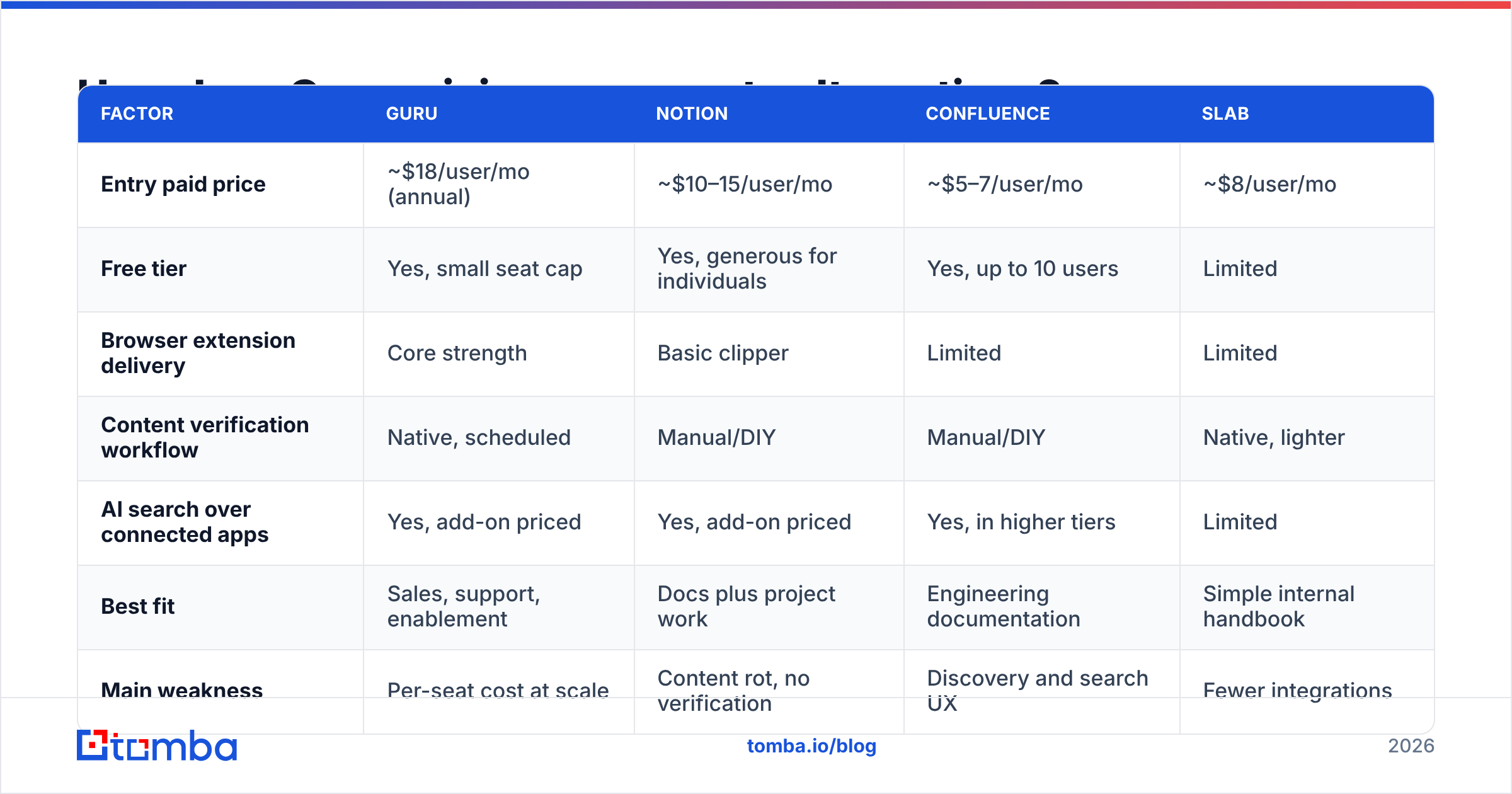
Guru rarely competes head-to-head with one tool. It competes with a wiki you already pay for plus the assumption that Slack search is good enough. Here's the honest comparison.
| Factor | Guru | Notion | Confluence | Slab |
|---|---|---|---|---|
| Entry paid price | ~$18/user/mo (annual) | ~$10–15/user/mo | ~$5–7/user/mo | ~$8/user/mo |
| Free tier | Yes, small seat cap | Yes, generous for individuals | Yes, up to 10 users | Limited |
| Browser extension delivery | Core strength | Basic clipper | Limited | Limited |
| Content verification workflow | Native, scheduled | Manual/DIY | Manual/DIY | Native, lighter |
| AI search over connected apps | Yes, add-on priced | Yes, add-on priced | Yes, in higher tiers | Limited |
| Best fit | Sales, support, enablement | Docs plus project work | Engineering documentation | Simple internal handbook |
| Main weakness | Per-seat cost at scale | Content rot, no verification | Discovery and search UX | Fewer integrations |
The decision usually reduces to one question: do your people need knowledge pushed to them mid-task, or do they need a place to go and read? If it's the former, Guru's premium is defensible. If it's the latter, cheaper tools do the job and you should not pay enablement prices for a document store.

Is Guru worth it for a sales team?#
Yes, conditionally — and the conditions are specific.
Guru is worth it when reps face high-variance questions under time pressure: competitive objections, pricing exceptions, security questionnaires, and compliance language. In those workflows, a wrong answer costs a deal, and verified-answer-in-context is worth $18 a seat.
Guru is not worth it when your team is small enough to answer questions in a Slack channel, or when your product changes so fast that no card survives a quarter. It is also the wrong buy when your bottleneck sits upstream. Plenty of teams buy enablement software to fix what is really a targeting or data problem. Reps are not slow because they can't find the battlecard. They're slow because half their list bounces and the other half is the wrong persona.
Test it honestly. Pull last quarter's lost-deal reasons. If "inconsistent messaging" and "slow response to security questions" show up repeatedly, Guru addresses that. If the pattern is "no reply" and "wrong contact," you have a data problem, and knowledge software will not move the number.
Where does Guru stop and your prospecting stack start?#
Guru governs what you say. Your data stack governs who you say it to. Keeping those budgets separate makes both easier to justify.
A clean split looks like this. Guru holds the playbooks, ICP definitions, objection handling, and pricing rules. Your CRM holds the pipeline. Your data layer finds and validates the contacts feeding it. When a rep opens an account in Salesforce, Guru surfaces the messaging. Your data tooling has already supplied a verified work email, a direct phone number, and enrichment fields worth personalising on.
That last part is where teams underinvest. Bounce rates above 5% damage sender reputation and quietly cap every campaign that follows. Good messaging in your knowledge base will not save a burnt domain. Run new contacts through an email verifier before they hit a sequence. And unlike per-seat enablement software, data tooling prices on volume. Tomba pricing starts free at 25 searches a month, then moves to $49/mo on Starter and $99/mo on Growth. The cost tracks how much prospecting you do, not how many people log in.
How should you negotiate a Guru contract?#
Four moves that consistently work on per-seat knowledge tools:
- Commit annually, but ask for a mid-term seat adjustment clause. You want the annual discount without being locked into a headcount you no longer have.
- Get the fully loaded per-seat number in writing, including AI search and any premium support, before you compare vendors.
- Negotiate on the ramp, not the rate. Vendors resist discounting the list price but will often agree to a lower seat count in months one to three while you migrate content.
- Ask what happens on renewal if active users double. Get the tier boundary and overage behaviour documented now, not in month eleven.
Also confirm export terms. If you leave, you want your cards out in a usable format. Knowledge lock-in is a real switching cost that never appears on the quote.
Guru pricing reviews pros and cons: the verdict#
Guru is a good product at a fair-but-premium price. The Guru pricing reviews pros and cons are both true at once. It earns its cost in high-stakes, high-variance answer environments. It wastes money when it's bought as a wiki replacement, or as a proxy fix for a pipeline problem. Model your bill at realistic adoption, not at pilot adoption. Then decide whether the per-seat curve still makes sense at the seat count you actually want.
Then check what's upstream. If your reps keep reaching the wrong people — or nobody at all — no knowledge base will save the quarter. Start with the Tomba Email Finder to build verified, deliverable contact lists from a domain or a name. Layer data enrichment on top for the personalisation fields your messaging depends on. Then let Guru do what it's genuinely good at: making sure every rep says the same correct thing once the right person finally opens the email.
Related guides#
// get started
Find, verify and enrich your first contacts today
Start on the free plan with 25 searches a month, then scale when your team is ready.
Free plan · No credit card required · GDPR & CCPA
// about the author