HitHorizons vs LeadsForge: Which B2B Data Tool Wins in 2026?
HitHorizons indexes company records. LeadsForge builds AI-generated lead lists. Neither one reliably hands you a verified email address — here is what each tool actually does, where both fall short, and how to close the gap.
HitHorizons vs LeadsForge is a common 2026 shortlist. One tool is a company-records database. The other is an AI list builder. Neither one hands you a verified work email. Here is what each does well, and where you still need a third tool.
TL;DR
- HitHorizons is a company-records database. It holds registry-grade firmographics: legal name, VAT or registration ID, industry code, revenue band. It is not a contact database.
- LeadsForge is an AI list-builder. You describe your ICP in plain language, and it returns a lead list. Speed is the selling point. Per-record verification is the weak point.
- The two tools barely overlap. One answers "which companies exist and are they real?" The other answers "give me 500 names that look like my customers."
- Neither one reliably delivers an SMTP-checked work email. That single field decides whether your sequence sends at all.
- A practical 2026 stack has three parts: a firmographic source for account selection, an AI list tool for speed, and a dedicated email finder and verifier (Tomba, free tier at 25 searches/mo, Starter $49/mo).
What are HitHorizons and LeadsForge?#
They solve different problems. That is why the HitHorizons vs LeadsForge question keeps coming up. Buyers shop for "a B2B data tool" without first splitting account data from contact data.
HitHorizons is a company information platform built on official business-registry data. Its core value is coverage and legitimacy. You can look up a registered legal name, national registration number, VAT identifier, industry code, size band, and ownership links. Compliance teams, credit analysts, and enterprise sales ops rely on this kind of source. They need to know if an entity is real and where it is incorporated. Europe is its strongest suit, with registry data from dozens of countries in one schema.
LeadsForge sits at the other end. It is an AI-first lead-generation tool. You type something like "Series A fintech startups in Germany with 20–100 employees hiring engineers," and it assembles a list. The interface is conversational. Onboarding takes minutes. The output is a spreadsheet of companies and contacts. It is aimed at founders and small outbound teams who want a list today, not a data-governance project.
Here is the mental model. HitHorizons is a library card catalog: authoritative, structured, and verifiable, but it will not tell you who to call. LeadsForge is a fast research assistant: it hands you a stack of names quickly, and some of them are wrong.
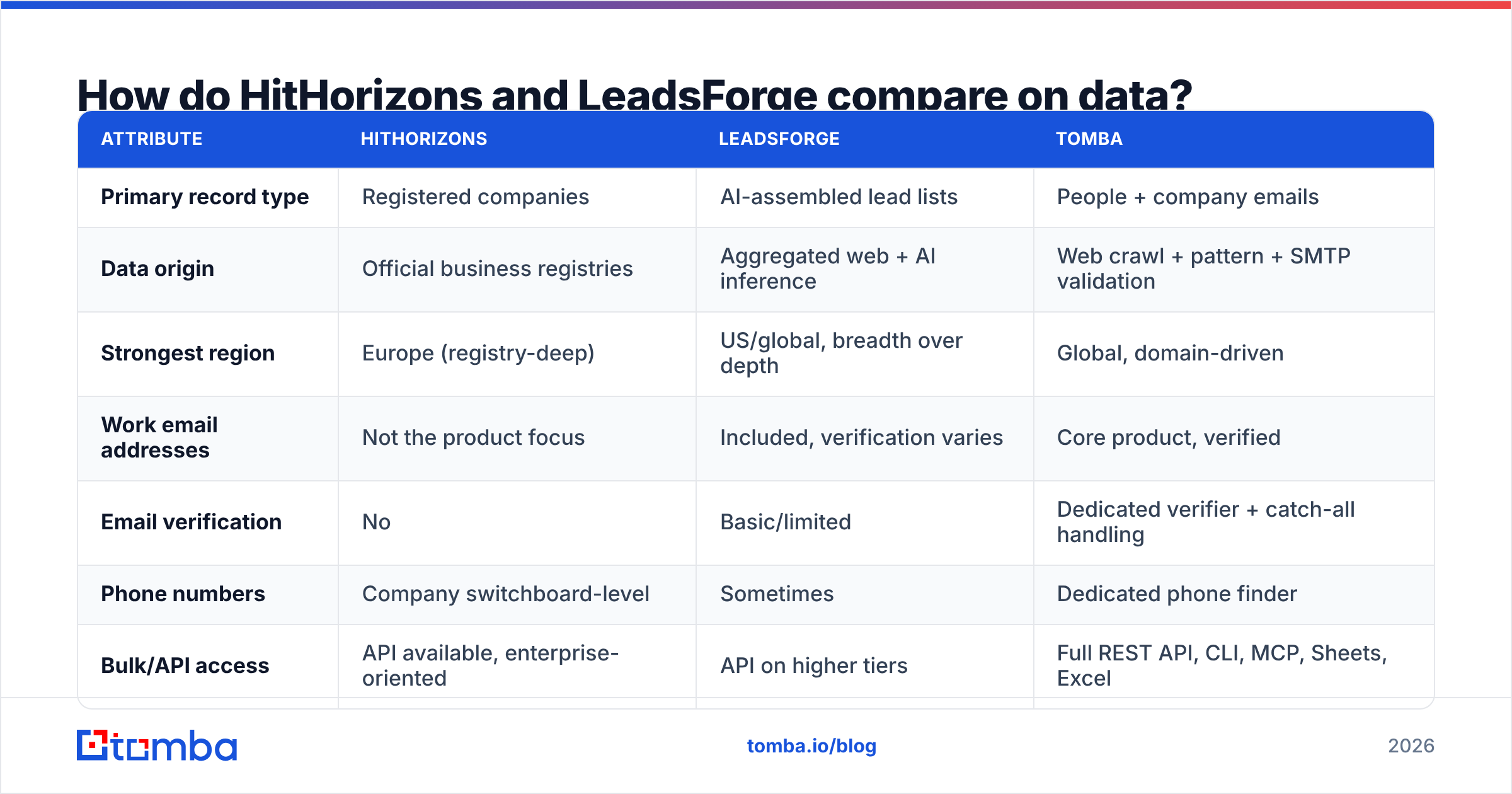
How do HitHorizons and LeadsForge compare on data?#
Here is the head-to-head on the attributes that actually change your workflow.
| Attribute | HitHorizons | LeadsForge | Tomba |
|---|---|---|---|
| Primary record type | Registered companies | AI-assembled lead lists | People + company emails |
| Data origin | Official business registries | Aggregated web + AI inference | Web crawl + pattern + SMTP validation |
| Strongest region | Europe (registry-deep) | US/global, breadth over depth | Global, domain-driven |
| Work email addresses | Not the product focus | Included, verification varies | Core product, verified |
| Email verification | No | Basic/limited | Dedicated verifier + catch-all handling |
| Phone numbers | Company switchboard-level | Sometimes | Dedicated phone finder |
| Bulk/API access | API available, enterprise-oriented | API on higher tiers | Full REST API, CLI, MCP, Sheets, Excel |
| Best for | Account selection, KYC, firmographic enrichment | Fast list building for SMB outbound | Turning a company or name into a sendable inbox |
| Entry price | Free lookup + paid data packages (quote-based) | Credit-based subscription tiers | Free 25 searches/mo, then $49/mo |
Read that table twice. The row that matters is email verification. A list you cannot send to is not a lead list. It is a bounce liability. Google and Microsoft both tightened bulk-sender rules. A spam-complaint or bounce spike now degrades your domain for weeks, not days.

Is HitHorizons better than LeadsForge?#
Not better — different. The honest answer depends on which of these three sentences sounds like your week.
- "I need to know if this company legally exists and what it files." HitHorizons wins outright. An AI list tool cannot approximate registry data. If your deal cycle involves procurement, credit checks, or EU entity resolution, this is the source of truth.
- "I need 300 accounts matching a fuzzy ICP by Friday." LeadsForge wins on time-to-list. One sentence beats a 12-filter query. For early-stage teams, that speed premium is real.
- "I have the company list, I need the humans." Neither tool is built for that. Most teams quietly lose 30–40% of their addressable pipeline in this gap. They have accounts, and no reliable path to inboxes.
That third case is the most common. It is why "HitHorizons vs LeadsForge" is often the wrong framing. The real question is which layer you are missing.
What does each tool cost in 2026?#
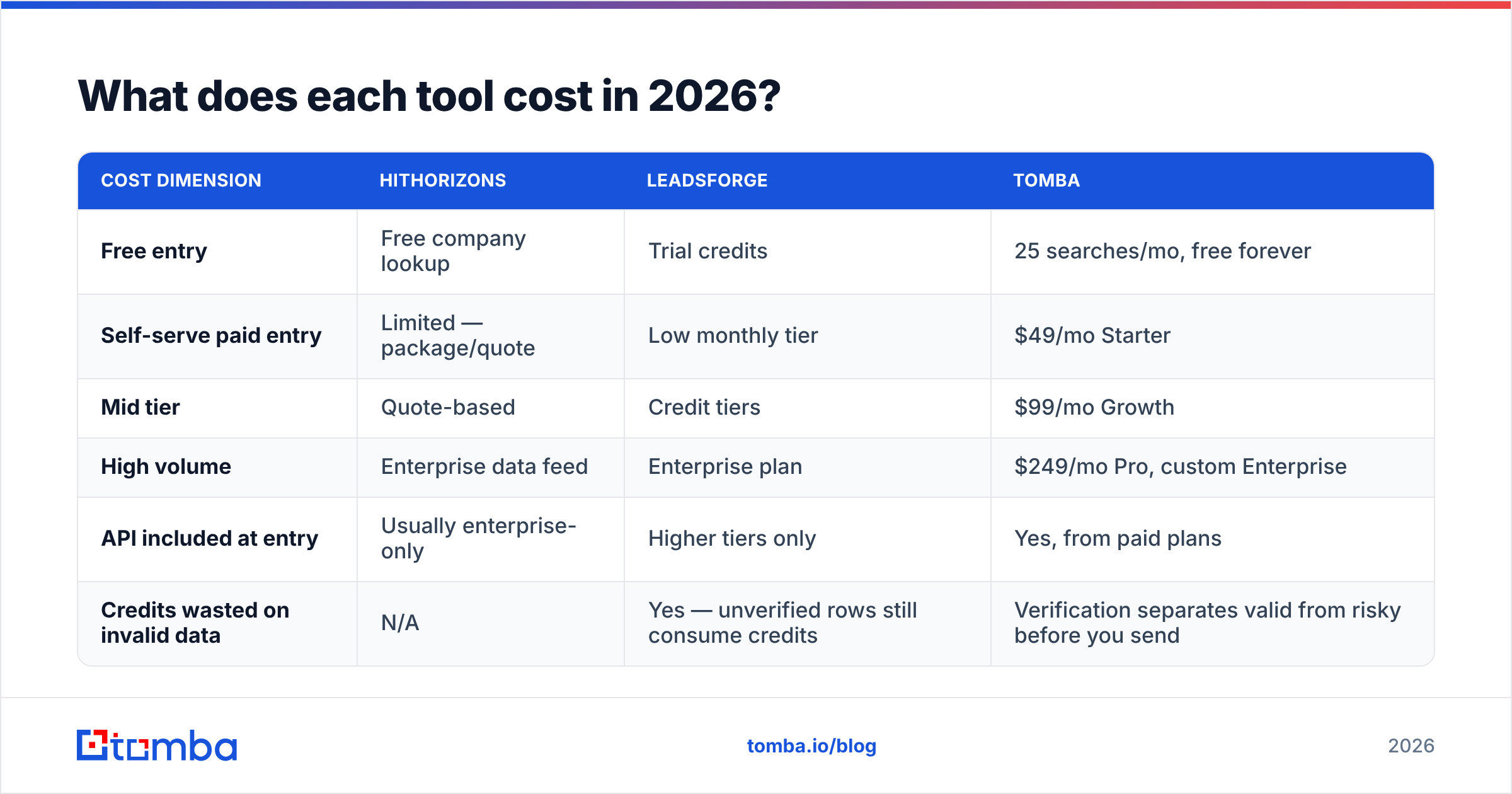
Pricing is where the two diverge structurally, not just numerically.
HitHorizons uses a data-package model. Single company profiles and search cost little or nothing. Bulk exports, API access, and enterprise feeds are quoted by volume and region. That is normal for registry data, because the licensing costs flow through. Budget for a procurement conversation, not a credit-card signup.
LeadsForge follows the modern SaaS credit model. You get monthly tiers, a credit allowance, overages, and feature gates on API access and integrations. It is cheap to start. The cost curve bends upward once you scale volume or need programmatic access.
| Cost dimension | HitHorizons | LeadsForge | Tomba |
|---|---|---|---|
| Free entry | Free company lookup | Trial credits | 25 searches/mo, free forever |
| Self-serve paid entry | Limited — package/quote | Low monthly tier | $49/mo Starter |
| Mid tier | Quote-based | Credit tiers | $99/mo Growth |
| High volume | Enterprise data feed | Enterprise plan | $249/mo Pro, custom Enterprise |
| API included at entry | Usually enterprise-only | Higher tiers only | Yes, from paid plans |
| Credits wasted on invalid data | N/A | Yes — unverified rows still consume credits | Verification separates valid from risky before you send |
Full Tomba pricing is public and flat. There is no "contact sales to learn the number" step. If you compare total cost of ownership, count the wasted credits too. A list tool that returns 1,000 rows with 220 undeliverable addresses charged you for 1,000 and gave you 780.
Which one actually gets you a deliverable email?#
Neither, consistently. This is the part vendor pages skip.
Firmographic databases like HitHorizons avoid personal contact data in many jurisdictions. Registry sources do not hold employee inboxes. Scraping them in would break the compliance story that makes the product valuable. AI list builders do surface emails. But the generation path is usually pattern inference plus light validation. Inference is fine, and Tomba does it too. Inference without an SMTP-level check is a guess wearing a suit.
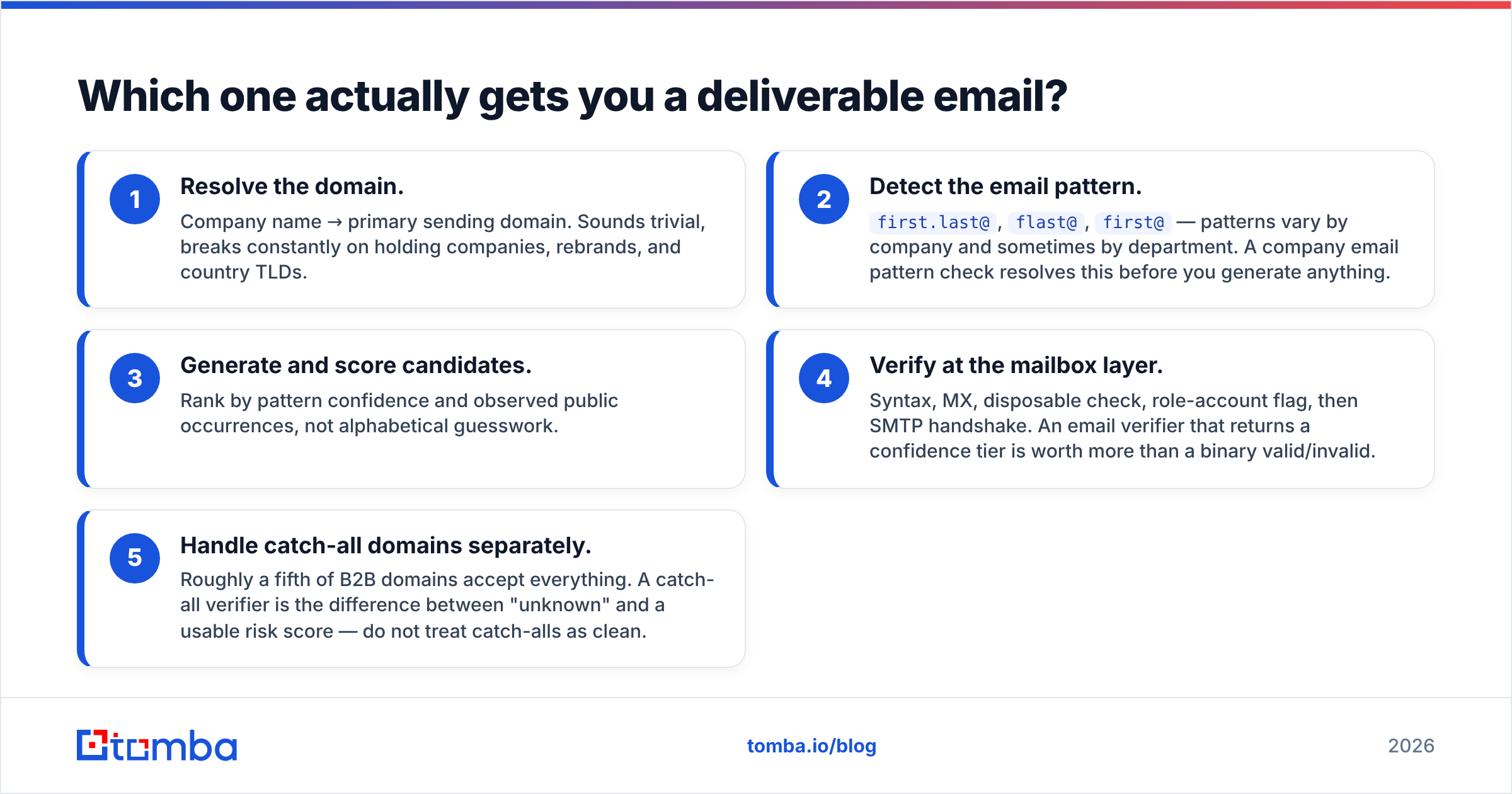
Here is what a real verification pipeline looks like.
- Resolve the domain. Turn a company name into its primary sending domain. This sounds trivial. It breaks constantly on holding companies, rebrands, and country TLDs.
- Detect the email pattern. Patterns vary by company, and sometimes by department:
first.last@,flast@,first@. A company email pattern check settles this before you generate anything. - Generate and score candidates. Rank by pattern confidence and observed public occurrences, not alphabetical guesswork.
- Verify at the mailbox layer. Check syntax, MX, disposable domains, and role accounts, then run the SMTP handshake. An email verifier that returns a confidence tier beats a binary valid/invalid.
- Handle catch-all domains separately. Roughly a fifth of B2B domains accept everything. A catch-all verifier turns "unknown" into a usable risk score. Do not treat catch-alls as clean.
Skip step 4 or 5, and your bounce rate tells on you within one sequence. For more depth, the data sources page documents where records come from and how confidence is scored.
Which should you choose for your use case?#
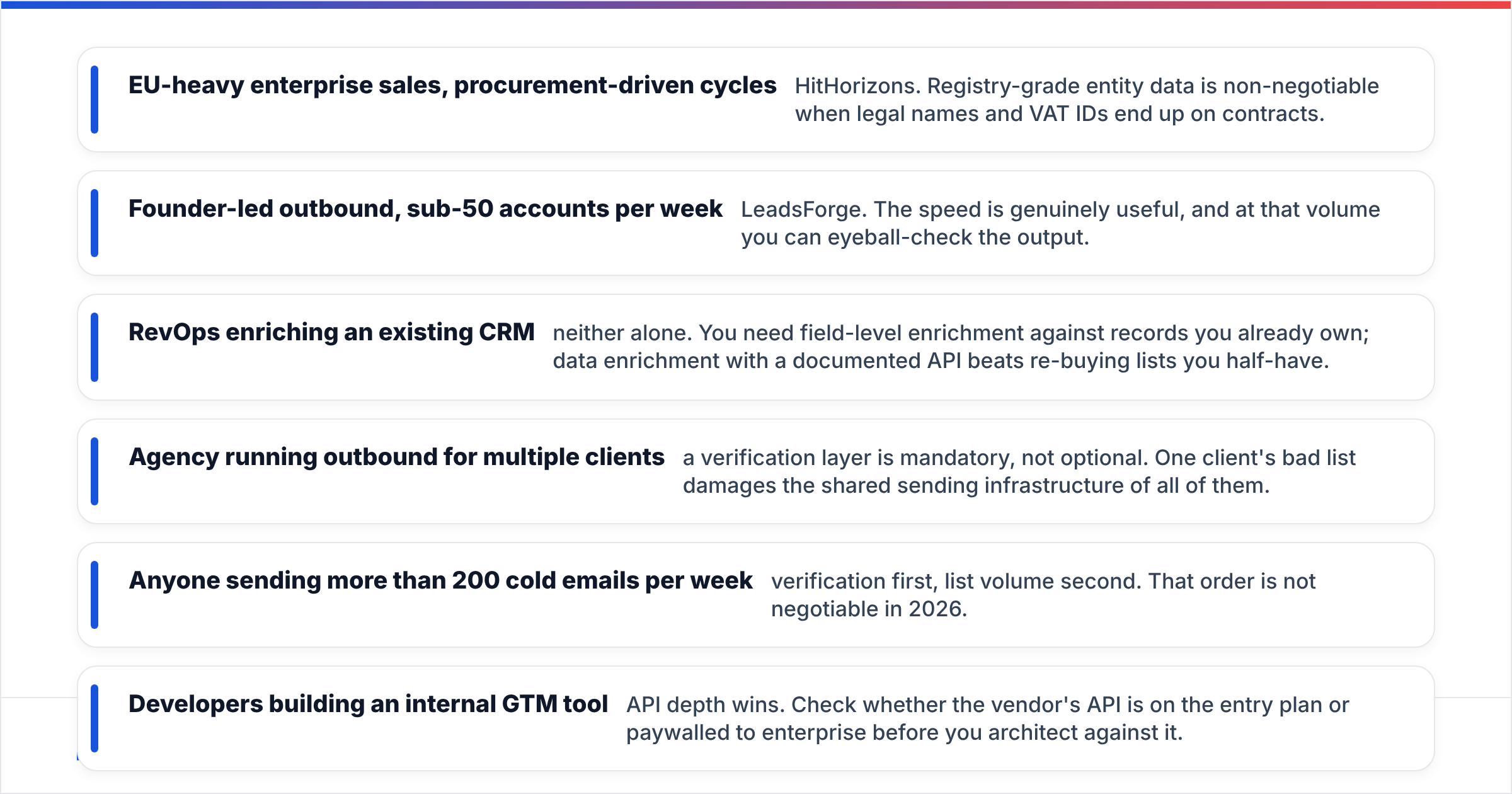
- EU-heavy enterprise sales with procurement-driven cycles — HitHorizons. Legal names and VAT IDs end up on contracts, so registry-grade entity data is non-negotiable.
- Founder-led outbound, under 50 accounts per week — LeadsForge. The speed is genuinely useful, and at that volume you can eyeball-check the output.
- RevOps enriching an existing CRM — neither alone. You need field-level enrichment on records you already own. Data enrichment with a documented API beats re-buying lists you half-have.
- Agency running outbound for several clients — a verification layer is mandatory, not optional. One client's bad list damages the sending infrastructure shared by all of them.
- Anyone sending more than 200 cold emails per week — verification first, list volume second. That order is not negotiable in 2026.
- Developers building an internal GTM tool — API depth wins. Check whether the API sits on the entry plan or behind an enterprise paywall before you build against it.
For due diligence beyond vendor marketing, G2 and Capterra both carry verified reviews for this category. Reviewers there are refreshingly blunt about bounce rates. If registry terminology is new to you, the VAT identification number explainer covers what these records actually contain.
Where does Tomba fit in this comparison?#
Tomba does not compete with HitHorizons on registry depth. It is not trying to be a conversational list builder either. It fills the layer both of them leave thin: turning a company or a person into a verified, sendable contact.
The workflow is simple.
- Select accounts with whichever firmographic source you trust — HitHorizons, LeadsForge, your CRM, or a conference attendee list.
- Run those domains through domain search. You get every publicly discoverable address on the domain, with department and seniority context.
- When you have named targets instead of domains, use the email finder to turn a name plus domain into a specific address.
- Push everything through verification, catch-all scoring included, before it touches your sequencer.
- Automate it with the Tomba API, CLI, Google Sheets add-on, or the HubSpot and Salesforce integrations. Enrichment then runs on record creation, not in a monthly CSV ritual.
That last point is where credit models quietly diverge. A tool that only exports CSVs makes verification a recurring manual chore. Manual chores get skipped under quota pressure. An API-first tool makes it a background job.
What does a sane 2026 data stack look like?#
There are three layers. Most teams try to buy one tool for all three.
Layer 1 — Account intelligence. Who exists, where, how big, and what they file. HitHorizons is strong here in Europe. Crunchbase-style sources or your own ICP model work elsewhere. This layer answers who to target.
Layer 2 — List assembly. Turning ICP criteria into a working list of accounts and named people. LeadsForge lives here, along with a dozen AI list tools launched since 2024. This layer answers who to contact.
Layer 3 — Contactability. Verified email, valid phone, deliverability signal. This is Tomba's layer. It decides whether layers 1 and 2 produced anything usable. A perfect ICP list with a 25% bounce rate is a negative-value asset once your domain reputation takes the hit.
Buying from layers 1 and 2 while skipping layer 3 is the most common B2B data mistake. It looks like success right up until the sequence sends.
Final verdict: HitHorizons vs LeadsForge#
Pick HitHorizons if you need verifiable company records: legal entities, registry IDs, European coverage, and compliance-safe firmographics. Pick LeadsForge if you are a small team that needs a plausible list fast and can clean it yourself. If the HitHorizons vs LeadsForge choice is really about emailing people, you are shopping in the wrong aisle. One does not sell contact data. The other sells it without hard verification.
The fix is a dedicated contactability layer. Start free with the Tomba Email Finder. You get 25 searches a month, no card, with domain search, verification, and catch-all handling included. Run it against 50 accounts from the account-data source you already trust. Then compare the deliverable-address count against your current list. That one test settles the HitHorizons vs LeadsForge debate faster than any feature matrix, including this one. Paid plans start at $49/mo when you need volume, and every tier includes the API.
Related guides#
Ready to find emails that actually work?
Join 150,000+ professionals who stopped guessing and started sending. Free credits on signup — no credit card required.
Get the Tomba newsletter
Practical outbound tactics and product updates — once every two weeks.
About the author