Holiday Sales Objections: How to Handle 12 Q4 Stalls
"Call me after the holidays" kills more Q4 pipeline than price ever will. Here are the 12 holiday sales objections reps actually hear, the scripts that move them, and the data hygiene that stops them from starting.
TL;DR
- Most holiday sales objections are timing stalls, not real objections. "Call me after the holidays" usually means "you haven't given me a reason to spend budget attention right now."
- Q4 has two distinct windows: the budget-flush window (roughly Nov 1 – Dec 15) and the dead zone (Dec 20 – Jan 2). Your script has to change between them.
- The three highest-value December moves are: qualify for use-it-or-lose-it budget, get a calendar commitment in writing before the office empties, and confirm your contact data so January restarts don't bounce.
- A stall you convert into a dated, agenda'd January meeting is worth more than a "yes" from someone who has no budget authority.
- Bad data multiplies every holiday objection. If half your December list is stale, you're not handling objections — you're talking to people who left in October.
Why do holiday sales objections spike in Q4?#
Because two calendars collide. Your fiscal calendar says close now. Your prospect's personal calendar says wrap up, hand off, and disappear for two weeks.
Think of it like trying to get a renovation quote from a contractor on December 22. Nothing about your request is unreasonable. It's just that everyone who has to approve it is already thinking about flights.
The result is that Q4 objections cluster into a specific, predictable set. Unlike a March objection ("this isn't a priority"), a December objection is usually about sequencing, not value. That distinction is your whole playbook. If you treat a sequencing problem like a value problem, you'll over-pitch, sound desperate, and burn a relationship that would have converted in six weeks.
There's also a real structural effect. Many organizations run a use-it-or-lose-it budget cycle, and unspent funds evaporate at fiscal year end. That's why the same two weeks produce both the fastest deals of the year and the most brutal stonewalling — you're talking to two completely different buyer states and they look identical on a cold call.

What are the most common holiday sales objections?#
Here are the twelve you'll actually hear, grouped by what they really mean.
Timing stalls (about 60% of Q4 objections)
- "Call me after the holidays." The default deflection. Means: I don't want a decision on my plate this month.
- "Everyone's out until January." Sometimes literally true. Often one person is out and the rest are coasting.
- "Let's pick this up in Q1." Slightly warmer — they're conceding future intent.
- "We're in a code freeze / change freeze." Common in engineering, retail, and finance. Usually genuine and worth respecting.
Budget objections
- "Budget's already spent for this year." Verify. Spent and committed are different things.
- "We're waiting on next year's budget approval." Real, and a gift — it gives you a dated trigger.
- "Too expensive right now." Q4 version of the classic. Often a proxy for "I can't justify this to a distracted CFO."
Authority and process objections
- "My approver is on PTO." The most common single-point blocker in December.
- "We're mid-reorg / new leadership starting January." Genuine; map the new org instead of pushing.
- "Procurement is closed until the new year." Verify the actual cutoff date — it's rarely the whole month.
Priority objections
- "We're heads-down on end-of-year close." True for finance, ops, and accounting teams specifically.
- "It's our busiest season." Retail, logistics, e-commerce, hospitality. Push and you look tone-deaf.
Notice how few of these are "your product is wrong for us." That's the point. Q4 objections are overwhelmingly about when, and "when" objections are the easiest category to convert — if you stop trying to close and start trying to schedule.
How do you handle "call me after the holidays"?#
Conclusion first: never accept it as a soft close. Convert it into a specific date with a specific agenda, or disqualify.
The move is a three-beat response: acknowledge, narrow, commit.
Beat 1 — Acknowledge without arguing. "Totally fair, December's a mess for everyone."
Beat 2 — Narrow the ask. Don't ask for a decision. Ask for a slot. "I'm not asking you to decide anything this month. I'd just like 20 minutes on your calendar before things get busy again."
Beat 3 — Commit to a real date. "Does the week of January 12 work better than the week of the 5th? Most people I talk to are still digging out that first week."
That last detail matters. Offering January 12 instead of January 5 signals you understand their world, and it lands your meeting after the inbox triage week — where it's far more likely to actually happen.
The failure mode to avoid: "Great, I'll reach out in January!" with no date. That's not a follow-up, that's a hope. Track your own numbers here. Undated January follow-ups convert at a fraction of dated ones in almost every pipeline I've reviewed, because by January the champion has forgotten the context and you're starting from scratch — often with a different cadence and a different response rate than you had in November.
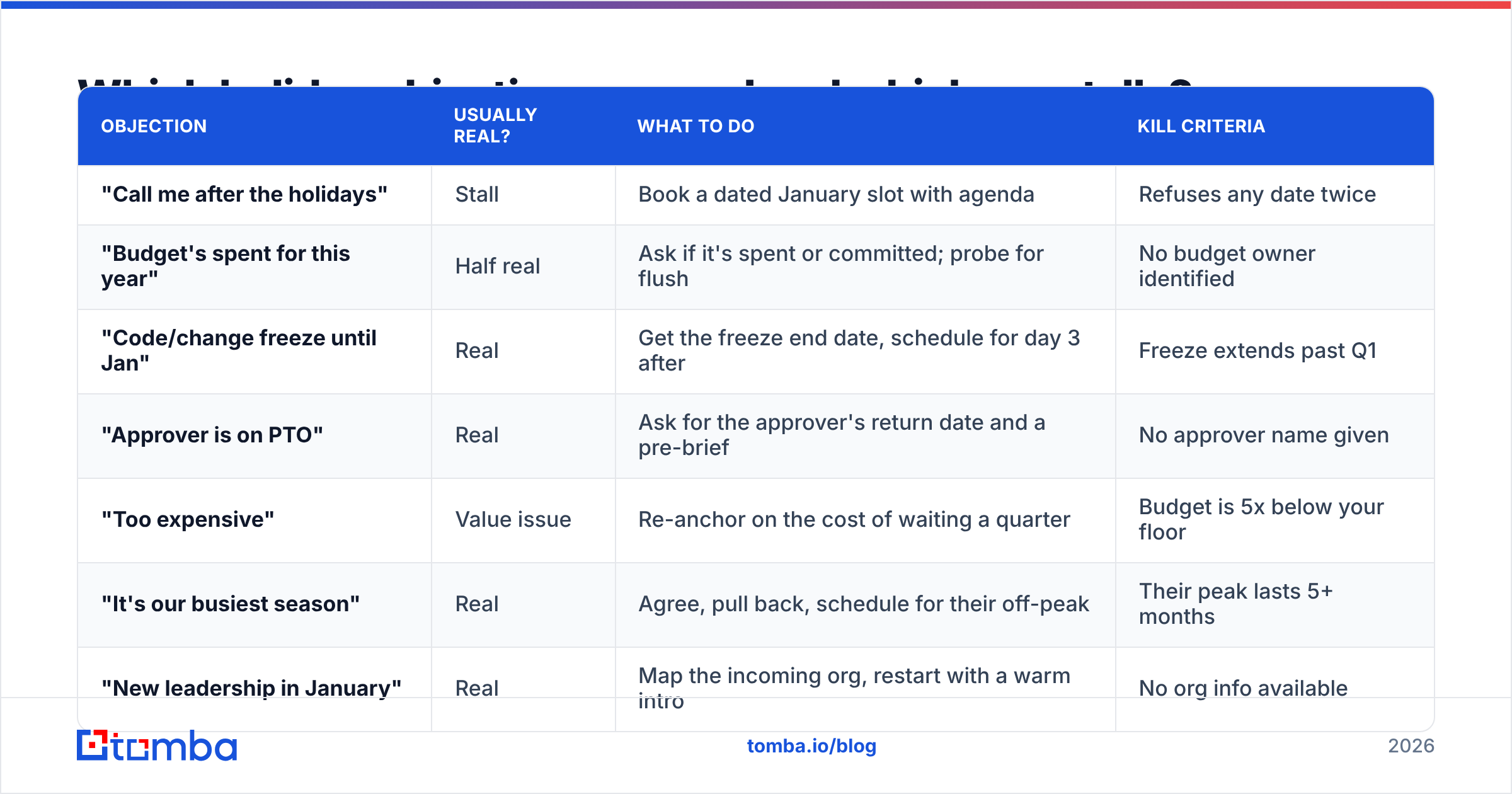
Which holiday objections are real and which are stalls?#
| Objection | Usually real? | What to do | Kill criteria |
|---|---|---|---|
| "Call me after the holidays" | Stall | Book a dated January slot with agenda | Refuses any date twice |
| "Budget's spent for this year" | Half real | Ask if it's spent or committed; probe for flush | No budget owner identified |
| "Code/change freeze until Jan" | Real | Get the freeze end date, schedule for day 3 after | Freeze extends past Q1 |
| "Approver is on PTO" | Real | Ask for the approver's return date and a pre-brief | No approver name given |
| "Too expensive" | Value issue | Re-anchor on the cost of waiting a quarter | Budget is 5x below your floor |
| "It's our busiest season" | Real | Agree, pull back, schedule for their off-peak | Their peak lasts 5+ months |
| "New leadership in January" | Real | Map the incoming org, restart with a warm intro | No org info available |
The column that matters most is the last one. Sales teams lose December to hope — reps keep three dead accounts alive because a stall felt polite. Write your kill criteria before December starts, and enforce them. A clean pipeline going into January beats an inflated one every single time, which is exactly why win rate tends to look artificially good in Q1 for teams that scrubbed hard in December.
How do you use the budget-flush window?#
Some accounts have the opposite problem: money that expires. Departments that underspent their annual allocation face a use-it-or-lose-it deadline, and December is when someone realizes there's $40K sitting unspent.
Your qualifying question is direct: "Does your budget roll over into next year, or does unspent allocation expire?"
If it expires, you've flipped from selling to helping. The conversation changes shape entirely:
- Confirm the fiscal year end. Not everyone runs December 31. Many enterprises close in January, March, or June.
- Find the procurement cutoff. Legal and procurement almost always close before the fiscal date. That's your real deadline.
- Ask what's already been approved. An existing approved vendor category is faster than a new one.
- Offer a prepay or annual option. Flush budgets prefer one big invoice over twelve small ones.
- Reduce signature friction. Fewer signatures, shorter contract, faster close. Deal size is negotiable in December; speed isn't.
Gartner's research on B2B buying consistently finds that buying groups struggle most with decision confidence, not information volume — you can read their overview of the B2B buying journey. In December that effect gets amplified, because the person who'd normally build consensus is out. Give them a decision that's small enough to make alone.
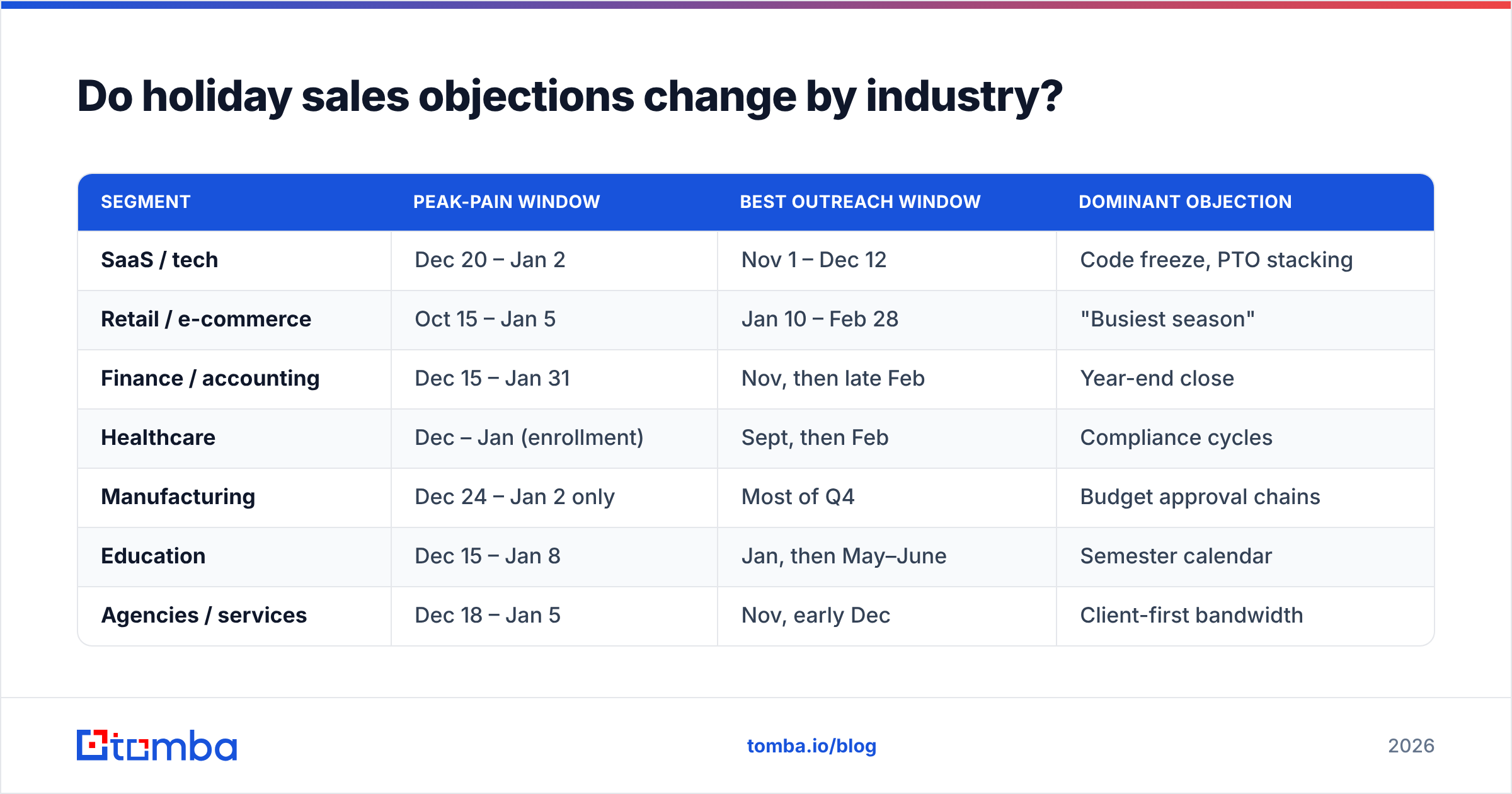
Do holiday sales objections change by industry?#
Substantially. Applying a generic December script across your whole list is how you get ignored.
| Segment | Peak-pain window | Best outreach window | Dominant objection |
|---|---|---|---|
| SaaS / tech | Dec 20 – Jan 2 | Nov 1 – Dec 12 | Code freeze, PTO stacking |
| Retail / e-commerce | Oct 15 – Jan 5 | Jan 10 – Feb 28 | "Busiest season" |
| Finance / accounting | Dec 15 – Jan 31 | Nov, then late Feb | Year-end close |
| Healthcare | Dec – Jan (enrollment) | Sept, then Feb | Compliance cycles |
| Manufacturing | Dec 24 – Jan 2 only | Most of Q4 | Budget approval chains |
| Education | Dec 15 – Jan 8 | Jan, then May–June | Semester calendar |
| Agencies / services | Dec 18 – Jan 5 | Nov, early Dec | Client-first bandwidth |
Retail is the clearest example of a segment where pushing in December actively damages you. A DTC ops lead running Black Friday through Christmas will remember the rep who kept calling — and not fondly. Skip them entirely and land in the second week of January when they're rebuilding their stack for the year.
Manufacturing runs the opposite way. Approval chains are long, decisions are calendar-driven, and December is often a fine time to work a deal that will sign in February.

What role does data quality play in holiday objections?#
Bigger than most teams admit. A meaningful share of what reps log as "objection" in December is actually a data failure wearing an objection costume.
Three specific December data problems:
The ghost contact. Your champion left in October. Their address still accepts mail because the domain is catch-all. You send three December follow-ups, get silence, and log it as "went dark for holidays." It wasn't the holidays. Run those addresses through a catch-all verifier before you build your January list, or you'll repeat the same cycle in Q1.
The January bounce spike. Companies do a lot of restructuring at fiscal year end. Lists that verified clean in October degrade fast across November and December. Sending a large January re-engagement blast against an unverified Q4 list is one of the fastest ways to damage sender reputation right when you need inbox placement most.
The wrong-persona stall. "Let's pick this up in Q1" from someone with no budget authority isn't an objection — it's a polite exit from a conversation they were never able to advance. Enriching your records with title, seniority, and department before you sequence means you spend December talking to people who can actually say yes. Running data enrichment across your Q4 target accounts costs less than a week of wasted rep time.
The practical sequence for a December list refresh:
- Verify every address you plan to touch in the next 60 days.
- Re-find contacts at accounts where the primary bounced, using a domain search to surface current employees at the same company.
- Enrich with role and seniority so you can route the January follow-up to the right person, not just the same person.
- Segment by industry calendar using the table above, not by a single blanket send date.
- Suppress anyone in a peak-season segment until their window opens.
HubSpot's ongoing sales research keeps landing on the same finding — data decay and misrouted outreach account for a large share of what reps experience as buyer resistance. Fix the input before you optimize the script.
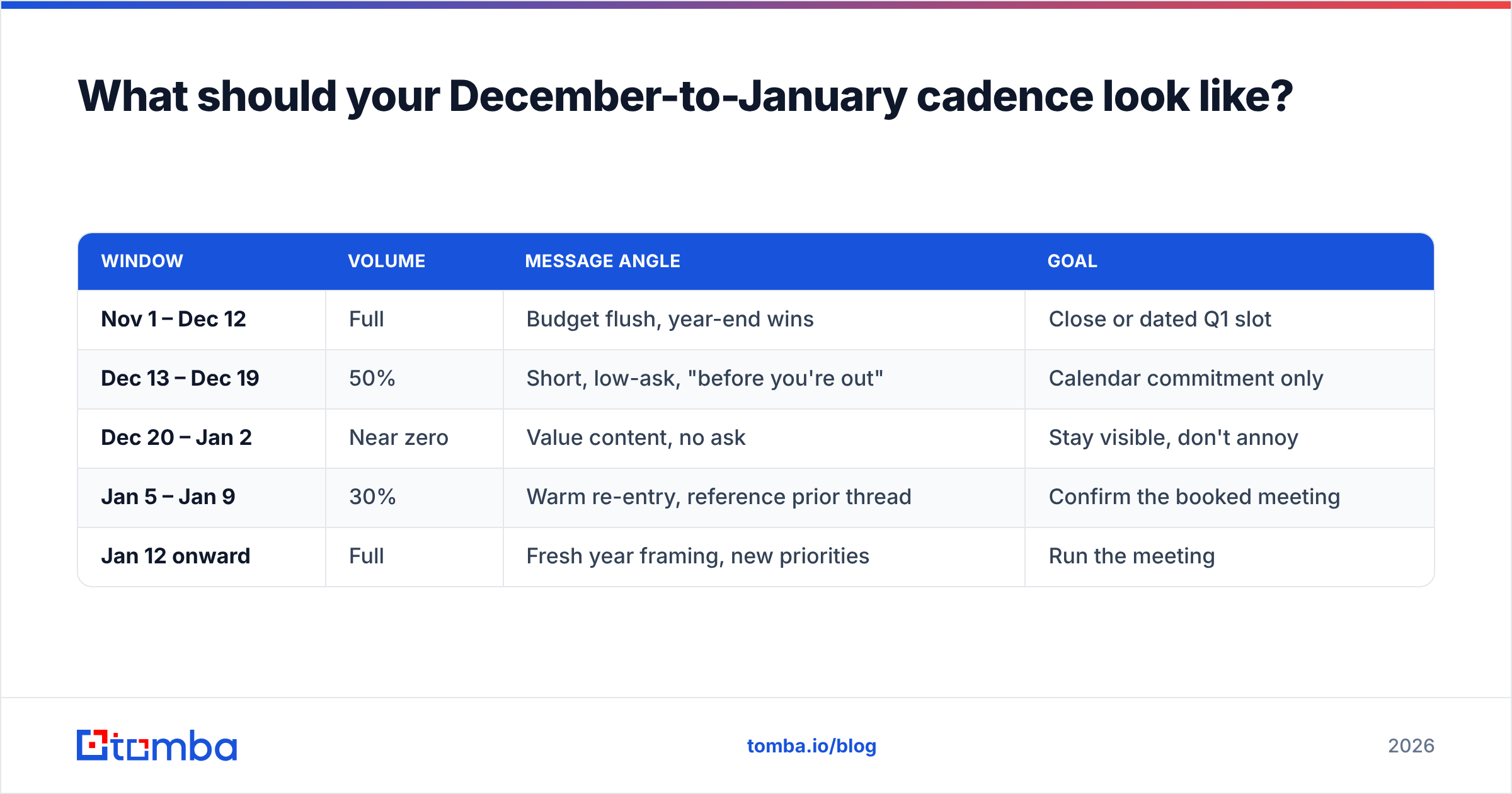
What should your December-to-January cadence look like?#
Here's a cadence that respects the calendar without going silent.
| Window | Volume | Message angle | Goal |
|---|---|---|---|
| Nov 1 – Dec 12 | Full | Budget flush, year-end wins | Close or dated Q1 slot |
| Dec 13 – Dec 19 | 50% | Short, low-ask, "before you're out" | Calendar commitment only |
| Dec 20 – Jan 2 | Near zero | Value content, no ask | Stay visible, don't annoy |
| Jan 5 – Jan 9 | 30% | Warm re-entry, reference prior thread | Confirm the booked meeting |
| Jan 12 onward | Full | Fresh year framing, new priorities | Run the meeting |
Two rules make this work.
Rule one: the December 20 – January 2 window is for content, not asks. A useful year-in-review, a benchmark report, an industry outlook. Zero calls to action. You're buying recall, not meetings.
Rule two: reference the exact prior conversation in your January re-entry. Not "following up on my last email." Instead: "When we spoke on December 4 you mentioned the renewal with your current vendor lands in March — still the case?" Specificity is the entire difference between a re-engagement that works and one that reads as a template.
If you're rebuilding sequences for January, it's worth auditing your subject lines at the same time — a subject line tester will catch the year-stale references ("2025 planning") that quietly tank open rates in the first week of the new year.
How do you handle "we're in a change freeze"?#
Respect it, then work the edges. A freeze is one of the few December objections that's almost always literally true, and arguing with it marks you as someone who doesn't understand enterprise operations.
The productive questions:
- "When does the freeze lift?" Get a date. It's your natural follow-up trigger.
- "Does the freeze cover evaluation, or just deployment?" Very often only deployment is frozen. Discovery, security review, and procurement paperwork can continue.
- "Who owns the post-freeze roadmap?" This surfaces the person who's actually planning Q1 — frequently not your current contact.
That second question is the unlock. Most freezes block changes to production systems, not conversations about next year's stack. A rep who asks it turns a hard no into a six-week runway of useful work.
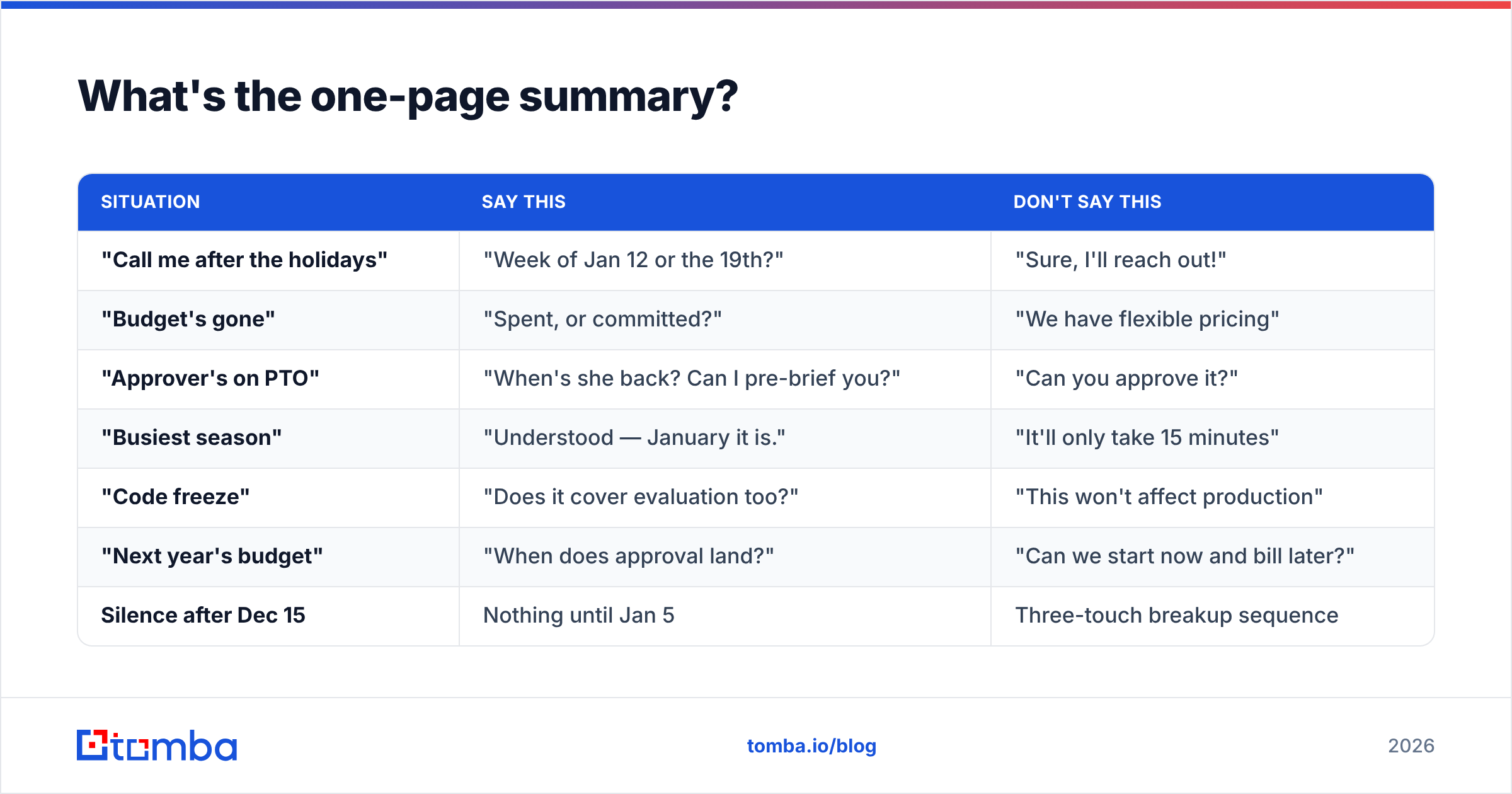
What's the one-page summary?#
| Situation | Say this | Don't say this |
|---|---|---|
| "Call me after the holidays" | "Week of Jan 12 or the 19th?" | "Sure, I'll reach out!" |
| "Budget's gone" | "Spent, or committed?" | "We have flexible pricing" |
| "Approver's on PTO" | "When's she back? Can I pre-brief you?" | "Can you approve it?" |
| "Busiest season" | "Understood — January it is." | "It'll only take 15 minutes" |
| "Code freeze" | "Does it cover evaluation too?" | "This won't affect production" |
| "Next year's budget" | "When does approval land?" | "Can we start now and bill later?" |
| Silence after Dec 15 | Nothing until Jan 5 | Three-touch breakup sequence |
The through-line: every good response either gets a date or gets information. Neither one requires the prospect to make a decision they're not in a position to make this month.
Start January with a list that actually works#
The single highest-leverage thing you can do in the last two weeks of December isn't calling — it's cleaning. Verify the contacts you'll sequence in January, re-find the ones who've moved, and enrich the records where you're not sure you have the right persona.
Tomba's Email Finder is built for exactly that rebuild: find current, verified professional addresses by name, domain, or company, so your January re-entry lands in the inbox of someone who's actually still there. The free tier gives you 25 searches a month to test your worst-decayed accounts, and paid plans start at $49/mo — see full Tomba pricing if you're refreshing a whole territory. Handle the objections you can control, and stop losing deals to the ones you created yourself.
Related guides#
Ready to find emails that actually work?
Join 150,000+ professionals who stopped guessing and started sending. Free credits on signup — no credit card required.
Get the Tomba newsletter
Practical outbound tactics and product updates — once every two weeks.
About the author