HoneyBook vs HubSpot: Which CRM Wins for Your Team in 2026
HoneyBook runs client projects end to end for solo service businesses. HubSpot runs a scaling revenue engine. Here is the honest breakdown of pricing, pipeline depth, and which one you should actually pay for in 2026.
TL;DR
- HoneyBook is a client-flow tool, not a sales CRM. It wins when your revenue comes from a handful of booked projects: proposal, contract, invoice, payment, all in one thread. Plans start around $36/mo (Starter) and top out near $129/mo (Premium).
- HubSpot is a revenue platform. Free CRM forever, Sales Hub Starter around $20/seat/mo, Professional near $100/seat/mo with a mandatory onboarding fee that often runs $1,500+.
- The real dividing line is inbound vs outbound. HoneyBook assumes leads come to you. HubSpot assumes you go get them — which means you also need a source of contact data.
- Neither tool finds you new contacts. HoneyBook has no prospecting layer at all; HubSpot's credit-metered database is thin outside the US mid-market. That gap is where a dedicated email finder belongs.
- Pick fast: solo or 2-person service business billing projects → HoneyBook. Any team running outbound, multi-stage pipelines, or marketing attribution → HubSpot.
What are HoneyBook and HubSpot actually built for?#
They get compared constantly because both call themselves a CRM. That word is doing far too much work.
Think of it like kitchen equipment. HoneyBook is a very good single-purpose appliance — a bread machine that takes flour and hands you a finished loaf without you touching the process in between. HubSpot is a full commercial kitchen: more capable, more expensive, and useless if all you wanted was bread.
HoneyBook was built for independent service providers — photographers, designers, consultants, event planners, coaches. Its core loop is: inquiry form → proposal → e-signed contract → invoice → payment → project delivery. Payments are native. That single fact explains most of the product.
HubSpot started as a marketing automation platform and grew a CRM, a sales engagement layer, a service desk, and a CMS around it. Its core loop is: capture a contact → score and route it → work it through a deal pipeline → report on it → repeat at scale.
The mismatch shows up in a simple test. Ask yourself: do I get paid inside my CRM? If yes, you want HoneyBook. If your invoicing happens in QuickBooks or Stripe and your CRM's job is forecasting and outreach, you want HubSpot.
How do HoneyBook and HubSpot compare on features and price?#
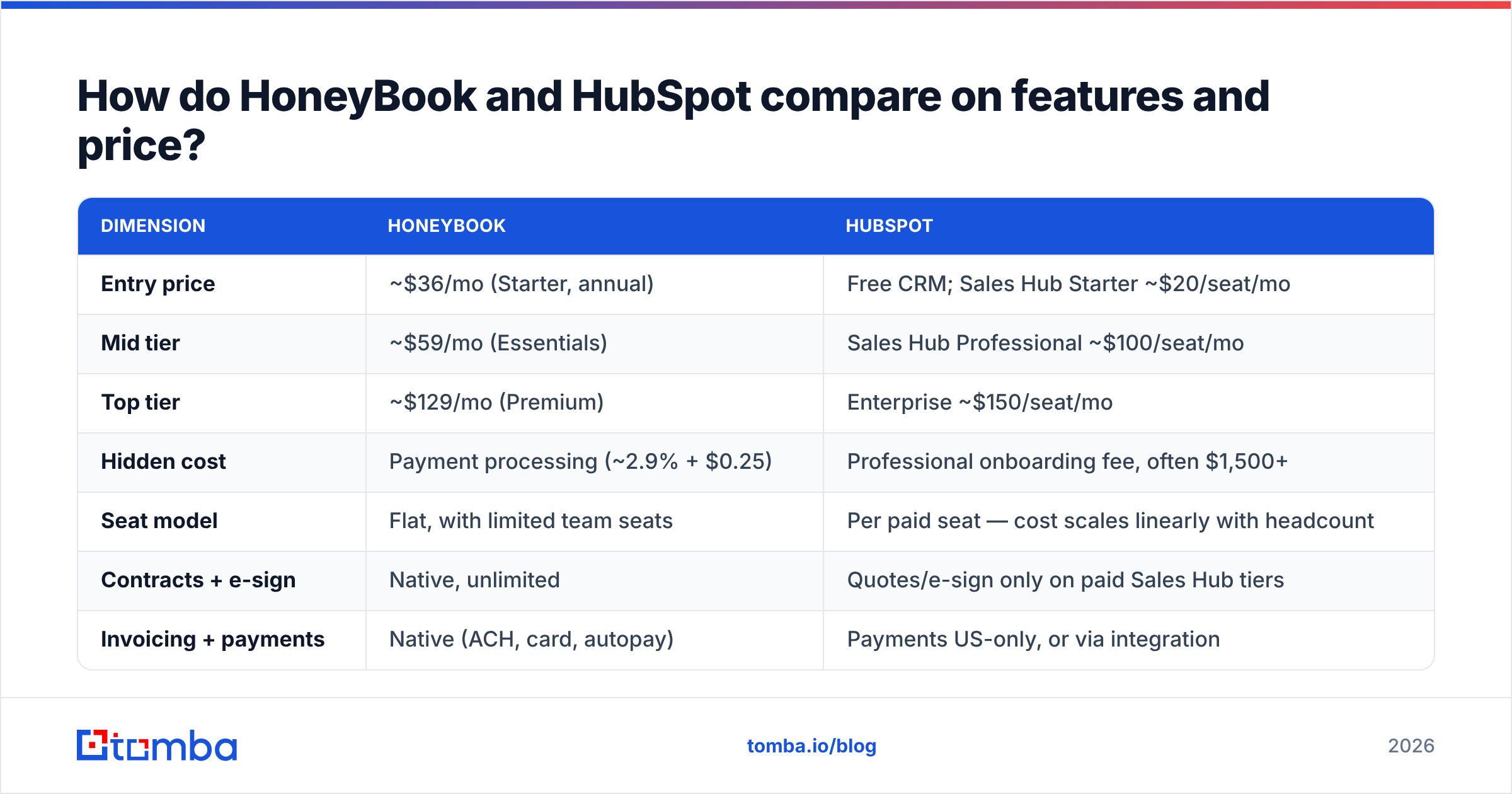
Pricing on both sides moves, and both publish list prices that hide real costs — HubSpot's onboarding fees and HoneyBook's payment processing cut. Here is the comparison at a level that survives those changes.
| Dimension | HoneyBook | HubSpot |
|---|---|---|
| Entry price | ~$36/mo (Starter, annual) | Free CRM; Sales Hub Starter ~$20/seat/mo |
| Mid tier | ~$59/mo (Essentials) | Sales Hub Professional ~$100/seat/mo |
| Top tier | ~$129/mo (Premium) | Enterprise ~$150/seat/mo |
| Hidden cost | Payment processing (~2.9% + $0.25) | Professional onboarding fee, often $1,500+ |
| Seat model | Flat, with limited team seats | Per paid seat — cost scales linearly with headcount |
| Contracts + e-sign | Native, unlimited | Quotes/e-sign only on paid Sales Hub tiers |
| Invoicing + payments | Native (ACH, card, autopay) | Payments US-only, or via integration |
| Deal pipeline depth | Single simple pipeline | Multiple pipelines, custom stages, deal scoring |
| Email sequences | Basic scheduled follow-ups | Full sequences, A/B tests, enrollment triggers |
| Reporting | Booking and revenue basics | Custom dashboards, attribution, forecasting |
| Native contact database | None | Yes, credit-metered, US-skewed |
| Integrations | ~20 (Zapier, QuickBooks, Calendars) | 1,700+ app marketplace |
| Best fit | 1–3 person service business | 3–500 person sales or marketing team |
Read that table with one filter: cost per outcome, not cost per month. HoneyBook's $59/mo replaces a proposal tool, an e-sign tool, and an invoicing tool — call it $80/mo of software collapsed into one bill. HubSpot's $100/seat looks worse until you have four reps who need shared pipeline visibility, sequences, and forecast reporting; then it replaces four separate subscriptions plus a spreadsheet nobody trusts.
Is HoneyBook better than HubSpot for small service businesses?#
Yes — if your definition of "small" is one to three people who deliver billable projects.
Here's the concrete reason. A wedding photographer books maybe 30 clients a year. Each one needs a custom proposal, a signed contract, a deposit, a payment schedule, and a delivery timeline. That's 30 deals with enormous per-deal admin weight. HoneyBook's smart files let you send a single document where the client picks a package, signs, and pays in one sitting. That collapses a five-email exchange into one link.
HubSpot cannot do that natively without stitching together quotes, payments (US-only), and a third-party e-sign tool. You would spend the first month building what HoneyBook ships on day one.
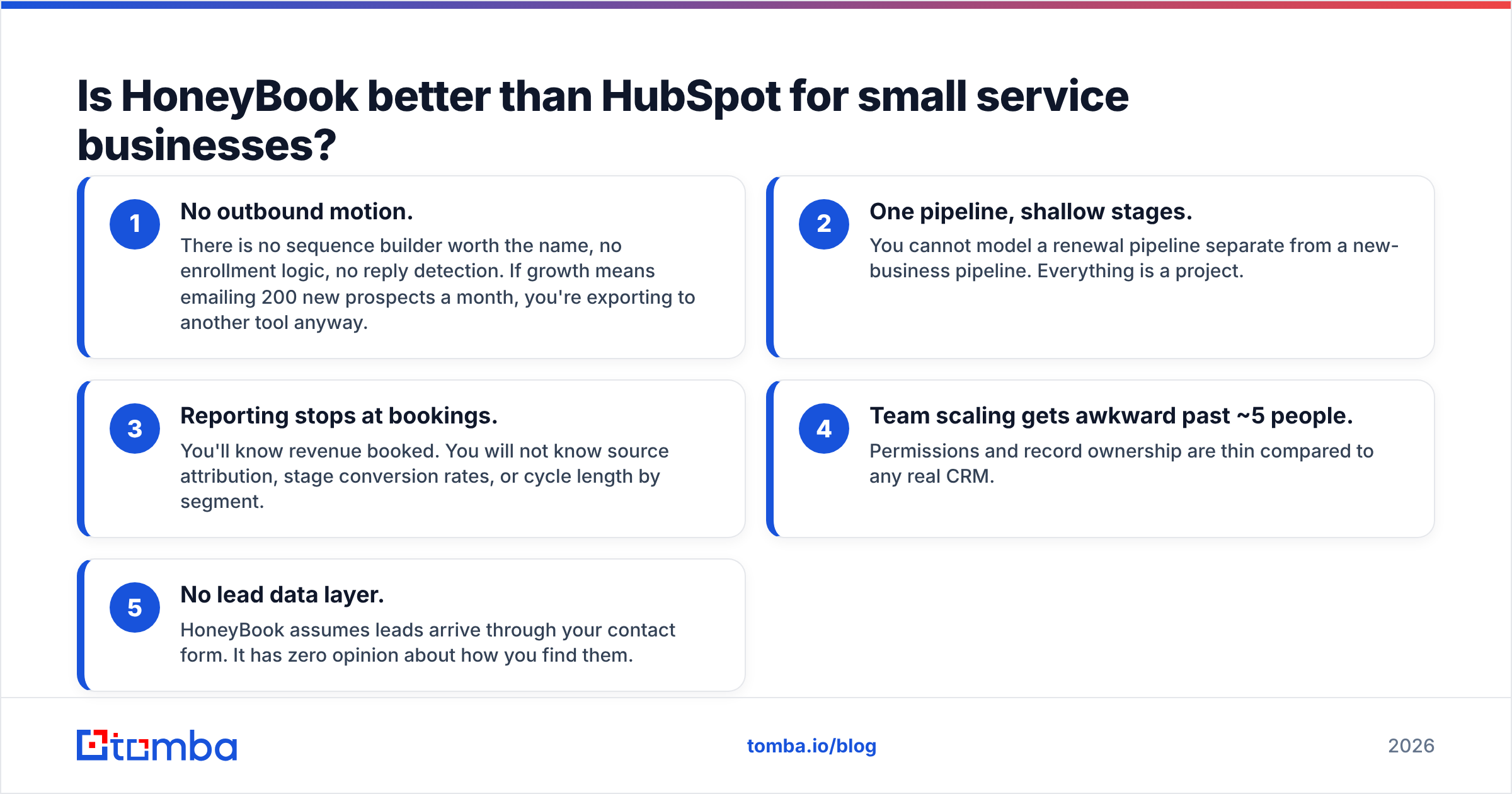
Where HoneyBook falls apart:
- No outbound motion. There is no sequence builder worth the name, no enrollment logic, no reply detection. If growth means emailing 200 new prospects a month, you're exporting to another tool anyway.
- One pipeline, shallow stages. You cannot model a renewal pipeline separate from a new-business pipeline. Everything is a project.
- Reporting stops at bookings. You'll know revenue booked. You will not know source attribution, stage conversion rates, or cycle length by segment.
- Team scaling gets awkward past ~5 people. Permissions and record ownership are thin compared to any real CRM.
- No lead data layer. HoneyBook assumes leads arrive through your contact form. It has zero opinion about how you find them.
That last point matters more than most reviews admit. HoneyBook's entire model presumes inbound demand. If your referrals dry up, the tool offers nothing to help.
Is HubSpot worth the price jump for a growing team?#
It depends entirely on whether you'll use the parts you're paying for.
HubSpot's free CRM is genuinely free and genuinely useful — unlimited contacts, basic deal pipelines, email tracking. Many teams run on it for a year. The bill arrives when you want sequences, custom reporting, workflow automation, or required fields. Those live on Professional, which is where the per-seat math turns real: five reps on Sales Hub Professional is roughly $500/mo plus the one-time onboarding fee HubSpot requires at that tier.
According to G2's CRM category data, HubSpot consistently ranks among the highest-adoption CRMs for mid-market teams, and the reason is ecosystem gravity — 1,700+ integrations means whatever you already use probably connects. That's a real, unglamorous advantage that no smaller tool matches.
Three honest warnings before you commit:
- Contact-tier pricing on Marketing Hub compounds. Marketing Hub bills by marketing contacts. Import a bloated list and your bill jumps a tier. Clean the list with an email verifier before import, not after.
- Annual contracts are the norm. Mid-year downgrades are usually not a thing.
- Onboarding fees are non-negotiable at Professional and above. Budget for them.
If you're evaluating alternatives at the outreach layer rather than the CRM layer, tools like Instantly, Apollo, and Reply.io solve different slices of the same problem — worth reading a comparison of Apollo alternatives before assuming one platform covers everything.
What do both tools fail to give you?#
Contacts. Neither HoneyBook nor HubSpot fills your pipeline. This is the single most common budgeting mistake in this comparison.
HoneyBook is explicit about it — no prospecting features exist. HubSpot is subtler. It ships a contact database metered by credits, and the coverage is respectable for US mid-market companies but degrades quickly for EU firms, sub-50-employee companies, and technical roles. Teams routinely burn Professional credits on records they then have to verify elsewhere.
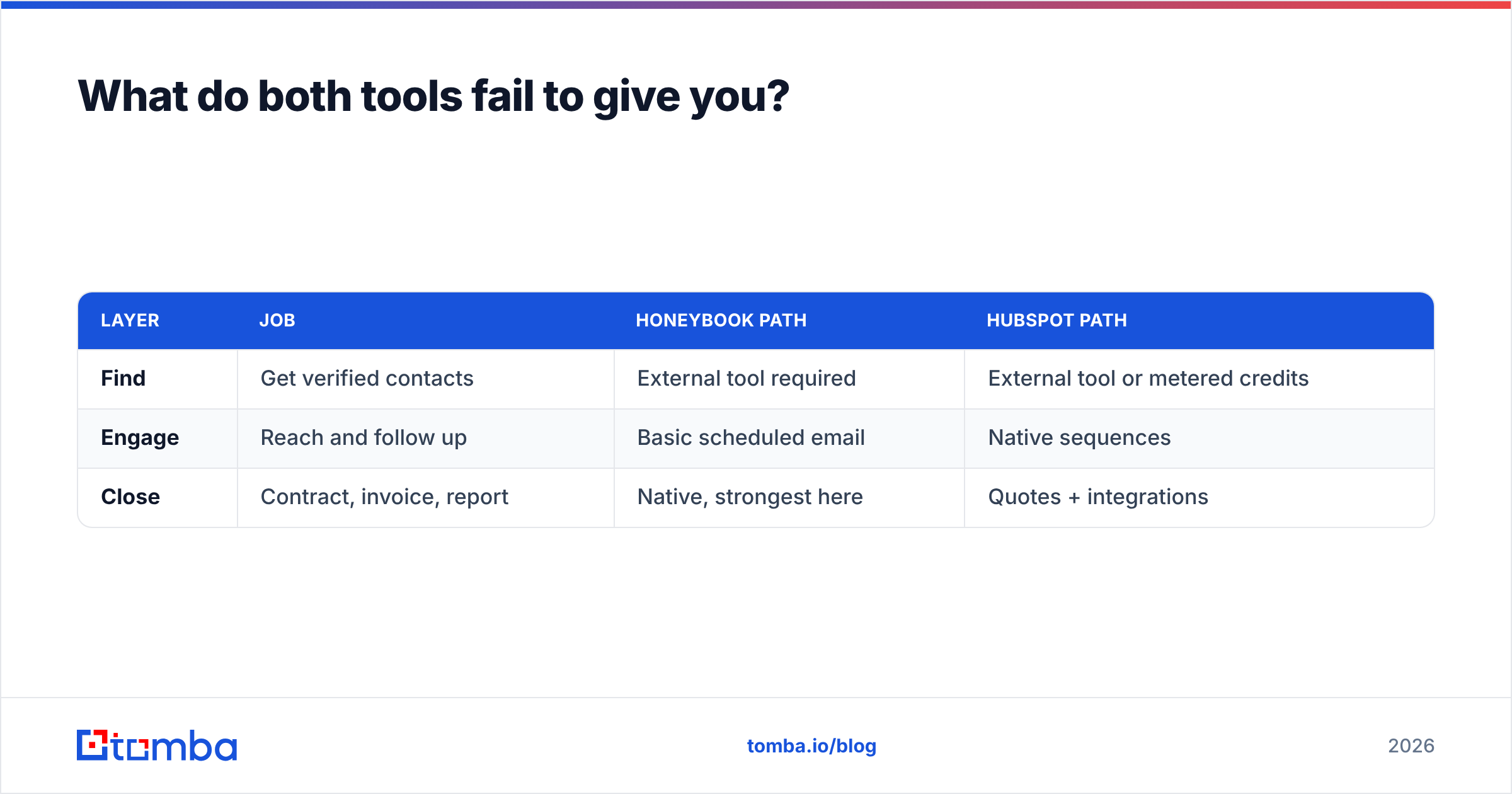
That leaves you with a three-layer stack whichever CRM you pick:
| Layer | Job | HoneyBook path | HubSpot path |
|---|---|---|---|
| Find | Get verified contacts | External tool required | External tool or metered credits |
| Engage | Reach and follow up | Basic scheduled email | Native sequences |
| Close | Contract, invoice, report | Native, strongest here | Quotes + integrations |
Filling the "find" layer properly means a dedicated source: domain search to pull every reachable contact at a target company, verification to strip the bounces, then a clean push into whichever CRM you chose. Tomba's HubSpot integration handles that last step directly; for HoneyBook, a Zapier hop or a Google Sheets staging tab does the same job with one extra step.
Cost sanity check: Tomba's Free tier gives you 25 searches/mo, Starter is $49/mo, Growth $99/mo, and Pro $249/mo — see Tomba pricing for the current credit breakdowns. Adding a $49/mo data layer to a $36/mo HoneyBook plan is still cheaper than one seat of HubSpot Professional, and it solves the problem neither CRM solves.
HoneyBook vs HubSpot: which should you choose?#
Match yourself to one of these four profiles.
Choose HoneyBook if: you're a solo operator or two-person shop, your revenue is project-based, you send fewer than 100 proposals a year, and getting paid faster is worth more to you than forecasting accuracy. The payments-native workflow is a genuine time saver, and no amount of HubSpot configuration replicates it cheaply.
Choose HubSpot Free if: you're pre-revenue or early, you want a real contact database with deal stages, and you're not ready to pay for automation. It's the best free CRM available and there's no trick to it.
Choose HubSpot Sales Hub Professional if: you have three or more people touching deals, you run outbound campaigns, you need multiple pipelines, and someone in the business asks for conversion reporting. The seat cost is defensible once pipeline visibility drives real decisions.
Choose neither — yet — if: your actual bottleneck is that you don't have enough qualified people to talk to. Buying a CRM to fix an empty pipeline is like buying a bigger fridge because you have no groceries. Fix the sourcing first.
A practical migration note: if you start on HoneyBook and outgrow it, the export is clean but shallow — contacts and project records come out, workflow history largely doesn't. Plan to re-map stages manually. Going the other direction (HubSpot to HoneyBook) is rare and usually means the team shrank.
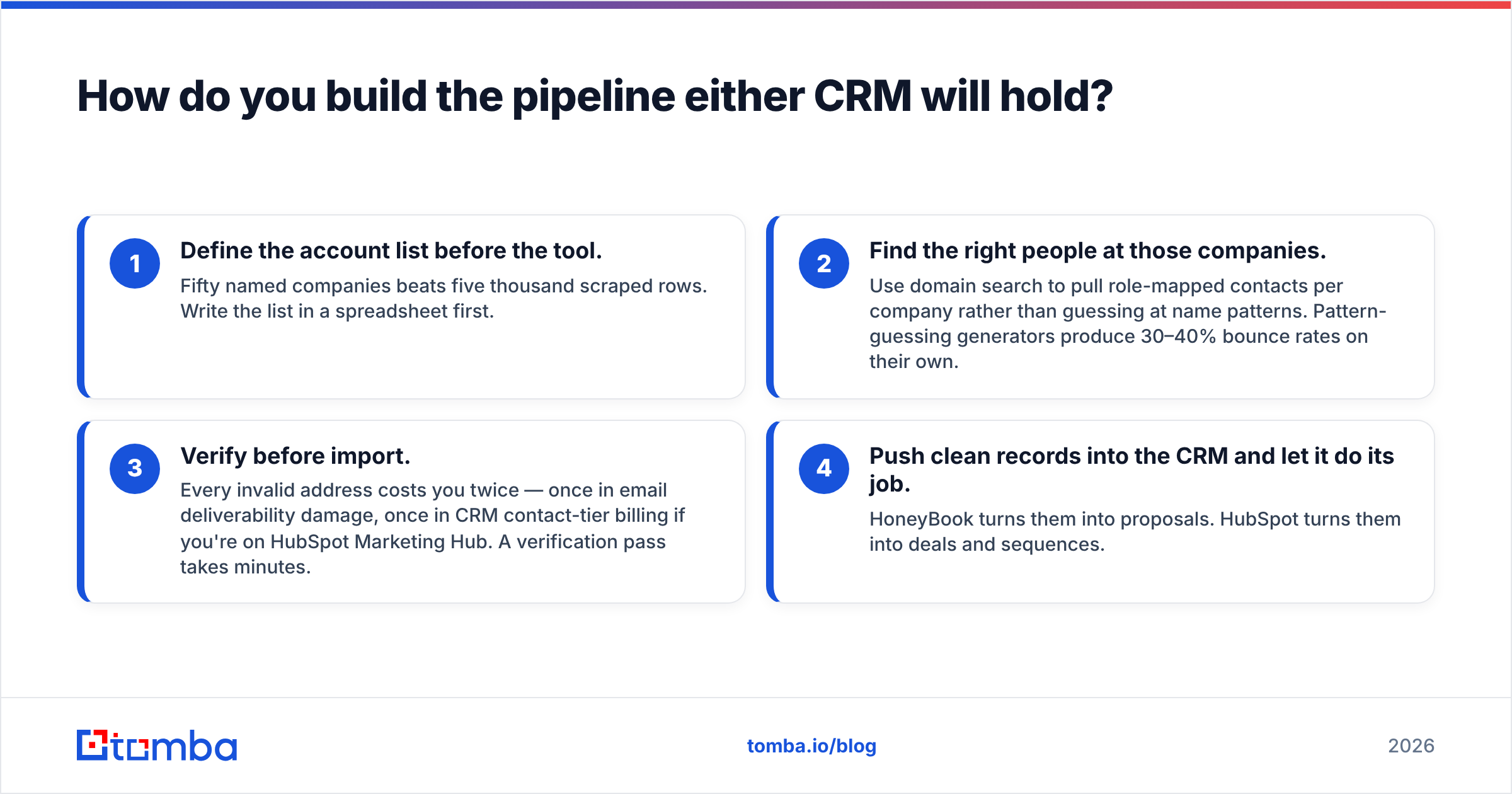
How do you build the pipeline either CRM will hold?#
Whichever side you land on, the workflow underneath is the same four steps.
- Define the account list before the tool. Fifty named companies beats five thousand scraped rows. Write the list in a spreadsheet first.
- Find the right people at those companies. Use domain search to pull role-mapped contacts per company rather than guessing at name patterns. Pattern-guessing generators produce 30–40% bounce rates on their own.
- Verify before import. Every invalid address costs you twice — once in email deliverability damage, once in CRM contact-tier billing if you're on HubSpot Marketing Hub. A verification pass takes minutes.
- Push clean records into the CRM and let it do its job. HoneyBook turns them into proposals. HubSpot turns them into deals and sequences.
Skipping step three is the most expensive shortcut in B2B sales. Bounce rates above 3% start degrading sender reputation, and reputation damage takes weeks to repair. That's true on every ESP, and no CRM protects you from it.
For teams doing this at volume, the Tomba API lets you run find-and-verify as a step inside your existing automation rather than as a manual export-import cycle — useful once you're adding more than a few hundred contacts a month.
The verdict#
HoneyBook and HubSpot barely compete. HoneyBook is the better product for a solo service business that gets paid per project, and no HubSpot configuration will match its proposal-to-payment flow without extra tools and extra money. HubSpot is the better product for any team that needs pipeline visibility, outbound sequences, and reporting that survives a board meeting — and its free tier removes the risk from trying.
The question that actually determines your outcome is upstream of both: where do the contacts come from? Neither platform answers it.
Start there. Use the Tomba Email Finder to build a verified contact list from the companies you already want to work with — 25 free searches a month, no card required — then let HoneyBook or HubSpot do what it's genuinely good at. A clean list makes a mediocre CRM look great. A dirty list makes the best CRM in the world look like a spreadsheet with a login screen.
Related guides#
Ready to find emails that actually work?
Join 150,000+ professionals who stopped guessing and started sending. Free credits on signup — no credit card required.
Get the Tomba newsletter
Practical outbound tactics and product updates — once every two weeks.
About the author