Hot Leads in 2026: How to Spot, Score, and Close Them
Most teams call a lead "hot" based on gut feel, then wonder why the pipeline stalls. Here's how to define, score, and work hot leads with signals you can actually measure.
TL;DR
- A hot lead is not "someone who seems interested." It is a contact whose fit, behavior, and timing all cross a threshold you defined in advance — and who you can actually reach.
- The three signal families that matter: fit (do they match your ICP), intent (what did they do), and recency (how long ago). Drop any one and your scoring model lies to you.
- Speed matters more than polish. Response inside five minutes of a high-intent action beats a beautifully written email sent the next morning.
- The most common failure is not scoring — it's contactability. A perfectly scored hot lead with a bounced email address is worth zero.
- Build the routing rule before you build the score. A "hot" tag that nobody acts on within an hour is just a dashboard decoration.
What is a hot lead, exactly?#
A hot lead is a contact who matches your ideal customer profile, has taken an action that signals active buying evaluation, and did it recently enough that the evaluation is still open.
All three conditions. Not two.
Think of it like a restaurant reservation. Someone walking past your window is traffic. Someone reading the menu on the door is interested. Someone calling to book a table for Thursday at 8pm is a hot lead — they have a need, a timeline, and they've identified you as a candidate. The difference is not enthusiasm. It's specificity plus timing.
Most CRMs let you tag anything as hot, which is exactly why the tag has stopped meaning anything at most companies. If your reps mark a lead hot because the prospect "seemed engaged on the call," you don't have a scoring system — you have a mood ring.
Here's the practical definition to work from:
- Fit threshold crossed — company size, industry, tech stack, geography, and role all land inside your ICP band. No fit, no heat, regardless of behavior.
- Intent action logged — pricing page view, demo request, repeat product-page sessions, competitor comparison content, or a direct reply asking about implementation.
- Recency window open — the action happened inside your category's evaluation window. For most B2B SaaS that's 7–14 days; for enterprise infrastructure it can be 60.
- Contact route verified — you have a deliverable email address or a valid direct phone. Without this, the lead is theoretical.
- No disqualifier present — not an existing customer, not a competitor, not a student researching a thesis, not in an unsupported region.
That fifth item catches more false positives than most teams expect. Roughly a fifth of "high-intent" traffic on B2B pricing pages comes from competitors and job seekers.
How are hot, warm, and cold leads actually different?#
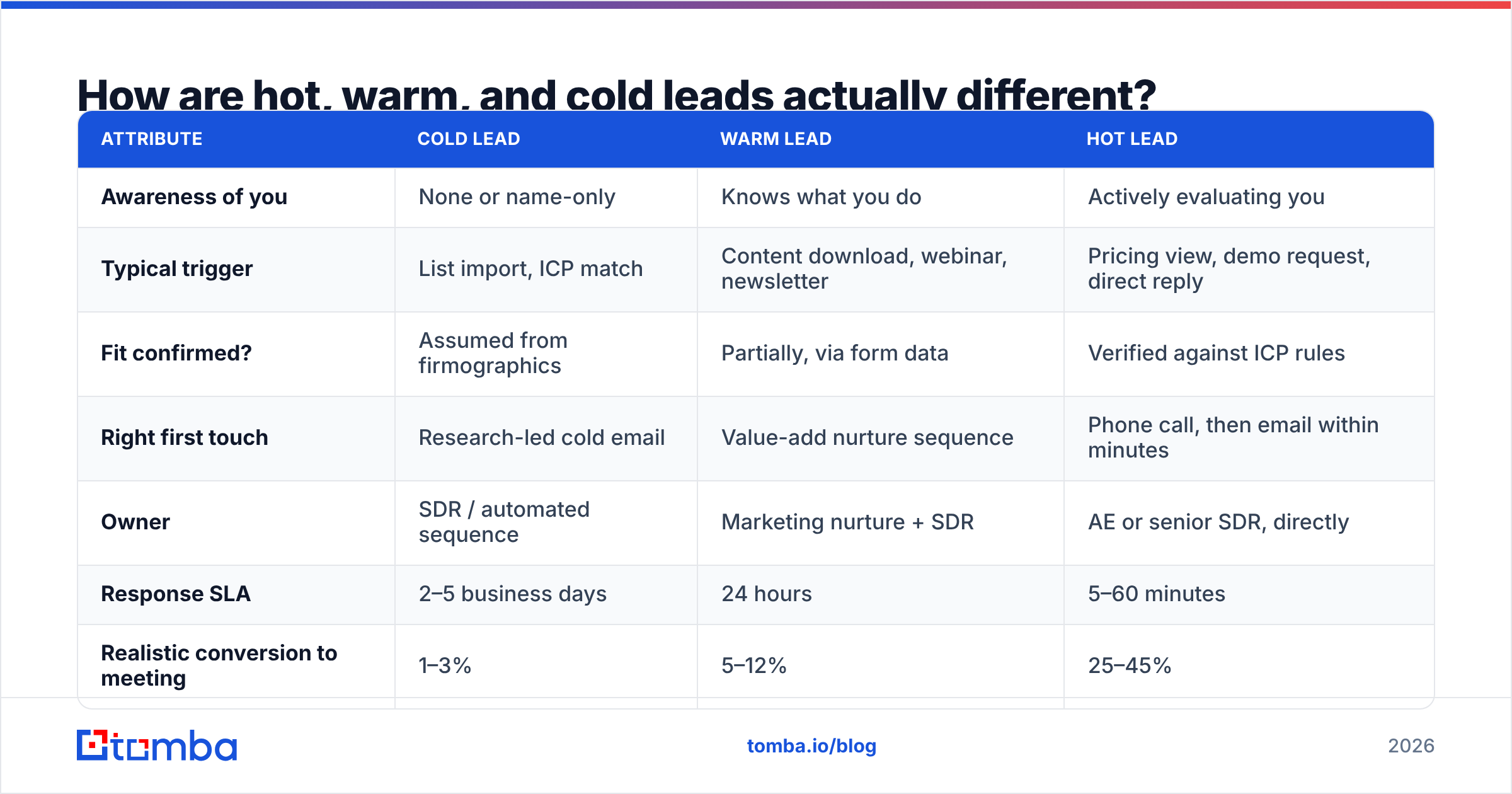
The temperature labels only earn their keep when each one maps to a different action, a different owner, and a different SLA. Otherwise you've built a color-coding exercise.
| Attribute | Cold lead | Warm lead | Hot lead |
|---|---|---|---|
| Awareness of you | None or name-only | Knows what you do | Actively evaluating you |
| Typical trigger | List import, ICP match | Content download, webinar, newsletter | Pricing view, demo request, direct reply |
| Fit confirmed? | Assumed from firmographics | Partially, via form data | Verified against ICP rules |
| Right first touch | Research-led cold email | Value-add nurture sequence | Phone call, then email within minutes |
| Owner | SDR / automated sequence | Marketing nurture + SDR | AE or senior SDR, directly |
| Response SLA | 2–5 business days | 24 hours | 5–60 minutes |
| Realistic conversion to meeting | 1–3% | 5–12% | 25–45% |
| Cost of getting it wrong | Low — retry later | Medium — goes quiet | High — competitor wins the slot |
That last row is the argument for taking this seriously. A mishandled cold lead costs you a follow-up. A mishandled hot lead costs you the deal, because someone in an active evaluation cycle will simply take the next vendor's call.
What signals actually make a lead hot?#
Split your signals into three buckets and weight them separately. Mixing them into one number is how scoring models end up recommending a 22-person startup because they clicked four emails.
Fit signals (who they are)
- Headcount, revenue band, funding stage
- Industry and sub-vertical
- Technology in use — a company running a tool you integrate with is a materially better fit
- Seniority and function of the specific contact
- Geography and language support
Intent signals (what they did)
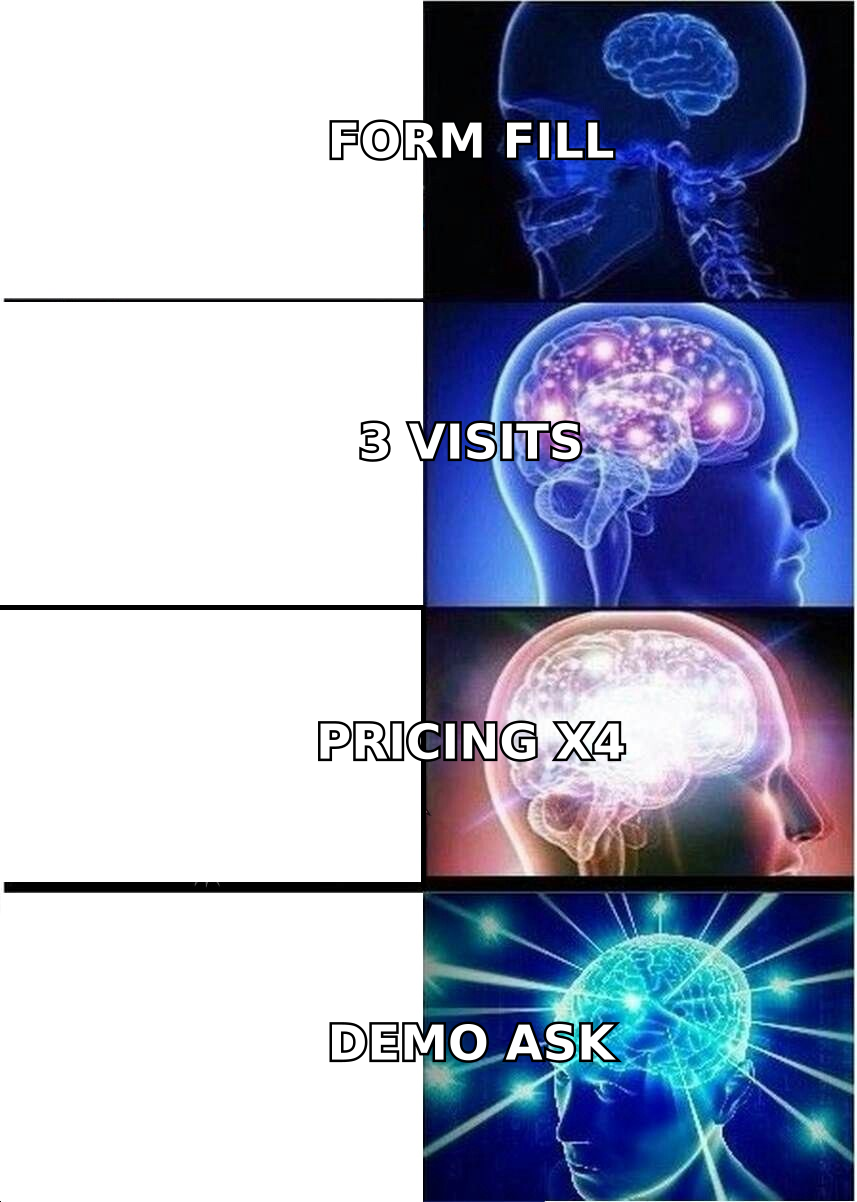
- Pricing page visits — the single strongest on-site signal in most B2B funnels
- Repeat visits within a short window (three sessions in seven days beats twelve sessions over six months)
- Demo, trial, or quote request
- Comparison or alternatives page views
- Direct reply with a question about implementation, security review, or contract terms
- Multiple people from the same domain visiting inside the same week — the classic buying-committee tell
Recency and velocity signals (when, and how fast)
- Days since last meaningful action
- Whether activity is accelerating or decaying
- Trigger events: new funding round, leadership hire in a relevant function, office expansion, a competitor's product being sunset
The velocity piece is underused. Two accounts with identical raw scores are not equal if one is trending up over the past 10 days and the other peaked a month ago. Score the derivative, not just the level.
For anonymous traffic, you need identity resolution before any of this is actionable — website visitor reveal turns an unnamed pricing-page session into a company you can research and route.
How do you score hot leads without overengineering it?#
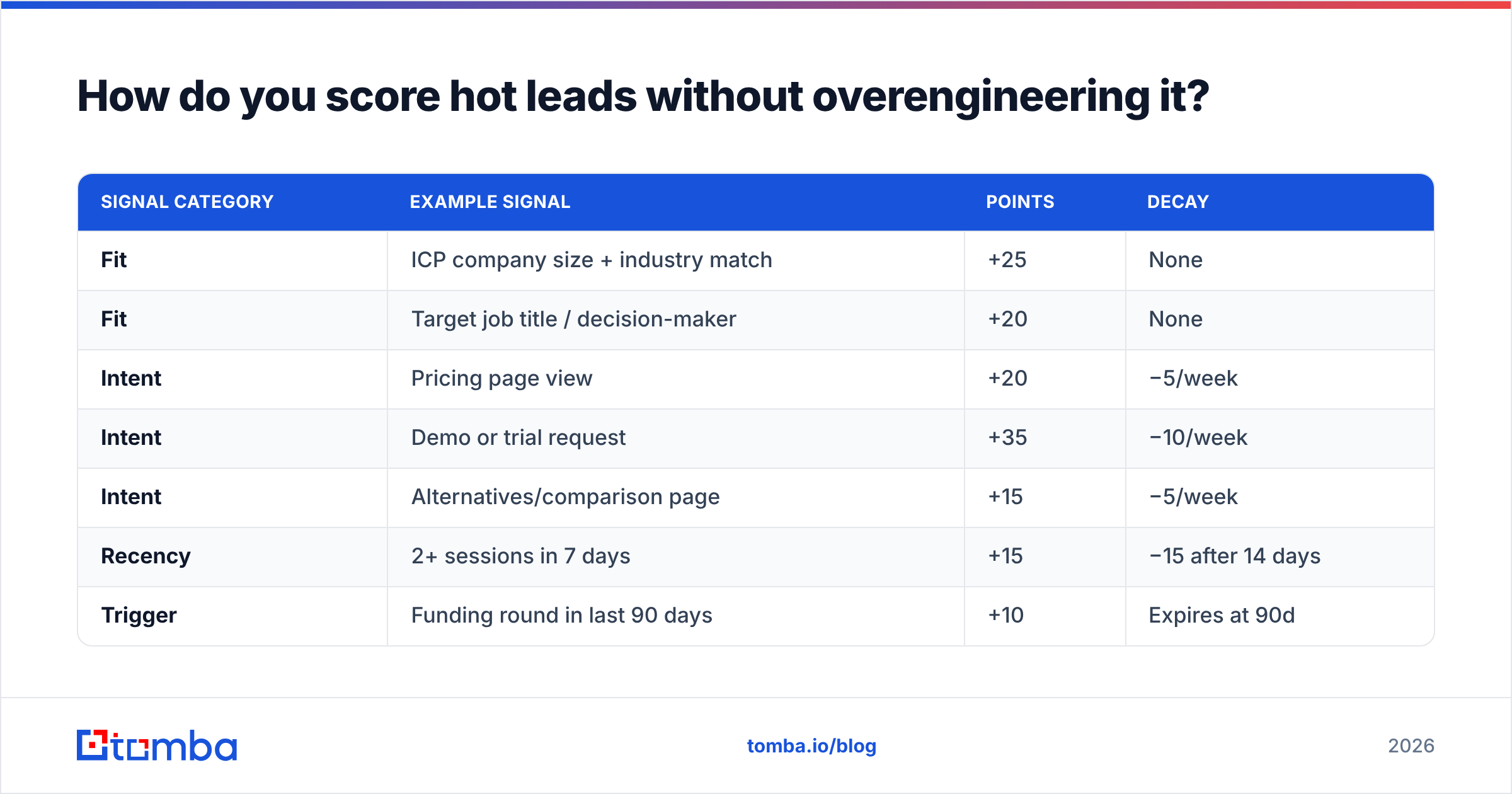
Start with a points model you can explain out loud in 30 seconds. If your rep can't recite why a lead scored 87, they won't trust the number and will go back to gut feel.
A workable starting framework:
| Signal category | Example signal | Points | Decay |
|---|---|---|---|
| Fit | ICP company size + industry match | +25 | None |
| Fit | Target job title / decision-maker | +20 | None |
| Intent | Pricing page view | +20 | −5/week |
| Intent | Demo or trial request | +35 | −10/week |
| Intent | Alternatives/comparison page | +15 | −5/week |
| Recency | 2+ sessions in 7 days | +15 | −15 after 14 days |
| Trigger | Funding round in last 90 days | +10 | Expires at 90d |
| Disqualifier | Free email domain / competitor | −40 | None |
Set your hot threshold at a level that produces a volume your team can actually work. If your two SDRs can handle 40 hot leads a week and your threshold produces 200, the threshold is wrong — not the team. Tune the number until supply matches capacity, then revisit monthly.
Two rules that save teams from the most common scoring mistakes:
- Fit gates intent, not the other way around. A non-ICP company that visits pricing twelve times should not outrank an ICP company that visited twice. Multiply fit by intent rather than adding them, or hard-gate on minimum fit.
- Decay is mandatory. Scores without decay accumulate forever, and by month six your "hottest" leads are people who were interested last spring. Anything intent-based should lose value weekly.
HubSpot's research on lead response time remains the clearest public data on why the recency dimension outweighs almost everything else in the model.
Why does speed-to-lead beat everything else?#
Because buying windows are short and attention is exclusive. When someone requests a demo, they are usually requesting two or three demos in the same session. The vendor who reaches them first frames the evaluation criteria — and the criteria you set are the criteria you win on.
The practical numbers, consistently reproduced across studies since the original Lead Response Management research:
- Contact attempts inside 5 minutes convert dramatically better than attempts at 30 minutes
- After the first hour, odds of qualifying the lead drop off a cliff
- After 24 hours, you are effectively cold-calling someone who once knew your name
What this means operationally:
- Route automatically, never manually. A human triaging a queue adds 20 minutes minimum. Rules-based routing adds zero.
- Alert in the channel reps already live in. A Slack integration firing a hot-lead alert gets acted on; a CRM dashboard nobody has open does not.
- Call first, email second. Phone connect rates on freshly-triggered leads are several times higher than on cold dials. Have the direct phone number resolved before the alert fires, not after.
- Pre-write the first touch. Reps should not compose from scratch under time pressure. Three templates keyed to trigger type, personalized in one line.
- Measure median time-to-first-touch weekly. It's the one operational metric that moves hot-lead conversion without changing anything else about your process.
What kills hot leads before you ever reach them?#
Contactability. This is the gap nobody puts on a dashboard, and it silently eats a large share of every scoring investment.
You can build a flawless model, surface a genuinely hot account, alert the right rep in 90 seconds — and then discover the email address in your CRM was a guess from a permutation tool, it bounces, and by the time anyone notices, the window closed.
The failure modes, in order of frequency:
- Stale records. B2B contact data decays roughly 25–30% per year through job changes alone. A lead scored hot against a contact who left in March is a dead end.
- Unverified guesses. Pattern-generated addresses (
first.last@domain.com) are right often enough to feel safe and wrong often enough to burn your domain reputation. Run them through an email verifier before any send. - Catch-all domains. Many enterprise domains accept every address, so a standard verification returns "unknown." That's where a dedicated catch-all verifier earns its place — it distinguishes a real mailbox from an accept-all black hole.
- Wrong person entirely. The account is hot; the contact you have is a junior analyst with no budget. Enrich to find the actual decision-maker before the call.
- Deliverability damage. Sending to unverified lists tanks your sender reputation, which means your next hot lead's email lands in spam. The cost compounds.
The fix is unglamorous: verify at the moment of routing, not at the moment of list-building. Data that was accurate when you imported it is not necessarily accurate when the lead goes hot three months later.
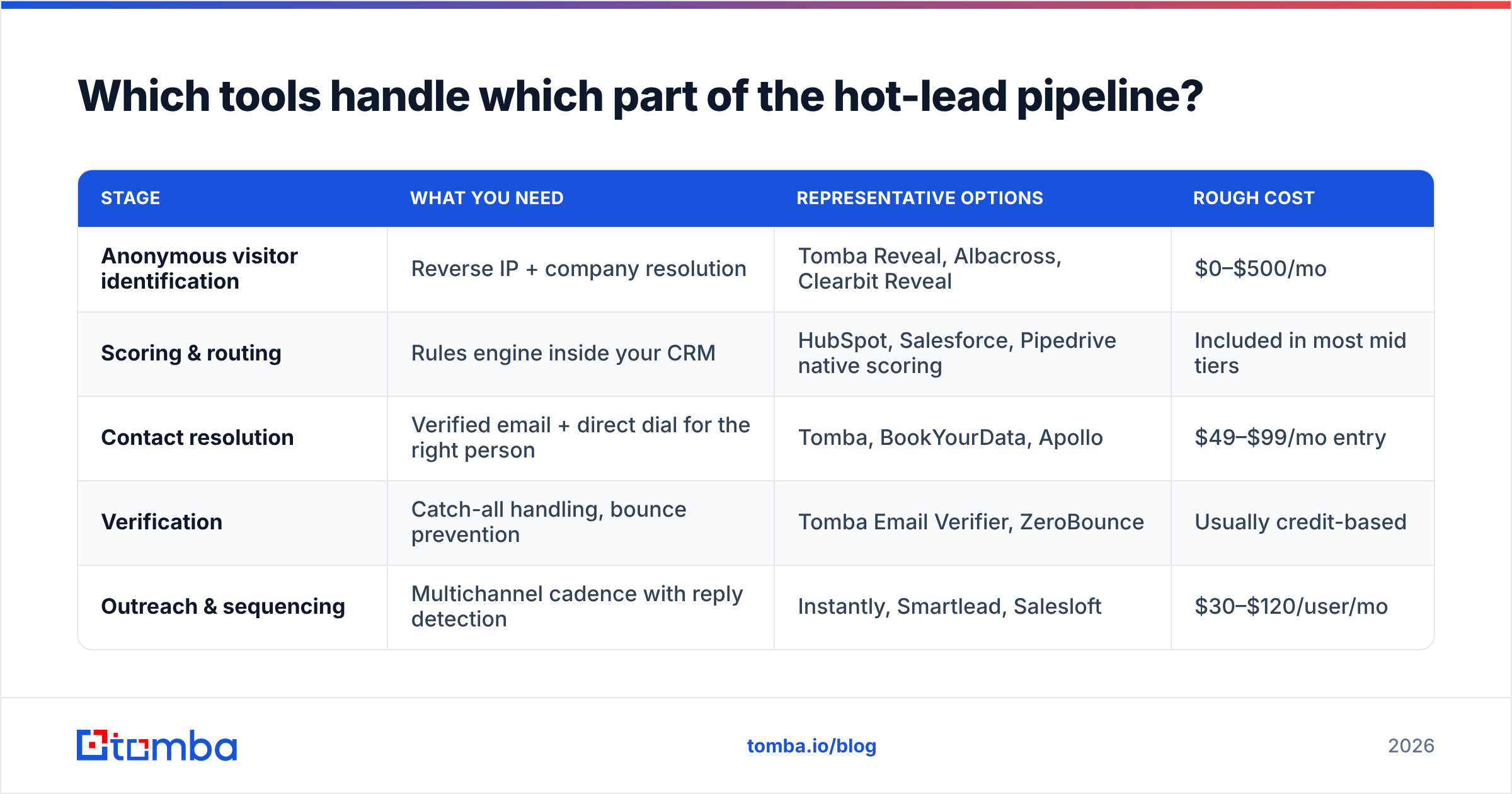
Which tools handle which part of the hot-lead pipeline?#
No single tool covers identification, scoring, contact resolution, and outreach well. The realistic stack is three or four pieces that hand off cleanly.
| Stage | What you need | Representative options | Rough cost |
|---|---|---|---|
| Anonymous visitor identification | Reverse IP + company resolution | Tomba Reveal, Albacross, Clearbit Reveal | $0–$500/mo |
| Scoring & routing | Rules engine inside your CRM | HubSpot, Salesforce, Pipedrive native scoring | Included in most mid tiers |
| Contact resolution | Verified email + direct dial for the right person | Tomba, BookYourData, Apollo | $49–$99/mo entry |
| Verification | Catch-all handling, bounce prevention | Tomba Email Verifier, ZeroBounce | Usually credit-based |
| Outreach & sequencing | Multichannel cadence with reply detection | Instantly, Smartlead, Salesloft | $30–$120/user/mo |
A note on the contact-resolution layer, since that's where the money leaks. Tools differ less on raw database size than on what they do when the database misses. Tomba pricing starts with a free tier at 25 searches per month, Starter at $49/mo, Growth at $99/mo, and Pro at $249/mo — with verification built into the same workflow rather than sold as a separate product. BookYourData takes a different approach with pre-verified list purchasing, which suits teams that want a bulk dataset up front rather than on-demand lookups. Both are legitimate models; pick based on whether your hot leads arrive one at a time (on-demand) or you're building target lists in batches (bulk).
If you're already running a CRM with native scoring, don't buy a second scoring tool. Buy the contact layer that makes your existing scores actionable. Check the vendor's own documentation and independent reviews on G2 rather than the comparison page written by their competitor.
How do you build the workflow end to end?#
Here's a concrete sequence you can implement in a week.
Step 1 — Define the hot threshold in writing. One paragraph, agreed by sales and marketing. Include the disqualifiers. Post it where both teams see it.
Step 2 — Instrument the intent signals. Pricing page, comparison pages, demo form, trial signup. Fire events into your CRM. Don't try to track everything — four high-signal pages beat forty low-signal ones.
Step 3 — Resolve identity on anonymous traffic. Company-level reveal on high-intent pages only. Running it site-wide produces noise and burns credits.
Step 4 — Enrich to a person. Company is not enough. Use domain search to pull the relevant roles at that company, then narrow to the two or three people who'd actually own the decision.
Step 5 — Verify before routing. Every address gets verified at routing time. Bounced or risky addresses trigger a fallback path (LinkedIn, phone, or a second contact at the same account) instead of a silent failure.
Step 6 — Route with an SLA and a timer. Assign, notify, and start a clock. If first touch hasn't happened in 30 minutes, escalate to a second rep. No exceptions for "I was in a meeting."
Step 7 — Log outcomes back into the score. Which signal combinations actually produced meetings? After 90 days you'll find that one or two of your weighted signals do nothing. Cut them and rebalance.
Step 8 — Review the threshold monthly. Volume, conversion, and rep capacity all drift. A threshold set in January is wrong by June.
What should you measure to know it's working?#
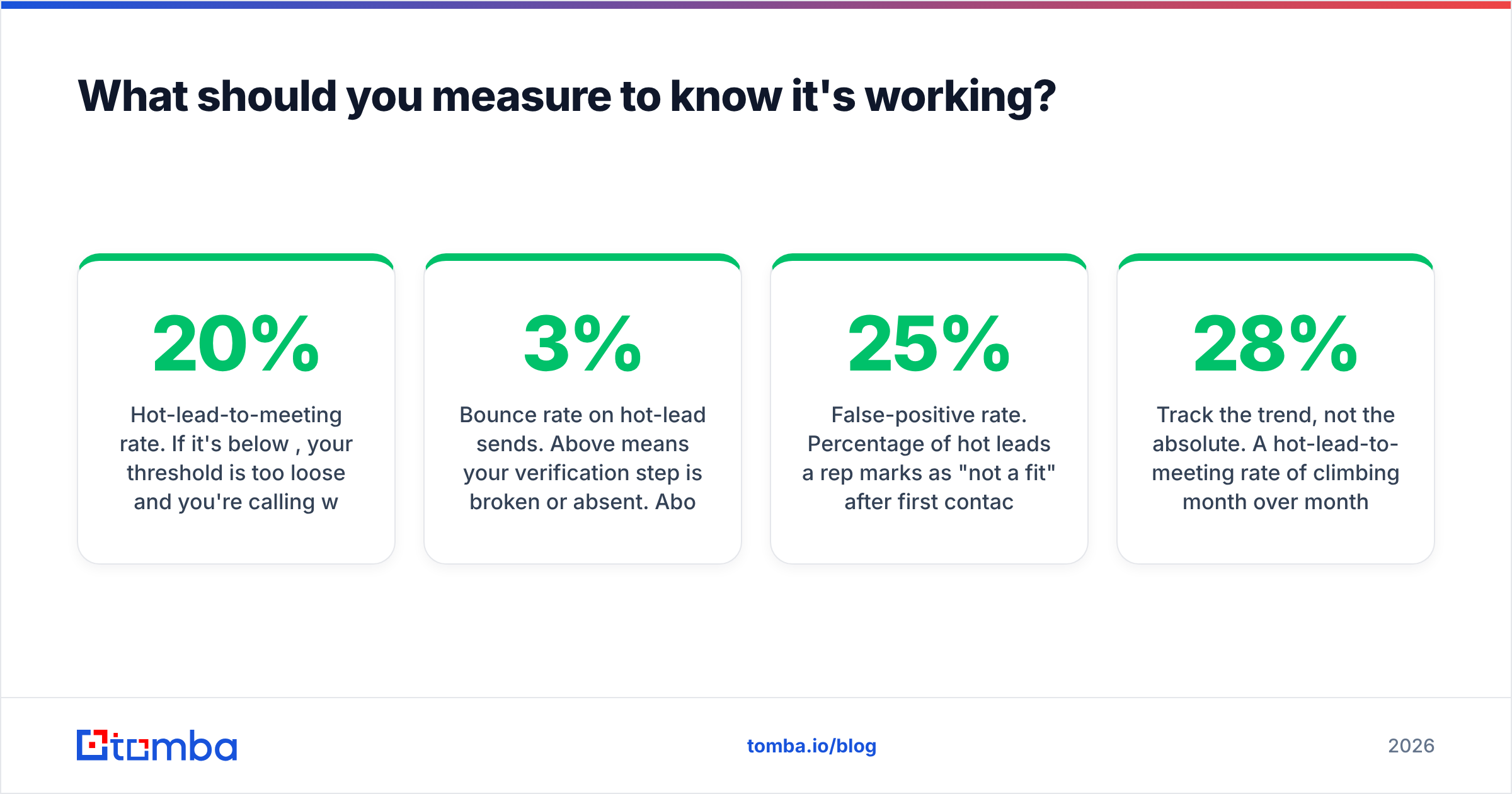
Four metrics, tracked weekly. More than four and nobody looks at any of them.
- Median time-to-first-touch on hot leads. Target: under 15 minutes during business hours. This is the leading indicator; everything else follows it.
- Hot-lead-to-meeting rate. If it's below 20%, your threshold is too loose and you're calling warm leads hot.
- Bounce rate on hot-lead sends. Above 3% means your verification step is broken or absent. Above 5% and you're actively damaging deliverability.
- False-positive rate. Percentage of hot leads a rep marks as "not a fit" after first contact. Above 25% means your fit gate isn't gating.
Track the trend, not the absolute. A hot-lead-to-meeting rate of 28% climbing month over month is healthier than 35% declining.
Get the contact data your hot leads deserve#
Scoring tells you who to call. It doesn't give you the number to dial or an address that lands.
That's the gap Tomba's Email Finder fills — resolve a company and a name into a verified, deliverable email address in seconds, with catch-all detection and verification built into the same lookup rather than bolted on afterward. Free tier gives you 25 searches a month to test it against your own hot-lead list; Starter is $49/mo when you're ready to run it at volume, and the Tomba API drops it directly into your routing workflow so verification happens automatically the moment a lead crosses your threshold.
Score the leads. Then make sure you can actually reach them.
Related guides#
Ready to find emails that actually work?
Join 150,000+ professionals who stopped guessing and started sending. Free credits on signup — no credit card required.
Get the Tomba newsletter
Practical outbound tactics and product updates — once every two weeks.
About the author