How Conversational AI Improves Email Follow-Ups in 2026
Most follow-up sequences fail because they repeat the first email louder. Here is how conversational AI actually changes reply rates — and where it quietly makes things worse.
TL;DR
- Conversational AI email follow-ups react to signals — replies, opens, site visits, out-of-office messages — instead of firing a fixed sequence on a fixed timer.
- The measurable gains come from three places: reply classification, dynamic timing, and per-thread context. Not from "AI-written" copy.
- Most teams see reply-rate lifts of 15-40% relative. Not the 5x numbers vendors put on landing pages.
- AI amplifies whatever data you feed it. A great follow-up sent to a guessed address is still a bounce. Verify first, automate second.
- Keep a human in the loop for pricing, objections, and anything a prospect could quote back at you later.
Your follow-ups are probably not weak on copy. They underperform because email step 3 has no idea what happened in steps 1 and 2. Conversational AI email follow-ups fix that one problem — the memory problem — and the reply-rate lift follows from there.
What are conversational AI email follow-ups?#
They are follow-ups that read the reply before they write the next message. The system takes each inbound reply, works out what the person means, and picks the next step from there. A normal sequence just fires a pre-written email at a pre-set time.
Think of a traditional sequence as a vending machine. You press the button and a fixed item drops out. It does not care that you already have three. Conversational AI is more like a shop assistant who remembers you walked out yesterday, annoyed at the price.
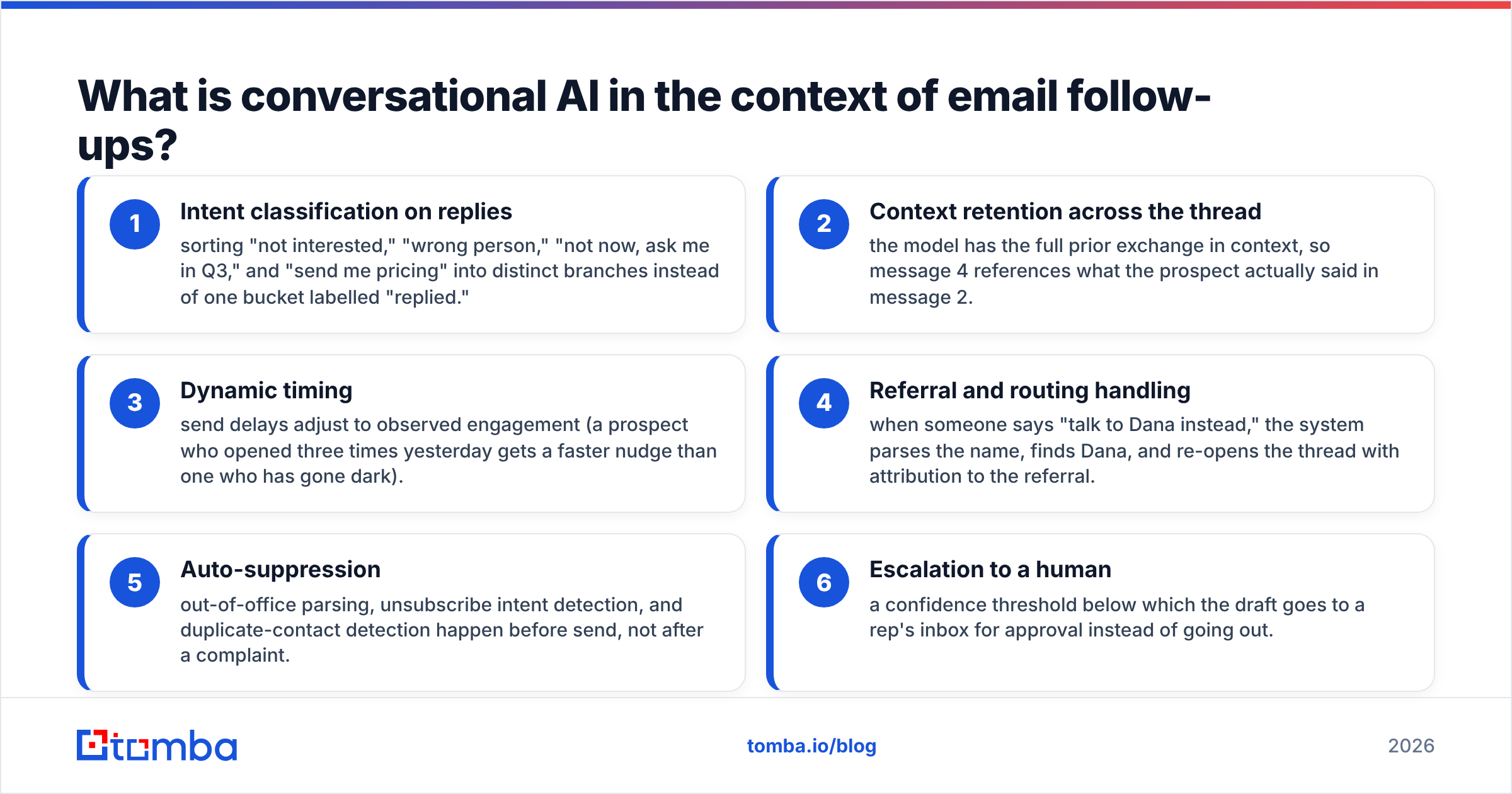
Six capabilities separate the two:
- Intent classification on replies — sorting "not interested," "wrong person," "not now, ask me in Q3," and "send me pricing" into separate branches. A static tool drops all four into one bucket marked "replied."
- Context retention across the thread — the model can see the whole prior exchange. So message 4 refers to what the prospect actually said in message 2.
- Dynamic timing — send delays shift with engagement. A prospect who opened three times yesterday gets a faster nudge than one who has gone quiet.
- Referral and routing handling — someone says "talk to Dana instead." The system reads the name, finds Dana, and opens the thread with credit to the referral.
- Auto-suppression — out-of-office parsing, unsubscribe intent, and duplicate contacts are caught before send, not after a complaint.
- Escalation to a human — below a set confidence level, the draft goes to a rep's inbox for approval instead of going out.
If a tool only does #1 and calls itself conversational AI, you are buying an autoresponder with better marketing.
Why do most follow-up sequences fail?#
Because they are written as monologues and sent into a medium that is a dialogue.
Walk through a typical five-step sequence. Step 1 pitches. Step 2 says "just bumping this." Step 3 shares a case study. Step 4 bumps again. Step 5 is the breakup email. Every step was written before the prospect existed. None of them change if she opens six times, forwards the email internally, or replies "we're evaluating in March."
The failure modes stack up:
- No branching on reply intent. A "not now" and a "never" get the same treatment. Usually that means removal from the sequence, which throws away the warmest lead on the list.
- Timing ignores signals. Fixed 3-day gaps nudge a hot prospect too slowly and a cold one too often.
- Repetition without new information. "Bumping this to the top of your inbox" adds nothing. It teaches people to skip your name, and that slowly erodes your sender reputation.
- Bad data underneath. Roughly 22-30% of B2B contact data decays each year as people change jobs. A list built in January is measurably worse by June.
HubSpot's research on sales follow-up keeps finding the same thing. Most conversions happen after several touches, yet many reps stop after one or two. The gap is persistence, and persistence is what automation should be good at. The trouble is that naive automation is persistent and deaf.
How does conversational AI actually improve reply rates?#
Through four mechanisms, ranked by how much they move the number.
1. Reply classification unlocks the "not now" pile. This is the biggest win and the least discussed. In most books of business, "not now" replies outnumber "yes" replies by 5-10x. A static sequence throws them away. A smarter system tags the date the prospect gave you, schedules a re-entry, and re-opens with a line about the first conversation. You are mining a pipeline you already paid for.
2. Timing adapts to behavior. Someone opened your email four times in an hour and clicked the pricing link. A 3-day wait is malpractice. Engagement-triggered timing usually produces the second-largest lift.
3. Personalization that survives contact with reality. AI-written first lines are everywhere now, and prospects have learned to spot them. What works is second-message personalization: quoting something the prospect actually wrote to you. That needs thread context.
4. Objection handling at the point of friction. A prospect says "we already use Competitor X." A good system replies within minutes with one specific, honest difference. The alternative is a rep who gets to it on Thursday.
What conversational AI does not do: fix a bad offer, rescue a mis-targeted list, or make an unverified address deliverable.
Which conversational AI approach fits your team?#
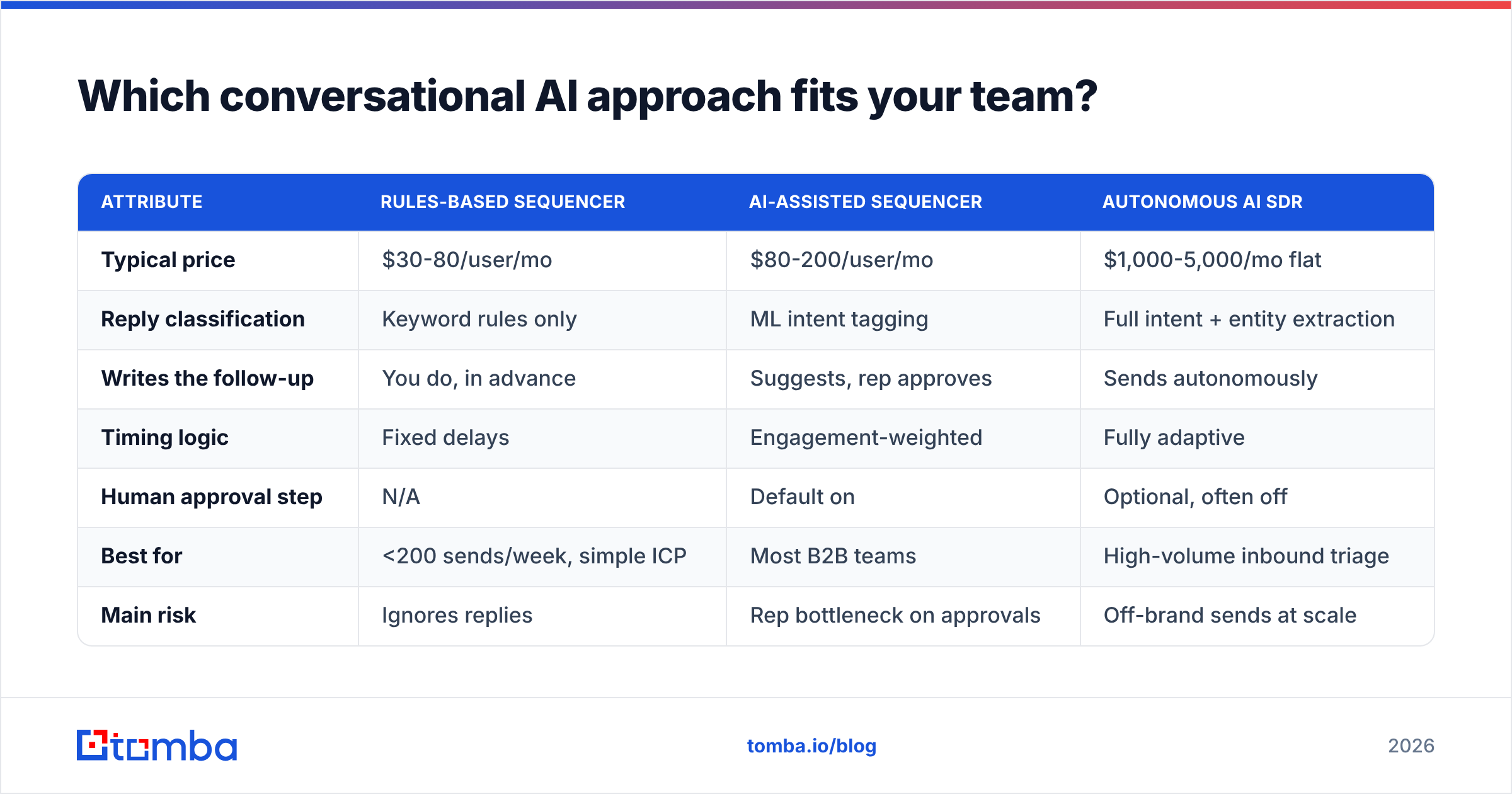
The market splits into three shapes. They solve different problems at very different prices.
| Attribute | Rules-based sequencer | AI-assisted sequencer | Autonomous AI SDR |
|---|---|---|---|
| Typical price | $30-80/user/mo | $80-200/user/mo | $1,000-5,000/mo flat |
| Reply classification | Keyword rules only | ML intent tagging | Full intent + entity extraction |
| Writes the follow-up | You do, in advance | Suggests, rep approves | Sends autonomously |
| Timing logic | Fixed delays | Engagement-weighted | Fully adaptive |
| Human approval step | N/A | Default on | Optional, often off |
| Best for | <200 sends/week, simple ICP | Most B2B teams | High-volume inbound triage |
| Main risk | Ignores replies | Rep bottleneck on approvals | Off-brand sends at scale |
| Data quality dependency | High | High | Extreme |
Most teams over-buy here. Have you branched on reply intent in a rules-based tool yet? If not, an autonomous agent will not help you. You will make the same mistakes, faster.
The honest advice: start with an AI-assisted sequencer and leave human approval on. Run it for a quarter. Then drop the approval gate only for the intent categories where the model already agrees with your reps 95% of the time.
What does conversational AI cost, and what is the real ROI?#
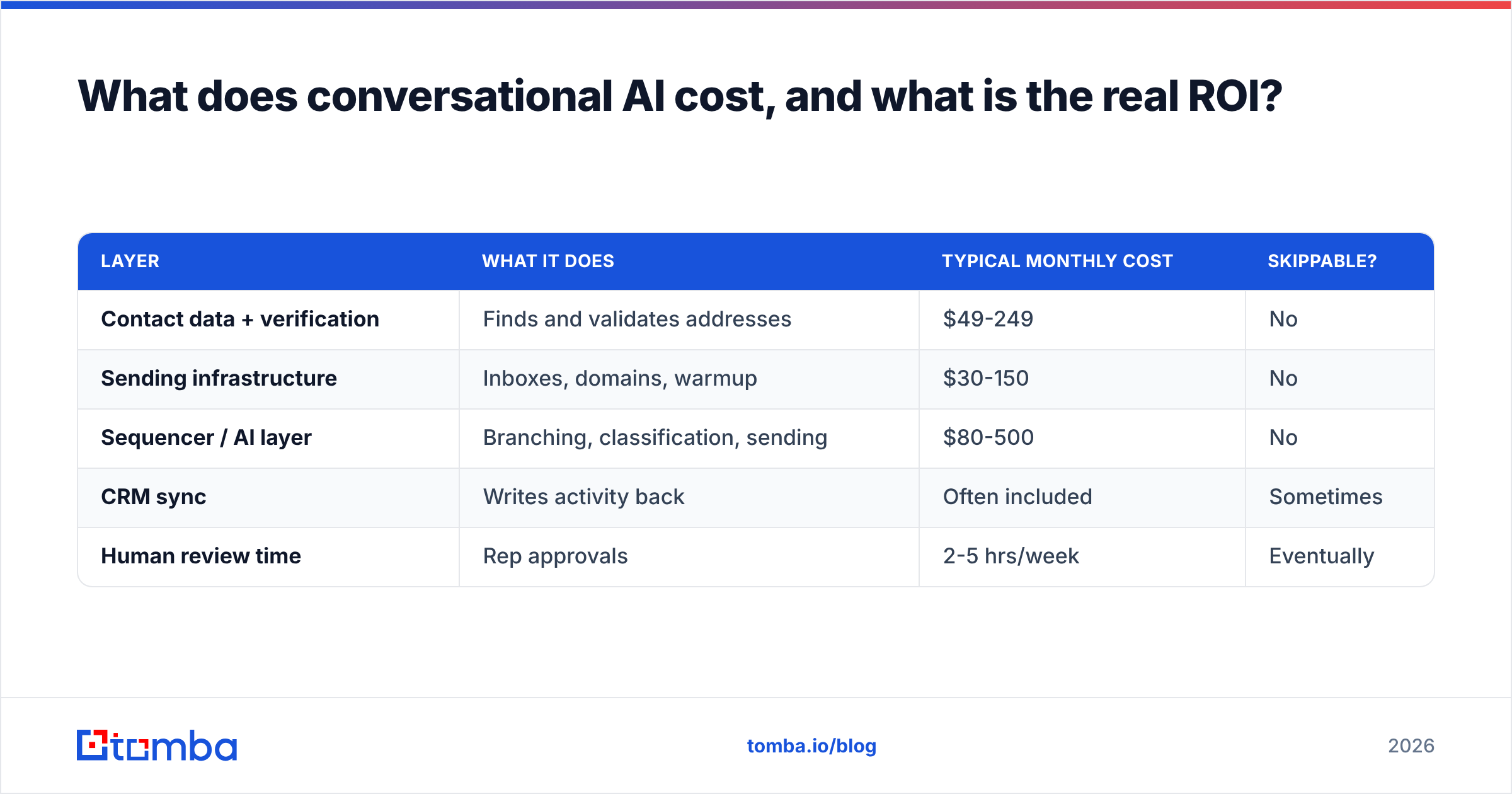
Price the whole stack, not the AI line item. A working follow-up system has four cost components:
| Layer | What it does | Typical monthly cost | Skippable? |
|---|---|---|---|
| Contact data + verification | Finds and validates addresses | $49-249 | No |
| Sending infrastructure | Inboxes, domains, warmup | $30-150 | No |
| Sequencer / AI layer | Branching, classification, sending | $80-500 | No |
| CRM sync | Writes activity back | Often included | Sometimes |
| Human review time | Rep approvals | 2-5 hrs/week | Eventually |
Tomba pricing gives you a feel for the data layer. There is a free tier at 25 searches a month, then Starter at $49/mo, Growth at $99/mo, and Pro at $249/mo. Budget the input side first, before you spend a cent on AI.
Here is the ROI math that matters. Say "not now" replies are 15% of your reply volume, and the AI recovers 10% of them. You have added roughly 1.5% to qualified pipeline for the cost of one seat. That number holds up. "5x your reply rate" does not.
Where does conversational AI make follow-ups worse?#
Four failure modes, all of which I have watched play out.
It answers questions it should escalate. Pricing edge cases, security questionnaires, and contract commitments should never be auto-sent. Set a hard escalation rule on any reply that mentions pricing, legal, security, or compliance.
It generates volume you cannot support. AI triples your reply handling, but your calendar has no slots. Now you are teaching prospects that you do not follow through.
It sends to addresses that were never valid. This is the most common and most expensive failure. Unverified data produces a higher bounce rate faster than a manual process would, simply because the machine sends more. Past roughly 3% bounces, email deliverability starts to slip. Past 5%, mailbox providers throttle you outright. Run every list through an email verifier before the sequencer sees it.
It flattens your voice. Six months in, your emails read like everyone else's AI drafts. Keep a library of your best human-written replies and feed them to the model as examples. Refresh it every quarter.
How do you set up conversational AI email follow-ups without breaking deliverability?#
Five steps, in this order. Skipping step 1 is why most rollouts underperform.
Step 1 — Fix the data before the AI. Build your list with a real email finder instead of guessing patterns, then verify it. Guessed addresses are the fastest route to a spam trap. Working from company domains rather than names? Domain search returns the verified addresses and the company's email pattern in one pass.
Step 2 — Define your intent taxonomy by hand. Write your categories down before a model classifies anything: interested, not now (with a date), wrong person (with a referral), competitor incumbent, no budget, hard no. Six to eight is plenty. Any more and your branches become unmaintainable.
Step 3 — Write the branch templates yourself. The AI adapts these. It should not invent them. One template per intent category, written by your best rep, in your real voice.
Step 4 — Turn on approval mode and measure agreement. Run for three or four weeks with every AI draft going to a rep. Log how often the rep sends it unedited. That agreement rate, per category, is your automation readiness score.
Step 5 — Automate only the high-agreement categories. Usually that means out-of-office rescheduling, referral routing, and "not now" re-entry go automatic first. Pricing questions and objections stay human.
Watch your bounce rate weekly and your spam-complaint rate daily. Google and Yahoo cap bulk-sender complaints at 0.3%. Because AI sends faster, you hit that ceiling sooner than you would by hand. Google's Postmaster Tools documentation is the authoritative reference for what they measure.
What metrics prove it is working?#
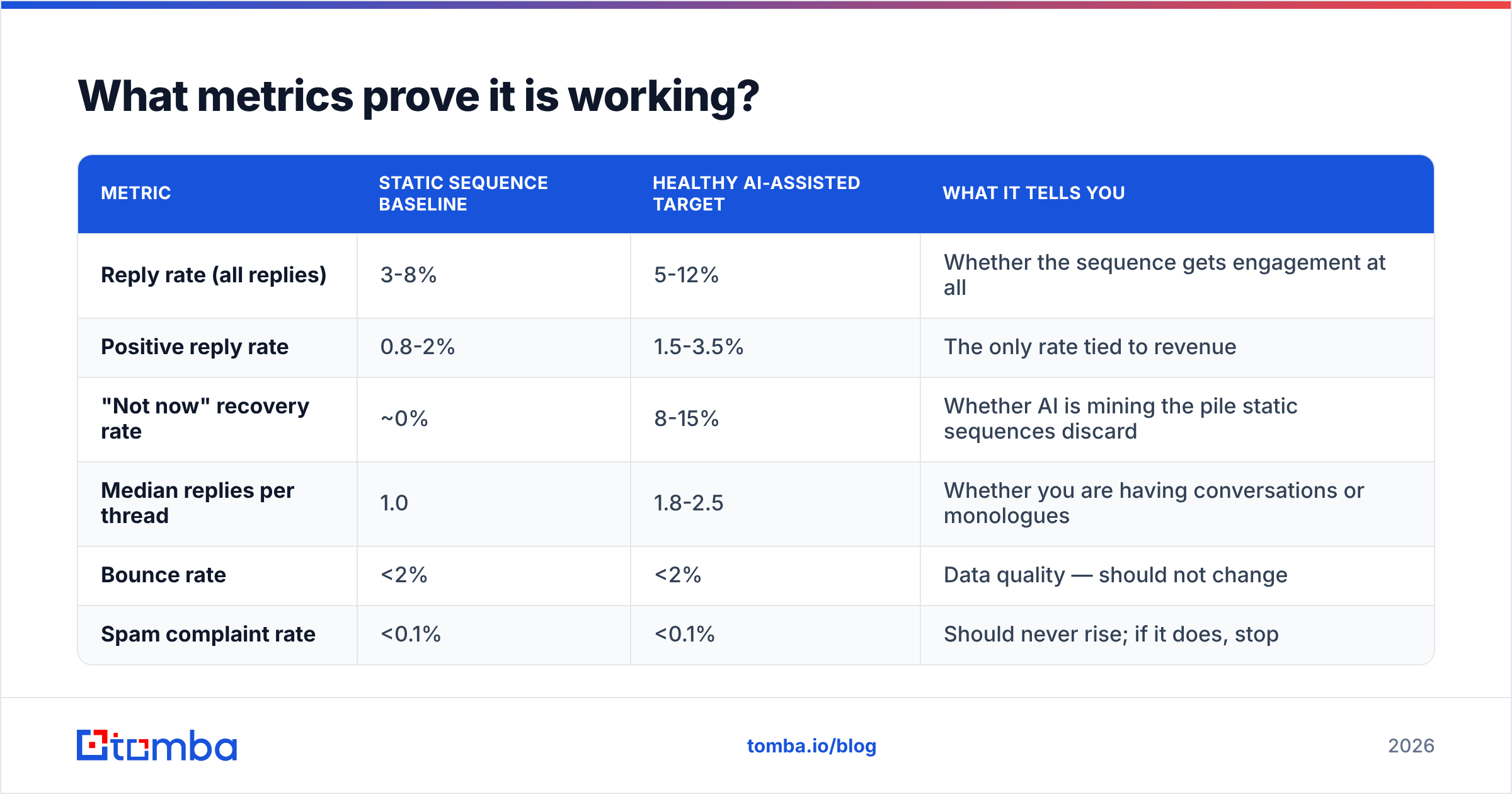
Stop reporting open rate. Since Apple Mail Privacy Protection landed in 2021, it is noise. Track these instead:
| Metric | Static sequence baseline | Healthy AI-assisted target | What it tells you |
|---|---|---|---|
| Reply rate (all replies) | 3-8% | 5-12% | Whether the sequence gets engagement at all |
| Positive reply rate | 0.8-2% | 1.5-3.5% | The only rate tied to revenue |
| "Not now" recovery rate | ~0% | 8-15% | Whether AI is mining the pile static sequences discard |
| Median replies per thread | 1.0 | 1.8-2.5 | Whether you are having conversations or monologues |
| Bounce rate | <2% | <2% | Data quality — should not change |
| Spam complaint rate | <0.1% | <0.1% | Should never rise; if it does, stop |
The two bottom rows are your guardrails. If reply rate climbs and bounce or complaint rate climbs with it, you have not improved your follow-ups. You have just sent more. The bill arrives 60 days later as a deliverability collapse.
Track response rate per intent branch, not per sequence. Aggregate numbers hide the truth: your "not now" branch carries the whole program while your breakup email does nothing.
Is conversational AI worth it for small teams?#
Yes, but the entry point is different.
If you send fewer than 200 emails a week, do not buy an autonomous AI SDR. Your leverage sits in the data layer and one AI-assisted seat. Picture a two-person team that verifies every address, branches on four intent categories, and personalizes the second message. It will beat a ten-person team blasting unverified lists through an expensive agent. That is not a moral position. It is what the bounce math does.
Building lists at volume? The bulk email finder workflow is simple: upload, find, verify, export to your sequencer. It takes the data step out of the daily loop, which is where most small teams lose their hours.
Check vendor claims against third-party reviews on G2 rather than vendor case studies. Read the reviews that mention deliverability, not just the ones that mention reply rate.
Where should you start this week?#
Pick one intent category — "not now" — and build a single branch for it. Tag every deferred reply with the date the prospect gave you. Set a re-entry. Write one honest re-open message that points back at the original thread. Run that branch by hand for a month. It will teach you more about what your AI layer needs than any vendor demo.
Then fix the input. AI is a multiplier, and a multiplier applied to guessed addresses multiplies bounces. Start with the Tomba Email Finder to build verified, current lists from a domain, a name, or a company. The free tier gives you 25 searches a month, no card. Get the addresses right first. Then every follow-up your AI writes reaches a human who can actually reply.
Related guides#
Ready to find emails that actually work?
Join 150,000+ professionals who stopped guessing and started sending. Free credits on signup — no credit card required.
Get the Tomba newsletter
Practical outbound tactics and product updates — once every two weeks.
About the author