How CRM Helps Sales: 9 Ways Reps Close More Deals in 2026
A CRM only pays for itself when reps actually use it. Here's what a CRM genuinely fixes in a sales process, what it doesn't, and how to wire clean contact data into it so pipeline stays trustworthy.
TL;DR
- A CRM helps sales in three concrete ways: it removes the memory tax (no rep tracks 60 deals in their head), it makes pipeline math auditable, and it turns individual habits into a repeatable process the whole team can copy.
- The measurable wins are shorter cycles, higher follow-up rates, and forecasts that stop being fiction. Nucleus Research pegs CRM ROI at roughly $8.71 back per dollar spent — but only for teams with clean adoption.
- A CRM will not fix bad data, bad targeting, or a bad offer. Garbage contacts in, garbage pipeline out.
- The single highest-leverage upgrade for most teams is not switching CRMs — it's feeding the CRM verified emails, phone numbers, and firmographics automatically instead of by hand.
- Start with five fields you actually enforce, three pipeline stages with exit criteria, and one enrichment source. Add complexity only when a rep asks for it.
Most "how CRM helps sales" articles read like a vendor brochure: centralized data, 360-degree view, seamless collaboration. That tells you nothing about whether your reps will log a call on a Friday afternoon.
This is the practical version. What a CRM actually changes in a sales week, what it measurably improves, where it fails, and how to set one up so the data inside it is worth forecasting on.
What does a CRM actually do for a sales team?#
A CRM is shared memory with a clock attached.
Think of it like a restaurant's ticket rail. Without it, every server remembers their own tables and hopes nothing burns. With it, anyone can walk up, see what's fired, what's waiting, and what's about to go cold. The rail doesn't cook better food — it just makes sure nothing gets forgotten and everyone sees the same queue.
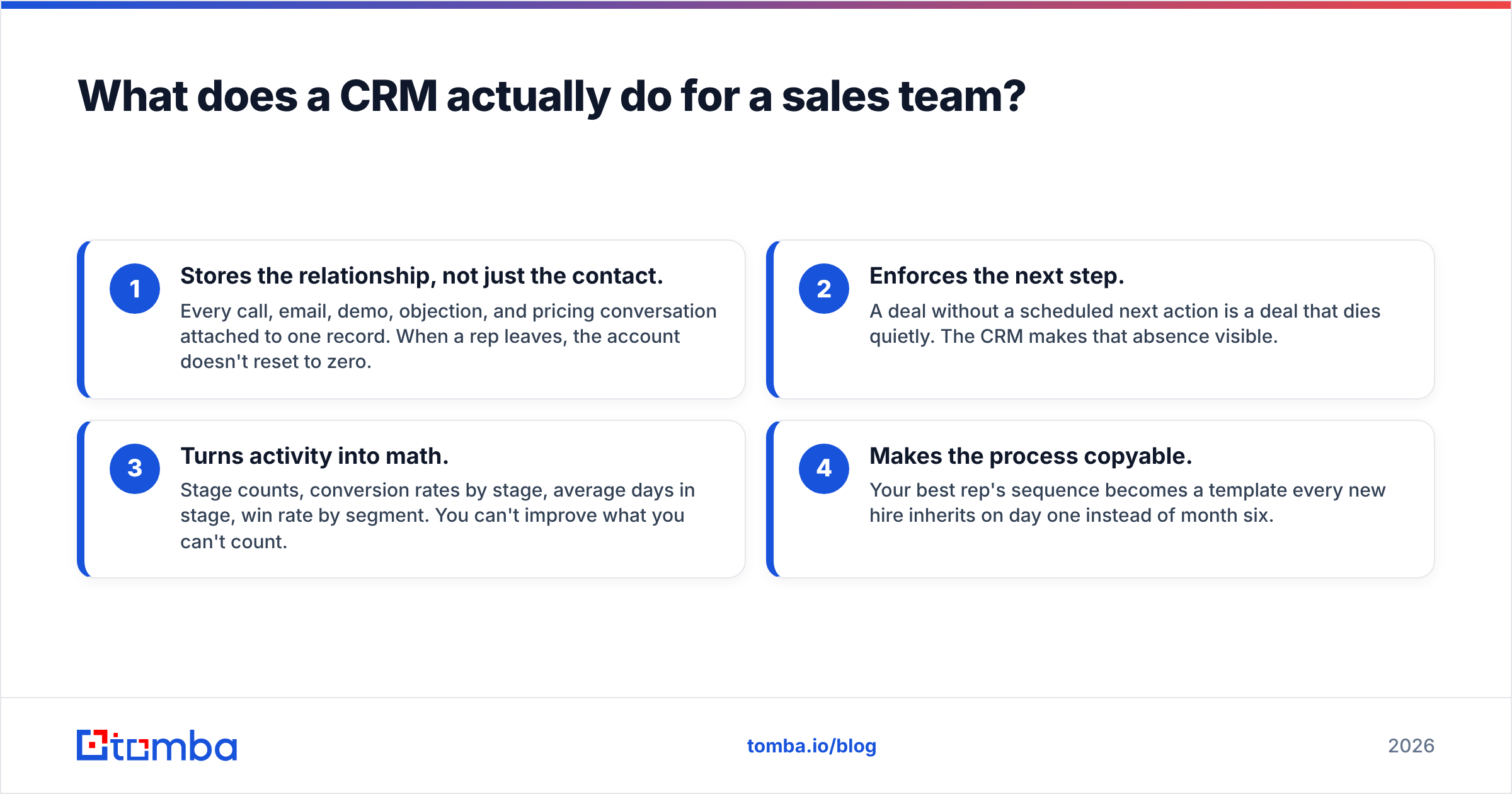
In sales terms, a CRM does four jobs:
- Stores the relationship, not just the contact. Every call, email, demo, objection, and pricing conversation attached to one record. When a rep leaves, the account doesn't reset to zero.
- Enforces the next step. A deal without a scheduled next action is a deal that dies quietly. The CRM makes that absence visible.
- Turns activity into math. Stage counts, conversion rates by stage, average days in stage, win rate by segment. You can't improve what you can't count.
- Makes the process copyable. Your best rep's sequence becomes a template every new hire inherits on day one instead of month six.
Everything else — AI summaries, scoring, dashboards, revenue intelligence — is built on those four. If the base layer is weak, the fancy layer produces confident nonsense.

Image placeholder: side-by-side of a deal record in HubSpot vs. the same deal tracked in a shared spreadsheet — same account, one with 40 logged touchpoints, one with a "last contacted: ?" cell.
How does a CRM help sales reps day to day?#
Ask a rep what a CRM gives them and you'll rarely hear "visibility." You'll hear "I stopped dropping deals."
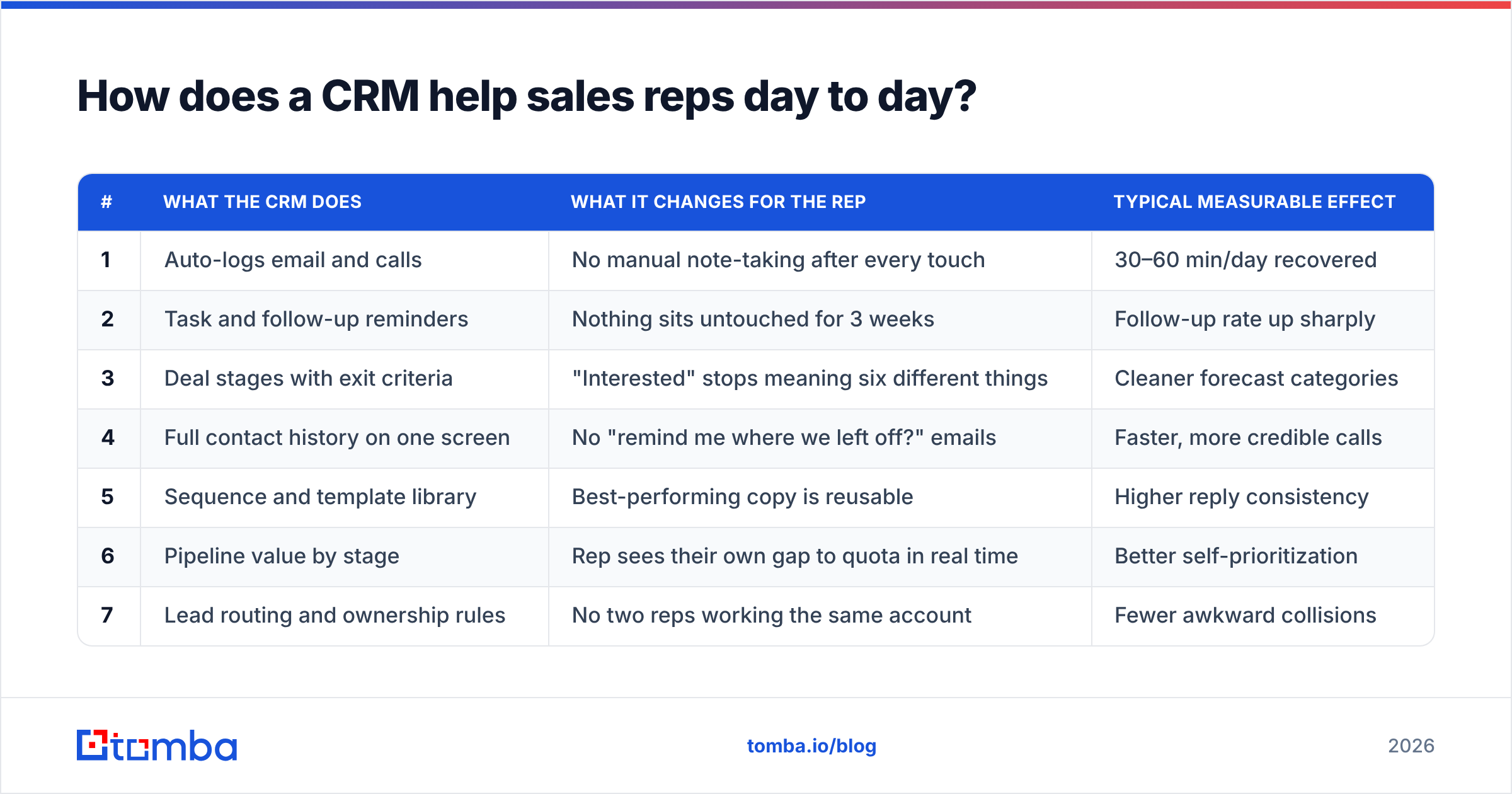
Here are the nine mechanisms that actually move a number:
| # | What the CRM does | What it changes for the rep | Typical measurable effect |
|---|---|---|---|
| 1 | Auto-logs email and calls | No manual note-taking after every touch | 30–60 min/day recovered |
| 2 | Task and follow-up reminders | Nothing sits untouched for 3 weeks | Follow-up rate up sharply |
| 3 | Deal stages with exit criteria | "Interested" stops meaning six different things | Cleaner forecast categories |
| 4 | Full contact history on one screen | No "remind me where we left off?" emails | Faster, more credible calls |
| 5 | Sequence and template library | Best-performing copy is reusable | Higher reply consistency |
| 6 | Pipeline value by stage | Rep sees their own gap to quota in real time | Better self-prioritization |
| 7 | Lead routing and ownership rules | No two reps working the same account | Fewer awkward collisions |
| 8 | Enrichment on the record | Title, company size, tech stack already filled in | Less pre-call research |
| 9 | Handoff trail to CS/AM | Renewal team inherits context, not a blank slate | Lower churn from bad handoffs |
The pattern: every one of these removes a decision or a lookup. A rep making 60 touches a day doesn't need more motivation — they need fewer micro-decisions between touches.
The follow-up point deserves its own paragraph. Most deals are lost to silence, not objections. Reps stop after one or two attempts because there is nothing telling them not to. A CRM with enforced next-step dates converts "I'll circle back sometime" into a dated task that either gets done or shows up red on a manager's screen. That alone is often the largest single lift a first CRM delivers.
How does a CRM help sales managers and forecasting?#
Different job entirely. Reps use a CRM to not forget. Managers use it to not guess.
Without a CRM, a forecast is a survey: you ask seven reps how confident they feel, average their optimism, and present it as a number. With a CRM, a forecast is arithmetic on stage conversion history — and you can audit which assumption broke when you miss.
What managers get specifically:
- Stage-by-stage leak detection. If 70% of demos advance but only 22% of proposals close, your problem is pricing or procurement, not top of funnel. Without stage data you'd have hired more SDRs.
- Cycle-time diagnostics. Average days in "Negotiation" jumping from 11 to 26 is an early warning weeks before the quarter misses.
- Activity-to-outcome correlation. Which activity actually predicts closing — demos booked, multithreading depth, mutual action plans? Only a CRM with clean logging can answer that.
- Coaching from evidence. "Your discovery calls average 9 minutes; the team average is 24" is a coachable fact. "Be more thorough" is not.
- Territory and quota sanity. Pipeline coverage ratio per rep, visible before the quarter, not after.
This is the revenue operations layer. It only works if the underlying records are complete — which is exactly where most CRM projects fail.
Is a CRM worth it for a small sales team?#
Yes, at a lower threshold than most people assume — roughly the point where one person can no longer hold every open deal in their head. In practice that's around 25–40 active opportunities, or the moment you hire a second rep.
Below that, a well-maintained spreadsheet genuinely works. Above it, you start losing deals to forgetting, and the cost of forgetting exceeds the cost of the tool very fast.
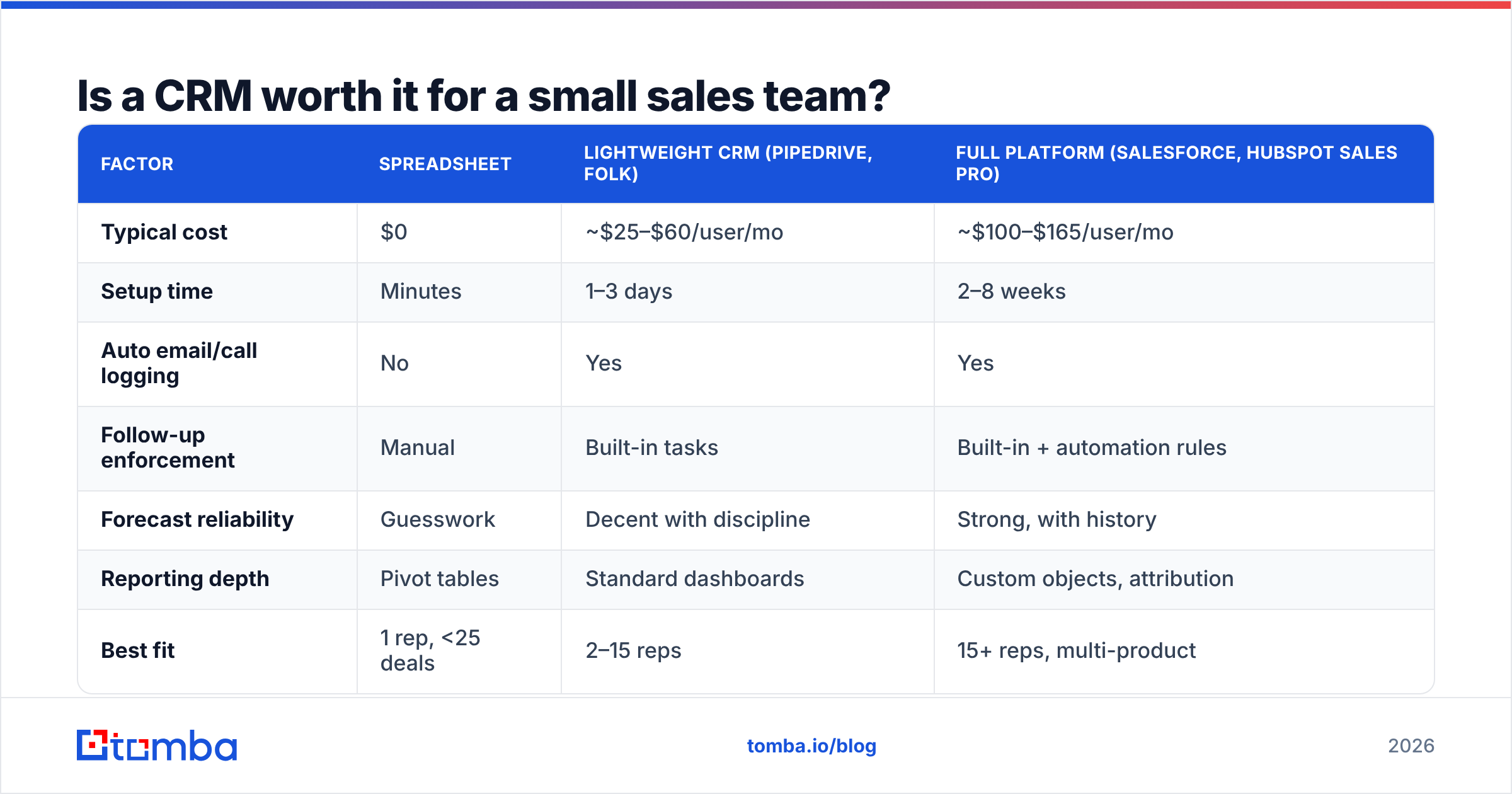
Here's the honest comparison across the three ways teams actually track deals:
| Factor | Spreadsheet | Lightweight CRM (Pipedrive, Folk) | Full platform (Salesforce, HubSpot Sales Pro) |
|---|---|---|---|
| Typical cost | $0 | ~$25–$60/user/mo | ~$100–$165/user/mo |
| Setup time | Minutes | 1–3 days | 2–8 weeks |
| Auto email/call logging | No | Yes | Yes |
| Follow-up enforcement | Manual | Built-in tasks | Built-in + automation rules |
| Forecast reliability | Guesswork | Decent with discipline | Strong, with history |
| Reporting depth | Pivot tables | Standard dashboards | Custom objects, attribution |
| Best fit | 1 rep, <25 deals | 2–15 reps | 15+ reps, multi-product |
| Failure mode | Version drift, lost history | Outgrown at ~20 reps | Over-configured, low adoption |
Note the failure modes. The most common CRM disaster isn't picking the wrong tool — it's buying the enterprise platform for a five-person team and spending six weeks configuring fields nobody fills in.
Also worth knowing: Gartner's CRM research consistently finds adoption, not feature count, separates the teams that get ROI from the ones that write off the license.
What can a CRM not fix?#
Three things, and pretending otherwise is how CRM projects get abandoned in month four.
1. Bad data. A CRM is a container. If your contact records have bounced emails, wrong titles, and companies that were acquired two years ago, the CRM will faithfully store and report on garbage. Every dashboard downstream inherits the error. This is the biggest one and it's fixable — see the next section.
2. Bad targeting. No pipeline view rescues a team calling the wrong segment. If your ICP is wrong, the CRM just documents the failure in higher resolution.
3. Bad process. A CRM encodes whatever process you give it. If your stages are "Interested," "Very Interested," and "Waiting," you now have those meaningless categories in a database instead of a notebook. Define exit criteria per stage first — a specific, verifiable event that moves a deal forward — then configure.
There's a fourth, softer one: a CRM does not create urgency. Reps adopt a CRM when it saves them time in the next hour, not when a manager mandates it. Any field that only serves reporting and never helps the rep will be filled in with junk.
How do you keep CRM data clean enough to trust?#
This is where most of the actual ROI lives, and it's the least glamorous part.
The decay math is brutal. B2B contact data goes stale at roughly 25–30% per year — people change jobs, companies rebrand, domains migrate. A CRM you populated cleanly in January is meaningfully wrong by December if nothing refreshes it. HubSpot's own research puts marketing database decay in the same range.
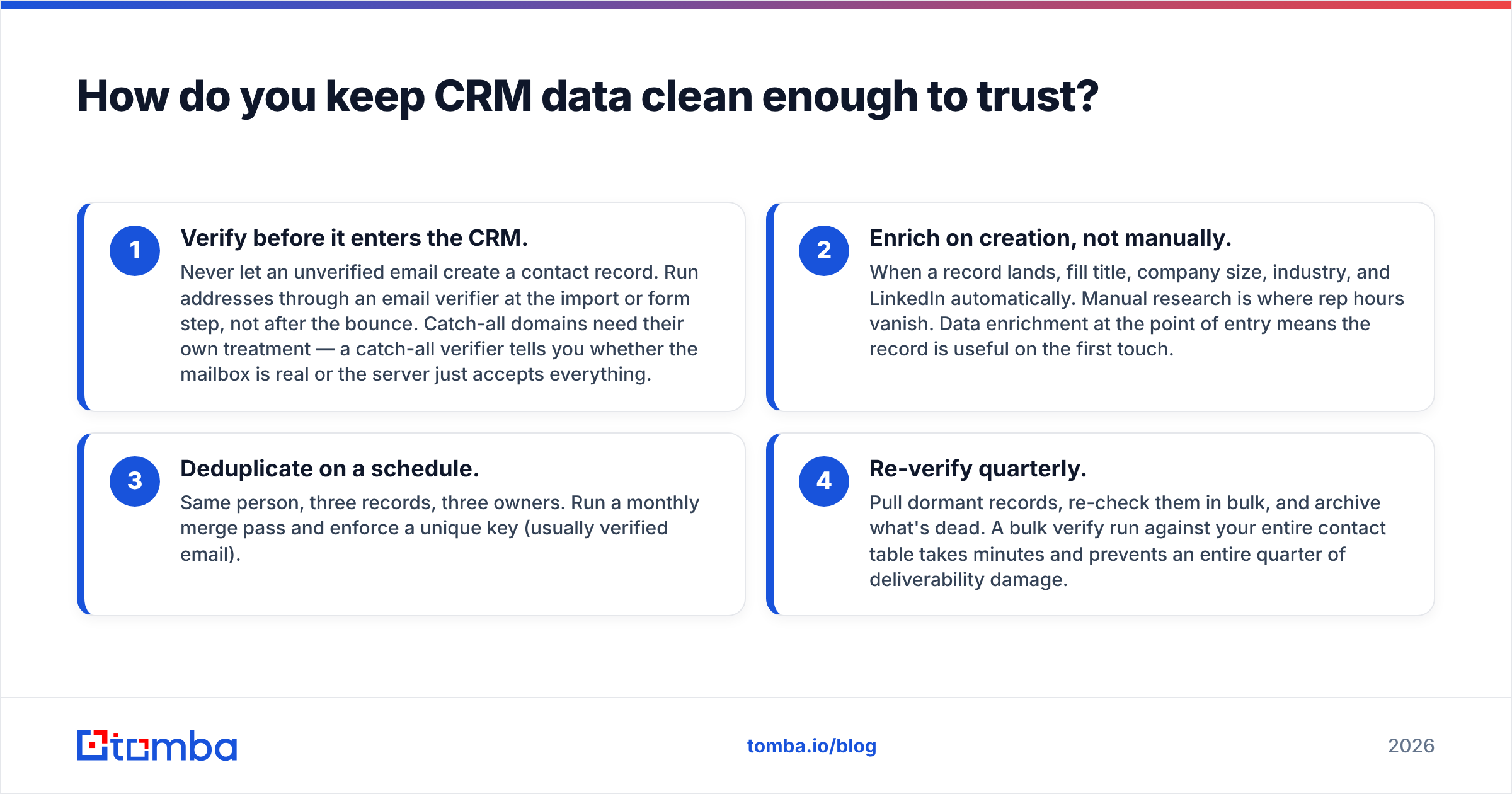
Four practices that hold the line:
- Verify before it enters the CRM. Never let an unverified email create a contact record. Run addresses through an email verifier at the import or form step, not after the bounce. Catch-all domains need their own treatment — a catch-all verifier tells you whether the mailbox is real or the server just accepts everything.
- Enrich on creation, not manually. When a record lands, fill title, company size, industry, and LinkedIn automatically. Manual research is where rep hours vanish. Data enrichment at the point of entry means the record is useful on the first touch.
- Deduplicate on a schedule. Same person, three records, three owners. Run a monthly merge pass and enforce a unique key (usually verified email).
- Re-verify quarterly. Pull dormant records, re-check them in bulk, and archive what's dead. A bulk verify run against your entire contact table takes minutes and prevents an entire quarter of deliverability damage.
That last point connects directly to sending. High bounce rates from stale CRM records hurt email deliverability for every campaign you run afterward, including from clean addresses. Dirty CRM data isn't just a reporting problem — it degrades your ability to reach anyone.

Image placeholder: a CRM contact record before and after enrichment — left side showing three filled fields, right side showing verified email, direct dial, title, headcount, and tech stack.
How do you connect a CRM to your prospecting stack?#
The CRM should be the destination, not the data source. Prospecting tools find and verify; the CRM stores and sequences. Keeping that boundary clear prevents the most common mess — reps doing research inside the CRM, half-finishing it, and leaving partial records everywhere.
A working setup looks like this:
- Find — sourcing tools identify accounts and people at the accounts. A domain search returns every known email at a target company plus the pattern the company uses, so you can build a full org map instead of one contact.
- Verify — every address is validated before it becomes a record. This is non-negotiable if you send cold email.
- Enrich — titles, headcount, phone numbers, socials appended automatically. A phone finder matters more than people expect now that email response rates have compressed.
- Push — records land in the CRM already complete. Native connectors matter here: check the HubSpot integration or Salesforce integration so nothing routes through a CSV.
- Sequence — the CRM or your sequencer takes over. From here the CRM's job is reminders, logging, and stage math.
For teams running this at volume, the API path is cleaner than any UI. Piping the email finder API into your CRM's webhook on record creation means enrichment happens in under a second and no rep ever tabs away to research a lead.
One caution on data vendors: purchased lists and platform-sourced contacts vary wildly in accuracy. Providers like BookYourData publish verified-at-purchase datasets that suit teams wanting a bulk starting point, while search-based finders suit teams building lists account by account. Both approaches work; the failure is skipping verification because a vendor said the data was clean. Verify at ingest regardless of source.
What does a good CRM rollout look like in the first 30 days?#
Small, enforced, and boring. Ambitious rollouts fail.
Week 1 — Define the process on paper. Three to five stages maximum. Each stage gets an exit criterion that is an observable event ("prospect confirmed budget owner attends next call"), not a feeling. Write it down before touching any settings.
Week 2 — Configure the minimum. Five required fields, not twenty. Pipeline, stages, owner, next step date, deal value. Turn on email and calendar sync. Skip custom objects, skip scoring, skip the seventeen-field qualification form.
Week 3 — Import clean data only. Verify and enrich everything on the way in. Do not migrate the old spreadsheet wholesale — migrate the accounts that are actually live, and archive the rest. A bad first import poisons trust permanently; reps who see three wrong records stop believing the fourth.
Week 4 — Enforce one rule. Every open deal has a dated next step. That's it. Managers run pipeline review off that single rule. Add automation, scoring, and dashboards only after this rule holds for a full month.
The reason to sequence it this way: adoption is a habit, and habits form around a single repeated action. Give reps twenty new behaviors and they'll adopt zero. Give them one that visibly saves them from losing a deal, and the rest gets easier.
The bottom line#
A CRM helps sales by removing the memory tax, exposing where the pipeline leaks, and making one rep's good habits the whole team's default. It does not fix targeting, process, or data quality — and of those three, data quality is the one you can solve this week.
Start by making sure everything entering your CRM is real. Use the Tomba Email Finder to source verified professional emails by name, domain, or company, then push complete records straight into HubSpot, Salesforce, or Pipedrive through the native integrations. The free tier gives you 25 searches a month to test the workflow; paid plans start at $49/mo on Starter and $99/mo on Growth, with full details on Tomba pricing. Clean records in means a forecast you can actually defend at the end of the quarter.
Related guides#
Ready to find emails that actually work?
Join 150,000+ professionals who stopped guessing and started sending. Free credits on signup — no credit card required.
Get the Tomba newsletter
Practical outbound tactics and product updates — once every two weeks.
About the author