How Email Validation Helps Avoid Spam Traps (2026 Guide)
Spam traps do not bounce, do not complain, and do not unsubscribe. Here is exactly which trap types email validation catches, which ones it cannot, and the hygiene rules that close the gap.
How email validation helps avoid spam traps is easy to state and easy to get wrong. Validation removes the addresses that decay into traps. It cannot remove the traps you bought. Here is where that line falls.
TL;DR
- Spam traps are addresses that exist and accept mail — so they never bounce, never complain, and never unsubscribe. Your open-rate dashboard will not warn you.
- Email validation removes the two categories that feed most trap hits: dead mailboxes and typo domains. That alone cuts most recycled-trap exposure.
- Validation cannot detect a pristine trap from an SMTP response. No vendor can. Any "spam trap detector" that claims otherwise is overselling.
- The real defense is layered: verify at capture, re-verify before every send, suppress by engagement age, and never mail purchased lists you did not source yourself.
- Budget roughly $0.001–$0.007 per verification. One Spamhaus listing costs far more in lost pipeline than a year of list hygiene.
What is a spam trap, and why does it not show up in your metrics?#
A spam trap is a working mailbox that no human reads. Mailbox providers and blocklist operators plant them to catch senders who mail addresses they never earned permission from. Think of it like a marked bill in a bank drawer: it spends exactly like every other note, so the thief has no idea anything is different until it turns up in evidence.
That is the whole problem. A trap accepts your message with a clean 250 OK. Your ESP records a delivery. Nobody clicks unsubscribe. Nobody files a complaint. From inside your dashboard, a list with 40 traps looks identical to a clean list — right up until inbox placement quietly collapses and your domain appears on a blocklist.
Spamhaus, the most consequential of the blocklist operators, runs enormous trap networks. Traps give them a signal no other method does: proof that a sender is mailing addresses that could not possibly have opted in. The Wikipedia entry on spamtraps is a decent primer on the mechanics if you want the neutral technical version.
Understanding how validation intersects with each trap type is the difference between hygiene that works and hygiene that just burns credits.
What are the four spam trap types, and which ones can validation catch?#
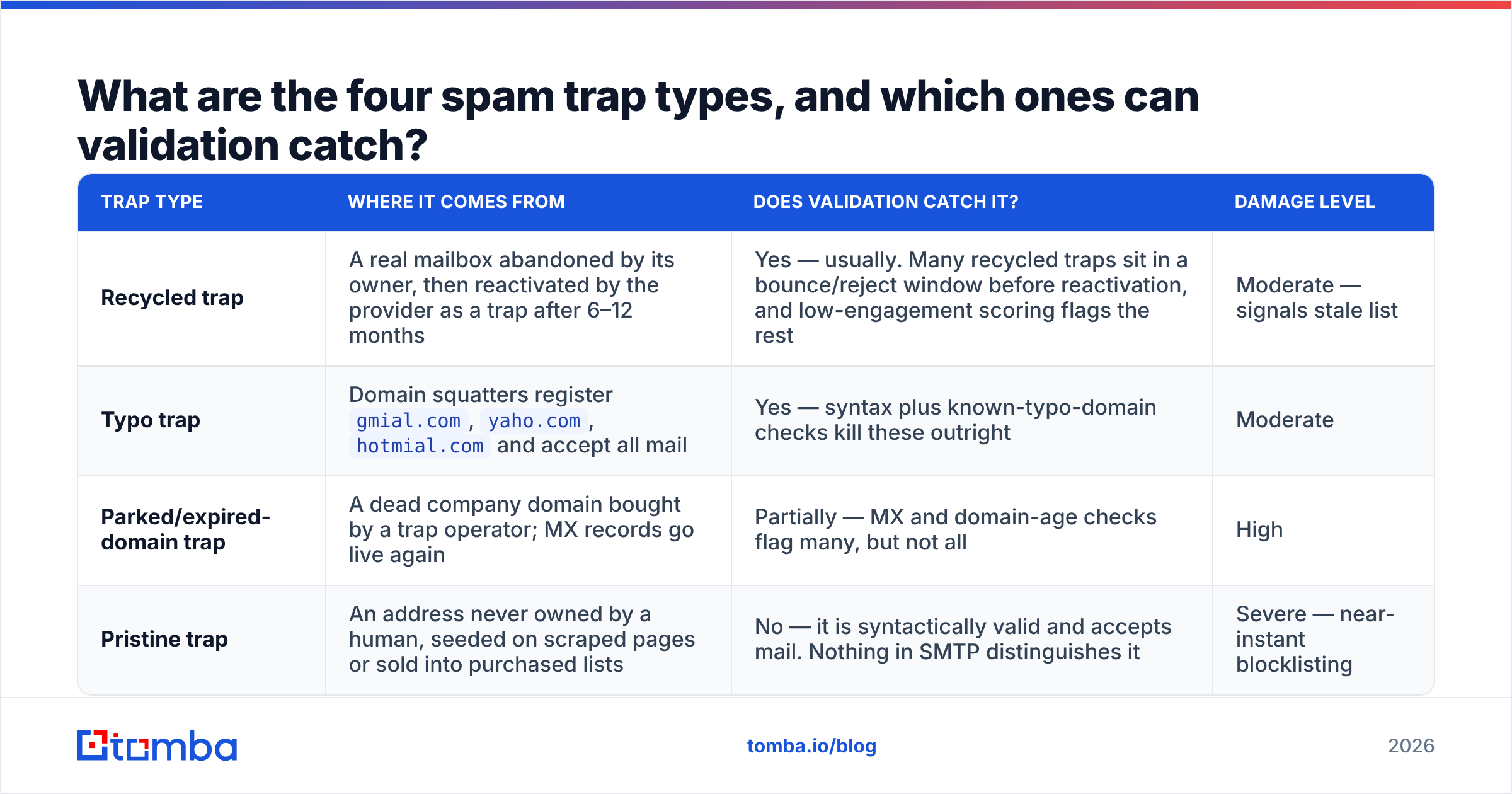
Not all traps are equal, and this is where most "does email verification stop spam traps?" advice goes wrong. Verification is excellent against two of the four types and structurally blind to a third.
| Trap type | Where it comes from | Does validation catch it? | Damage level |
|---|---|---|---|
| Recycled trap | A real mailbox abandoned by its owner, then reactivated by the provider as a trap after 6–12 months | Yes — usually. Many recycled traps sit in a bounce/reject window before reactivation, and low-engagement scoring flags the rest | Moderate — signals stale list |
| Typo trap | Domain squatters register gmial.com, yaho.com, hotmial.com and accept all mail |
Yes — syntax plus known-typo-domain checks kill these outright | Moderate |
| Parked/expired-domain trap | A dead company domain bought by a trap operator; MX records go live again | Partially — MX and domain-age checks flag many, but not all | High |
| Pristine trap | An address never owned by a human, seeded on scraped pages or sold into purchased lists | No — it is syntactically valid and accepts mail. Nothing in SMTP distinguishes it | Severe — near-instant blocklisting |
Read that table honestly: validation is a filter, not a force field. It removes the trap categories created by decay and human error. It cannot remove the category created by you acquiring a list you had no right to. That is the honest boundary of how email validation helps avoid spam traps.
That distinction matters for how you spend money. Verification spend fixes decay. Sourcing discipline fixes pristine traps. Neither substitutes for the other.

How email validation helps avoid spam traps, layer by layer#
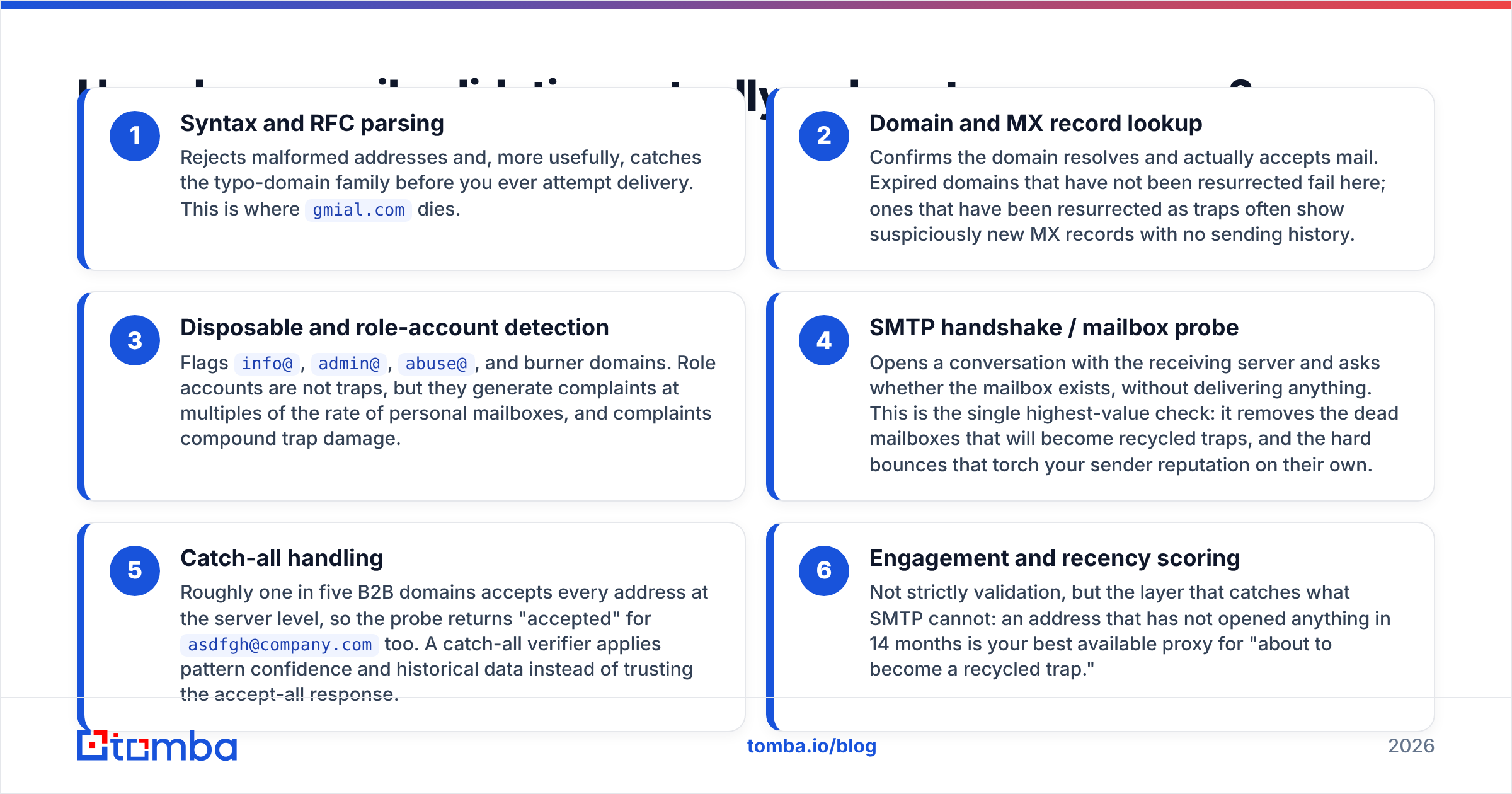
An email verification pass is a stack of checks running in sequence. Each one is cheaper and faster than the one after it. Here is what each layer contributes to trap avoidance.
Checks that run before delivery is ever attempted:
- Syntax and RFC parsing — Rejects malformed addresses. More usefully, it catches the typo-domain family before you attempt delivery. This is where
gmial.comdies. - Domain and MX record lookup — Confirms the domain resolves and accepts mail. Expired domains that have not been resurrected fail here. Ones resurrected as traps often show suspiciously new MX records with no sending history.
- Disposable and role-account detection — Flags
info@,admin@,abuse@, and burner domains. Role accounts are not traps, but they complain at multiples of the rate of personal mailboxes, and complaints compound trap damage.
Checks that run against the receiving server:
- SMTP handshake / mailbox probe — Opens a conversation with the receiving server and asks whether the mailbox exists, without delivering anything. This is the highest-value check. It removes the dead mailboxes that become recycled traps, plus the hard bounces that torch your sender reputation on their own.
- Catch-all handling — Roughly one in five B2B domains accepts every address at the server level, so the probe returns "accepted" for
asdfgh@company.comtoo. A catch-all verifier applies pattern confidence and historical data instead of trusting that response. - Engagement and recency scoring — Not strictly validation, but it catches what SMTP cannot. An address that has not opened anything in 14 months is your best proxy for "about to become a recycled trap."
The compounding effect is what matters. A list run through all six layers has a lower bounce rate, a lower complaint rate, and a smaller recycled-trap population. Those three metrics decide whether a blocklist operator cares about your pristine-trap hit in the first place.
Is a cheap verifier good enough, or do you need a full hygiene stack?#
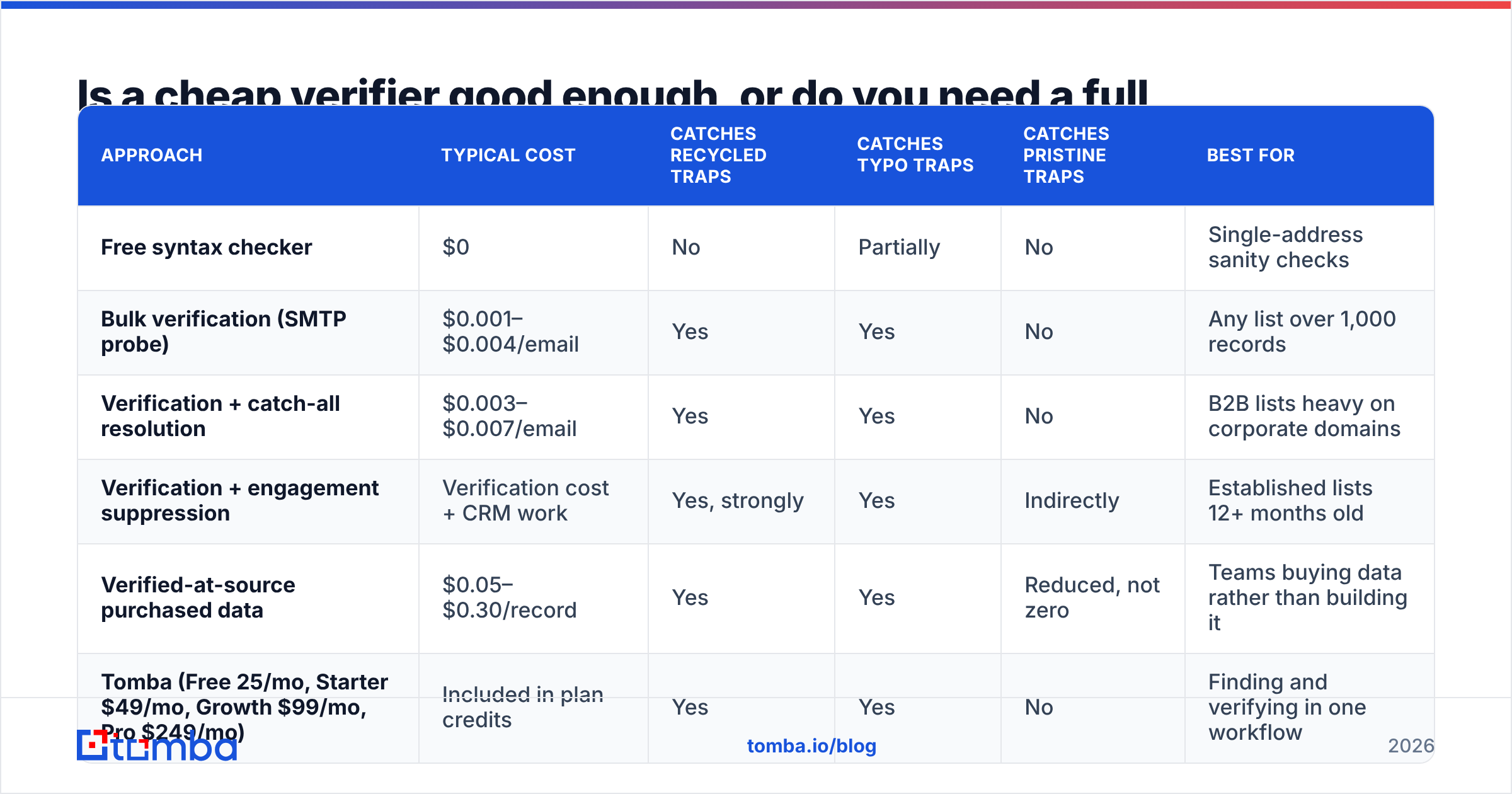
Depends entirely on where your addresses come from. Here is the honest cost-versus-coverage comparison.
| Approach | Typical cost | Catches recycled traps | Catches typo traps | Catches pristine traps | Best for |
|---|---|---|---|---|---|
| Free syntax checker | $0 | No | Partially | No | Single-address sanity checks |
| Bulk verification (SMTP probe) | $0.001–$0.004/email | Yes | Yes | No | Any list over 1,000 records |
| Verification + catch-all resolution | $0.003–$0.007/email | Yes | Yes | No | B2B lists heavy on corporate domains |
| Verification + engagement suppression | Verification cost + CRM work | Yes, strongly | Yes | Indirectly | Established lists 12+ months old |
| Verified-at-source purchased data | $0.05–$0.30/record | Yes | Yes | Reduced, not zero | Teams buying data rather than building it |
| Tomba (Free 25/mo, Starter $49/mo, Growth $99/mo, Pro $249/mo) | Included in plan credits | Yes | Yes | No | Finding and verifying in one workflow |
Two things worth calling out from that table.
First, the free syntax checkers are fine for what they are — a free email checker is genuinely useful when you have one address and a question. But they do not open an SMTP connection, so they tell you nothing about whether a mailbox is alive.
Second, on purchased data: buying a list is where pristine traps enter your database. Not all vendors are equal, though. Some verify at the point of collection and re-verify on a schedule — BookYourData is a reasonable example of the compliant end of that market — and they carry far lower trap density than the $99-for-10-million-records sellers. If you buy data, buy from someone who will tell you when and how each record was verified. If they cannot answer that, the price is not the price.

How do you build a workflow that keeps traps out permanently?#
One-time cleanup is theater. Traps regenerate because lists decay. B2B email data goes stale at roughly 2–2.5% per month as people change jobs, so a list you cleaned in January is meaningfully dirty by summer.
Build these four checkpoints instead. They are how email validation helps avoid spam traps permanently rather than once.
At capture. Validate in real time on the form. An API call at signup costs a fraction of a cent and prevents the typo trap from ever entering the database. If you collect addresses through forms, this is the highest-ROI place to spend. The Tomba API or any equivalent real-time endpoint handles this in under a second.
At import. Every list that arrives from an event, a partner, a scrape, or a data vendor goes through bulk verify before it touches your sending platform. No exceptions, including for lists the vendor swears are already clean. Vendor-clean and your-ESP-clean are different standards.
Before each campaign. Re-verify any segment you have not mailed in 90 days. This checkpoint catches recycled traps specifically. The SMTP probe now returns a rejection for mailboxes the provider has deactivated — the window before reactivation as a trap.
Continuously, by engagement. Suppress anyone with zero opens or clicks in 6 months from your main sends. Run them in a separate low-volume re-engagement stream, on a separate subdomain if you can, and delete them if that fails. Validation cannot tell you a mailbox is unread; engagement data can.
Then instrument the result. Google Postmaster Tools gives you domain reputation, spam rate, and authentication pass rates for Gmail recipients at no cost. Gmail reputation dropping from High to Medium is your earliest warning that something in the list is wrong. Pair it with a periodic blacklist checker run against your sending IP and domain, so you learn about a listing from your own monitoring rather than from a confused rep asking why nobody is replying.
For the broader mechanics of how all of this rolls up into inbox placement, the email deliverability fundamentals are worth a read alongside this.
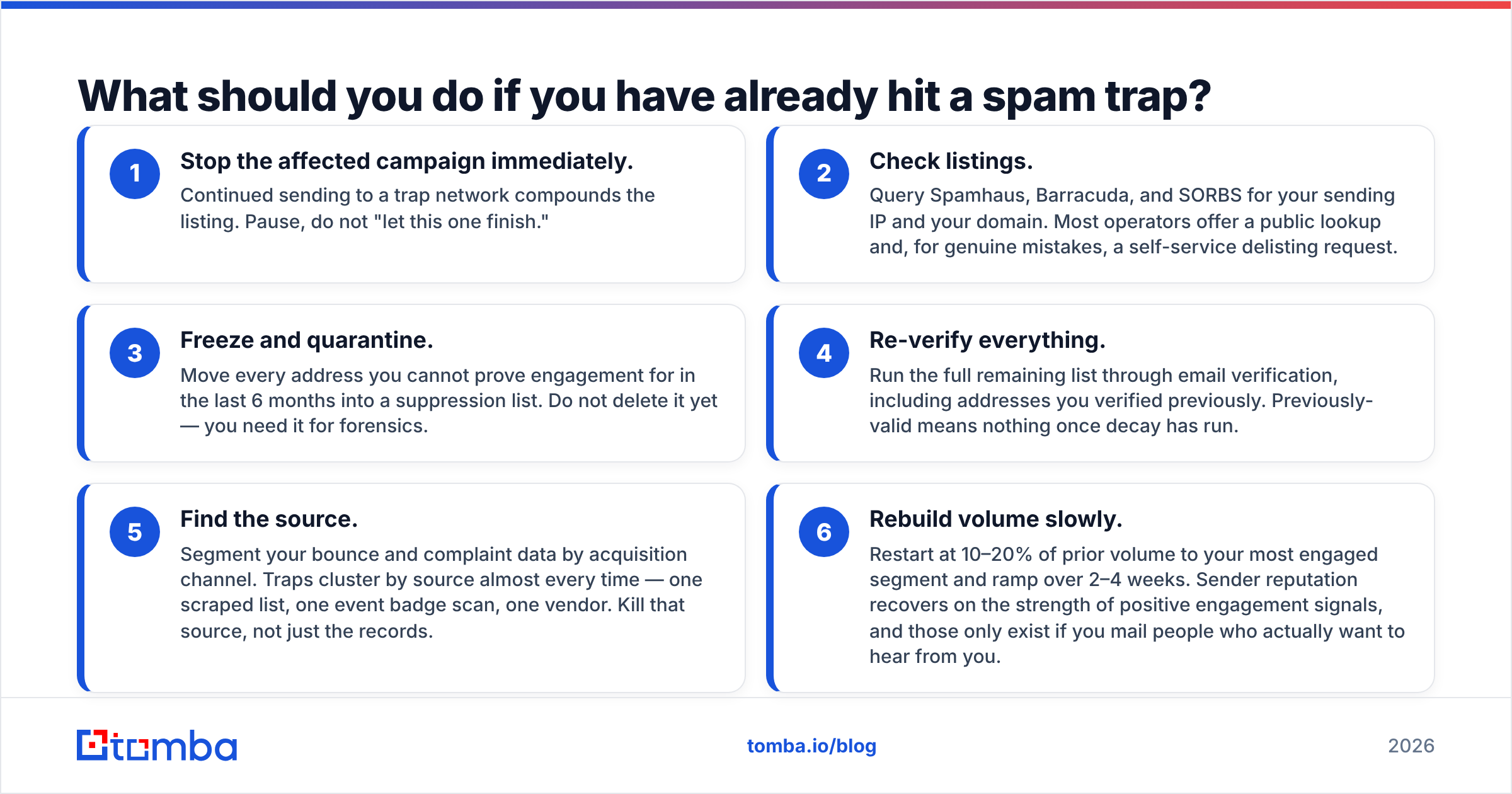
What should you do if you have already hit a spam trap?#
Assume you have. If you have been mailing B2B lists for more than a year without systematic hygiene, the question is how many, not whether.
Contain it first:
- Stop the affected campaign immediately. Continued sending to a trap network compounds the listing. Pause, do not "let this one finish."
- Check listings. Query Spamhaus, Barracuda, and SORBS for your sending IP and your domain. Most operators offer a public lookup and, for genuine mistakes, a self-service delisting request.
- Freeze and quarantine. Move every address you cannot prove engagement for in the last 6 months into a suppression list. Do not delete it yet — you need it for forensics.
Then rebuild:
- Re-verify everything. Run the full remaining list through email verification, including addresses you verified previously. Previously-valid means nothing once decay has run.
- Find the source. Segment your bounce and complaint data by acquisition channel. Traps cluster by source almost every time — one scraped list, one event badge scan, one vendor. Kill that source, not just the records.
- Rebuild volume slowly. Restart at 10–20% of prior volume to your most engaged segment and ramp over 2–4 weeks. Sender reputation recovers on positive engagement signals, and those only exist if you mail people who want to hear from you.
Delisting typically takes days to weeks for a first offense with a credible remediation story. Repeat listings are a different conversation, and the operators have long memories.
Does validation replace permission, or just supplement it?#
It supplements it. This is the part worth being blunt about, because a lot of vendor content implies otherwise.
Verification tells you an address can receive mail. It cannot tell you whether a human at that address wants your mail. Those are separate questions, and only the second one decides whether your program survives. A perfectly verified list of 50,000 scraped addresses will still get you blocklisted. Pristine traps are seeded exactly where scrapers look, and complaint rates on unsolicited mail dwarf the tolerance threshold at every major mailbox provider.
The order of operations that actually works: source addresses you can justify, find them accurately, verify them before sending, then keep verifying as they decay. Skip step one and no amount of steps two through four will save you.
That is also why finding and verifying belong in the same workflow. Pulling a contact from a company's own domain search gives you a real person, at a real company, in a role that plausibly cares about what you sell. That is a fundamentally different trap risk profile than a bulk file, regardless of how thoroughly either one gets verified afterward.
Ready to clean the list before it costs you the domain?#
If your current process is "export, upload, send, hope," start with a single audit run. Take the segment you have not mailed in six months, push it through the Tomba Email Finder and verifier workflow, and look at what percentage comes back invalid or catch-all-risky. The number is usually higher than teams expect, and it is a direct proxy for how much recycled-trap exposure is sitting in your database.
The free tier gives you 25 searches a month to test the accuracy on addresses you can independently confirm. Paid plans start at $49/mo with bulk processing, catch-all resolution, and API access for form-level validation. Full Tomba pricing is public if you want to model the per-record cost against your list size. Run the math against the alternative first: a week of blocked sending costs more than a year of verification, every time.
Related guides#
Ready to find emails that actually work?
Join 150,000+ professionals who stopped guessing and started sending. Free credits on signup — no credit card required.
Get the Tomba newsletter
Practical outbound tactics and product updates — once every two weeks.
About the author