How Long Should a Cold Email Be? Word Counts That Get Replies
Most cold emails die because they ask a stranger for five minutes of reading before earning thirty seconds. Here are the word counts that actually get replies in 2026, and a repeatable method for cutting any draft down to them.
TL;DR
- The reliable range for a first-touch cold email is 50-125 words, with 75-100 as the sweet spot for most B2B outbound.
- Length is a symptom, not the disease. Long emails are usually long because the sender hasn't decided what one thing they want.
- Anything past ~150 words shifts the reader from "skim and decide" into "read later" — which means never.
- Mobile is the real constraint: roughly 40-50% of B2B email opens happen on a phone, where 125 words is already three scrolls.
- Short emails to the wrong person still fail. Get the targeting and the address right first, then compress.
How long should a cold email be, exactly?#
50-125 words for the first touch. 75-100 if you want a single number.
That range isn't arbitrary. It's the amount of text a busy person can process in the 8-12 seconds they give an unknown sender before deciding to reply, archive, or report. Below 50 words you usually haven't established why you're relevant. Above 125 you've asked for a reading commitment you haven't earned.
Practically, that means:
- 3-5 short paragraphs, never more than two sentences each
- One ask, not three
- One proof point, not a case-study paragraph
- Zero attachments and at most one link
The teams that hit this consistently aren't better writers. They just made a decision before opening the editor: what single response do I want from this email? Once that's fixed, the word count collapses on its own.
Why do shorter cold emails get more replies?#
Because a cold email isn't a pitch — it's an application for a conversation.
Think of it like a cover letter versus a résumé. Nobody hires from the cover letter. Its only job is to get the résumé read. A cold email works the same way: its only job is to earn a reply, a call, or a "send me more." Every sentence that doesn't move the reader toward that action is drag.
There are three mechanical reasons short wins:
1. Skimming, not reading. Recipients scan the first line, the ask, and the sign-off. A 300-word email doesn't get read at one-third speed; it gets scanned at the same speed with more skipped. You lose control of what they see.
2. Mobile rendering. On a phone, 125 words is already a scroll-and-a-half after the signature block. Two more paragraphs and your call to action lands below three swipes. Nobody swipes for a stranger.
3. Spam signals. Long, link-heavy, image-heavy emails from a new sending domain look structurally like bulk mail. Filters weigh content patterns alongside authentication. A 90-word plain-text email from a warmed domain with clean SPF records reads as person-to-person; a 400-word HTML block with three CTAs does not.
Gong's research on sales conversations makes a related point about calls that transfers cleanly to email: the reps who win talk less and ask more. Gong has published repeatedly on how discovery — not monologue — drives outcomes. Cold email is the same trade in text.
What does each cold email length actually do?#
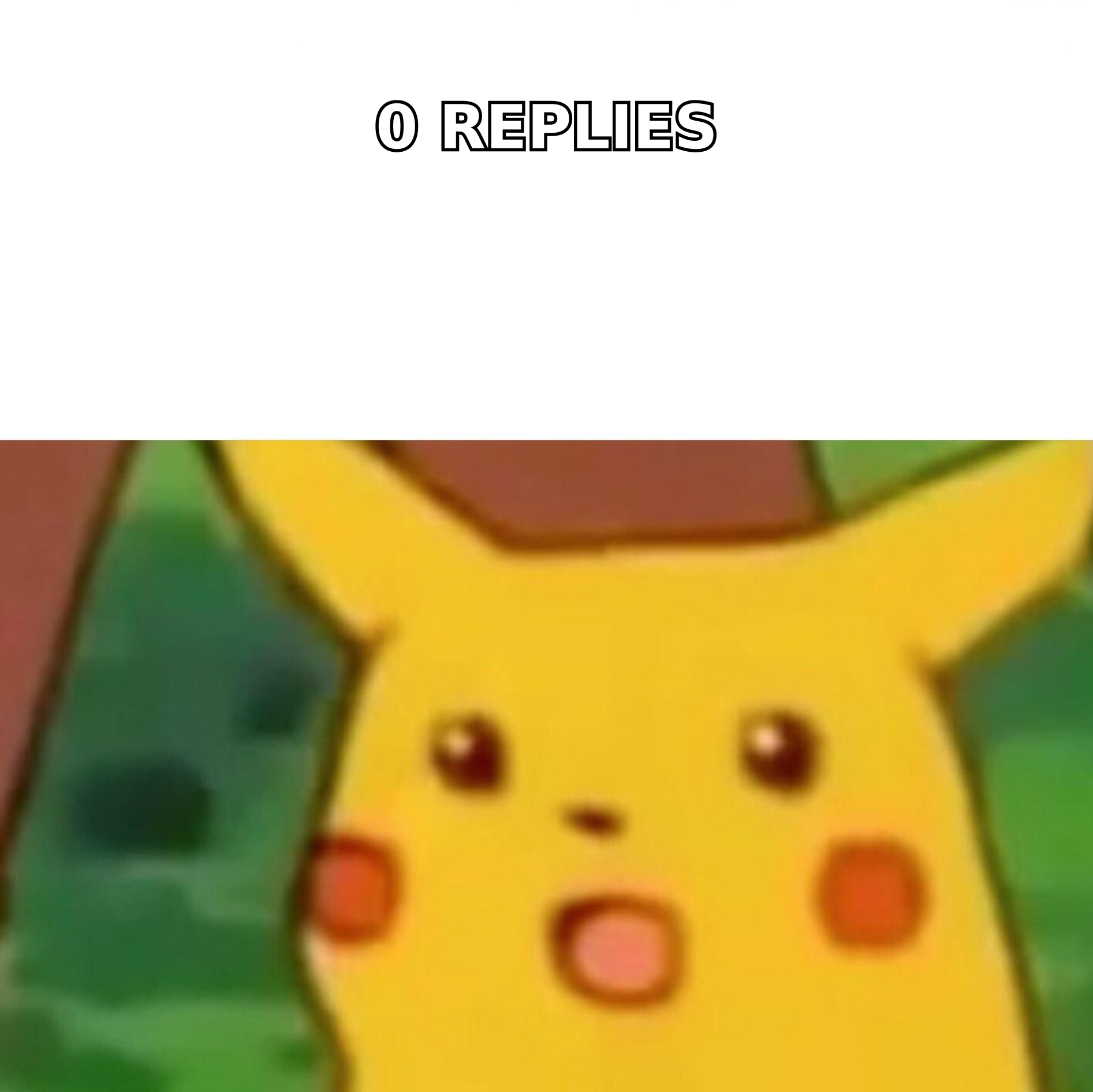
Different lengths solve different problems. The mistake isn't writing long — it's writing long at the wrong stage.
| Length | Best use | Typical reply behavior | Risk |
|---|---|---|---|
| 25-50 words | Follow-up 2-4, warm intro, referral ask | High reply rate, low information transfer | Reads as low-effort if it's the first touch |
| 50-75 words | First touch to a busy exec (VP+, C-level) | Strong on mobile, forces one clear ask | Not enough room for a non-obvious value prop |
| 75-125 words | Default first touch for most B2B outbound | Best balance of context and skimmability | None if disciplined; creeps to 150 fast |
| 125-200 words | Complex/technical product, senior buyer who asked for detail | Lower reply rate, higher reply quality | Needs strong relevance or it's deleted unread |
| 200+ words | Post-call recap, proposal follow-up, inbound response | Fine — the relationship already exists | Fails almost always as a cold first touch |
Read that table as a decision tool, not a scoreboard. A 180-word email to a CTO who just published a post about the exact problem you solve can outperform a 60-word template blasted to 3,000 contacts. Length is a lever you pull after you've earned the right to send.
What should a 75-word cold email contain?#
Five components, in this order. If a sentence doesn't belong to one of them, delete it.
- The relevance hook (1 sentence). Why this person, right now. A hiring signal, a funding round, a tool in their stack, a post they wrote. Not "I came across your profile" — that's a filler sentence pretending to be personalization.
- The problem framing (1-2 sentences). State the pain in their language, not your feature language. "Your SDRs are rebuilding lists every month" beats "our platform offers data enrichment."
- The proof (1 sentence). One number, one comparable company, one outcome. "Cut list-building from 6 hours to 40 minutes for a 12-rep team at [Company]." Resist the urge to add a second.
- The ask (1 sentence). Specific, small, and answerable with one word. "Worth a look?" or "Want the 90-second breakdown?" A 30-minute demo request is a big ask from a stranger.
- The exit (optional, short). A one-line opt-out reads as confident, not desperate. "If this isn't your area, happy to stop here."
That's it. Five sentences, roughly 75-90 words, and it survives a phone screen without scrolling.
Does length matter more than relevance?#
No — and this is where most "shorter is better" advice goes wrong.
Length is a multiplier on relevance, not a substitute for it. A perfectly compressed 60-word email sent to a person who doesn't own the problem gets the same result as a 400-word one: nothing. The variable that dominates email response rate is whether the recipient recognizes themselves in the first line.
The order of operations that actually works:
- Targeting first. Define the trigger, the role, and the company profile before writing a word.
- Deliverability second. A short email in the spam folder is still a zero. Authenticate the domain, warm it properly, keep volume sane.
- Data quality third. Bounces destroy sender reputation faster than bad copy does. Run every list through an email verifier before the first send, and treat catch-all domains as their own category rather than assuming they're valid.
- Length last. Compress once the other three are solid.
Teams that reverse this order spend weeks A/B testing subject lines on a list that was 22% invalid to begin with. HubSpot's sales blog covers the same sequencing problem in depth — see their sales resources for the broader outbound framework.
How do you cut a 200-word draft to 90 words?#
Write long, then cut. Editing down beats trying to write short on the first pass — you'll under-explain and end up vague.
Run these six passes in order. Each one is mechanical, so it works even at 6 p.m. on a Friday.
- Delete the throat-clearing. "I hope this email finds you well," "I wanted to reach out," "My name is X and I'm the Y at Z." That's typically 25-35 words gone in one keystroke. Your signature already says who you are.
- Cut every adjective pair. "Powerful, intuitive platform" becomes "platform." Adjectives are what you write when you don't have a number.
- Kill the second proof point. You wrote two because you weren't sure which lands. Pick the one closest to their industry and delete the other. Test the other in follow-up 2.
- Collapse compound sentences. Any sentence with "and also," "which means that," or a semicolon is two sentences pretending to be one. Split them, then delete the weaker half.
- Reduce to one link, zero attachments. Multiple links dilute the click and raise spam risk. Attachments from unknown senders get stripped or flagged outright.
- Read it on your phone. Send the draft to yourself. If the CTA isn't visible without scrolling past the signature, cut another 20 words.
A 200-word draft usually lands between 85 and 110 words after this. If it doesn't, you're trying to sell two things in one email — split it into two sends.
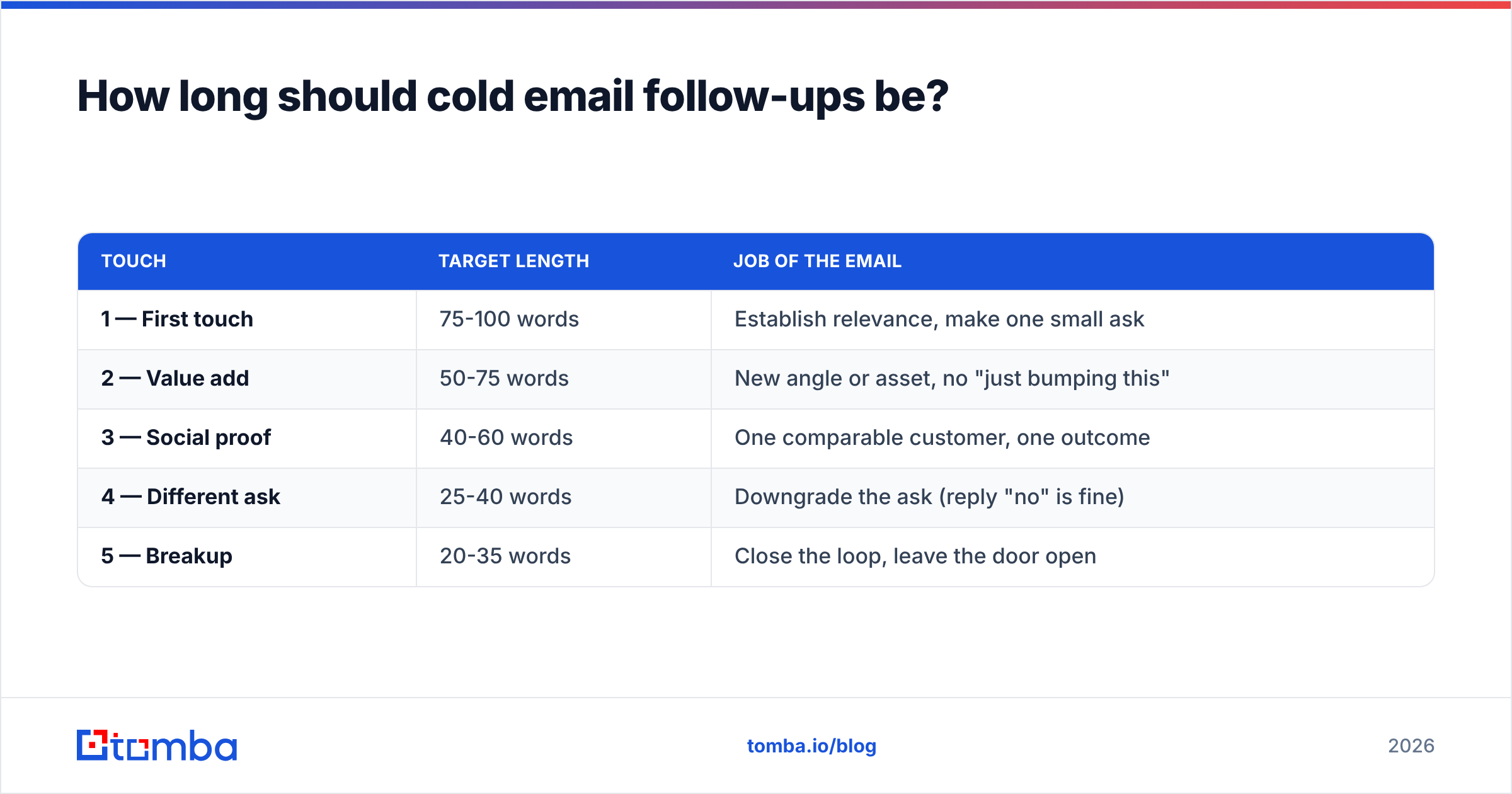
How long should cold email follow-ups be?#
Shorter than the first one — and each subsequent one shorter still.
The follow-up doesn't need to re-establish context; the thread carries it. A useful pattern:
| Touch | Target length | Job of the email |
|---|---|---|
| 1 — First touch | 75-100 words | Establish relevance, make one small ask |
| 2 — Value add | 50-75 words | New angle or asset, no "just bumping this" |
| 3 — Social proof | 40-60 words | One comparable customer, one outcome |
| 4 — Different ask | 25-40 words | Downgrade the ask (reply "no" is fine) |
| 5 — Breakup | 20-35 words | Close the loop, leave the door open |
Two rules keep this from turning into noise. First, never send a follow-up whose entire content is "checking in" — that's a message about your pipeline, not their problem. Second, change the angle each time. Five emails asking for the same meeting in five ways is one email sent five times.
Does subject line length matter as much as body length?#
It matters differently. The subject line is a gate, not a message.
Practical constraints:
- 3-6 words, 30-50 characters. Mobile clients truncate around 35-40 characters; desktop shows more but nobody reads more.
- Lowercase or sentence case outperforms Title Case in most cold contexts because it reads as a person writing, not a campaign.
- No brackets, no "Re:" tricks, no false urgency. Recipients recognize the pattern, and open-rate gains from deception convert into reply-rate losses and spam complaints.
- Specific beats clever. "question about your SDR onboarding" beats "unlock 3x pipeline growth."
If you're systematically testing variants, run them through a subject line tester before the send rather than burning list segments on obvious losers. And if you're drafting at volume, a cold email AI assist is fine for the first pass — just apply the six-pass cut afterward, because generated drafts skew long by default.
Which mistakes make cold emails too long?#
Nearly every bloated cold email traces back to one of these five:
- Selling the company instead of the next step. You don't need to explain your funding, your team, or your roadmap. You need them to reply.
- Hedging. "I thought this might potentially be somewhat relevant to your team, depending on how you currently handle..." — hedging language roughly doubles sentence length and halves credibility.
- Feature lists. Three features is a brochure. One outcome is an email.
- Over-personalization. Two sentences about their podcast appearance before you get to the point is worse than one. Personalization earns attention; it doesn't hold it.
- Fear of being ignored. Long emails are often anxiety in text form — the sender adds one more reason, one more proof, one more CTA. The reader feels it.
There's also a readability dimension worth knowing. Cold emails that score well on Flesch-Kincaid readability — short sentences, common words, grade 6-8 range — outperform dense prose regardless of total length. A 120-word email at grade 7 reads faster than an 80-word email at grade 14.
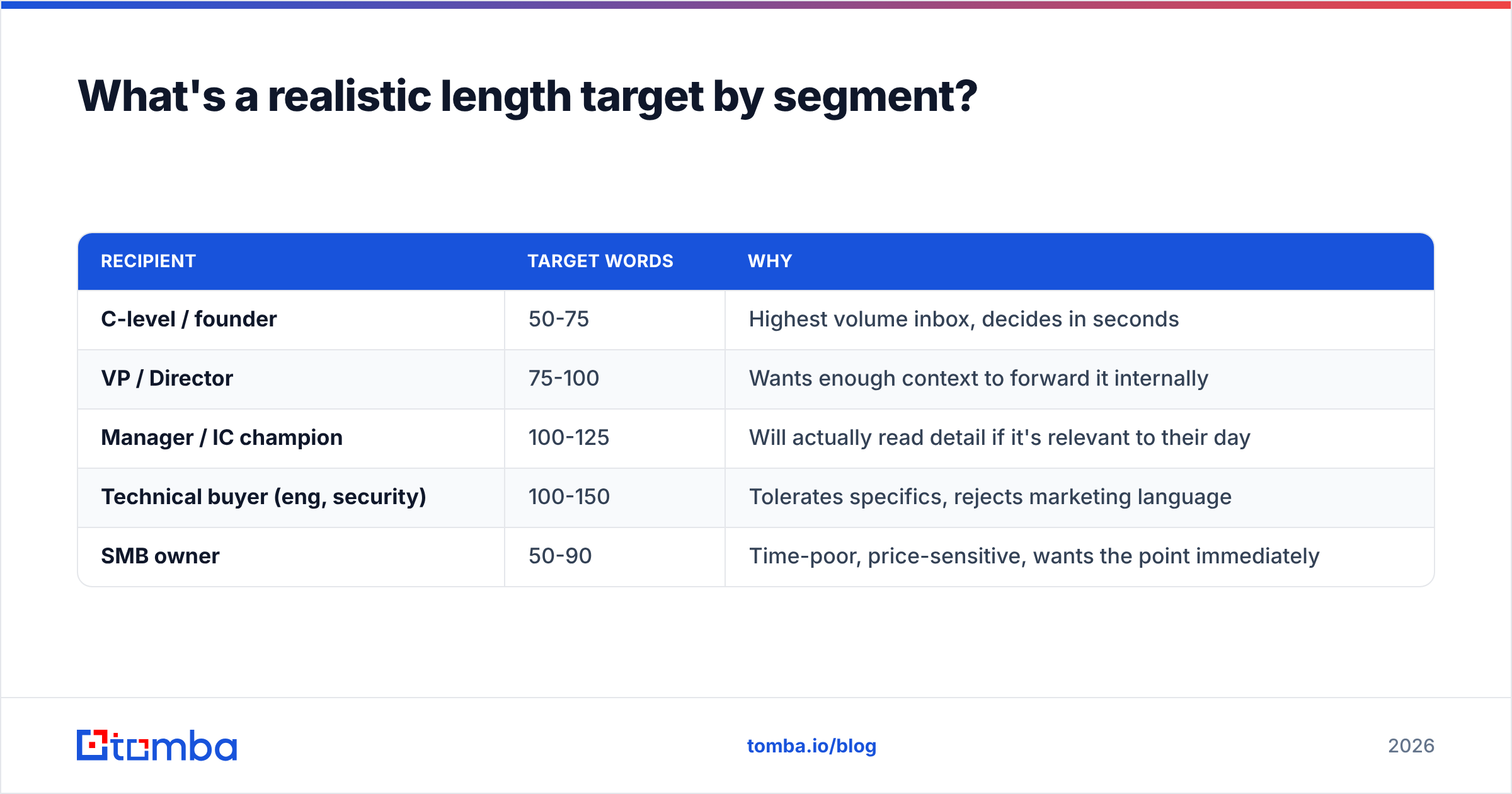
What's a realistic length target by segment?#
Adjust the default by who's reading:
| Recipient | Target words | Why |
|---|---|---|
| C-level / founder | 50-75 | Highest volume inbox, decides in seconds |
| VP / Director | 75-100 | Wants enough context to forward it internally |
| Manager / IC champion | 100-125 | Will actually read detail if it's relevant to their day |
| Technical buyer (eng, security) | 100-150 | Tolerates specifics, rejects marketing language |
| SMB owner | 50-90 | Time-poor, price-sensitive, wants the point immediately |
Note the pattern: seniority correlates inversely with tolerated length, and technical roles buy the opposite trade — more detail, less adjective. Write for the individual, not the segment average.
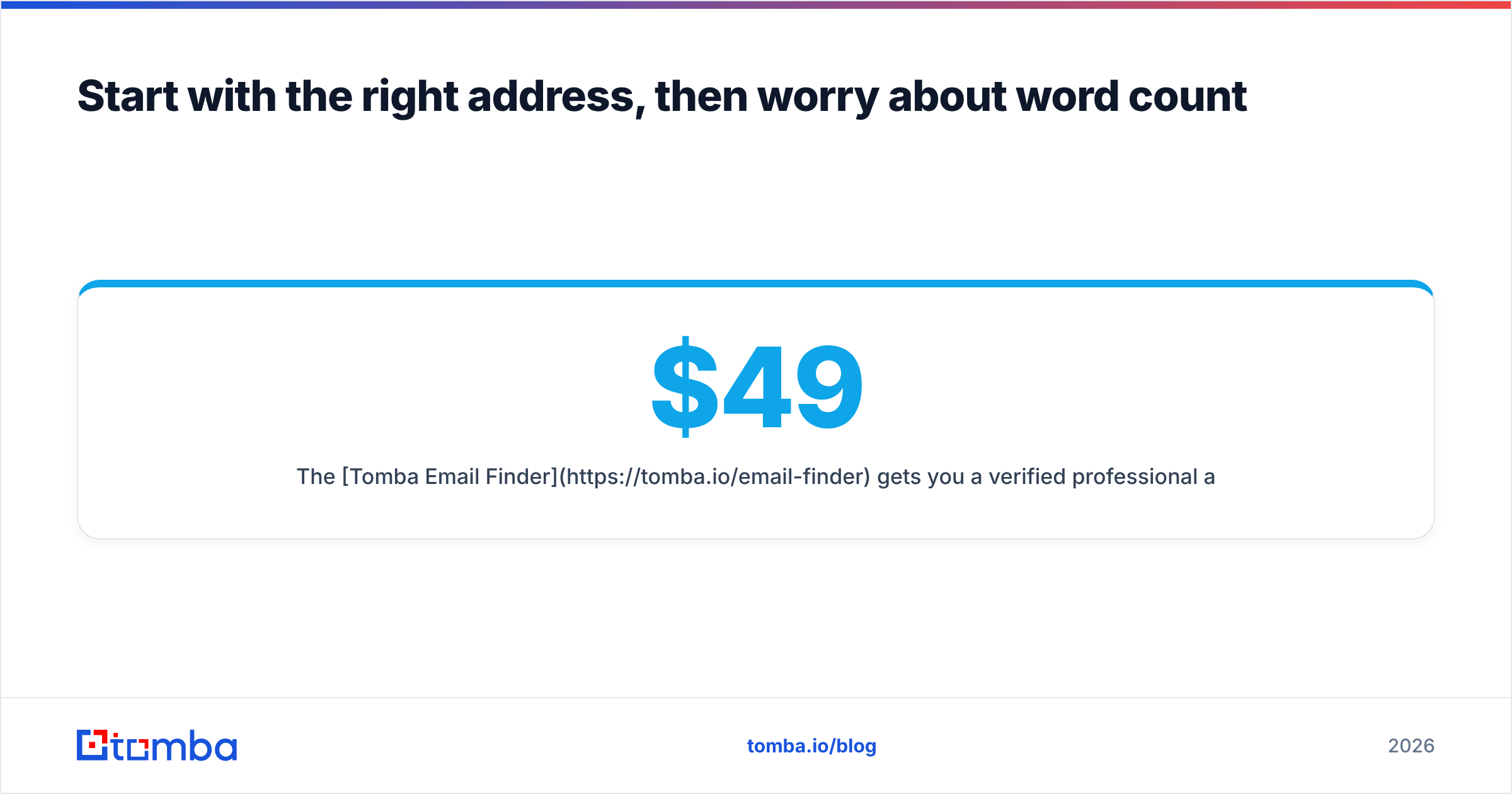
Start with the right address, then worry about word count#
A 75-word email is a wasted 75 words if it bounces or lands with the wrong person. Get the foundation right: build the list from verified, current data, confirm the address before the send, and only then spend your energy on compression.
The Tomba Email Finder gets you a verified professional address from a name and domain, with a free tier of 25 searches a month to test the quality on your own accounts before committing. Paid plans start at $49/mo (Starter), with Growth at $99/mo and Pro at $249/mo — see Tomba pricing for the full breakdown. Fix the data, then cut the words.
Related guides#
Ready to find emails that actually work?
Join 150,000+ professionals who stopped guessing and started sending. Free credits on signup — no credit card required.
Get the Tomba newsletter
Practical outbound tactics and product updates — once every two weeks.
About the author