How Many Cold Calls Per Hour Can a Rep Actually Make?
Most "200 dials a day" claims fall apart under a stopwatch. Here are realistic cold call volumes per hour by dialer type, list quality, and segment — plus the math to set your own targets.
TL;DR
- A rep dialing manually from a decent list makes 8–12 cold calls per hour. With click-to-dial from a CRM, that rises to 15–25. With a power dialer, 35–60. With a parallel dialer, 80–150 attempts — but far fewer real conversations per attempt.
- Dials per hour is the vanity number. Conversations per hour (1–4 for most B2B teams) is the number that predicts pipeline.
- Bad phone data is the single biggest tax on your hour. A list with 30% wrong numbers doesn't cost you 30% of your dials — it costs you the research time to fix them mid-session.
- The realistic ceiling for a full day is 3–4 hours of actual dialing, not 8. Everything else is research, notes, follow-up, and recovery.
- Set targets from your own funnel math (meetings needed → connects needed → dials needed), not from a LinkedIn post claiming 300 dials a day.
How many cold calls per hour can a rep actually make?#
Between 8 and 60, and the spread is almost entirely explained by tooling and data quality — not effort.
The honest baseline: a rep manually dialing numbers, taking notes in a CRM, and looking up the next prospect between calls lands around 10 dials an hour. Each cycle is roughly 30–60 seconds of dial and ring, 60–180 seconds of conversation or voicemail, and 90–180 seconds of logging, disposition, and finding the next name. That's five to six minutes per attempt. Ten attempts fills the hour.
Add automation and the picture changes fast. Click-to-dial removes the manual keypad entry and the tab switching. A power dialer removes the decision of "who's next" entirely. A parallel dialer rings four to six numbers simultaneously and connects the rep only when a human answers.
But raw attempt volume isn't the metric that pays. Cold call connect rates in B2B typically sit somewhere between 5% and 15% depending on seniority, industry, and whether you're calling a direct line or a switchboard. At a 10% connect rate, 20 dials produces two conversations. At 150 parallel-dialed attempts against a stale list with a 3% connect rate, you get four or five conversations — and you've burned your caller ID reputation to get them.
What actually eats your dialing hour?#
If you've never timed a rep's block, the breakdown is usually uncomfortable. Here's where a typical unoptimized hour goes:
- Prospect research and lookup — 18–25 minutes. Finding the right person, confirming the title, tracking down a direct number. This is the biggest single drain and the most fixable.
- Dialing and ringing — 8–12 minutes. Four to six rings per attempt, plus the pause before you hang up on a voicemail.
- Actual conversation — 6–15 minutes. Two or three real conversations at three to five minutes each, if you're lucky.
- Voicemails and gatekeeper deflection — 5–10 minutes. Leaving a message takes 25–40 seconds; getting bounced by a receptionist takes longer.
- CRM logging and disposition — 8–15 minutes. Notes, next steps, sequence enrollment, the follow-up email you promised.
- Recovery and context switching — 5+ minutes. Nobody makes 60 minutes of uninterrupted calls. Nobody.
Notice that the two largest blocks — research and logging — involve zero talking. That's where the leverage is. Fix your data pipeline and your CRM hygiene and you can double dials per hour without asking anyone to work harder or talk faster.
Does dialer type change how many cold calls per hour you make?#
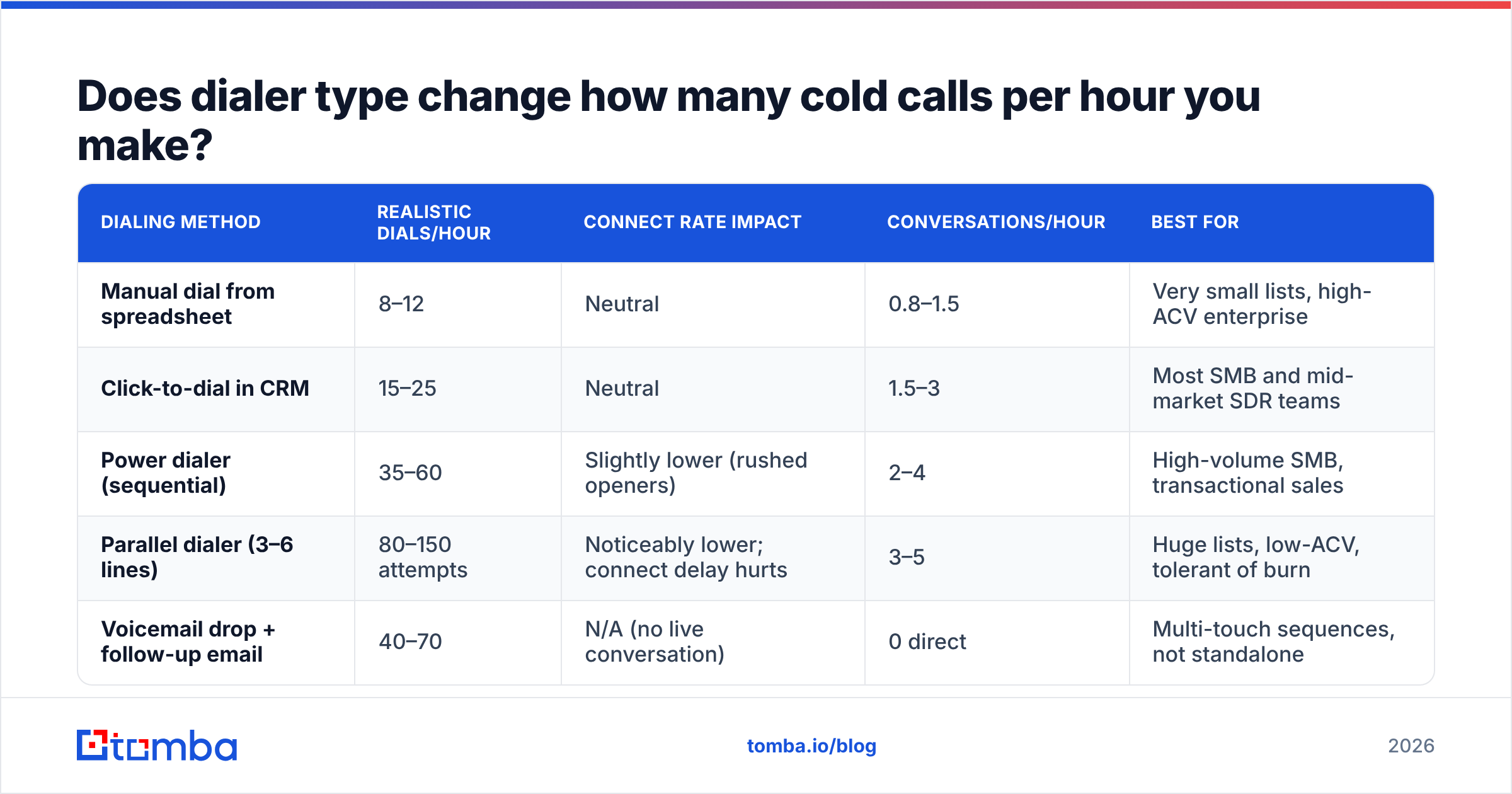
Dramatically. Here's what each tier realistically produces, based on published vendor benchmarks and what teams report on review sites like G2's auto-dialer category:
| Dialing method | Realistic dials/hour | Connect rate impact | Conversations/hour | Best for |
|---|---|---|---|---|
| Manual dial from spreadsheet | 8–12 | Neutral | 0.8–1.5 | Very small lists, high-ACV enterprise |
| Click-to-dial in CRM | 15–25 | Neutral | 1.5–3 | Most SMB and mid-market SDR teams |
| Power dialer (sequential) | 35–60 | Slightly lower (rushed openers) | 2–4 | High-volume SMB, transactional sales |
| Parallel dialer (3–6 lines) | 80–150 attempts | Noticeably lower; connect delay hurts | 3–5 | Huge lists, low-ACV, tolerant of burn |
| Voicemail drop + follow-up email | 40–70 | N/A (no live conversation) | 0 direct | Multi-touch sequences, not standalone |
Two caveats that vendors rarely put in their marketing.
First, parallel dialers introduce a connection delay — the half-second of dead air after the prospect says "hello" while the system bridges the rep. Prospects hang up on that pause because it sounds like a robocall. Some teams see connect-to-conversation rates drop by a third when they move from power to parallel dialing.
Second, high-volume dialing from a single number gets that number flagged. Carrier analytics engines mark numbers with high call volume and low answer duration as spam, and once you're labeled, your effective connect rate collapses regardless of dial count. Rotating local numbers helps; calling fewer, better-targeted people helps more.
How do you calculate your own cold calls per hour target?#
Work backwards from revenue, not forwards from activity. Five steps:
- Start with meetings needed. If a rep needs four qualified meetings a week to hit quota, that's the anchor.
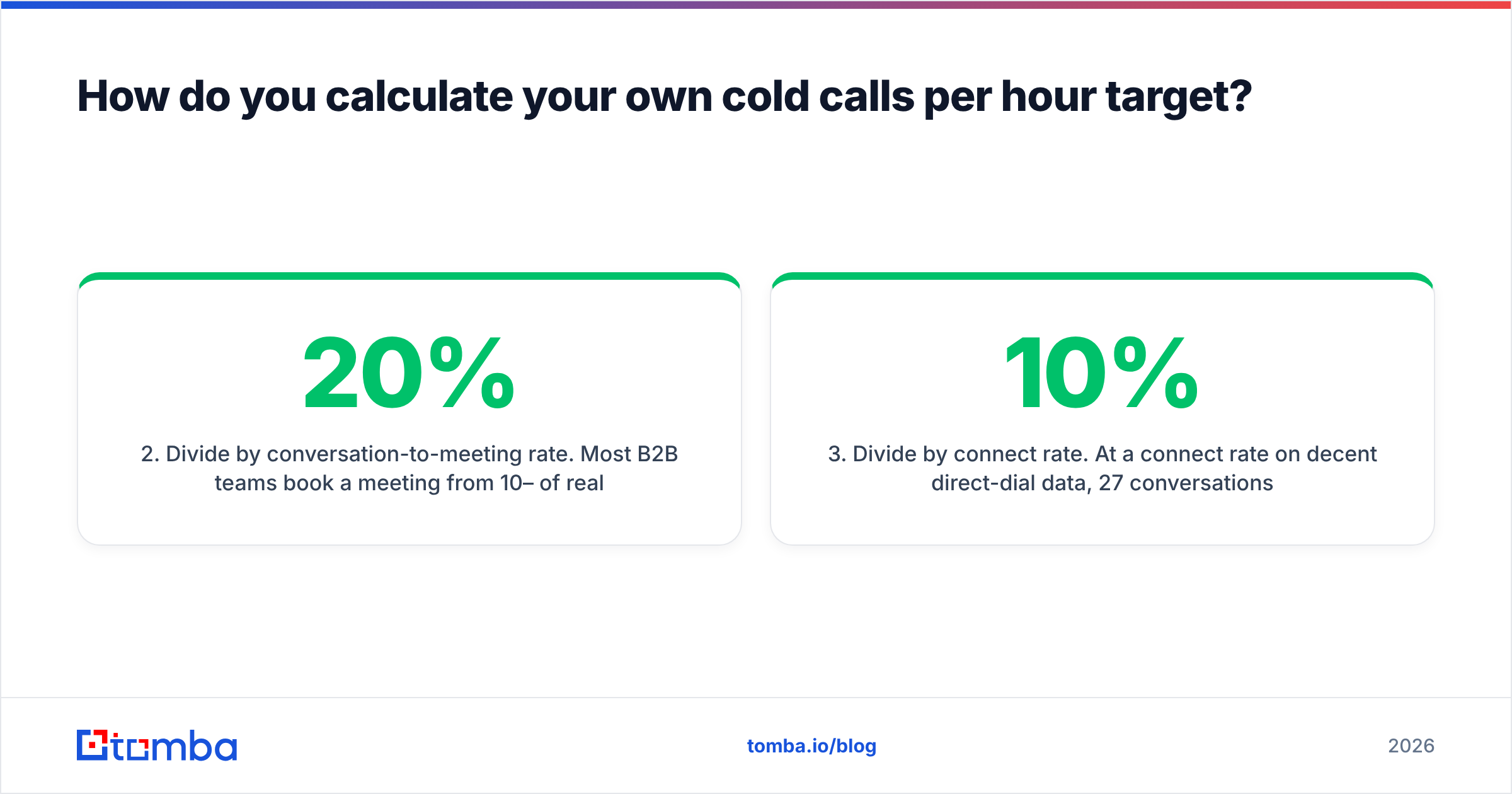
- Divide by conversation-to-meeting rate. Most B2B teams book a meeting from 10–20% of real conversations. At 15%, four meetings needs ~27 conversations a week.
- Divide by connect rate. At a 10% connect rate on decent direct-dial data, 27 conversations needs ~270 dials a week.
- Divide by dialing hours available. A rep realistically dials 12–15 focused hours a week, not 40. That's ~20 dials per hour.
- Sanity-check against your tooling. If you're at 20 dials/hour needed and your team dials manually from spreadsheets, the target is not achievable. Either fix the tooling or fix the expectation.
That math is the whole exercise. If your required dials-per-hour comes out above 40, your problem isn't rep motivation — it's your connect rate or your conversation-to-meeting conversion. Both are data and messaging problems, not volume problems.
Is a higher dial count always better?#
No, and this is where most cold calling programs quietly break.
Dials per hour is easy to measure and easy to game. A rep under pressure to hit 250 dials a day will hang up on ring three, skip voicemails, blow through openers, and dial the easiest numbers on the list rather than the best-fit accounts. You get the number on the dashboard and none of the pipeline.
The metrics that actually correlate with booked meetings:
- Connect rate — percentage of attempts that reach a live human. This is a data quality metric more than a calling metric.
- Conversations per hour — the real throughput number. Two to four is healthy for most B2B teams.
- Talk time per hour — 12–20 minutes of live conversation in an hour is a strong session.
- Meetings per 100 dials — the single cleanest efficiency ratio. One to three is normal; above four means your targeting is excellent.
- Dial-to-followup ratio — how many calls actually produced a next step in the CRM.
HubSpot's sales research and most enterprise playbooks land in the same place: sequencing and relevance beat brute-force volume once you're past a minimum activity floor. The floor exists — a rep making 30 dials a week will not hit quota — but the ceiling on volume-as-strategy arrives much earlier than most managers assume.
What benchmarks should you hold different teams to?#
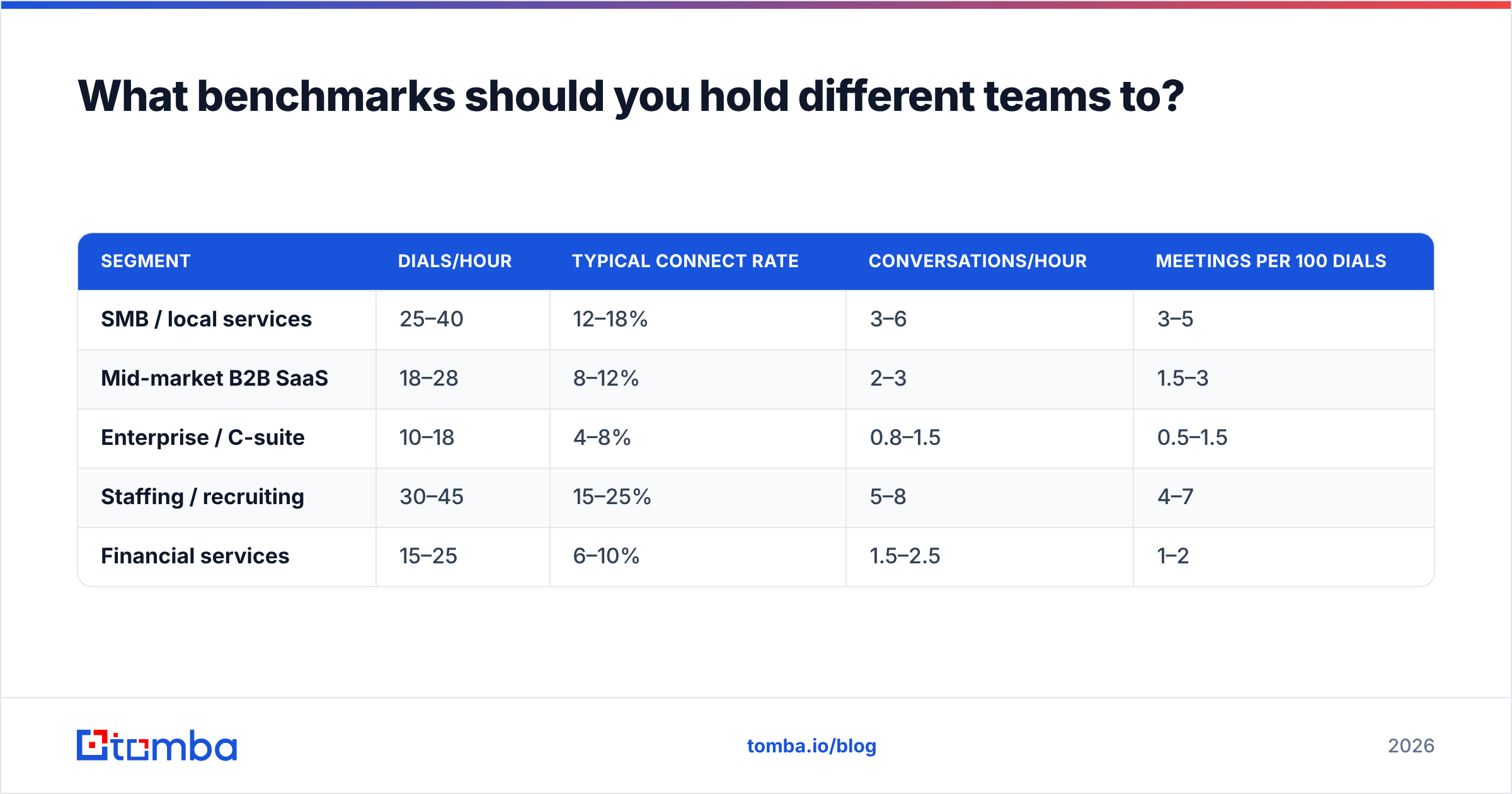
Segment matters more than tooling in some cases. Calling an office manager at a 20-person dental practice is a completely different activity from calling a VP of Engineering at a Fortune 500.
| Segment | Dials/hour | Typical connect rate | Conversations/hour | Meetings per 100 dials |
|---|---|---|---|---|
| SMB / local services | 25–40 | 12–18% | 3–6 | 3–5 |
| Mid-market B2B SaaS | 18–28 | 8–12% | 2–3 | 1.5–3 |
| Enterprise / C-suite | 10–18 | 4–8% | 0.8–1.5 | 0.5–1.5 |
| Staffing / recruiting | 30–45 | 15–25% | 5–8 | 4–7 |
| Financial services | 15–25 | 6–10% | 1.5–2.5 | 1–2 |
Treat these as ranges to calibrate against, not targets to enforce. If your enterprise team is doing 40 dials an hour, they are almost certainly calling switchboards and low-value contacts. If your SMB team is doing 10, something in the workflow is broken.
Also worth noting: dials-per-hour degrades across a session. Hour one is usually the best hour. By hour three, most reps drop 20–30% in both volume and conversation quality. Two 90-minute blocks with a real break between them beat one four-hour marathon almost every time.
How do you actually increase cold calls per hour without burning out?#
Five changes, roughly in order of impact:
- Build the list before the block, never during it. Research and dialing are different cognitive modes. Batch all lookups — company, contact, title, direct number — into a separate session, then call from a finished list. This alone typically adds 5–10 dials per hour.
- Get direct numbers instead of switchboards. A main line means a gatekeeper, a transfer, and a 4x longer cycle per attempt. Sourcing verified direct dials through a phone finder and cleaning them with a phone validator removes both the dead numbers and the receptionist tax.
- Enrich before you dial, not after. If the rep has to look up the company's headcount or funding round mid-call, you've lost the hour. Push firmographic and contact fields into the CRM ahead of time with data enrichment so the rep opens a record and sees everything.
- Automate disposition, not conversation. Single-key call outcomes, auto-logged notes, and one-click sequence enrollment claw back 8–12 minutes an hour. Most modern CRM setups support this out of the box — see Salesforce's sales cloud docs for the standard pattern.
- Call in blocks that match answer-rate windows. Answer rates cluster in the mid-morning and late-afternoon in the prospect's local time. Dialing outside those windows inflates your dial count and deflates your conversation count.
Notice that four of the five are data and workflow changes. None of them ask a rep to talk faster.
Does bad phone data really cost that much?#
More than most teams model. Run the arithmetic on a 500-record list with 30% bad numbers:
- 150 wasted attempts at ~45 seconds each = ~2 hours of pure dead dialing
- Plus the mid-session research to find replacements: ~3 minutes each on the 60 records the rep bothers to chase = 3 more hours
- Plus the connect-rate distortion that makes your reporting lie to you about which segments actually respond
That's a full day gone from one list. And the flow-on effect is worse: high volumes of disconnected-number calls are exactly the signal carriers use to flag a caller ID as spam, which drags down your connect rate on the good numbers too.
The fix isn't complicated. Validate before the block. Filter out anything that doesn't return a live line type. Prioritize mobile and direct-dial over main lines. A list of 200 verified direct numbers outperforms 800 scraped ones on every metric that matters — including total meetings booked, not just efficiency ratios.
If you're building lists at scale, running them through a bulk email finder alongside phone lookup lets you keep both channels warm from the same source, so a missed call becomes a same-day email touch instead of a dead end.
Frequently asked questions#
Is 100 cold calls a day realistic? Yes, with a power dialer and a prepared list — that's roughly 3.5 hours of dialing at 30/hour. Without automation, 100 dials a day means a rep is doing almost nothing else.
How many cold calls per hour do top performers make? Usually fewer than average performers, with dramatically higher conversation and meeting rates. They spend the difference on pre-call research and account selection.
Does calling more improve results linearly? Up to a point. Past your team's data quality ceiling, extra dials mostly add wrong numbers and voicemails.
What's a good conversations-per-hour target? Two to four for B2B, five to eight for SMB and transactional sales.
Where to start#
Fix the list before you fix the target. Most teams chasing a higher dials-per-hour number are actually paying a data tax they've never measured — wrong numbers, missing direct lines, unenriched records that force mid-call research.
Build your call list from verified contact data so every dial has a real person on the other end. Tomba Email Finder sources verified professional contacts by domain, name, or company, and pairs with phone lookup and enrichment so your reps open a record and dial — no tab-switching, no guessing. Start on the free tier with 25 searches a month, or move to the Starter plan at $49/mo when you're ready to build lists at volume. Full Tomba pricing is public, with Growth at $99/mo and Pro at $249/mo for larger outbound teams.
Give your reps 200 verified numbers instead of 800 scraped ones and watch the dials-per-hour question stop mattering.
Related guides#
Ready to find emails that actually work?
Join 150,000+ professionals who stopped guessing and started sending. Free credits on signup — no credit card required.
Get the Tomba newsletter
Practical outbound tactics and product updates — once every two weeks.
About the author