How Many Cold Calls Per Week Should Reps Actually Make?
Most cold call quotas are guesses. Here are the real weekly dial numbers by role, deal size, and data quality — plus how to hit them without burning your list.
TL;DR
- A full-time SDR running phone-first outbound realistically makes 250–400 dials per week (50–80/day) — not the 500+ some quotas demand.
- Account executives with a split calendar land at 60–120 dials per week. Enterprise reps often sit under 50 and that's correct.
- Dial count is the wrong north star. Connects per week is the number that predicts pipeline, and it collapses when your phone data is stale.
- A 3-hour focused block beats an 8-hour trickle. Two 90-minute power hours per day covers most SDR quotas.
- Before raising the quota, audit the list: bad numbers silently eat 20–40% of dial capacity.
What is a realistic number of cold calls per week?#
The honest answer: 250 to 400 dials per week for a dedicated SDR, and roughly a quarter of that for an AE carrying a full pipeline.
Think of dials like reps in a gym. You can technically do 500 sloppy ones, but the sets that build anything are the ones with form. A "dial" where you punch a wrong number, hear a disconnect tone, and hang up in four seconds counts on the dashboard and does nothing for your pipeline. That gap between activity and outcome is why weekly call quotas get argued about in every sales org.
Here's the arithmetic that matters. A conversation-heavy dial takes 3–6 minutes end to end: research glance, dial, navigate a gatekeeper or voicemail, log the outcome, set the follow-up. A no-answer dial takes 45–90 seconds. Blend those and a rep in a genuine calling block averages 25–35 dials per hour. Two 90-minute blocks a day is 75–105 dials. Five days is 375–525 — but nobody gets five clean days. Meetings, demos, list building, and CRM hygiene eat 20–30%. You land back at 250–400.
Anyone quoting you 600 dials a week is either counting power-dialer drops that never ring a human, or describing a role where the rep reads a script off a screen and never researches anything.

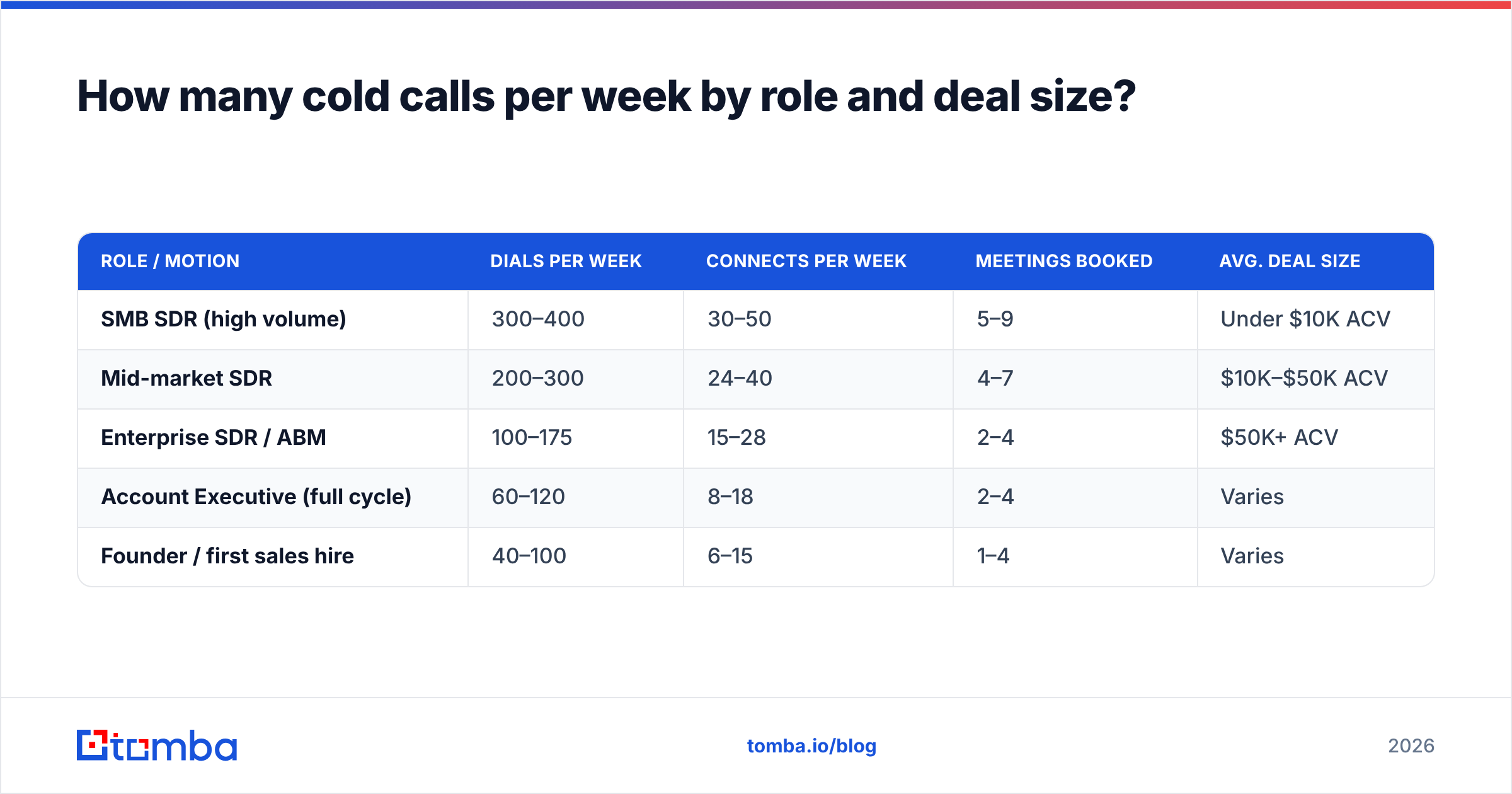
How many cold calls per week by role and deal size?#
Weekly dial expectations should scale inversely with deal size and research depth. A $200/month SaaS product tolerates volume. A $250K enterprise contract punishes it — the prospect can tell in ten seconds whether you looked them up.
| Role / Motion | Dials per week | Connects per week | Meetings booked | Avg. deal size |
|---|---|---|---|---|
| SMB SDR (high volume) | 300–400 | 30–50 | 5–9 | Under $10K ACV |
| Mid-market SDR | 200–300 | 24–40 | 4–7 | $10K–$50K ACV |
| Enterprise SDR / ABM | 100–175 | 15–28 | 2–4 | $50K+ ACV |
| Account Executive (full cycle) | 60–120 | 8–18 | 2–4 | Varies |
| Founder / first sales hire | 40–100 | 6–15 | 1–4 | Varies |
Two things to notice. First, connects don't scale linearly with dials — the enterprise SDR converts a much higher share of dials into conversations because the list is smaller, better researched, and the numbers are direct lines rather than switchboards. Second, meetings-per-connect is roughly flat across rows (10–20%). That's the real lever: get more connects, not more dials.
Cognism's B2B dial benchmarks and the HubSpot sales statistics roundup both put average connect rates in the 5–12% band for standard B2B lists. If yours is under 5%, the problem is almost certainly data, not effort.
Why does dial count fail as a KPI?#
Because it's the only sales metric a rep can hit while accomplishing nothing.
Dial count is trivially gameable. Reps hang up on ring three. They cycle the same dead numbers. They dial main switchboards where no human ever answers. The dashboard turns green, the pipeline stays empty, and the manager raises the quota — which makes the gaming worse, not better.
Track this ladder instead, in this order:
- Connects per week — actual human conversations, 30 seconds or longer. This is the denominator for everything downstream. Target 25–45 for a full-time SDR.
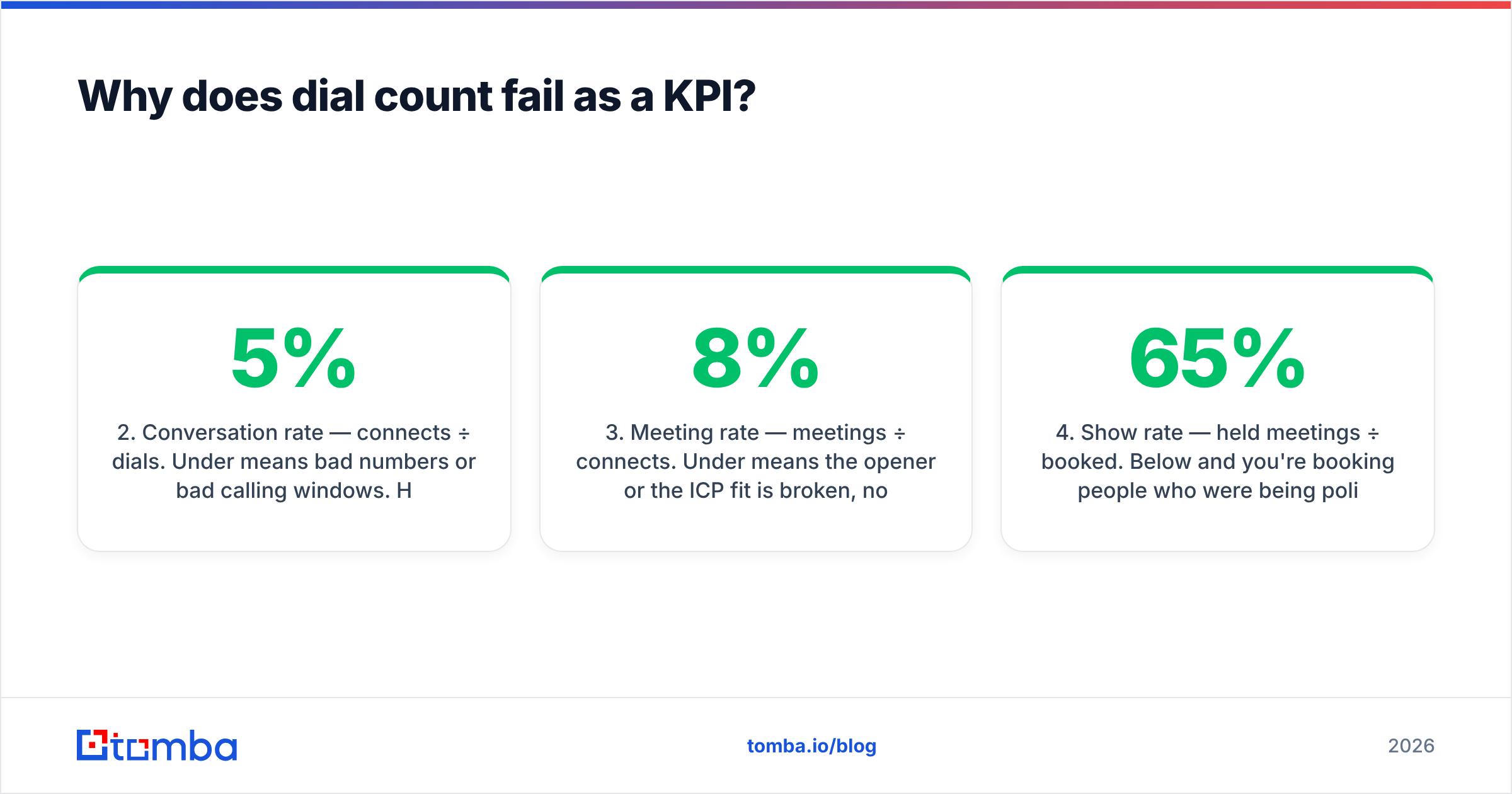
- Conversation rate — connects ÷ dials. Under 5% means bad numbers or bad calling windows. Healthy is 8–15% with direct dials.
- Meeting rate — meetings ÷ connects. Under 8% means the opener or the ICP fit is broken, not the volume.
- Show rate — held meetings ÷ booked. Below 65% and you're booking people who were being polite.
- Pipeline per 100 dials — the single number that tells you whether the phone channel deserves more headcount.
Manage the top of that list and dial count sorts itself out. Manage dial count alone and you get theater. This is the same failure mode you see when teams optimize response rate on email without checking whether the addresses were valid in the first place.
How much does bad phone data cost you?#
More than any coaching intervention will ever give back.
Run the numbers on a 300-dial week. If 30% of your numbers are wrong — disconnected, switched employer, or a company switchboard that dumps you into an IVR maze — you burned 90 dials, roughly 2.5 hours, on nothing. That's a full calling block per week, per rep, evaporated. On a team of six that's 15 hours a week, or most of a headcount.
Contact data decays fast. Job changes, area code ports, and companies retiring desk lines in favor of mobile all chew through a list. The commonly cited figure is about 30% B2B data decay per year, and phone numbers rot faster than emails because desk extensions die when someone changes floors, let alone companies.
Three practical fixes:
- Validate before the block, not during it. Run the week's list through a phone validator so line status and type are known before a rep wastes a dial.
- Prefer direct dials over switchboards. A phone finder that returns mobile or direct lines will roughly double your connect rate versus main-number lists — the gatekeeper step disappears entirely.
- Refresh quarterly, not annually. Re-run enrichment on any record older than 90 days. Contact enrichment that appends current title and company also tells you when someone has moved on, which is a trigger event, not a dead lead.

What does a week of cold calling actually look like?#
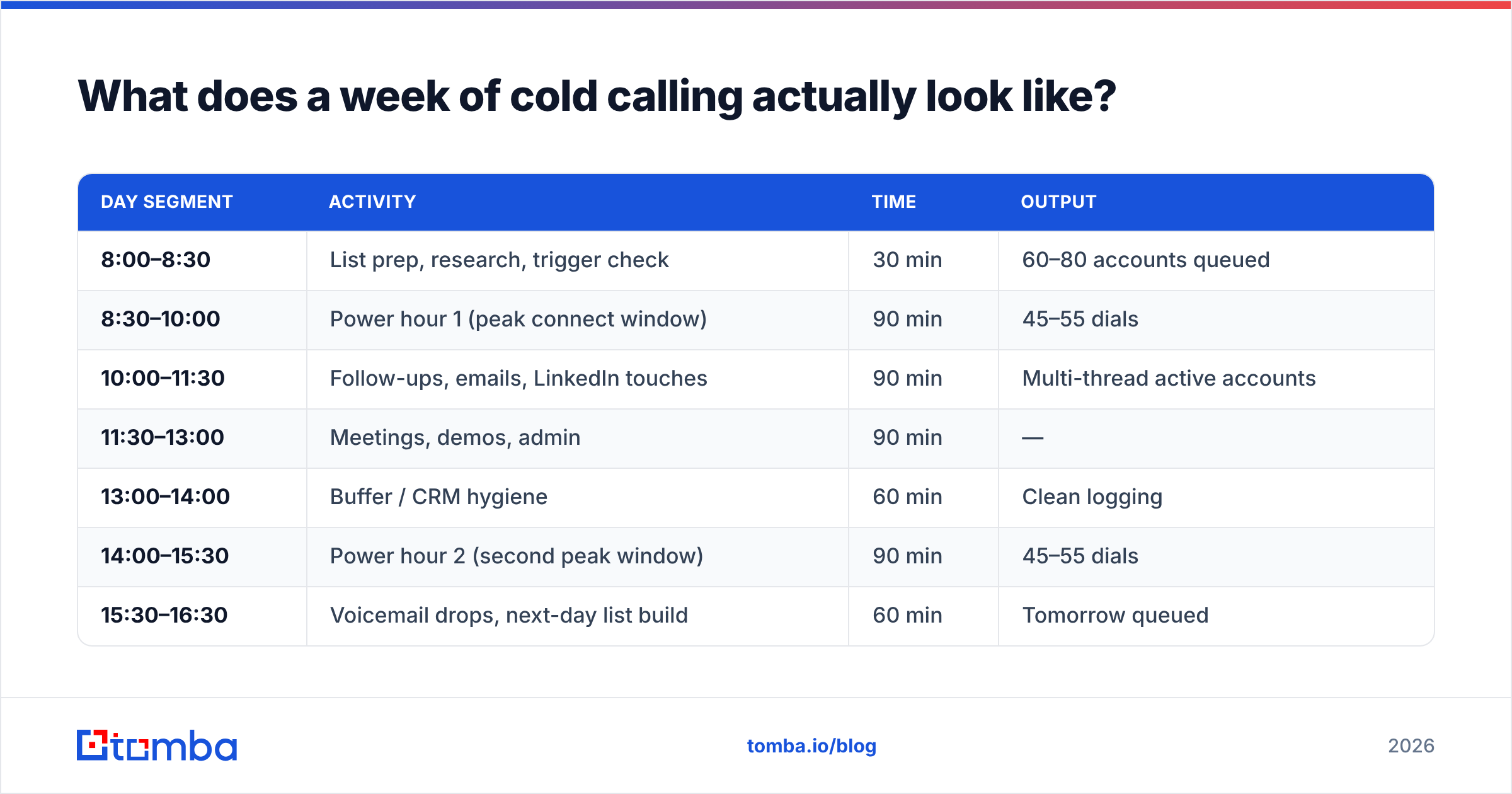
Structure beats willpower. Here's a schedule that produces 300+ quality dials without turning a rep into a zombie by Thursday.
| Day segment | Activity | Time | Output |
|---|---|---|---|
| 8:00–8:30 | List prep, research, trigger check | 30 min | 60–80 accounts queued |
| 8:30–10:00 | Power hour 1 (peak connect window) | 90 min | 45–55 dials |
| 10:00–11:30 | Follow-ups, emails, LinkedIn touches | 90 min | Multi-thread active accounts |
| 11:30–13:00 | Meetings, demos, admin | 90 min | — |
| 13:00–14:00 | Buffer / CRM hygiene | 60 min | Clean logging |
| 14:00–15:30 | Power hour 2 (second peak window) | 90 min | 45–55 dials |
| 15:30–16:30 | Voicemail drops, next-day list build | 60 min | Tomorrow queued |
Two blocks, roughly 90–110 dials a day, four solid calling days a week (Friday is usually half-value) gets you to 320–400. Wednesday and Thursday consistently outperform Monday; late morning and mid-afternoon beat lunch and 9am inbox hour.
The prep block matters more than it looks. If a rep starts a power hour by opening LinkedIn to look up who to call, they'll get 20 dials in instead of 50. The list must be built, validated, and loaded before the block starts. That's the entire difference between 250 and 400.
Should you call more or call better?#
Call better first — but only until you hit diminishing returns, then call more.
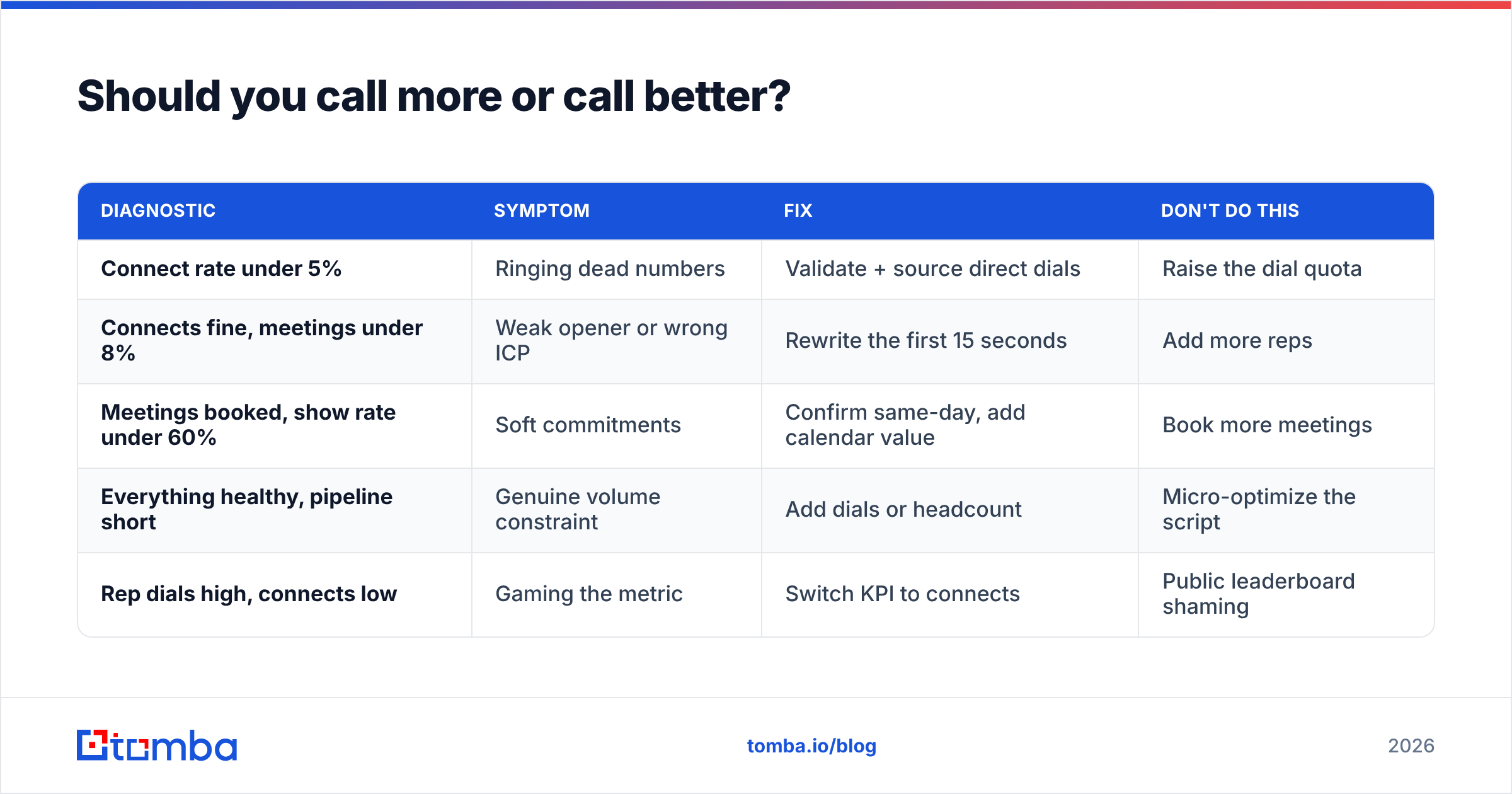
The decision rule is simple. Calculate your meetings per 100 dials. If it's below 1.5, adding volume just multiplies a broken process; fix targeting, data, or the opener. If it's above 2.5, your process works and volume is genuinely the constraint — hire or raise activity.
| Diagnostic | Symptom | Fix | Don't do this |
|---|---|---|---|
| Connect rate under 5% | Ringing dead numbers | Validate + source direct dials | Raise the dial quota |
| Connects fine, meetings under 8% | Weak opener or wrong ICP | Rewrite the first 15 seconds | Add more reps |
| Meetings booked, show rate under 60% | Soft commitments | Confirm same-day, add calendar value | Book more meetings |
| Everything healthy, pipeline short | Genuine volume constraint | Add dials or headcount | Micro-optimize the script |
| Rep dials high, connects low | Gaming the metric | Switch KPI to connects | Public leaderboard shaming |
Most teams that ask "how many cold calls per week should we require?" are actually in row one or row two. The quota is not the bottleneck. The list is.
How do cold calls fit alongside email and LinkedIn?#
Phone alone is a fragile channel in 2026. Answer rates on unknown numbers keep sliding, especially with carrier spam labeling. The teams still winning on the phone treat it as one leg of a sequence, not the whole thing.
A workable multi-channel cadence over 12 business days:
- Day 1 — Call + voicemail, then a short email referencing the voicemail. The email makes the missed call legible instead of creepy.
- Day 3 — LinkedIn connection request, no pitch. See LinkedIn outreach for how to keep this from reading as automated.
- Day 5 — Second call in a different time window than day 1. If they never pick up at 9am, stop calling at 9am.
- Day 8 — Value email: a specific observation about their business, not a case study dump.
- Day 12 — Final call and a breakup email that leaves the door open.
That's 2–3 dials per contact across the sequence. Which means a 300-dial week covers roughly 100–150 contacts in flight — a useful sanity check on how big your list needs to be. If you're building that list from scratch each week, an email finder paired with phone lookups is what keeps the top of funnel from starving the calling block.
Worth noting: the phone step lifts the whole sequence even when nobody answers. A voicemail plus a matching email consistently outperforms email alone, because it adds a second recognition cue before the prospect decides whether you're a real person.
What weekly targets should managers actually set?#
Set two numbers, not one.
Primary: connects per week. 30 for an SDR, 12 for an AE. This is what the rep is accountable for, because it's the closest thing to a controllable input that correlates with output.
Secondary: dials per week, as a floor not a target. 250 for an SDR, 60 for an AE. Framed as "you probably can't hit 30 connects with fewer than 250 dials" rather than "you owe me 250 dials." The distinction sounds pedantic. It completely changes rep behavior.
Then review three things every Friday:
- Connect rate trend. Falling week over week means the data is aging out, not that the rep got lazy.
- Time-to-first-dial. If reps are starting their block at 9:40 instead of 8:30, prep is the problem.
- List burn rate. If a rep exhausts their account list by Wednesday, the pipeline of contacts is the constraint, not effort.
Most quota disputes evaporate once managers can see whether the rep is dialing bad numbers or dialing badly. Those need opposite fixes.
The bottom line#
Aim for 250–400 dials per week if you're a dedicated SDR, 60–120 if you're an AE carrying deals. But treat those as byproducts of the number that matters: 25–45 real conversations a week. If your connect rate is under 5%, no quota increase will save you — you're paying reps to listen to disconnect tones.
Fix the input first. Pull verified direct dials and current contact records before the calling block starts, refresh anything older than a quarter, and put the whole list in front of the rep before 8:30. Then the volume question mostly answers itself.
Start with a clean list. Tomba Email Finder pairs with phone lookup and enrichment so your reps open a calling block with numbers that actually ring — free tier includes 25 searches a month, with Starter at $49/mo when you're ready to scale. Check Tomba pricing for volume tiers.
Related guides#
Ready to find emails that actually work?
Join 150,000+ professionals who stopped guessing and started sending. Free credits on signup — no credit card required.
Get the Tomba newsletter
Practical outbound tactics and product updates — once every two weeks.
About the author