How Many Times Should You Follow Up With A Prospect?
Most reps quit after two touches. Most replies land between touch three and seven. Here is the data-backed follow-up cadence, the exact stop rule, and how to build a sequence that stays on the right side of annoying.
TL;DR
- Five to eight touches over 21–30 days is the range where most B2B replies land. Below three, you are leaving the majority of your pipeline on the table; above nine, reply rate flattens while spam complaints climb.
- Roughly half of all positive replies arrive after the first message — but most reps stop at touch two, which is exactly where the compounding starts.
- Cadence spacing matters more than raw count: day 0, +3, +7, +14, +21 beats five emails in five days every time.
- Every follow-up must add something new. "Just bumping this to the top of your inbox" is a touch that costs you reputation and buys nothing.
- Bad data inflates your touch count. If 20% of your list bounces, your "8 touches" are really 8 attempts at a mailbox that never existed — verify before you sequence.
What does "follow up" actually mean in a B2B sequence?#
A follow-up is any deliberate contact after your first attempt, aimed at the same prospect about the same opportunity. That includes replies in the same email thread, a fresh thread with a new subject line, a LinkedIn message, a call, and a voicemail.
The reason the "how many times should you follow up with a prospect" question gets muddy is that people count different things. A rep running a 12-step multichannel sequence and a rep sending 4 emails might both say "I follow up a lot." They are not doing the same thing. So before you pick a number, separate touches into three buckets:
- Email touches in-thread — replies to your own original message. Low friction, low deliverability risk, but easy to ignore once buried.
- Email touches in a new thread — a fresh subject line, usually with a genuinely different angle. Higher open rate, higher risk of feeling like a new pitch.
- Non-email touches — LinkedIn connection or comment, a call, a voicemail, or a relevant referral intro. These reset the prospect's attention without touching your sending domain's reputation at all.
The healthy total is a blend. Eight email-only touches feel like harassment. Eight touches spread across email, LinkedIn, and one call feel like a persistent professional.
How many times should you follow up with a prospect?#
Five to eight total touches over three to four weeks. That is the honest answer for most B2B outbound motions, and it holds across deal sizes with adjustments described below.
Here is why that band, and not a single magic number. Reply curves in outbound follow a predictable shape: touch one gets a spike (curiosity + novelty), touches two and three underperform touch one but still convert, touches four through six pick back up as timing luck kicks in — the prospect's quarter turns over, a competitor's contract lapses, a budget unlocks — and touches seven-plus produce diminishing returns with rising unsubscribes and complaints.
The mistake almost nobody talks about is that the "stop" decision is usually made emotionally, not statistically. Rep sends two, hears nothing, decides the prospect "isn't interested." But no reply is not a no. No reply is almost always: wrong week, wrong inbox tab, or a message that didn't earn ten seconds.
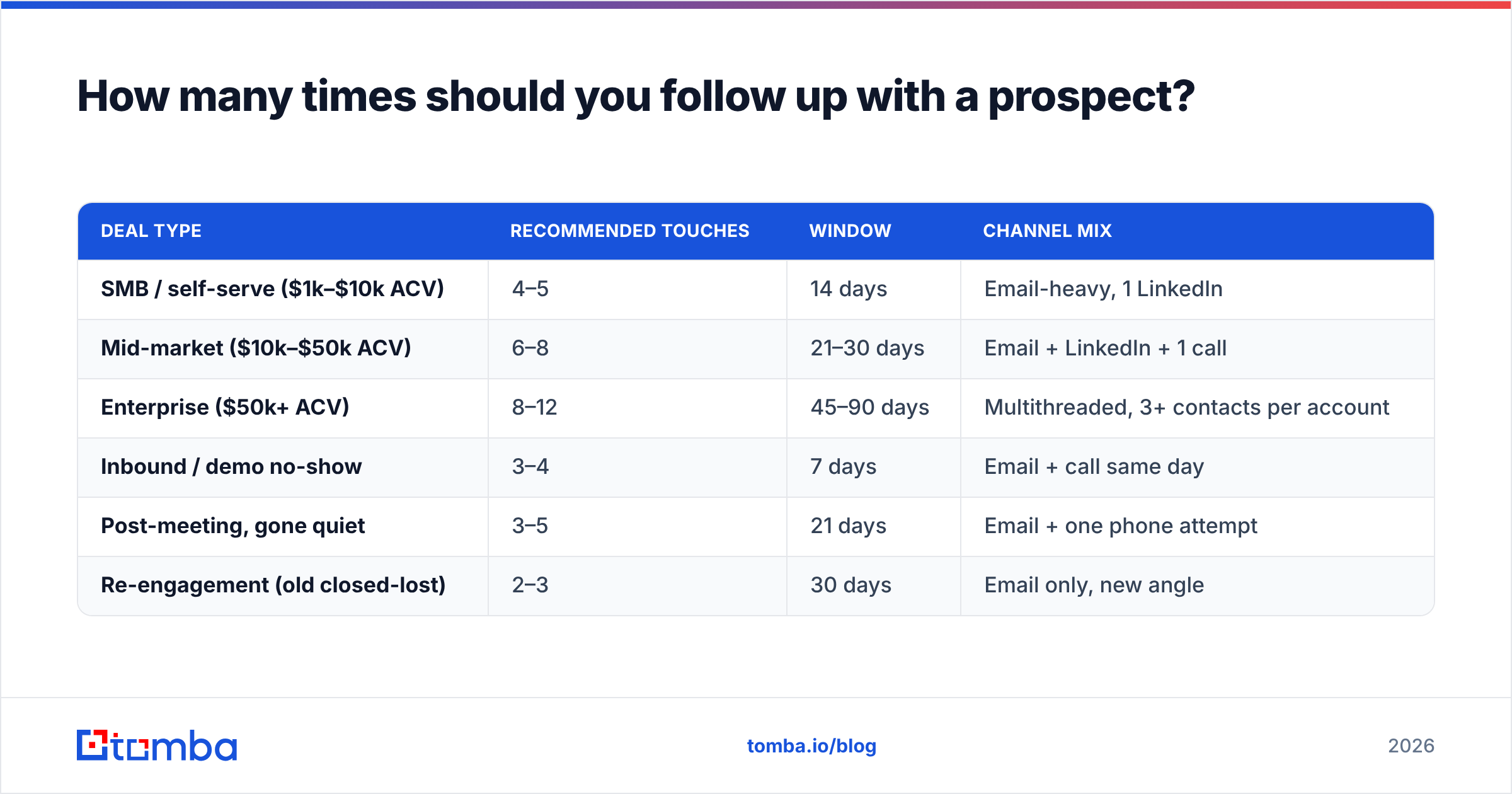
Adjust the base range by deal shape:
| Deal type | Recommended touches | Window | Channel mix |
|---|---|---|---|
| SMB / self-serve ($1k–$10k ACV) | 4–5 | 14 days | Email-heavy, 1 LinkedIn |
| Mid-market ($10k–$50k ACV) | 6–8 | 21–30 days | Email + LinkedIn + 1 call |
| Enterprise ($50k+ ACV) | 8–12 | 45–90 days | Multithreaded, 3+ contacts per account |
| Inbound / demo no-show | 3–4 | 7 days | Email + call same day |
| Post-meeting, gone quiet | 3–5 | 21 days | Email + one phone attempt |
| Re-engagement (old closed-lost) | 2–3 | 30 days | Email only, new angle |
Notice enterprise gets more touches — but spread across more people, not more emails to one exhausted VP. That is the single most underused lever in B2B follow-up: when contact A goes silent, the next touch should often go to contact B at the same company. Use a domain search to map the other buying-committee members before you burn your remaining touches on one unresponsive inbox.
Why do most reps stop too early?#
Because the first two touches feel like the whole effort, and the payoff sits behind touches three through six.
Sales research from vendors and analysts has circled the same finding for a decade: a large majority of reps make fewer than three attempts before abandoning a prospect, while a large share of conversions require five or more. HubSpot's sales research documents the same persistence gap year after year. The gap between "what reps do" and "what closes" is the cheapest arbitrage in outbound.
Three specific psychological traps:
- Silence read as rejection. A non-reply carries zero information about intent. Treat it as a scheduling problem, not a verdict.
- Fear of being annoying. Reps overestimate how irritated prospects are. A prospect who doesn't care about your product simply doesn't register touch four. The person who does care is grateful you followed up when they were drowning in week one.
- Activity metrics rewarding new contacts. If your dashboard counts "prospects contacted," you are structurally incentivized to spray touch one across 500 names instead of finishing sequences on 100.
Fix the third one and the first two mostly resolve. Measure completed sequences, not contacts touched.
What does a good follow-up cadence look like day by day?#
Spacing is where most sequences fail. Reps compress five touches into five days, which reads as desperation, or spread three touches across ten weeks, which reads as nothing at all.
A cadence that works for mid-market:
- Day 0 — Touch 1 (email). The initial message. One specific observation about their company, one hypothesis, one low-friction ask.
- Day 2 — Touch 2 (LinkedIn). Connection request, no pitch in the note. Or a genuine comment on something they posted. Zero-cost attention reset.
- Day 4 — Touch 3 (email, same thread). New information: a customer result from their exact segment, a benchmark, a relevant teardown. Three sentences.
- Day 8 — Touch 4 (call + voicemail). Reference the emails. Leave a 20-second voicemail that names the specific problem, not your company.
- Day 14 — Touch 5 (email, new thread). Fresh subject line, completely different angle. If touch 1 was about cost, this one is about risk or speed.
- Day 21 — Touch 6 (email). The permission-to-close message. Short, no guilt, easy exit.
- Day 30+ — Touch 7 (optional, new quarter). Trigger-based only: funding round, new hire in the role, product launch, competitor news.
The two rules that make this cadence work:
Rule 1: increasing intervals. 2, 2, 4, 6, 7 days. Early touches ride the memory of your first message; later touches should feel like they're arriving from a person who has other things going on.
Rule 2: one new idea per touch. If you cannot articulate what is new in the message, don't send it. Rewrite it or skip it. A "checking in" email costs you a touch, some sender reputation, and a bit of the prospect's respect.
When should you stop following up?#
Stop when the last two touches produced zero engagement of any kind and you have no new trigger to justify a ninth. Engagement includes opens on a clean list, a LinkedIn profile view, a site visit, a forward, or a bounce-back from an assistant.
Concrete stop conditions:
| Signal | Action |
|---|---|
| Explicit "not interested" or unsubscribe | Stop immediately, suppress the address |
| "Not now, circle back in Q3" | Stop the sequence, set a dated task, restart with a new angle |
| Hard bounce | Stop, remove from list, re-find the correct address |
| 8 touches, zero engagement, no trigger | Move to a quarterly nurture list |
| Auto-reply: left the company | Stop, find the replacement in that role |
| Opened 6 times, never replied | Switch channel — call or LinkedIn, do not send email 7 |
That fifth row deserves attention. When someone leaves a company, a follow-up to their old inbox is a wasted touch forever. Running your list through an email verifier before and during a long sequence catches these silently-dead addresses instead of letting you sequence a ghost for a month.
Does the number of touches matter more than message quality?#
No — but the two interact, and most teams optimize the wrong one first.
Think of follow-up like knocking on a door in an apartment building. Knocking eight times on the wrong door is worse than useless: it annoys a stranger and it never reaches the person you wanted. Getting the address right first, then knocking three times, beats knocking eight times at random. Persistence multiplies relevance; it does not substitute for it.
That is why data quality sits upstream of cadence design. Every one of these erodes your effective touch count:
- Invalid addresses. A hard bounce isn't touch one, it's a deliverability tax. Bounce rates above 3% start damaging email deliverability for every other message you send that week.
- Catch-all domains. These accept everything and reveal nothing. You can burn eight touches on an address that quietly routes to nowhere. A catch-all verifier distinguishes real mailboxes from black holes.
- Role accounts. info@, sales@, contact@ — these rarely reward persistence. One touch, then move on.
- Stale titles. The VP you researched was promoted eight months ago. Your "specific" message reads as a form letter.
- Wrong company match. Same name, different org. Common with generic surnames and multi-entity brands.
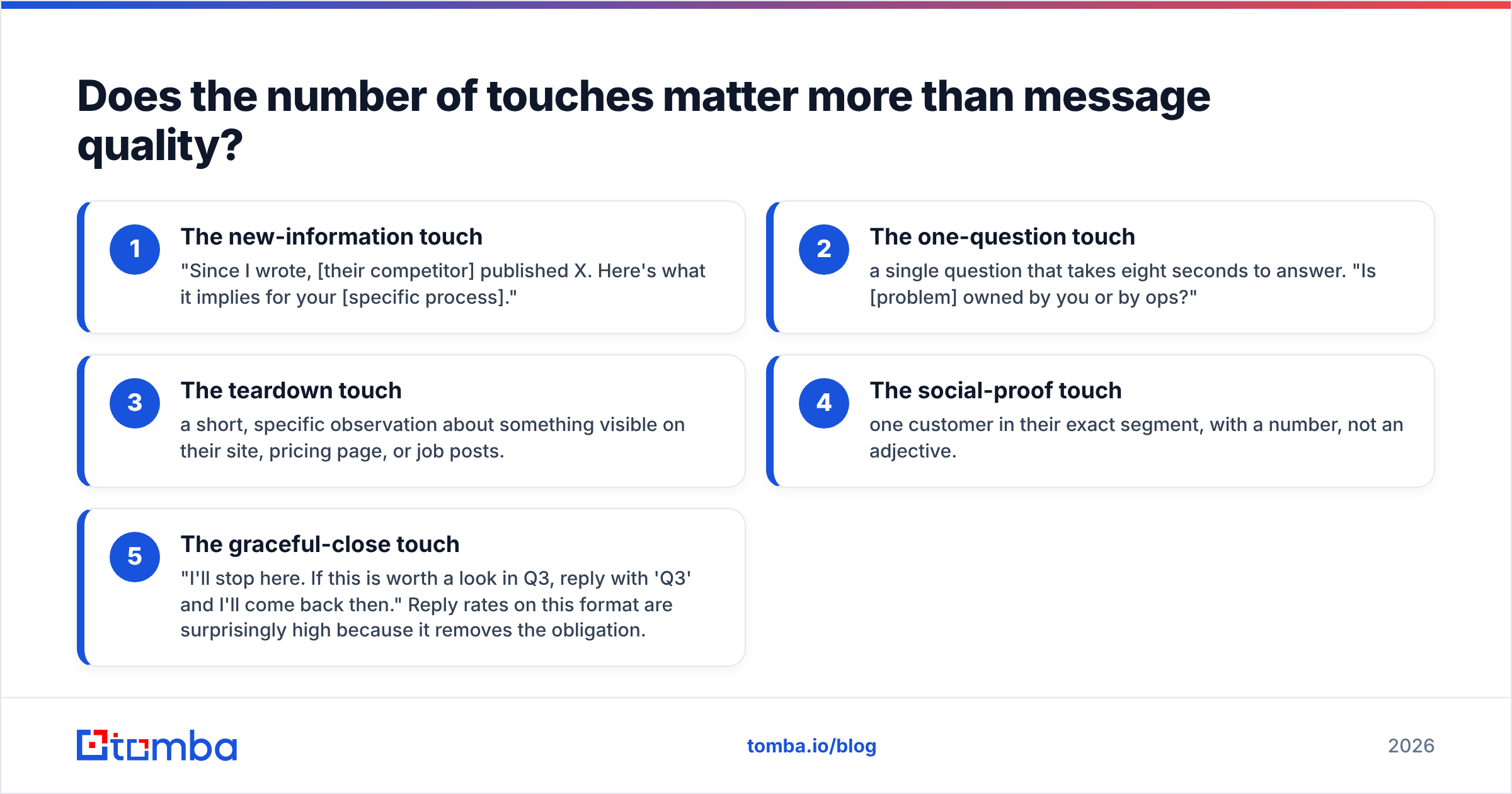
Once the data is right, the message decides the outcome. The follow-up formats that consistently earn replies:
- The new-information touch — "Since I wrote, [their competitor] published X. Here's what it implies for your [specific process]."
- The one-question touch — a single question that takes eight seconds to answer. "Is [problem] owned by you or by ops?"
- The teardown touch — a short, specific observation about something visible on their site, pricing page, or job posts.
- The social-proof touch — one customer in their exact segment, with a number, not an adjective.
- The graceful-close touch — "I'll stop here. If this is worth a look in Q3, reply with 'Q3' and I'll come back then." Reply rates on this format are surprisingly high because it removes the obligation.
How do you build a follow-up sequence that scales?#
Follow-up breaks down at volume for a boring reason: manual work. A rep can hand-craft six touches for ten prospects. Nobody hand-crafts six touches for four hundred.
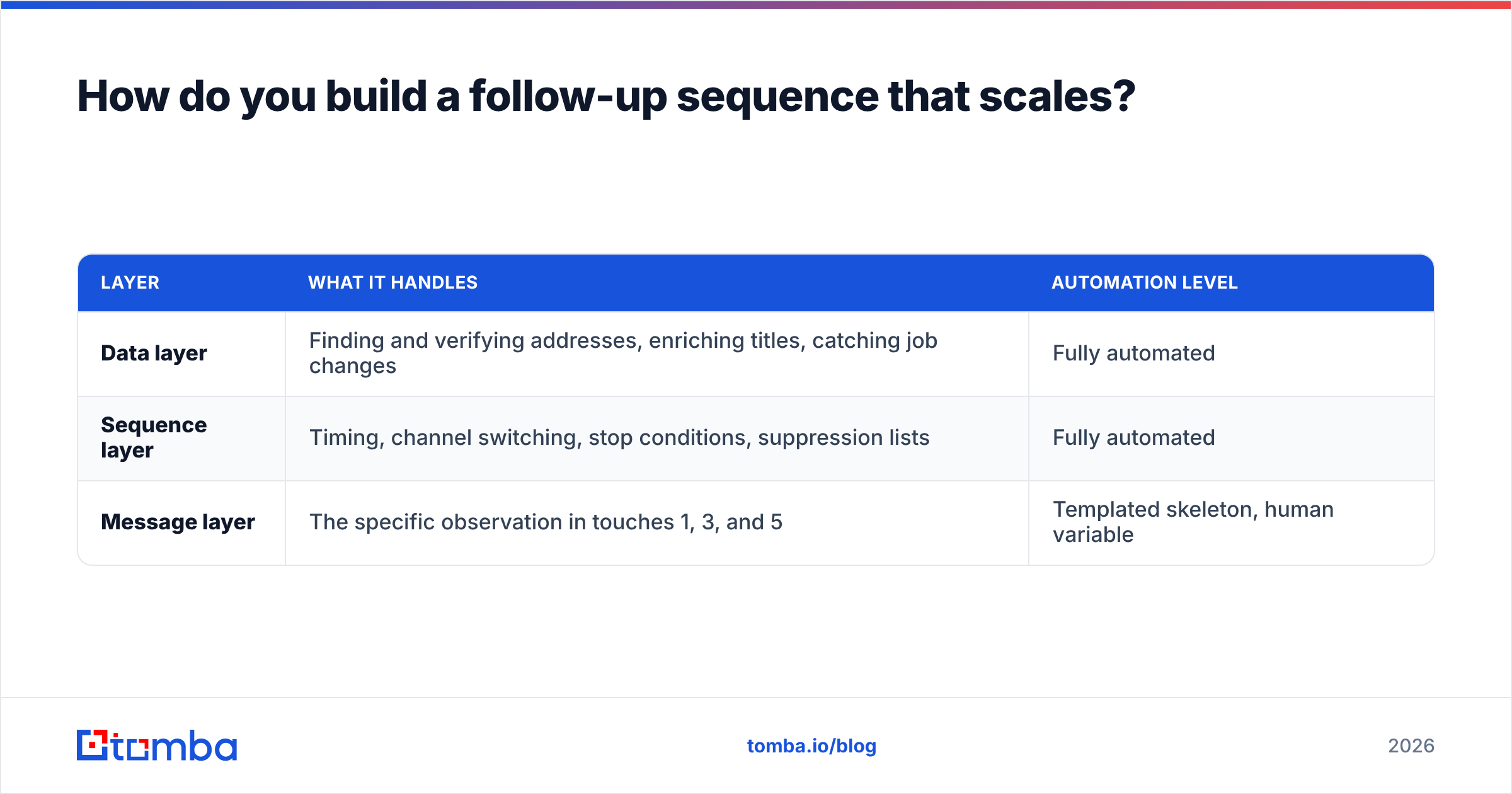
The scalable structure has three layers:
| Layer | What it handles | Automation level |
|---|---|---|
| Data layer | Finding and verifying addresses, enriching titles, catching job changes | Fully automated |
| Sequence layer | Timing, channel switching, stop conditions, suppression lists | Fully automated |
| Message layer | The specific observation in touches 1, 3, and 5 | Templated skeleton, human variable |
Automate layers one and two ruthlessly. Keep a human in layer three for anything above your average deal size. Below it, use tight templates with two or three genuine variables — never twelve merge fields pretending to be research.
For the data layer, pull contacts in bulk rather than one at a time. A bulk email finder run against a target account list, followed by verification, gives you a sequence-ready list where each touch actually lands. If you are running follow-up from a CRM, wire the enrichment in directly — Tomba's HubSpot integration and Tomba API both let you refresh contact data mid-sequence so a job change triggers a re-find instead of six wasted sends.
Peers in this space handle the same job differently and worth knowing: BookYourData leans on a pay-as-you-go verified B2B database with strong bounce guarantees, which suits teams that want a list handed to them rather than built. Compare approaches on G2 before you commit budget — the right choice depends on whether your bottleneck is list building or list accuracy.
What metrics tell you your follow-up count is right?#
Track these four, per sequence, not per rep:
- Reply rate by touch number. If touch 5 still produces replies at a meaningful rate, you are stopping too early. If touches 6–8 produce near zero, trim the sequence.
- Unsubscribe and complaint rate by touch number. The moment complaints climb past 0.1%, your last touch is doing more harm than the replies it earns.
- Sequence completion rate. What percentage of started sequences actually finish? Below 60% means your reps are abandoning mid-cadence and your data on touch counts is meaningless.
- Positive reply rate, not total reply rate. "Not interested" is a reply. Track meetings booked per 100 sequences completed.
Run this analysis monthly. The right touch count for your market is not the one in this article — it is the one your own reply-by-touch curve tells you, and that curve shifts as your segment, offer, and response rate benchmarks change. What you take from here is the method and the starting range; your data supplies the final number.
One caveat on measuring anything: if your list has not been verified, every metric above is contaminated. Bounces suppress apparent reply rates, dead mailboxes inflate your "no engagement" bucket, and you will conclude persistence doesn't work when the real problem was that touch one never arrived.
Where should you start?#
Pick one target segment. Build a 6-touch, 21-day cadence using the day-by-day structure above. Verify the list before you start. Complete every sequence — no abandoning at touch two. Then read the reply-by-touch curve and adjust.
The single biggest lift most teams get is not from adding a seventh touch. It is from making sure touches one through six reach a real, current, correctly-attributed mailbox.
That is where Tomba Email Finder fits. Find verified professional addresses by name, company, or domain, confirm them before you sequence, and re-check them when a prospect goes quiet for three weeks — so you know whether you are being ignored or simply emailing a mailbox nobody reads anymore. Start on the free tier at 25 searches a month, or scale to Starter at $49/mo; full Tomba pricing runs through Growth at $99/mo and Pro at $249/mo. Get the data right, then let persistence do what persistence does.
Related guides#
Ready to find emails that actually work?
Join 150,000+ professionals who stopped guessing and started sending. Free credits on signup — no credit card required.
Get the Tomba newsletter
Practical outbound tactics and product updates — once every two weeks.
About the author