How Many Times To Contact A Prospect Before Giving Up
Most reps quit after two touches. The data says deals close between touch five and twelve. Here is exactly how many times to contact a prospect, across which channels, and when stopping is the smarter call.
TL;DR
- The working range is 8 to 12 touches over 21 to 30 days for most B2B outbound. Below 5, you are leaving pipeline on the table; above 14, reply rates flatten while spam complaints climb.
- 44% of reps quit after one follow-up, but the majority of booked meetings in a well-run sequence land between touch 4 and touch 9.
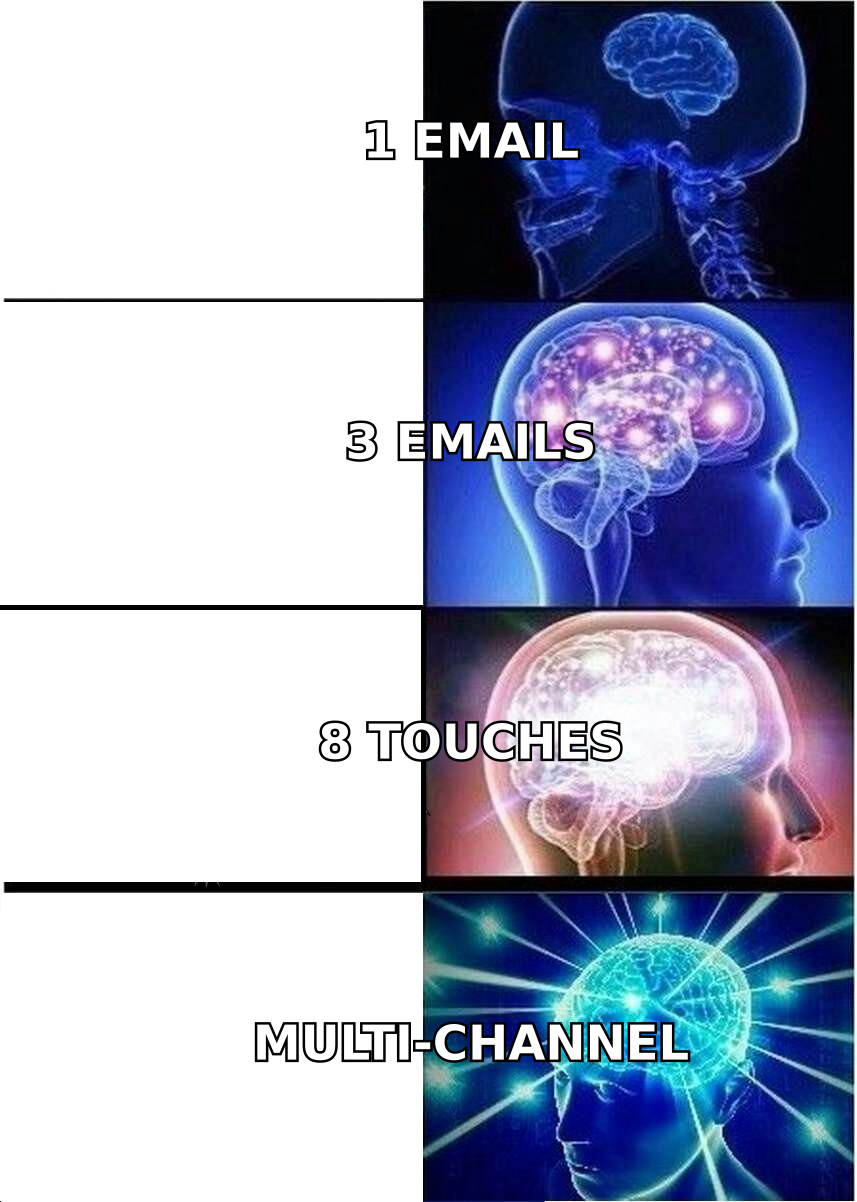
- Touch count is meaningless without channel spread. Eight emails to the same inbox is not eight touches — it is one annoying email sent eight times.
- Bad data inflates your touch count. If 20% of your list is invalid, you are burning sends on ghosts and dragging your sender reputation down with them.
- Stop when you hit a hard no, a bounce, an out-of-office role change, or touch 12 with zero engagement signal. Then recycle into nurture, don't delete.
What Does "How Many Times To Contact A Prospect" Actually Mean?#
Ask ten sales leaders how many times to contact a prospect and you will get ten numbers between 3 and 20. They are all sort of right, because they are counting different things.
A "touch" is any deliberate attempt to reach a specific person: an email, a call, a voicemail, a LinkedIn connection request, a comment on their post, a text. What most teams report as "we do 6 touches" usually means "we send 6 emails from one sequence and call it a cadence." Those are very different animals.
Think of it like knocking on a door. Knocking eight times on the same door at the same hour is not persistence — it's noise. Knocking, then ringing the bell, then leaving a note, then coming back at a different time of day is persistence. Same effort, wildly different outcome.
So the real question is not just how many, but:
- How many total touches across the whole sequence
- How many channels those touches are spread across
- How many days the sequence runs
- How much new information each touch carries
- What signal tells you to stop early or keep going
Get those five right and the raw number almost sorts itself out.
What Do The Numbers Say About Follow-Up Attempts?#
The most-cited figures in sales training decks are old, but the direction they point still holds up against what modern sequencing platforms report:
- Roughly half of reps never send a second follow-up. That alone explains most of the gap between top and bottom performers on the same list.
- Meetings cluster in the middle of the sequence, not at the start. Touch 1 gets the eager buyers already in-market. Touches 4 through 9 get the people who were busy, traveling, or not yet aware they had the problem.
- Reply rate per touch decays, but cumulative reply rate keeps climbing until roughly touch 10 to 12, then flattens hard.
- Call connect rates need volume. Cold-call connect sits in the single digits to low teens per dial. One dial is a coin flip you will lose. Six dials across different days and hours is a real attempt.
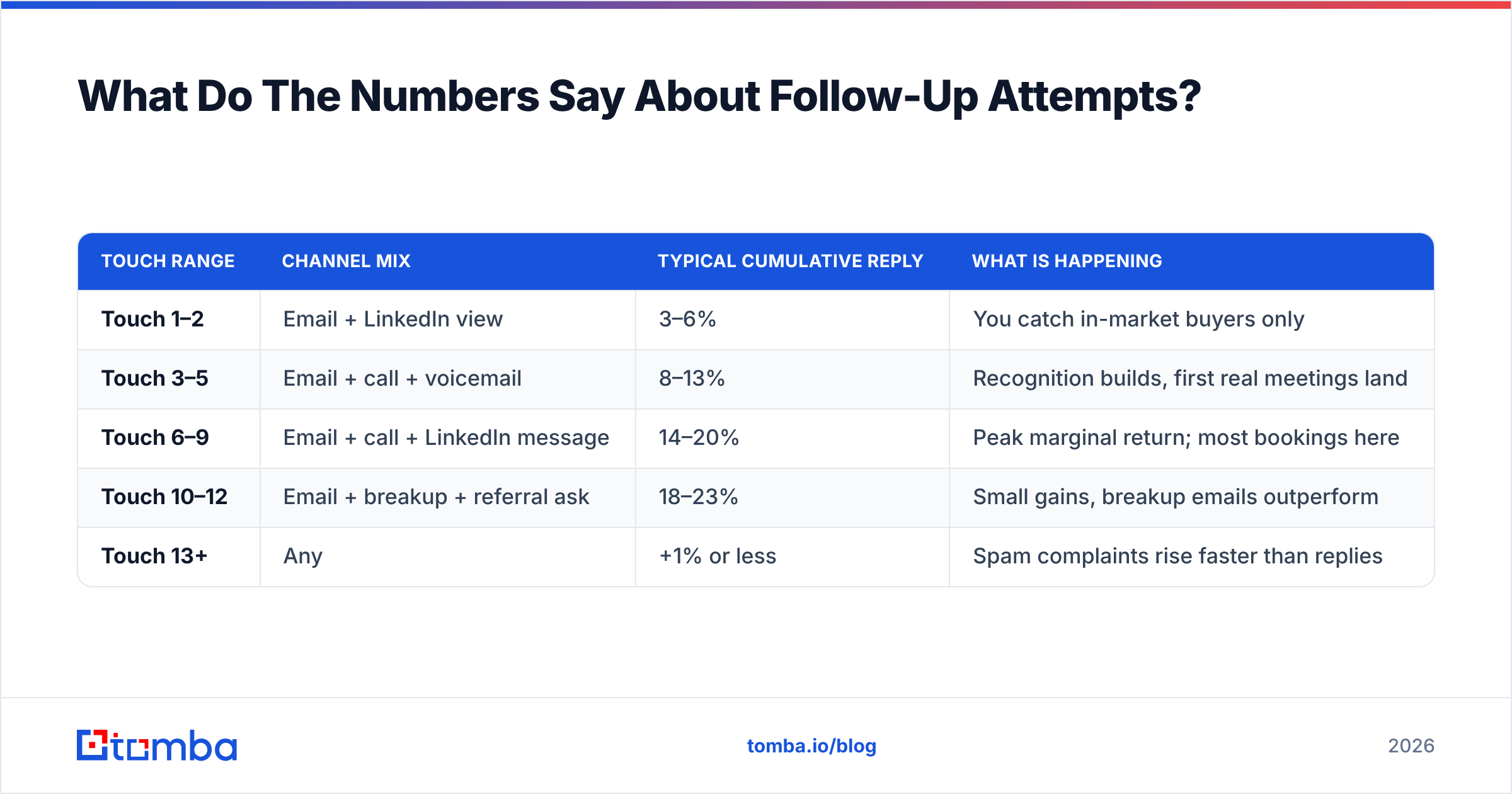
Here is the practical shape of a healthy sequence, measured across a typical mid-market SaaS motion:
| Touch range | Channel mix | Typical cumulative reply | What is happening |
|---|---|---|---|
| Touch 1–2 | Email + LinkedIn view | 3–6% | You catch in-market buyers only |
| Touch 3–5 | Email + call + voicemail | 8–13% | Recognition builds, first real meetings land |
| Touch 6–9 | Email + call + LinkedIn message | 14–20% | Peak marginal return; most bookings here |
| Touch 10–12 | Email + breakup + referral ask | 18–23% | Small gains, breakup emails outperform |
| Touch 13+ | Any | +1% or less | Spam complaints rise faster than replies |
The pattern is consistent: the middle of the sequence does the work, and the tail is where you burn goodwill. If you cut a cadence short at three, you are stopping right before the payoff.
Is There A Right Number Of Touches By Deal Type?#
Yes — and treating every prospect with the same 8-touch cadence is why so many teams see flat reply rates.
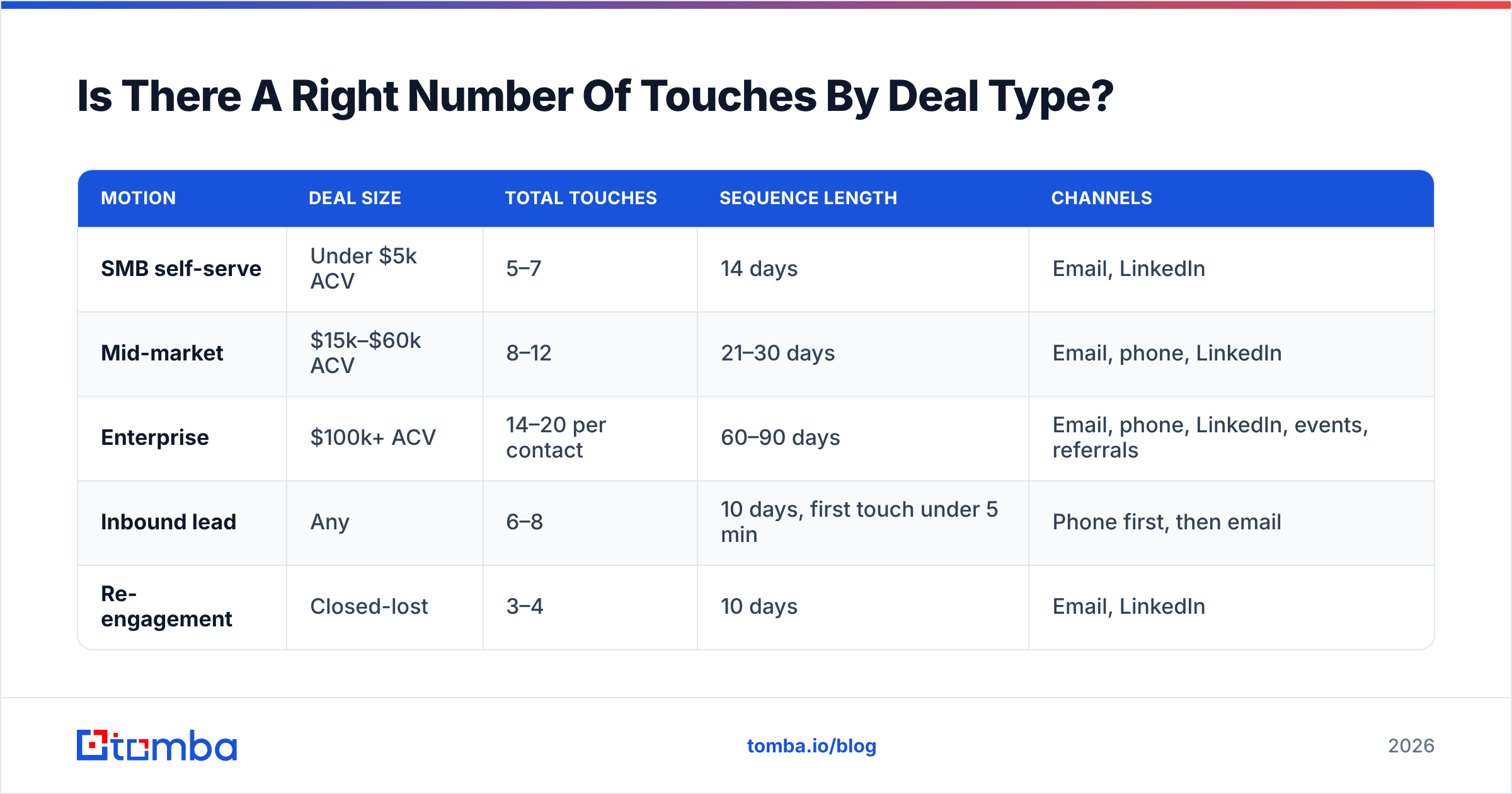
Touch count should scale with deal size and buying-committee complexity. A $200/month self-serve product does not deserve a 14-touch enterprise cadence. A $250k platform deal with seven stakeholders absolutely does.
| Motion | Deal size | Total touches | Sequence length | Channels |
|---|---|---|---|---|
| SMB self-serve | Under $5k ACV | 5–7 | 14 days | Email, LinkedIn |
| Mid-market | $15k–$60k ACV | 8–12 | 21–30 days | Email, phone, LinkedIn |
| Enterprise | $100k+ ACV | 14–20 per contact | 60–90 days | Email, phone, LinkedIn, events, referrals |
| Inbound lead | Any | 6–8 | 10 days, first touch under 5 min | Phone first, then email |
| Re-engagement | Closed-lost | 3–4 | 10 days | Email, LinkedIn |
Two things fall out of this table that people miss.
First, inbound leads invert the rules. Speed matters more than count. A lead contacted in the first five minutes converts at a multiple of one contacted in the first hour. Six fast touches beat twelve slow ones every time.
Second, enterprise touch counts are per contact, not per account. If you are running a 14-touch cadence against five stakeholders at one company, that is 70 touches at the account level, and the account will notice. Vary your angle by role: the CFO gets cost of inaction, the VP Eng gets integration effort, the CEO gets the one-line strategic frame.
How Should You Space Those Touches Out?#
Spacing is where most cadences quietly fail. Reps front-load everything into week one, go silent, then send a desperate "just checking in" three weeks later.
Use expanding intervals. Tight at the start while you are fresh in memory, wider as the sequence matures:
- Day 1 — Email 1. Specific trigger, one clear ask, no attachments.
- Day 3 — Call + voicemail. Reference the email by subject line so the two connect.
- Day 5 — LinkedIn connection request, no pitch in the note.
- Day 8 — Email 2. New angle, not a bump. Share something useful — a benchmark, a teardown, a relevant customer outcome.
- Day 12 — Call at a different hour than day 3. Early morning or after 4pm outperforms midday.
- Day 16 — Email 3. Social proof from a near-identical company.
- Day 21 — LinkedIn message or comment on their recent post.
- Day 26 — Breakup email. Short, no guilt, easy door left open.
Notice that no two consecutive touches use the same channel, and no touch repeats the previous one's argument. That is the whole trick. Eight touches that each say something new feel like a persistent professional. Eight touches that each say "just bumping this" feel like a bot.
For the mechanics of when to send and how to protect your domain while you run this volume, our guide on email deliverability covers the infrastructure side.
Does Contacting More Times Hurt Your Deliverability?#
This is the part touch-count debates usually skip, and it is the one that can quietly kill your entire outbound program.
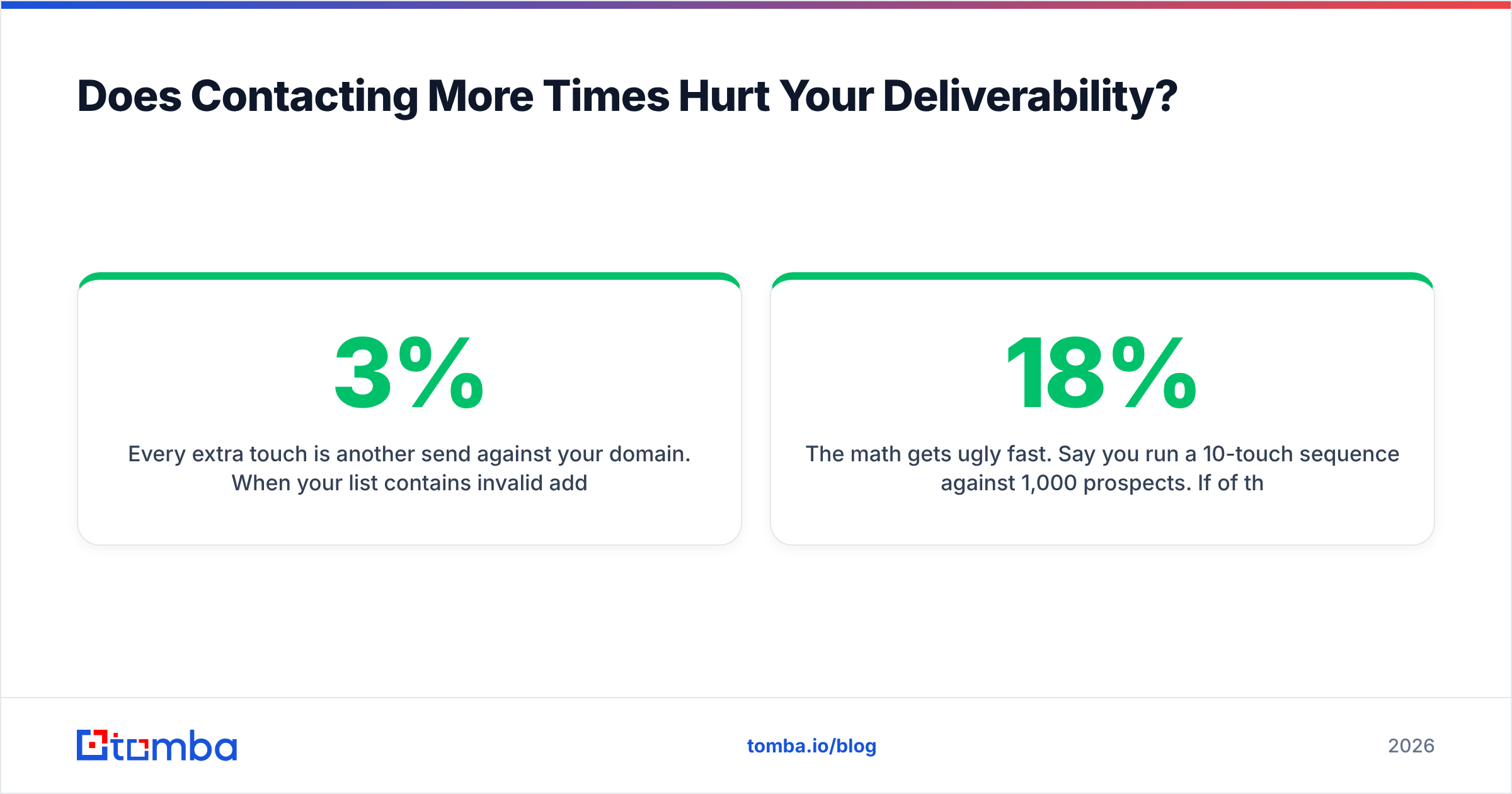
Every extra touch is another send against your domain. When your list contains invalid addresses, those extra sends turn into bounces, and mailbox providers read bounce rate as a spam signal. A 3% bounce rate is a warning. Above 5% and Google and Microsoft start throttling you — which means the touches you thought you were sending are landing in a folder nobody opens.
The math gets ugly fast. Say you run a 10-touch sequence against 1,000 prospects. If 18% of those addresses are dead, you have generated roughly 1,800 wasted sends and a bounce profile that flags you as a list-buyer. Your touch count went up. Your actual reach went down.
Three habits fix this before it starts:
- Verify before the sequence, not after. Run the list through an email verifier so bounces never enter the cadence at all.
- Handle catch-all domains separately. They accept everything and tell you nothing. A catch-all verifier gives you a confidence tier instead of a coin flip, so you can decide whether to spend touches there.
- Cap daily volume per mailbox. Spread sends across multiple sending domains rather than pushing one domain harder. Touch count per prospect and send volume per inbox are separate dials — don't confuse them.
Mailbox providers also watch engagement. If the same 1,000 people never open, never reply, and never move your mail out of Promotions, touch 11 is actively damaging the deliverability of touch 1 for your next campaign. Persistence against a non-responsive list is not grit. It is self-harm with a CRM attached.
When Should You Actually Stop Contacting A Prospect?#
Stop signals matter more than start signals, and most teams only have one: "sequence finished."
Add these:
- Hard bounce. Remove immediately, no exceptions. One hard bounce is a data problem, not a timing problem.
- Explicit no. "Not interested" ends the sequence and starts a 90-day nurture timer. Arguing with a no costs you the relationship and sometimes an abuse report.
- Role change or departure. The person left. Re-run the account, find the replacement, start clean. A reverse email lookup helps you confirm who is behind a stale address before you waste another six touches on them.
- Zero engagement through touch 12. No opens, no clicks, no LinkedIn accept, no connect on any dial. That contact is either wrong or genuinely unreachable. Move on.
- Compliance signal. Unsubscribe, spam complaint, or a regional opt-out request. Immediate, permanent, logged.
And one signal to keep going past your normal cap: partial engagement. Repeat opens with no reply, a LinkedIn accept, a pricing page visit. Those people are interested and busy. They earn four more touches with a lower-friction ask — a 10-minute call, a one-question email, a resource with no meeting attached.
That is the actual answer to how many times to contact a prospect: as many times as the signal justifies, capped by the point where you are talking to yourself.
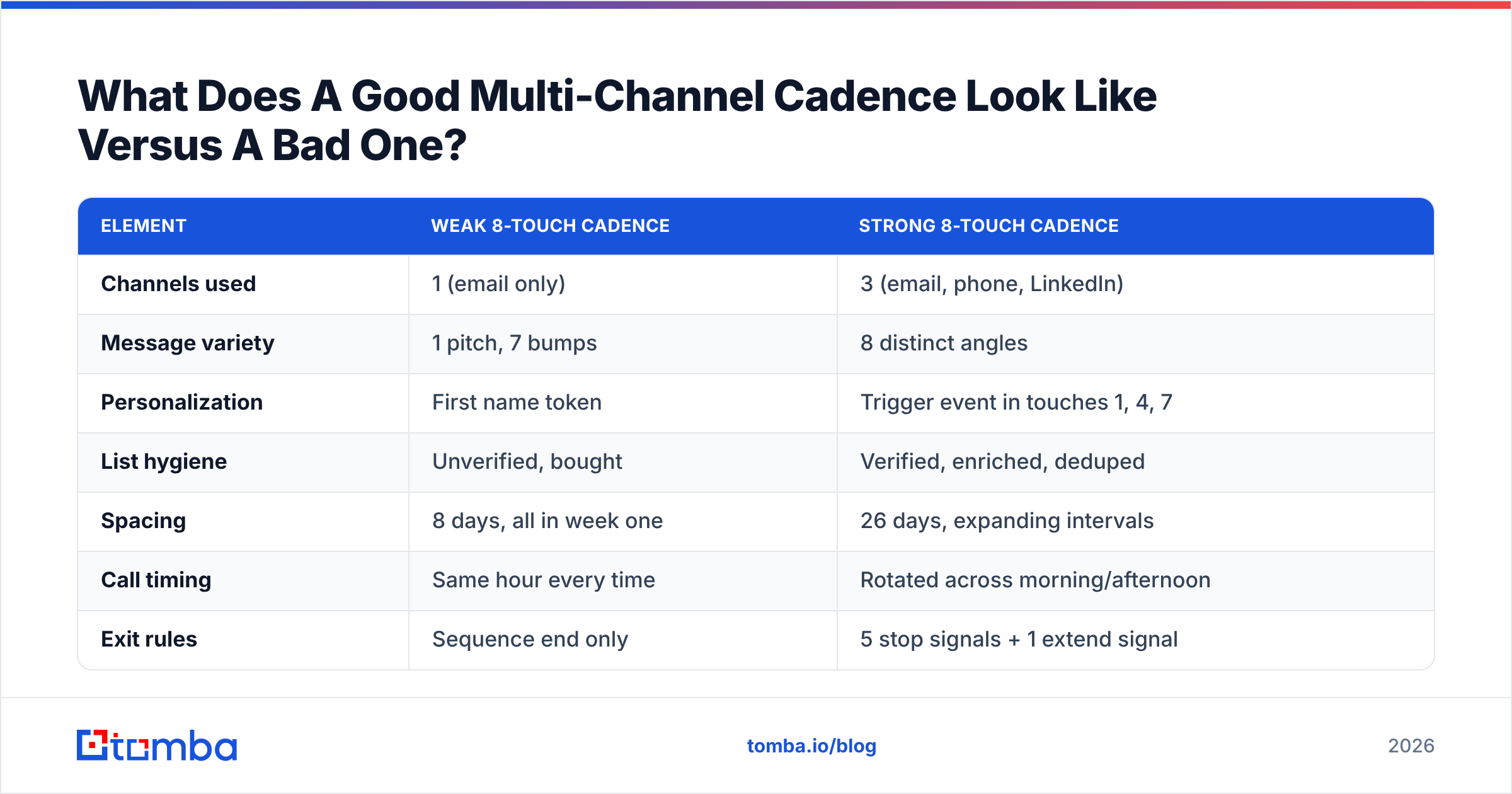
What Does A Good Multi-Channel Cadence Look Like Versus A Bad One?#
Same touch count, opposite outcomes:
| Element | Weak 8-touch cadence | Strong 8-touch cadence |
|---|---|---|
| Channels used | 1 (email only) | 3 (email, phone, LinkedIn) |
| Message variety | 1 pitch, 7 bumps | 8 distinct angles |
| Personalization | First name token | Trigger event in touches 1, 4, 7 |
| List hygiene | Unverified, bought | Verified, enriched, deduped |
| Spacing | 8 days, all in week one | 26 days, expanding intervals |
| Call timing | Same hour every time | Rotated across morning/afternoon |
| Exit rules | Sequence end only | 5 stop signals + 1 extend signal |
| Typical reply rate | 2–4% | 12–20% |
The strong column costs about the same number of rep-minutes. The difference is preparation, not effort — which is why teams that fix their data and their angles usually see the jump before they change their touch count at all.
If you are rebuilding cadences at scale, pull contact data programmatically instead of by hand. The Tomba API lets you find and verify contacts inside your sequencing tool so every new prospect enters the cadence already validated, and Tomba pricing starts with a free tier at 25 searches a month if you want to test the workflow before committing.
How Do You Track Whether Your Touch Count Is Right?#
Measure three things, monthly:
- Reply rate by touch number. Plot it. If replies are still climbing at touch 10, extend. If they died at touch 5, shorten and reinvest the effort in better targeting.
- Meetings per 100 prospects, by sequence. Not per email — per prospect. This is the number that survives channel changes.
- Bounce and complaint rate per campaign. If bounces cross 3% or complaints cross 0.1%, your data is the problem, not your persistence. Fix the list before touching the cadence.
Benchmarks from G2 and vendor reports are useful for orientation, and HubSpot's sales research publishes regular follow-up data worth checking against your own numbers. But your list, your ICP, and your offer will move these figures more than any published average. Run the measurement for a quarter and you will have benchmarks that actually apply to you.
One more thing worth auditing: whether your reps are actually completing the cadence. Sequence design says 10 touches; CRM data very often says the median contact received 3. If that gap exists in your team, no amount of cadence redesign helps until you close it.
Where Should You Start?#
If you are running fewer than five touches today, add touches — you are almost certainly under-contacting. If you are running more than twelve on a single channel, cut touches and add channels instead. If your bounce rate is above 3%, stop everything and fix the data first, because every number in this article assumes your emails actually arrive.
Persistence only compounds when it lands. Build your list with the Tomba Email Finder so every address in your cadence is a real person at a real company, verify before the first send, and let your 8 to 12 touches do what they are supposed to do — reach someone. Start free with 25 searches a month, and scale up when your reply-rate-by-touch chart tells you it's working.
Related guides#
Ready to find emails that actually work?
Join 150,000+ professionals who stopped guessing and started sending. Free credits on signup — no credit card required.
Get the Tomba newsletter
Practical outbound tactics and product updates — once every two weeks.
About the author