How Many Touch Points Before a Sale? 2026 B2B Data
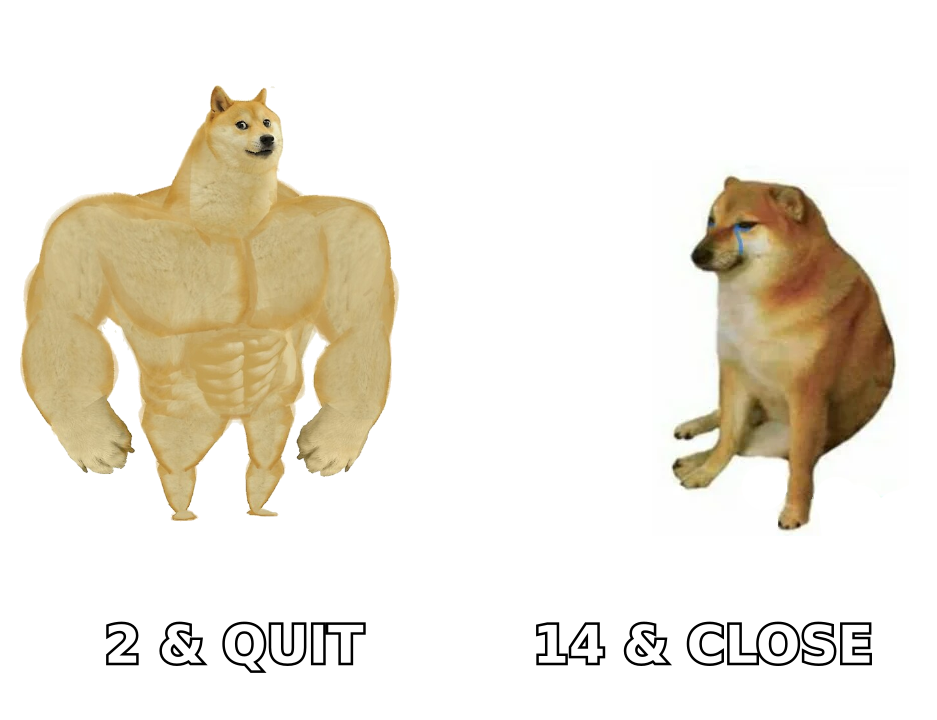
Most reps quit after two follow-ups. The data says B2B deals close somewhere between 8 and 27 touches. Here is how to count yours, sequence them, and stop guessing.
TL;DR
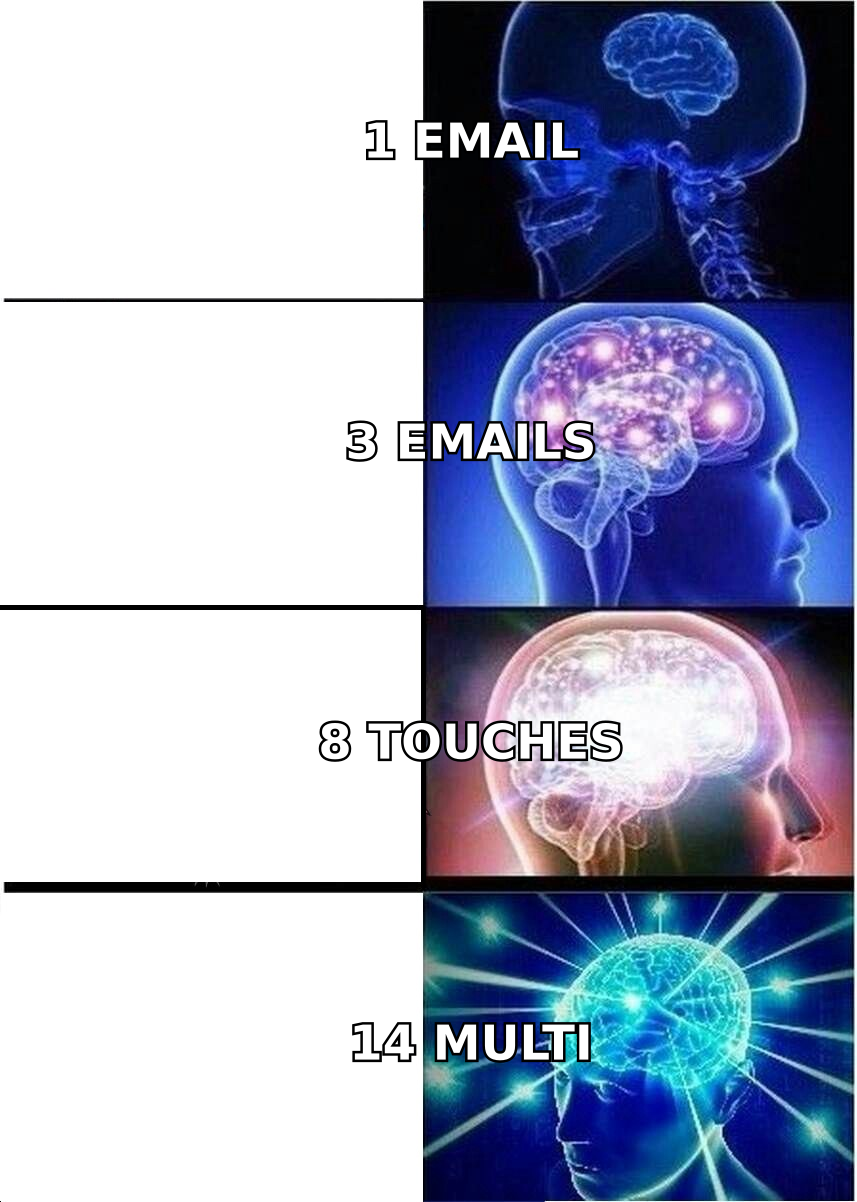
- There is no single number. Credible B2B benchmarks land between 8 and 27 touch points before a closed deal, and the spread is driven by deal size, buying-committee size, and how warm the account is.
- Most reps stop at 2 follow-ups. That is the actual problem — not the benchmark.
- Touch points are not all equal. One relevant, well-timed message beats six templated bumps, and a bad email address burns a touch without ever reaching a human.
- Use 8-12 touches over 21-28 days for warm inbound, 14-20 touches over 5-8 weeks for cold outbound into mid-market, and more for enterprise with 6+ stakeholders.
- Count touches per buying committee, not per contact. A six-person committee at 14 touches each is 84 sequence steps — plan capacity accordingly.
What is a touch point in B2B sales?#
A touch point is any deliberate contact between your company and a person in the buying account. Email, phone call, voicemail, LinkedIn connection request, LinkedIn message, a comment on their post, a direct mail piece, a retargeting ad impression they actually noticed, an event conversation, a webinar registration follow-up.
Think of it like knocking on a door in a large apartment building. One knock at the wrong door at the wrong hour proves nothing about whether anyone is home. The count only becomes meaningful when you know which door you knocked on, when, and whether the knock was audible.
That analogy matters because most "how many touches" arguments are really arguments about definitions. Three camps count differently:
- Outbound-only counters — count sequence steps a rep executes. Usually the smallest number.
- Full-funnel counters — include marketing touches: ads, content downloads, webinars, newsletter opens. Usually the largest number, often 20+.
- Attributed-touch counters — only count touches that appear in a multi-touch attribution model. Sits in the middle and is the most defensible for revenue reporting.
When someone tells you "it takes 27 touches to close a sale," ask which camp they are in. The old Rain Group and Marketo-era figures folded marketing exposure into the count. Sales-only sequence data from tools like Salesloft and Outreach reports much lower numbers.
How many touch points before a sale, really?#
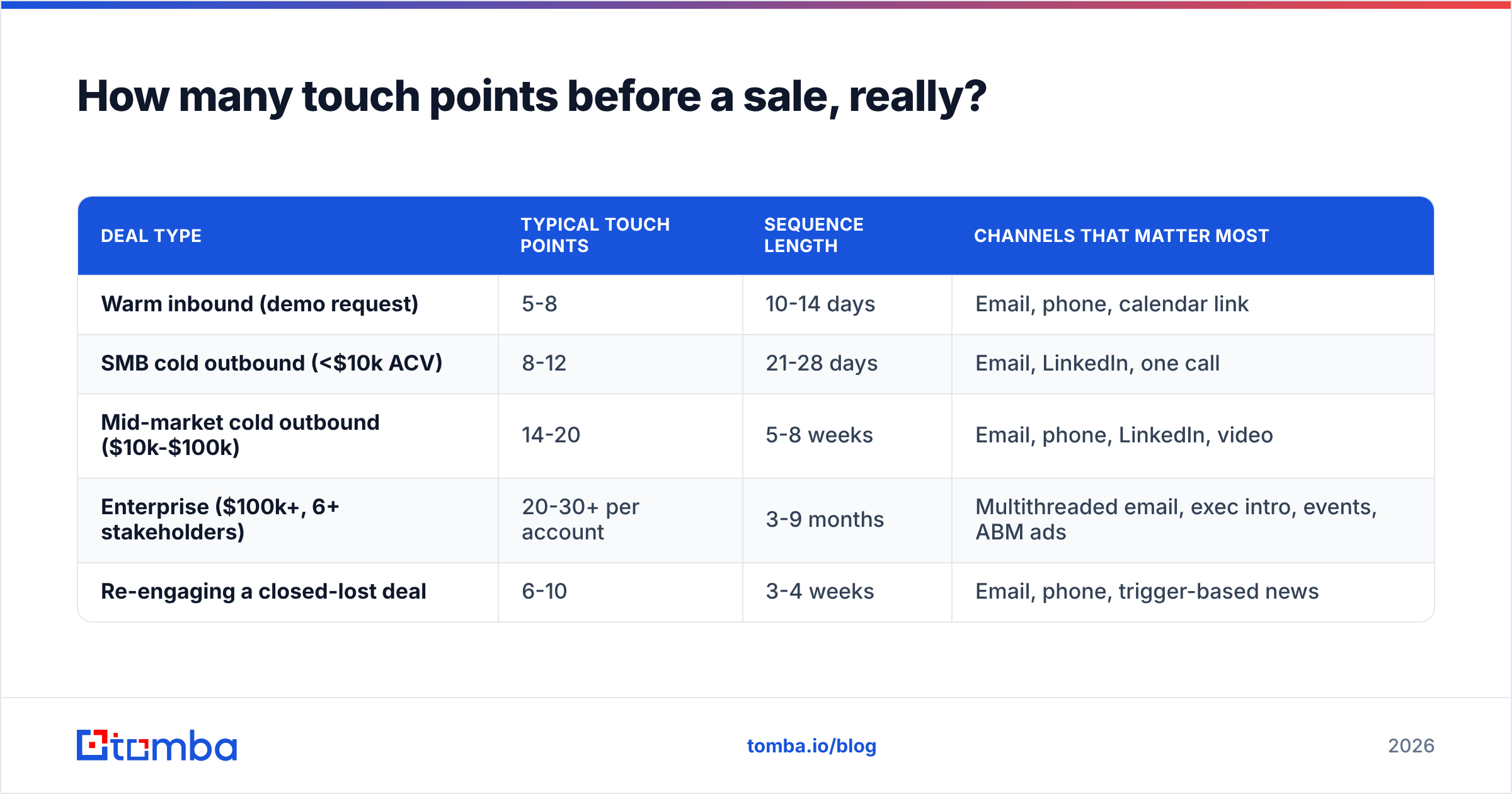
Here is the honest ranged answer, segmented by what actually changes the number.
| Deal type | Typical touch points | Sequence length | Channels that matter most |
|---|---|---|---|
| Warm inbound (demo request) | 5-8 | 10-14 days | Email, phone, calendar link |
| SMB cold outbound (<$10k ACV) | 8-12 | 21-28 days | Email, LinkedIn, one call |
| Mid-market cold outbound ($10k-$100k) | 14-20 | 5-8 weeks | Email, phone, LinkedIn, video |
| Enterprise ($100k+, 6+ stakeholders) | 20-30+ per account | 3-9 months | Multithreaded email, exec intro, events, ABM ads |
| Re-engaging a closed-lost deal | 6-10 | 3-4 weeks | Email, phone, trigger-based news |
Two patterns hold across every segment:
First, the drop-off is brutal and predictable. Reply rates on a well-targeted sequence usually peak on touches 1-3, dip hard on 4-6, then produce a smaller secondary bump around touches 8-11 as timing finally aligns with the buyer's internal cycle. Reps who quit at touch 3 never see the second bump. That is where the "80% of sales need 5 follow-ups but 44% of reps quit after one" statistic comes from — it is old, widely recycled, and directionally still true.
Second, more touches only work if the earlier ones did not annoy anyone. Fourteen identical "just bumping this up" emails is not a 14-touch cadence. It is one bad email sent 14 times. HubSpot's sales research and buyer-side surveys on G2 both point at relevance, not repetition, as the variable that separates sequences that book meetings from sequences that generate spam complaints.
Why do most reps stop too early?#
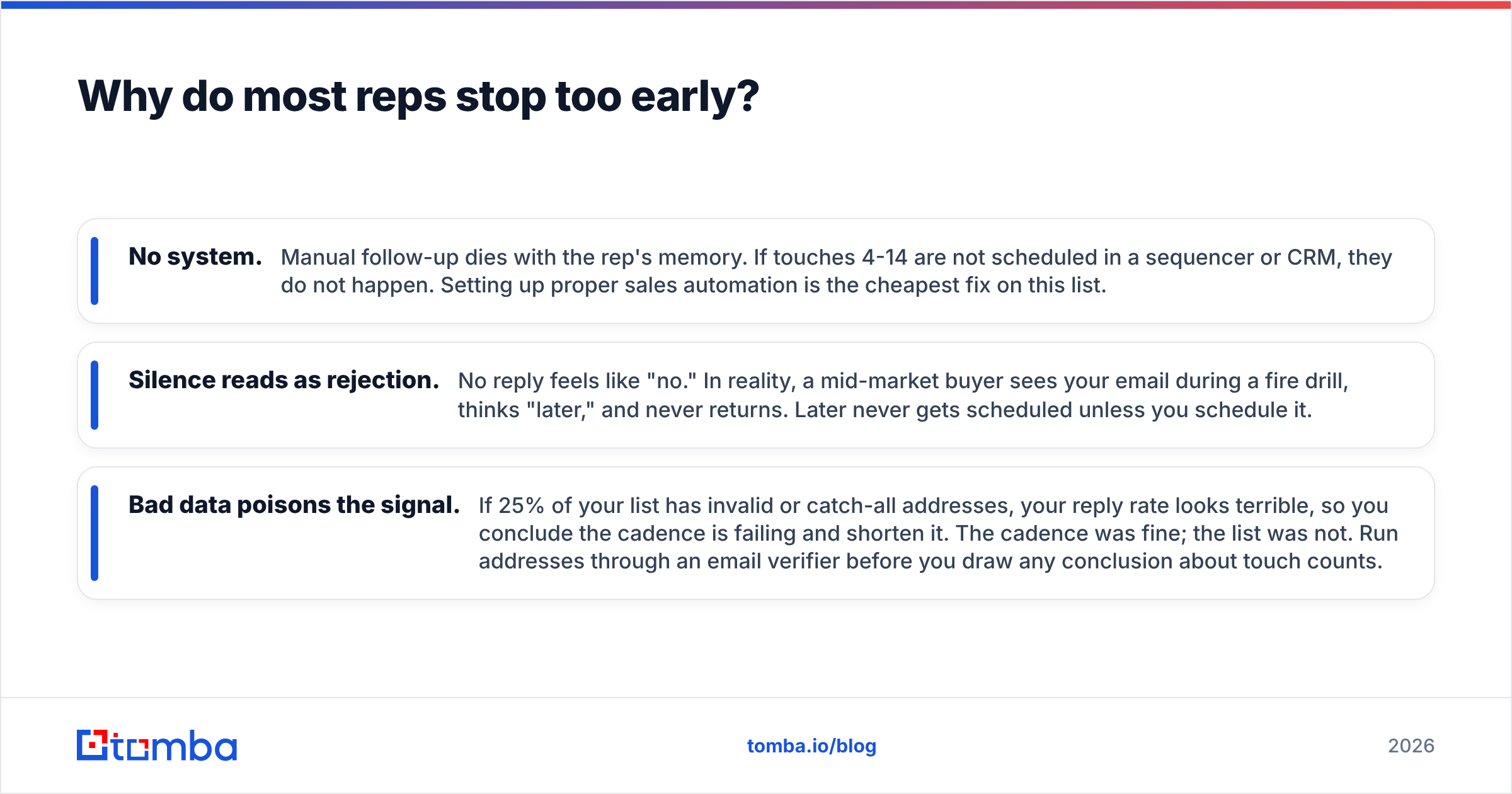
Three reasons, in order of how much damage they do.
- No system. Manual follow-up dies with the rep's memory. If touches 4-14 are not scheduled in a sequencer or CRM, they do not happen. Setting up proper sales automation is the cheapest fix on this list.
- Silence reads as rejection. No reply feels like "no." In reality, a mid-market buyer sees your email during a fire drill, thinks "later," and never returns. Later never gets scheduled unless you schedule it.
- Bad data poisons the signal. If 25% of your list has invalid or catch-all addresses, your reply rate looks terrible, so you conclude the cadence is failing and shorten it. The cadence was fine; the list was not. Run addresses through an email verifier before you draw any conclusion about touch counts.
That last one deserves emphasis. A bounced email is a touch that was never delivered but still consumed a sequence step, still counted in your dashboard, and still degraded your sender reputation. You end up with a cadence that looks like 12 touches and functions like 8.
How should you structure a multichannel cadence?#
Do not think in "emails." Think in channel-rotated touches with escalating specificity. A workable mid-market cadence over six weeks:
- Day 1 — Email (trigger-based). Reference a specific event: funding, hire, product launch, job post. No pitch beyond one sentence.
- Day 2 — LinkedIn view + connect. No message. Just presence.
- Day 4 — Phone call + voicemail. Voicemail references the email subject line so the two link in their memory.
- Day 7 — Email (value asset). A benchmark, teardown, or short internal doc. Not a case study PDF gate.
- Day 10 — LinkedIn message. Two sentences, referencing the asset, ending in a question.
- Day 14 — Phone call. Different time of day than touch 3.
- Day 18 — Email (new angle). Address a different pain than touches 1 and 4. This is where most sequences repeat themselves and lose.
- Day 24 — Multithread. Same offer, a peer or manager of your original contact. Never disparage the first contact.
- Day 30 — Video or voice note. Highest effort, lowest volume — reserve for accounts that showed any signal.
- Day 38 — Breakup email. Short, no guilt, explicit door left open.
- Day 60+ — Nurture re-entry. Move to a quarterly trigger-based touch, not a weekly bump.
Eleven scheduled touches, four channels, one account. If you multithread three contacts, that is 33 sequence steps for one logo. This is the arithmetic most teams skip when they set activity quotas.
For teams working accounts rather than individuals, add LinkedIn outreach as a parallel track rather than a substitute — the reply rate lift comes from the channel mix, not from any single channel being magic.
What makes a touch point count?#
Five tests. If a touch fails two or more, it is not a touch — it is noise.
- Deliverable. The address is valid, not a catch-all guess, and your domain is not blacklisted. Everything downstream depends on this.
- Addressed to a real decision influencer. A verified email to the wrong persona is a delivered failure.
- Specific. Contains at least one fact you could not have written about any other company.
- New. Advances an angle the previous touch did not. Repetition is the single fastest way to get marked as spam.
- Timed against a real signal. Funding round, leadership change, competitor switch, hiring spike, tech-stack change.
Sourcing that specificity at volume is a data problem before it is a copywriting problem. This is where a domain search that returns verified contacts with roles and departments beats scraping a list and guessing formats. If your list is built from permutation guessing, expect a meaningful share of your "touches" to never land.
How do you measure touch points without lying to yourself?#
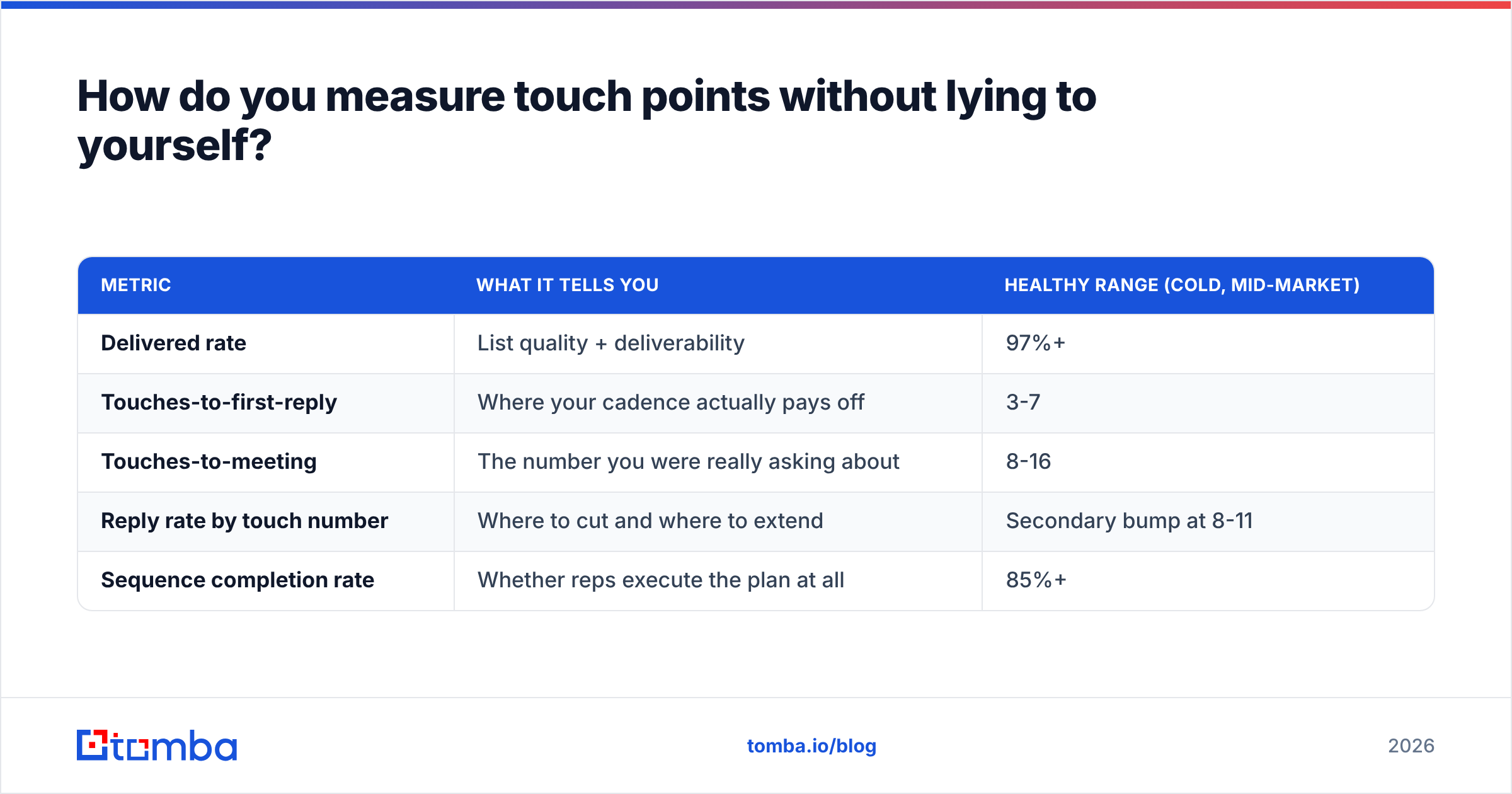
Track four numbers per sequence, not one.
| Metric | What it tells you | Healthy range (cold, mid-market) |
|---|---|---|
| Delivered rate | List quality + deliverability | 97%+ |
| Touches-to-first-reply | Where your cadence actually pays off | 3-7 |
| Touches-to-meeting | The number you were really asking about | 8-16 |
| Reply rate by touch number | Where to cut and where to extend | Secondary bump at 8-11 |
| Sequence completion rate | Whether reps execute the plan at all | 85%+ |
If your sequence completion rate is under 60%, ignore every other number on this page. You are not testing a 14-touch cadence — you are testing a 6-touch cadence with extra steps written down. Fix execution before you tune the count.
Also segment by response rate per persona. VPs and directors typically reply earlier or not at all; individual contributors and managers show the long tail that makes touches 8-14 worth running.
Does more touches ever hurt?#
Yes, in three specific ways.
Deliverability damage. High-volume, low-relevance sending drives spam complaints, and complaint rate is the metric mailbox providers weight hardest. Google and Microsoft both tightened bulk-sender requirements, and the practical effect is that a sloppy 20-touch cadence can cost you the domain. Google's sender guidelines spell out the complaint-rate thresholds. Protect email deliverability first; extend cadence length second.
Brand cost with named accounts. In enterprise ABM, the buying committee talks internally. Nine unanswered bumps to four people at the same company reads as desperation, and it closes the door on the next quarter too.
Opportunity cost. Touches 15-20 into a cold account with zero engagement signal usually convert worse than touches 1-5 into a fresh, well-researched account. Past roughly touch 12 with no signal at all, moving the contact to a quarterly nurture and reallocating the effort is the better trade.
The rule of thumb: extend cadence length for accounts that show any signal, and cut it short for accounts that show none. Signal includes opens on multiple touches, a LinkedIn profile view back, a website visit, or a colleague replying. Static cadences that treat a silent account the same as an engaged one waste the majority of a rep's week.
Which tools help you run longer cadences without burning your domain?#
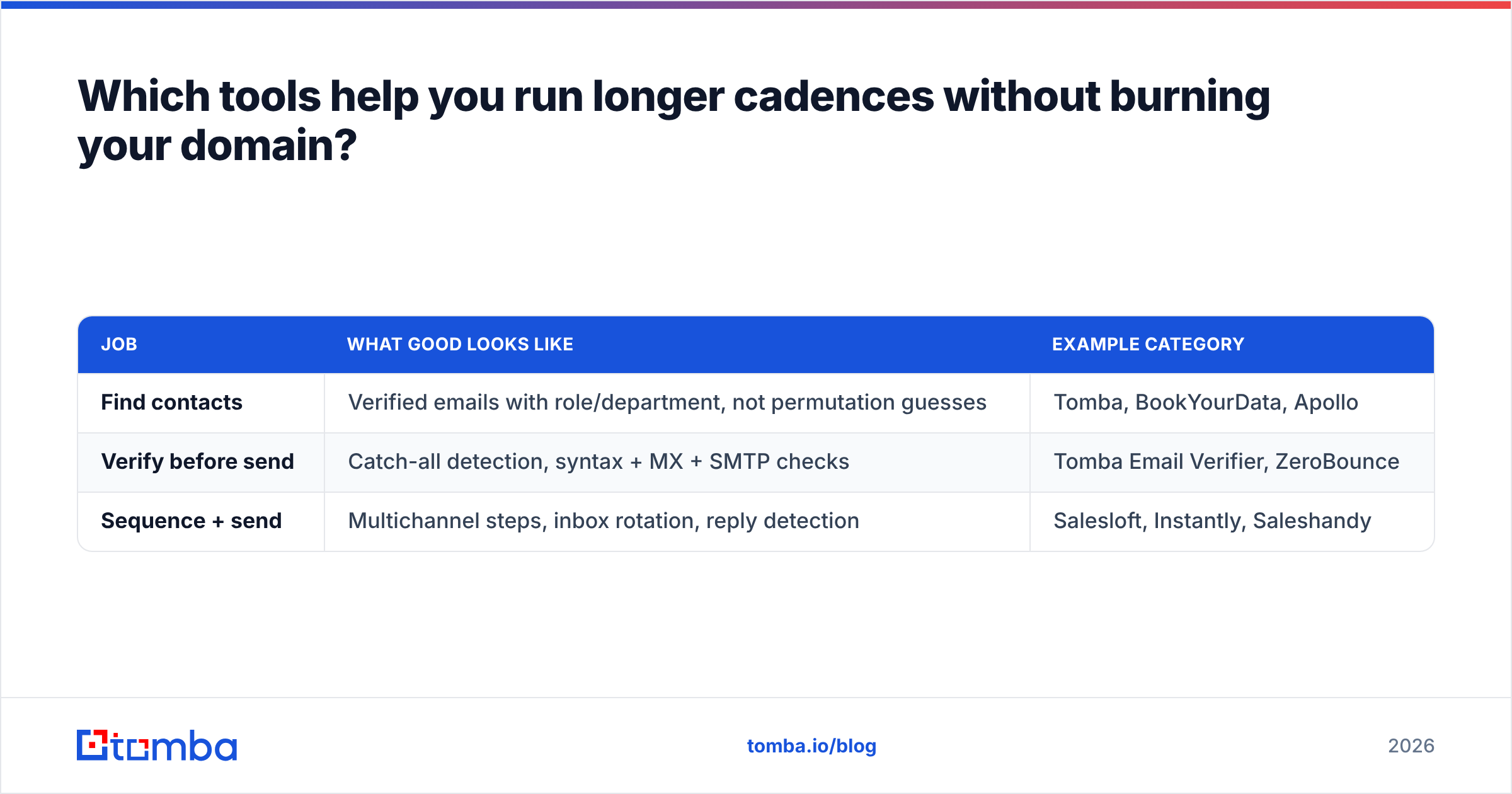
Split the stack into three jobs and pick the best tool per job rather than one platform for everything.
| Job | What good looks like | Example category |
|---|---|---|
| Find contacts | Verified emails with role/department, not permutation guesses | Tomba, BookYourData, Apollo |
| Verify before send | Catch-all detection, syntax + MX + SMTP checks | Tomba Email Verifier, ZeroBounce |
| Sequence + send | Multichannel steps, inbox rotation, reply detection | Salesloft, Instantly, Saleshandy |
A few practical notes on the first two columns, since they determine whether your touch count is real:
- Coverage vs accuracy is a real trade-off. A provider that returns an address for 95% of your list but is right 70% of the time gives you a worse effective touch count than one that returns 70% coverage at 96% accuracy.
- Catch-all domains are where most tools quietly fail. Many providers mark catch-alls "valid." Check whether your tool distinguishes them — a catch-all verifier that scores rather than shrugs is worth the line item.
- Cost per usable contact beats cost per credit. Tomba's pricing runs a free tier at 25 searches/mo, Starter at $49/mo, Growth at $99/mo, and Pro at $249/mo. Divide by contacts you actually sent to, not credits consumed.
- List providers like BookYourData suit teams that want pre-built, human-verified lists by industry and title; finder-and-verify tools suit teams building lists from their own ICP research. Both approaches work — the failure mode is mixing an unverified list into a long cadence.
For the sequencing layer, look at real user reviews on Capterra rather than vendor benchmark pages, and weight recency heavily — inbox-provider rules changed enough since 2024 that older reviews describe a different product reality.
What should you do this week?#
Three concrete steps, in order:
- Audit your current touch count. Pull the last 50 closed-won deals and count actual logged touches to first meeting. Most teams find the real number is 40% higher than what their playbook says.
- Verify the top of your list. Run your active sequences' contacts through verification and remove invalids and unscored catch-alls. Recalculate reply rate on the clean list — it usually jumps enough to change your conclusion about cadence length.
- Add touches 9-14 as a signal-gated branch. Do not extend every sequence. Extend only for contacts with one or more engagement signals, and route the silent ones to quarterly nurture.
Then re-measure in 30 days. The number of touch points before a sale is not a fact you look up — it is a number your own pipeline reports back to you once the data underneath it is clean.
Ready to make every touch point land?#
Long cadences only pay off when the contact details are right. Start with Tomba Email Finder to build lists from verified, role-tagged company data instead of guessed formats, then verify before the first send so touches 1 through 14 all reach a real inbox. The free tier gives you 25 searches a month to test it against a list you already have — compare the delivered rate before you decide anything about how many touches your team really needs.
Related guides#
Ready to find emails that actually work?
Join 150,000+ professionals who stopped guessing and started sending. Free credits on signup — no credit card required.
Get the Tomba newsletter
Practical outbound tactics and product updates — once every two weeks.
About the author