How To Answer Emails Professionally: A 2026 Reply Playbook
Most professional replies fail on structure, not vocabulary. Here is a repeatable framework, response-time benchmarks, and copy-paste templates for the replies that actually decide deals.
TL;DR
- A professional reply is a structure, not a vocabulary. Five parts — acknowledgment, direct answer, context, next step, close — handle roughly 90% of business email.
- Speed beats polish. A clear reply in 4 hours outperforms a perfect one in 3 days, and internal SLAs should be written down, not assumed.
- The single biggest failure mode is the reply that ends without a named owner and a date. That is how threads die.
- Match formality to the sender's register, not to a textbook. Mirroring beats "Dear Sir/Madam" in almost every B2B context.
- Templates are scaffolding, not scripts. Keep 8–10 reply patterns and personalize the first two lines every time.
You already know how to write an email. What most people never learn is how to answer one — how to take an inbound message with three implicit questions, one hidden objection, and a vague deadline, and turn it into a reply that closes the loop instead of opening two more.
This guide covers the reply itself: structure, tone calibration, response-time benchmarks, the messages that need extra care, and templates you can adapt today.
What makes a reply "professional" in the first place?#
Professional does not mean formal. It means the recipient finishes reading and knows exactly what happened, what you decided, and what occurs next.
Three tests separate a professional reply from an amateur one:
- The scan test. Can someone reading on a phone in eight seconds extract the answer? If your conclusion is buried in paragraph three, you failed.
- The forward test. If your recipient forwards your reply to their boss with no added context, does it still make sense? Professional replies survive being forwarded.
- The loop test. Does the thread end here, or does it end with a named owner and a date? Every reply either closes a loop or explicitly hands it to someone.
Everything else — sign-offs, greeting style, whether you write "Best" or "Regards" — is noise compared to those three.
What is the 5-part structure for answering emails professionally?#
Here is the structure that handles most business replies. It works for customer questions, internal requests, vendor negotiations, and cold-inbound responses alike.
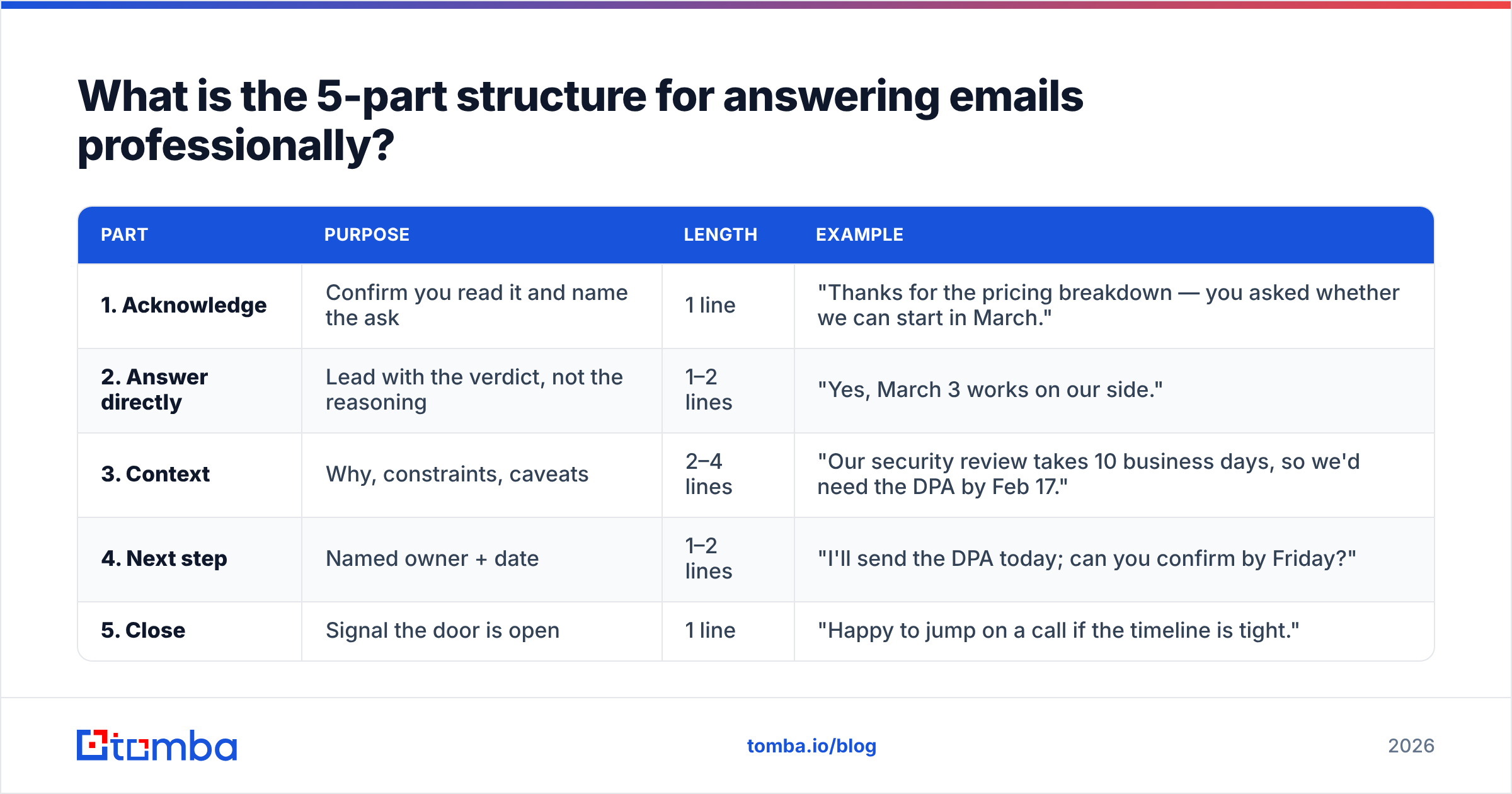
| Part | Purpose | Length | Example |
|---|---|---|---|
| 1. Acknowledge | Confirm you read it and name the ask | 1 line | "Thanks for the pricing breakdown — you asked whether we can start in March." |
| 2. Answer directly | Lead with the verdict, not the reasoning | 1–2 lines | "Yes, March 3 works on our side." |
| 3. Context | Why, constraints, caveats | 2–4 lines | "Our security review takes 10 business days, so we'd need the DPA by Feb 17." |
| 4. Next step | Named owner + date | 1–2 lines | "I'll send the DPA today; can you confirm by Friday?" |
| 5. Close | Signal the door is open | 1 line | "Happy to jump on a call if the timeline is tight." |
Two rules make this work in practice. First, the answer comes before the reasoning — the reverse of how most people naturally write. Second, part 4 is non-negotiable. A reply without an owner and a date is a status update, not a reply.
Applied to a real message, the difference is stark:
Weak: "Thanks for reaching out! We've been discussing this internally and there are a few moving pieces on our end with the security team and procurement, so it's been a bit slow, but I think we should be able to figure something out. Let me know your thoughts!"
Strong: "Thanks — you asked about a March start. Yes, March 3 works. Our security review runs 10 business days, so we need the signed DPA by Feb 17. I'm sending it over today; can you confirm receipt by Friday? Happy to call if that's tight."
Same information. One of them ends the thread.
How fast should you answer emails?#
Faster than you think, and slower than "immediately." Response time is the metric buyers actually notice — HubSpot's sales research has repeatedly found that speed-to-lead correlates more strongly with conversion than message quality does.
Set explicit internal targets rather than reacting to whatever's loudest:
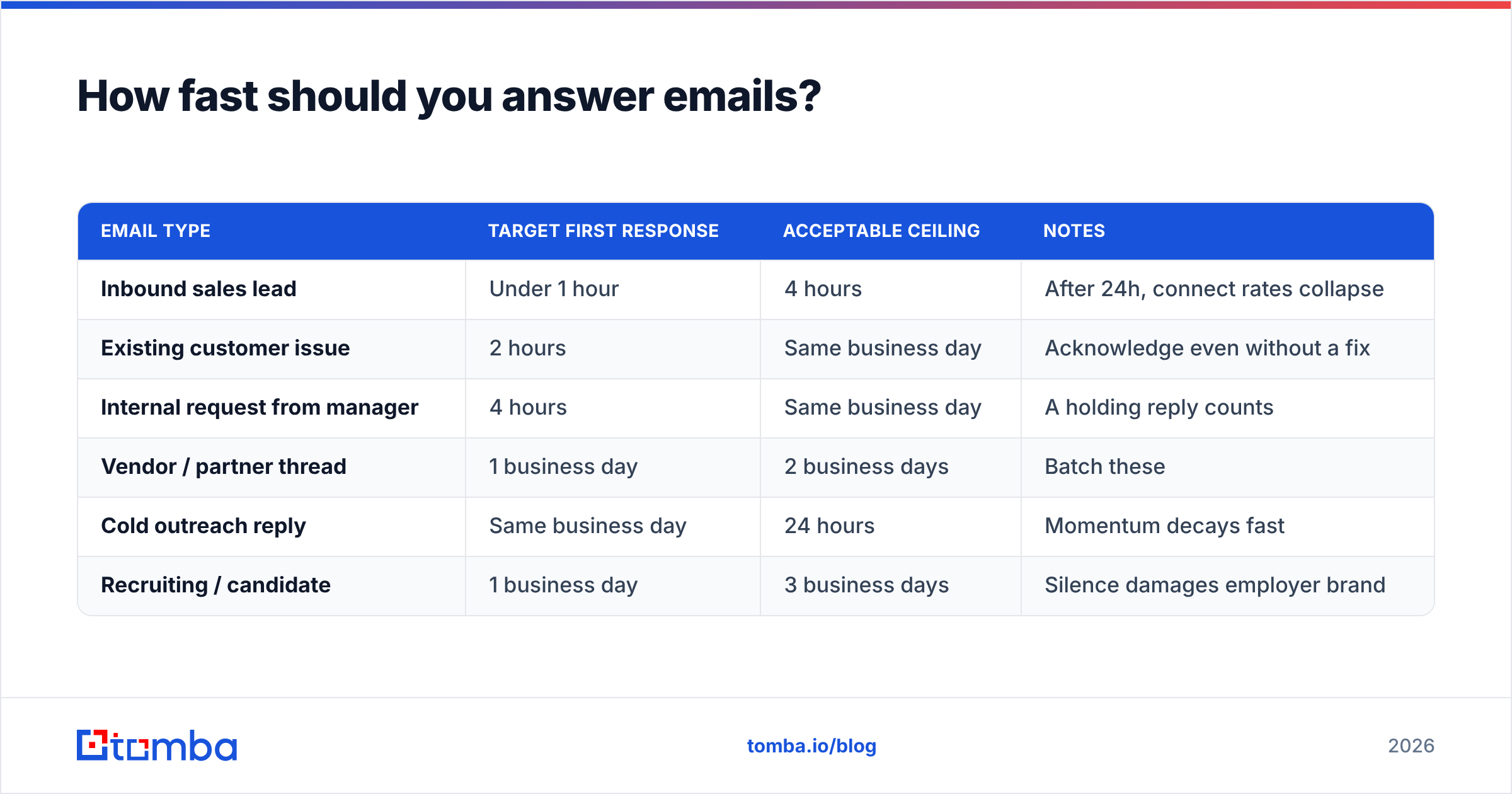
| Email type | Target first response | Acceptable ceiling | Notes |
|---|---|---|---|
| Inbound sales lead | Under 1 hour | 4 hours | After 24h, connect rates collapse |
| Existing customer issue | 2 hours | Same business day | Acknowledge even without a fix |
| Internal request from manager | 4 hours | Same business day | A holding reply counts |
| Vendor / partner thread | 1 business day | 2 business days | Batch these |
| Cold outreach reply | Same business day | 24 hours | Momentum decays fast |
| Recruiting / candidate | 1 business day | 3 business days | Silence damages employer brand |
The unlock is the holding reply. When you cannot answer properly, send four lines: what you received, what you're doing about it, who owns it, and when they'll hear back. That is a complete professional reply even when you have no answer yet.
"I got your question about the enterprise SSO timeline. I'm checking with engineering today and will have a firm date for you by Thursday afternoon. Flagging now in case that's slower than you need."
How do you match tone without sounding stiff?#
Mirror the sender's register, one notch more formal. If they wrote "Hey — quick q on pricing," don't reply with "Dear Mr. Alvarez, I trust this message finds you well." If they wrote a three-paragraph formal note with a signature block, don't reply with "yep, works."
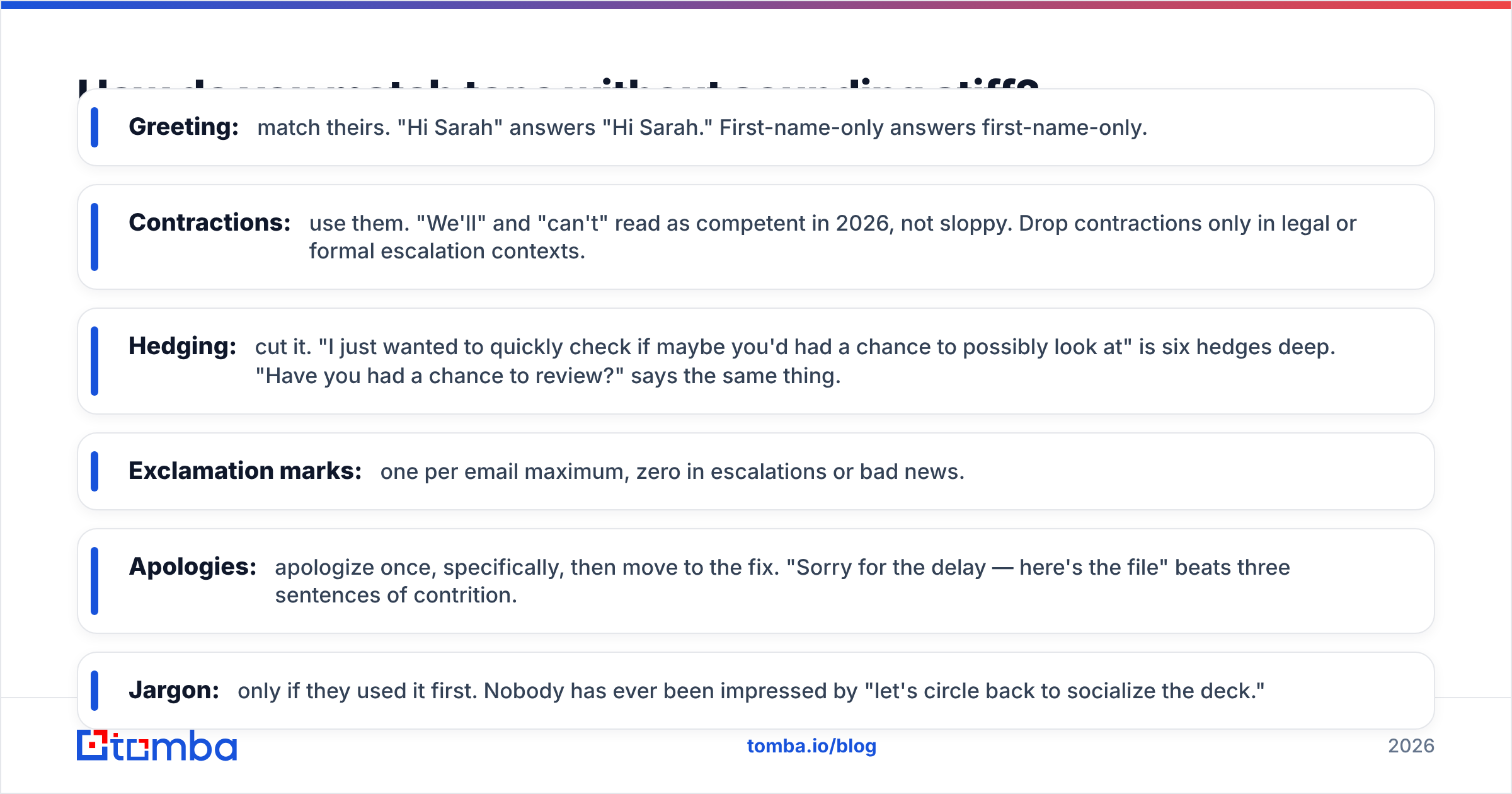
Practical calibration rules:
- Greeting: match theirs. "Hi Sarah" answers "Hi Sarah." First-name-only answers first-name-only.
- Contractions: use them. "We'll" and "can't" read as competent in 2026, not sloppy. Drop contractions only in legal or formal escalation contexts.
- Hedging: cut it. "I just wanted to quickly check if maybe you'd had a chance to possibly look at" is six hedges deep. "Have you had a chance to review?" says the same thing.
- Exclamation marks: one per email maximum, zero in escalations or bad news.
- Apologies: apologize once, specifically, then move to the fix. "Sorry for the delay — here's the file" beats three sentences of contrition.
- Jargon: only if they used it first. Nobody has ever been impressed by "let's circle back to socialize the deck."
Cross-cultural note: directness reads differently by market. German and Dutch business email tends to be more direct than US norms; Japanese and Korean business email leans on more elaborate openers. When in doubt, mirror.
What are the hardest emails to answer, and how do you handle them?#
Five categories cause most of the damage. Each has a reliable pattern.
1. The angry customer. Acknowledge the specific problem before anything else — not "sorry you feel that way," but "you were charged twice in March, and that's our error." Then state the fix, the date, and what prevents a repeat. Never explain your internal process before acknowledging their loss.
2. The "no." Lead with it. "We're not going to be able to do the custom integration this quarter." Then one honest reason, then an alternative if one exists. Burying a no under four paragraphs of cushioning reads as evasive, and the recipient has to read twice to find it.
3. The vague request. Don't guess. Ask one specific question, and propose a default so the thread can move if they don't answer. "To scope this: do you need all 50 states or just the top 10 markets? I'll assume top 10 unless you say otherwise."
4. The cold pitch you might actually want. A short honest reply builds more pipeline than silence. "Not a fit now — we renew our current tool in September. Ping me in August." Sales people remember who replied.
5. The thread that's gone off the rails. Twelve replies, four participants, no decision. Reset it: summarize the decision in three bullets, name the owner, propose a call. "Rather than keep this in email, I've summarized where we are below. Nadia owns the final call. 20 minutes Thursday?"
What templates should you keep on hand?#
Keep a small set and personalize the first two lines every time. Ten templates covering 80% of your volume beats a library of ninety you never open. If you want a starting library, our email templates collection covers the common B2B patterns, and a subject line generator helps when your reply changes the thread topic enough to warrant a new one.
Holding reply
Got your note on [topic]. I'm [specific action] and will come back to you by [day, time]. Flagging now in case that timing doesn't work.
Answering a pricing question
Thanks — short answer: [number/range]. That assumes [key variable]. If [variable] changes, the figure moves to roughly [alternative]. I've attached the breakdown. Want me to walk through it Thursday?
Declining without burning the relationship
We're going to pass on this one — [honest reason in one clause]. What I can do instead: [alternative]. If [condition changes], I'd want to revisit.
Chasing a non-responder (reply on the same thread)
Bumping this in case it got buried. The one thing I need is [single specific item]. If it's not a priority right now, tell me and I'll close the loop on my side.
Answering a question you don't know the answer to
I don't have a confident answer on [topic] yet. [Name] owns that, and I've forwarded your question. Expect a reply from them by [date]. If nothing lands, ping me and I'll chase.
Introducing two people
[Name A], meet [Name B] — [one line on why this matters to A]. [Name B], [Name A] is [role and relevance]. Moving myself to bcc; you two take it from here.
What tools actually help you answer email better?#
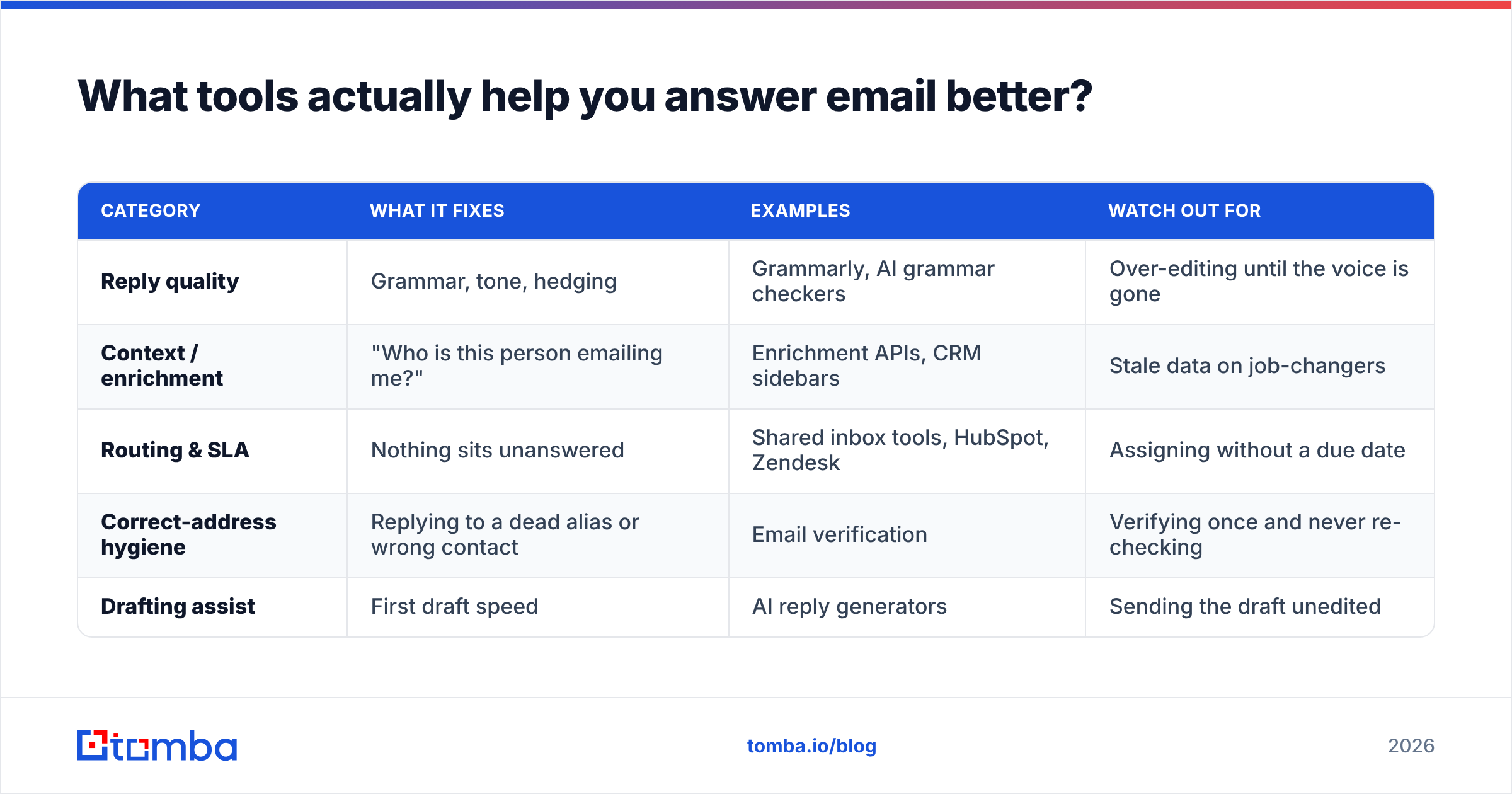
Most "AI email" tooling optimizes for volume, which is the opposite of what reply quality needs. What genuinely helps falls into three buckets:
| Category | What it fixes | Examples | Watch out for |
|---|---|---|---|
| Reply quality | Grammar, tone, hedging | Grammarly, AI grammar checkers | Over-editing until the voice is gone |
| Context / enrichment | "Who is this person emailing me?" | Enrichment APIs, CRM sidebars | Stale data on job-changers |
| Routing & SLA | Nothing sits unanswered | Shared inbox tools, HubSpot, Zendesk | Assigning without a due date |
| Correct-address hygiene | Replying to a dead alias or wrong contact | Email verification | Verifying once and never re-checking |
| Drafting assist | First draft speed | AI reply generators | Sending the draft unedited |
The under-discussed one is the fourth row. A meaningful share of professional replies fail not because the writing is bad but because they go to an address that bounces, a shared alias nobody monitors, or a contact who left the company nine months ago. Running inbound and outbound contacts through an email verifier before an important reply takes seconds and prevents the silent failure where you think you answered and the recipient never saw it.
Similarly, if someone emails you from an address you don't recognize, a reverse email lookup tells you who you're talking to before you write back — which changes how you calibrate tone and how much context you include. Both of these are cheap wins that no amount of writing coaching substitutes for.
For teams standardizing reply quality across reps, the practical move is enriching contact records so every rep sees the same context: role, company, previous touchpoints. Data enrichment that populates your CRM automatically means the "who am I replying to?" question is answered before the rep opens the draft window.
What should you stop doing immediately?#
A short list of habits that cost you credibility:
- "Per my last email." Everyone knows it means "you didn't read this." Say "resending the key point" instead.
- Reply-all by default. Check the recipient list every time. It takes two seconds and prevents most email crises.
- Answering only the last question. Multi-question emails need multi-part answers. Number them if there are three or more.
- Sending the emotional reply. Draft it, save it, reread it in an hour. The version you send after a walk is always better.
- Attaching without mentioning it. "See attached" with no description forces the recipient to open a file to learn what it is.
- Vague sign-off asks. "Let me know your thoughts" is not a next step. "Can you confirm by Friday?" is.
- Burying the ask. If you need something, it goes in the first three lines or on its own line — never in the middle of paragraph two.
One more: don't apologize for response time under 24 hours. Apologizing for a same-day reply trains people to expect instant replies and makes you look anxious. Reserve the apology for genuine lateness.
How do you build a reply system that survives a busy week?#
Individual discipline collapses under volume. Systems don't. Three things scale:
- Two inbox passes a day, not continuous monitoring. Batch at a fixed morning and afternoon time. Emergencies come by phone or Slack — that's what those channels are for.
- The two-minute rule with a hard variant. If a reply takes under two minutes, send it now. If it takes longer, send the holding reply now and schedule the real one. Nothing sits in "read but unanswered" limbo.
- A weekly loop audit. Every Friday, scan for threads where you're the blocker. Ten minutes of that prevents most of the "sorry for the slow reply" emails you'd otherwise write next week.
Teams should add a shared definition of done: every customer-facing thread has an owner in the CRM, a next action, and a date. If your CRM can't tell you which threads are stalled, the system is running on memory — which is where most follow-up dies. G2's reviews of shared inbox and CRM tools are a reasonable place to start comparing options if you don't have one yet.
Frequently asked questions#
Should I use "Best regards" or "Thanks"? Either is fine. "Thanks" is warmer and now standard in most B2B contexts; "Best regards" suits first contact, legal matters, and formal cultures. Consistency matters more than choice — pick one and stop thinking about it.
How long should a professional reply be? As short as the answer allows. Most business replies land between 50 and 150 words. Past 200, consider whether a call or a document would serve better.
Is it unprofessional to reply outside business hours? Sending is fine; expecting a reply is not. If you write at 11pm, schedule the send for the morning — it removes the implied pressure without costing you the moment you had the thought.
What if I made a factual error in a previous reply? Correct it in a new message on the same thread, at the top, plainly: "Correction to my last note: the figure is X, not Y." Fast, specific corrections build trust. Quiet ones destroy it.
Do AI-drafted replies read as unprofessional? Only when they're sent unedited. AI drafts are useful for structure and speed; the failure signal is generic openers and no specific detail. Rewrite the first two lines and add one concrete fact only you would know.
Answer the right people, at the right address#
Reply structure only pays off if the message reaches a real, monitored inbox belonging to the person who can act. That's a data problem, not a writing problem.
If your team spends time replying into the void — dead aliases, job-changers, generic info@ addresses — start upstream. Tomba Email Finder resolves the correct professional address for a person at a company, with verification built into the same workflow, so your carefully structured reply lands with the decision-maker instead of a shared mailbox. The free tier covers 25 searches a month, and paid plans start at $49/mo — see Tomba pricing for the full breakdown across Starter, Growth, and Pro. Write the better reply, then make sure it actually arrives.
Related guides#
Ready to find emails that actually work?
Join 150,000+ professionals who stopped guessing and started sending. Free credits on signup — no credit card required.
Get the Tomba newsletter
Practical outbound tactics and product updates — once every two weeks.
About the author