How To Ask For An Appointment: Scripts That Book Meetings
Most reps bury the ask at the end of a long email and wonder why nobody books. Here are the exact appointment-request scripts, timing rules, and follow-up cadences that actually get a calendar slot.
TL;DR
- The appointment ask fails most often because it is vague ("let me know if you'd like to chat"), not because it is too direct. Name a concrete, low-commitment next step instead.
- Ask for the meeting in the first two sentences of a cold email or the first 30 seconds of a call. Burying it after three paragraphs of context kills reply rates.
- Single-option asks ("Does Thursday at 10:00 ET work?") outperform open-ended ones because they cost the reader one decision instead of five.
- Your ask can be perfect and still fail if the email lands in spam or hits a dead inbox — verify addresses before you send.
- Plan four to six follow-ups. Roughly half of booked meetings come after the first message, and giving up at touch two throws away the rest.
Why does asking for an appointment feel so hard?#
Because you are asking a stranger to spend a scarce, non-refundable resource — 30 minutes — on an outcome they cannot yet see. That is a real cost, and most requests do nothing to lower it.
Think of it like asking someone on the street for directions versus asking them to walk you there. The first request is cheap and specific, so people say yes. The second is vague and open-ended, so people hedge. Most appointment requests are written like the second one: "Would you be open to a quick chat about how we help companies like yours?" That sentence asks for an unbounded commitment toward an undefined benefit.
The fix is mechanical, not motivational. You shrink the perceived cost (short call, specific time, clear agenda) and you raise the perceived value (a reason tied to their situation, not your product). Everything below is a variation on those two levers.
What makes an appointment request actually work?#
Every high-converting ask contains the same five components. Miss one and the request gets softer, and softer requests get ignored.
- A trigger — the reason you are reaching out now. A funding round, a job posting, a new integration, a competitor announcement, a comment they left on LinkedIn. Without a trigger, your email reads as a random blast, because it is one.
- A relevance bridge — one sentence connecting the trigger to a problem they plausibly have. Not a feature list. "Teams that just doubled their SDR headcount usually hit list-quality problems by month two" is a bridge. "We offer AI-powered prospecting" is not.
- A bounded time request — "15 minutes," not "some time." Naming the duration is the single cheapest way to lower perceived cost.
- A specific slot or a binary choice — "Thursday 10:00 ET" or "Tuesday morning or Thursday afternoon?" Never a menu of five options and never "let me know what works."
- An easy out — "If this isn't a priority, just reply 'not now' and I'll close the loop." Counterintuitively, permission to decline increases reply rates because it removes the fear of a sales spiral.

Notice what is absent from that list: your company boilerplate, your funding announcement, your customer logos, and any sentence beginning "I hope this email finds you well." None of those lower the cost of saying yes.
How do you ask for an appointment over email?#
Lead with the ask, then justify it. Most reps do the reverse — three paragraphs of context, then a timid question at the bottom that the reader never reaches because they bailed at line two.
Here are four templates that hold up across industries. Adapt the specifics; keep the structure.
Template 1 — the trigger email (cold, first touch)
Subject: your new SDR hires
Hi Dana — saw you posted three SDR roles this month.
Teams scaling outbound that fast usually lose a chunk of their first quarter to bad contact data. We cut list-build time for [similar company] from six hours a week to under one.
Worth 15 minutes on Thursday at 10:00 ET to see if the same applies here? If it's not a priority, "not now" is a fine reply.
Template 2 — the referral ask (warm intro)
Subject: Marcus suggested I reach out
Hi Priya — Marcus at [Company] mentioned you're rebuilding the RevOps stack this quarter.
He thought the way we handle enrichment on inbound forms would be relevant to what you're scoping.
Do you have 20 minutes Tuesday or Wednesday? Happy to send over what we built for his team beforehand either way.
Template 3 — the re-engagement ask (dormant lead)
Subject: closing your file?
Hi Tom — we spoke in March about deliverability and you asked me to circle back after your migration.
Migration's done based on your DNS records. Still worth a conversation, or should I close this out?
15 minutes Friday morning works on my end.
Template 4 — the event follow-up
Subject: your question at [Conference] about catch-all domains
Hi Nadia — you asked the panel how to handle catch-all domains without burning sender reputation. I didn't get to answer properly.
I can walk you through the approach we use in about 15 minutes. Wednesday at 2:00 PT?
Every one of these puts the ask in the last line of a message under 80 words. That is the pattern. If your email needs scrolling, the ask has already lost.
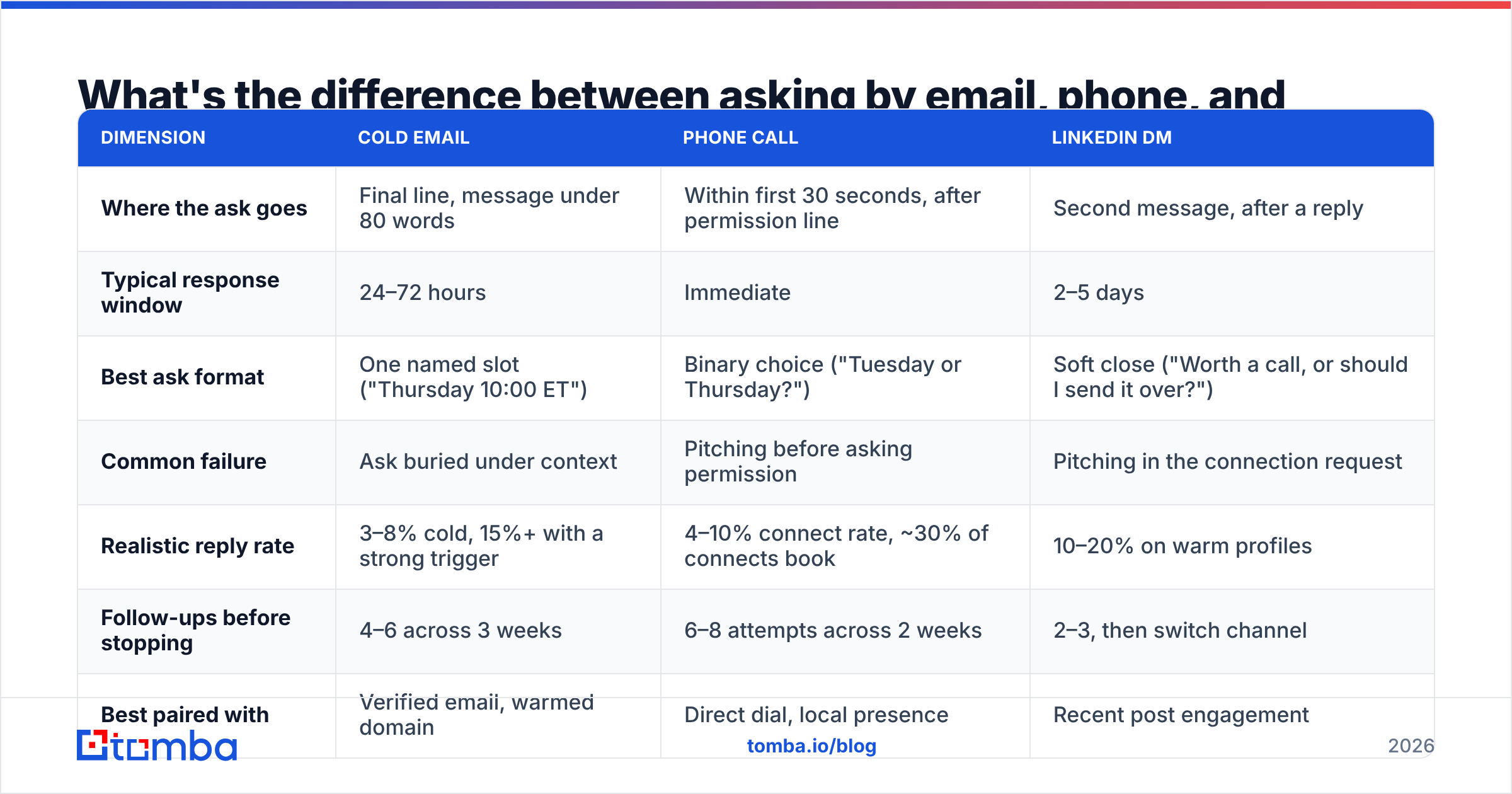
What's the difference between asking by email, phone, and LinkedIn?#
Channel changes the wording, the timing, and how much resistance you should expect. It does not change the five components.
| Dimension | Cold email | Phone call | LinkedIn DM |
|---|---|---|---|
| Where the ask goes | Final line, message under 80 words | Within first 30 seconds, after permission line | Second message, after a reply |
| Typical response window | 24–72 hours | Immediate | 2–5 days |
| Best ask format | One named slot ("Thursday 10:00 ET") | Binary choice ("Tuesday or Thursday?") | Soft close ("Worth a call, or should I send it over?") |
| Common failure | Ask buried under context | Pitching before asking permission | Pitching in the connection request |
| Realistic reply rate | 3–8% cold, 15%+ with a strong trigger | 4–10% connect rate, ~30% of connects book | 10–20% on warm profiles |
| Follow-ups before stopping | 4–6 across 3 weeks | 6–8 attempts across 2 weeks | 2–3, then switch channel |
| Best paired with | Verified email, warmed domain | Direct dial, local presence | Recent post engagement |
On the phone, the structure inverts slightly. You ask permission before you ask for the appointment: "Dana, I know I'm calling out of the blue — do you have 30 seconds for me to explain why, and then you can tell me to go away?" That line does the work of the easy out in an email. Once you have the 30 seconds, deliver the trigger and bridge, then close with a binary choice. If they hesitate, drop to a smaller ask: "How about I send a two-minute overview and you tell me if it's worth a call?"
On LinkedIn, never ask in the connection request. Connect, engage with something they published, then ask on the second or third exchange. A connection request that contains a meeting ask reads as automation, and most buyers now filter it as such. HubSpot's sales research consistently shows that personalized, multi-touch sequences outperform single-channel blasts — the reason is simply that each channel catches a different set of people.
When should you ask — and how many times?#
Ask early, and ask more times than feels comfortable.
Timing rules that hold up in practice:
- Send Tuesday through Thursday, 7:00–9:00 AM in the prospect's timezone. Monday mornings compete with weekend backlog; Friday afternoons compete with leaving.
- Wait 3–4 business days between touches. Daily follow-ups read as pressure. Weekly gaps let you fall out of memory.
- Propose a slot 2–5 business days out. Tomorrow is too soon for a calendar that is already full; three weeks out invites "let's revisit."
- Stop at touch six, then move the contact to a quarterly nurture. Persistence past that point damages your domain reputation more than it books meetings.
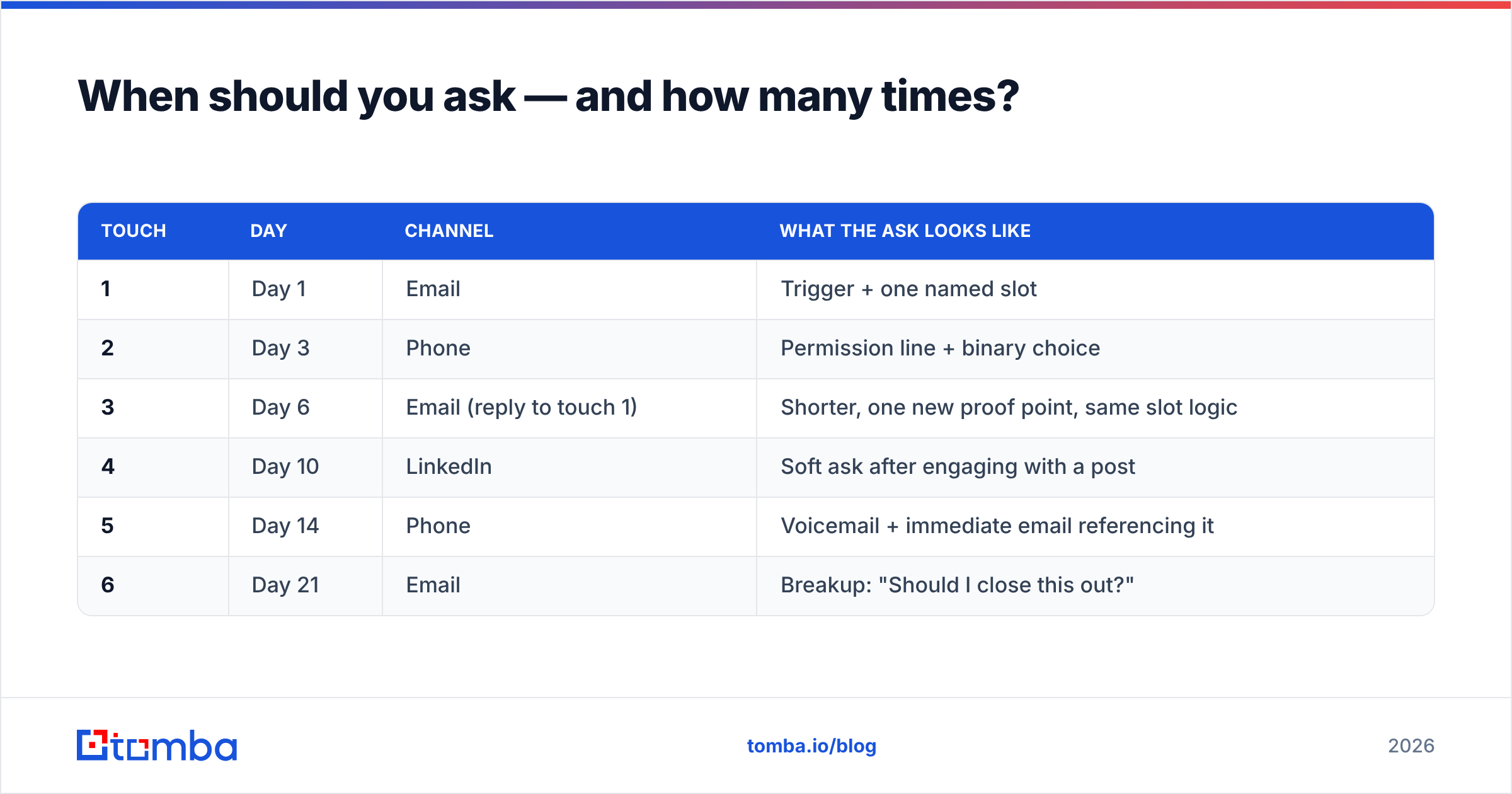
A cadence that works for most B2B teams:
| Touch | Day | Channel | What the ask looks like |
|---|---|---|---|
| 1 | Day 1 | Trigger + one named slot | |
| 2 | Day 3 | Phone | Permission line + binary choice |
| 3 | Day 6 | Email (reply to touch 1) | Shorter, one new proof point, same slot logic |
| 4 | Day 10 | Soft ask after engaging with a post | |
| 5 | Day 14 | Phone | Voicemail + immediate email referencing it |
| 6 | Day 21 | Breakup: "Should I close this out?" |
The breakup email is not a gimmick. It converts because it flips the direction of the request — you are now asking for permission to stop, which is far easier to grant than a meeting, and a meaningful share of replies come back as "no, don't close it, next month is better."
Why do good appointment requests still get ignored?#
Usually for reasons that have nothing to do with your wording. Before you rewrite the script for the fourth time, rule these out.
- The address is wrong. A guessed pattern like
first.last@is right maybe 60% of the time depending on the company. Every bounce also chips away at your sending reputation. Run addresses through an email verifier before the send, and use a real email finder rather than a permutation guess. - The message never reached the inbox. If your SPF, DKIM, and DMARC records are misconfigured, or your domain is too new, your perfectly written ask sits in spam. Check your SPF record and monitor email deliverability before scaling volume.
- You asked the wrong person. An individual contributor cannot approve a 30-minute vendor call in most orgs. Map the actual decision-maker first.
- Your ask was a request for a request. "Would you be open to exploring whether it makes sense to connect?" is three layers of hedging. Cut to: "Thursday at 10:00 ET?"
- The trigger was stale. A funding round from 14 months ago is not news. Triggers decay in about 30 days.
Fixing data quality typically moves reply rates more than any copy change. A sequence sent to 500 verified contacts beats the same sequence sent to 1,500 scraped ones — fewer sends, fewer bounces, cleaner sender reputation, better inbox placement for everyone you actually want to reach.
How do you handle the three most common objections?#
The appointment ask rarely fails with a flat no. It fails with a deflection. Each has a scripted counter.
"Just send me some information." This is usually a polite exit. Answer: "Happy to. So I don't send you 40 pages of the wrong thing — are you more focused on the data-quality side or the workflow side? I'll trim it to that and include a two-minute walkthrough. If it's useful, we can talk Thursday."
"We already use [competitor]." Do not attack the incumbent. Answer: "Makes sense — they're solid at [genuine strength]. Most teams I talk to who use them still handle [specific gap] manually. If that's not a problem for you, I'll leave you alone. If it is, 15 minutes Thursday?"
"Now's not a good time." Take it literally and get a date. Answer: "Understood. Is this a 'circle back in three weeks' or a 'circle back next quarter'? I'll put it in the calendar and stop emailing until then." You lose nothing and you convert a dead lead into a scheduled one.
"What's this about?" (on the phone) Answer with the trigger, not the pitch: "You posted three SDR roles this month. I called because teams scaling that fast usually hit a list-quality wall around month two, and I wanted to see if you're planning for it."
The pattern in all four: acknowledge, narrow, re-ask with a specific slot. Never re-ask with a vague one.
What should you do right after they say yes?#
The booking is not the finish line — no-show rates on cold-sourced meetings routinely run 20–40%.
- Send the invite within five minutes. Momentum decays fast.
- Put the agenda in the invite body. Three bullets on what you will cover and what you need from them. Vague invites get cancelled first.
- Confirm 24 hours ahead with a one-line message: "Still good for 10:00 tomorrow? Here's the link."
- Enrich the record before the call. Company size, tech stack, funding, recent news — pull it automatically with data enrichment rather than 20 minutes of manual tab-hopping.
- Add a direct dial as backup. If they no-show, a call two minutes later recovers a meaningful share of them. Reviews aggregators like G2 are also useful for understanding which tools your prospect already runs before you walk in.
Teams that run a structured pre-meeting checklist consistently see lower no-show rates than teams that book and forget. It costs five minutes per meeting and protects the 30 you just fought for.
How do you scale this without turning it into spam?#
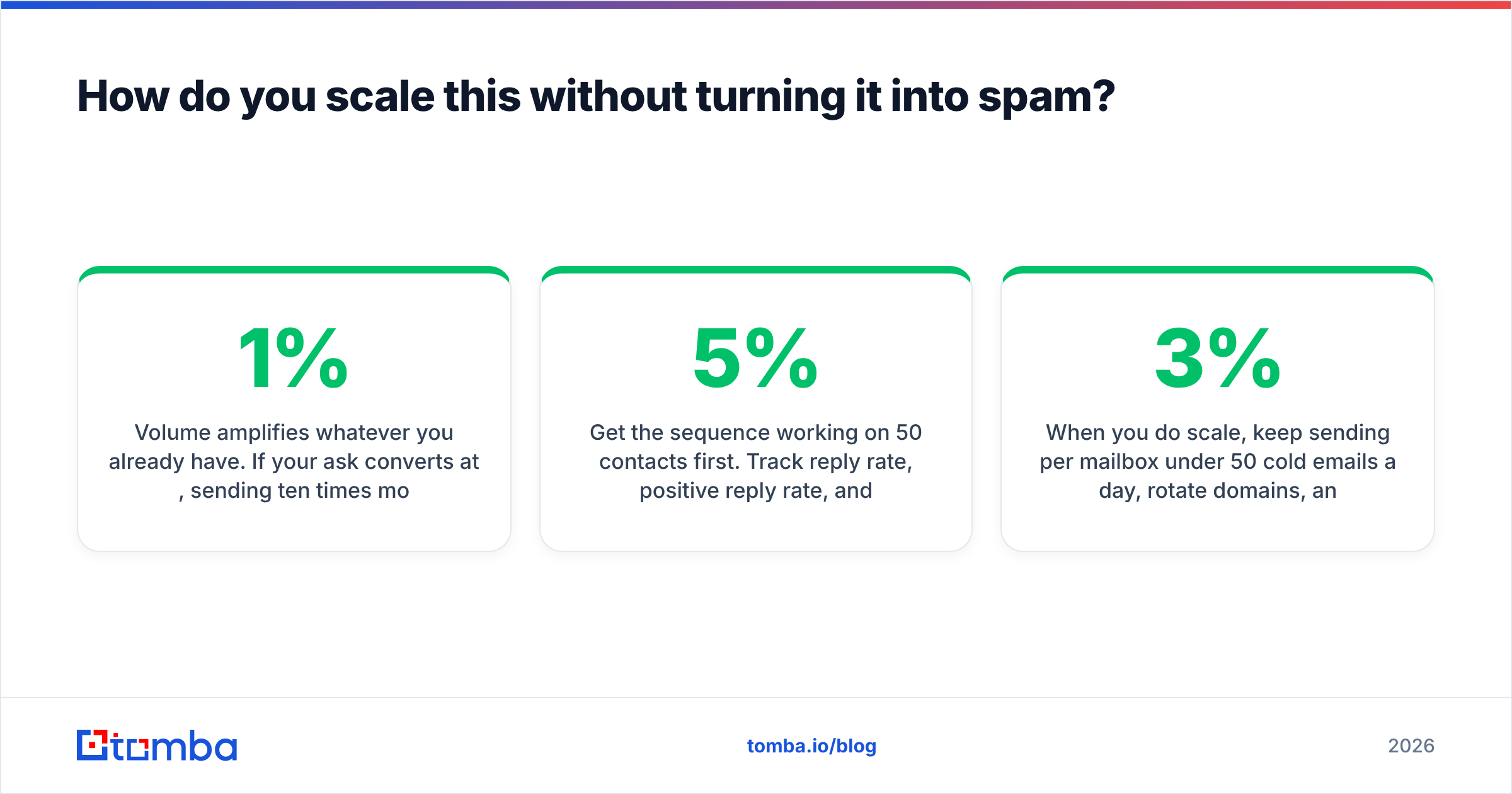
Volume amplifies whatever you already have. If your ask converts at 1%, sending ten times more will mostly produce ten times more complaints.
Get the sequence working on 50 contacts first. Track reply rate, positive reply rate, and meetings booked separately — a high reply rate with no meetings means your ask is too soft. Only after positive replies clear roughly 5% should you increase volume, and then do it by adding verified contacts, not by loosening your targeting criteria.
When you do scale, keep sending per mailbox under 50 cold emails a day, rotate domains, and re-verify any list older than 90 days. B2B contact data decays at roughly 2–3% per month as people change jobs, so a list you bought in January is materially wrong by summer. Both Gartner and most deliverability vendors have published on the compounding cost of stale contact data; the practical takeaway is that verification is not a one-time step.
If you are building lists at scale, a bulk email finder run against a target account list gives you verified addresses in one pass instead of one lookup at a time.
Start with addresses that actually work#
The best appointment script in the world converts at zero if it lands in a dead inbox. Before you rewrite your ask again, fix the layer underneath it: pull verified, deliverable addresses for the people you actually want to meet.
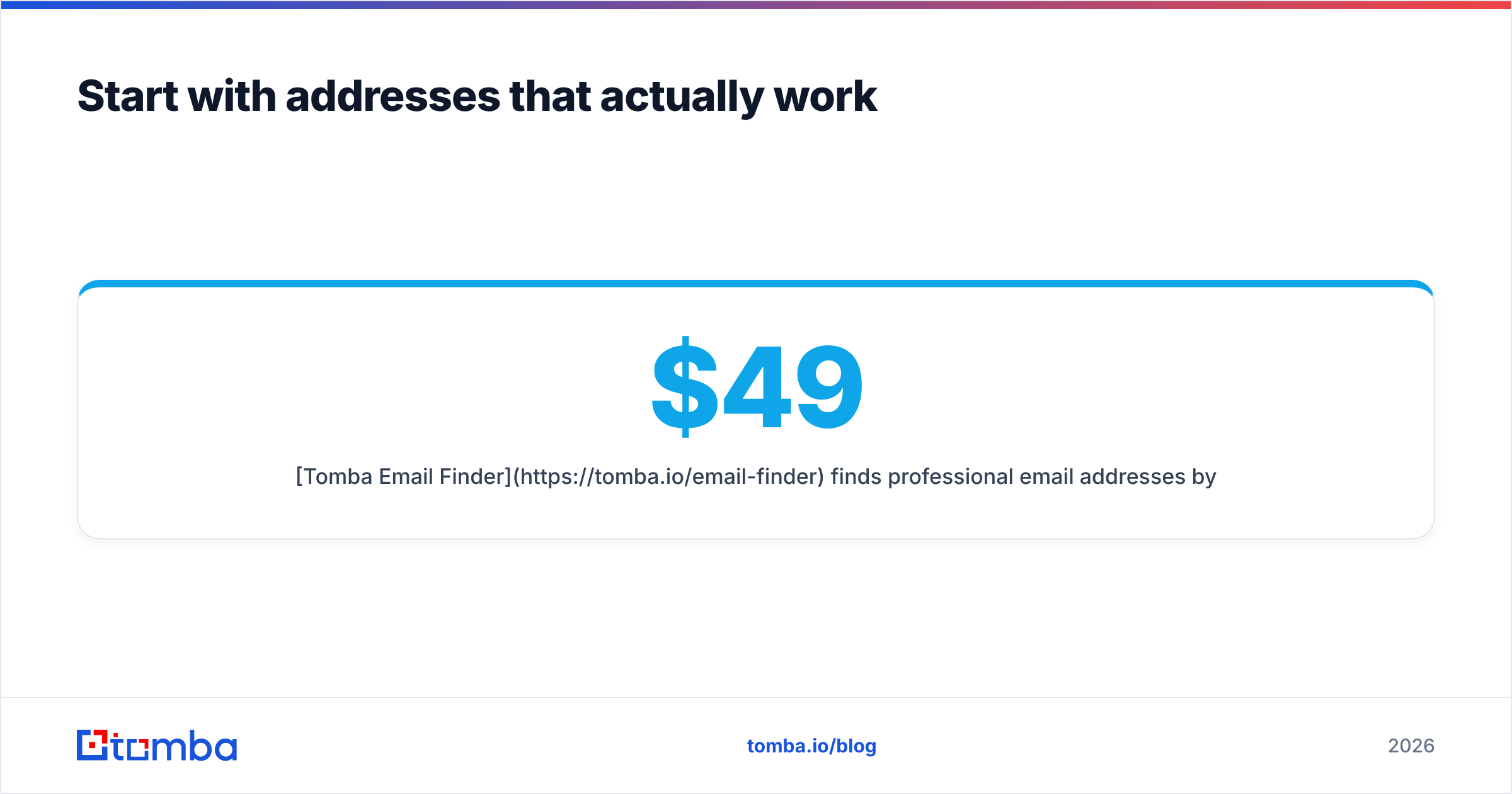
Tomba Email Finder finds professional email addresses by domain, name, or company, with verification built into the same workflow. The free tier gives you 25 searches a month to test your sequence on a real list; paid plans start at $49/mo for Starter, $99/mo for Growth, and $249/mo for Pro — see Tomba pricing for the full breakdown. Send your next ask to contacts you know exist, and let the script do the job it was written for.
Related guides#
Ready to find emails that actually work?
Join 150,000+ professionals who stopped guessing and started sending. Free credits on signup — no credit card required.
Get the Tomba newsletter
Practical outbound tactics and product updates — once every two weeks.
About the author