How to Ask for the Right Contact Person (Without Getting Ignored)
Gatekeepers forward maybe 1 in 10 referral requests. Here are the exact scripts, routing rules, and data steps that get you the right contact person faster — plus when to skip asking entirely.
TL;DR
- Asking for the right contact person works, but only when the request is short, specific about the job to be done, and sent to a human who is one hop away from the decision-maker — not to
info@. - The highest-converting referral ask is 4 lines and asks a routing question ("who owns X?"), never a selling question.
- Response rates on referral asks sit far below direct outreach in most teams' data, so treat asking as a fallback, not a primary channel.
- A data-first path — org chart research plus an email finder — usually gets you the right name in under two minutes without burning a touch.
- Best practice in 2026: research first, ask second, and only ask people whose job makes them a natural router (EAs, ops, marketing, junior team members).
Why Does Asking for the Right Contact Person Fail So Often?#
Because most reps ask a stranger to do unpaid labor for a company they've never heard of.
The typical referral ask reads like a pitch with a question mark bolted on the end. It explains the product, name-drops three customers, then buries "could you point me to the right person?" in paragraph four. The recipient scans it, recognizes vendor email, and archives it. Nothing about the message signals that answering takes ten seconds.
There's a second failure mode that's less obvious: asking the wrong router. Sending "who handles procurement?" to a VP of Engineering is asking a busy senior person to do internal navigation on your behalf. Senior people protect their time by ignoring. Meanwhile an operations coordinator, an executive assistant, or a marketing associate at the same company knows exactly who owns that budget and has far more slack in their day.
Third: asking when you didn't need to. Most B2B org structures are legible from the outside now. LinkedIn, company about-pages, conference speaker lists, podcast guest bios, and job postings leak reporting lines constantly. If a company posted a req for "Demand Gen Manager, reporting to the Director of Growth," you already know the title above your target. Asking a human to confirm what a public job posting told you is a wasted touch.
What Does a Good "Who Owns This?" Email Actually Look Like?#
Short, routing-shaped, and answerable with a name.
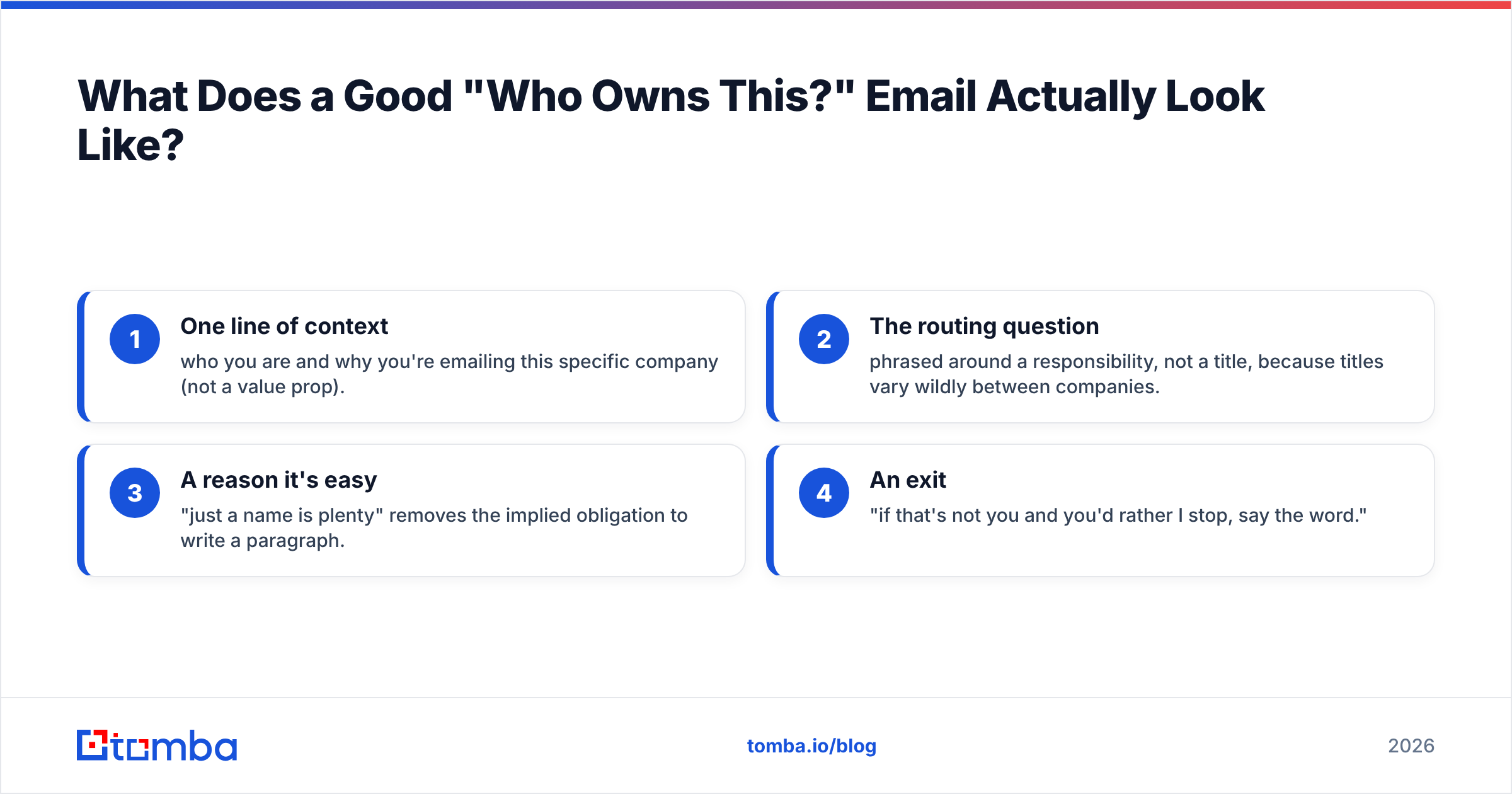
The structure that consistently works has four components and nothing else:
- One line of context — who you are and why you're emailing this specific company (not a value prop).
- The routing question — phrased around a responsibility, not a title, because titles vary wildly between companies.
- A reason it's easy — "just a name is plenty" removes the implied obligation to write a paragraph.
- An exit — "if that's not you and you'd rather I stop, say the word."
Here's the template stripped to bone:
Subject: quick routing question
Hi [Name] — I'm [You] at [Company]. We help [category of company] with [specific outcome].
Who owns [specific responsibility] at [Company] these days? A name is plenty, I'll take it from there.
If that's the wrong ask, no problem — just say so and I'll stop.
Notice what's missing: no case study, no calendar link, no "circling back," no three-paragraph explanation. The moment you add a pitch, the recipient has to evaluate the pitch instead of answering the question, and evaluation is expensive. HubSpot's outreach research has consistently found shorter emails outperform long ones for reply rate, and routing asks are the extreme case — the shorter, the better.
For the responsibility phrasing, be concrete. "Who owns your outbound email infrastructure?" beats "who's your head of sales ops?" because the first survives a title mismatch. Companies name the same job DevRel, Developer Advocacy, Community, and Technical Marketing. The work is stable; the label isn't.
Who Should You Actually Ask?#
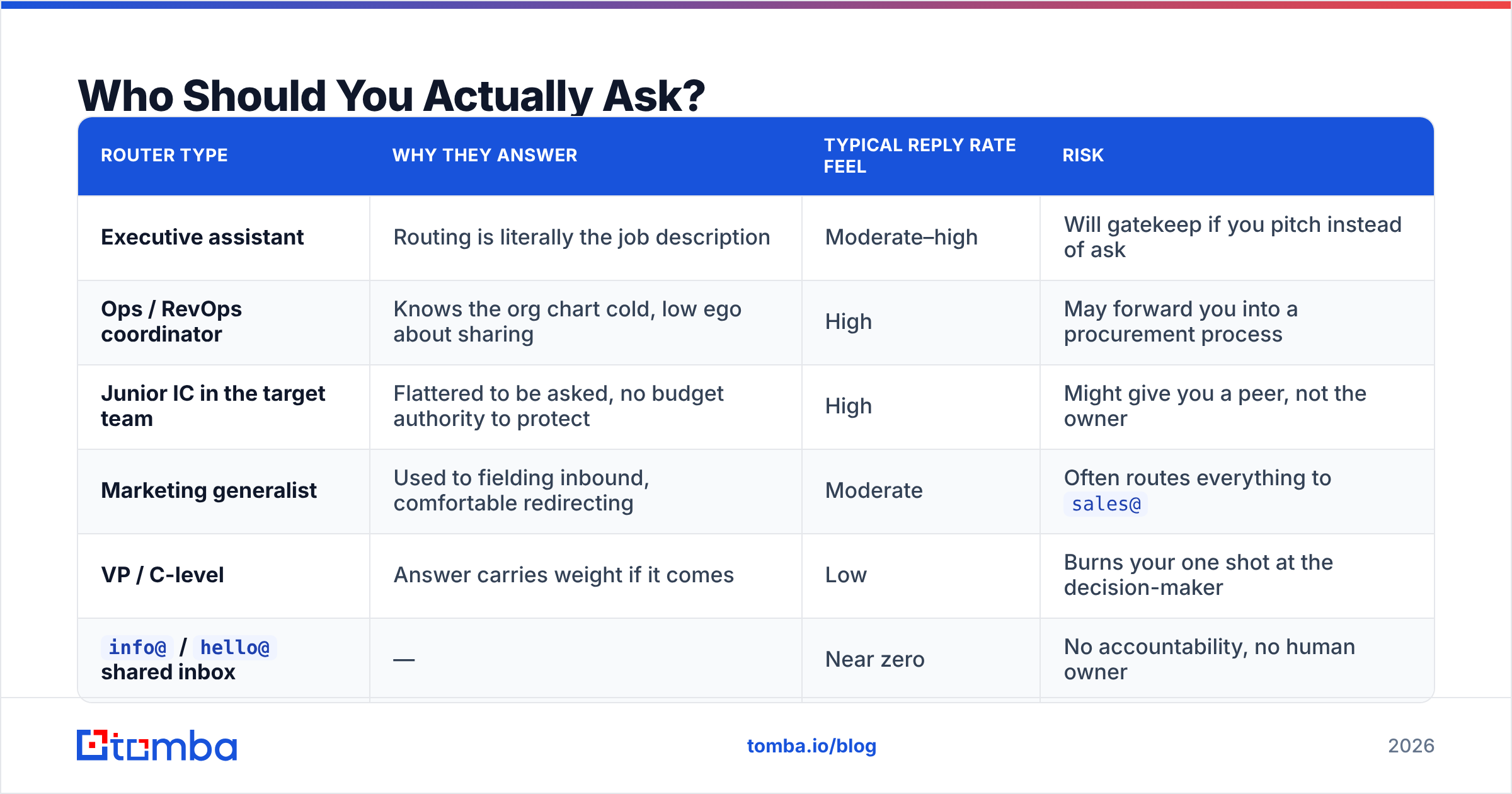
Ask the people whose job is adjacent to routing, not the people at the top.
| Router type | Why they answer | Typical reply rate feel | Risk |
|---|---|---|---|
| Executive assistant | Routing is literally the job description | Moderate–high | Will gatekeep if you pitch instead of ask |
| Ops / RevOps coordinator | Knows the org chart cold, low ego about sharing | High | May forward you into a procurement process |
| Junior IC in the target team | Flattered to be asked, no budget authority to protect | High | Might give you a peer, not the owner |
| Marketing generalist | Used to fielding inbound, comfortable redirecting | Moderate | Often routes everything to sales@ |
| VP / C-level | Answer carries weight if it comes | Low | Burns your one shot at the decision-maker |
info@ / hello@ shared inbox |
— | Near zero | No accountability, no human owner |
The pattern: reply likelihood is inversely related to seniority, and the quality of the referral is directly related to it. That trade-off is why the referral ask should almost never be your first move on a high-value account. You spend your best contact — the VP — on a question a coordinator could have answered.
One more rule: never ask the person you actually want to sell to. If you email the CMO asking "who runs paid acquisition?" and the CMO runs paid acquisition, you've announced that you didn't do ten seconds of research. That's a worse first impression than a cold pitch.
Is Asking Better Than Just Finding the Person Yourself?#
Usually not. Finding is faster, cheaper, and doesn't spend social capital.
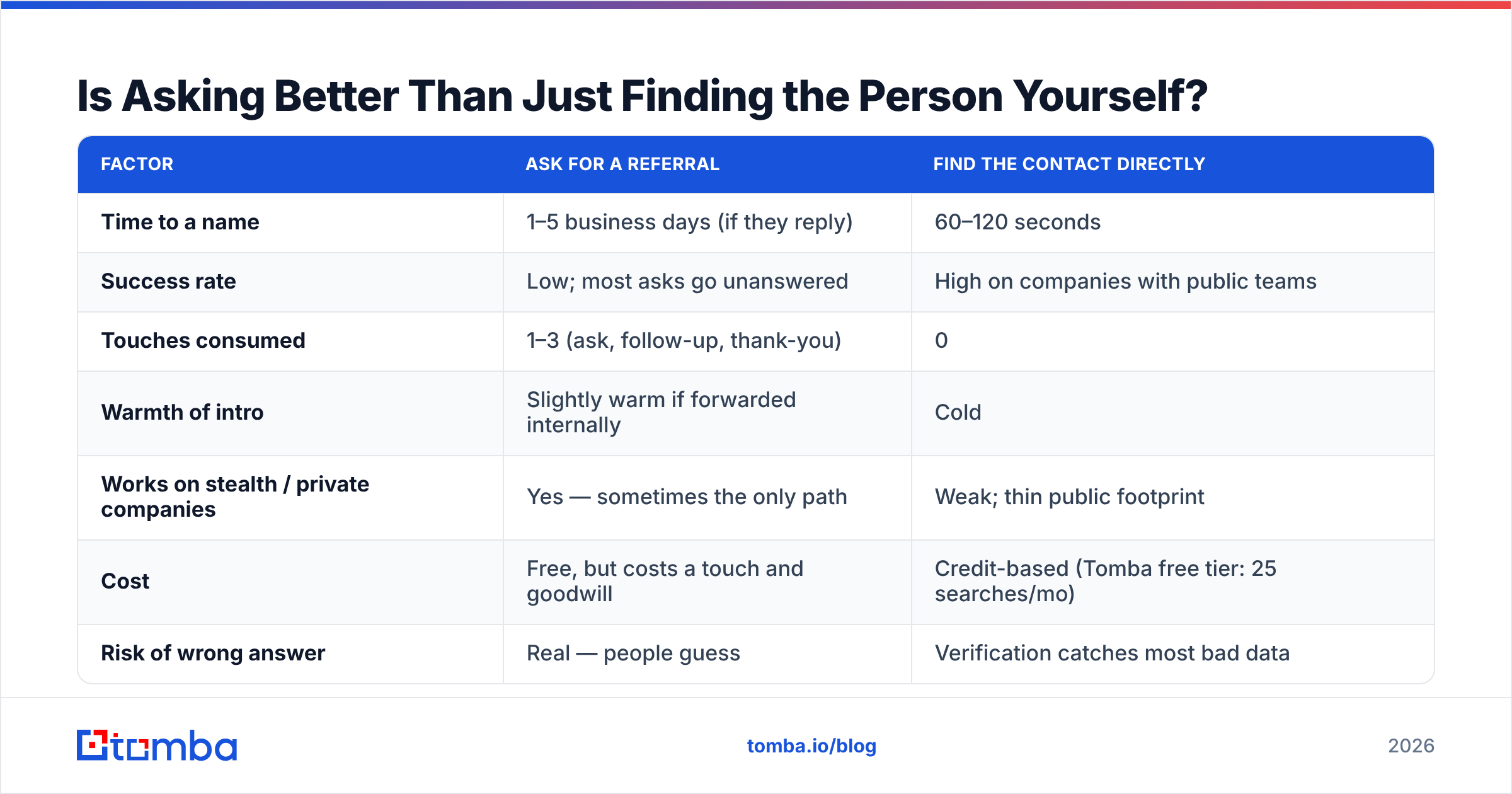
Here's the honest comparison between the two paths on a typical mid-market account:
| Factor | Ask for a referral | Find the contact directly |
|---|---|---|
| Time to a name | 1–5 business days (if they reply) | 60–120 seconds |
| Success rate | Low; most asks go unanswered | High on companies with public teams |
| Touches consumed | 1–3 (ask, follow-up, thank-you) | 0 |
| Warmth of intro | Slightly warm if forwarded internally | Cold |
| Works on stealth / private companies | Yes — sometimes the only path | Weak; thin public footprint |
| Cost | Free, but costs a touch and goodwill | Credit-based (Tomba free tier: 25 searches/mo) |
| Risk of wrong answer | Real — people guess | Verification catches most bad data |
| Scales to 500 accounts | No | Yes, via bulk workflows |
The exception column matters. Referral asking earns its keep in exactly three situations: opaque companies with no public team page, organizations where the buying committee is genuinely non-obvious (large enterprises with regional P&Ls), and warm networks where the ask is social rather than commercial. Everywhere else, research wins.
The practical sequence most disciplined teams run in 2026:
- Pattern the domain first. Run a domain search to see the company's email format and which departments are represented. If you can see twelve people and their titles, you don't need to ask anyone anything.
- Map the function, not the title. Search LinkedIn for the responsibility keyword ("lifecycle marketing," "vendor management") rather than the org-chart title you assume exists.
- Cross-check with public artifacts. Job postings, press releases, conference bios, and podcast appearances name owners constantly and are indexed by Google.
- Verify before you send. Run the address through an email verifier — a bounce on a first touch damages sender reputation and tells you nothing about whether the person was right.
- Only then ask a human, and ask the cheapest human available.
What Are the Six Scripts That Actually Get Replies?#
Six situations, six shapes. Adapt the bracketed parts; keep the length.
1. The cold routing ask (to an ops or junior contact)
Hi [Name] — quick one. Who owns [responsibility] at [Company]? We do [one-clause description] and I'd rather bother the right person than the wrong one. A name is plenty.
2. The EA ask (to an executive assistant)
Hi [Name] — I'm trying to reach whoever owns [responsibility] at [Company]. I know [Exec] gets a lot of these, so rather than send it their way blind: is there a better person on the team for this? Happy to be told no.
3. The wrong-person reply (after someone tells you it isn't them)
Thanks for the fast reply — appreciated. Any idea who does own it? If you'd rather not forward me, a name works and I'll reach out myself.
4. The internal-forward ask (person is close but not the owner)
Makes sense. Would you be willing to forward this to [Name/team]? Two lines is all it needs: "this vendor does [X], might be relevant." If forwarding is awkward, totally fine — I'll go direct.
5. The event / mutual-context ask (warm-ish)
Hi [Name] — we both spoke at [Event] / we're both in [Community]. I'm looking for whoever runs [responsibility] at [Company]. Any chance you know who that is?
6. The last-resort shared-inbox ask (only when there's no other address)
Subject: routing — [responsibility]
Hi — not a pitch, just a routing question. Who at [Company] owns [responsibility]? If you can forward this to them or reply with a name, that's all I need.
Every one of them stays under 60 words. Every one names a responsibility rather than a title. Every one gives an easy out, which is what converts a defensive reader into a helpful one.

How Do You Handle the Reply You Get?#
Move fast, credit the router, and never make them regret it.
When someone gives you a name, three things need to happen within the hour. First, verify the email you construct for that name — a referral is worthless if your message bounces. Second, reference the referral in your subject or first line ("[Router] suggested I reach out about [responsibility]") because that single phrase is the entire value of the ask. Third, thank the router in one line, with zero pitch attached. People who feel used once don't route twice.
If the referral turns out to be wrong — which happens more than reps admit, because people guess — do not go back to the original router a second time. You've spent that relationship. Go back to research.
There's also a quiet failure mode worth naming: some routers forward you internally without telling you. You get silence, assume the ask failed, and start a fresh sequence to a different person at the same company. Two weeks later both threads surface in the same Slack channel and you look disorganized. Log every ask in your CRM against the account, not just the person, so account-level context survives contact-level noise.
How Do You Scale This Without Becoming Spam?#
By making asking the rare path and enrichment the default path.
At ten accounts, asking works fine because you can hand-craft every message. At five hundred, a template asking "who owns X?" sent to five people per company is indistinguishable from spam and will get your domain flagged. The math is unforgiving: five asks per account across 500 accounts is 2,500 emails, most going to people with no reason to answer, most bouncing or landing in shared inboxes.
The scalable version inverts the ratio. Enrich first — a bulk email finder run against your account list resolves the majority of contacts without a single email being sent. Then reserve human asks for the residual accounts where enrichment came back empty or ambiguous. That residual is usually 10–20% of a list, which is a volume you can actually personalize.
Two guardrails keep this clean. First, cap asks at one per company. If the coordinator doesn't answer, don't cascade to four colleagues — that's how you become the vendor everyone at that company recognizes for the wrong reason. Second, respect the no. When someone says "we're not interested," that's an answer to a different question than the one you asked, but it's still a signal to close the account for two quarters.
For teams running this at volume, peer platforms like BookYourData offer verified contact lists that shortcut the enrichment step entirely, which is a reasonable option when you'd rather buy the coverage than build it. Whichever route you take, the sequencing principle holds: exhaust data before you spend attention. Reviews on G2 are useful for comparing coverage by region and industry, since no single dataset wins everywhere.
What Should You Do This Week?#
Pick your twenty highest-value accounts and run the sequence in order.
Start by checking how many of them you can resolve without asking anyone. Pull the company domain, look at the published email format, search the responsibility keyword on LinkedIn, and check for job postings that name a reporting line. Score each account: resolved, ambiguous, or opaque. In most B2B lists, resolved is the biggest bucket by a wide margin, and every account in it just saved you a referral ask.
For the ambiguous bucket, use script one or two on the cheapest available router. For the opaque bucket — genuinely private companies with no public footprint — asking is your only real tool, so make the ask excellent: shortest possible, responsibility-framed, easy exit.
Then measure one thing: of the referral asks you sent, how many produced a name that turned into a real conversation. If that number is under 10%, your asks aren't the problem — your account selection is. You're asking about companies you should have researched instead. Check Tomba pricing if you want to move that research step from manual to automated; the free tier's 25 searches a month is enough to test the workflow on a single account list before committing.
Stop treating "who's the right person?" as your opening move. Make it your fallback. Run the Tomba Email Finder against your target accounts first — start free with 25 searches a month, or move to Starter at $49/mo when the workflow proves itself — and reserve your referral asks for the handful of companies where no dataset can help you. You'll spend fewer touches, look more prepared, and land in the right inbox on the first try far more often than the reps still emailing info@ and hoping.
Related guides#
Ready to find emails that actually work?
Join 150,000+ professionals who stopped guessing and started sending. Free credits on signup — no credit card required.
Get the Tomba newsletter
Practical outbound tactics and product updates — once every two weeks.
About the author