How To Ask For Time For A Meeting: 7 Scripts That Get Yes
Most meeting requests die because they ask for too much, too vaguely, too early. Here are seven tested scripts, the right meeting length, and a follow-up cadence that gets replies without nagging.
TL;DR
- The ask fails before the calendar does. If your first three sentences do not explain why this person should spend their minutes, no amount of scheduling-link polish saves you.
- Ask for the smallest credible unit of time. A 15-minute request converts meaningfully better than a 30-minute one for cold contacts, and you can always run long once you are on the call.
- Give one specific time plus an easy escape hatch ("Tuesday 10:00 ET, or send me a better window"). Pure open-ended asks push the work onto the recipient.
- Follow up three to four times over 12-14 days, changing the angle each time, then close the loop politely. Repeating "just bumping this" is how you get filtered.
- None of it matters if the email never lands. Verify the address and check the domain before you write a single word of the ask.
What does "asking for time" really mean in B2B?#
Learning how to ask for time for meeting requests is not a politeness exercise. It is a negotiation over the single resource your prospect cannot manufacture more of. A director of ops with 27 hours of weekly meetings is not evaluating your product when your email arrives — they are evaluating whether your 30 minutes will cost them a lunch break.
That reframe changes everything about the message. You stop writing "I'd love to connect and learn about your goals" and start writing "you mentioned in the Q3 earnings call that support ticket volume doubled — we cut that by 40% for two companies your size, and I can show you how in 15 minutes."
Three things determine whether the ask lands:
- Relevance — is there a specific, observable reason you are contacting this person this week? Funding, a new hire, a job posting, a product launch, a LinkedIn post.
- Cost — how many minutes are you asking for, and how much prep work does the reply require?
- Credibility — does the sender look like a real person at a real company, or a sequence?
Everything below is downstream of those three.
Why do most meeting requests get ignored?#
Because they are expensive to answer. Look at what a typical bad request actually demands of the reader: interpret a vague value prop, decide whether it applies to them, guess how long the meeting will run, open their calendar, cross-reference two time zones, and compose a reply. That is five minutes of cognitive work to grant you thirty.
The other silent killer is deliverability. Plenty of "low reply rate" problems are actually "never reached the inbox" problems. If your bounce rate creeps above 3-4%, mailbox providers start treating your domain as a low-quality sender, and even your good messages get throttled. Run addresses through an email verifier before the send, not after the campaign flops.
The third killer is asking too early. A cold contact who has never heard of you does not owe you a discovery call. Some of the highest-converting first asks are not meeting requests at all — they are permission requests ("worth a conversation?") or micro-asks ("who owns this at your company?").
What are the four ways to ask for time for a meeting?#
There is no single correct ask. There are four distinct patterns, and picking the wrong one for the relationship stage is the most common mistake in outbound.
- The interest-based ask — "Is this worth 15 minutes?" No time proposed, no link. Lowest friction, best for cold first touches. You trade a slower path to the calendar for a much higher reply rate.
- The specific-time ask — "Does Thursday at 11:00 ET work?" One concrete slot. Best for warm leads, referrals, and inbound. It works because a yes/no is cheaper than a calendar audit.
- The scheduling-link ask — "Here's my calendar." Fastest for people who already want to meet. Sending a link to a stranger reads as "my time is more valuable than yours," so keep it for later touches or inbound.
- The micro-ask — "Are you the right person for X?" or "Want me to send the two-minute version instead?" Not a meeting request at all. Use it as touch three or four when the direct asks have gone unanswered; it often unlocks a reply that turns into a meeting anyway.
Match the pattern to the temperature of the relationship and your acceptance rate moves before you change a single word of copy.
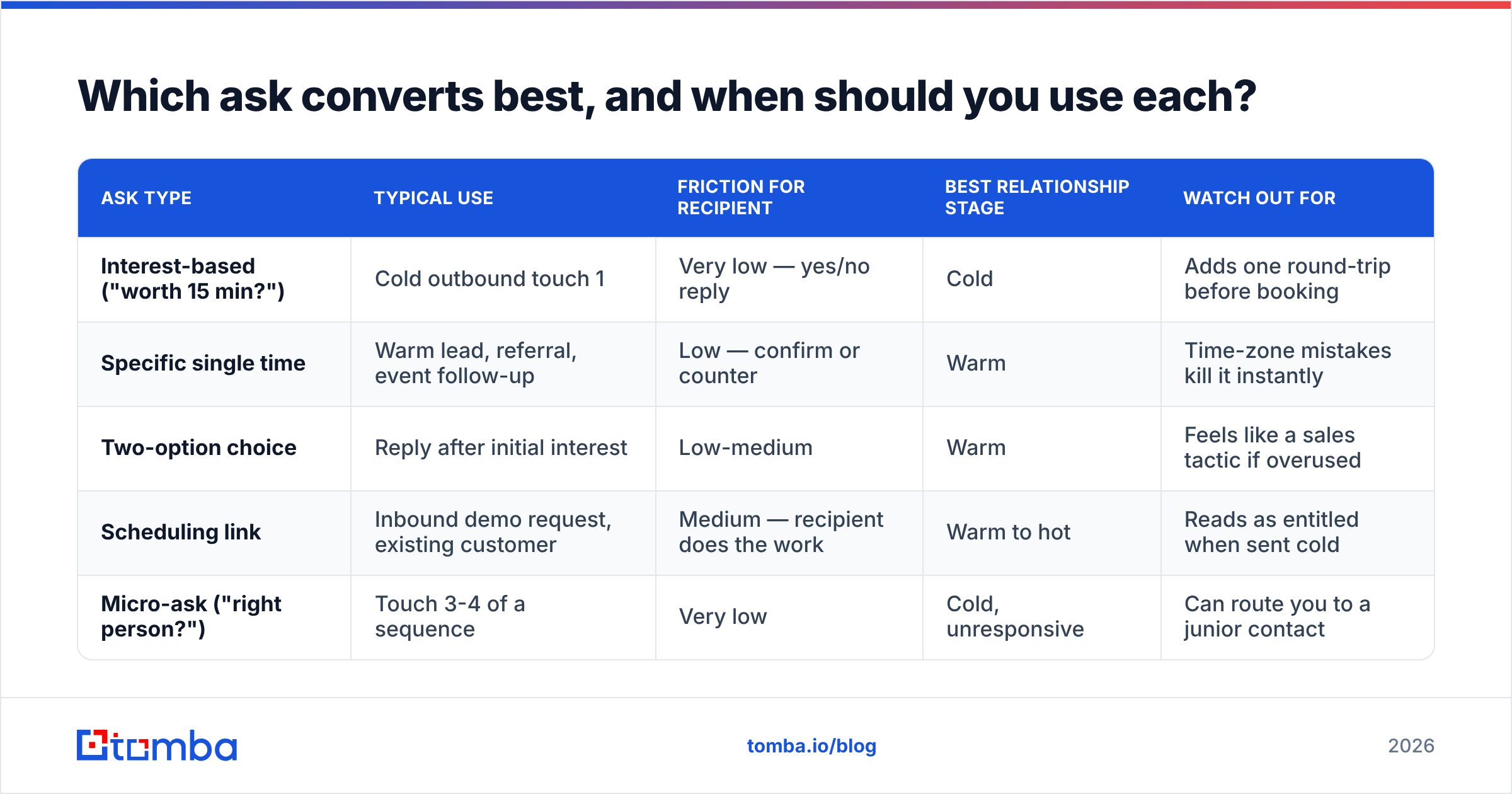
Which ask converts best, and when should you use each?#
| Ask type | Typical use | Friction for recipient | Best relationship stage | Watch out for |
|---|---|---|---|---|
| Interest-based ("worth 15 min?") | Cold outbound touch 1 | Very low — yes/no reply | Cold | Adds one round-trip before booking |
| Specific single time | Warm lead, referral, event follow-up | Low — confirm or counter | Warm | Time-zone mistakes kill it instantly |
| Two-option choice | Reply after initial interest | Low-medium | Warm | Feels like a sales tactic if overused |
| Scheduling link | Inbound demo request, existing customer | Medium — recipient does the work | Warm to hot | Reads as entitled when sent cold |
| Micro-ask ("right person?") | Touch 3-4 of a sequence | Very low | Cold, unresponsive | Can route you to a junior contact |
The pattern most teams get wrong: they lead with the scheduling link on touch one. It is the highest-friction option dressed up as the most convenient one.
How long should the meeting be?#
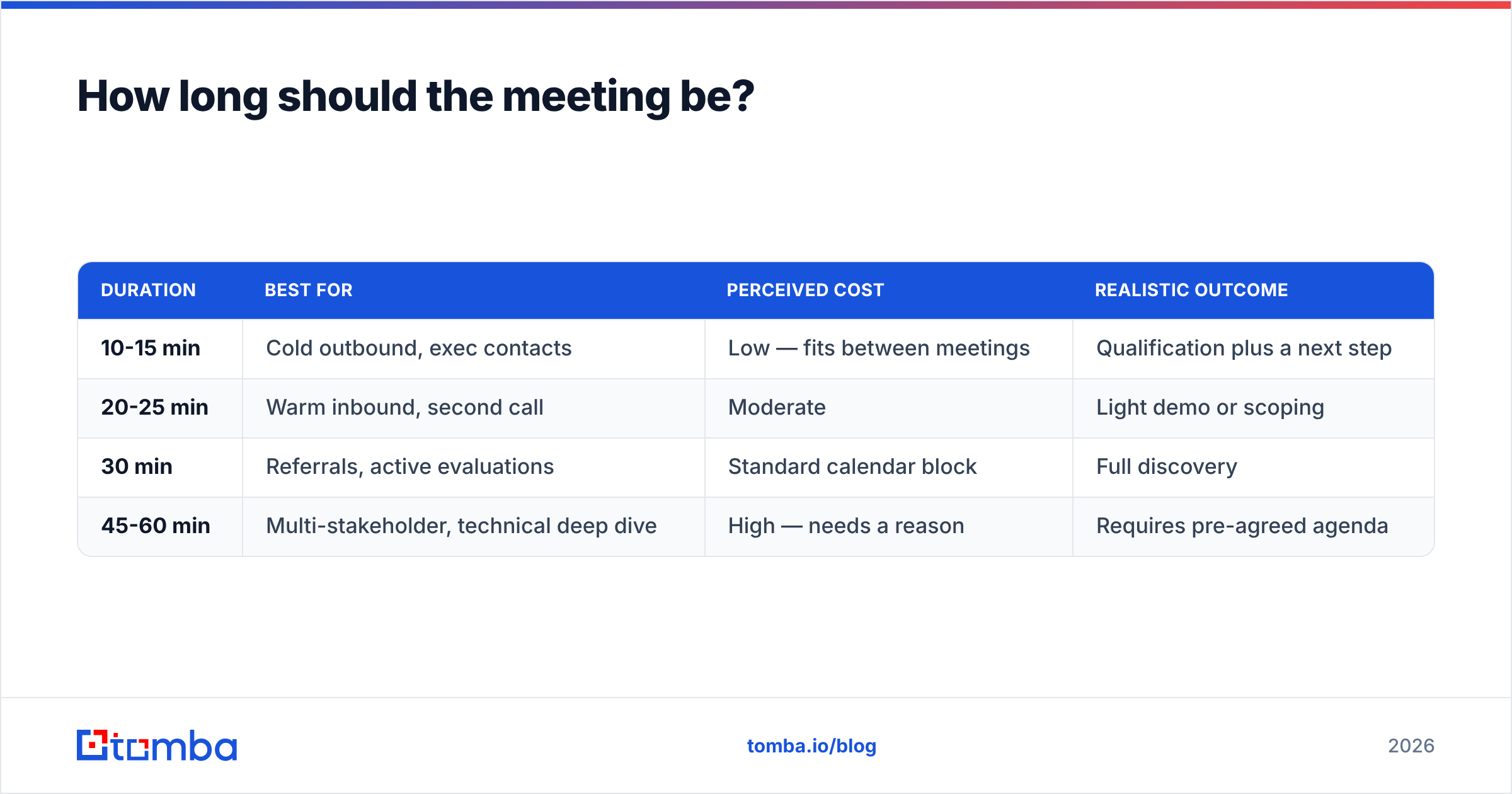
Shorter than you want. The length you name is a price tag, and cold prospects are price-sensitive.
| Duration | Best for | Perceived cost | Realistic outcome |
|---|---|---|---|
| 10-15 min | Cold outbound, exec contacts | Low — fits between meetings | Qualification plus a next step |
| 20-25 min | Warm inbound, second call | Moderate | Light demo or scoping |
| 30 min | Referrals, active evaluations | Standard calendar block | Full discovery |
| 45-60 min | Multi-stakeholder, technical deep dive | High — needs a reason | Requires pre-agreed agenda |
Two rules to enforce: never ask a VP or above for more than 15 minutes on a first touch, and never propose a duration without saying what you will cover in it. "15 minutes to walk through how three logistics companies cut onboarding time" beats "15 minutes to chat" every time. HubSpot's sales research has consistently found that specificity in the ask correlates with acceptance more strongly than send-time optimization does.
What are seven scripts that actually get a yes?#
Adapt these — do not paste them. The bracketed parts are the whole point.
1. The cold interest-based ask
Subject: [Company]'s onboarding queue
Hi [Name] — saw you're hiring three more onboarding specialists. Usually that means the queue is growing faster than the team.
We cut [similar company]'s time-to-first-value from 21 days to 9 without adding headcount.
Worth 15 minutes to see if the same approach fits [Company]? If not, I'll leave you alone.
2. The specific-time ask (warm lead)
Hi [Name] — following up on the whitepaper you downloaded on [topic]. The section on [X] is the one most teams have questions about.
Does Thursday at 11:00 ET work for a quick 15 minutes? If not, send me a window that does.
3. The referral ask
Hi [Name] — [Referrer] suggested I reach out. She mentioned you're rebuilding the [process] workflow this quarter.
I helped her team do the same thing last year. Happy to share what worked and what we'd skip.
20 minutes next week? Tuesday or Wednesday afternoon both work on my side.
4. The event follow-up
Hi [Name] — good talking at [Event] about [specific thing they said]. You mentioned [pain point] was still unsolved.
I pulled together two examples of how other [role]s handled it. Want me to walk you through them Wednesday at 2:00 PT, or send them over instead?
5. The internal meeting ask
Hi [Name] — I need 20 minutes to get a decision on the [project] budget before the freeze on the 15th. I'll come with three options and a recommendation, so it should be a quick one.
I've put a hold on your calendar Thursday 9:30 — move it if that clashes.
6. The executive ask
[Name] — one question, not a pitch. [Company] is running [tool/process] for [function]. We've seen that break at around [threshold] and I suspect you're near it.
If I'm right, 15 minutes is probably worth your time. If I'm wrong, tell me and I'll stop.
7. The breakup / final touch
Hi [Name] — I've sent a few notes about [topic] and haven't heard back, which usually means it's not a priority right now. Totally fair.
I'll close the loop here. If [pain point] moves up the list in Q2, reply to this and I'll pick it back up.
Every one of those uses the same skeleton: observable trigger → specific claim → small, bounded ask → easy out. If you want more structural variants, the cold email templates library covers the adjacent use cases.
When should you send, and how often should you follow up?#
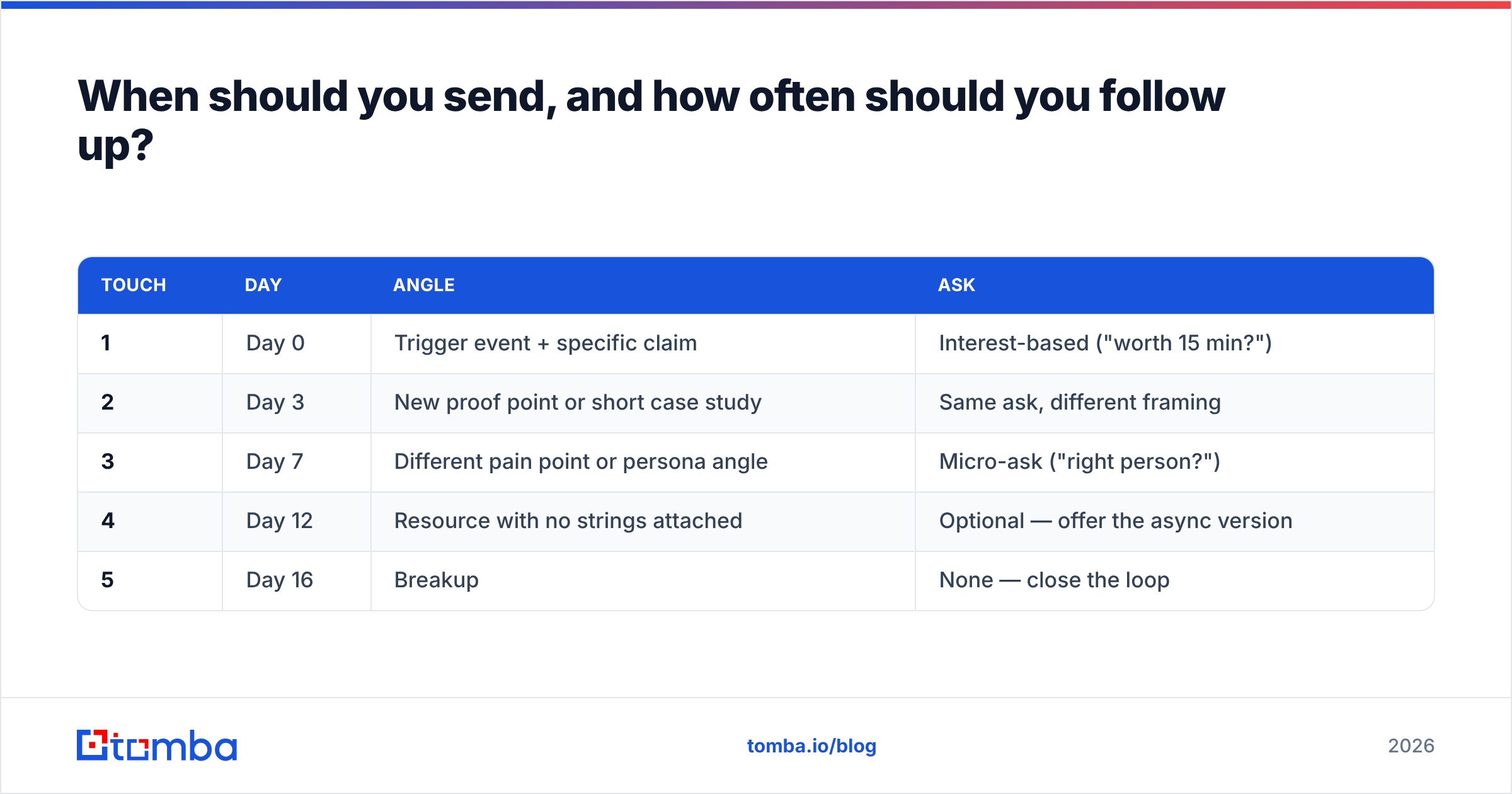
Send timing matters less than sequencing, but it is not nothing. Tuesday through Thursday, 7-9am or 1-2pm in the recipient's time zone, still outperform Monday morning and Friday afternoon for most B2B audiences. The bigger lever is what you do after the first email goes unanswered — roughly 70% of booked meetings come from a touch after the first.
| Touch | Day | Angle | Ask |
|---|---|---|---|
| 1 | Day 0 | Trigger event + specific claim | Interest-based ("worth 15 min?") |
| 2 | Day 3 | New proof point or short case study | Same ask, different framing |
| 3 | Day 7 | Different pain point or persona angle | Micro-ask ("right person?") |
| 4 | Day 12 | Resource with no strings attached | Optional — offer the async version |
| 5 | Day 16 | Breakup | None — close the loop |
Two rules that keep you out of the spam folder. First, never send a follow-up that adds no new information; "bumping this to the top of your inbox" is a tax on the reader. Second, keep total touches to five or fewer per contact per quarter. Volume without relevance is what destroys sender reputation, and once that is gone your good campaigns suffer too.
How is asking internally different from asking externally?#
Internally, you already have the right to their time — what you are actually negotiating is priority. So lead with the deadline and the decision, not the relationship. "I need a go/no-go on the vendor shortlist before the 15th" gets a slot. "Do you have time to sync on vendors?" gets ignored for a week.
Internal asks should also state what you are bringing. A meeting where you arrive with three options and a recommendation is a 20-minute meeting. A meeting where you arrive with an open question is a 60-minute meeting that ends in a second meeting.
Externally, you have no claim on their calendar at all, so you are buying attention with relevance. The practical difference: internal asks can be direct and calendar-first; external asks must earn the calendar with the first two sentences. Tools like Calendly collapse the scheduling friction in both cases, but they cannot manufacture the reason to meet.
What mistakes quietly kill your meeting requests?#
- Asking for 30 minutes cold. You are asking a stranger for a half-hour of a finite resource on the strength of one paragraph.
- The double ask. "Can we meet, and also could you forward this to your CTO?" One ask per email.
- Time zones left implicit. "Thursday at 11" is meaningless. Always write "11:00 ET."
- Company-centric openers. If the first word is "I" or your company name, rewrite it.
- Sending to unverified addresses. Bounces damage your domain and hide your real reply rate. A quick pass through a bulk email finder before launch costs minutes and prevents weeks of degraded deliverability.
- No easy out. "If this isn't a priority, just say so and I'll stop" raises reply rates because it makes "no" cheap. A no this quarter is worth more than silence.
- Over-personalized filler. Complimenting someone's LinkedIn post from 2023 reads as a merge field. Recent and specific, or skip it.
How do you measure whether your ask is working?#
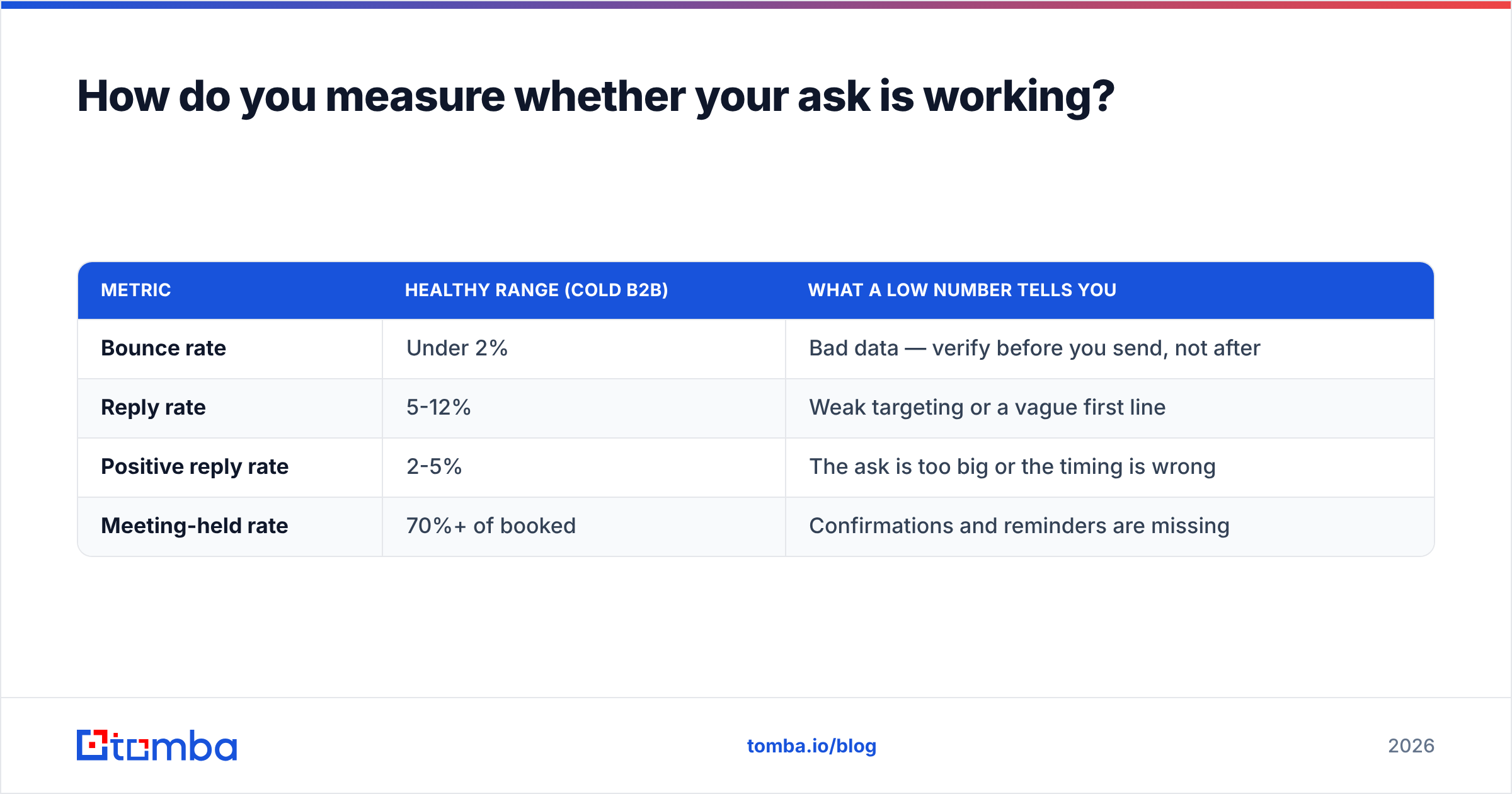
Track three numbers, in this order:
| Metric | Healthy range (cold B2B) | What a low number tells you |
|---|---|---|
| Bounce rate | Under 2% | Bad data — verify before you send, not after |
| Reply rate | 5-12% | Weak targeting or a vague first line |
| Positive reply rate | 2-5% | The ask is too big or the timing is wrong |
| Meeting-held rate | 70%+ of booked | Confirmations and reminders are missing |
If bounces are high, nothing downstream is measurable — fix the data first. If replies are healthy but positive replies are not, your ask is the problem: shrink the time request, add a concrete agenda, or switch to a micro-ask. If people book and then no-show, send a confirmation with the agenda restated and a reminder the morning of. For a fuller breakdown of benchmarks, see the note on email response rate.
FAQ#
How do I ask for someone's time without sounding desperate? Bound the ask and offer an exit. "15 minutes, and if it's not relevant just tell me and I'll close the file" signals you value your own time too.
Should I attach a calendar link in the first cold email? Usually not. Ask the interest question first; send the link once they say yes. Links in cold first touches also correlate with more spam filtering.
How many follow-ups is too many? Four to five touches over roughly two weeks, each with a new angle. Beyond that you are training the recipient to ignore your domain.
What if they say "send me some info instead"? Take it. Send a genuinely short version — three bullets and one proof point — then ask if the 15 minutes is worth it now. The async path converts more often than reps expect.
Is LinkedIn better than email for meeting requests? It is better for the trigger and the warm-up; email is better for the ask itself, because it is easier to reply to and easier to forward internally.
Where do you go from here?#
The ask is the last 10% of the work. The first 90% is knowing who to ask, why now, and whether the address you have will actually deliver. Get those wrong and even the best-written 15-minute request lands in a dead mailbox.
Start with clean, verified contact data. The Tomba Email Finder locates professional email addresses by name, domain, or company, with verification built into the same workflow — so your meeting requests reach real inboxes instead of bouncing against your sender reputation. The free tier includes 25 searches a month if you want to test the accuracy on your own target list before committing; paid plans start at $49/mo, with full details on Tomba pricing.
Fix the data, shrink the ask, and give people an easy way to say no. The yeses come faster than you would expect.
Related guides#
Ready to find emails that actually work?
Join 150,000+ professionals who stopped guessing and started sending. Free credits on signup — no credit card required.
Get the Tomba newsletter
Practical outbound tactics and product updates — once every two weeks.
About the author