How To Ask If Someone Received Your Email (Without Sounding Needy)
Asking "did you get my email?" kills more deals than silence does. Here are the exact scripts, timing windows, and delivery checks that get you a real answer instead of another week of nothing.
TL;DR
- Before you ask anyone if they got your email, confirm the email was actually deliverable. Roughly 20-30% of "no response" cases are really "no delivery" — bad address, spam folder, or a silent bounce your sending tool swallowed.
- Never send a bare "Just checking if you received my email below." It adds zero value, signals low status, and trains the recipient to ignore you.
- The best follow-up re-states the ask in one line, adds one new piece of value, and gives an easy out ("if this isn't a priority, tell me and I'll close the loop").
- Wait 3 business days for a warm thread, 4-5 for cold outreach, and 24-48 hours only when there is a genuine deadline.
- Read receipts and open tracking are unreliable in 2026 — Apple Mail Privacy Protection and Gmail image proxying inflate opens and hide non-opens. Treat them as weak signals, not proof.
Why does "did you receive my email?" almost never work?#
Because it puts the burden on the wrong person. You're asking a busy stranger to do administrative work — search their inbox, confirm receipt, and reply — in exchange for nothing. There is no reason for them to spend the 40 seconds.
There's a second problem. "Did you get my email?" is a passive accusation. Everyone knows the real message is "you ignored me." Even when you don't mean it that way, the recipient reads defensiveness into it and now has to manage your feelings on top of their own workload. The path of least resistance is to keep not replying.
The third problem is that it wastes your only remaining shot. If your first email didn't land, the follow-up is your last realistic chance to earn attention. Spending it on a receipt confirmation instead of a reason to care is a strategic mistake.
Here's the reframe that fixes all three: stop asking about the email, and start asking about the decision. "Did you get my email?" becomes "Is reducing onboarding time still on your Q4 list, or has that moved?" One requires clerical work. The other requires an opinion — and people love giving opinions.
What should you check before you follow up at all?#
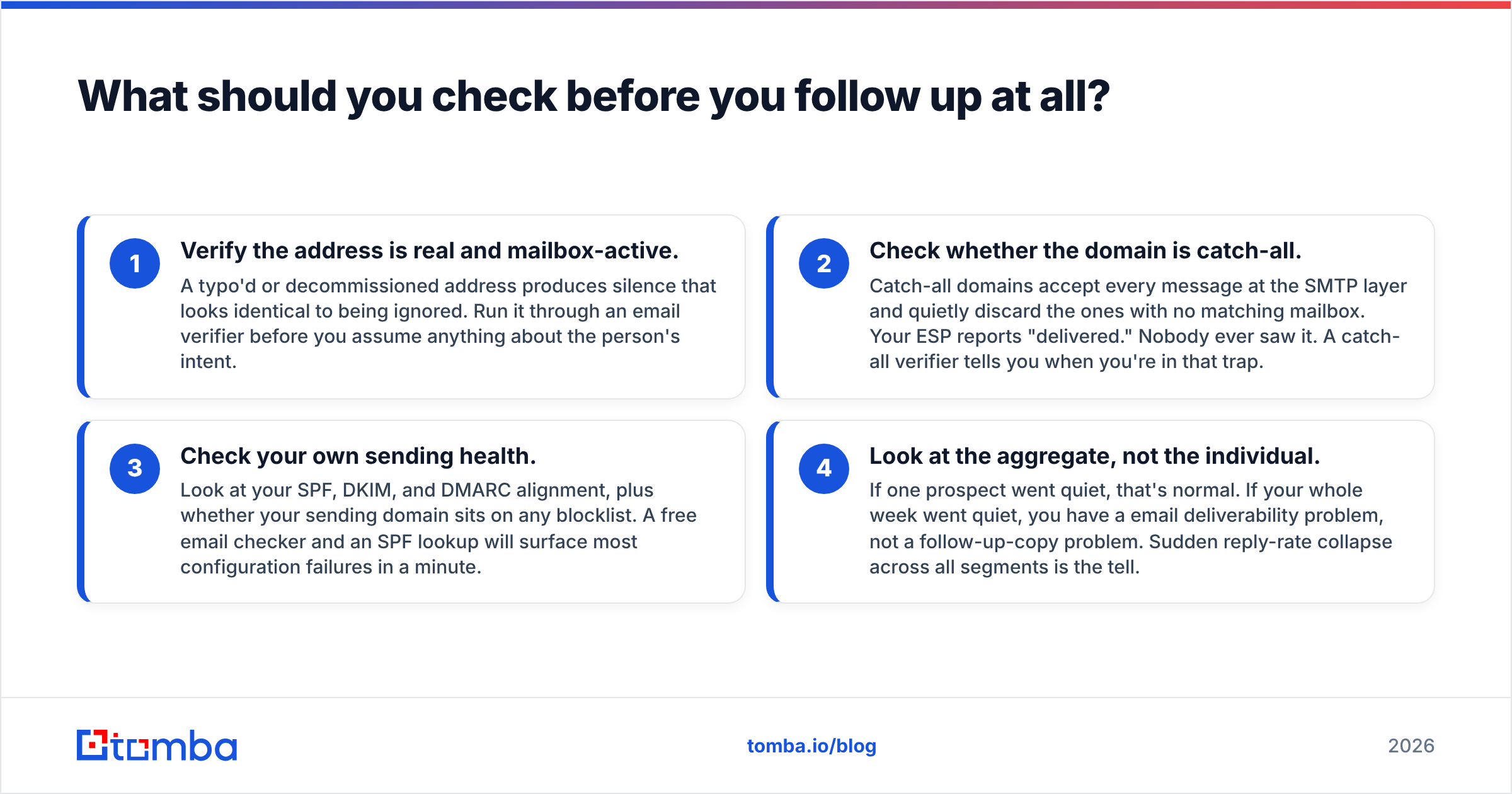
Run these four checks first. They take under five minutes and they change what you write.
- Verify the address is real and mailbox-active. A typo'd or decommissioned address produces silence that looks identical to being ignored. Run it through an email verifier before you assume anything about the person's intent.
- Check whether the domain is catch-all. Catch-all domains accept every message at the SMTP layer and quietly discard the ones with no matching mailbox. Your ESP reports "delivered." Nobody ever saw it. A catch-all verifier tells you when you're in that trap.
- Check your own sending health. Look at your SPF, DKIM, and DMARC alignment, plus whether your sending domain sits on any blocklist. A free email checker and an SPF lookup will surface most configuration failures in a minute.
- Look at the aggregate, not the individual. If one prospect went quiet, that's normal. If your whole week went quiet, you have a email deliverability problem, not a follow-up-copy problem. Sudden reply-rate collapse across all segments is the tell.
[Screenshot placeholder: Google Postmaster Tools domain reputation graph showing a drop from "High" to "Medium" over 14 days]
Only after those four come back clean does the question "how do I phrase the follow-up?" become the right question.
How long should you wait before asking?#
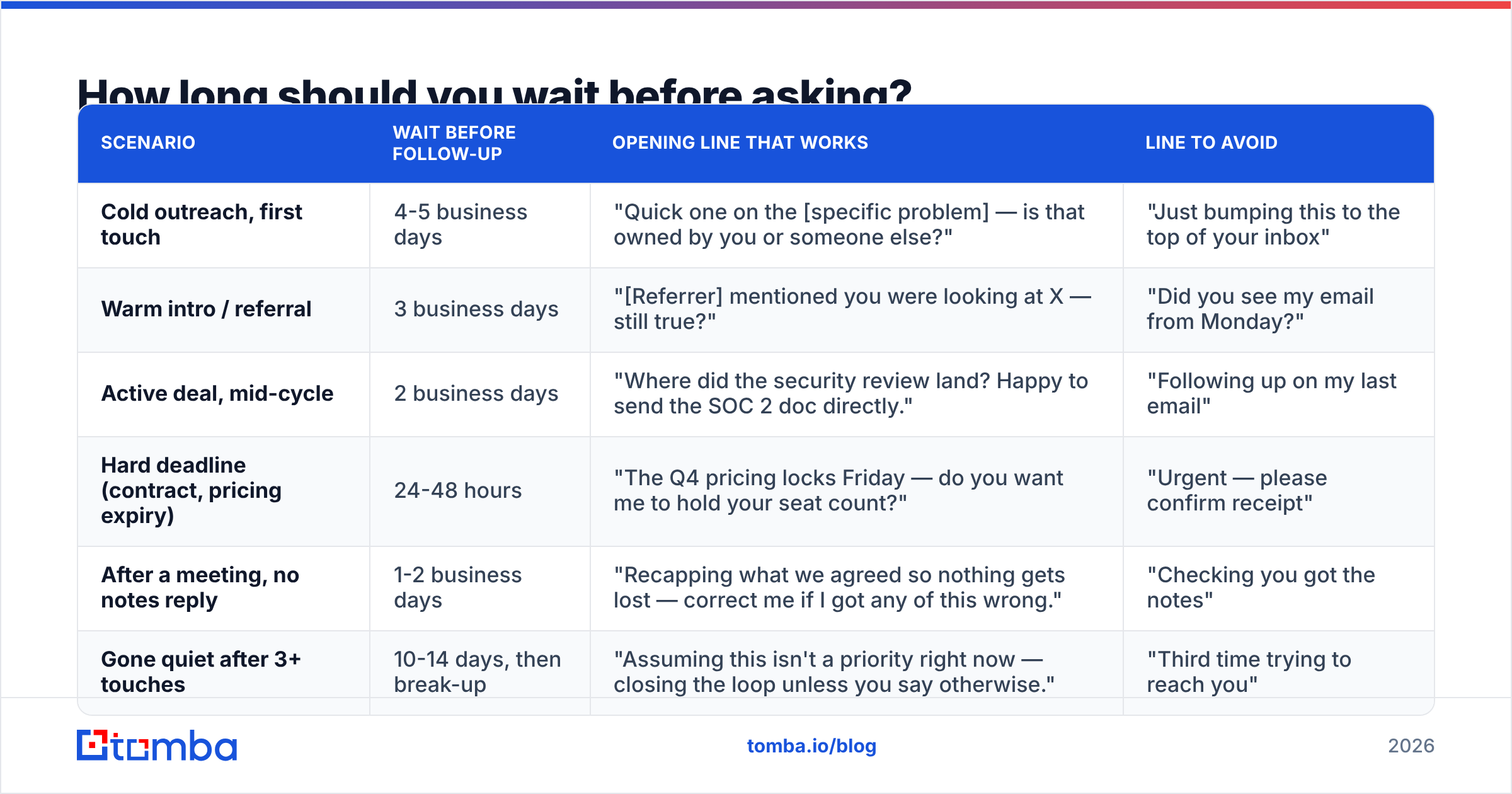
Waiting too little reads as anxious. Waiting too long means the context is gone and you're effectively starting over. The window depends entirely on the relationship and the stakes.
| Scenario | Wait before follow-up | Opening line that works | Line to avoid |
|---|---|---|---|
| Cold outreach, first touch | 4-5 business days | "Quick one on the [specific problem] — is that owned by you or someone else?" | "Just bumping this to the top of your inbox" |
| Warm intro / referral | 3 business days | "[Referrer] mentioned you were looking at X — still true?" | "Did you see my email from Monday?" |
| Active deal, mid-cycle | 2 business days | "Where did the security review land? Happy to send the SOC 2 doc directly." | "Following up on my last email" |
| Hard deadline (contract, pricing expiry) | 24-48 hours | "The Q4 pricing locks Friday — do you want me to hold your seat count?" | "Urgent — please confirm receipt" |
| After a meeting, no notes reply | 1-2 business days | "Recapping what we agreed so nothing gets lost — correct me if I got any of this wrong." | "Checking you got the notes" |
| Gone quiet after 3+ touches | 10-14 days, then break-up | "Assuming this isn't a priority right now — closing the loop unless you say otherwise." | "Third time trying to reach you" |
The pattern in the right-hand column is consistent: every "avoid" line is about you and your email. Every "works" line is about them and their decision.
Data from HubSpot's sales research consistently shows that most closed deals require five or more touches, while the majority of reps stop at one or two. The reps who follow up more are not more annoying — they're the ones with something new to say each time.
What are the actual scripts?#
Seven templates you can copy. Each one asks about receipt implicitly while giving the recipient a reason to answer.
1. The value-add bump
Subject: re: [original subject]
Hi [Name] — one more data point since I wrote: [competitor/peer company] cut their [metric] by [number] doing exactly this. Worth 15 minutes, or should I stop here?
2. The single-question close
Hi [Name] — instead of a longer pitch, one question: is [problem] currently costing you more than [rough dollar figure] a quarter? Yes or no is enough.
3. The wrong-person check
Hi [Name] — I may have aimed this at the wrong desk. Is [initiative] yours, or should I be talking to someone on the [department] side? Happy to get out of your inbox either way.
4. The explicit permission-to-decline
Hi [Name] — I'd rather get a clean "no" than keep guessing. If this isn't relevant, reply with "not now" and I'll close the file. If it is, I'll send the two-page overview.
5. The genuine-deadline ask
Hi [Name] — flagging this one because it's time-boxed: [specific deadline and consequence]. If you didn't see the original, I've pasted the short version below.
6. The recap-and-correct
Hi [Name] — recapping Tuesday so nothing slips: you're taking [item] to [stakeholder], I'm sending [item] by Thursday. Shout if I've got any of that wrong.
7. The honest break-up
Hi [Name] — I've reached out a few times and haven't heard back, which usually means the timing's wrong. I'll stop here. If [problem] comes back on your list in Q1, my line is open.
Notice what none of them contain: the phrase "did you receive my email." The receipt question is answered as a side effect of getting a reply.
[Screenshot placeholder: Gmail thread view showing a two-line follow-up with a reply arriving 20 minutes later]
Is it ever okay to ask about receipt directly?#
Yes — in three narrow cases.
When there's a legal or contractual clock. "Confirming you received the signed MSA on the 14th" is not needy; it's record-keeping. Say exactly what you sent and when.
When you have evidence of a delivery failure. If you got a bounce, a vacation autoresponder, or an admin telling you the address changed, name it: "My first note bounced from your old address — resending here."
When the recipient explicitly asked you to confirm. Obvious, but people still hedge. If they said "ping me when it's sent," ping them when it's sent.
Outside those three, the direct receipt question costs you more than it gains. And for what it's worth, the deliverability world has moved past read receipts as evidence. Since Apple introduced Mail Privacy Protection, a large slice of "opens" are pre-fetched by Apple's proxy servers regardless of whether a human looked at the message. Gmail has proxied images through its own servers for over a decade. An "opened" flag proves an image loaded somewhere — nothing more.
How do read receipts, open tracking, and reply detection compare?#
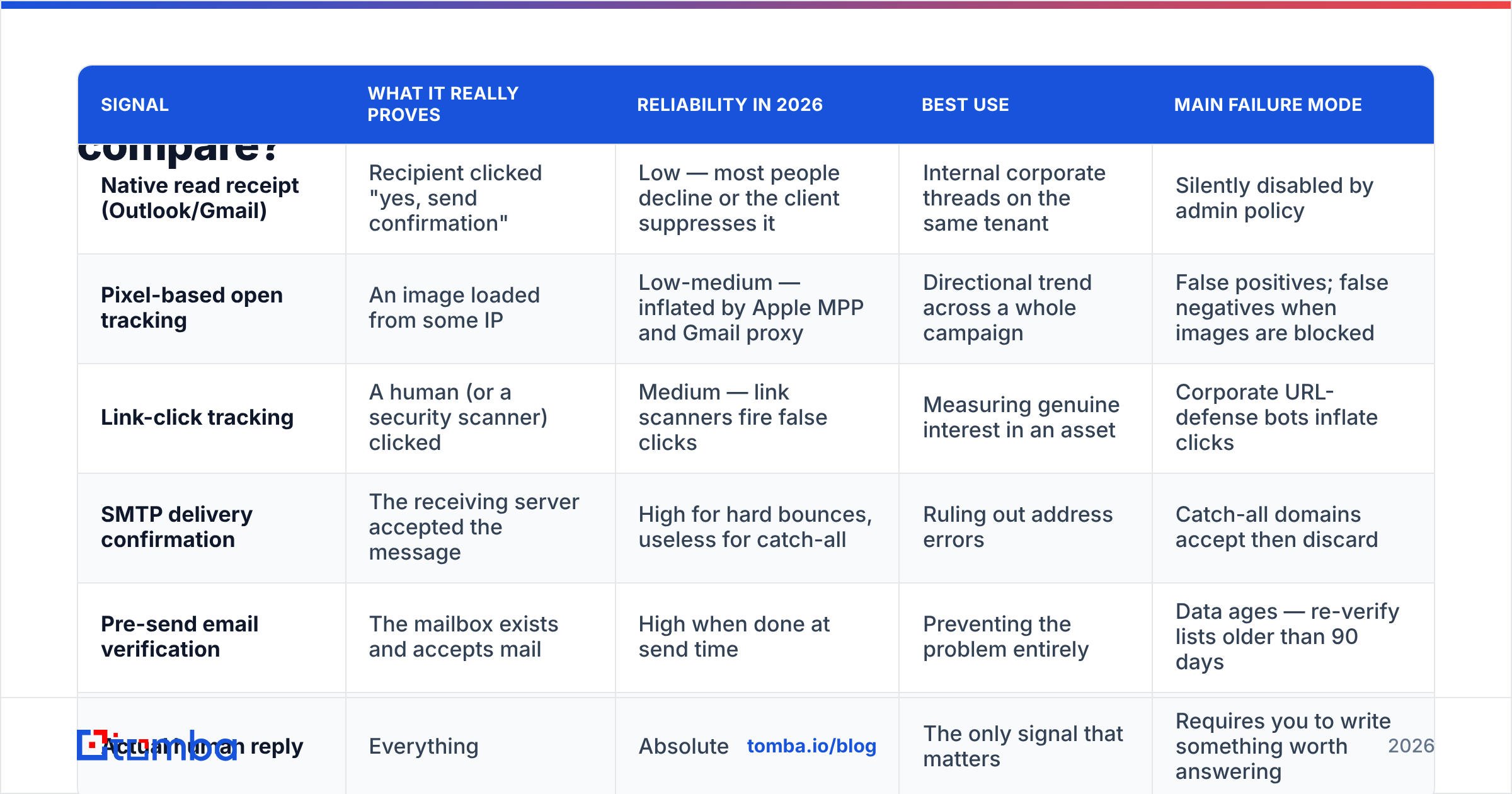
Each signal answers a different question and each fails differently. Pick based on what you actually need to know.
| Signal | What it really proves | Reliability in 2026 | Best use | Main failure mode |
|---|---|---|---|---|
| Native read receipt (Outlook/Gmail) | Recipient clicked "yes, send confirmation" | Low — most people decline or the client suppresses it | Internal corporate threads on the same tenant | Silently disabled by admin policy |
| Pixel-based open tracking | An image loaded from some IP | Low-medium — inflated by Apple MPP and Gmail proxy | Directional trend across a whole campaign | False positives; false negatives when images are blocked |
| Link-click tracking | A human (or a security scanner) clicked | Medium — link scanners fire false clicks | Measuring genuine interest in an asset | Corporate URL-defense bots inflate clicks |
| SMTP delivery confirmation | The receiving server accepted the message | High for hard bounces, useless for catch-all | Ruling out address errors | Catch-all domains accept then discard |
| Pre-send email verification | The mailbox exists and accepts mail | High when done at send time | Preventing the problem entirely | Data ages — re-verify lists older than 90 days |
| Actual human reply | Everything | Absolute | The only signal that matters | Requires you to write something worth answering |
The practical takeaway: spend your effort at the top of the funnel, not the bottom. Verifying an address before you send prevents the ambiguity that makes you want to ask "did you get it?" three days later. Tracking tells you about the past; verification protects the future.
How do you build a follow-up sequence that doesn't need this question?#
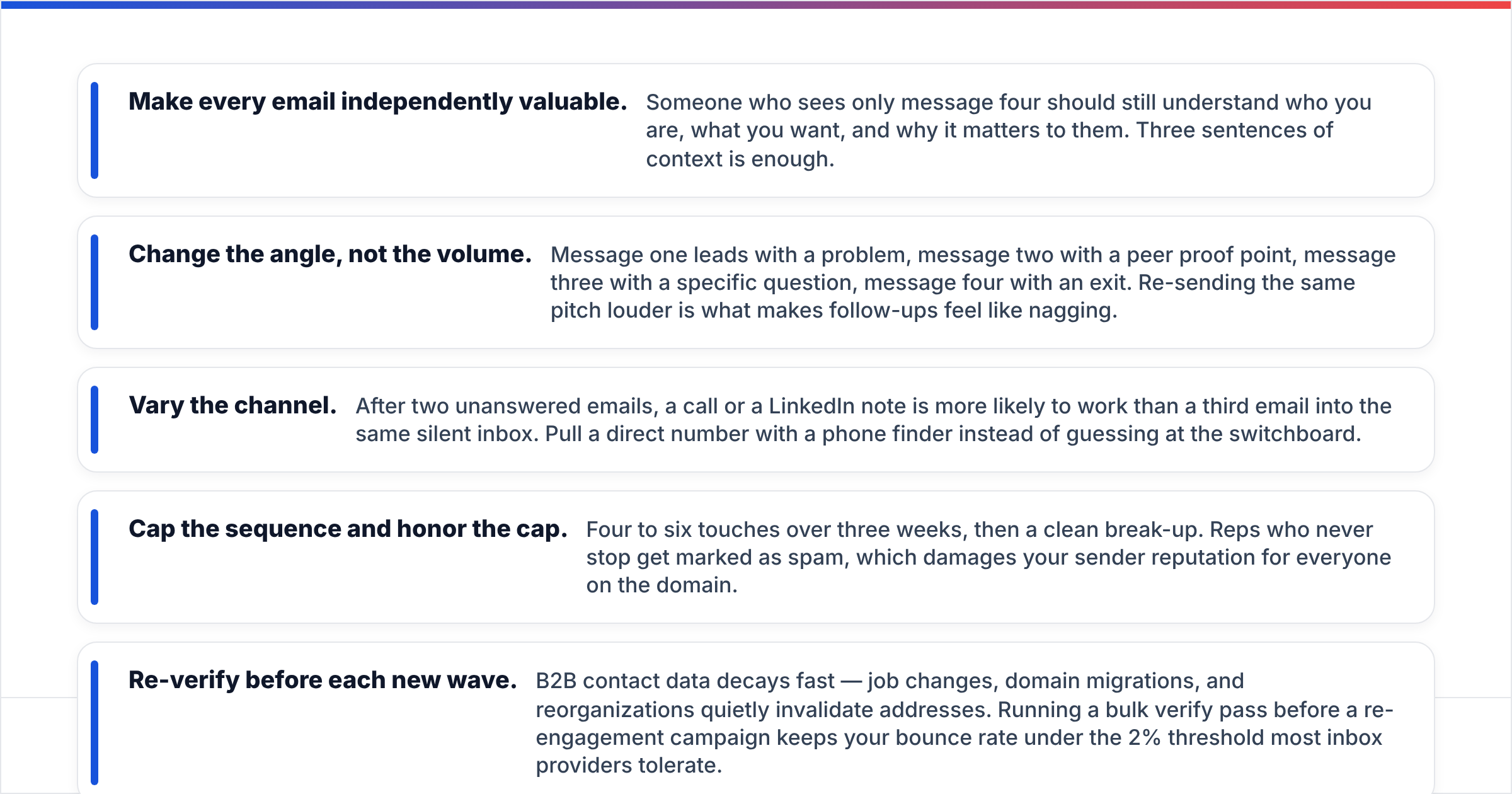
Design the sequence so each message stands alone. If email three assumes the recipient read email one, you've built a dependency that breaks the moment one message lands in spam.
- Make every email independently valuable. Someone who sees only message four should still understand who you are, what you want, and why it matters to them. Three sentences of context is enough.
- Change the angle, not the volume. Message one leads with a problem, message two with a peer proof point, message three with a specific question, message four with an exit. Re-sending the same pitch louder is what makes follow-ups feel like nagging.
- Vary the channel. After two unanswered emails, a call or a LinkedIn note is more likely to work than a third email into the same silent inbox. Pull a direct number with a phone finder instead of guessing at the switchboard.
- Cap the sequence and honor the cap. Four to six touches over three weeks, then a clean break-up. Reps who never stop get marked as spam, which damages your sender reputation for everyone on the domain.
- Re-verify before each new wave. B2B contact data decays fast — job changes, domain migrations, and reorganizations quietly invalidate addresses. Running a bulk verify pass before a re-engagement campaign keeps your bounce rate under the 2% threshold most inbox providers tolerate.
[Screenshot placeholder: Sequence builder showing a 4-step cadence with day gaps and a channel switch on step 3]
What if the person genuinely never got it?#
It happens more than most reps assume, and there's a specific recovery play.
Resend from a different sending domain or a different mailbox. If the original went out from an automated sequencer, send the recovery manually from your primary inbox — it takes a different path through filtering and usually lands. Strip the tracking pixel and any shortened links; both are common spam triggers.
Change the subject line entirely. Reply-chain subjects ("re: re: quick question") that were filtered once tend to get filtered again. Start a fresh thread with a subject that names the recipient's company or a specific number.
Keep it under 75 words with a single link at most. Heavy HTML, multiple CTAs, and image-only bodies all raise spam scores. If you want to check before sending, run the draft through a spam checker and fix anything flagged.
And if two clean sends both vanish, stop blaming the copy. Look at your domain: check blocklists, confirm DMARC is at least at p=none with reporting on, and review whether a shared IP pool is dragging you down. G2's reviews of deliverability tooling are a reasonable starting point for finding a monitoring tool, but the fix is almost always configuration, not software.
What does good look like in practice?#
A short before-and-after makes the difference concrete.
Before:
Subject: Following up
Hi Sarah, just wanted to check if you received my email from last Tuesday about our platform? Let me know if you have any questions. Looking forward to hearing from you!
That's 34 words, zero information, and three separate low-status signals ("just wanted," "let me know," "looking forward").
After:
Subject: Onboarding time at Northwind
Sarah — you mentioned on the webinar that new-hire onboarding takes six weeks. Two teams your size cut that to nine days by pre-verifying contact data before it hits the CRM. Worth 15 minutes next week, or is this parked until Q1?
That's 44 words, one specific hook, one proof point, and a question with two easy answers. It never asks about receipt, and it gets a reply either way — which tells you the email arrived.
Where should you start?#
Start upstream. Most "did you get my email?" moments trace back to a contact record that was wrong, stale, or never verified in the first place — not to weak copy. Fix the input and the awkward follow-up mostly disappears.
Tomba's Email Finder returns verified professional addresses by name and domain, with a confidence score and the public sources behind each result, so you know whether silence means "not interested" or "never arrived." The free tier covers 25 searches a month, and paid plans start at $49/mo — see Tomba pricing for the full breakdown. Verify first, follow up second, and you'll never have to write "just checking you received this" again.
Related guides#
Ready to find emails that actually work?
Join 150,000+ professionals who stopped guessing and started sending. Free credits on signup — no credit card required.
Get the Tomba newsletter
Practical outbound tactics and product updates — once every two weeks.
About the author