How to Ask Someone for a Meeting via Email (2026 Guide)
Most meeting requests die because they ask for time before they earn it. Here are the 7 structural moves, 5 copy-paste templates, and the follow-up cadence that actually get a slot on the calendar.
TL;DR
- The meeting request is not the ask — the reason is. Lead with a specific, dated, verifiable reason the recipient benefits from talking, then make the time cost as small as honestly possible.
- Ask for one thing. A single proposed slot plus an escape hatch ("if that's bad, Thursday works too") outperforms "let me know what works for you," which offloads scheduling work onto a stranger.
- Subject lines that name a topic beat subject lines that name a meeting. "Question about your Q3 onboarding flow" beats "Quick sync?"
- Send to a verified address. Roughly 20–30% of B2B contact data decays annually, so a perfect meeting request bouncing off a dead inbox is the most common failure mode nobody measures.
- Follow up 3–4 times over 12–14 days, each time adding new information rather than repeating the original ask.
You already know how to write a polite email. That's not the bottleneck. The bottleneck is that a meeting request is a request for the single least renewable resource your recipient has, sent by someone they have no relationship with, competing against 100+ other messages that day. This guide covers the structure that survives that filter.
What Makes a Meeting Request Email Actually Work?#
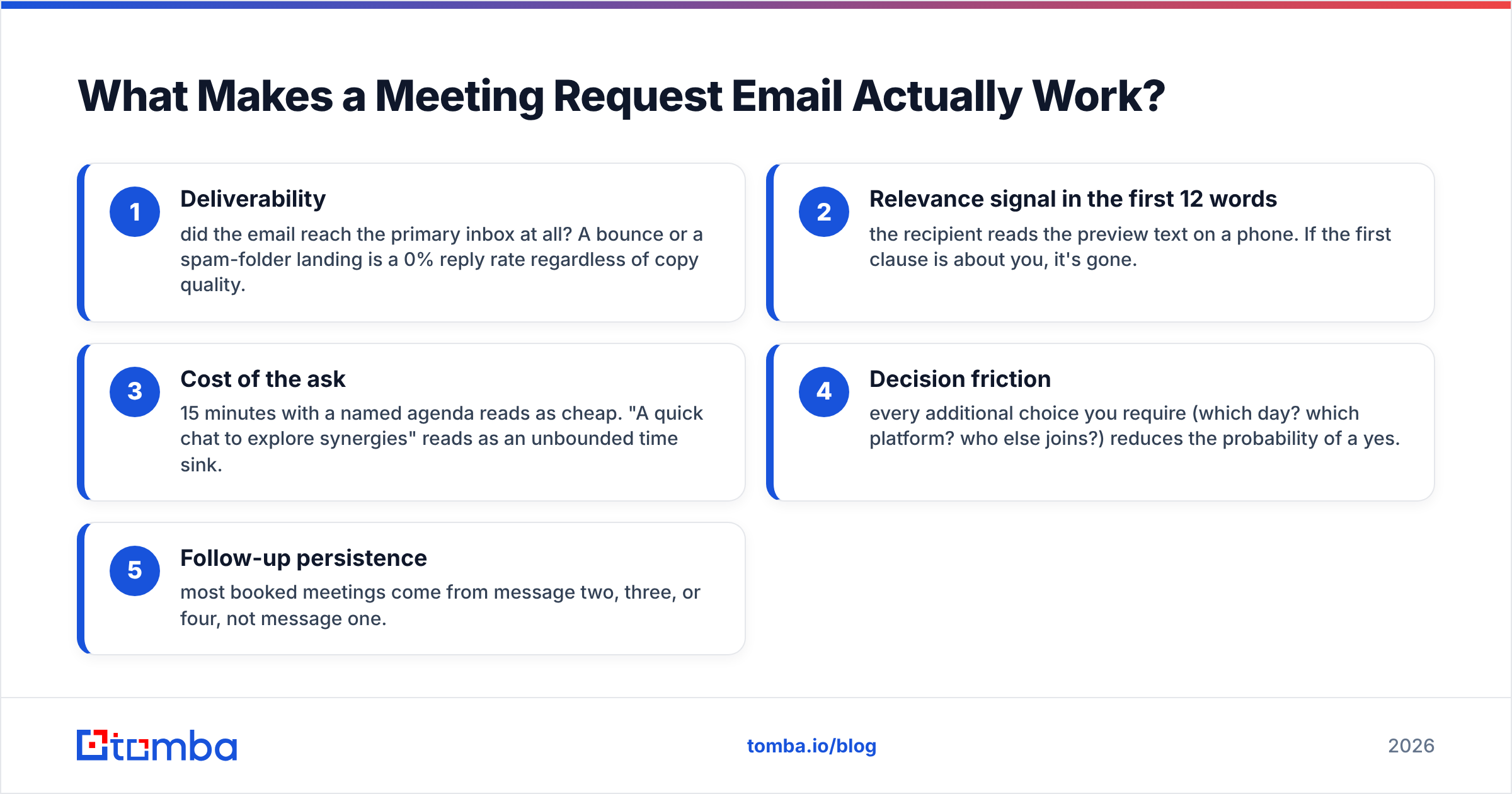
A meeting request succeeds or fails on five variables, and only two of them are about writing.
- Deliverability — did the email reach the primary inbox at all? A bounce or a spam-folder landing is a 0% reply rate regardless of copy quality.
- Relevance signal in the first 12 words — the recipient reads the preview text on a phone. If the first clause is about you, it's gone.
- Cost of the ask — 15 minutes with a named agenda reads as cheap. "A quick chat to explore synergies" reads as an unbounded time sink.
- Decision friction — every additional choice you require (which day? which platform? who else joins?) reduces the probability of a yes.
- Follow-up persistence — most booked meetings come from message two, three, or four, not message one.
Notice that three of those five have nothing to do with your prose. This is why "better templates" rarely fix a broken meeting-request motion on its own.
What Is the Right Structure for a Meeting Request Email?#
Use a five-part structure. It's boring, and boring converts.
1. Subject line — name the topic, not the meeting. Bad: "Quick sync next week?" Good: "Your careers page loads in 6.2s on mobile". The second one earns the open because it contains information, not a request.
2. Opening line — proof you did work. One sentence establishing why this person, not their job title. Reference something dated and verifiable: a post they published, a hire they made, a product change, a conference talk. Avoid "I came across your profile" — it's the email equivalent of "to whom it may concern."
3. The reason — one sentence, one outcome. Say what the meeting produces for them. Not "learn about our platform." Something like: "I want to show you the three URL patterns your competitors rank for that you don't."
4. The ask — one slot, one alternative. "Does Tuesday at 2pm ET work for 15 minutes? If not, Thursday morning is open." You've now made the reply a one-word action.
5. The exit. "If this isn't a priority right now, tell me and I'll stop." Counterintuitively, this raises reply rates because it converts a nagging obligation into a two-second decision.
Keep the whole thing under 120 words. Under 90 is better. If you need a paragraph to explain the reason, the reason is not sharp enough yet.
How Do the Main Meeting-Request Formats Compare?#
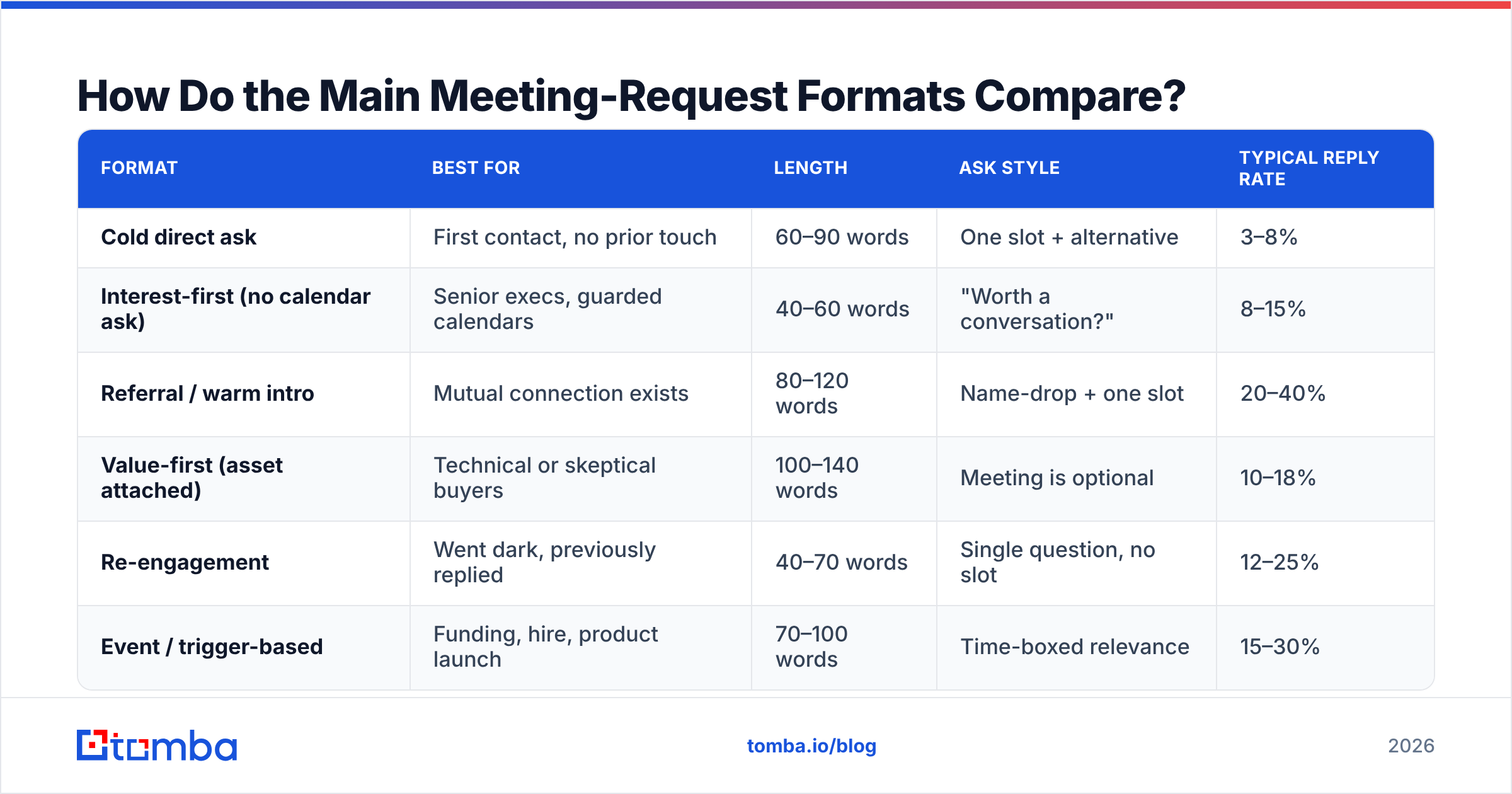
Not every meeting ask should look the same. The right format depends on how warm the relationship is and what you're asking them to give up.
| Format | Best for | Length | Ask style | Typical reply rate |
|---|---|---|---|---|
| Cold direct ask | First contact, no prior touch | 60–90 words | One slot + alternative | 3–8% |
| Interest-first (no calendar ask) | Senior execs, guarded calendars | 40–60 words | "Worth a conversation?" | 8–15% |
| Referral / warm intro | Mutual connection exists | 80–120 words | Name-drop + one slot | 20–40% |
| Value-first (asset attached) | Technical or skeptical buyers | 100–140 words | Meeting is optional | 10–18% |
| Re-engagement | Went dark, previously replied | 40–70 words | Single question, no slot | 12–25% |
| Event / trigger-based | Funding, hire, product launch | 70–100 words | Time-boxed relevance | 15–30% |
The interest-first format deserves attention. Instead of asking for a calendar slot, you ask whether the topic is worth a conversation at all. That's a lower-commitment reply, and once someone types "yes, sure," you've converted a cold contact into a scheduling conversation — a much easier negotiation.
Rates above are directional ranges from published B2B outbound benchmarks and vary enormously by list quality, industry, and seniority. Treat them as relative rankings, not promises.
What Are Five Meeting Request Templates You Can Copy?#
Template 1 — Cold direct ask
Subject: Your Shopify checkout on mobile
Hi Dana,
I ran your checkout on an iPhone 14 this morning — the payment step adds 2.1s before the card field renders. That's usually a third-party script load order issue.
I've fixed this for four DTC brands in your size range; the median cart-abandon improvement was 6%.
Worth 15 minutes Tuesday at 2pm ET to walk you through what I saw? Thursday 10am also works.
If checkout speed isn't on the roadmap this quarter, say so and I'll leave it.
Template 2 — Interest-first (for executives)
Subject: Question about your EMEA expansion
Hi Marcus,
Saw the Berlin office announcement. Most teams hit the same VAT-compliance wall around month three of an EMEA rollout.
Is that something your team is already handling, or is it still an open question?
No meeting request at all. You're testing for interest first. If they answer, the meeting is trivially easy to propose in reply two.
Template 3 — Referral
Subject: Priya Raman suggested I reach out
Hi Tom,
Priya on your RevOps team mentioned you're rebuilding lead routing before the fiscal year rolls over.
We did the same migration at Northbeam last spring — the part everyone underestimates is territory history in closed-won records.
Happy to walk through what broke for us. 20 minutes Wednesday at 11am?
Template 4 — Value-first
Subject: 3 competitors ranking on your bottom-funnel terms
Hi Alex,
I pulled the SERP for "warehouse management software pricing" — three competitors hold positions 2, 4, and 5 with pages published in the last eight months. You rank 14.
I put the gap analysis in a two-page doc, link below. No form, no gate.
[link]
If it's useful and you want the implementation order we'd use, I'm free Thursday at 3pm. If not, keep the doc.
Template 5 — Re-engagement
Subject: Closing the loop
Hi Sam,
You mentioned in March that the vendor review was pushed to H2. Is that still the plan, or did it move again?
No pitch — just want to know whether to check back in September or drop it.
Each of these does the same three things: proves specific research, names one outcome, and makes the reply short. If you're building these at scale, the cold email templates library and a subject line generator will save you the first draft.
When Should You Send a Meeting Request Email?#
Timing matters less than most advice claims, but the effects are real and cheap to capture.
- Tuesday through Thursday outperform Monday (inbox triage) and Friday (mental checkout) in most published B2B send-time studies, including HubSpot's ongoing email benchmark research.
- Send in the recipient's timezone, between 7:00–9:00am local or 1:00–2:00pm local. Early morning catches the phone-scroll; early afternoon catches the post-lunch inbox sweep.
- Propose meetings 3–7 days out. Tomorrow is presumptuous. Three weeks out is forgettable and gets rescheduled.
- Avoid the last three days of a quarter for anyone in a revenue role. Their calendar is a war zone.
One more: never propose a slot you can't actually hold. Getting a yes and then countering with "actually, can we move that?" burns the credibility your research just bought.
Why Do Good Meeting Request Emails Still Get No Reply?#
Because the email never arrived, or arrived at a dead address. This is the most under-diagnosed problem in outbound.
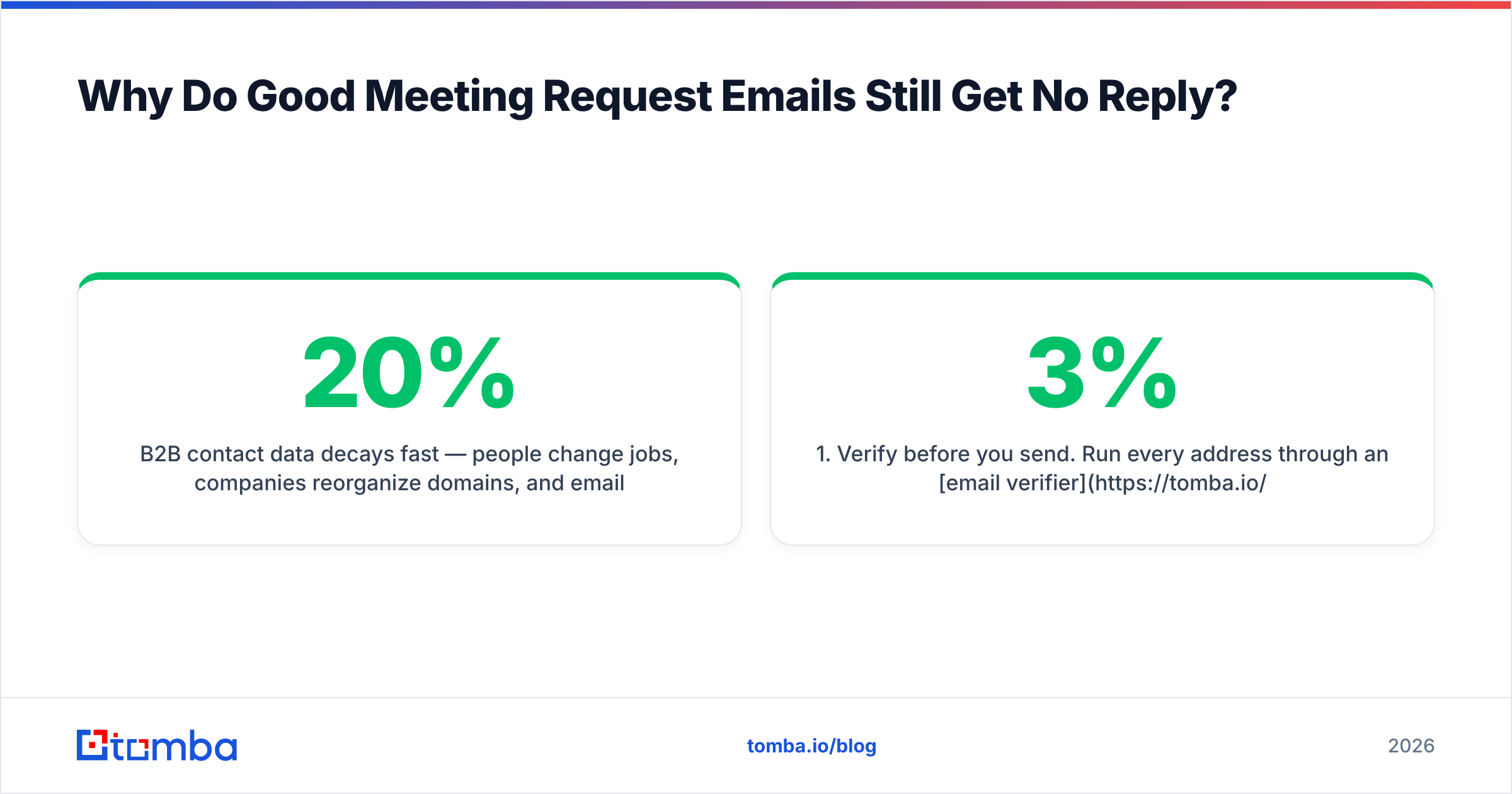
B2B contact data decays fast — people change jobs, companies reorganize domains, and email formats shift after acquisitions. Industry estimates put annual decay somewhere between 20% and 30%, and G2's data-quality research reflects the same pattern across lead intelligence vendors. If a quarter of your list is stale, you're writing perfect emails into a void and blaming your copy.
Two operational fixes, in order:
- Verify before you send. Run every address through an email verifier so hard bounces never touch your sending domain. Bounce rates above 2–3% start damaging sender reputation, which then suppresses the deliverability of the emails that would have converted.
- Re-find, don't guess. When a contact bounces, don't permutate five variants and blast them all — that's how you get flagged. Look the person up again against the current domain with a domain search and send once to the confirmed address.
There's also a copy-side failure worth naming: the email that asks for a meeting without ever saying what the meeting is about. "I'd love to connect and learn more about your priorities" is a request for free consulting. Senior people have been trained to ignore it.
How Should You Follow Up After a Meeting Request?#
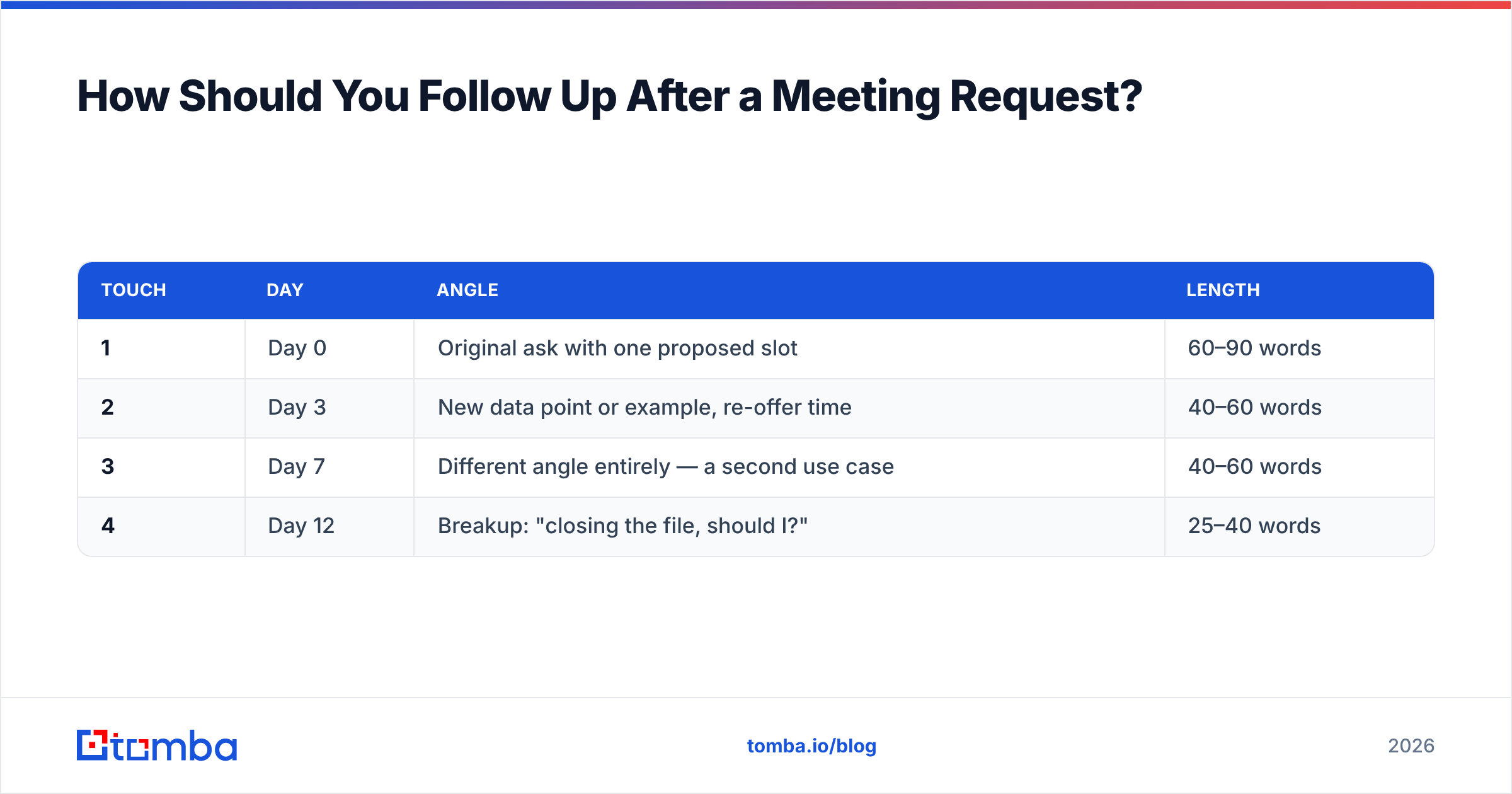
Follow up 3–4 times over roughly two weeks, and make each message carry new information.
| Touch | Day | Angle | Length |
|---|---|---|---|
| 1 | Day 0 | Original ask with one proposed slot | 60–90 words |
| 2 | Day 3 | New data point or example, re-offer time | 40–60 words |
| 3 | Day 7 | Different angle entirely — a second use case | 40–60 words |
| 4 | Day 12 | Breakup: "closing the file, should I?" | 25–40 words |
Rules that make this work rather than annoy:
- Reply in the same thread for touches 2 and 3. Thread continuity gives context and reads as persistence, not spam.
- Never write "just bumping this." It signals you have nothing new, which invites them to keep ignoring you.
- Change the ask size on touch 3. If 15 minutes didn't land, ask a single question they can answer in one line. A reply of any kind restarts the conversation.
- Mean the breakup. If you say you're closing the file, close it. The breakup email works precisely because people believe it — and it stops working the moment you send a fifth message anyway.
The breakup message is consistently the highest-reply-rate email in most sequences, which tells you something uncomfortable: a lot of your prospects were mildly interested and simply never prioritized responding. Removal is the forcing function.
How Do You Scale This Without Sounding Like a Robot?#
The tension is real. Personalization is what makes a meeting request work, and personalization is what makes it impossible to send 200 of them a day.
The resolution is to personalize the variable and template the frame. Your structure — subject, research line, reason, ask, exit — stays fixed. The research line changes per prospect and must be genuinely specific. If you can copy your first line into another prospect's email without editing it, it isn't research, it's filler.
Practically:
- Segment before you write. Ten prospects who all just raised a Series A can share one research angle. That's honest specificity at scale.
- Cap your daily volume per inbox. 30–50 cold sends per mailbox per day is a defensible ceiling. Beyond that you're choosing volume over deliverability, and deliverability wins on a long enough timeline.
- Enrich once, reuse everywhere. Pull role, seniority, tech stack, and company signals in one pass with data enrichment so your research line writes itself from real attributes instead of guesses.
- Test one variable at a time. Subject line one week, ask format the next. Changing four things and seeing a lift teaches you nothing.
- Read your email out loud. If you wouldn't say the sentence to someone's face, delete it. "Circle back," "touch base," and "pick your brain" all fail this test.
The teams that book the most meetings are rarely the ones with the cleverest copy. They're the ones with clean lists, disciplined follow-up, and a research habit that takes 90 seconds per prospect instead of zero.
Start With an Address That Actually Exists#
Every technique above assumes your message lands in a real, monitored inbox. That assumption is wrong more often than most teams realize, and it's the cheapest thing on this list to fix.
Use the Tomba Email Finder to locate verified professional addresses by name and domain before you write a single meeting request — the free tier covers 25 searches a month, and paid plans start at $49/mo on Tomba pricing if you're running volume. Get the address right, then let the copy do the job you designed it to do.
Related guides#
Ready to find emails that actually work?
Join 150,000+ professionals who stopped guessing and started sending. Free credits on signup — no credit card required.
Get the Tomba newsletter
Practical outbound tactics and product updates — once every two weeks.
About the author