How to Automate Follow Up Emails Without Sounding Like a Bot
Automated follow-ups drive most of your replies — or most of your spam complaints. Here is the exact sequence logic, timing, and tooling stack that keeps automation invisible to the person reading it.
TL;DR
- Most replies to cold outreach arrive on follow-up 2 through 5, not the first send — automation is how you actually collect them.
- The mechanics are simple: a sequence tool, a clean verified list, business-day spacing (day 0, 3, 7, 12, 18), and hard exit rules on reply or booking.
- Automation fails for two reasons only: bad data (bounces destroy sender reputation) and copy that repeats itself instead of adding a new angle.
- Budget roughly $50-$100/month for a sending tool plus $49-$99/month for contact data at small-team volume.
- Every automated follow-up needs a kill switch: reply detected, meeting booked, out-of-office, or unsubscribe should all stop the sequence within minutes.
What does it actually mean to automate follow up emails?#
Automating follow-ups means a system sends your second, third, and fourth touches on a schedule you defined once, and stops sending the moment the prospect does something — replies, books, clicks unsubscribe, or bounces.
That is the whole idea. It is not AI writing personalized novels for you. Think of it like a dishwasher: you still scrape the plates and load them correctly, the machine just handles the repetitive part reliably at 2 a.m. If you load it wrong, you get dirty dishes at scale.
There are three moving parts:
- The trigger — what starts the sequence. A list import, a form fill, a CRM stage change, a webinar signup, or a manual add.
- The sequence — the ordered list of steps with delays between them, plus the copy for each step.
- The exit conditions — the rules that pull someone out. Reply, meeting booked, link click on a specific page, manual removal, or a hard bounce.
Get all three right and automation is invisible to the recipient. Get exit conditions wrong and you send follow-up #3 to someone who already replied "yes, let's talk Tuesday" — the single fastest way to look like a bot.
Why do follow-ups matter more than the first email?#
Because the first email lands in an inbox that gets 100+ other messages that day. The follow-up lands when the person has bandwidth.
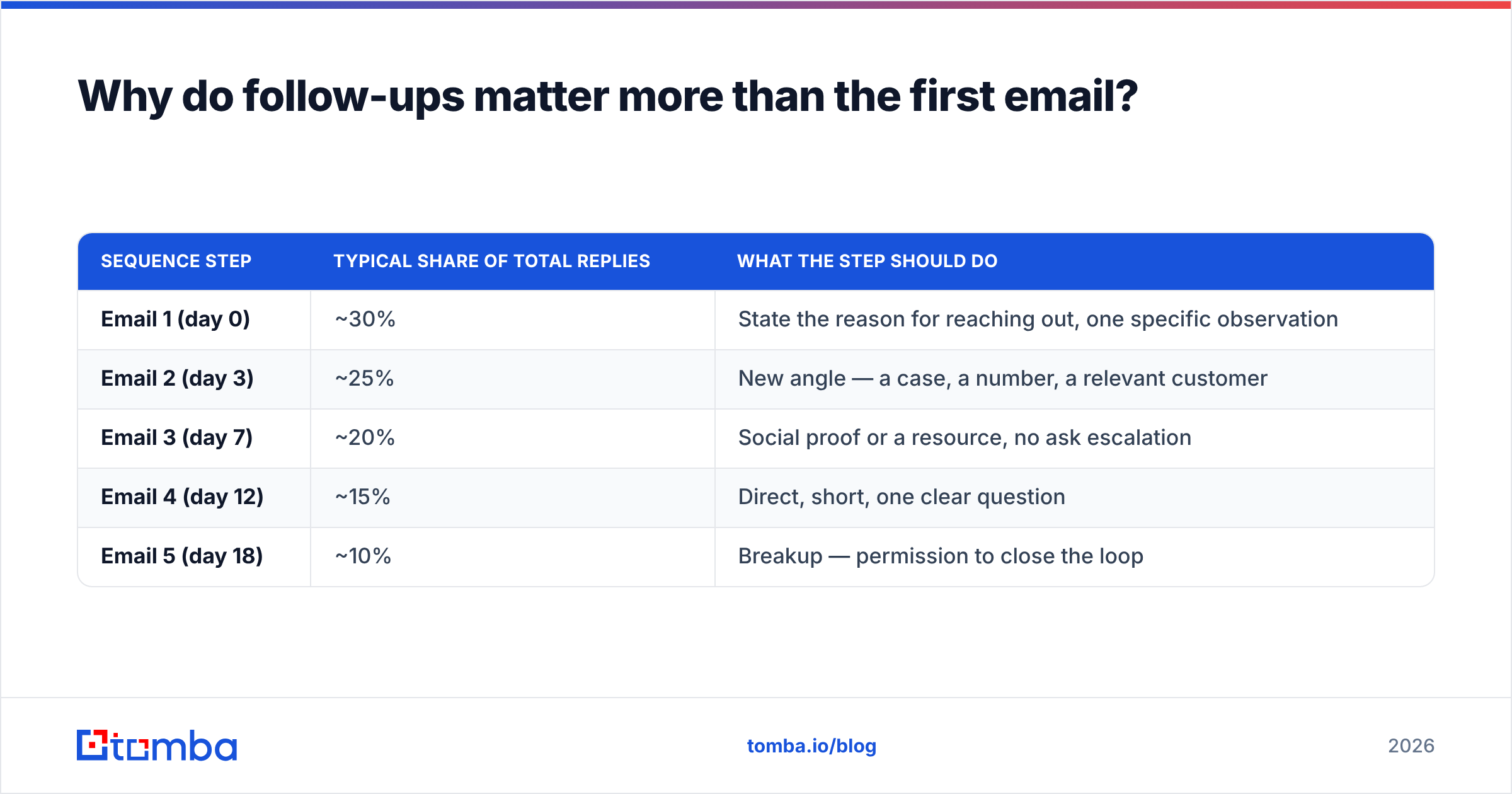
The pattern is consistent across outbound teams: reply volume is spread across the sequence rather than concentrated in step one. A rough distribution you can plan around:
| Sequence step | Typical share of total replies | What the step should do |
|---|---|---|
| Email 1 (day 0) | ~30% | State the reason for reaching out, one specific observation |
| Email 2 (day 3) | ~25% | New angle — a case, a number, a relevant customer |
| Email 3 (day 7) | ~20% | Social proof or a resource, no ask escalation |
| Email 4 (day 12) | ~15% | Direct, short, one clear question |
| Email 5 (day 18) | ~10% | Breakup — permission to close the loop |
Two conclusions fall out of that table. First, stopping after one email throws away roughly 70% of your potential replies. Second, there is a floor: by step five you are scraping the bottom, and steps six through ten mostly generate spam complaints. Five is the practical ceiling for cold sequences; three is fine for warm inbound.
The reason automation matters is that manual follow-up decays. Week one you diligently chase everyone. Week three, a deal heats up and 200 prospects silently fall out of your memory. A sequence tool does not get distracted.
How do you automate follow up emails step by step?#
Five steps. Do them in this order — skipping straight to the tool is the most common failure.
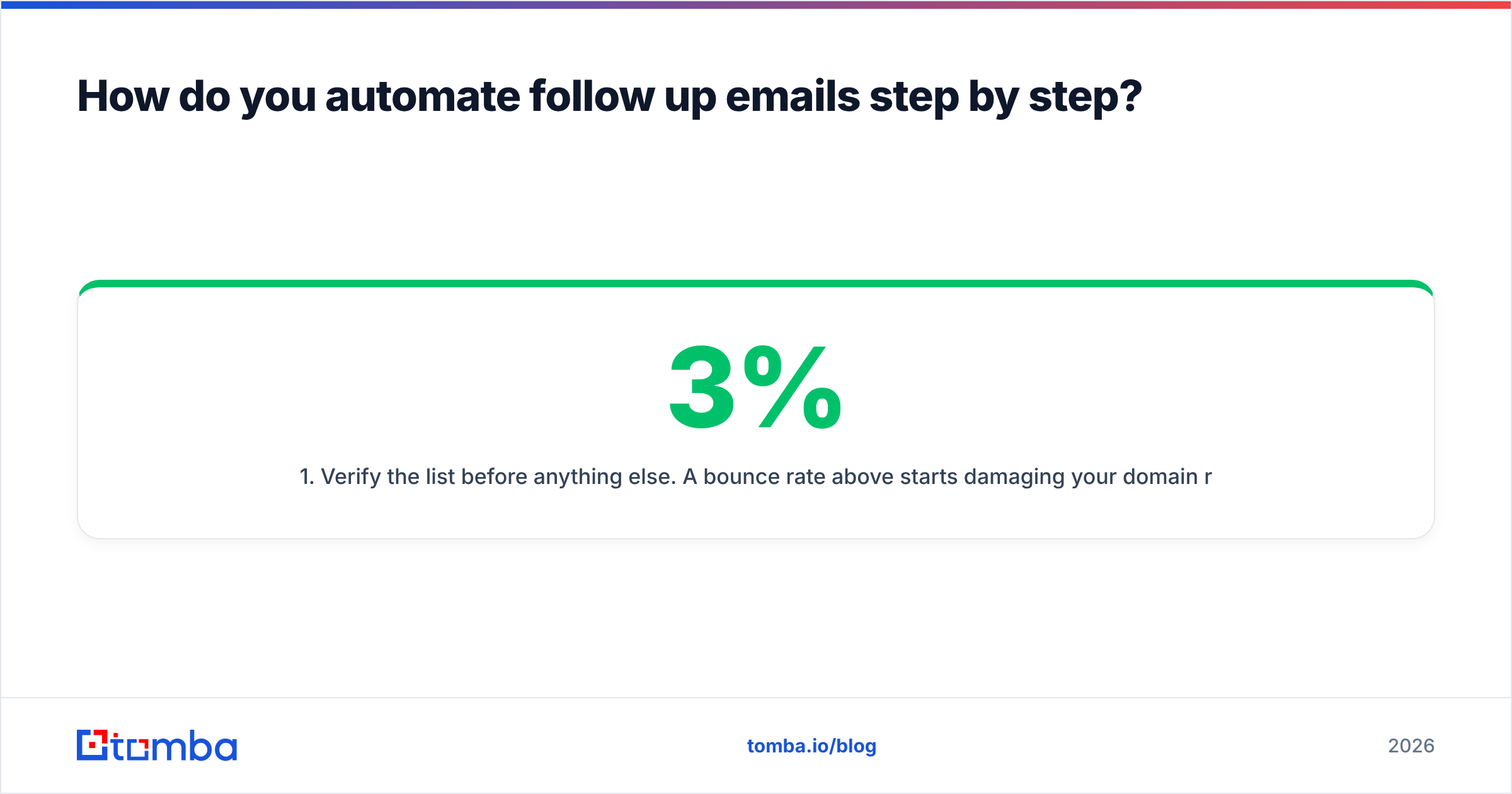
- Verify the list before anything else. A bounce rate above 3% starts damaging your domain reputation, and above 5% mailbox providers begin routing you to spam wholesale. Run every address through an email verifier before import, and re-verify lists older than 90 days. B2B data decays at roughly 25-30% per year as people change jobs.
- Warm the sending domain and mailbox. New domains need 3-4 weeks of gradually increasing volume before you send real sequences. Use a subdomain (
go.yourcompany.com) so a reputation problem never touches your primary domain. Check your SPF record, DKIM, and DMARC are all passing first — Google and Yahoo now require authentication for bulk senders. - Write the sequence as one argument, not five emails. Each step should introduce something the previous step did not say. If you can delete step 3 without losing information, delete it. The classic mistake is "just bumping this to the top of your inbox" — that is a step that adds zero value and trains people to ignore you.
- Configure delays in business days, not calendar days. A day-3 follow-up sent on Saturday is wasted. Set your tool to send Tuesday through Thursday, 8-11 a.m. in the recipient's timezone, and skip weekends and major holidays.
- Set exit conditions and test them with your own address. Add yourself to the sequence, reply from a different mailbox, and confirm the next step does not fire. Do this every time you change tools or templates. It takes ten minutes and prevents the worst possible outcome.
What spacing should you use between follow-ups?#
Day 0, 3, 7, 12, 18 is the default that survives contact with reality. It widens as it goes, which mirrors how interest actually decays — early follow-ups catch people who were busy, later ones catch people whose situation changed.
Compress it to 0, 2, 5, 9 for time-sensitive offers (event invites, expiring pricing). Stretch it to 0, 5, 12, 21 for enterprise buyers with long committee cycles. Never go tighter than 48 hours between sends to the same person.
Which tools should you use to automate follow-ups?#
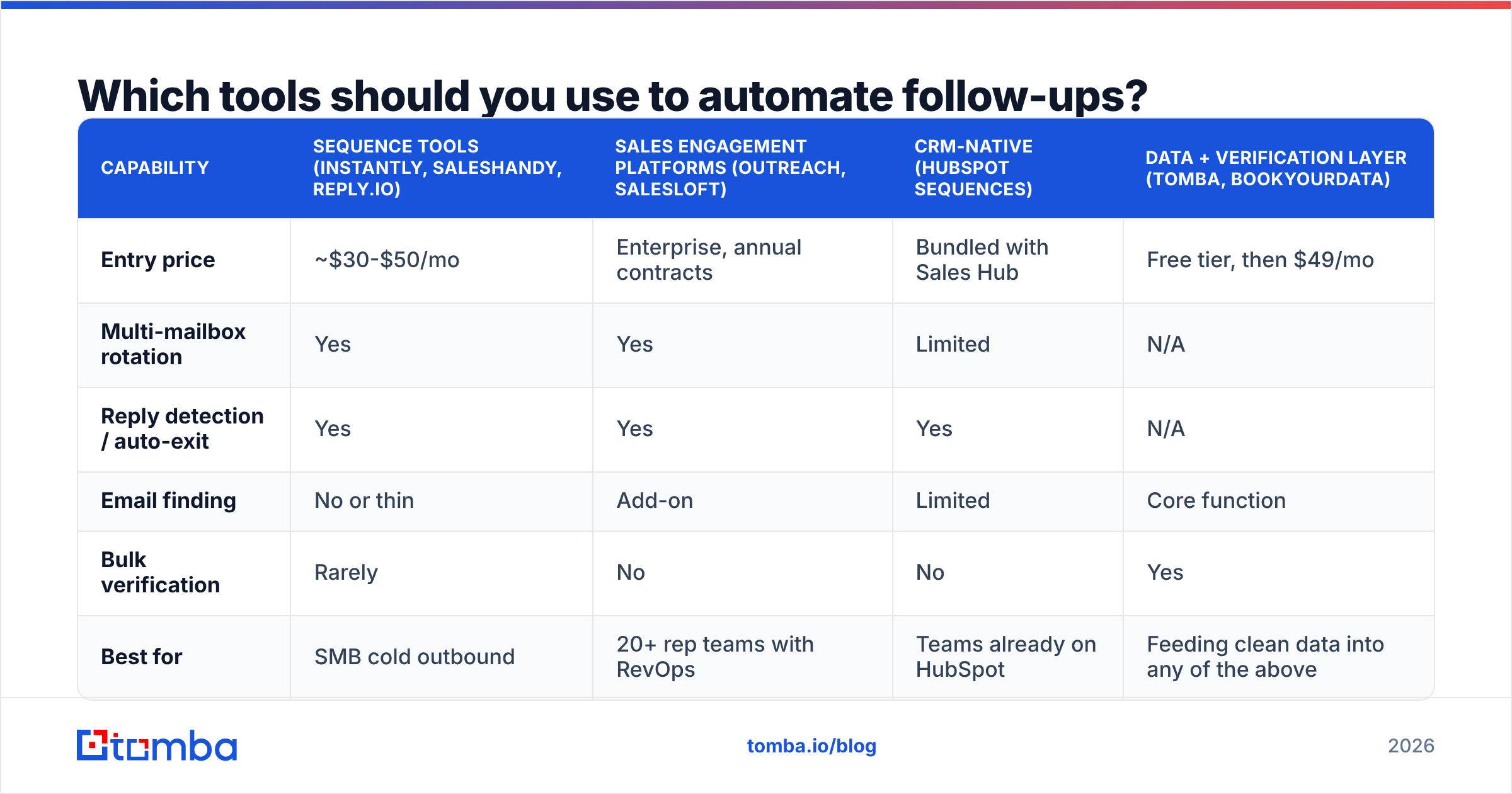
Split the stack into two jobs: finding and verifying contacts, and sending sequences. Almost nobody does both well.
| Capability | Sequence tools (Instantly, Saleshandy, Reply.io) | Sales engagement platforms (Outreach, Salesloft) | CRM-native (HubSpot Sequences) | Data + verification layer (Tomba, BookYourData) |
|---|---|---|---|---|
| Entry price | ~$30-$50/mo | Enterprise, annual contracts | Bundled with Sales Hub | Free tier, then $49/mo |
| Multi-mailbox rotation | Yes | Yes | Limited | N/A |
| Reply detection / auto-exit | Yes | Yes | Yes | N/A |
| Email finding | No or thin | Add-on | Limited | Core function |
| Bulk verification | Rarely | No | No | Yes |
| Best for | SMB cold outbound | 20+ rep teams with RevOps | Teams already on HubSpot | Feeding clean data into any of the above |
A few honest notes on picking:
- If you are under 10 reps, a dedicated sequence tool plus a data provider costs a fraction of an enterprise platform and does 90% of the same work. See Tomba pricing for what the data half runs.
- If you already live in HubSpot, use their native sequences before buying anything else — the CRM logging alone is worth it, and HubSpot's sequences documentation covers the enrollment rules clearly.
- If you need buying-committee coverage, an enterprise platform earns its price through multi-channel orchestration and shared task queues, not through better email sending.
- BookYourData is worth a look when you want prepaid, download-and-own B2B lists rather than a subscription — different model, same underlying need for verification before send.
Check current user ratings on G2's sales engagement category before committing to an annual contract; the feature gaps move quarter to quarter.
How do you keep automated follow-ups out of spam?#
Deliverability is where automated follow-ups die. Four levers, in order of impact:
1. List hygiene. Bounces are the loudest negative signal you can send. Verify before every campaign, not once a year. If you are working from LinkedIn exports or scraped lists, assume 20-40% of addresses are dead until proven otherwise. Use a bulk email finder to enrich and validate in one pass rather than importing raw CSVs.
2. Volume per mailbox. Cap each sending mailbox at 30-50 cold emails per day. Need more? Add mailboxes, not volume. A tool sending 300/day from one Google Workspace account will get throttled inside a week.
3. Content signals. No link in email 1. No image-heavy HTML. No attachments. Keep the plain-text-to-link ratio high, and never use link shorteners — they share reputation with every spammer using the same service. Run drafts through a spam checker before you load them into the sequence.
4. Engagement. Mailbox providers watch replies and opens as positive signals. This is why a five-step sequence to 200 well-targeted people outperforms one email to 5,000 — the reply rate feeds back into your sender reputation and makes the next campaign land better.
One more: monitor your bounce rate per campaign, not per month. A single bad list can spike you past 5% in a day, and by the time the monthly average shows it, the damage is done.
What should each automated follow-up actually say?#
Short answer: each one should be a different argument, and each should be readable on a phone in under 15 seconds.
Here is a working five-step skeleton for a cold B2B sequence. Replace the brackets with something specific — vague personalization is worse than none.
Step 1 — day 0 (the observation) Reference one concrete thing: a hiring post, a product launch, a funding round, a page on their site. Then one sentence on why that makes your thing relevant. End with a low-friction question, not "do you have 15 minutes Tuesday?"
Step 2 — day 3 (the proof) "Similar situation: [company like theirs] was [problem]. After [change], [specific number]." No re-introduction. No "just following up." Assume they read email 1.
Step 3 — day 7 (the resource) Send something useful with no ask attached — a teardown, a benchmark, a short checklist. This is the step that converts skeptics, and it is the step most people skip.
Step 4 — day 12 (the direct ask) Three sentences maximum. One question with a binary answer: "Is reducing [problem] on the roadmap this quarter, or is this the wrong time?"
Step 5 — day 18 (the close) "I'll stop here — if this becomes relevant later, reply to this thread and I'll pick it up." Give permission to say no. This step reliably produces replies, including a decent share of "actually, timing is bad, circle back in Q3" — which is a real outcome you can put in the CRM.
Keep all five in the same thread. Threading raises visibility and makes the sequence read like a conversation instead of five cold openers. If you want templates to adapt rather than write from scratch, cold email templates will get you to a first draft faster.
How do you measure whether the automation is working?#
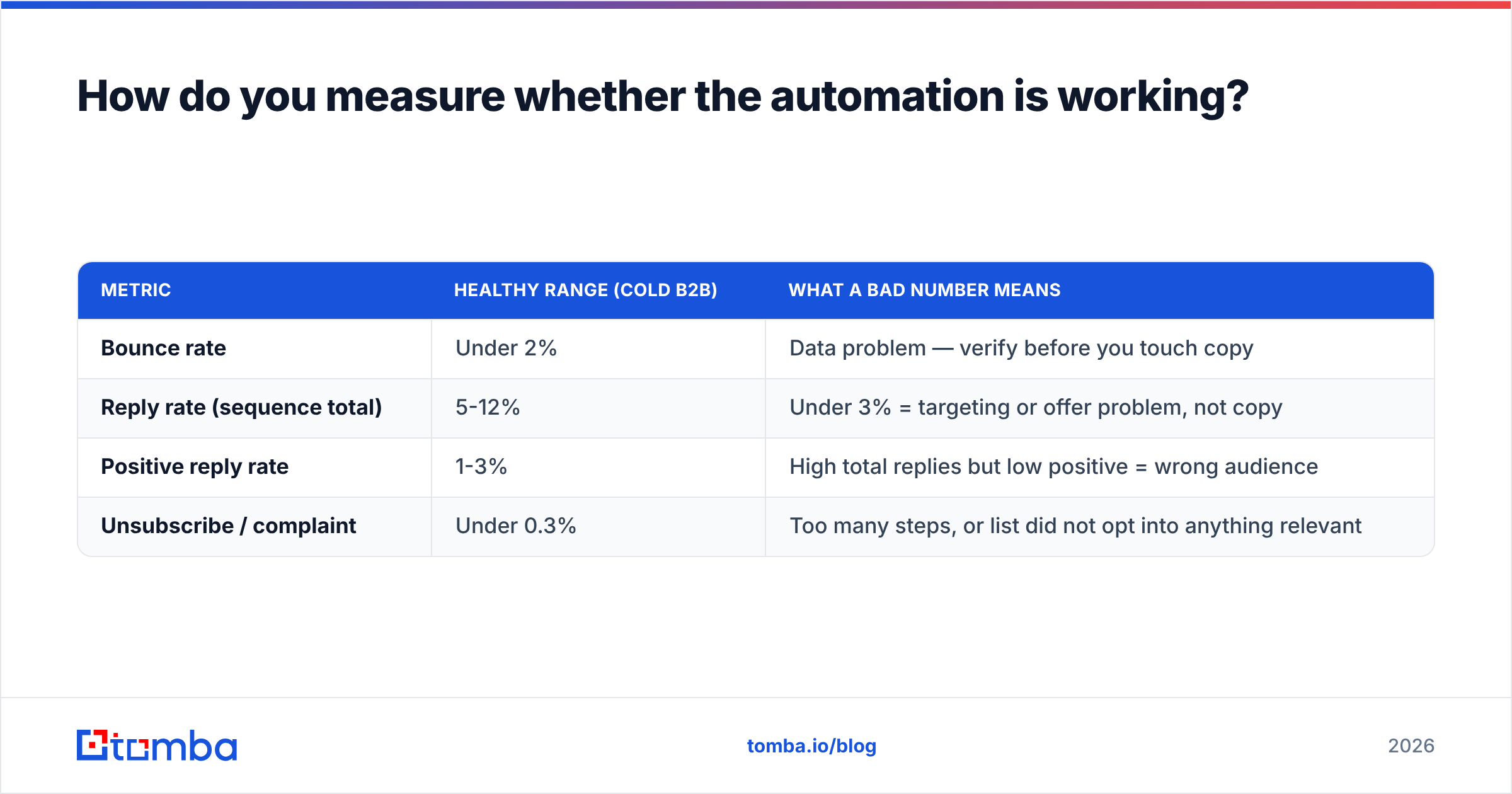
Track four numbers per sequence, not per email:
| Metric | Healthy range (cold B2B) | What a bad number means |
|---|---|---|
| Bounce rate | Under 2% | Data problem — verify before you touch copy |
| Reply rate (sequence total) | 5-12% | Under 3% = targeting or offer problem, not copy |
| Positive reply rate | 1-3% | High total replies but low positive = wrong audience |
| Unsubscribe / complaint | Under 0.3% | Too many steps, or list did not opt into anything relevant |
Diagnose in that order. Teams almost always rewrite subject lines when the real problem is that 30% of the list bounced or the ICP was never right. Fix data, then targeting, then offer, then copy — copy is the last and smallest lever.
Also watch reply rate by step. If step 4 outperforms step 1 consistently, your first email is doing too much work and your sequence is doing the actual selling. That is fine. If steps 3-5 all sit near zero, cut the sequence to three and reallocate the volume.
Log everything back to the CRM. An automated follow-up that never touches your CRM creates a second source of truth, and within a quarter nobody trusts either one.
What are the most common automation mistakes?#
- No reply detection across aliases. If the prospect replies from a different address than the one you targeted, many tools miss it. Configure thread-based detection, not address-matching.
- Sending to catch-all domains without checking. Catch-all servers accept everything, so a "valid" result means nothing. Use a catch-all verifier to score risk before including them.
- Personalization tokens with no fallback.
Hi {{first_name}},rendering asHi ,is the clearest bot tell there is. Set default values for every token. - Running the same sequence to every segment. One sequence, four ICPs, zero relevance. Clone and adjust per segment — the delay structure can stay, the copy cannot.
- Never pausing. Sequences should stop for holidays, for company news (a layoff announcement is not the moment for step 3), and for anyone in an active deal.
Where should you start?#
Start with the list, not the tool. A five-step sequence to 100 verified, well-targeted contacts will outperform the same sequence to 1,000 scraped addresses on every metric that matters — replies, deliverability, and the reputation of the domain you have to keep using next quarter.
Build the target list, verify it, then pick a sending tool that matches your team size. The sequence structure in this post works out of the box; the variable that decides your outcome is who is on the receiving end.
If you need the contact layer, Tomba Email Finder finds professional addresses by domain, name, or company, with verification built into the same workflow so your sequences start clean. The free tier gives you 25 searches a month to test the fit before committing, and paid plans start at $49/month when you are ready to scale the volume.
Related guides#
Ready to find emails that actually work?
Join 150,000+ professionals who stopped guessing and started sending. Free credits on signup — no credit card required.
Get the Tomba newsletter
Practical outbound tactics and product updates — once every two weeks.
About the author