How to Automate Prospecting in 2026: A Practical Playbook
Most prospecting automation dies at the data layer. Here's the 6-stage stack that actually works in 2026, what each layer costs, and where automation stops paying.
TL;DR
- Prospecting automation fails at the data layer, not the sending layer. Fix sourcing and verification first or you are just automating bounces.
- The working stack has six layers: trigger detection, list building, contact resolution, verification, enrichment, and sequencing. Automate layers 1-5 aggressively, layer 6 carefully.
- Expect to spend $150-$400/month for a one-to-three-rep team running a fully automated pipeline. Most of that is data, not software seats.
- Never automate: ICP definition, first-touch personalization on tier-1 accounts, and the reply itself.
- A realistic target is 4-6 hours saved per rep per week and a bounce rate under 3%. If you are not hitting both, something in the stack is broken.
What does "automate prospecting" actually mean in 2026?#
It means removing human hands from everything between "a company matches our ICP" and "a verified contact with context is sitting in a sequence."
That is a narrower definition than most vendors sell you. Automation does not mean a robot writes your outbound and books meetings while you sleep. It means the mechanical parts — finding companies, resolving people to email addresses, checking those addresses are real, appending firmographic context, pushing rows into a CRM — happen without a human clicking anything.
The parts that stay human are the parts where judgment compounds: who you target, what claim you make in the first line, and how you respond when someone pushes back.
Here is the split that holds up across the teams I have audited:
- Trigger detection — fully automatable. Hiring signals, funding rounds, tech-stack changes, job-change alerts. Machines are better at this than you.
- List building — fully automatable. Filter a database or scrape a source, dedupe, apply ICP rules.
- Contact resolution — fully automatable. Name plus domain to email address via an API.
- Verification — fully automatable and non-negotiable. SMTP checks, catch-all handling, role-address filtering.
- Enrichment — fully automatable. Headcount, funding, tech stack, phone numbers, LinkedIn URLs.
- Sequencing — partially automatable. Send timing and follow-up cadence yes; the opening claim on your top 50 accounts, no.
Why does most prospecting automation break?#
Because teams start at layer 6 and work backwards. They buy a sequencer, load a CSV someone exported from a scraper, and watch a 22% bounce rate torch their domain reputation in nine days.
The failure chain is predictable:
- Unverified list goes into the sequencer.
- Hard bounces spike above 5%.
- Mailbox providers throttle, then filter.
- Reply rate collapses, so the team sends more volume to compensate.
- Domain lands on a blocklist.
The fix is boring: verify before you send, always, no exceptions. Run every list through an email verifier and drop anything that comes back invalid or risky-without-context. If your list has catch-all domains — and any list with enterprise accounts will — handle them separately with a catch-all verifier rather than guessing.
The second most common break is over-automating personalization. AI-written first lines that reference a company's "innovative approach to digital transformation" are worse than no personalization, because they signal a bot. Google's own bulk sender guidelines push hard on spam-complaint rates below 0.3% — generic AI slop is exactly what generates those complaints.
What does the full automated prospecting stack look like?#
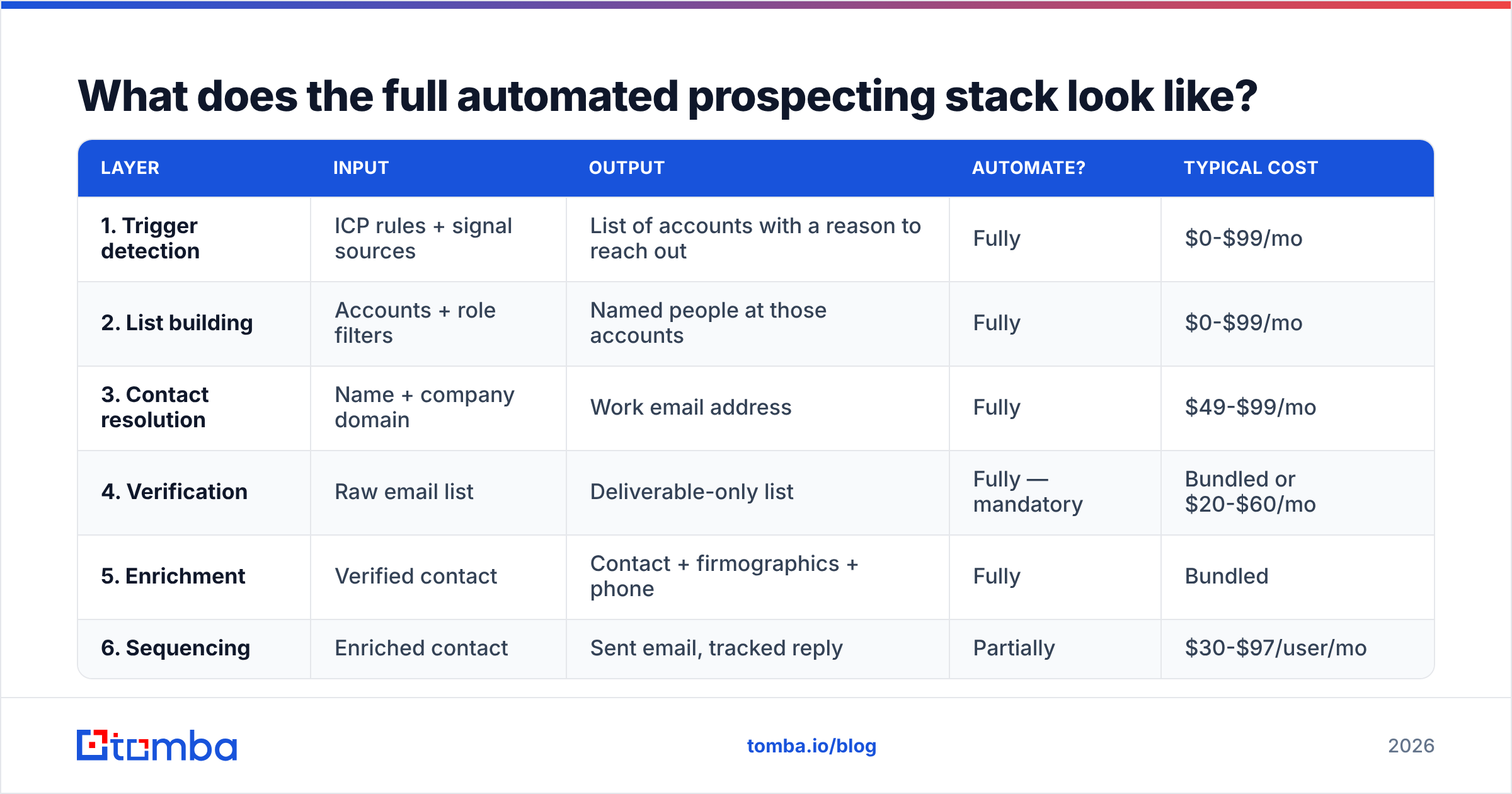
Six layers, each with a defined input and output. Build them in order; do not skip verification.
| Layer | Input | Output | Automate? | Typical cost |
|---|---|---|---|---|
| 1. Trigger detection | ICP rules + signal sources | List of accounts with a reason to reach out | Fully | $0-$99/mo |
| 2. List building | Accounts + role filters | Named people at those accounts | Fully | $0-$99/mo |
| 3. Contact resolution | Name + company domain | Work email address | Fully | $49-$99/mo |
| 4. Verification | Raw email list | Deliverable-only list | Fully — mandatory | Bundled or $20-$60/mo |
| 5. Enrichment | Verified contact | Contact + firmographics + phone | Fully | Bundled |
| 6. Sequencing | Enriched contact | Sent email, tracked reply | Partially | $30-$97/user/mo |
Layers 3 through 5 are where an email finder does the heavy lifting. Instead of stitching three vendors together, one API call takes a first name, last name, and domain and returns a scored email address. Batch that across a thousand rows with a bulk email finder and layer 3-5 collapses into a single overnight job.
For layer 1, the highest-signal free source is still job postings. A company hiring three SDRs is buying sales tooling within 90 days. A company posting a "Head of Data" role is about to rebuild its stack. You can poll these from company career pages or from LinkedIn, then push matches into layer 2.
How do you build the automation step by step?#
Here is the sequence I would run for a team starting from zero. Budget one working week.
Step 1 — Write the ICP as machine-readable filters. Not "mid-market SaaS companies who care about efficiency." Instead: headcount 50-500, HQ in US/UK/DE, uses Segment or Rudderstack, raised a round in the last 18 months. If a filter cannot be expressed as a field comparison, it is not an ICP criterion, it is a vibe.
Step 2 — Pick your account source and set a refresh cadence. Either a B2B database you query on a schedule, or a scraper pointed at a directory, or trigger feeds. Weekly refresh is enough for most teams; daily only if you are chasing funding or job-change signals where speed wins the deal.
Step 3 — Resolve contacts via API, not manual search. This is the step that eats the most rep hours when done by hand. A single call to the Tomba API with {first_name, last_name, domain} returns the address plus a confidence score and the sources it was found in. Do it in a scheduled job, write results straight to your CRM. If you would rather stay in a spreadsheet, the Google Sheets add-on runs the same lookup as a formula across a column.
Step 4 — Verify everything and quarantine the greys. Split output into three buckets: valid (send), invalid (delete, do not retry), catch-all/unknown (hold for a manual pass or a low-volume warm domain). Never merge bucket three into bucket one to hit a volume target.
Step 5 — Enrich for personalization inputs, not for vanity fields. You need one or two facts that give you a reason to write. Funding date, recent hire, tech stack change, office opening. Headcount and industry alone do not produce a good first line. Add phone numbers here if your motion includes calls, since a multi-channel touch beats email-only by a wide margin on enterprise accounts.
Step 6 — Push to the sequencer with a personalization token that has real content in it. If the token is empty, the record should not send. Build that as a hard rule in your workflow, not a nice-to-have.
Step 7 — Instrument the whole thing. Track bounce rate, reply rate, and cost per verified contact by source. If a source produces contacts at $0.04 but bounces at 12%, it is more expensive than a $0.15 source that bounces at 1%.
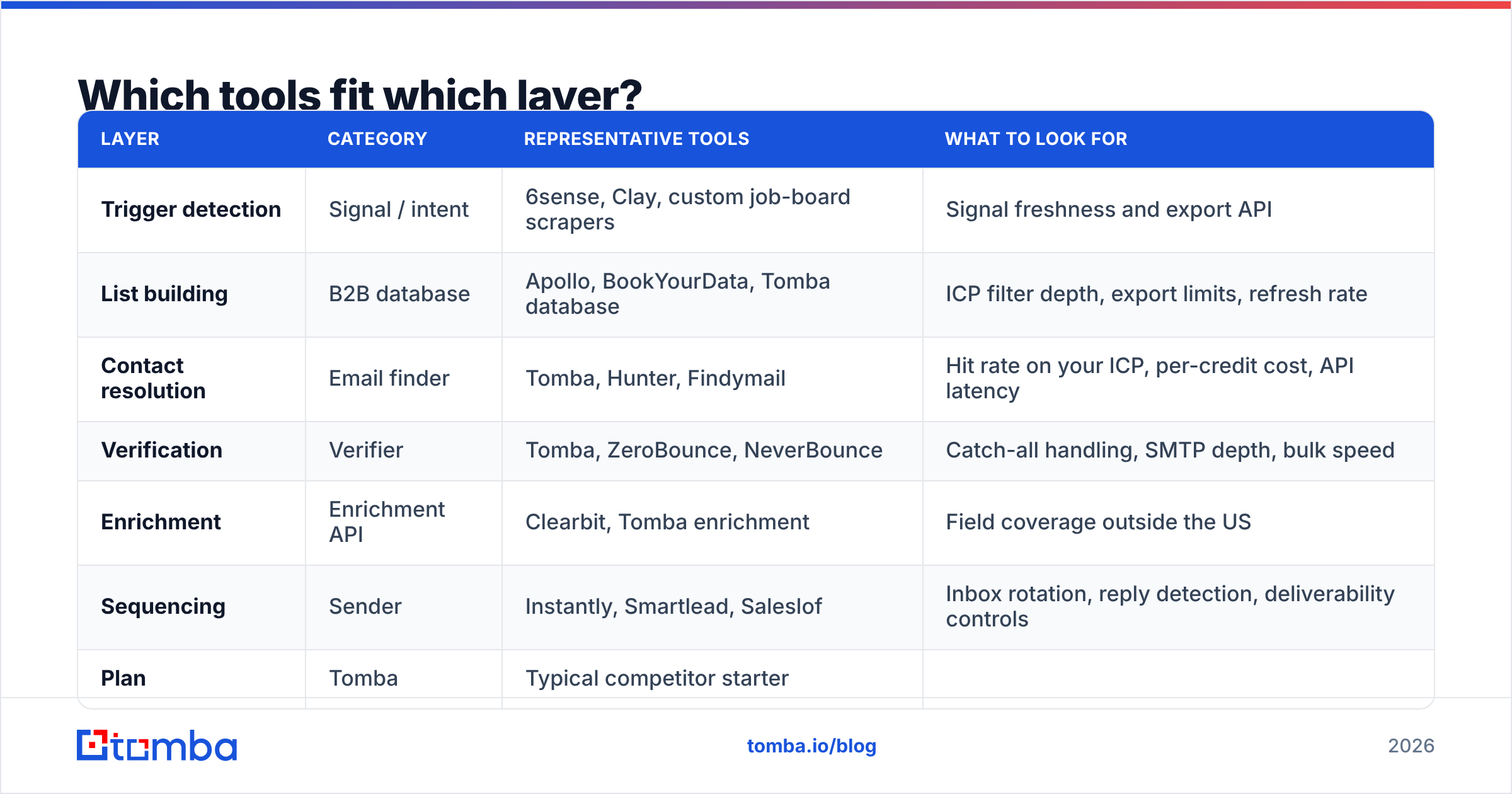
Which tools fit which layer?#
There is no single tool that does all six layers well. Anyone claiming otherwise is strong at one layer and mediocre at five. Here is an honest mapping of the categories, with representative options.
| Layer | Category | Representative tools | What to look for |
|---|---|---|---|
| Trigger detection | Signal / intent | 6sense, Clay, custom job-board scrapers | Signal freshness and export API |
| List building | B2B database | Apollo, BookYourData, Tomba database | ICP filter depth, export limits, refresh rate |
| Contact resolution | Email finder | Tomba, Hunter, Findymail | Hit rate on your ICP, per-credit cost, API latency |
| Verification | Verifier | Tomba, ZeroBounce, NeverBounce | Catch-all handling, SMTP depth, bulk speed |
| Enrichment | Enrichment API | Clearbit, Tomba enrichment | Field coverage outside the US |
| Sequencing | Sender | Instantly, Smartlead, Saleslof | Inbox rotation, reply detection, deliverability controls |
BookYourData is worth a look if your motion is buy-the-list rather than build-the-list — it sells pre-verified contacts by the record, which suits teams that want a clean starting file without running their own sourcing pipeline. Tomba sits at the other end: you bring the accounts, it resolves and verifies the people, and you pay for the lookup rather than the record.
Pricing across the resolution layer, since that is where budgets actually get decided:
| Plan | Tomba | Typical competitor starter |
|---|---|---|
| Free tier | 25 searches/mo | 25-50 credits/mo |
| Entry paid | $49/mo | $49-$79/mo |
| Mid tier | $99/mo | $99-$149/mo |
| Pro tier | $249/mo | $249-$399/mo |
| API access | All paid plans | Often mid-tier and up |
| Verification included | Yes | Often billed separately |
Full Tomba pricing is public, which is more than you can say for a lot of this category — several enterprise data vendors still gate their number behind a demo call, and G2 reviewers consistently flag that as a buying friction point. Check current standings on G2's lead intelligence category before you commit to anything annual.

What should you never automate?#
Three things. Automating any of them costs more than it saves.
Your ICP definition. No tool knows which of your closed-won accounts were painful to serve and churned in month seven. That analysis is manual, it takes an afternoon per quarter, and it determines whether every downstream layer is pointed at the right target. Get it wrong and you have built a very efficient machine for reaching people who will never buy.
The opening claim on tier-one accounts. For your top 30-50 accounts, write the first email yourself. The economics are obvious: if an account is worth $80k ACV, ten minutes of your time is the cheapest input in the entire pipeline. Automate the follow-ups, not the opener.
Replies. The moment a human responds, automation should stop entirely. AI reply drafting is fine as a starting point in your own inbox, but nothing auto-sends after a human has engaged. This is where deals are won and where automated tone-deafness is most expensive.
There is also a compliance line here. Under GDPR and similar frameworks, automated processing at scale carries obligations around lawful basis and opt-out handling. The ICO's guidance on direct marketing is the clearest free reference on where B2B legitimate interest holds and where it does not. Build suppression lists into layer 6 before you scale volume, not after someone complains.
How do you know the automation is working?#
Measure four numbers weekly. If any of them drifts, you know which layer to inspect.
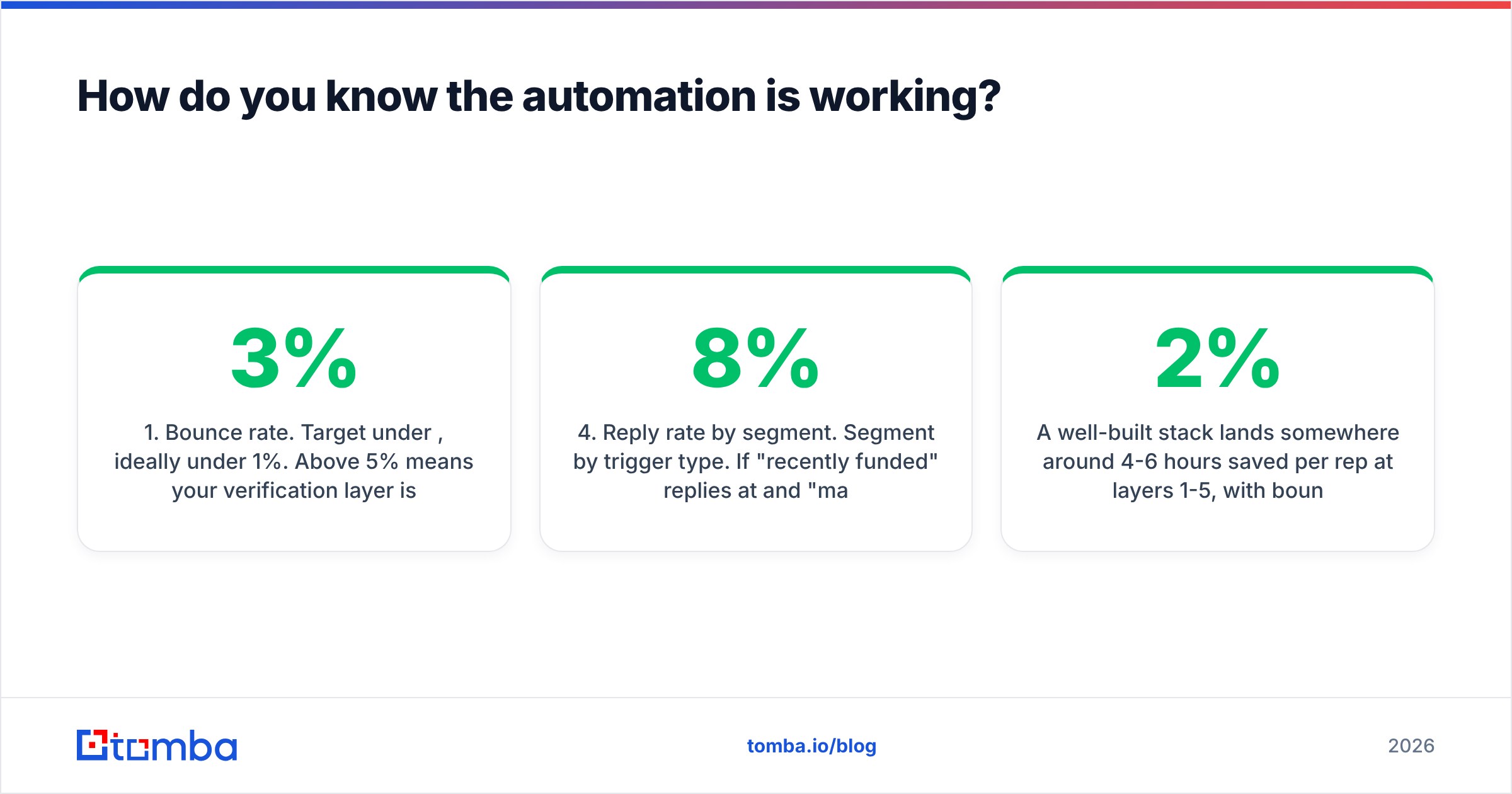
- Bounce rate. Target under 3%, ideally under 1%. Above 5% means your verification layer is broken or being bypassed.
- Cost per verified contact. Total data spend divided by contacts that passed verification. This is the number that tells you whether a cheap source is actually cheap.
- Rep hours on list building. Should trend toward zero. If reps are still manually searching for emails, layer 3 is not deployed properly.
- Reply rate by segment. Segment by trigger type. If "recently funded" replies at 8% and "matches firmographics only" replies at 1.5%, kill the second segment and double the first.
A well-built stack lands somewhere around 4-6 hours saved per rep per week at layers 1-5, with bounce under 2%. Those are achievable numbers, not aspirational ones. If your setup is producing less than that, the problem is almost always that one layer is still manual and creating a queue in front of everything downstream.
One more diagnostic: pull a random sample of 20 contacts from last week's sends and check them by hand. Are they real people, in the right role, at companies that match the ICP? If more than three fail that check, your filters are leaking and no amount of sequencing sophistication will fix it. You can spot-check individual addresses fast with a free email checker before committing budget to a full re-run.
What does a realistic month-one rollout look like?#
Week one: define ICP filters, pick sources, run a 200-contact test batch end to end and measure bounce rate. Do not send anything yet.
Week two: fix whatever broke. Usually it is domain matching — companies with multiple domains, acquired subsidiaries, or regional TLDs resolve badly on the first pass. Add a normalization step.
Week three: connect layer 6, send at 20% of target volume, watch deliverability daily. Use a warm-up period if the domain is new.
Week four: scale to full volume and set the weekly metric review. From here the system runs itself and you spend your time on ICP refinement and tier-one messaging — which is exactly where you should have been spending it all along.
Ready to automate the layer that matters most?#
Contact resolution and verification are where prospecting automation lives or dies, and they are the layers you can fix this week. Tomba Email Finder handles both in one call: give it a name and a domain, get back a verified, confidence-scored work email with its sources attached. The free tier covers 25 searches a month if you want to test hit rate on your own ICP before paying anything, and API access ships on every paid plan from $49/mo so you can wire it into the scheduled job on day one rather than waiting for an enterprise upgrade.
Build the data layer right, and the rest of the stack finally starts returning what it promised.
Related guides#
Ready to find emails that actually work?
Join 150,000+ professionals who stopped guessing and started sending. Free credits on signup — no credit card required.
Get the Tomba newsletter
Practical outbound tactics and product updates — once every two weeks.
About the author