How to Automate Your Sales Process in 2026: A 7-Step Guide
Most sales automation projects fail because teams automate the messy parts first. Here is the order that actually works — data, routing, outreach, follow-up — plus what each layer really costs in 2026.
TL;DR
- Automating your sales process is an ordering problem, not a tooling problem. Fix data first, routing second, outreach third. Reverse that order and you scale mistakes.
- The highest-ROI automation for most B2B teams is contact sourcing and enrichment, because every downstream step inherits the quality of that record.
- A working stack for a 5–15 person sales team costs roughly $300–$900/month, not the $5,000+ that "all-in-one revenue platforms" quote.
- Never automate qualification judgment or the first personalization line. Automate the retrieval, the routing, the logging, and the reminders.
- Measure automation by cycle-time reduction and reply quality, not by "activities per rep." Activity metrics reward the exact behavior automation should eliminate.
What does "automate your sales process" actually mean?#
It means removing the steps where a human adds no judgment.
That definition matters, because most teams interpret sales automation as "send more emails faster." That is the one interpretation that reliably damages pipeline. A sales process has roughly seven stages — sourcing, enrichment, qualification, routing, outreach, follow-up, and handoff — and only two of them genuinely require a human brain. The rest are lookups, copy-paste jobs, conditional branches, and reminders. Those are the automation targets.
Here is the honest test for any step in your process: if two competent reps would produce the same output given the same inputs, automate it. Finding a prospect's work email is deterministic. Deciding whether a 12-person startup is worth a demo is not. Logging a call outcome is deterministic. Writing the sentence that references their Series B is not — at least not yet, and not at a quality that outperforms silence.
Gartner's research on sales technology adoption has consistently found that stack size correlates poorly with quota attainment. The pattern is familiar: teams buy an eleventh tool to solve a problem created by the sixth. Automation compounds only when each layer feeds clean data to the next.
Which parts of the sales process should you automate first?#
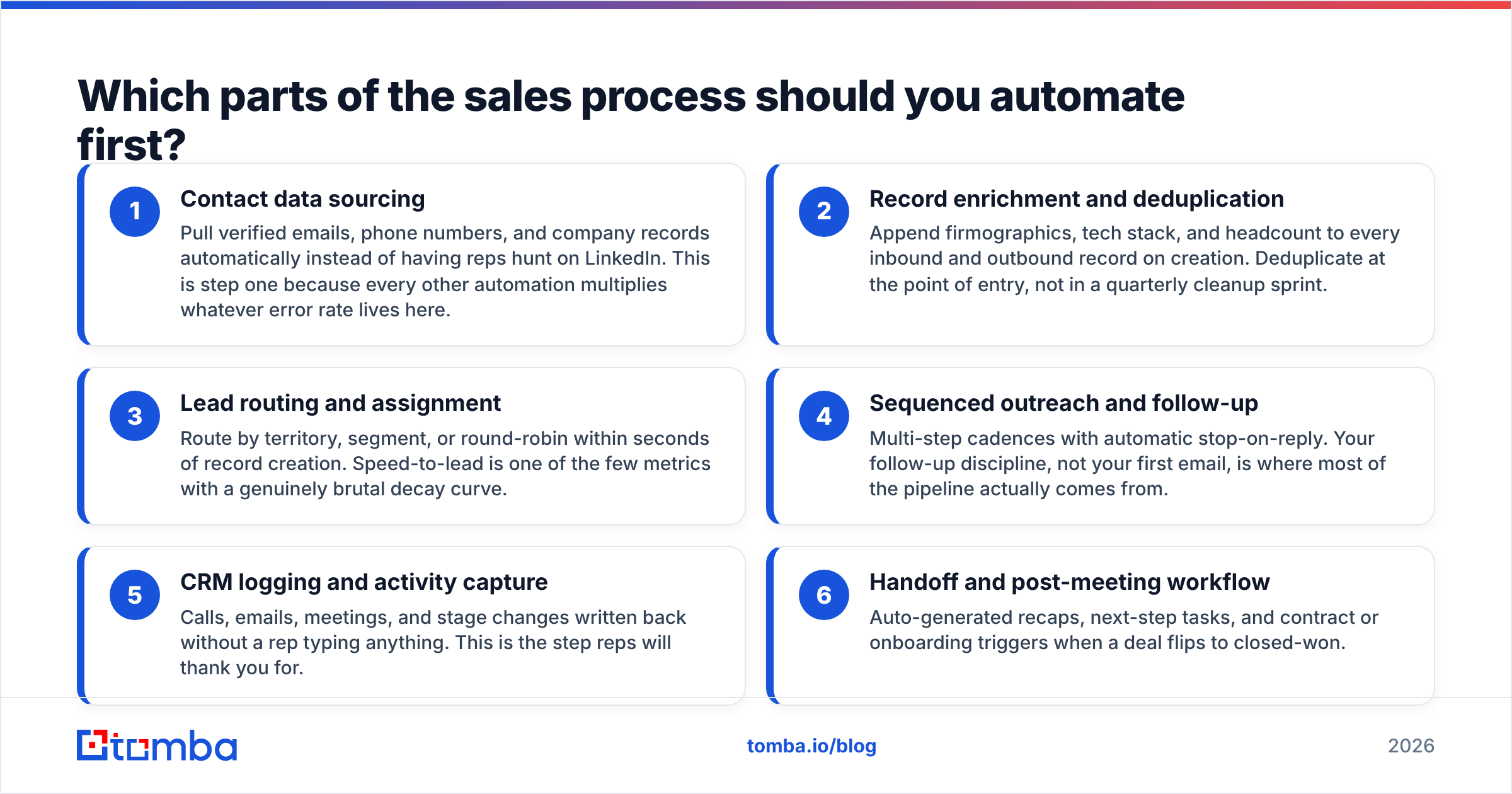
Order matters more than tool choice. Work through these in sequence, and do not start step 3 until step 1 is stable.
- Contact data sourcing — Pull verified emails, phone numbers, and company records automatically instead of having reps hunt on LinkedIn. This is step one because every other automation multiplies whatever error rate lives here.
- Record enrichment and deduplication — Append firmographics, tech stack, and headcount to every inbound and outbound record on creation. Deduplicate at the point of entry, not in a quarterly cleanup sprint.
- Lead routing and assignment — Route by territory, segment, or round-robin within seconds of record creation. Speed-to-lead is one of the few metrics with a genuinely brutal decay curve.
- Sequenced outreach and follow-up — Multi-step cadences with automatic stop-on-reply. Your follow-up discipline, not your first email, is where most of the pipeline actually comes from.
- CRM logging and activity capture — Calls, emails, meetings, and stage changes written back without a rep typing anything. This is the step reps will thank you for.
- Handoff and post-meeting workflow — Auto-generated recaps, next-step tasks, and contract or onboarding triggers when a deal flips to closed-won.
Steps 1 and 2 are where the leverage lives. Steps 4 and 5 are where the visible time savings live. Teams that start at step 4 — because sequencing tools have the best marketing — end up sending polished emails to bad addresses.
How do you automate lead sourcing and data capture?#
Start with a repeatable input and a verified output.
The manual version of this step looks like a rep opening LinkedIn, copying a name, guessing at firstname.lastname@company.com, and pasting it into a spreadsheet. The automated version looks like a list of target domains going into an API and verified contacts coming out.
Three practical patterns, in increasing order of sophistication:
Pattern A — Domain-first. You have a target account list. Feed the domains into a domain search and pull every discoverable contact at each company, filtered by department and seniority. Best for ABM motions and territory builds.
Pattern B — Person-first. You have names and companies from a conference list, a webinar registration, or a scraped source. Run them through an email finder to resolve verified addresses. Best for event follow-up and inbound enrichment.
Pattern C — Trigger-first. A signal fires — a website visit, a job posting, a funding round — and the automation sources the relevant contact on the spot. Best for teams with real intent data.
Whichever pattern you use, the verification step is non-negotiable. Sending to unverified addresses is the fastest way to burn a sending domain, and once your bounce rate crosses roughly 3%, mailbox providers start throttling you regardless of how good the copy is. Run every address through an email verifier before it enters a sequence, and treat catch-all domains as a separate bucket requiring their own handling rather than as valid sends.

For data sourcing, you have real choices in 2026, and they split by purchase model. API-first providers like Tomba charge per lookup and fit teams that want automation glue. Database vendors like BookYourData sell downloadable lists with per-record pricing, which suits teams that want a bulk file today without wiring anything up. Neither model is wrong — they solve different problems. The mistake is paying platform prices for a database you could have bought outright, or buying a static file when your workflow needs a live API call.
Which tools handle which stage of the automated sales process?#
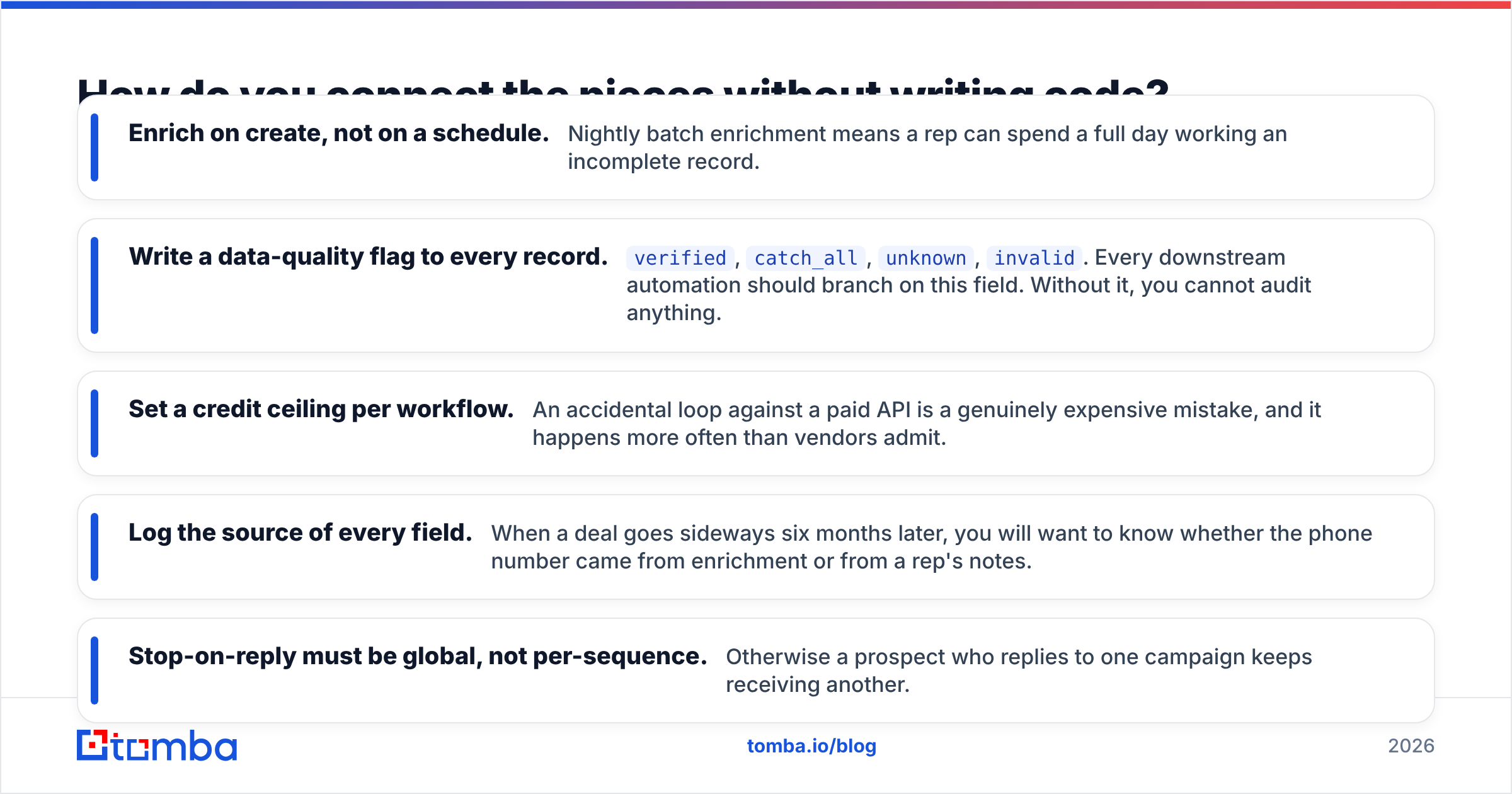
There is no single tool that does all seven stages well. Here is what each category is genuinely good at, and roughly what it costs.
| Stage | Tool category | Typical 2026 cost | What it fails at |
|---|---|---|---|
| Sourcing + verification | Email finder / data API | $49–$249/mo | Sequencing, CRM logic |
| Enrichment | Enrichment API or CRM-native | $0–$300/mo | Sourcing net-new contacts |
| Routing | CRM workflow or routing app | Included–$150/mo | Anything requiring judgment |
| Outreach + follow-up | Sequencer / sales engagement | $60–$150/user/mo | Data quality, verification |
| Logging + activity capture | CRM + native email sync | Included | Structuring unstructured notes |
| Reporting | CRM dashboards or BI | Included–$500/mo | Fixing the data underneath |
Two things stand out in that table. First, the per-user pricing on sales engagement platforms means outreach becomes your most expensive line item as you hire — a 10-rep team at $120/user is $14,400 a year for what is, functionally, a scheduler. Second, sourcing is the cheapest layer and the highest leverage, which is exactly backwards from how most budgets get allocated.
For reference on the sequencing side, HubSpot's sales tooling and Salesforce Sales Cloud both bundle routing and logging into their mid-tier plans, which can make a standalone routing tool redundant. Check what you already own before buying.
Here is the same decision framed as build versus buy:
| Consideration | Buy an all-in-one platform | Assemble a stack |
|---|---|---|
| Time to first automation | 2–4 weeks | 3–7 days per layer |
| Monthly cost, 8 reps | $1,200–$4,000 | $350–$900 |
| Data ownership | Vendor-controlled schema | Yours, in your CRM |
| Swapping one layer | Contract renegotiation | Change one API key |
| Best fit | 25+ reps, dedicated RevOps | 2–20 reps, technical owner |
How do you connect the pieces without writing code?#
Use your CRM as the source of truth and a workflow tool as the wiring.
The concrete build looks like this. A record lands in HubSpot or Pipedrive from any source. A workflow fires that calls an enrichment endpoint, appends verified contact details, and sets a data-quality flag. A routing rule assigns an owner. The owner's sequence enrolls the contact only if the verification flag reads valid. Every send, open, and reply writes back to the record automatically.
That entire chain needs exactly three components: a CRM, a data API, and a connector. If your team is non-technical, the connector is Zapier or Make. If someone on the team can write ten lines of Python, call the Tomba API directly and skip the connector cost entirely — you will save a few hundred dollars a month and get better error handling.
A few implementation details that save pain later:
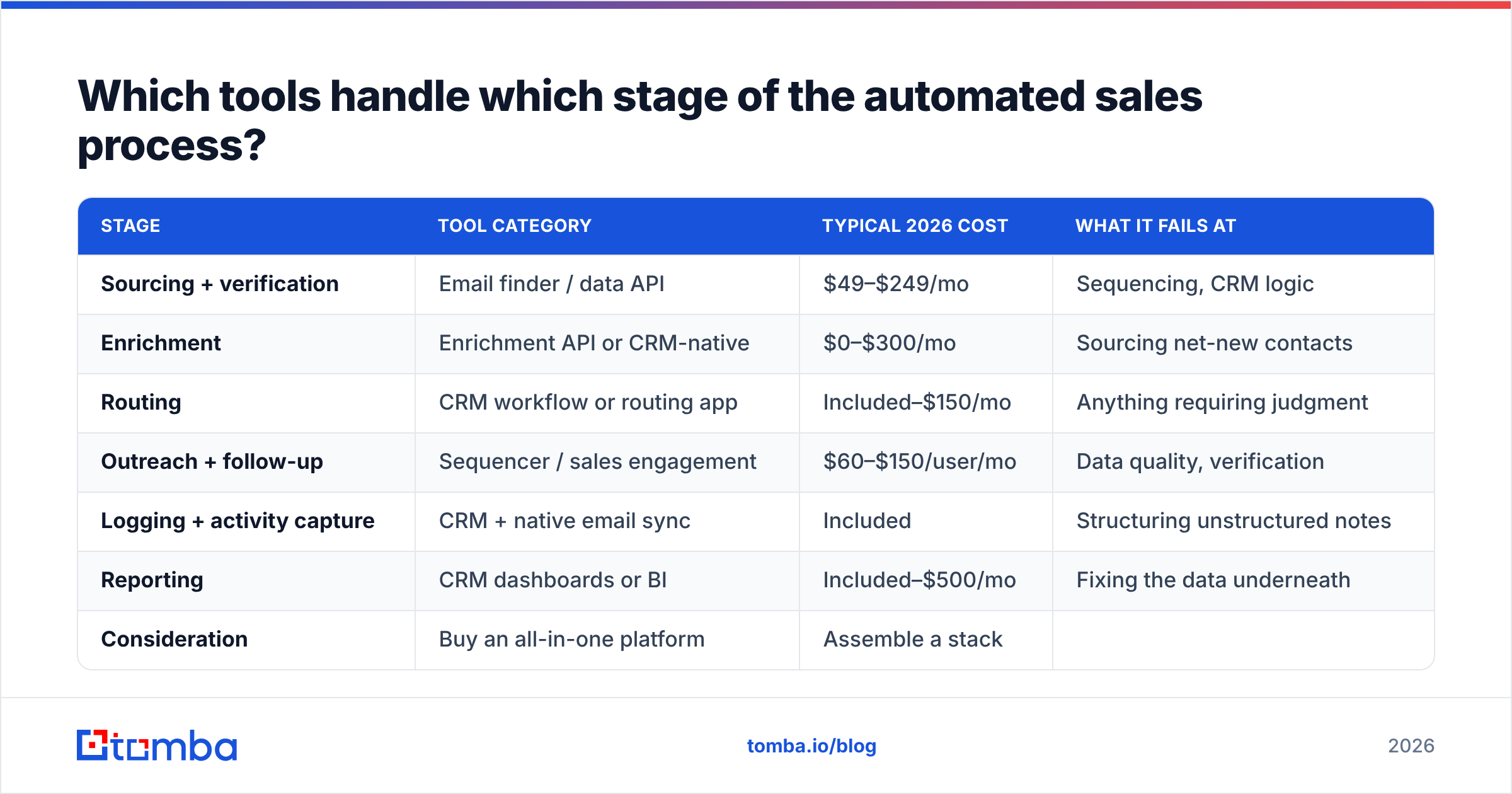
- Enrich on create, not on a schedule. Nightly batch enrichment means a rep can spend a full day working an incomplete record.
- Write a data-quality flag to every record.
verified,catch_all,unknown,invalid. Every downstream automation should branch on this field. Without it, you cannot audit anything. - Set a credit ceiling per workflow. An accidental loop against a paid API is a genuinely expensive mistake, and it happens more often than vendors admit.
- Log the source of every field. When a deal goes sideways six months later, you will want to know whether the phone number came from enrichment or from a rep's notes.
- Stop-on-reply must be global, not per-sequence. Otherwise a prospect who replies to one campaign keeps receiving another.
What breaks when you automate too much of the sales process?#
Three things, predictably.
Deliverability collapses first. Automation makes volume cheap, and cheap volume tempts teams into sending 400 emails a day from a domain that was handling 40. The domain gets throttled, replies drop, and the team blames the copy. If you scale send volume, you must scale sending infrastructure and warmup in parallel — that is not optional, it is arithmetic.
Personalization degenerates into tokens. {{first_name}}, I saw {{company}} is growing is not personalization; it is a mail merge with extra steps. Buyers pattern-match it instantly. The automation should retrieve the raw material — the funding round, the job posting, the tech stack change — and the rep should write the sentence. Automate the research, not the writing.
Reps stop knowing their accounts. When every field is auto-populated and every follow-up is auto-scheduled, a rep can walk into a call having never actually thought about the account. That shows up in win rates about a quarter later, long after anyone connects it to the automation project.
The correction is a rule, not a tool: any automation that removes a rep's need to think must be paired with a step that forces them to. A pre-call brief they have to complete. A qualification note they have to write. Something with a cursor in it.
How do you measure whether sales automation actually worked?#
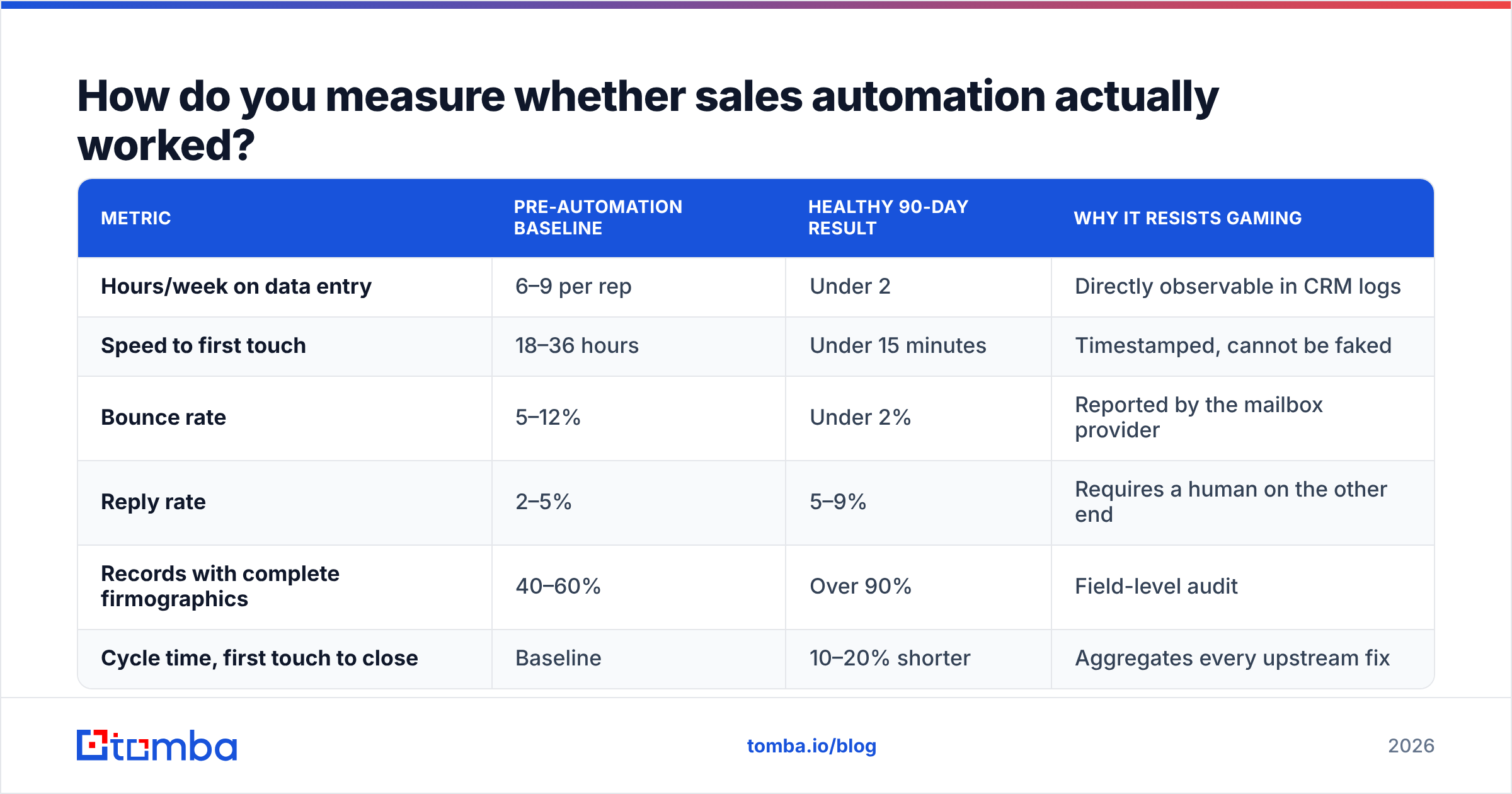
Pick metrics that automation cannot inflate.
| Metric | Pre-automation baseline | Healthy 90-day result | Why it resists gaming |
|---|---|---|---|
| Hours/week on data entry | 6–9 per rep | Under 2 | Directly observable in CRM logs |
| Speed to first touch | 18–36 hours | Under 15 minutes | Timestamped, cannot be faked |
| Bounce rate | 5–12% | Under 2% | Reported by the mailbox provider |
| Reply rate | 2–5% | 5–9% | Requires a human on the other end |
| Records with complete firmographics | 40–60% | Over 90% | Field-level audit |
| Cycle time, first touch to close | Baseline | 10–20% shorter | Aggregates every upstream fix |
Note what is absent: emails sent, calls dialed, sequences enrolled. Those numbers go up the moment you automate anything, which makes them useless as evidence. If your automation dashboard leads with activity volume, you are measuring the tool's throughput rather than the process's health. G2's sales engagement category reviews are full of teams who hit record activity numbers in month two and record churn in month six.
Give the whole thing 90 days before judging it. Data quality improvements take one full sales cycle to show up in revenue, and any earlier read is noise.
Where should you start this week?#
Audit one thing: what percentage of the contacts in your CRM have a verified email address and a complete company record. If it is under 70%, your automation ceiling is set by that number, and no sequencer will raise it.
Fix the data layer first. Run your existing list through a bulk email finder to see how many records are recoverable, then wire the same lookup into your record-creation workflow so the problem stops regenerating. Once verified data flows in automatically, routing, sequencing, and reporting all get easier — and cheaper — because they stop compensating for garbage inputs.
Start with the Tomba Email Finder. The free tier gives you 25 searches a month, which is enough to test accuracy against contacts you already know are correct before spending anything. Paid plans start at $49/mo, and the same lookups are available through the API, a Chrome extension, or a Google Sheets add-on, so you can automate the sourcing layer whether or not you have an engineer available. Check Tomba pricing for the credit tiers, run twenty known-good contacts through it, and only then decide what the rest of your stack needs to do.
Related guides#
Ready to find emails that actually work?
Join 150,000+ professionals who stopped guessing and started sending. Free credits on signup — no credit card required.
Get the Tomba newsletter
Practical outbound tactics and product updates — once every two weeks.
About the author