How to Be a Successful SDR in 2026: The Complete Playbook
Quota-crushing SDRs do not send more emails than everyone else. They pick better accounts, verify their data, and run a disciplined multi-touch cadence. Here is the exact system.
TL;DR
- Top SDRs do not out-send everyone. They out-select. Account and persona quality drives more of your meeting rate than any subject line rewrite ever will.
- Bad contact data silently eats 20-40% of your effort. Verify before you send, not after your bounce rate tanks your domain.
- A working cadence is 12-16 touches over 18-21 days across email, phone, and LinkedIn — not 8 emails and hope.
- Book time on the calendar the way you'd book a meeting: research blocks, call blocks, admin blocks. Reactive SDRs miss quota.
- Track leading indicators (dials, connects, verified contacts added) weekly, and lagging ones (meetings held, pipeline created) monthly.
Being a successful SDR is a systems problem, not a hustle problem. The reps who consistently hit 120% of quota are not the ones sending the most emails — they are the ones who have removed the most waste from their process. Every hour spent on an account that was never going to buy, every email sent to an address that bounced, every follow-up forgotten because it lived in your head instead of your sequence — that is the gap between a rep who scrapes by and one who gets promoted to AE in 14 months.
This guide breaks down what that system actually looks like in 2026, when buyers ignore more outreach than ever and AI-generated personalization has made "I saw you went to Michigan" utterly worthless.
What does a successful SDR actually do differently?#
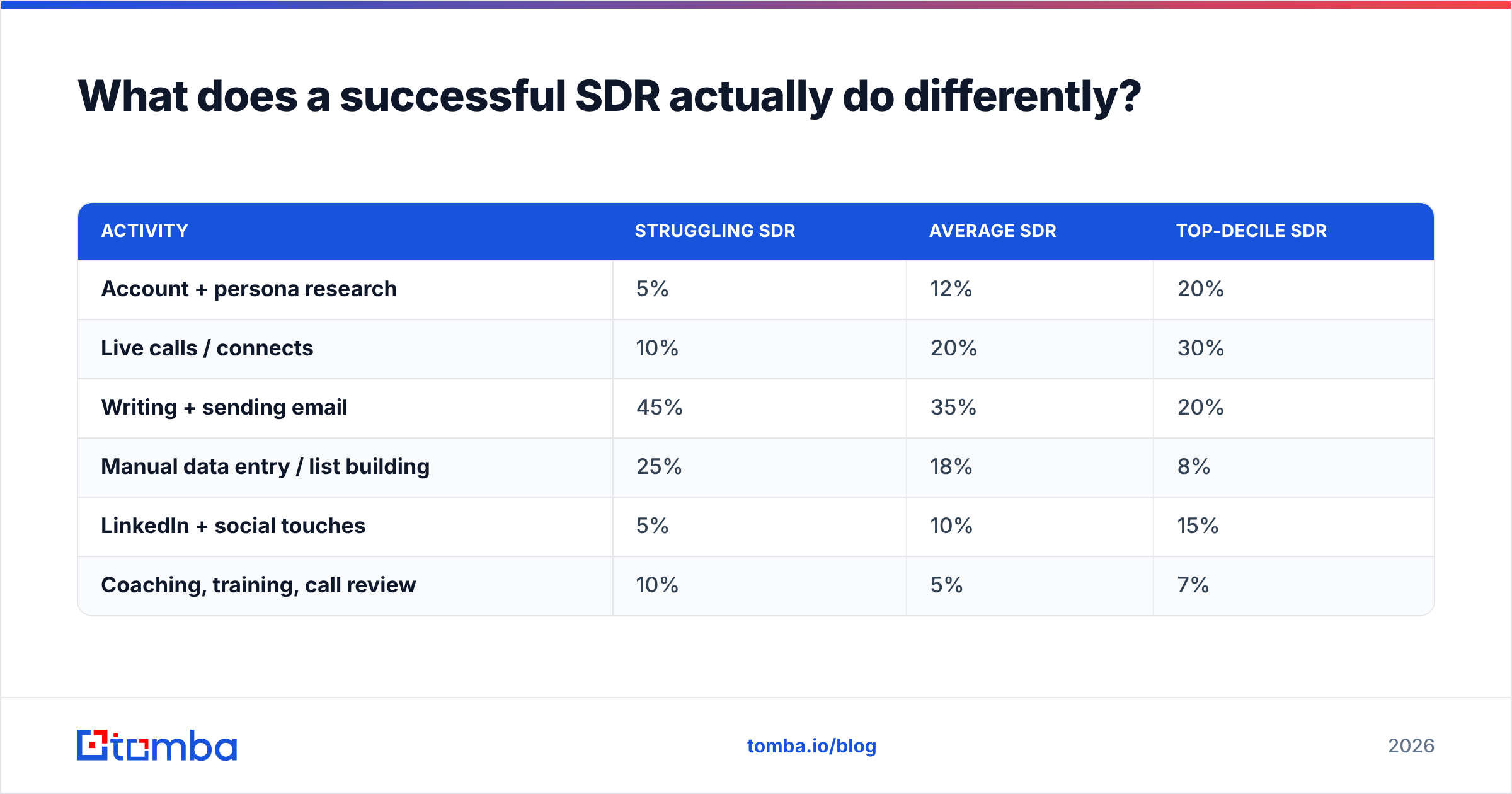
The honest answer: they spend a much larger share of their week on the two activities that compound — account research and live conversations — and a much smaller share on activities that feel productive but aren't.
Here is what time allocation looks like across performance tiers, based on how most SDR teams actually operate:
| Activity | Struggling SDR | Average SDR | Top-decile SDR |
|---|---|---|---|
| Account + persona research | 5% | 12% | 20% |
| Live calls / connects | 10% | 20% | 30% |
| Writing + sending email | 45% | 35% | 20% |
| Manual data entry / list building | 25% | 18% | 8% |
| LinkedIn + social touches | 5% | 10% | 15% |
| Coaching, training, call review | 10% | 5% | 7% |
Notice the two biggest swings. Top performers cut manual list building by roughly two-thirds — usually by automating contact discovery instead of hand-copying from LinkedIn — and reinvest that time into calls and research. They also write fewer emails, because they are sending to a tighter list where each message has a real reason to exist.
The second thing top SDRs do differently: they treat the pipeline as a math problem they can debug. If you know your connect rate, your reply rate, your meeting-set rate, and your show rate, you can find the broken step in an afternoon. If you only know "I'm behind quota," you will spend three weeks guessing.
How do you build a target account list that's actually worth working?#
Start from your closed-won data, not from a filter panel.
Pull your last 30 closed-won accounts and look for the shared attributes that show up in at least 60% of them: employee count band, industry, tech stack, funding stage, geography, and — the one most people skip — the trigger that preceded the deal. New VP of Sales hired. Series B raised. Competitor tool showing up on their job posts. That trigger is what makes an account workable this quarter instead of theoretically someday.
Then apply this filter stack, in order:
- Fit — Does the account look like your best customers on firmographics and tech stack? If not, stop. No amount of persistence fixes a bad fit.
- Trigger — Is something happening right now that makes the pain acute? Hiring, funding, leadership change, product launch, regulatory deadline.
- Access — Can you actually reach the buying committee? If you can name three people and get contact data for all three, the account is workable. If you can name one and have no email, it's a research task, not an outreach task.
- Timing — Have they been sequenced by your team in the last 90 days? If yes, wait or change the angle entirely. Re-sequencing the same message to the same person is how domains get burned.
- Effort-to-value — A 40-person startup and a 4,000-person enterprise take very different research investments. Match the effort to the deal size, or you'll spend a week on an account worth $8K ARR.
Run that filter and a 2,000-account TAM usually collapses to 150-250 accounts you should genuinely be working in a given quarter. That's the list. Working it properly beats spraying the other 1,800.
For account intelligence, the free tiers of G2 and vendor case-study pages tell you which tools your prospects already run, and job postings tell you what they're building. Both are better trigger sources than any "intent data" score you can't inspect.
Why does contact data quality decide whether you hit quota?#
Because every downstream number in your funnel is multiplied by it.
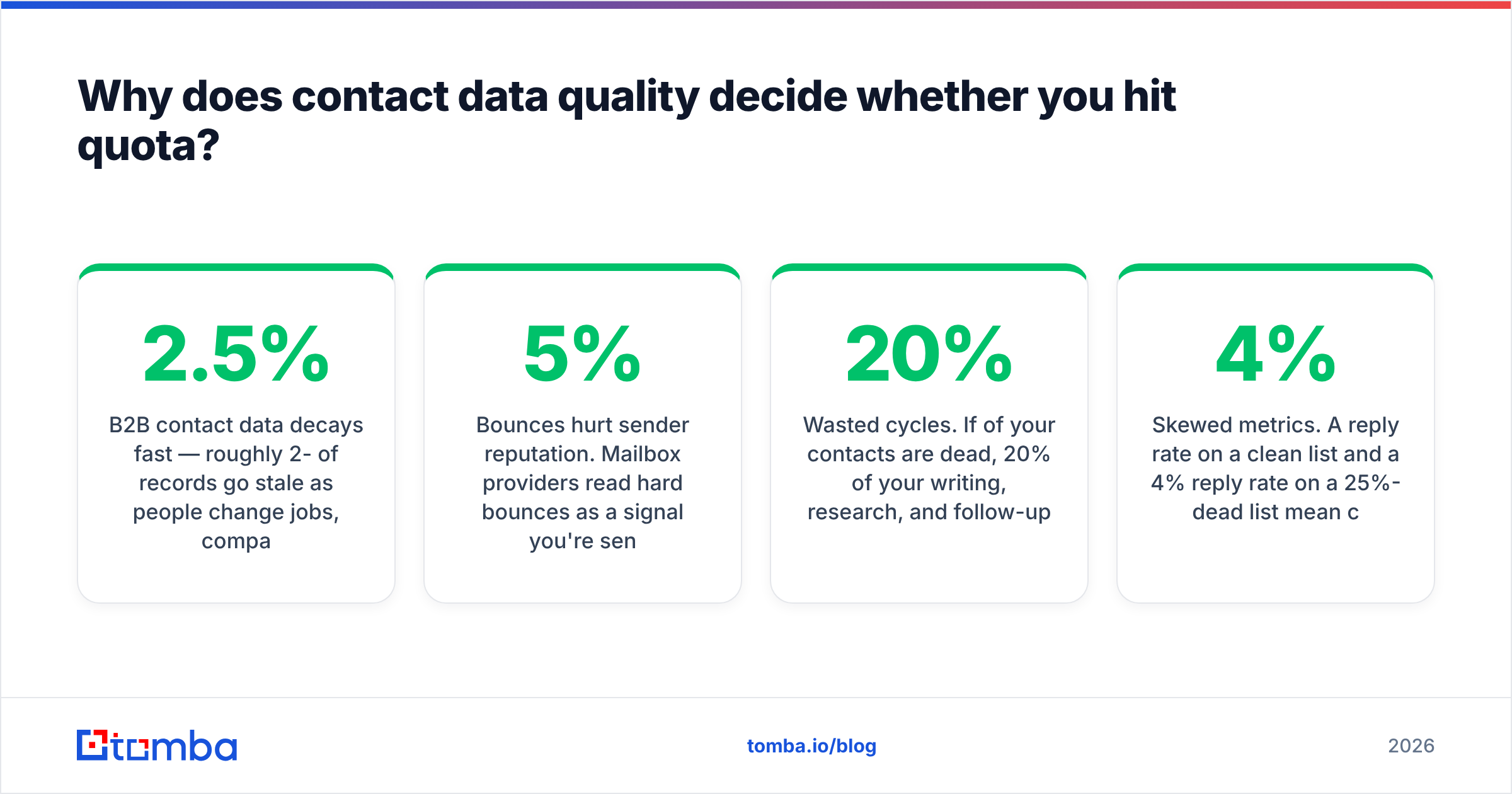
B2B contact data decays fast — roughly 2-2.5% of records per month go stale as people change jobs, companies rebrand, and email formats shift after acquisitions. Over a year that's 25-30% of a list that was accurate when you built it. If you are sending to a list you built in January and it's now September, roughly one in five of your sends is landing nowhere useful.
The compounding damage:
- Bounces hurt sender reputation. Mailbox providers read hard bounces as a signal you're sending to purchased or scraped lists. Push past 3-5% bounce rate and your inbox placement drops for every email you send, including the good ones. Google and Microsoft both tightened bulk-sender requirements over the last two years, and Google's sender guidelines now spell out spam-rate thresholds explicitly.
- Wasted cycles. If 20% of your contacts are dead, 20% of your writing, research, and follow-up time produced nothing.
- Skewed metrics. A 4% reply rate on a clean list and a 4% reply rate on a 25%-dead list mean completely different things. You will optimize the wrong variable.
The fix is unglamorous: find contacts programmatically and verify them before they enter a sequence. A good email verifier runs syntax, domain, MX, and mailbox checks and tells you which addresses are risky before you send. For company-wide prospecting, domain search returns the known addresses and the dominant email pattern at a company in one call, which beats guessing at firstname.lastname and finding out three days later.
Catch-all domains deserve a specific mention because they trip up a lot of SDRs. A catch-all server accepts mail to any address at the domain, so a standard verification returns "accepted" for addresses that don't exist. Use a catch-all verifier to separate genuinely deliverable addresses from ones that will silently vanish, or segment catch-alls into their own low-volume sequence off your primary sending domain.
What does a high-performing SDR cadence look like in 2026?#
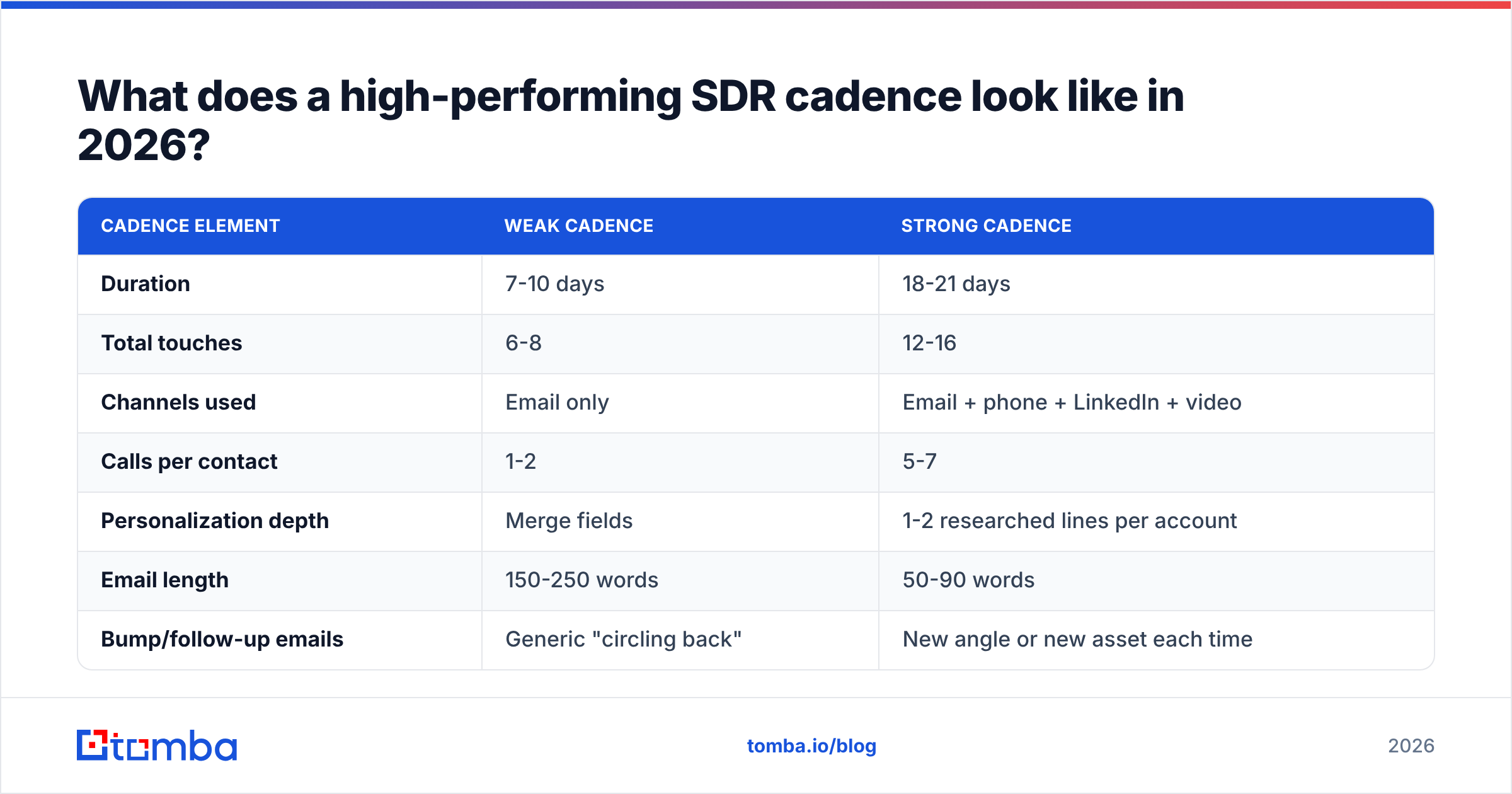
Multi-channel, 18-21 days, front-loaded, and with a clear reason for each touch.
The single-channel email cadence stopped working around 2022. Buyers get 100+ cold emails a week and answer almost none. What still works is showing up in more than one place with a consistent, specific message.
| Cadence element | Weak cadence | Strong cadence |
|---|---|---|
| Duration | 7-10 days | 18-21 days |
| Total touches | 6-8 | 12-16 |
| Channels used | Email only | Email + phone + LinkedIn + video |
| Calls per contact | 1-2 | 5-7 |
| Personalization depth | Merge fields | 1-2 researched lines per account |
| Email length | 150-250 words | 50-90 words |
| Bump/follow-up emails | Generic "circling back" | New angle or new asset each time |
| Exit criteria | Sequence ends | Explicit no, or move to nurture |
A concrete 18-day shape that works for mid-market outbound:
- Day 1: Call (no voicemail) + connection request with no pitch
- Day 2: Email 1 — specific trigger + one-line hypothesis about their problem
- Day 4: Call + voicemail referencing the email
- Day 6: LinkedIn engagement on their recent post or company news
- Day 8: Email 2 — different angle, include a relevant proof point or customer example
- Day 11: Call + voicemail
- Day 13: LinkedIn DM (short, no link)
- Day 16: Email 3 — the "wrong person?" referral ask
- Day 18: Call, then breakup email
Two rules that matter more than the exact sequence. First, calls come before the first email as often as they come after — the call gives you a reason to write ("tried to reach you this morning"). Second, every email must survive the ten-word test: if the first ten words could have been sent to 500 people, rewrite them.
Getting the phone leg of this to work requires actual mobile numbers, not switchboard lines. A phone finder that returns direct dials is worth more to your connect rate than any dialer feature.
How should you personalize without wasting your whole morning?#
Use a three-tier model and stop treating every account the same.
- Tier 1 (top 20 accounts): 10-15 minutes of research each. Read their last earnings call or funding announcement, their careers page, the prospect's last three LinkedIn posts. Write a genuinely bespoke first email. These get manual follow-up outside any sequence.
- Tier 2 (next 80 accounts): 3-4 minutes each. One researched line about the company — a hire, a launch, a stated priority — dropped into a strong template. Everything else is templated.
- Tier 3 (the rest): Segment-level personalization only. The message speaks to a role and an industry, not a person. Sent at volume, measured ruthlessly, killed if it underperforms.
What counts as real personalization in 2026: referencing a decision they made, a problem their job posting implies, or a change in their business. What does not: their alma mater, their city, the fact that their website exists, or anything an LLM could generate from their LinkedIn headline alone. Buyers can now spot machine-written flattery instantly, and it actively costs you credibility.
The best-performing opener structure is still: observation about them → hypothesis about a problem that observation implies → one-sentence proof you've solved it → soft ask. Under 90 words. One link maximum, and only if the link is genuinely useful to them.
What tools does a successful SDR actually need?#
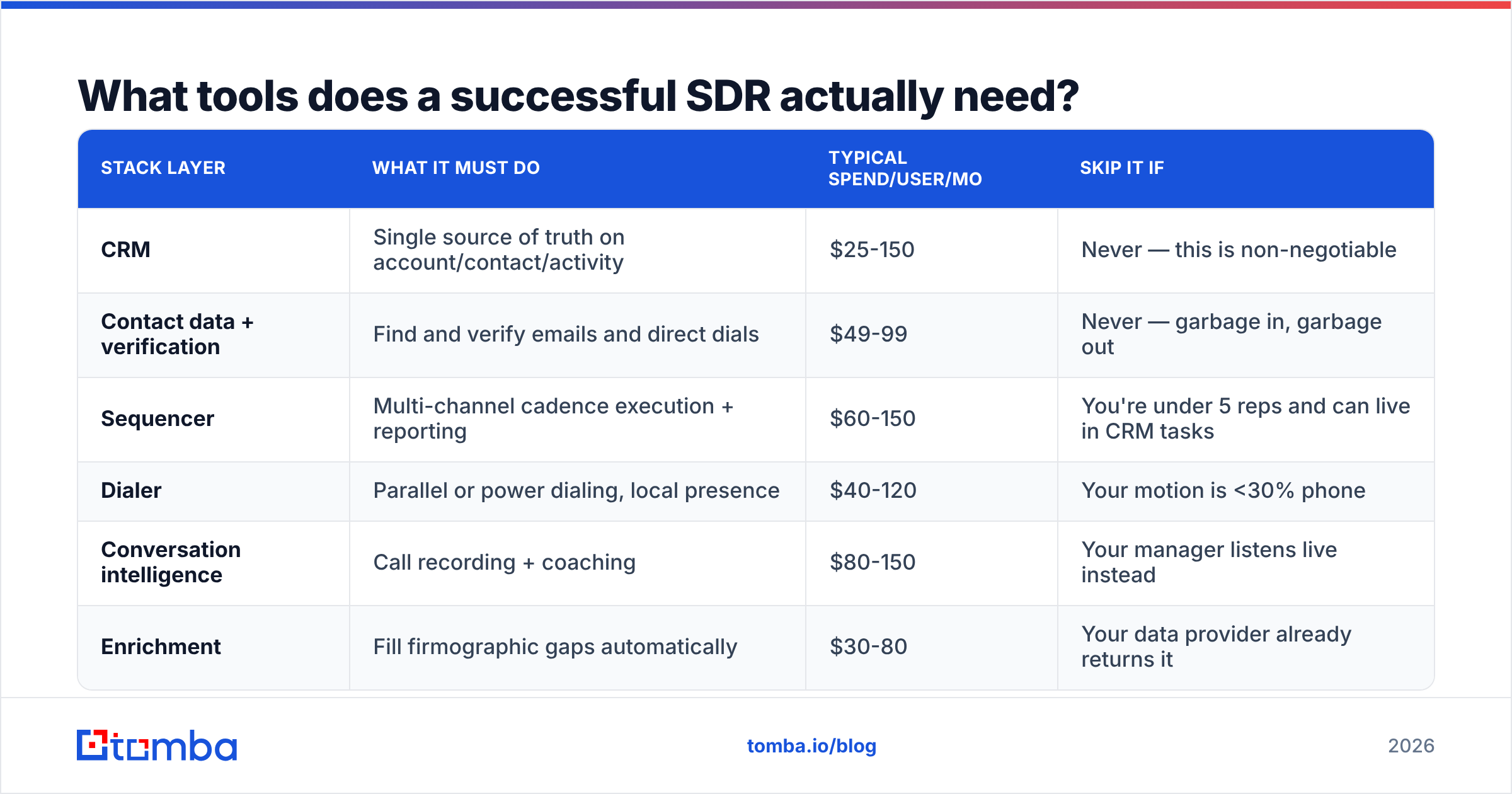
Fewer than most stacks contain. Here's the honest comparison of what each layer costs and what it must do:
| Stack layer | What it must do | Typical spend/user/mo | Skip it if |
|---|---|---|---|
| CRM | Single source of truth on account/contact/activity | $25-150 | Never — this is non-negotiable |
| Contact data + verification | Find and verify emails and direct dials | $49-99 | Never — garbage in, garbage out |
| Sequencer | Multi-channel cadence execution + reporting | $60-150 | You're under 5 reps and can live in CRM tasks |
| Dialer | Parallel or power dialing, local presence | $40-120 | Your motion is <30% phone |
| Conversation intelligence | Call recording + coaching | $80-150 | Your manager listens live instead |
| Enrichment | Fill firmographic gaps automatically | $30-80 | Your data provider already returns it |
Two notes on this. First, the contact-data layer is where cheap decisions cost the most — a provider with 70% accuracy on a $30/mo plan is more expensive than one with 92% accuracy at $49/mo once you count wasted sends and reputation damage. Tomba pricing starts free at 25 searches/month, with Starter at $49/mo and Growth at $99/mo, which covers a full-time SDR's monthly list-building volume.
Second, if you're building lists in a spreadsheet — and most SDRs still are — pull the data into the sheet rather than tabbing between tools. A Google Sheets add-on or a bulk email finder run turns a 3-hour list-building session into 20 minutes. That reclaimed time is the difference between the "average" and "top-decile" columns in the first table.
Providers worth knowing in this space include BookYourData for pre-built verified B2B lists when you'd rather buy than build, alongside on-demand finders like Tomba for account-by-account discovery. Which you want depends on whether your motion is broad-list or narrow-account.
How do you measure whether you're actually improving?#
Separate leading indicators (what you control this week) from lagging ones (what shows up next month).
Leading — review weekly:
- Dials per day and connect rate (target: 5-10% connect on cold dials, higher with direct mobiles)
- Verified contacts added to sequence per week
- Sequence completion rate — are you finishing cadences or abandoning them at touch 6?
- Positive reply rate, tracked separately from total reply rate
Lagging — review monthly:
- Meetings booked vs. meetings held (a 25%+ no-show rate is a confirmation-process problem, not a lead-quality problem)
- Meetings held → opportunity conversion (your AE's judgment on lead quality)
- Pipeline dollars created and their eventual win rate
The diagnostic logic is simple. Low connect rate → your phone data or your calling windows are wrong. High open, low reply → your body copy and ask are wrong. High reply, low meeting → your qualification or your CTA is wrong. High meeting-set, low show → your confirmation cadence is wrong. High show, low opportunity → your targeting is wrong, and you should revisit the account filter above.
Most reps skip this and instead ask for a better template. The template is almost never the constraint.
What separates SDRs who get promoted from ones who don't?#
Three behaviors, consistently.
They treat call review as non-optional. Listen to two of your own calls per week with a transcript open. Count how many seconds you talk before asking a question, how many times you say "just" or "quick," and where the prospect's tone shifts. This is the highest-ROI hour in an SDR's week and almost nobody does it.
They own their pipeline math out loud. In their 1:1s they show up with "my connect rate dropped from 8% to 5% after we switched to the new dialer, here's my hypothesis" — not "I'm trying really hard." Managers promote reps who can diagnose, because diagnosis is the actual AE skill.
They build a repeatable research habit. Twenty minutes at the start of the day reading customer news, industry publications, and their own closed-won notes. Over a quarter that becomes real domain fluency, and domain fluency is what makes prospects stay on the phone past the first fifteen seconds.
One anti-pattern worth naming: chasing volume as a response to a bad month. When quota pressure hits, the instinct is to double sends. That is exactly when data quality drops, personalization collapses, bounce rates spike, and deliverability craters — which makes the next month worse. Fix selection and data first. Volume is the last lever, not the first.
Where should you start this week?#
Pick one thing, not seven.
If your bounce rate is above 3%, start with data — run your active sequence lists through verification before you send another batch. If your connect rate is under 4%, start with phone data quality and calling windows. If your reply rate is fine but meetings aren't converting, start with your qualification questions and your account filter.
The system compounds. A cleaner list makes your cadence look better, which makes your metrics readable, which makes your coaching useful, which makes your next quarter easier. There's no single trick here — just a set of unglamorous habits applied for two consecutive quarters.
Start with the data layer. Tomba's Email Finder gives you verified professional email addresses by name and domain, with 25 free searches a month to test it against your own list before you commit — so the accounts you researched actually get reached, and the effort you're already spending stops leaking out the bottom of your funnel.
Related guides#
Ready to find emails that actually work?
Join 150,000+ professionals who stopped guessing and started sending. Free credits on signup — no credit card required.
Get the Tomba newsletter
Practical outbound tactics and product updates — once every two weeks.
About the author